Plugable 16-in-1 Thunderbolt 4 Dock Alternatives: 6 Similar Picks Compared
As an Amazon Associate we earn from qualifying purchases. Links on this page are affiliate links.
You are looking for plugable 16 in 1 thunderbolt 4 dock alternatives to expand your workspace. The original model offers dual 4K@60Hz displays and 100W power delivery via Thunderbolt 4. It provides sixteen ports, including 2.5Gbps Ethernet and SD card slots. This makes it a strong choice for users who need high port counts and reliable charging for their laptops.
You might want a different option if you need more power, different display counts, or a smaller footprint. Some users require triple or quad monitors, while others prioritize a lighter device for travel. The alternatives listed here were chosen because their specifications overlap with the original. Each pick shares key features like Thunderbolt connectivity or high power delivery, but they differ in port layout, weight, or maximum resolution support. This comparison helps you find the exact spec combination that fits your workflow.
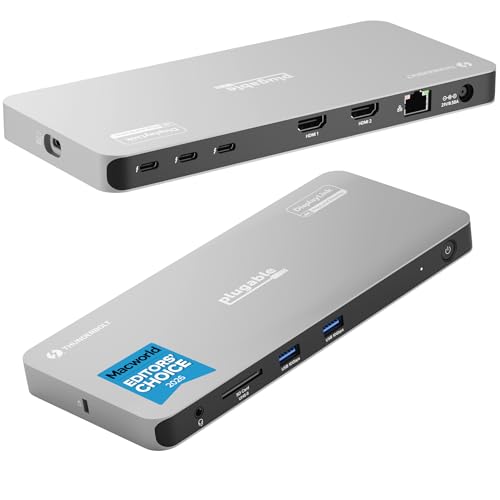
Our top pick: Plugable 16-in-1 Thunderbolt 4 Dock.
How alternatives compare to Plugable
Lenovo ThinkPad Thunderbolt 4 Smart Dock
The Lenovo ThinkPad Smart Dock matches the Plugable’s 100W power delivery and Thunderbolt 4 connectivity. It shares the 4K UHD resolution capability but distinguishes itself with higher refresh rate support for dual monitors. This dock is smaller and lighter than the Plugable, measuring 8.66 inches in length and weighing 1.21 pounds. It targets enterprise environments where remote configuration and high-resolution displays are priorities. You should choose this if you need dual 4K@144Hz support and are managing a fleet of devices. It sacrifices the extensive port count of the Plugable for a more compact, IT-managed solution.
Plugable 13-in-1 Triple 4K USB-C Dock
This Plugable model offers triple 4K display support via USB-C, expanding your screen real estate beyond the original’s dual setup. It maintains the same 100W power delivery and 4K UHD resolution. However, it uses a standard USB-C interface instead of Thunderbolt 4, which affects maximum data speeds. The unit is smaller and lighter at 1.07 pounds. It is ideal for developers or analysts who need three screens and do not require Thunderbolt speeds. You pick this over the original if triple displays are essential and you want to save on the premium associated with Thunderbolt connectivity.
Koncept Thunderbolt 4 Modular Dock 130W
The Koncept dock provides 130W power delivery, exceeding the Plugable’s 100W output. It supports dual 4K UHD displays over Thunderbolt 4, matching the original’s video performance. It is slightly more compact and lighter at 1.28 pounds. This model is designed for users who need higher charging speeds for power-hungry laptops while maintaining dual monitor setups. You should consider this if your devices require more than 100W for optimal performance. It gives up the extensive port variety of the Plugable in favor of higher power output and reliable wired connectivity.
Dell Thunderbolt 4 Dock
This TechTray dock supports triple 4K UHD displays, offering more screen space than the Plugable’s dual setup. It features 180W power delivery, significantly higher than the original’s 100W. It connects via Thunderbolt 4, ensuring high-speed data transfer. The dock is black and designed for stable networking and high power delivery. It is best for professionals needing triple monitors and robust charging capabilities. You should choose this if your workflow demands three screens and your laptop requires substantial power. It sacrifices the specific port layout of the Plugable for greater display and power capacity.
Plugable Thunderbolt 4 Quad Display Dock
The Plugable Quad Dock supports four simultaneous 4K UHD displays, vastly expanding your workspace compared to the original’s dual monitors. It retains the 100W power delivery and Thunderbolt 4 connectivity. The unit is heavier at 2.78 pounds and designed for stationary desktop setups. It is ideal for users needing maximum display expansion from a single connection. You should pick this if you require four screens and do not need portability. It gives up the compact form factor and varied port selection of the original for maximum display capability.
UGREEN 5-in-1 USB-C Hub with 100W PD
The UGREEN hub supports a single 4K UHD display via HDMI, differing from the Plugable’s dual monitor support. It offers 100W power delivery and USB-C connectivity. It is much smaller and lighter, weighing only 3.21 ounces. This model is for users who need basic video and charging without Thunderbolt complexity or cost. You should choose this if you only need one external monitor and want a simple, portable solution. It sacrifices dual display support and Thunderbolt speeds for simplicity, size, and ease of use.
Quick picks
Our 7 picks

Plugable 16-in-1 Thunderbolt 4 Dock
Best for: Dual 4K monitor setups with high power needs
- Host Interface
- Thunderbolt 4
- Display Support
- Dual
- Max Resolution
- 4K@60Hz
- Power Delivery
- 100W
- Port Count
- 16
- Video Ports
- HDMI, DisplayPort
View on Amazon: Plugable 16-in-1 Thunderbolt 4 Dock Affiliate link
This 16-port Thunderbolt 4 dock supports dual 4K@60Hz displays via HDMI and DisplayPort. It delivers 100W of power delivery to charge your laptop while you work. The unit includes 2.5Gbps Ethernet, SD card slots, and seven USB ports. It connects via a 40Gbps Thunderbolt 4 cable. This setup suits professionals who need a clean, driver-free dual-monitor workspace for Mac or Windows laptops.
Pros
- Supports dual 4K@60Hz monitors simultaneously
- 100W power delivery for laptop charging
- 16 ports including 2.5Gbps Ethernet
- Universal compatibility with Thunderbolt 4 and USB4
- No drivers required for plug-and-play setup
Cons
- Larger footprint at 11.9 inches long
- Heavier at 1.42 pounds
- Requires specific Thunderbolt 4 cable for full features
Good fit if
- You need two 4K displays for productivity
- You want 100W charging for your laptop
- You use Thunderbolt 4 or USB4 laptops
Skip if
- You only need a single monitor
- You prefer a compact, portable hub
- Your laptop lacks Thunderbolt 4 or USB4
Verdict: Plugable 16-in-1 Thunderbolt 4 Dock offers a robust dual-monitor solution with 100W charging. It fits users who prioritize port count and display quality over portability.

Lenovo ThinkPad Thunderbolt 4 Smart Dock
Best for: Enterprise fleets needing dual 4K@144Hz support
- Host Interface
- Thunderbolt 4
- Max Resolution
- 8K 60Hz
- Power Delivery
- 100W
- Video Ports
- Thunderbolt 4, HDMI 2.1, DisplayPort 1.4
- Max Data Speed
- 40Gbps
- Dimensions
- 8.66 × 3.15 × 1.18 inches
View on Amazon: Lenovo ThinkPad Thunderbolt 4 Smart Dock Affiliate link
This Thunderbolt 4 dock supports up to 40 Gbps bandwidth and delivers 100W power delivery. It handles one 8K display at 60Hz or two 4K monitors at 144Hz. The unit includes HDMI 2.1 and DisplayPort 1.4 outputs. It also features cloud-based fleet management via Lenovo Accessories Fleet Manager. This setup suits professionals needing high-resolution multi-monitor support and centralized IT control.
Pros
- Thunderbolt 4 host interface with 40 Gbps data speed
- Supports dual 4K@144Hz or single 8K@60Hz displays
- 100W Power Delivery 3.1 for fast laptop charging
- Integrated 1-meter Thunderbolt 4 cable included
- Cloud-based management via Lenovo Accessories Fleet Manager
Cons
- Heavier at 1.21 pounds compared to slim USB-C hubs
- Requires Thunderbolt 4 port on host laptop
- Limited to two external displays maximum
Good fit if
- You need to drive two 4K monitors at high refresh rates
- You manage a fleet of devices and want remote configuration
- You require 100W power delivery through a single cable
Skip if
- You only need a single display connection
- Your laptop lacks a Thunderbolt 4 port
- You prioritize the lightest possible portable setup
Verdict: Lenovo ThinkPad TBT4 Smart Dock Gen 2 fits IT-heavy environments where managing multiple high-resolution displays and remote device configuration are priorities.

Plugable 13-in-1 Triple 4K USB-C Dock
Best for: Triple monitor setups via USB-C
- Host Interface
- USB-C
- Display Support
- Triple
- Max Resolution
- 4K @ 60Hz
- Power Delivery
- 100W
- Port Count
- 13
- Video Ports
- HDMI, DisplayPort
View on Amazon: Plugable 13-in-1 Triple 4K USB-C Dock Affiliate link
The Plugable UD-ULTC4K is a 13-in-1 USB-C docking station that supports triple 4K 60Hz displays. It connects via a single 10Gbps USB-C cable and delivers up to 100W of Power Delivery for your laptop. This dock includes HDMI and DisplayPort outputs, Ethernet, and USB expansion. It is designed for users who need significant screen real estate and comprehensive connectivity for a multi-monitor workstation setup.
Pros
- Supports up to three 4K 60Hz monitors simultaneously
- Delivers 100W Power Delivery for laptop charging
- Includes 13 ports for extensive peripheral connectivity
- Connects via a single 10Gbps USB-C cable
Cons
- Requires DisplayLink drivers on macOS systems
- Does not support HDCP for protected content
- Host interface is USB-C, not Thunderbolt 4
Good fit if
- You need three external monitors for productivity
- You want a single-cable connection for your laptop
- You require built-in Ethernet and USB expansion
Skip if
- You need Thunderbolt 4 bandwidth for high-speed data
- You want to stream protected 4K content without issues
- You prefer a setup that requires no driver installation
Verdict: The Plugable 13-in-1 USB-C Dock 4K Triple is a solid choice for users who need triple displays and extensive ports via a standard USB-C connection. It fits developers and analysts who prioritize screen space over Thunderbolt speeds.

Koncept Thunderbolt 4 Modular Dock 130W
Best for: Dual 4K setups needing 130W charging
- Host Interface
- Thunderbolt 4
- Display Support
- Dual
- Max Resolution
- 4K
- Power Delivery
- 130W
- Video Ports
- Thunderbolt 4, DisplayPort, HDMI, USB-C
- Max Data Speed
- 40Gbps
View on Amazon: Koncept Thunderbolt 4 Modular Dock 130W Affiliate link
The Koncept SD25TB4 is a Thunderbolt 4 docking station designed for users needing high-speed connectivity and robust power delivery. It supports dual 4K displays and delivers 130W of power to your laptop. With a 40 GB/s data transfer rate, it handles demanding peripherals efficiently. The unit includes a 180W power adapter and necessary cables, making it ready for immediate use in Windows, macOS, or Linux environments.
Pros
- 130W Power Delivery for compatible laptops
- Dual 4K display support via HDMI and DisplayPort
- Thunderbolt 4 interface with 40 GB/s data speed
- Includes 180W power adapter and cables in the box
- Gigabit Ethernet port for wired network stability
Cons
- Supports only dual monitors, not quad setups
- No mention of wireless charging or Bluetooth
- Heavier build at 1.28 pounds
Good fit if
- You need 130W charging for high-power laptops
- You require dual 4K monitors at 60Hz
- You want a Thunderbolt 4 dock with included cables
Skip if
- You need to connect four monitors simultaneously
- You require wireless charging capabilities
- You prefer a lighter, more portable hub
Verdict: The Koncept SD25TB4 130W Thunderbolt 4 Dock offers strong dual 4K support and fast data transfer for users who need reliable wired connectivity and high power delivery for their workstation setup.

Dell Thunderbolt 4 Dock
Best for: triple monitor setups with Thunderbolt laptops
- Host Interface
- Thunderbolt 4, Thunderbolt 3, USB-C
- Display Support
- Dual, Triple
- Max Resolution
- 4K@60Hz
- Power Delivery
- 130W (Dell), 90W (non-Dell)
- Port Count
- 13
- Video Ports
- DisplayPort, HDMI, USB-C, Thunderbolt
View on Amazon: Dell Thunderbolt 4 Dock Affiliate link
This dock supports triple displays via Thunderbolt 4 or USB-C with DisplayPort Alt Mode. It provides up to 130W power delivery for Dell laptops and 90W for non-Dell systems. The unit includes 13 ports, a Gigabit Ethernet connector, and security slots. It works with Windows, macOS, and Chrome OS. You need a compatible laptop to utilize the full bandwidth and charging capabilities.
Pros
- Supports dual or triple monitor setups
- Includes Gigabit Ethernet and 13 total ports
- Provides up to 130W power delivery
- Features Kensington security-cable and wedge lock slots
Cons
- MacBooks are limited to one external display
- HDMI and USB-C Alt Mode ports are muxed
- Requires Thunderbolt 4 or 3 for full features
Good fit if
- You need to connect three monitors to a compatible laptop
- You want a Gigabit Ethernet port for stable networking
- You use a Dell laptop requiring high power delivery
Skip if
- You use a standard USB-A only laptop without Thunderbolt
- You own an M1 or M2 MacBook needing multiple screens
- You require USB4 or Thunderbolt 5 host compatibility
Verdict: TechTray WD22TB4 Thunderbolt 4 Dock is a solid option for users needing triple display support and extensive port connectivity. It fits professionals who require stable networking and high power delivery for their workstations.
Plugable Thunderbolt 4 Quad Display Dock
Best for: Users needing four simultaneous 4K displays
- Host Interface
- Thunderbolt 4
- Display Support
- Quad
- Max Resolution
- 8K
- Power Delivery
- 96W
- Video Ports
- HDMI, Thunderbolt
- Max Data Speed
- 40Gbps
View on Amazon: Plugable Thunderbolt 4 Quad Display Dock Affiliate link
This Thunderbolt 4 dock supports up to four 4K displays or a single 8K screen. It delivers 96W of host charging through a single cable connection. The unit includes three additional 40Gbps Thunderbolt ports for data and peripherals. You get Gigabit Ethernet and an SD card slot for workflow flexibility. It requires DisplayLink software for HDMI outputs. This setup suits users needing maximum screen real estate from one connection point.
Pros
- Supports up to four 4K displays simultaneously
- Provides 96W of laptop charging power
- Includes three extra 40Gbps Thunderbolt ports
- Features Gigabit Ethernet and SD card slot
Cons
- HDMI outputs require DisplayLink software installation
- Base model M1 and M2 Macs limit you to three displays
- Weighs 2.78 pounds, making it less portable
Good fit if
- You need to drive four monitors from one laptop
- You use Windows 10 or macOS 14+ systems
- You want a single cable for data and power
Skip if
- You use a base model M1 or M2 Mac
- You want a plug-and-play HDMI setup without drivers
- You need to carry the dock frequently
Verdict: Plugable TBT-6950PD Thunderbolt 4 Quad Dock fits users who need four screens and high-speed data from a single connection. It is ideal for stationary desktop setups requiring maximum display expansion.

UGREEN 5-in-1 USB-C Hub with 100W PD
Best for: single 4K monitor and charging needs
- Host Interface
- USB-C
- Max Resolution
- 4K
- Power Delivery
- 100W
- Port Count
- 5
- Video Ports
- HDMI
- Max Data Speed
- 5Gbps
View on Amazon: UGREEN 5-in-1 USB-C Hub with 100W PD Affiliate link
This UGREEN hub offers five connection points via a single USB-C host interface. It includes a 4K HDMI video port, a 100W Power Delivery port, one 5 Gbps USB-A data port, and two 480 Mbps USB-A ports. The device weighs 3.21 ounces and measures 4.79 inches in length. It suits users needing basic video output and moderate data transfer speeds without requiring Thunderbolt bandwidth.
Pros
- Includes a 4K HDMI port for external displays
- Supports 100W Power Delivery for laptop charging
- Features a 5 Gbps USB-A data port
- Compact and lightweight at 3.21 ounces
Cons
- Limited to one HDMI video output
- USB-A ports max out at 480 Mbps
- Lacks Thunderbolt 4 connectivity
Good fit if
- You need a single 4K display connection
- You want to charge a laptop via 100W PD
- You require basic USB-A data expansion
Skip if
- You need dual or quad monitor support
- You require Thunderbolt 4 data speeds
- You need more than one HDMI port
Verdict: UGREEN 5-in-1 USB-C Hub with 4K HDMI provides essential video and charging capabilities for basic setups. It fits users who need a simple 4K display and moderate data speeds without the cost or complexity of Thunderbolt docks.
Specifications side by side
| Spec | Plugable 16-in-1 Thunderbolt 4 Dock | Lenovo ThinkPad Thunderbolt 4 Smart Dock | Plugable 13-in-1 Triple 4K USB-C Dock | Koncept Thunderbolt 4 Modular Dock 130W | Dell Thunderbolt 4 Dock | Plugable Thunderbolt 4 Quad Display Dock | UGREEN 5-in-1 USB-C Hub with 100W PD |
|---|---|---|---|---|---|---|---|
| Host Interface | Thunderbolt 4 | Thunderbolt 4 | USB-C | Thunderbolt 4 | Thunderbolt 4, Thunderbolt 3, USB-C | Thunderbolt 4 | USB-C |
| Display Support | Dual | not specified | Triple | Dual | Dual, Triple | Quad | not specified |
| Max Resolution | 4K@60Hz | 8K 60Hz | 4K @ 60Hz | 4K | 4K@60Hz | 8K | 4K |
| Power Delivery | 100W | 100W | 100W | 130W | 130W (Dell), 90W (non-Dell) | 96W | 100W |
| Port Count | 16 | not specified | 13 | not specified | 13 | not specified | 5 |
| Video Ports | HDMI, DisplayPort | Thunderbolt 4, HDMI 2.1, DisplayPort 1.4 | HDMI, DisplayPort | Thunderbolt 4, DisplayPort, HDMI, USB-C | DisplayPort, HDMI, USB-C, Thunderbolt | HDMI, Thunderbolt | HDMI |
| Max Data Speed | 40Gbps | 40Gbps | 10Gbps | 40Gbps | 40Gbps | 40Gbps | 5Gbps |
| Ethernet Speed | 2.5Gbps | not specified | not specified | Gigabit Ethernet | Gigabit Ethernet | Gigabit | not specified |
| Resolution | 4K UHD | not specified | 4K UHD | 4K UHD | 4K UHD | 4K UHD | 4K UHD |
| Connectivity | HDMI, DisplayPort, Ethernet, Thunderbolt 4 | Thunderbolt 4 | USB-C, HDMI, DisplayPort | USB-C, HDMI, DisplayPort, Thunderbolt 4 | USB-C, Thunderbolt 4 | USB-C, HDMI, Thunderbolt 4 | USB-C, HDMI, USB-A |
| Features | Card Reader | not specified | not specified | not specified | not specified | not specified | not specified |
| Dimensions | 11.9 × 6 × 4.3 inches | 8.66 × 3.15 × 1.18 inches | 4.72 × 2.64 × 6.89 inches | 8.07 × 3.54 × 1.39 inches | not specified | 8.42 × 3.74 × 0.72 inches | 4.79 × 1.09 × 0.47 inches |
| Weight | 1.42 pounds | 1.21 pounds | 1.07 pounds | 1.28 pounds | not specified | 2.78 pounds | 3.21 ounces |
| Size | 11.6" × 5.8" × 4.1" | 1 Count (Pack of 1) | not specified | not specified | not specified | not specified | 0.65 feet |
| Color | Silver | Eclipse Black | not specified | Black | Black | not specified | grey |
| Model | TBT4-UDZ | 40BE0135US | UD-ULTC4K | SD25TB4 | WD22TB4-DOCK NEW | TBT-6950PD | CM478 |
Frequently asked questions
Which dock offers the highest power delivery for charging laptops?
The TechTray WD22TB4 Thunderbolt 4 Dock provides 180W power delivery. This is the highest output among the listed alternatives. It supports triple 4K displays and connects via Thunderbolt 4. This high wattage suits users needing maximum power for workstation setups.
Can I connect four monitors to a single dock?
Yes, the Plugable TBT-6950PD Thunderbolt 4 Quad Dock supports four simultaneous 4K displays. It uses a Thunderbolt 4 connection to drive all screens. This model is designed for stationary desktops where maximum display expansion is required for productivity.
Is there a dock that supports 144Hz refresh rates?
The Lenovo ThinkPad Thunderbolt 4 Smart Dock supports dual 4K@144Hz displays. It matches the Plugable dock’s 100W power delivery and Thunderbolt 4 connectivity. This higher refresh rate is ideal for enterprise fleets needing smoother visual performance on multiple screens.
Which alternative works with standard USB-C ports instead of Thunderbolt?
The Plugable 13-in-1 Triple 4K USB-C Dock connects via standard USB-C. It supports triple 4K monitors and offers 100W power delivery. This option fits users who prioritize screen space and port count over the high speeds of Thunderbolt 4.
What is the smallest dock on this list?
The UGREEN 5-in-1 USB-C Hub is the most compact option. It measures 4.79 inches in length and weighs only 3.21 ounces. It provides 4K HDMI video and 100W charging. This size is ideal for users needing basic single-monitor expansion without bulk.
Which dock is best for triple monitor setups?
The TechTray WD22TB4 Thunderbolt 4 Dock supports triple 4K displays. It also delivers 180W power delivery via Thunderbolt 4. This configuration suits professionals who require stable networking and extensive port connectivity for their primary workstation setup.
Does any dock offer 130W power delivery?
The Koncept Thunderbolt 4 Modular Dock offers 130W power delivery. It supports dual 4K displays and connects via Thunderbolt 4. This wattage is higher than the standard 100W found in many other docks, making it suitable for power-hungry laptops.