Best Laptop Cooling Pads with Kickstand: 14 Spec-Based Picks
As an Amazon Associate we earn from qualifying purchases. Links on this page are affiliate links.
A laptop cooling pad with kickstand elevates your screen for better posture while active fans push air across your computer. This extra clearance improves intake airflow and keeps hardware temperatures manageable.
The Kootek 12-17 Inch 5-Fan Laptop Cooling Pad takes the top spot by pairing six elevation angles with five adjustable fans for laptops up to 17 inches. We compared 14 products based on the specifications published on their listings. This guide helps you choose the right dimensions, tilt levels, and fan layout for your workspace.
Quick picks
The best fit for you
- You want versatile elevation angles for a 17-inch laptop Kootek 12-17 Inch 5-Fan Laptop Cooling Pad Its six-position kickstand elevation and selective five-fan airflow support laptops from 12 to 17 inches.
- You have a large laptop needing high-output sealed cooling Llano 19-Inch Turbo Laptop Cooling Pad Its 19-inch frame features three kickstand tilt angles designed specifically for heavy gaming rigs.
- You need the lightest kickstand cooling pad for travel AIMIUZI 15.6-Inch 5-Fan Cooling Stand It weighs just 1.39 pounds while providing five elevation angles and dual USB connectivity.
- You want a rigid aluminum stand with peripheral connectivity Soundance Aluminum Laptop Cooling Stand with USB Hub Its aluminum frame provides rigid elevation alongside active cooling and an integrated four-port USB hub.
Our 14 picks

Kootek 12-17 Inch 5-Fan Laptop Cooling Pad
Best for: multi-angle cooling on 12- to 17-inch laptops
- Features
- Kickstand (what this guide is about)
- Compatible Laptop Size
- 12–17 in
- Fan Count
- 5
- Height Adjustment Levels
- 6
- USB Port Count
- 2
- Fan Diameter
- 4.72 in, 2.76 in
This Kootek cooling pad supports 12- to 17-inch laptops with five built-in fans and a six-level adjustable kickstand. It includes one 4.72-inch center fan, four 2.76-inch outer fans, and dual switches to run one, four, or all five units. Dual USB ports maintain peripheral access while powering the pad. It suits you if you need angle flexibility and multi-fan airflow control.
Pros
- Six adjustable height settings for ergonomic positioning
- Five fans with switch options for 1, 4, or 5 active fans
- Built-in dual USB hub preserves laptop connectivity
- Two front stoppers prevent laptop slippage
Cons
- Requires a separate adapter for USB-C laptops
- Weighs 2.56 pounds, adding bulk to laptop bags
Good fit if
- You want six selectable tilt angles from an integrated kickstand.
- You need independent switch control over multiple cooling fans.
- You use a 12- to 17-inch laptop with standard USB-A ports.
Skip if
- You rely exclusively on USB-C ports and lack a USB-A adapter.
- You require a lightweight cooler under two pounds for travel.
Verdict: Kootek 12-17 Inch 5-Fan Laptop Cooling Pad delivers versatile six-position elevation combined with selective five-fan airflow. It provides dependable physical support and cooling adjustments for laptops up to 17 inches.

Llano 19-Inch Turbo Laptop Cooling Pad
Best for: large laptops needing maximum sealed airflow
- Features
- Kickstand, RGB Lighting (what this guide is about)
- Compatible Laptop Size
- 15.6–19 in
- Fan Count
- 1
- Height Adjustment Levels
- 3
- USB Port Count
- 3
- Fan Diameter
- 5.5 in
The Llano 19-Inch Turbo Laptop Cooling Pad is a high-power desk cooler designed for 15.6-inch to 19-inch laptops. It features a built-in kickstand supporting three tilt angles at 3°, 12°, and 15° to adjust your display height. Powered by an included 36W adapter, it uses a 5.5-inch turbo fan with a sealed foam gasket, an integrated dust filter, and a three-port USB 2.0 hub for external peripherals.
Pros
- Dedicated 36W power adapter drives a 5.5-inch turbo fan
- Kickstand provides three tilt settings at 3°, 12°, and 15°
- Integrated three-port USB 2.0 hub for desktop peripherals
- Removable high-density dust filter protects laptop vents
Cons
- Operating noise reaches up to 70 dB at maximum speed
- Chassis weight is relatively heavy at 3.97 pounds
- USB 2.0 ports do not support device charging
Good fit if
- You use a heavy 15.6-inch to 19-inch laptop
- You want kickstand adjustability across 3°, 12°, and 15° angles
- You need built-in dust filtration and extra peripheral ports
Skip if
- You require quiet operation below 70 dB under full load
- You want a lightweight, portable cooler for frequent travel
- You need USB ports capable of charging external gear
Verdict: Llano 19-Inch Turbo Laptop Cooling Pad delivers high-output cooling with three kickstand tilt angles for heavy rigs. It works best on dedicated desks where 70 dB maximum fan noise is acceptable.

ICE Coorel 17.3-Inch 6-Fan Laptop Cooling Pad
Best for: large laptops requiring multi-angle kickstand height adjustment
- Features
- Kickstand, Adjustable Height, RGB Lighting, 2 USB Ports (what this guide is about)
- Compatible Laptop Size
- 15–17.3 in
- Fan Count
- 6
- Height Adjustment Levels
- 6
- USB Port Count
- 2
- Lighting
- RGB
View on Amazon: ICE Coorel 17.3-Inch 6-Fan Laptop Cooling Pad
The ICE Coorel 17.3-Inch 6-Fan Laptop Cooling Pad provides elevated cooling for large notebooks up to 17.3 inches. It features six internal fans, top and bottom ventilation, and an integrated kickstand offering six distinct height adjustments to align your screen. An integrated LCD screen displays your fan speed, and two USB ports keep your connectivity open. You get a stable desktop cooling solution designed for extended gaming or heavy workstation use.
Pros
- Six height adjustment levels via the built-in kickstand
- Six cooling fans with variable speed controls and an LCD screen
- Dual USB ports for accessory connectivity
- Seven selectable RGB lighting modes
Cons
- Weighs roughly 3 pounds, adding bulk to travel bags
- Footprint measures 16 by 12 inches, requiring substantial desk space
Good fit if
- You need a multi-angle kickstand with six height options.
- You operate a larger 15-inch to 17.3-inch laptop.
- You want an LCD panel to monitor and adjust fan speeds directly.
Skip if
- You carry a compact laptop under 15 inches.
- You need an ultralight cooler under two pounds for commuting.
Verdict: ICE Coorel 17.3-Inch 6-Fan Laptop Cooling Pad delivers versatile positioning with its six-level kickstand and dedicated fan status display. It gives you solid airflow controls and wide desk coverage for larger laptops.

LIANGSTAR 6-Fan Laptop Cooling Pad
Best for: dual-zone fan control on large laptops
- Features
- Kickstand (what this guide is about)
- Compatible Laptop Size
- 12–17.3 in
- Fan Count
- 6
- Height Adjustment Levels
- 3
- USB Port Count
- 2
- Lighting
- Blue LED
The LIANGSTAR 6-Fan Laptop Cooling Pad is a ventilated stand designed for notebooks up to 17.3 inches. It features six blue LED fans divided into two separately controlled zones, allowing you to independently adjust the speeds of the three large and three small fans. The built-in kickstand offers three height settings to adjust viewing angles, while two flip-up baffles and bottom anti-skid pads keep your hardware stable during use.
Pros
- Six fans with independent dual-dial speed controls for large and small fan zones
- Three selectable kickstand elevation settings
- Supports notebooks up to 17.3 inches across a metal mesh panel
- Two USB ports with an included braided USB-to-USB cable
Cons
- Requires a separate adapter for USB-C laptops
- Limited to three preset kickstand elevation angles
Good fit if
- You want independent speed controls for separate fan sections.
- You use a notebook between 12 and 17.3 inches.
- You need foldable kickstand legs with fold-out front stability baffles.
Skip if
- You rely solely on USB-C ports without using adapters.
- You need more than three elevation levels for your setup.
Verdict: LIANGSTAR 6-Fan Laptop Cooling Pad provides dual-zone fan adjustments and three kickstand height levels for notebooks up to 17.3 inches. It delivers straightforward airflow management and stable desktop elevation.

ICE Coorel 6-Fan Laptop Cooling Pad
Best for: multi-angle cooling on a budget
- Features
- Kickstand, Adjustable Height, 2 USB Ports (what this guide is about)
- Compatible Laptop Size
- Up to 17 in
- Fan Count
- 6
- Maximum Fan Speed
- 2600 RPM
- USB Port Count
- 2 ports
- Fan Diameter
- 70 mm
The ICE Coorel 6-Fan Laptop Cooling Pad is an elevated cooler built for laptops up to 17 inches. It features six 70mm fans running between 2,400 and 2,600 RPM behind a metal mesh surface. A five-position kickstand lets you raise the typing angle, while two fold-up baffles stop the computer from sliding. You also get two integrated USB 2.0 ports and an included USB power cable.
Pros
- Six 70mm fans running at 2,400 to 2,600 RPM
- Five adjustable kickstand height positions
- Two USB 2.0 ports with included connection cable
- Dual fold-up baffles to secure the laptop
Cons
- Uses slower USB 2.0 standard instead of USB 3.0
- Offered only in blue
Good fit if
- You need a multi-fan cooler with five adjustable height settings.
- You use a laptop up to 17 inches and need front retaining baffles.
- You want spare USB 2.0 connectivity while powering the stand.
Skip if
- You require fast USB 3.0 data throughput on your stand hub.
- You prefer larger diameter fans over multiple 70mm units.
Verdict: ICE Coorel 6-Fan Laptop Cooling Pad provides five ergonomic angles and high-speed multi-fan airflow for laptops up to 17 inches. Its dual USB 2.0 ports and front baffles keep your workspace secure and functional.

Trullypine 17.3-Inch 12-Fan Cooling Pad
Best for: multi-fan airflow on wide laptop setups
- Features
- Kickstand, Adjustable Height, 2 USB Ports, Phone Holder (what this guide is about)
- Compatible Laptop Size
- 12–17.3 in
- Fan Count
- 12
- Height Adjustment Levels
- 5 levels
- USB Port Count
- 2 ports
- Lighting
- LED
The Trullypine 17.3-Inch 12-Fan Cooling Pad is a multi-fan laptop stand designed for notebooks up to 17.3 inches. It features 12 cooling fans, five selectable height angles, and a built-in kickstand structure to position your screen comfortably. You also get dual USB 2.0 ports and a detachable side phone holder. It suits you if you run demanding laptop tasks and need extensive multi-point airflow across a wide base.
Pros
- Twelve cooling fans distributed across a metal mesh surface
- Five-level adjustable kickstand for custom viewing angles
- Supports laptops from 12 up to 17.3 inches
- Dual USB 2.0 ports and integrated side phone mount
Cons
- Uses USB 2.0 ports rather than faster USB 3.0
- Base measures 14.3 by 10.2 inches, so 17.3-inch laptops will overhang the edges
Good fit if
- You want 12 dedicated fans to distribute airflow across the underside of your machine.
- You need five kickstand angle settings to adjust screen elevation.
- You want an integrated side bracket to hold your phone.
Skip if
- You require high-speed USB 3.0 passthrough on your cooling stand.
- You need a pad wide enough to support 17.3-inch laptops without edge overhang.
Verdict: Trullypine 17.3-Inch 12-Fan Cooling Pad delivers widespread airflow through its 12-fan array and five height adjustments. It provides dependable surface ventilation and viewing flexibility for larger laptops.

AIMIUZI 15.6-Inch 5-Fan Cooling Stand
Best for: midsize laptops needing multi-angle elevation and cooling
- Features
- Kickstand, Adjustable Height, 2 USB Ports (what this guide is about)
- Compatible Laptop Size
- 12–15.6 in
- Fan Count
- 5
- Height Adjustment Levels
- 5 levels
- USB Port Count
- 2 ports
- Surface Material
- Metal plate
The AIMIUZI 15.6-Inch 5-Fan Cooling Stand provides active airflow and elevation for midsize laptops. It features five fans behind a metal plate, a built-in kickstand offering five height levels, and dual USB ports with an included cable. Measuring 13.11 by 9.84 inches, it includes a hideable phone holder and a retractable non-slip baffle. You get a lightweight option suited for keeping 12- to 15.6-inch setups elevated at your desk.
Pros
- Five built-in cooling fans with a metal plate
- Five-level adjustable kickstand for screen elevation
- Dual USB ports with an included power cable
- Integrated hideable phone holder and fold-out baffle
Cons
- Maximum supported laptop size is 15.6 inches
- No fan speed controls or dials listed in specifications
Good fit if
- You use a 12- to 15.6-inch laptop and want five ergonomic tilt options.
- You need an extra USB port to avoid losing laptop connectivity.
- You want a built-in stand to hold your phone alongside your screen.
Skip if
- You use a 16-inch or 17.3-inch laptop that exceeds the dimensions.
- You need independent fan speed controls or variable RPM toggles.
Verdict: AIMIUZI 15.6-Inch 5-Fan Cooling Stand delivers five angles of elevation and multi-fan cooling for midsize laptops. It serves as a practical kickstand base with dual USB connectivity and an integrated phone mount.

Llano 14cm Turbo Fan Laptop Cooler
Best for: oversized gaming laptops on permanent desks
- Features
- Kickstand (what this guide is about)
- Compatible Laptop Size
- 15–21 in
- Fan Count
- 1
- Fan Diameter
- 5.5 in (14 cm)
- Use
- Gaming
- Dimensions
- 16.9 × 12.9 × 2.7 inches
This cooling stand provides active airflow using a 5.5-inch turbo fan for laptops between 15 and 21 inches. It features an integrated kickstand for height adjustment and double non-slip baffles to secure heavy rigs. Touch controls let you manage fan speeds directly on an LED display. Because it weighs 4.74 pounds and includes a 36W power adapter, it suits you if you keep a permanent desk station.
Pros
- Single 5.5-inch (14cm) turbo fan with digital LED speed readout
- Supports large laptops ranging from 15 to 21 inches
- Includes removable dust filter structure plus a replacement filter
- Comes bundled with a 36W dedicated power adapter and large mouse pad
Cons
- Weighs 4.74 pounds, making it cumbersome for mobile use
- Requires an external 36W power adapter instead of low-draw USB bus power
- Large 16.9 by 12.9 inch frame demands substantial desk area
Good fit if
- You run a large laptop sized between 15 and 21 inches.
- You want physical kickstand height adjustments paired with integrated dust filtering.
- You prefer monitoring active fan speeds on a real-time digital display.
Skip if
- You need a compact cooler for notebooks under 15 inches.
- You pack your laptop accessories into a bag for daily travel.
- You want a stand powered strictly through your computer's USB port.
Verdict: Llano 14cm Turbo Fan Laptop Cooler delivers high-output cooling with an adjustable kickstand and digital speed readout for large setups. Its 4.74-pound frame and dedicated 36W power adapter make it an ideal fixture for stationary gaming desks.

KLIM Wind 4-Fan Laptop Cooling Pad
Best for: angled multi-fan cooling on larger laptops
- Features
- Kickstand (what this guide is about)
- Compatible Laptop Size
- 11–19 in
- Fan Count
- 4
- Maximum Fan Speed
- 1200 RPM
- USB Port Count
- 2
- Dimensions
- 1.22 × 10.7 × 1.22 inches
The KLIM Wind is a multi-fan laptop cooler designed to elevate and cool your computer. It features two rear fold-out kickstand legs for angled typing alongside frontal pegs that prevent slippage. Four integrated fans spin at up to 1200 RPM across a base supporting laptops from 11 up to 19 inches. Two USB ports retain accessory connections, fitting intense desk setups.
Pros
- Four cooling fans operating at up to 1200 RPM
- Two rear kickstand legs and front pegs for stability
- Dual USB ports leave one free port for accessories
- Broad compatibility covering laptops from 11 up to 19 inches
Cons
- Laptops 17.3 inches and larger overhang the pad edges
- Only a single kickstand incline level supported by rear legs
- No adjustable fan speed controls listed in specifications
Good fit if
- You need a kickstand pad with front pegs to stop laptops from sliding.
- You want four 1200 RPM fans to cover a wide laptop base.
- You need a spare USB port to replace the one powering the cooler.
Skip if
- You need multiple kickstand height settings rather than a single tilt angle.
- You want variable fan speed dials or independent fan switches.
Verdict: KLIM Wind 4-Fan Laptop Cooling Pad pairs four 1200 RPM fans with two rear kickstand legs for stable, angled cooling. It provides straightforward elevation and dual USB connectivity for laptops up to 19 inches.

AISUNKUTECH 17-Inch Laptop Cooling Pad with Kickstand
Best for: multi-angle kickstand adjustment with a phone holder
- Features
- Kickstand, Adjustable Height, 2 USB Ports, Phone Holder (what this guide is about)
- Compatible Laptop Size
- 12-17 Inch
- Fan Count
- 3
- Height Adjustment Levels
- 5
- USB Port Count
- 2
- Surface Material
- stainless steel mesh
View on Amazon: AISUNKUTECH 17-Inch Laptop Cooling Pad with Kickstand
The AISUNKUTECH cooling pad supports laptops from 12 to 17 inches using a stainless steel mesh surface and three quiet fans rated up to 40dB. Its metal support bar provides five height adjustments, giving you flexible viewing angles on your desk. You also get a top-mounted speed wheel, two USB ports, and an integrated phone holder. It suits you if you need basic ergonomics and multi-angle elevation during work or gaming sessions.
Pros
- Five-level height adjustment via metal support bar
- Three cooling fans with rotary wheel speed control
- Built-in dual-port USB hub
- Integrated phone holder and stainless steel mesh surface
Cons
- Requires a separate adapter for USB Type-C devices
- Limited to laptops measuring up to 17 inches
- Noise reaches 40dB at maximum fan speed
Good fit if
- You want five physical kickstand angles to lift your laptop screen.
- You use laptops between 12 and 17 inches in size.
- You want an integrated holder to keep your phone visible on your desk.
Skip if
- You use a laptop larger than 17 inches.
- You require native USB Type-C ports without external adapters.
Verdict: AISUNKUTECH 17-Inch Laptop Cooling Pad with Kickstand offers five physical elevation angles and three-fan airflow for laptops up to 17 inches. It adds practical utility with a rotary speed dial, two USB ports, and a built-in phone stand.

TECKNET 15.6-Inch 9-Fan Laptop Cooling Pad
Best for: compact desks needing multi-angle laptop cooling
- Features
- Kickstand (what this guide is about)
- Compatible Laptop Size
- 12-15.6 Inch
- Fan Count
- 9
- Maximum Fan Speed
- 2600 RPM
- Height Adjustment Levels
- 5
- USB Port Count
- 2
This TECKNET cooling pad uses nine fans spinning up to 2,600 RPM beneath an alloy mesh surface to cool laptops between 12 and 15.6 inches. Its five-position kickstand lets you raise your screen up to 6 inches and tilt up to 34 degrees for improved ergonomics. If you need multi-angle elevation, low operating noise under 40 dB, and an integrated phone holder at your desk, this setup fits your workspace.
Pros
- Nine cooling fans with stepless speed control reaching 2,600 RPM
- Five-level adjustable kickstand raises up to 6 inches and tilts up to 34 degrees
- Operating noise rated under 40 dB
- Dual USB ports provide built-in passthrough connectivity
- Integrated phone holder and anti-slip baffle included
Cons
- Maximum supported laptop size is 15.6 inches
- LED brightness is tied directly to fan speed rather than controlled separately
Good fit if
- You use a 12-inch to 15.6-inch laptop and want dense fan coverage.
- You want up to 6 inches of kickstand height adjustment across five angles.
- You want an attached dock to hold your phone alongside your computer.
Skip if
- You use a 17-inch or larger laptop.
- You want to turn off the LEDs without reducing fan speed.
Verdict: TECKNET 15.6-Inch 9-Fan Laptop Cooling Pad provides high-speed multi-fan cooling and five kickstand angles for mid-sized laptops. It offers functional elevation and an integrated phone stand while maintaining low noise levels under 40 dB.
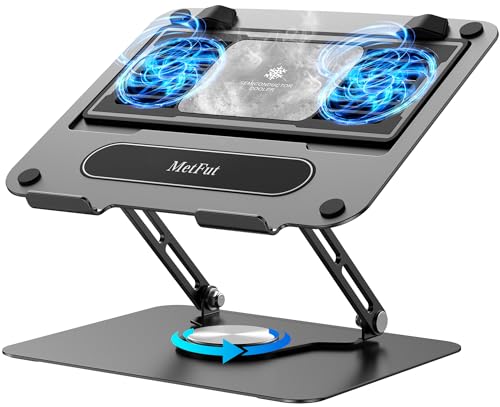
MetFut Rotating Thermoelectric Laptop Stand
Best for: compact setups needing semiconductor cooling and rotation
- Features
- Kickstand (what this guide is about)
- Compatible Laptop Size
- Up to 15.6 in
- Surface Material
- Carbon steel
- Weight
- 3 pounds
The MetFut Rotating Thermoelectric Laptop Stand provides active cooling through a semiconductor Peltier panel and two fans. Built from carbon steel, this three-pound stand holds laptops up to 15.6 inches and 20 pounds. You get a 360-degree rotating base, adjustable height, and a detachable cooler running at 20 dB or less. It suits you if you want sub-ambient contact cooling and flexible desktop positioning for smaller or midsize laptops.
Pros
- Thermoelectric Peltier cooling plate with dual ultra-quiet fans
- Carbon steel frame rated for up to 20 lbs load capacity
- 360-degree swivel base allows quick orientation adjustments
- Detachable cooler design with four spring-loaded contact dampers
- Low operational noise profile under 20 dB
Cons
- Requires separate 20W power adapter to reach peak cooling output
- Maximum laptop size limit of 15.6 inches
- Condensation mist can form on cooling panel in high humidity
Good fit if
- You own a laptop up to 15.6 inches that needs direct contact semiconductor cooling.
- You frequently rotate your laptop screen to collaborate or share views.
- You want an adjustable carbon steel stand supporting up to 20 pounds.
Skip if
- You use a larger 16-inch or 17.3-inch laptop.
- You prefer full cooling performance without needing an optional 20W power adapter.
Verdict: MetFut Rotating Thermoelectric Laptop Stand delivers targeted semiconductor cooling paired with a rotatable carbon steel base. It works best for devices up to 15.6 inches where direct contact heat transfer matters.

SHUWEI 15" Aluminum Laptop Cooling Stand
Best for: elevated ergonomic setups with compact laptops
- Features
- Kickstand, 360° Rotation (what this guide is about)
- Compatible Laptop Size
- 10–15 in
- Surface Material
- Anodized aluminum
- Dimensions
- 10.2 × 9.4 × 2.2 inches
- Weight
- 2.07 pounds
The SHUWEI 15" Aluminum Laptop Cooling Stand is an anodized aluminum desk riser with a single fan and built-in kickstand adjustment. It supports machines up to 15 inches and 22 pounds. You can tilt the deck from 0 to 120 degrees and adjust screen height up to 11.8 inches. Its three-speed fan moves between 40 CFM and 85 CFM of airflow, making it suitable if you need elevated, stable ergonomic support.
Pros
- Supports up to 22 pounds on an anodized aluminum frame
- Height adjusts up to 11.8 inches with 0 to 120-degree tilt
- Three selectable fan speeds reaching up to 85 CFM airflow
- Folds down to a 2.2-inch flat profile for storage
Cons
- Sized for laptops up to 15 inches only
- Uses a single cooling fan instead of a multi-fan array
- Base model configuration omits rotating base functionality
Good fit if
- You need screen elevation up to 11.8 inches on your desk.
- You use a 10- to 15-inch laptop that weighs under 22 pounds.
- You want defined fan speed settings from 40 to 85 CFM.
Skip if
- You run a 16-inch or 17-inch laptop.
- You require multi-fan cooling targeted across multiple chassis zones.
- You want an ultra-light plastic stand under 2 pounds.
Verdict: SHUWEI 15" Aluminum Laptop Cooling Stand provides sturdy elevation up to 11.8 inches with 85 CFM of single-fan airflow. It suits 10- to 15-inch setups needing high adjustability and a rigid aluminum structure.
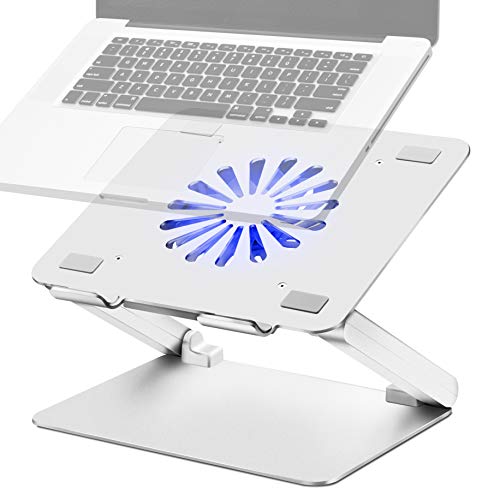
Soundance Aluminum Laptop Cooling Stand with USB Hub
Best for: aluminum desk setups needing peripheral connectivity
- Features
- Kickstand (what this guide is about)
- Compatible Laptop Size
- 10–17.3 in
- Fan Diameter
- 140 mm
- Lighting
- Blue LED
- Surface Material
- Aluminum
- Dimensions
- 11.8 × 11.8 × 2.17 inches
View on Amazon: Soundance Aluminum Laptop Cooling Stand with USB Hub
This Soundance laptop cooling stand features aluminum construction and a built-in 140mm fan with blue LED lighting. It supports notebooks from 10 to 17.3 inches using an adjustable shaft design for height and angle adjustments. You get an integrated four-port USB 3.0 hub powered through a dedicated USB input. It suits you if you need a metal desk stand that combines active single-fan cooling with accessory connectivity.
Pros
- Built-in four-port USB 3.0 data hub
- 140mm cooling fan with blue LED indicator
- Aluminum build with non-slip silicone pads
- Adjustable height and angle shaft design
Cons
- Weighs 3.64 pounds, making it heavier to carry
- Single fan layout with no multi-speed controls listed
Good fit if
- You want an aluminum stand rather than plastic construction.
- You need four USB 3.0 ports for desk peripherals.
- You use a notebook between 10 and 17.3 inches.
Skip if
- You want a lightweight cooler under 3 pounds for frequent travel.
- You require a multi-fan cooling setup.
Verdict: Soundance Aluminum Laptop Cooling Stand with USB Hub provides rigid metal elevation alongside active single-fan cooling. It serves as both an ergonomic riser and an active four-port USB 3.0 station for larger notebooks.
Specifications side by side
| Spec | Kootek 12-17 Inch 5-Fan Laptop Cooling Pad | Llano 19-Inch Turbo Laptop Cooling Pad | ICE Coorel 17.3-Inch 6-Fan Laptop Cooling Pad | LIANGSTAR 6-Fan Laptop Cooling Pad | ICE Coorel 6-Fan Laptop Cooling Pad | Trullypine 17.3-Inch 12-Fan Cooling Pad | AIMIUZI 15.6-Inch 5-Fan Cooling Stand | Llano 14cm Turbo Fan Laptop Cooler | KLIM Wind 4-Fan Laptop Cooling Pad | AISUNKUTECH 17-Inch Laptop Cooling Pad with Kickstand | TECKNET 15.6-Inch 9-Fan Laptop Cooling Pad | MetFut Rotating Thermoelectric Laptop Stand | SHUWEI 15" Aluminum Laptop Cooling Stand | Soundance Aluminum Laptop Cooling Stand with USB Hub |
|---|---|---|---|---|---|---|---|---|---|---|---|---|---|---|
| Compatible Laptop Size | 12–17 in | 15.6–19 in | 15–17.3 in | 12–17.3 in | Up to 17 in | 12–17.3 in | 12–15.6 in | 15–21 in | 11–19 in | 12-17 Inch | 12-15.6 Inch | Up to 15.6 in | 10–15 in | 10–17.3 in |
| Fan Count | 5 | 1 | 6 | 6 | 6 | 12 | 5 | 1 | 4 | 3 | 9 | not specified | not specified | not specified |
| Maximum Fan Speed | not specified | not specified | not specified | not specified | 2600 RPM | not specified | not specified | not specified | 1200 RPM | not specified | 2600 RPM | not specified | not specified | not specified |
| Height Adjustment Levels | 6 | 3 | 6 | 3 | not specified | 5 levels | 5 levels | not specified | not specified | 5 | 5 | not specified | not specified | not specified |
| USB Port Count | 2 | 3 | 2 | 2 | 2 ports | 2 ports | 2 ports | not specified | 2 | 2 | 2 | not specified | not specified | not specified |
| Fan Diameter | 4.72 in, 2.76 in | 5.5 in | not specified | not specified | 70 mm | not specified | not specified | 5.5 in (14 cm) | not specified | not specified | not specified | not specified | not specified | 140 mm |
| Lighting | Blue LED | RGB | RGB | Blue LED | not specified | LED | not specified | not specified | not specified | not specified | LED | not specified | not specified | Blue LED |
| Surface Material | not specified | not specified | not specified | Metal mesh | Metal mesh | Metal mesh | Metal plate | not specified | not specified | stainless steel mesh | Alloy Material Mesh | Carbon steel | Anodized aluminum | Aluminum |
| Features | Kickstand | Kickstand, RGB Lighting | Kickstand, Adjustable Height, RGB Lighting, 2 USB Ports | Kickstand | Kickstand, Adjustable Height, 2 USB Ports | Kickstand, Adjustable Height, 2 USB Ports, Phone Holder | Kickstand, Adjustable Height, 2 USB Ports | Kickstand | Kickstand | Kickstand, Adjustable Height, 2 USB Ports, Phone Holder | Kickstand | Kickstand | Kickstand, 360° Rotation | Kickstand |
| Use | not specified | Gaming | Gaming | Gaming | not specified | Gaming | Gaming | Gaming | not specified | Gaming | not specified | not specified | not specified | not specified |
| Size | not specified | not specified | 17.3 Inch | not specified | 6 Fans | 17.3 Inch | Silver | 12.9*16.6*2.7 inches | not specified | for 12"-17" Laptops | not specified | Medium | For 15" Laptop & No 360°Rotation | not specified |
| Material | not specified | not specified | not specified | not specified | not specified | not specified | not specified | not specified | not specified | not specified | not specified | not specified | not specified | Aluminum |
| Dimensions | 15 × 1.38 × 11.8 inches | 16.9 × 12.9 × 2.7 inches | 16 × 12 × 1.4 inches | 16.4 × 11.8 × 1.18 inches | 16.5 × 11 × 1.1 inches | 14.3 × 10.2 × 1.3 inches | 13.1 × 9.84 × 1.42 inches | 16.9 × 12.9 × 2.7 inches | 1.22 × 10.7 × 1.22 inches | 13.4 × 10.1 × 1.4 inches | 15 × 14 × 1.5 inches | not specified | 10.2 × 9.4 × 2.2 inches | 11.8 × 11.8 × 2.17 inches |
| Weight | 2.56 pounds | 3.97 pounds | 3 pounds | 2.1 pounds | 2.27 pounds | 2.4 pounds | 1.39 pounds | 4.74 pounds | 1.61 pounds | not specified | 1.5 pounds | 3 pounds | 2.07 pounds | 3.64 pounds |
| Color | Blue | Black RGB | Black | Blue | Blue | F12Fan-Gear | Silver | Black | Blue | black | Black | Black | Silver | Adjustable_Sliver |
| Model | LCP04 | V12 Black (Hub+RGB) | ICE K9 | 1 | CO-K21-FBA | Gear | F2PLUS | V12 | K2N | F3 Ultra | F9 | LZ-D21 | not specified | LS2 |
For laptop setups, check the best cooling pillows for your sleep schedule next.
How to Choose a Laptop Cooling Pad
-
USB Hub Connectivity
Laptop cooling pads draw operational power through USB connections, which occupies an active port on your computer. Basic configurations feature dual USB 2.0 pass-through ports so you do not lose peripheral connectivity when powering the fans. Advanced setups need more data bandwidth for external drives and accessories. If your workspace relies on multiple peripherals, look for models with integrated multi-port hubs, such as the Soundance Aluminum Laptop Cooling Stand with its four-port USB 3.0 station. Match the port quantity to the equipment you keep connected at your desk.
-
Fan Array and Coverage
Cooling pads use diverse fan arrangements ranging from single large impellers to dense multi-fan arrays. A single central fan delivers focused airflow directly beneath your laptop chassis, which works well if your intake vents sit centrally. Multi-fan setups distribute air across a broader surface area to reach separated vents. For laptops with widely spaced bottom intakes, high-density options like the Trullypine 17.3-Inch 12-Fan Cooling Pad provide widespread ventilation across the entire base. Check the underside of your laptop to confirm whether concentrated or dispersed airflow aligns with your system vents.
-
Surface Dimensions and Fit
Pad dimensions must correspond directly to your laptop footprint to prevent instability and overhang. Manufacturers specify maximum display compatibility, but physical measurements offer a more exact reference. Compact units around 13 inches wide fit 14-inch to 15.6-inch machines neatly on smaller desks. Larger 17-inch to 17.3-inch gaming laptops require surface lengths reaching 16 inches or more. For instance, the ICE Coorel 17.3-Inch 6-Fan Laptop Cooling Pad measures 16 inches long by 12 inches wide. Measure the base of your computer against published pad dimensions before choosing a size.
-
Dedicated Power Requirements
Most cooling stands run entirely on standard 5V USB bus power supplied directly by your laptop. This configuration keeps cable management simple and allows full portability without extra wall plugs. However, high-output cooling hardware demands significantly higher wattage to drive heavy-duty fans. Powerful units like the Llano 14cm Turbo Fan Laptop Cooler require a dedicated 36W power adapter to function. If you plan to travel or move between desks frequently, verify whether the cooler operates from a standard laptop USB connection or needs an external AC wall outlet.
-
Chassis Construction Material
Cooling pad frames are typically constructed from plastic, metal mesh, or solid aluminum. Standard plastic builds keep overall weight down for easy repositioning around an office. Solid metal frames offer greater physical rigidity and passive heat dissipation by conducting thermal energy away from the laptop base. If you place a heavy workstation or metal laptop onto the stand, an aluminum model such as the SHUWEI 15" Aluminum Laptop Cooling Stand provides a stiff, durable platform. Select aluminum for stationary rigidity or lighter composite materials for easier handling.
-
Built-In Phone Holders
Workspace organization accessories often come built directly into laptop cooling pads. Several models include detachable or fold-out phone brackets on the side of the cooling base. This feature keeps your secondary device visible at eye level without taking up additional desk surface. The AISUNKUTECH 17-Inch Laptop Cooling Pad includes a built-in phone stand alongside its primary cooling hardware. If your daily workflow involves tracking notifications, authenticating sign-ins, or viewing reference documents on a phone, look for a cooling pad that integrates a dedicated mobile cradle.
Frequently asked questions
Can a laptop cooling pad with a kickstand hold a 17.3-inch gaming laptop?
Yes, several models support 17.3-inch setups directly. The LIANGSTAR 6-Fan pad and the ICE Coorel ICE K9 accommodate notebooks up to 17.3 inches using wide frames and built-in kickstands. Trullypine also offers a 17.3-inch model with five height adjustments to keep larger chassis stable during use.
Do cooling pad kickstands add significant weight to your bag?
Most kickstand cooling pads remain lightweight for travel, though heavy-duty options exist. For instance, the AIMIUZI cooling stand weighs 1.39 pounds and the TECKNET 9-fan cooler weighs 1.5 pounds. In contrast, high-output options like the Llano 14cm Turbo cooler weigh up to 4.74 pounds, making them better suited for stationary desks.
How many fans do laptop cooling pads typically use?
Fan counts vary widely depending on the model you select. Some options, like the SHUWEI aluminum stand, utilize a single high-output fan rated at 85 CFM. Other designs spread airflow across multiple smaller units, such as the KLIM Wind with four 1200 RPM fans, the Kootek with five fans, or the Trullypine featuring a 12-fan array.
Which cooling pads include phone mounts alongside their kickstands?
Several multi-angle cooling pads integrate dedicated phone holders directly into their frames. The AIMIUZI 5-fan stand, AISUNKUTECH 17-inch cooler, Trullypine 12-fan pad, and TECKNET 9-fan model all include phone mounts. These fixtures allow you to position a mobile device directly beside your elevated screen to monitor notifications without taking up extra desk space.
Can you get a cooling pad with a kickstand made of metal?
Yes, metal cooling stands are available for desks that require rigid support. The Soundance LS2 features an aluminum build paired with an integrated four-port USB 3.0 station. Similarly, the SHUWEI stand uses an aluminum structure that elevates up to 11.8 inches, while the MetFut thermoelectric cooling stand uses a rotatable carbon steel base.
How loud do cooling pads with kickstands get during operation?
Noise ratings depend on fan velocity and blower design. Compact multi-fan options like the TECKNET F9 maintain low operating noise levels under 40 dB. High-output blower models deliver significantly stronger airflow but run louder; the Llano 19-Inch Turbo cooling pad, for example, reaches up to 70 dB at maximum speed.
Do laptop cooling pads offer controls for fan speed?
Many cooling pads incorporate manual switches or dials to regulate cooling. The AISUNKUTECH F3 Ultra includes a rotary speed dial, while the LIANGSTAR 6-fan cooler offers dual-zone fan adjustments. Higher-end units like the Llano 14cm Turbo Fan cooler provide a digital speed readout so you can monitor operational settings directly.