Baseus Docking Stations: 7 Picks Ranked by Specs
As an Amazon Associate we earn from qualifying purchases. Links on this page are affiliate links.
Finding the right Baseus docking station depends on your display requirements, port needs, and desk layout. Baseus offers options ranging from compact 6-in-1 hubs to 12-in-1 elevated laptop stands with kickstands and multi-display connections.
The Baseus 9-in-1 USB-C Dock with 4K 120Hz HDMI ranks first because it provides dual HDMI handling, 4K 120Hz video, and 85W pass-through charging in a 5.3-ounce profile. This guide evaluates 7 products strictly by their published specifications to help you configure your workstation.
Quick picks
Our 7 picks

Baseus 9-in-1 USB-C Dock with 4K 120Hz HDMI
Best for: dual HDMI Windows setups needing 120Hz video
- Host Interface
- USB-C
- Display Support
- Dual
- Max Resolution
- 4K@120Hz
- Power Delivery
- 85W
- Port Count
- 9
- Video Ports
- HDMI
This Baseus 9-in-1 USB-C docking station adds dual HDMI outputs, gigabit Ethernet, and three USB-A ports to your laptop. It supports a single display at up to 4K resolution at 120Hz, or dual monitors across both HDMI ports. It handles 85W pass-through charging with a 100W input and includes SD and TF card readers. It suits you if you need high refresh rate video and wired networking at your desk.
Pros
- Single display video output up to 4K at 120Hz
- Up to 85W power delivery with 100W input
- 1000Mbps gigabit Ethernet port
- Built-in SD and TF slots with up to 104MB/s transfer rates
Cons
- Dual extended displays not supported on macOS
- Hub consumes 15W of power from the connected charger
- No DisplayPort outputs provided
Good fit if
- You need up to 4K at 120Hz output on a single external display.
- You use a Windows laptop to extend your desktop across two HDMI monitors.
- You require wired gigabit Ethernet and integrated memory card slots.
Skip if
- You use macOS and need dual displays with extended desktop mode.
- You require DisplayPort connectivity for your monitors.
Verdict: Baseus 9-in-1 Dual HDMI USB-C Dock provides high refresh rate single-display 4K output alongside dual HDMI handling, 85W pass-through charging, and gigabit wired networking. It gives Windows users a balanced set of desk ports in a compact 5.3-ounce footprint.

Baseus 6-in-1 Docking Station Stand
Best for: handheld gaming devices and compact tablet desks
- Max Resolution
- 4K@60Hz
- Power Delivery
- 100W
- Port Count
- 6
- Video Ports
- HDMI
- Ethernet Speed
- Gigabit
- Connectivity
- HDMI, Ethernet, USB-A
This Baseus 6-in-1 docking station combines an adjustable kickstand with an integrated hub for handhelds, tablets, and laptops. You get a single HDMI output capable of 4K at 60Hz, three USB 3.0 data ports, Gigabit Ethernet, and 100W Power Delivery passthrough. Its angled cradle holds devices upright while connected. It fits your portable monitor setup well if you need reliable wired networking and video output from a single compact USB-C device.
Pros
- HDMI output supports up to 4K at 60Hz and 1080p at 120Hz
- 100W USB-C Power Delivery charging port
- Gigabit RJ45 Ethernet port supporting up to 1000 Mbps
- Built-in adjustable stand design holds devices with protective cases
Cons
- Power adapter and input cable are not included
- Single display output with no second video port
- No built-in SD or microSD card slots
Good fit if
- You want an integrated adjustable cradle to prop up your handheld or tablet
- You need 4K at 60Hz output to an external monitor alongside Gigabit Ethernet
- You need three USB 3.0 ports for connecting wired peripherals
Skip if
- You require dual or triple display outputs for multiple external monitors
- You want a docking station that includes its own AC power adapter and cable
Verdict: Baseus 6-in-1 Docking Station with Stand delivers solid single-display 4K video, Gigabit Ethernet, and 100W Power Delivery in a functional kickstand format. It is a practical choice if you want to mount and dock a USB-C handheld or tablet without buying a separate stand.

Baseus 7-in-1 USB-C Hub with 3 USB-A Ports
Best for: single-monitor workspaces needing memory card slots
- Host Interface
- USB-C
- Max Resolution
- 4K@60Hz
- Power Delivery
- 100W
- Port Count
- 7
- Video Ports
- HDMI
- Max Data Speed
- 5Gbps
This Baseus 7-in-1 USB-C Hub connects your laptop to external gear through a single USB-C host interface. You get one HDMI port supporting up to 4K at 60Hz or 1080p at 120Hz, three 5Gbps USB-A ports, SD and TF card slots, and a 100W USB-C Power Delivery input. It suits you if you need a compact single-display dock for standard desktop peripherals and memory card transfers.
Pros
- HDMI output supports up to 4K at 60Hz or 1080p at 120Hz
- Supports up to 100W USB-C Power Delivery input
- Three USB 3.0 Type-A data ports reaching up to 5Gbps
- Integrated SD and TF memory card readers
Cons
- Provides only one external display output
- Lacks an Ethernet port for wired networking
- Requires a separate external charger to power your laptop
Good fit if
- You need a single-monitor setup running at 4K 60Hz.
- You frequently transfer media using SD or TF cards.
- You want three USB-A ports for everyday accessories.
Skip if
- You need to drive two or more external monitors.
- You require a wired RJ45 Ethernet connection.
Verdict: Baseus 7-in-1 USB-C Hub with 4K 60Hz HDMI delivers essential port expansion, fast card access, and high-wattage power passthrough in a slim profile. It handles everyday single-screen workstation needs without unnecessary bulk.

Baseus 12-in-1 Triple 4K Docking Station
Best for: triple-monitor desk setups needing an elevated stand
- Host Interface
- USB-C
- Display Support
- Triple
- Max Resolution
- 4K
- Power Delivery
- 85W
- Port Count
- 12
- Video Ports
- HDMI, DisplayPort
This 12-in-1 USB-C docking station doubles as an ergonomic laptop stand to elevate your computer. It features triple 4K display support across two HDMI ports and one DisplayPort, along with 85W Power Delivery to your machine from a 100W input. With Gigabit Ethernet, three USB-A 3.0 ports, a USB-C 3.0 data port, an audio jack, and SD/TF card slots, you get comprehensive peripheral connectivity for desk productivity.
Pros
- Triple 4K display support via HDMI and DisplayPort
- 12-in-1 port expansion including SD/TF card readers and audio jack
- Up to 85W laptop charging output from 100W Power Delivery input
- Built-in stand design to elevate your laptop for cooling
- Gigabit Ethernet port for wired network connections
Cons
- Supplies 85W host charging rather than full 100W output
- Weighs 12 ounces, making it less packable than simple travel hubs
Good fit if
- You want to connect up to three 4K external displays.
- You prefer an integrated stand that elevates your laptop on your desk.
- You need built-in SD/TF card readers alongside Gigabit Ethernet.
Skip if
- You require more than 85W of charging power for your laptop.
- You want a lightweight, pocketable adapter rather than a stationary stand.
Verdict: Baseus 12-in-1 Triple 4K Docking Station Stand combines triple-monitor 4K video expansion with a built-in elevated laptop base. It gives you 85W Power Delivery and a broad selection of legacy and data ports for a clean workstation.
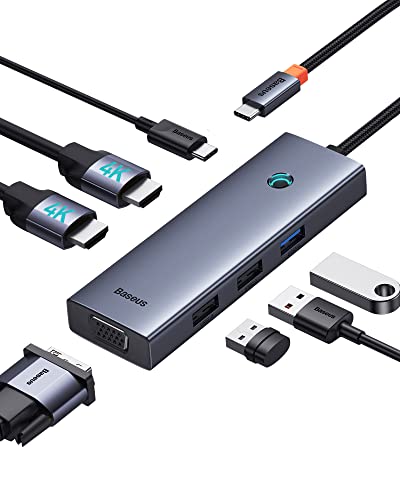
Baseus 7-in-1 USB-C Dock with VGA & Dual HDMI
Best for: Connecting legacy VGA and HDMI monitors on Windows
- Host Interface
- USB-C
- Display Support
- Triple
- Max Resolution
- 4K@60Hz
- Power Delivery
- 100W
- Port Count
- 7
- Video Ports
- HDMI, VGA
View on Amazon: Baseus 7-in-1 USB-C Dock with VGA & Dual HDMI
This Baseus 7-in-1 USB-C docking station adds legacy and modern video connections to your laptop setup. You get dual HDMI ports alongside a dedicated VGA port, supporting up to 4K at 60Hz from a single DP 1.4 connection. It also delivers up to 100W USB-C pass-through power and weighs just 2.26 ounces. This hub suits you if you need to connect legacy VGA screens alongside HDMI displays.
Pros
- Includes VGA port alongside two HDMI outputs
- Supports up to 4K at 60Hz over HDMI on DP 1.4 sources
- Delivers up to 100W USB-C Power Delivery
- Compact 2.26-ounce aluminum alloy chassis
Cons
- Two of three USB data ports are USB 2.0
- macOS does not support distinct extended desktop displays across video ports
- No Ethernet or SD card slots included
Good fit if
- You need a dedicated VGA port for legacy monitors or projectors.
- You require 100W USB-C pass-through charging in a compact travel form factor.
- You want to connect up to three external screens to a compatible Windows laptop.
Skip if
- You use macOS and require independent extended desktop screens across multiple external monitors.
- You need high-speed USB 3.0 transfer rates on more than one peripheral port.
- You need a wired Ethernet connection.
Verdict: Baseus 7-in-1 USB-C Hub with VGA delivers essential legacy and modern video outputs with 100W power pass-through in a pocket-sized package. It offers versatile multi-display connectivity for Windows users who still work with VGA hardware.
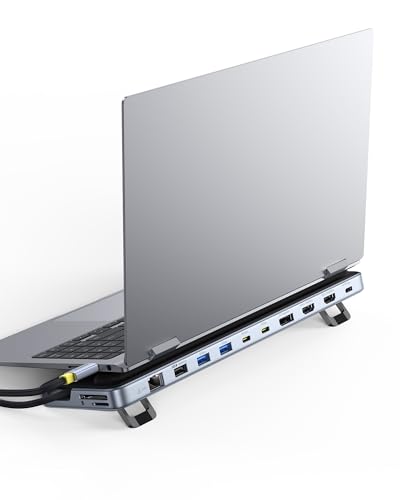
Baseus 12-in-1 Triple Display Laptop Stand Dock
Best for: triple 4K setups needing an elevated stand
- Host Interface
- USB-C
- Display Support
- Triple
- Max Resolution
- 4K
- Power Delivery
- 85W
- Port Count
- 12
- Video Ports
- HDMI, DisplayPort
View on Amazon: Baseus 12-in-1 Triple Display Laptop Stand Dock
This Baseus unit combines an ergonomic laptop stand with a 12-port USB-C docking station. You get triple 4K display support across two HDMI ports and one DisplayPort, alongside 10Gbps USB-A and USB-C data speeds. It delivers up to 85W of pass-through power to your laptop from a 100W input and includes Gigabit Ethernet. It suits you if you need a raised laptop setup with multi-monitor video outputs and fast peripheral connectivity.
Pros
- Triple 4K video output via two HDMI ports and one DisplayPort
- 10Gbps transfer speeds on USB-A and USB-C data ports
- 85W laptop power delivery from a 100W input
- Integrated laptop stand form factor with screen-lock button
Cons
- Limits laptop power delivery to 85W
- Large 11.2-inch stand footprint rather than a pocketable hub design
Good fit if
- You need triple 4K external display support using HDMI and DisplayPort.
- You want an elevated laptop stand that provides 10Gbps data ports and Gigabit Ethernet.
- You use a USB-C laptop that requires 85W or less for power delivery.
Skip if
- You need more than 85W of charging power for your laptop.
- You prefer a compact, pocketable adapter instead of a desktop stand.
Verdict: Baseus 12-in-1 Triple 4K Laptop Docking Stand merges desktop elevation with triple-monitor 4K outputs and 10Gbps data connectivity. It handles expansive workstation setups while supplying up to 85W of pass-through power.

Baseus Triple Display Dock with SD and TF Reader
Best for: Dual-monitor desks needing 4K@120Hz video output
- Host Interface
- USB-C
- Display Support
- Dual
- Max Resolution
- 4K@120Hz
- Power Delivery
- 85W
- Video Ports
- HDMI, DisplayPort
- Max Data Speed
- 5Gbps
View on Amazon: Baseus Triple Display Dock with SD and TF Reader
The Baseus 4K@120Hz Dual Display USB-C Dock is a multiport desktop adapter designed to expand your laptop connectivity. It supports single-monitor video output up to 4K at 120Hz via HDMI, dual-monitor configurations using HDMI and DisplayPort, and up to 85W pass-through charging. With integrated Gigabit Ethernet, SD and TF slots, and three USB-A ports, it suits professionals who need steady wired connections and high-refresh external display setups.
Pros
- Supports single display video output up to 4K at 120Hz
- Dual monitor support via two HDMI and DisplayPort connections
- Provides 1000Mbps Gigabit Ethernet and SD/TF card slots
- Pass-through charging delivers up to 85W to host laptop
Cons
- Consumes 15W internally, reducing 100W input to 85W output
- USB-A ports limited to 5Gbps max with one port at USB 2.0
- No downstream USB-C data ports included
Good fit if
- You want a single external display running at 4K resolution at 120Hz.
- You regularly transfer media from SD or TF cards.
- You need a hardwired 1000Mbps Ethernet connection.
Skip if
- You require a full 100W power delivery output to your laptop.
- You need 10Gbps transfer speeds for high-speed external storage drives.
Verdict: Baseus 4K@120Hz Dual Display USB-C Dock provides flexible video outputs up to 4K@120Hz alongside essential everyday legacy ports. It is a capable hub if you want dual display multitasking without losing Gigabit networking or memory card access.
Specifications side by side
| Spec | Baseus 9-in-1 USB-C Dock with 4K 120Hz HDMI | Baseus 6-in-1 Docking Station Stand | Baseus 7-in-1 USB-C Hub with 3 USB-A Ports | Baseus 12-in-1 Triple 4K Docking Station | Baseus 7-in-1 USB-C Dock with VGA & Dual HDMI | Baseus 12-in-1 Triple Display Laptop Stand Dock | Baseus Triple Display Dock with SD and TF Reader |
|---|---|---|---|---|---|---|---|
| Host Interface | USB-C | not specified | USB-C | USB-C | USB-C | USB-C | USB-C |
| Display Support | Dual | not specified | not specified | Triple | Triple | Triple | Dual |
| Max Resolution | 4K@120Hz | 4K@60Hz | 4K@60Hz | 4K | 4K@60Hz | 4K | 4K@120Hz |
| Power Delivery | 85W | 100W | 100W | 85W | 100W | 85W | 85W |
| Port Count | 9 | 6 | 7 | 12 | 7 | 12 | not specified |
| Video Ports | HDMI | HDMI | HDMI | HDMI, DisplayPort | HDMI, VGA | HDMI, DisplayPort | HDMI, DisplayPort |
| Max Data Speed | 5Gbps | not specified | 5Gbps | not specified | not specified | 10Gbps | 5Gbps |
| Ethernet Speed | 1Gbps | Gigabit | not specified | Gigabit | not specified | Gigabit Ethernet | 1000Mbps |
| Resolution | 4K UHD | 4K UHD | 4K UHD | 4K UHD | 4K UHD | 4K UHD | 4K UHD |
| Connectivity | USB-C, HDMI | HDMI, Ethernet, USB-A | USB-C, HDMI, USB-A | HDMI, DisplayPort, Ethernet, USB-A | USB-C, HDMI, VGA | USB-C, HDMI, DisplayPort, Ethernet, USB-A | USB-C, HDMI, DisplayPort, Ethernet, USB-A |
| Refresh Rate | 120Hz | 60Hz | 60Hz | not specified | not specified | not specified | not specified |
| Features | Card Reader | Kickstand | Card Reader | Card Reader | not specified | Kickstand | Card Reader |
| Dimensions | 5.31 × 1.93 × 0.63 inches | 5.31 × 3.38 × 1.18 inches | 5.31 × 1.93 × 0.63 inches | not specified | 4.33 × 1.46 × 0.55 inches | 3.15 × 1 × 11.2 inches | 5.9 × 2.8 × 2.91 inches |
| Weight | 5.3 ounces | 11.2 ounces | not specified | 12 ounces | 2.26 ounces | not specified | 7.04 ounces |
| Size | 9 in 1 | not specified | 7 in 1 | not specified | 6 in 1 | not specified | not specified |
| Color | Grey | Black | Black | Silver | not specified | Silver | Gray |
| Model | not specified | not specified | 7 in 1 | not specified | not specified | not specified | not specified |
The Baseus Lineup at a Glance
The Baseus lineup splits between multi-monitor workstation docks and compact portable hubs. If you run multiple screens or need high refresh rates, the larger models match your workflow. The Baseus 9-in-1 USB-C Dock with 4K 120Hz HDMI supports dual displays with fast refresh output, while the Baseus 12-in-1 Triple 4K Docking Station provides triple-display video across HDMI and DisplayPort connections on an integrated stand.
For single-screen desks or mobile gear, compact hubs prioritize portability and focused features. The Baseus 6-in-1 Docking Station Stand adds a kickstand built for tablets and handheld devices. If you need everyday peripherals and external media access, the Baseus 7-in-1 USB-C Hub with 3 USB-A Ports delivers 4K 60Hz video, memory card slots, and 100W Power Delivery.
Where the Baseus Range Fits
Baseus fits setups needing compact dongles or elevated stands. The hardware range spans from a 2.26-ounce, 4.33-inch travel hub up to a 12-ounce, 11.2-inch elevated laptop base. Form factors include slim rectangular bars, handheld kickstands, and full desk stands finished in black, gray, or silver.
Lineup gaps exist. Zero models include integrated status lighting or RGB options. You get no standalone AC power supplies; all units rely on 85W or 100W USB-C pass-through charging. Port selections max out at 12-in-1 layouts. Video supports VGA up to triple 4K, but larger multi-drive or high-port enterprise configurations do not exist in this catalog.
If you require internal drive storage, compare the best NVMe SSD docking stations to evaluate their interface speeds.
How to Choose a Baseus Dock
-
Target Screen Refresh Rates
Check the refresh rate specification if you plan to connect gaming monitors or smooth external displays. Standard hubs output 4K at 60Hz, which works well for general office documents and web browsing. If you want fluid motion for gaming or fast scrolling, look for 120Hz support at 4K resolution. The Baseus 9-in-1 USB-C Dock with 4K 120Hz HDMI lists this capability for single-display video output. Matching the dock refresh rate to your monitor native refresh rate avoids locked lower frame rates.
-
Check External Display Support
Review display support specifications if you plan to run two or three external monitors simultaneously. Basic hubs only route video to a single screen, while multi-display docks provide combinations of HDMI and DisplayPort outputs. For extensive multitasking across three separate screens, verify that the unit explicitly lists triple 4K display support. The Baseus 12-in-1 Triple 4K Docking Station provides HDMI and DisplayPort connections to power multiple high-resolution displays. Choosing a dock with multiple matched display connections eliminates the need for extra video converters on your desk.
-
Verify Power Delivery Wattage
Examine the Power Delivery wattage rating to confirm your laptop charges properly under heavy workloads. Docks handle power delivery differently, often drawing internal power before passing the rest to your computer. Models with 100W Power Delivery input typically supply between 85W and 100W directly to your host machine. The Baseus 7-in-1 USB-C Hub with 3 USB-A Ports features 100W Power Delivery to keep compatible laptops charged through a single cable. Selecting adequate wattage ensures your laptop battery does not drain while driving external accessories and displays.
-
Consider Legacy Video Ports
Check whether your workstation relies on legacy monitors or conference room projectors that require analog connections. Most modern docks prioritize digital HDMI and DisplayPort outputs, dropping older analog standards completely. If your setup includes an older screen, look for dedicated VGA connectivity on the dock alongside modern ports. The Baseus 7-in-1 USB-C Dock with VGA & Dual HDMI incorporates a VGA port alongside dual HDMI outputs for Windows setups. Getting built-in VGA hardware support saves you from carrying separate active dongles to link older display equipment.
-
Evaluate Built-In Stand Hardware
Assess the physical chassis design if your workspace requires elevated device positioning. Standard portable docks lay flat on your desk, while specialized designs incorporate an integrated kickstand or raised platform. If you dock a tablet or handheld gaming device, an upright stand holds the screen at an accessible viewing angle while keeping ports organized. The Baseus 6-in-1 Docking Station Stand provides a built-in kickstand format alongside its wired connections. Choosing a dock with an integrated stand keeps your hardware upright and saves valuable desk space.
-
Look for Card Readers
Check the feature list for integrated SD and TF card slots if you frequently transfer media files. Docks without card slots force you to use external adapters, which consume spare USB ports. If you work with cameras, drones, or audio recorders, integrated card slots provide direct, convenient access for your storage media. The Baseus Triple Display Dock with SD and TF Reader includes dedicated card readers directly alongside its video and network connections. Choosing a dock with built-in card access streamlines regular file transfers.
Frequently asked questions
Can a Baseus docking station power and charge your laptop?
Yes, Baseus docks support USB Power Delivery passthrough up to 100W to keep your computer charged during use. Models like the Baseus 7-in-1 USB-C Hub accept 100W input, while the Baseus 9-in-1 and 12-in-1 docking stations supply 85W pass-through power directly to your machine. This provides enough energy to operate your laptop alongside external drives, displays, and networked peripherals.
Which Baseus docks include integrated stands for laptops or handheld devices?
Baseus makes several docking stations with integrated frames and kickstands. The Baseus 6-in-1 Docking Station Stand features an upright kickstand tailored for handheld gaming devices and tablets. If you use a laptop, the Baseus 12-in-1 Triple Display Laptop Stand Dock integrates an elevated desktop stand directly into the dock body, raising your notebook while expanding connectivity through HDMI, DisplayPort, and USB ports.
Can you connect legacy monitors using VGA to a Baseus dock?
Yes, select Baseus docks feature analog VGA ports alongside digital connections. The Baseus 7-in-1 USB-C Dock with VGA & Dual HDMI includes a legacy VGA port alongside two HDMI outputs. This layout allows Windows users to connect older conference room projectors or legacy monitors directly to a modern USB-C laptop while retaining 100W Power Delivery and dual-display capabilities.
Do Baseus docking stations have built-in memory card readers?
Several Baseus docking stations include integrated card readers for camera media. The Baseus 7-in-1 USB-C Hub, the Baseus 12-in-1 Triple 4K Docking Station, and the Baseus Triple Display Dock with SD and TF Reader all feature integrated memory card access. These built-in slots allow you to transfer photos and footage directly without plugging in external USB dongles.
Can you connect three external displays using a Baseus docking station?
Yes, Baseus offers 12-in-1 docking stations designed to drive triple external displays. Both the Baseus 12-in-1 Triple 4K Docking Station and the Baseus 12-in-1 Triple Display Laptop Stand Dock include combinations of HDMI and DisplayPort video outs. On compatible systems, these docks output video to three independent 4K monitors while providing Gigabit Ethernet and peripheral data ports.
Do Baseus USB-C docks include wired Gigabit Ethernet ports?
Yes, most multi-port Baseus docks incorporate an RJ45 Gigabit Ethernet port for stable wired networking. Models such as the Baseus 9-in-1 USB-C Dock, the Baseus 6-in-1 Docking Station Stand, and the Baseus 12-in-1 stations provide gigabit connectivity. Connecting via the physical Ethernet jack ensures steady network speeds and low latency when wireless signals are congested or unavailable.