15 Best Dual Monitor Portable Monitors, Compared
As an Amazon Associate we earn from qualifying purchases. Links on this page are affiliate links.
Adding screen real estate on the go requires hardware tailored to your specific workflow and ports. Finding the best dual monitor portable monitors comes down to matching panel resolution, physical dimensions, and connectivity to your machine.
The ZUMWALT 15.6-Inch Dual Screen Extender leads our comparison because its dual 1080p FHD displays and aluminum frame expand laptops up to 17.3 inches over USB-C. We compared 15 models based strictly on the specifications published on their listings. This guide helps you choose the right display format, weight, and mounting style for your portable multi-screen setup.
Quick picks
The best fit for you
- You need triple-screen productivity for a large laptop ZUMWALT 15.6-Inch Dual Screen Extender Its dual 1080p FHD screens support laptops up to 17.3 inches through USB-C connectivity.
- You want a high refresh rate on larger displays MAGICRAVEN 18.5" 100Hz Foldable Dual Monitor It features an 18.5-inch 1080p IPS foldable display that supports a 100Hz refresh rate.
- You want a folding stacked setup for dual multitasking InnoView 15.6-Inch Dual Foldable Portable Monitor The dual 15.6-inch displays feature 315-degree folding with USB-C and HDMI connectivity.
- You travel often and need a lightweight dual monitor APILDELLA 14-Inch Dual Portable Monitor The 14-inch 1080p IPS display provides dual-screen expansion at a weight of 1.9 pounds.
Our 15 picks

ZUMWALT 15.6-Inch Dual Screen Extender
Best for: triple-screen productivity on full-featured USB-C laptops
- Display Support
- Dual Monitor (what this guide is about)
- Screen Size
- 15.6"
- Resolution
- 1080P FHD
- Connectivity
- USB-C, HDMI, USB-A
- Weight
- 4 lbs (1.8 kg)
- Use
- Travel
This dual-screen setup from ZUMWALT adds two 15.6-inch 1080p displays to your laptop workspace. It features an aluminum alloy frame, 280 nits of brightness, and 178-degree viewing angles. You can connect it with two full-featured USB-C cables without clip attachments. It suits mobile professionals with 13-inch to 17.3-inch laptops who need a portable multi-display workstation for extended, mirrored, or portrait viewing modes while traveling.
Pros
- Dual 15.6-inch 1080p displays with 178-degree viewing angles
- Aluminum alloy housing weighing 4 lbs (1.8 kg)
- Supports landscape, mirror, and portrait display modes
- Includes carry bag, power adapter, and connection cables
Cons
- Peak brightness is limited to 280 nits
- M1, M2, and M3 MacBooks require driver installation and an extra H5-T cable
- Requires two full-featured USB-C ports or an external power connection
Good fit if
- You use a 13-inch to 17.3-inch laptop with two full-featured USB-C ports.
- You want an aluminum dual-display setup that supports portrait orientation.
- You need a complete package with an included power adapter and carrying case.
Skip if
- You use an Apple M1, M2, or M3 laptop and want plug-and-play operation without drivers.
- You require screen brightness higher than 280 nits for bright environments.
Verdict: ZUMWALT 15.6" Dual Screen Laptop Extender delivers dual Full HD displays in a durable aluminum frame for laptops up to 17.3 inches. It provides flexible viewing orientations, provided your laptop supports dual USB-C video output or you install the necessary drivers.

SMISEACOW 15.6" Stacked Laptop Screen Extender
Best for: vertical stacked setups on compact desks
- Display Support
- Dual Monitor (what this guide is about)
- Screen Size
- 15.6"
- Resolution
- 1920x1080
- Refresh Rate
- 60Hz
- Panel Type
- IPS
- Connectivity
- USB-C, HDMI
View on Amazon: SMISEACOW 15.6" Stacked Laptop Screen Extender
This SMISEACOW unit is a 15.6-inch dual monitor that mounts directly above your laptop screen using an adjustable clamp. It features a 1080p IPS panel with 300 nits brightness, 60Hz refresh rate, and 100% sRGB color gamut. Weighing 2.2 pounds with an aluminum chassis, it connects through USB-C or HDMI. It suits you if you want a vertical display layout that preserves desk width.
Pros
- Vertical clamp mounts display directly above 13-inch to 17.3-inch laptops
- 1080p IPS screen with 100% sRGB color coverage and 300 nits brightness
- Dual connectivity options via USB-C and HDMI ports
- Aluminum alloy chassis measures 0.17 inches thick and weighs 2.2 pounds
Cons
- Standard 60Hz refresh rate lacks high-frame-rate display support
- Screen resolution capped at 1080p rather than 1440p or 4K
Good fit if
- You need a stacked display orientation to save horizontal desk space.
- You work on a laptop with a screen size between 13 inches and 17.3 inches.
- You require 100% sRGB color coverage for your daily tasks.
Skip if
- You prefer side-by-side horizontal dual-screen configurations.
- You require a refresh rate faster than 60Hz.
- You need a panel resolution higher than 1920x1080.
Verdict: SMISEACOW 15.6" Vertical Dual Portable Monitor provides an above-laptop stacked layout with 100% sRGB color accuracy for compact workspaces. Its aluminum body and dual USB-C and HDMI inputs deliver dependable secondary-screen utility.

Vixtan 15.3" 16:10 Portable Monitor
Best for: portable 16:10 productivity and color-accurate work
- Display Support
- Dual Monitor (what this guide is about)
- Screen Size
- 15.3"
- Resolution
- 1200P
- Panel Type
- IPS
- Connectivity
- USB-C, HDMI
- Color Gamut
- 100% sRGB
The Vixtan portable monitor gives you a 15.3-inch IPS panel with a 16:10 aspect ratio and 1200P resolution. It covers 100% sRGB color and weighs 1.7 pounds inside a 0.19-inch-thick aluminum alloy housing with an integrated plastic stand. With USB-C and HDMI inputs, it provides a dual-monitor setup without driver installation, making it practical if you need extra vertical screen height on the go.
Pros
- 16:10 aspect ratio with 1200P IPS display
- Full 100% sRGB color gamut coverage
- Slim 0.19-inch profile weighing 1.7 pounds
- Dual connectivity via USB-C and HDMI ports
Cons
- Requires external power or an extra USB cable when used with HDMI
- Integrated stand is plastic rather than full aluminum alloy
Good fit if
- You want extra vertical screen space from a 16:10 aspect ratio display.
- You need a lightweight dual monitor weighing under 2 pounds with 100% sRGB color.
Skip if
- You want an all-metal build including the integrated stand.
- You prefer a conventional 16:9 widescreen layout for your setup.
Verdict: Vixtan 15.3-inch 16:10 Portable Monitor delivers a lightweight build and extra vertical workspace with its 1200P IPS panel. It provides a simple plug-and-play dual-screen expansion through USB-C or HDMI.

Screnex 15.6-Inch Vertical Portable Dual Monitor
Best for: vertical stacked dual-screen laptop setups
- Display Support
- Dual Monitor (what this guide is about)
- Screen Size
- 15.6"
- Resolution
- 1920×1080
- Panel Type
- IPS
- Connectivity
- USB-C, HDMI
- Aspect Ratio
- 16:9
View on Amazon: Screnex 15.6-Inch Vertical Portable Dual Monitor
The Screnex 15.6" Vertical Portable Monitor adds a second screen directly above your 13–17.3" laptop display. It features a 1080p IPS panel with 300 cd/m² brightness and a 16:9 aspect ratio. At 2.2 lbs and 0.16 inches thick, it connects through a single full-function USB-C cable with 65W PD reverse charging, or mini HDMI with supplemental power. This setup suits you if you need a stacked layout that conserves desk space.
Pros
- Single USB-C connection supports video and 65W+ PD reverse charging
- Vertical clamp fits 13–17.3" laptops with 360° stand rotation and 180° tilt
- 1080p IPS panel delivers 300 cd/m² brightness with low blue light filtering
- Weighs 2.2 lbs with an ultra-thin 0.16" screen profile
Cons
- HDMI connection requires a secondary USB-C cable for power
- Clamp mechanism is incompatible with laptops outside the 13–17.3" range
- Requires a separate 5V/2A external power supply if display signals are unstable
Good fit if
- You want a vertical stacked display layout to save horizontal desk space.
- You use a 13–17.3" laptop equipped with a full-function USB-C port.
- You need 360° rotation and 180° viewing angle adjustment on an attached mount.
Skip if
- You use a laptop smaller than 13 inches or larger than 17.3 inches.
- You prefer placing your secondary display side-by-side rather than vertically stacked.
Verdict: Screnex 15.6" Vertical Portable Monitor delivers a 1080p IPS stacked display setup via a 360° adjustable clamp for 13–17.3" laptops. It provides single-cable USB-C connectivity with 65W+ PD passthrough in a 2.2-pound form factor.
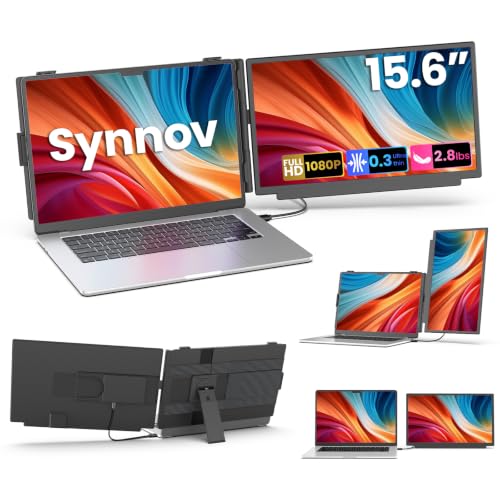
Synnov 15.6-Inch Detachable Dual Monitor
Best for: flexible portrait and landscape dual-screen setups
- Display Support
- Dual Monitor (what this guide is about)
- Screen Size
- 15.6"
- Resolution
- 1920×1080
- Panel Type
- IPS
- Connectivity
- USB-C, HDMI, USB-A
- Color Gamut
- Full sRGB
This 15.6-inch dual monitor adds a second screen to your laptop using a detachable design. It features a 1080p IPS panel with 280 nits brightness, a 1000:1 contrast ratio, and full sRGB coverage. You connect through a single USB-C cable or HDMI with USB-A. At 3.5 pounds total, it suits users who want flexible landscape or portrait configurations across Windows, macOS, Chrome OS, Android, or Linux.
Pros
- Detachable screen rotates between landscape and portrait orientations
- 1080p IPS display with 1000:1 contrast and full sRGB coverage
- Single-cable USB-C video and power delivery with HDMI backup
- Broad OS support including Windows, macOS, Chrome OS, Android, and Linux
Cons
- Peak brightness tops out at 280 nits
- Total combined unit weight is 3.5 pounds
Good fit if
- You need portrait orientation for coding or reading documents.
- You want a detachable display that functions independently on a desk.
- You have a laptop with full-function USB-C or HDMI ports.
Skip if
- You work outdoors and require display brightness over 280 nits.
- You require an ultra-light setup under 3.5 pounds total weight.
Verdict: Synnov 15.6" Detachable Dual Monitor provides flexible landscape or portrait viewing with full sRGB color in a plug-and-play package. Its 280-nit brightness limits outdoor visibility, but the detachable stand adapts well to varied desk setups.
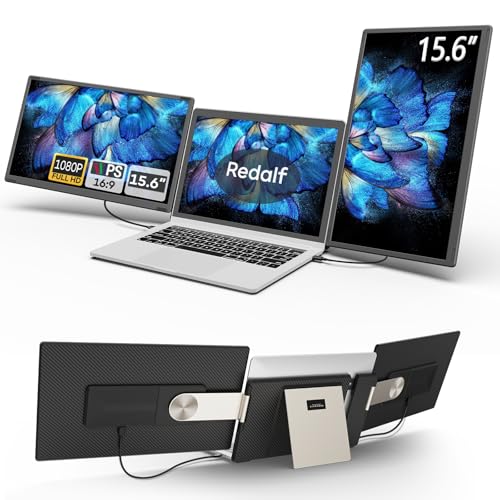
Redalf 15.6-Inch Detachable Dual Screen Extender
Best for: customizable orientation and detachable dual-screen setups
- Display Support
- Dual Monitor (what this guide is about)
- Screen Size
- 15.6"
- Resolution
- 1080P FHD
- Panel Type
- IPS
- Connectivity
- USB-C, USB-A, HDMI
- Weight
- 2.1 pounds
View on Amazon: Redalf 15.6-Inch Detachable Dual Screen Extender
The Redalf detachable screen setup adds two 15.6-inch 1080p FHD IPS displays to your 13-inch to 17.3-inch laptop. You get a customizable stand supporting 235-degree horizontal and 90-degree vertical rotation for landscape, portrait, or stacked orientations. Each screen detaches to run independently at 2.1 pounds. It suits you if you need multi-screen flexibility across Windows, Linux, Android, or Mac Pro and Max laptops without installing external drivers.
Pros
- Dual 15.6-inch 1080p FHD IPS panels with anti-glare treatment
- Detachable design allows single-panel standalone operation
- Stand adjusts through 235-degree horizontal and 90-degree vertical rotation
- Driver-free plug-and-play connectivity via USB-C, USB-A, or HDMI
- Built-in speakers on the monitor panels
Cons
- Incompatible with base Apple M1, M2, and M3 chips
- HDMI connection requires an additional USB cable for power
- Each individual screen section weighs 2.1 pounds
Good fit if
- You want rotating screens for landscape, portrait, or stacked layouts.
- You need detachable panels that can operate as independent displays.
- You work on a 13-inch to 17.3-inch laptop with compatible video outputs.
Skip if
- You use a Mac laptop powered by a standard M1, M2, or M3 chip.
- You prefer single-cable HDMI connectivity without extra power lines.
Verdict: Redalf 15.6" Detachable Dual Portable Monitor provides highly adjustable multi-screen layouts with fully detachable panels for independent use. Its hardware constraints make it ideal specifically for supported multi-display laptops.

Aefieoy 15.6" Stacked Dual Portable Monitor
Best for: vertical stacked setups on narrow desks
- Display Support
- Dual Monitor (what this guide is about)
- Screen Size
- 15.6"
- Resolution
- 1920x1080
- Refresh Rate
- 60Hz
- Panel Type
- IPS
- Connectivity
- USB-C, Mini HDMI
The Aefieoy 15.6" Stacked Dual Portable Monitor adds an extra 1080p display mounted directly above your 13-to-17-inch laptop. You get a 60Hz IPS panel outputting 300 nits brightness, an aluminum alloy chassis, and an integrated 360-degree stand. Weighing 2.2 lb and connecting via USB-C or Mini HDMI, this monitor suits you if you work in compact workspaces where horizontal desk room is limited.
Pros
- Vertical stacked mounting saves horizontal desk space
- 1080p IPS panel with 300 nits brightness and 60Hz refresh rate
- 2.2 lb aluminum alloy body measures 0.16 inches thick
- Integrated rear stand rotates 360 degrees
- USB-C and Mini HDMI ports with included cables
Cons
- Mounts only vertically above the laptop without side-mounting options
- 60Hz refresh rate is limited to standard display output
- Requires dual cabling when host laptop lacks full-featured USB-C
Good fit if
- You want a vertical second screen above your 13–17" laptop.
- You have limited horizontal desk space in your workspace.
- You need a lightweight 2.2 lb aluminum monitor for mobile setups.
Skip if
- You prefer attaching your secondary monitor to the left or right side.
- You require display resolutions higher than 1920x1080.
Verdict: Aefieoy 15.6" Stacked Dual Portable Monitor provides a compact vertical second screen with standard 1080p IPS clarity. Its 2.2 lb aluminum frame and 360-degree stand fit tight workspaces without requiring wide desk clearance.

APILDELLA 14-Inch Dual Portable Monitor
Best for: travelers wanting lightweight 14-inch dual-screen setups
- Display Support
- Dual Monitor (what this guide is about)
- Screen Size
- 14"
- Resolution
- 1920×1080P
- Panel Type
- IPS
- Connectivity
- USB-C, HDMI, USB-A
- Weight
- 1.9 lb
The APILDELLA dual screen setup attaches to your laptop to expand your workspace using a 14-inch 1080p FHD IPS panel. Weighing 1.9 pounds with a 0.2-inch profile, it adds secondary display real estate without excessive bulk in your travel bag. It supports single-cable USB-C or HDMI connections and features a 226-degree screen rotation. You get portrait, landscape, and mirrored viewing options compatible with Windows, Mac, Chrome OS, and Android devices.
Pros
- Weighs 1.9 pounds with a slim 0.2-inch profile
- 1080p Full HD IPS panel with 226-degree rotation
- Plug-and-play setup requiring no driver installation
- Supports single-cable USB-C or HDMI plus USB-A connections
Cons
- Smaller 14-inch screen size compared to standard 15.6-inch extenders
- Requires two cables if your laptop lacks a full-featured USB-C port
Good fit if
- You need a lightweight dual-screen extender under 2 pounds for travel.
- You want flexible viewing angles with 226-degree screen rotation and portrait support.
- You use Windows, Mac, Android, or Chrome OS laptops with full-featured USB-C.
Skip if
- You prefer a larger 15.6-inch or 16-inch display for daily tasks.
- You want a resolution higher than 1080p FHD.
Verdict: APILDELLA 14-Inch FHD Dual Portable Monitor delivers a compact 1080p IPS screen that balances portability at 1.9 pounds with versatile 226-degree rotation.

Wixzet 15.6-Inch Detachable Dual Monitor Extender
Best for: flexible dual-screen setups with laptop charging
- Display Support
- Dual Monitor (what this guide is about)
- Screen Size
- 15.6"
- Resolution
- 1080P
- Panel Type
- IPS
- Connectivity
- USB-C, HDMI, USB-A
- Color Gamut
- 100% sRGB
View on Amazon: Wixzet 15.6-Inch Detachable Dual Monitor Extender
This 15.6-inch portable IPS display attaches to 13-inch to 17.3-inch laptops or works detached as a standalone screen. It delivers a 1080p resolution with 280 nits of brightness and full 100% sRGB color gamut coverage. Featuring 100W Power Delivery pass-through charging over USB-C, it powers your laptop while receiving display input. It suits you if you need a flexible secondary panel for dual-screen travel productivity.
Pros
- 100W USB-C Power Delivery pass-through charging
- 100% sRGB color gamut coverage with 178° viewing angles
- Detachable design functions mounted or as a standalone monitor
- Adjustable stand with 192° rotation fits 13" to 17.3" laptops
Cons
- Peak brightness is limited to 280 nits
- Adds 2.75 pounds to your mobile setup
- HDMI connection requires a secondary USB cable for power
Good fit if
- You want 100W PD pass-through charging to keep your laptop powered
- You need a screen that detaches for use as a standalone monitor
- You use a laptop measuring between 13 inches and 17.3 inches
Skip if
- You need display brightness higher than 280 nits for outdoor work
- You require an ultra-light travel monitor weighing under 2 pounds
Verdict: Wixzet 15.6" Detachable Dual Monitor Extender provides practical 1080p workspace expansion with 100W pass-through charging and versatile mounting options. Its detachable frame allows you to switch between attached dual-screen use and a standalone second display.

Blackview 14.1-Inch Ultra-Light Dual Monitor
Best for: travelers wanting a lightweight secondary laptop display
- Display Support
- Dual Monitor (what this guide is about)
- Screen Size
- 14.1"
- Resolution
- 1920x1080
- Refresh Rate
- 60Hz
- Panel Type
- IPS
- Connectivity
- USB-C, HDMI
View on Amazon: Blackview 14.1-Inch Ultra-Light Dual Monitor
The Blackview 14.1-Inch Lightweight Portable Monitor expands your laptop into a dual-screen workspace. It features a 14.1-inch 1080p IPS panel with a 60Hz refresh rate, 300 nits of brightness, and full 100% sRGB color coverage. Weighing 1.3 pounds, it clamps onto 13- to 17-inch laptops using a built-in kickstand. This display suits you if you travel frequently and need an ultra-thin second screen for daily productivity tasks.
Pros
- Weighs 1.3 pounds with a 0.17-inch panel profile
- Full 100% sRGB color gamut and 300 nits brightness
- Hardware-level TÜV SÜD low blue light certification
- Includes carry bag, USB-C, USB-C to USB-A, and HDMI cables
Cons
- Resolution capped at standard 1080p at 60Hz
- Requires separate HDMI and USB-A connections without full-feature USB-C
Good fit if
- You need a lightweight 1.3-pound display for travel.
- You work on a 13-inch to 17-inch laptop.
- You want 100% sRGB color accuracy on an IPS screen.
Skip if
- You need higher than 1080p resolution or a 120Hz refresh rate.
- You want a two-screen extender for a triple-monitor setup.
Verdict: Blackview 14.1-Inch Lightweight Portable Monitor provides an ultra-slim, travel-friendly dual-screen setup with accurate colors and versatile mounting. It gives mobile workers a dependable secondary display without adding excessive bulk to their gear.

InnoView 15.6-Inch Dual Foldable Portable Monitor
Best for: dual 15.6-inch vertical stacked multitasking setups
- Display Support
- Dual Monitor (what this guide is about)
- Screen Size
- 15.6"
- Resolution
- 1920x1080
- Panel Type
- IPS
- Connectivity
- Type-C, HDMI
- Weight
- 3.5 pounds
View on Amazon: InnoView 15.6-Inch Dual Foldable Portable Monitor
This setup pairs two 15.6-inch 1080p IPS screens in a vertically stacked foldable design. It connects using USB-C or HDMI and includes an integrated stand with 0 to 315-degree screen adjustment and gravity sensors for automatic rotation. Weighing 3.5 pounds, it gives you a dual-display workstation in one unit. It suits you if you need expanded vertical screen space for documents or spreadsheets.
Pros
- Dual 15.6-inch 1080p IPS panels with 0 to 315-degree folding adjustment
- Built-in gravity sensor enables automatic orientation rotation
- Integrated 180-degree adjustable kickstand
- Driver-free plug-and-play operation on Windows via USB-C
Cons
- HDMI connection only supports duplicate and split-screen modes, not extended mode
- Requires driver installation to use extended display mode on macOS
- Weighs 3.5 pounds and requires an external 30W or higher power source
Good fit if
- You use Windows and want a driver-free dual 15.6-inch display setup.
- You prefer a stacked vertical layout with automatic screen rotation.
- You have access to a dedicated 30W power supply for mobile use.
Skip if
- You rely on HDMI and require extended desktop mode across both displays.
- You use macOS and prefer not to install software drivers for extended mode.
- You want an ultra-lightweight travel screen under three pounds.
Verdict: InnoView 15.6-Inch Stacked Foldable Dual Monitor delivers dual 1080p screens with flexible 315-degree folding and auto-rotation in a single 3.5-pound package. It gives Windows users an efficient vertical workspace, though macOS users must install drivers for extended mode.

POCSARUE 15.6" Foldable Dual Monitor
Best for: stacked dual-screen laptop multitasking on the go
- Display Support
- Dual Monitor (what this guide is about)
- Screen Size
- 15.6"
- Resolution
- 1080P FHD
- Panel Type
- IPS
- Connectivity
- USB-C, Mini HDMI
- Color Gamut
- 107% sRGB
The POCSARUE dual monitor expands your workspace with two stacked 15.6-inch 1080p IPS panels. It features 107% sRGB coverage, a 178-degree viewing angle, and DisplayLink support for single-cable USB-C video and power. An integrated kickstand and reserved VESA mounting holes give you flexible positioning across Windows and Mac setups. It suits you if you need vertical screen real estate for multitasking, editing, or office work away from a permanent desk.
Pros
- Dual 15.6-inch 1080p IPS screens with 107% sRGB color gamut
- DisplayLink technology enables single-cable USB-C video and power
- Built-in adjustable kickstand and reserved VESA mounting holes
- Dual connectivity options including USB-C and Mini HDMI ports
Cons
- Resolution capped at standard 1080p FHD
- No touchscreen support included on this configuration
- Refresh rate specification is not listed
Good fit if
- You want a stacked dual-screen setup driven by a single USB-C connection.
- You need 107% sRGB color coverage for visual tasks and document editing.
- You intend to mount your dual portable displays to a VESA monitor arm.
Skip if
- You require panels sharper than 1080p resolution.
- You need touchscreen input for your workflow.
Verdict: POCSARUE 15.6" Foldable Dual Portable Monitor provides a practical dual-screen workspace with DisplayLink single-cable connectivity and 107% sRGB color accuracy. Its stacked folding design and VESA compatibility make it a versatile expansion for travel or desk setups.

Blackview 14-Inch Dual Screen Extender
Best for: traveling laptop users needing a durable clamp-on display
- Display Support
- Dual Monitor (what this guide is about)
- Screen Size
- 14"
- Resolution
- 1080P FHD
- Panel Type
- IPS
- Connectivity
- USB-C, HDMI, USB-A
- Weight
- 1.97 lbs
This Blackview monitor is a clamp-on 14-inch screen extender designed for mobile setups. It attaches directly to 13-inch to 17.3-inch laptops using silicone-lined pads and a 90-degree adjustable stand. You get a 1080p full HD IPS panel running at 300 nits brightness with hardware blue-light reduction. Connecting via single-cable USB-C or HDMI with USB-A, it gives you portrait, mirror, and extend modes at an overall weight of 1.97 pounds.
Pros
- Weighs 1.97 pounds with a protective galvanized steel shell
- Supports single-cable USB-C video and power, plus HDMI input
- 300-nit 1080p IPS panel with hardware blue-light reduction
- Mounts directly to 13-inch to 17.3-inch laptops with silicone pads
Cons
- Requires a separate USB-A power connection when using HDMI input
- Resolution tops out at 1080p FHD
- Screen size is limited to 14 inches
Good fit if
- You need a lightweight clamp-on display under 2 pounds for travel.
- You work on a laptop between 13 inches and 17.3 inches in size.
- You want single-cable USB-C connectivity with portrait and landscape support.
Skip if
- You want a resolution higher than 1080p.
- You prefer a larger 15.6-inch or standalone desktop display.
Verdict: Blackview 14-Inch 1080P Clamp-On Screen Extender provides a durable steel-shelled secondary display that attaches securely to laptops up to 17.3 inches. It gives you 300 nits of brightness and single-cable USB-C operation in a 1.97-pound package.

Teamgee 14-Inch Dual Screen Extender
Best for: 13- to 17-inch laptop users wanting 1080p expansion
- Display Support
- Dual Monitor (what this guide is about)
- Screen Size
- 14"
- Panel Type
- IPS
- Connectivity
- USB-C, HDMI, USB-A
- Color Gamut
- 72% NTSC
- Weight
- 2.36 lbs
The Teamgee 14" Laptop Screen Extender adds a single 14-inch Full HD IPS display to your 13-inch to 17-inch laptop. It features a 72% NTSC color gamut, 300 nits of brightness, and a 0 to 180-degree rotation range. You connect via full-featured USB-C or HDMI with USB-A, supported by an adjustable kickstand. It suits you if you need a travel-friendly dual-screen setup weighing 2.36 pounds.
Pros
- 14-inch Full HD IPS panel with 72% NTSC color and 300 nits brightness
- Screen rotates between 0 and 180 degrees
- Connects via single full-featured USB-C or dual HDMI and USB-A
- Includes built-in adjustable kickstand and integrated stereo speakers
Cons
- Adds 2.36 pounds to your travel bag
- Requires two cables (HDMI and USB-A) if your laptop lacks full-featured USB-C
- Clamping mechanism does not support laptops smaller than 13 inches or larger than 17 inches
Good fit if
- You use a 13-inch to 17-inch laptop running Windows, macOS, ChromeOS, or Linux.
- You want a 1080p IPS panel with 72% NTSC color reproduction and 300-nit output.
- You need an adjustable display that rotates up to 180 degrees.
Skip if
- You have a laptop outside the supported 13-inch to 17-inch size range.
- You need an ultra-lightweight display setup under two pounds.
- You lack a full-featured USB-C port and prefer not to use two cables.
Verdict: Teamgee 14" Laptop Screen Extender delivers a portable 1080p secondary display with a 180-degree rotation range and integrated kickstand for compatible 13- to 17-inch laptops. It provides flexible connectivity through USB-C or HDMI without requiring driver installations.

MAGICRAVEN 18.5" 100Hz Foldable Dual Monitor
Best for: smooth 100Hz multi-window productivity and presentations
- Display Support
- Dual Monitor (what this guide is about)
- Screen Size
- 18.5"
- Resolution
- 1080p
- Refresh Rate
- 100Hz
- Panel Type
- IPS
- Connectivity
- USB-C, HDMI
View on Amazon: MAGICRAVEN 18.5" 100Hz Foldable Dual Monitor
The MAGICRAVEN dual monitor expands your laptop setup with two 18.5-inch 1080p IPS displays. Its 100Hz refresh rate delivers smoother visuals than standard 60Hz panels, while 100% sRGB coverage and 300 nits brightness maintain clear color reproduction. Built with a metal frame, integrated kickstand, and VESA mount holes, it suits mobile professionals who need expansive multi-window screen real estate for data analysis, programming, or dual-screen presentations.
Pros
- Fluid 100Hz refresh rate on dual 18.5-inch 1080p IPS panels
- 100% sRGB color gamut with 300 nits brightness and 1000:1 contrast
- Built-in 90° kickstand and standard VESA mount compatibility
- Upper display features 360° rotation and 180° one-button flip
- Independent physical brightness and color control buttons on each screen
Cons
- HDMI port supports display mirroring only
- Extended desktop mode is unsupported on M1, M2, and M3 MacBook Air
- Mac connections require two separate USB-C cables for video and power
Good fit if
- You want a 100Hz refresh rate across two large 18.5-inch displays.
- You plan to mount your portable screens using standard VESA arms.
- You require independent hardware brightness adjustments on each screen.
Skip if
- You use an M1, M2, or M3 MacBook Air and require extended desktop mode.
- You plan to connect your laptop solely via HDMI for dual independent displays.
Verdict: MAGICRAVEN 18.5-Inch 100Hz Dual Portable Monitor provides spacious dual-panel multitasking and a faster refresh rate for desktop-grade workflows. It delivers versatile viewing angles and mounting options, provided your host system supports its display connectivity.
Specifications side by side
| Spec | ZUMWALT 15.6-Inch Dual Screen Extender | SMISEACOW 15.6" Stacked Laptop Screen Extender | Vixtan 15.3" 16:10 Portable Monitor | Screnex 15.6-Inch Vertical Portable Dual Monitor | Synnov 15.6-Inch Detachable Dual Monitor | Redalf 15.6-Inch Detachable Dual Screen Extender | Aefieoy 15.6" Stacked Dual Portable Monitor | APILDELLA 14-Inch Dual Portable Monitor | Wixzet 15.6-Inch Detachable Dual Monitor Extender | Blackview 14.1-Inch Ultra-Light Dual Monitor | InnoView 15.6-Inch Dual Foldable Portable Monitor | POCSARUE 15.6" Foldable Dual Monitor | Blackview 14-Inch Dual Screen Extender | Teamgee 14-Inch Dual Screen Extender | MAGICRAVEN 18.5" 100Hz Foldable Dual Monitor |
|---|---|---|---|---|---|---|---|---|---|---|---|---|---|---|---|
| Screen Size | 15.6" | 15.6" | 15.3" | 15.6" | 15.6" | 15.6" | 15.6" | 14" | 15.6" | 14.1" | 15.6" | 15.6" | 14" | 14" | 18.5" |
| Resolution | 1080P FHD | 1920x1080 | 1200P | 1920×1080 | 1920×1080 | 1080P FHD | 1920x1080 | 1920×1080P | 1080P | 1920x1080 | 1920x1080 | 1080P FHD | 1080P FHD | not specified | 1080p |
| Refresh Rate | not specified | 60Hz | not specified | not specified | not specified | not specified | 60Hz | not specified | not specified | 60Hz | not specified | not specified | not specified | not specified | 100Hz |
| Panel Type | not specified | IPS | IPS | IPS | IPS | IPS | IPS | IPS | IPS | IPS | IPS | IPS | IPS | IPS | IPS |
| Connectivity | USB-C, HDMI, USB-A | USB-C, HDMI | USB-C, HDMI | USB-C, HDMI | USB-C, HDMI, USB-A | USB-C, USB-A, HDMI | USB-C, Mini HDMI | USB-C, HDMI, USB-A | USB-C, HDMI, USB-A | USB-C, HDMI | Type-C, HDMI | USB-C, Mini HDMI | USB-C, HDMI, USB-A | USB-C, HDMI, USB-A | USB-C, HDMI |
| Color Gamut | not specified | 100% sRGB | 100% sRGB | not specified | Full sRGB | not specified | not specified | not specified | 100% sRGB | 100% sRGB | not specified | 107% sRGB | not specified | 72% NTSC | 100% sRGB |
| Aspect Ratio | not specified | not specified | 16:10 | 16:9 | not specified | not specified | not specified | not specified | not specified | 16:9 | not specified | not specified | not specified | not specified | not specified |
| Weight | 4 lbs (1.8 kg) | 2.2 lbs | 1.7 lbs | 2.2 lbs | 3.5 pounds | 2.1 pounds | 2.2 lb | 1.9 lb | 2.75 lbs | 1.3 lbs | 3.5 pounds | not specified | 1.97 lbs | 2.36 lbs | not specified |
| Features | not specified | not specified | not specified | not specified | not specified | not specified | not specified | not specified | not specified | not specified | Foldable | Foldable | not specified | not specified | Foldable |
| Use | Travel | not specified | not specified | Travel | not specified | not specified | not specified | Travel | Travel | Travel | not specified | not specified | Travel | not specified | Travel, Office |
| Display Support | Dual Monitor | Dual Monitor | Dual Monitor | Dual Monitor | Dual Monitor | Dual Monitor | Dual Monitor | Dual Monitor | Dual Monitor | Dual Monitor | Dual Monitor | Dual Monitor | Dual Monitor | Dual Monitor | Dual Monitor |
| Size | 17.3 Inch | 15.6"- Dual Monitor Extender | not specified | Dual 15.6" Monitor | 15.6" Dual Screen | 17.3 Inch | Dual 15.5" | 14''-Dual | 17.3 Inch | 14.1 | 15.6 Inches | Dual15.6 | 17.3 Inch | 14inch Dual | 18.5" |
| Dimensions | 10 × 6 × 1.11 inches | 15.5 × 7 × 8.7 inches | not specified | 0.7 × 15.6 × 8.81 inches | 9 × 15 × 2 inches | 13.9 × 8.15 × 1.5 inches | 15.5 × 10.2 × 2.3 inches | 2 × 28 × 16 inches | 8.15 × 14.2 × 1.4 inches | 13.9 × 8.14 × 0.9 inches | 8.5 × 14 × 0.85 inches | 2 × 21 × 14.5 inches | 0.59 × 9.06 × 13.8 inches | 13.9 × 8.15 × 1.5 inches | 11.8 × 7.6 × 0.4 inches |
| Color | 15.6" Silver | 15.6"-natural black | 15.3" Black | Dark Grey | Black | Charcoal Gray | 15.6" Silver | 14''-Inky | Black | Black | Black | BIACK | Black | Black | Black |
| Model | P7 | S15 PLUS 15.6" Laptop Screen Extender | not specified | S15 PLUS | M5 | S6 | S15 PLUS | A4 | M5 | SCM6 | INVPM009 | Pm156fhd | SCM5 | S1 | A1-Dual-18.5"-1080P-100Hz |
Is a Dual Monitor Portable Setup Worth It?
Dual monitor hardware adds secondary panels directly to your workspace. Models in this category range from 14-inch to 18.5-inch sizes with 1080p FHD or 1200p IPS panels. These setups support stacked vertical layouts, clamp-on attachments, or folding angles up to 315 degrees. Some units feature detachable screens that operate independently in landscape or portrait orientation. Carrying dual-screen hardware adds between 1.9 and 3.5 pounds to your gear, expanding viewing area without permanent desk fixtures.
Worth it if
- You need stacked vertical layouts or clamp-on secondary displays for compact desks.
- You want detachable panels or folding hinges that adjust up to 315 degrees for portrait and landscape viewing.
Skip it if
- You want to keep your travel bag weight below 1.9 pounds.
- You prefer a single standalone screen instead of multi-panel hardware.
If you want a permanent workstation for your displays, you can compare dimensions and weight capacities across the best standing desks for dual monitors.
How We Picked These Monitors
To build this guide, we identified displays with dual monitor support directly from published specifications and feature lists. A monitor qualifies when the product title or bullet points explicitly confirm dual display support. We show only one variant per product family to keep your options distinct across the 15 selections for 2026. Every detail comes directly from manufacturer data without physical testing.
The displays are ordered with products in stock first, then by Amazon sales rank so better-selling options appear first. We compare practical hardware specifications such as resolution, panel type, and connectivity ports so you can evaluate the right setup for your needs. Stock and live prices refresh on the page at least daily.
Choosing the Right Dual Portable Monitor
-
Select the Right Aspect Ratio
Most dual portable displays feature standard 1080p Full HD resolution with a 16:9 aspect ratio. This format aligns neatly with common video formats and everyday office software. If your workflow involves long documents, spreadsheets, or coding, look for a 16:10 aspect ratio with 1200p resolution instead. For example, the Vixtan 15.3-inch monitor provides extra vertical pixels that reduce scrolling. Choose 1080p for broad media compatibility and 1200p when you need more vertical workspace on a compact travel display.
-
Compare Panel Refresh Rates
Standard portable monitors refresh at 60Hz, which is completely adequate for text editing, web research, and standard administrative tasks. If you spend hours moving between dense data tables or managing fast-paced presentations, stepping up to a higher refresh rate makes cursor movement and window scrolling noticeably smoother. The MAGICRAVEN 18.5-inch panel features a 100Hz refresh rate, delivering fluid frame transitions across its IPS display. Opt for 60Hz to conserve laptop battery, or pick 100Hz if motion smoothness is your primary visual priority.
-
Evaluate the Mounting Design
Dual monitors generally use clamp-on frames, vertical stacked stands, or detachable panels. Clamp-on displays anchor directly to your laptop lid, saving desk space but placing physical weight on the laptop hinges. Vertical stacked options elevate screens above your laptop, making them ideal for shallow desks. Detachable designs, such as the Wixzet 15.6-inch model, offer the greatest physical flexibility. You can clip them to your laptop for mobile work or remove the panel to stand freely on your desk. Choose the design that fits your typical desk depth.
-
Check Travel Weight Limits
Weight determines how easily a dual monitor fits into your daily commute. Dual-screen hardware ranges from less than two pounds to over three and a half pounds. If you carry your equipment in a backpack every day, look for compact 14-inch options. The APILDELLA 14-inch monitor weighs just 1.9 pounds, keeping your carrying load light. Heavier options that reach 3.5 pounds often include robust metal frames or larger panels. Choose lightweight units under two pounds for frequent air travel and heavier builds for permanent desk use.
-
Verify Power Delivery Specifications
Running two displays alongside your laptop draws substantial power over USB-C. Monitors equipped with power delivery passthrough allow you to plug your external charger directly into the monitor, which then powers both the display panels and your laptop. For example, the Screnex 15.6-inch vertical display supports 65W or higher power delivery passthrough. Check that the monitor's supported wattage matches or exceeds your laptop's original power adapter rating. This prevents battery drain during heavy multitasking and eliminates the clutter of separate charging cables for every screen.
-
Match Chassis and Screen Size
When buying an attached screen extender, you must match the monitor bracket to your laptop screen size. Compact setups utilize 14-inch screens that balance neatly on smaller laptops, while larger dual monitors measure 15.6 inches or more. Models like the Blackview 14-inch extender specifically clamp onto laptops up to 17.3 inches in size. Check your laptop screen diagonal and overall chassis width before deciding. Picking a monitor designed for your exact laptop size ensures a stable grip and prevents strain on your laptop display hinges during use.
Frequently asked questions
How much do dual monitor portable displays weigh to carry?
Dual portable monitors typically weigh between 1.9 pounds and 3.5 pounds. Lightweight options like the APILDELLA 14-Inch weigh 1.9 pounds, while the Redalf 15.6-Inch comes in at 2.1 pounds. If you need larger frames, models like the Wixzet weigh 2.75 pounds, and the InnoView or Synnov models reach 3.5 pounds. Lighter units fit backpacks easily without adding heavy bulk to your travel gear.
Do dual screen portable monitors work with Mac laptops?
Yes, dual portable monitors work with Mac laptops, but you may need to install specific drivers. For example, the InnoView 15.6-Inch foldable monitor requires macOS users to install drivers to enable extended desktop mode across both screens. Other models like the ZUMWALT also require driver installation if your host laptop does not natively support dual display output over USB-C. Always verify driver requirements before connecting to Mac systems.
Can you detach individual screens from a dual portable monitor?
Certain models feature fully detachable screens for flexible placement. The Redalf 15.6-Inch dual monitor includes detachable panels that allow independent operation. Similarly, the Wixzet 15.6-Inch model features a detachable frame that lets you switch between an attached dual-screen setup and a standalone second display. The Synnov 15.6-Inch monitor also uses a detachable stand, allowing you to reconfigure your desk orientation in portrait or landscape modes quickly.
What rotation angles do dual portable monitor stands support?
Rotation capabilities depend entirely on the hinge and stand mechanism. The Teamgee 14-Inch extender features a 180-degree rotation range with a built-in kickstand. The APILDELLA 14-Inch display expands that movement to 226 degrees of rotation. For full folding or vertical orientation, the InnoView 15.6-Inch supports 315-degree folding, while the Screnex and Aefieoy stacked monitors utilize 360-degree adjustable hinges to let you angle your display properly.
Can a portable dual monitor charge your laptop while in use?
Yes, select dual monitors offer pass-through power delivery to charge your connected laptop. The Screnex 15.6-Inch vertical monitor supports 65W+ power delivery passthrough over a single USB-C cable. If your device demands higher wattage, the Wixzet 15.6-Inch model provides up to 100W pass-through charging. This setup lets you connect an external power supply to the monitor, which then powers both the displays and your laptop simultaneously.
Can you mount a dual portable monitor on a desk arm?
Some dual portable monitors support mounting directly onto desk arms or wall brackets. The POCSARUE 15.6-inch foldable dual monitor includes standard VESA compatibility, allowing you to secure the stacked panels to an external mount instead of relying solely on its built-in stand. Many other clamp-on or kickstand-based portable displays lack VESA mounting holes, so you must confirm VESA specifications if you plan to use an arm.
How bright are dual screen portable monitors for daily work?
Dual portable displays generally provide brightness levels between 280 and 300 nits. For instance, the Synnov 15.6-inch dual monitor produces 280 nits of brightness, which works well in indoor office lighting but limits outdoor visibility. In comparison, the Blackview 14-inch steel-shelled screen extender reaches 300 nits. These brightness ratings are standard for everyday indoor multitasking, document editing, and mobile work setups away from direct sun.