Best Laptop Cooling Pads with 2 USB Ports: 8 Spec-Based Picks
As an Amazon Associate we earn from qualifying purchases. Links on this page are affiliate links.
A laptop cooling pad with 2 USB Ports powers internal fans while preserving a connection for an external mouse or drive. This keeps your machine cool without sacrificing peripheral connectivity.
The ChillCore 15.6–19.3-Inch 9-Fan Cooling Pad leads our ranking with its nine-fan layout and broad support for notebooks up to 19.3 inches. We compared 8 models strictly using specifications published on their listings. This guide helps you choose the right fan count, deck dimensions, and height adjustments for your desk setup.
Quick picks
The best fit for you
- You need cooling support for an oversized laptop ChillCore 15.6–19.3-Inch 9-Fan Cooling Pad It supports notebooks up to 19.3 inches using nine fans and eight tilt settings.
- You need the highest number of cooling fans Trullypine 17.3-Inch 12-Fan Cooling Pad It equips twelve fans across a five-angle frame built for 17.3-inch laptops.
- You want the lightest cooling stand available AIMIUZI 15.6-Inch 5-Fan Cooling Stand At 1.39 pounds, this five-fan stand provides the lowest weight on the list.
Our 8 picks

ChillCore 15.6–19.3-Inch 9-Fan Cooling Pad
Best for: Large laptops needing multi-angle ergonomic elevation
- Features
- RGB Lighting, 2 USB Ports (what this guide is about)
- Compatible Laptop Size
- 15.6–19.3 in
- Fan Count
- 9
- Height Adjustment Levels
- 8 levels
- USB Port Count
- 2 ports
- Lighting
- RGB
The ChillCore 9-Fan RGB Laptop Cooling Pad provides dedicated airflow and port expansion for your workstation. It fits laptops from 15.6 to 19.3 inches and features nine integrated fans with an LCD readout to monitor fan speed. You get two USB ports alongside eight adjustable height settings for ergonomic viewing angles. Ten RGB light modes offer visual customization. It suits you if you need wide laptop support and multi-angle elevation.
Pros
- Nine cooling fans with LCD speed readout
- Eight adjustable ergonomic height settings
- Fits large laptops up to 19.3 inches
- Built-in 2 USB ports and 10 RGB modes
Cons
- 16.1 by 11.9-inch footprint occupies substantial desk space
- Not sized for laptops under 15.6 inches
Good fit if
- You use a large laptop between 15.6 and 19.3 inches.
- You need eight ergonomic angle adjustments.
- You want an LCD screen to verify fan speeds.
Skip if
- You carry a compact laptop smaller than 15.6 inches.
- You require more than two USB ports for peripherals.
Verdict: ChillCore 9-Fan RGB Laptop Cooling Pad delivers multi-fan coverage, eight tilt options, and dual USB ports for large notebooks up to 19.3 inches.

ICE Coorel 17.3-Inch 6-Fan Laptop Cooling Pad
Best for: large laptops needing multi-angle lift and speed readouts
- Features
- Kickstand, Adjustable Height, RGB Lighting, 2 USB Ports (what this guide is about)
- Compatible Laptop Size
- 15–17.3 in
- Fan Count
- 6
- Height Adjustment Levels
- 6
- USB Port Count
- 2
- Lighting
- RGB
View on Amazon: ICE Coorel 17.3-Inch 6-Fan Laptop Cooling Pad
This cooling pad supports laptops up to 17.3 inches using six fans and includes two USB ports for connectivity. You can select between six elevation angles to adjust your screen level and use the integrated LCD display to monitor fan speeds. Touch controls govern seven RGB lighting modes and fan output, making this a functional desk base if you need multi-angle ergonomic positioning and targeted airflow for a larger laptop.
Pros
- Six cooling fans with top and bottom casing vents
- Two integrated USB ports
- Built-in LCD screen with real-time fan speed readout
- Six selectable height adjustment angles
- Surface fits laptops up to 17.3 inches
Cons
- Weighs approximately 3 pounds, reducing portability
- Base profile sits at a minimum height of 1.4 inches
Good fit if
- You use a 15 to 17.3-inch laptop requiring broad airflow coverage.
- You want real-time fan speed readouts displayed on a dedicated LCD screen.
- You need multiple ergonomic angle settings for a stationary desk setup.
Skip if
- You need a lightweight, compact pad to carry daily in a bag.
- You prefer hardware dials or toggle switches over touch-button controls.
Verdict: ICE Coorel 17.3-Inch 6-Fan Cooling Pad provides multi-angle ergonomic lift and active fan monitoring for larger laptops. Its dual USB ports and six-fan layout make it an organized desktop cooling solution.

KeiBn Dual-Fan 15.6-Inch Laptop Cooling Pad
Best for: Laptops up to 15.6 inches with pass-through USB
- Features
- 2 USB Ports (what this guide is about)
- Compatible Laptop Size
- 10–15.6 in
- Fan Count
- 2
- Height Adjustment Levels
- 5
- USB Port Count
- 2
- Lighting
- Blue LED
The KeiBn Dual-Fan Laptop Cooling Pad gives you basic cooling and elevation for laptops measuring up to 15.6 inches. It pairs a metal mesh surface and two fans with five adjustable height levels. Two rear USB 2.0 ports handle system power while retaining a spare port for peripherals like a mouse. A built-in hideable phone mount adds desk utility if you need a dual-screen reference.
Pros
- Dual USB 2.0 ports maintain an open connection for peripherals
- Five selectable height angles with dual fold-out baffles
- Hideable side phone mount installs on either side
- Lightweight frame weighing under 1.8 pounds
Cons
- Limited to laptops measuring up to 15.6 inches
- Provides only two cooling fans
- No adjustable fan speed control listed in specs
Good fit if
- You use a 10 to 15.6-inch laptop and want basic dual-fan airflow.
- You need a spare USB 2.0 port to replace the port used for fan power.
- You want multiple tilt settings and an integrated phone mount.
Skip if
- You use a 17-inch or larger laptop.
- You require fine-grained fan speed controls or higher fan counts.
Verdict: KeiBn Dual-Fan Laptop Cooling Pad provides five working angles and two USB 2.0 ports for mid-sized laptops up to 15.6 inches. It delivers straightforward dual-fan airflow with the convenience of an integrated phone dock.

ICE Coorel 6-Fan Laptop Cooling Pad
Best for: multi-angle setups needing six adjustable cooling fans
- Features
- Kickstand, Adjustable Height, 2 USB Ports (what this guide is about)
- Compatible Laptop Size
- Up to 17 in
- Fan Count
- 6
- Maximum Fan Speed
- 2600 RPM
- USB Port Count
- 2 ports
- Fan Diameter
- 70 mm
This ICE COOREL cooler provides six 70mm fans that operate between 2400 and 2600 RPM over a metal mesh surface. You get two USB 2.0 ports for pass-through connectivity, along with five adjustable height levels supported by a built-in kickstand and dual fold-out baffles. It accommodates laptops up to 17 inches, making it a practical choice if you need multi-fan airflow and adjustable screen elevation.
Pros
- Six 70mm fans with adjustable speeds from 2400 to 2600 RPM
- Two USB 2.0 ports with included USB cable
- Five adjustable height settings with fold-out anti-slip baffles
- Metal mesh surface designed for heat dissipation
Cons
- USB ports use USB 2.0 data transfer speeds
- Uses 70mm fans rather than larger diameter fan options
- Weighs 2.27 pounds, adding bulk when traveling
Good fit if
- You need five selectable tilt angles to raise your laptop screen.
- You want six dedicated 70mm fans with adjustable speed controls.
- You use a laptop up to 17 inches and require dual USB 2.0 connectivity.
Skip if
- You require USB 3.0 or USB-C pass-through connections.
- You prefer larger 120mm or 140mm cooling fans.
- You need a lightweight stand under two pounds for frequent mobility.
Verdict: ICE COOREL 6-Fan Laptop Cooling Pad delivers versatile positioning with five height settings, dual USB 2.0 ports, and six high-speed 70mm fans. It works well as a sturdy elevated workstation base for laptops up to 17 inches.
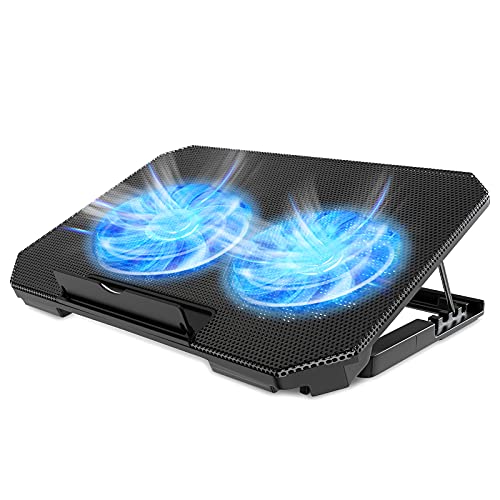
LIENS Dual-Fan 15.6-Inch Laptop Cooling Pad
Best for: midsize laptops needing USB passthrough
- Features
- Adjustable Height, 2 USB Ports (what this guide is about)
- Compatible Laptop Size
- 12–15.6 in
- Fan Count
- 2
- Maximum Fan Speed
- 2000 RPM
- Height Adjustment Levels
- 4 levels
- USB Port Count
- 2 ports
The LIENS Dual-Fan 15.6-Inch Laptop Cooling Pad provides active heat dissipation for 12-inch to 15.6-inch laptops. It features two 5.1-inch fans operating between 800 and 2,000 RPM with noise levels from 5 to 15 dB. Two built-in USB ports let you power the pad while retaining an open connection for external peripherals. With four angle settings from 9 to 28 degrees, you can match your display height to your workspace.
Pros
- Two 5.1-inch fans with adjustable speeds from 800 to 2,000 RPM
- Two integrated USB ports for passthrough peripheral connectivity
- Four height settings ranging from 2.3 to 5.1 inches (9 to 28 degrees)
- Lightweight frame weighing approximately 1.6 pounds
Cons
- Accommodates laptops only up to 15.6 inches
- Lighting is limited to fixed blue LEDs
Good fit if
- You use a laptop measuring between 12 and 15.6 inches.
- You need two USB ports to keep a peripheral connection open.
- You want adjustable elevation angles between 9 and 28 degrees.
Skip if
- You use a 17-inch or larger laptop.
- You prefer hardware without integrated LED lighting.
Verdict: LIENS Dual-Fan 15.6-Inch Laptop Cooling Pad delivers dual 5.1-inch fans and four height options while preserving a spare USB port. It provides a lightweight, adjustable cooling base for standard midsize notebooks.

Trullypine 17.3-Inch 12-Fan Cooling Pad
Best for: large laptops requiring extensive base airflow
- Features
- Kickstand, Adjustable Height, 2 USB Ports, Phone Holder (what this guide is about)
- Compatible Laptop Size
- 12–17.3 in
- Fan Count
- 12
- Height Adjustment Levels
- 5 levels
- USB Port Count
- 2 ports
- Lighting
- LED
The Trullypine 12-Fan Cooling Pad gives you a high-density cooling surface with 12 silent fans and dual USB 2.0 ports. Its metal mesh deck fits laptops from 12 to 17.3 inches, and the frame adjusts across five ergonomic tilt angles. It includes an integrated side phone stand and switchable LED edge lighting. This cooler fits you if you run large laptops and want multi-fan coverage with pass-through USB power.
Pros
- 12 integrated cooling fans across the deck
- Dual USB 2.0 pass-through ports with included braided cable
- 5-level height adjustment with two anti-slip front baffles
- Built-in side mount phone holder
Cons
- USB ports use older 2.0 data transfer speeds
- No digital display for fan RPM control
Good fit if
- You need a wide pad for laptops up to 17.3 inches.
- You want maximum fan distribution across your chassis base.
- You keep your mobile phone next to your screen while working or gaming.
Skip if
- You require fast USB 3.0 data throughput from the hub.
- You prefer a minimal cooler without LED edge lighting.
Verdict: Trullypine 12-Fan Cooling Pad packs high fan density, dual USB 2.0 ports, and a phone stand into a five-angle ergonomic frame. It offers dependable stability for notebooks up to 17.3 inches without losing your machine's USB connectivity.

AIMIUZI 15.6-Inch 5-Fan Cooling Stand
Best for: 12- to 15.6-inch laptops needing angled airflow
- Features
- Kickstand, Adjustable Height, 2 USB Ports (what this guide is about)
- Compatible Laptop Size
- 12–15.6 in
- Fan Count
- 5
- Height Adjustment Levels
- 5 levels
- USB Port Count
- 2 ports
- Surface Material
- Metal plate
The AIMIUZI 5-Fan Laptop Cooling Pad provides active cooling for 12- to 15.6-inch laptops using five integrated quiet fans and a metal top plate. It includes two USB ports so you can power the unit with the bundled cable without losing a peripheral connection. With five height adjustment levels, a fold-out phone holder, and a 1.39-pound frame, this stand suits everyday desk work and gaming setups.
Pros
- Dual USB ports prevent port loss and include a connection cable
- Five built-in quiet fans paired with a metal plate
- Five adjustable ergonomic height positions
- Integrated hideable phone holder and anti-slip baffle
Cons
- Maximum supported laptop size is 15.6 inches
- No manual fan speed adjustment listed
Good fit if
- You use a 12-inch to 15.6-inch notebook
- You want multiple tilt angles with five height settings
- You want a dedicated dock for your smartphone
Skip if
- You have a 17-inch or larger laptop
- You require granular manual fan speed controls
Verdict: AIMIUZI 5-Fan Laptop Cooling Pad delivers reliable multi-angle support and airflow for mid-sized laptops using dual USB pass-through. It is a solid pick if you want an angled setup with an integrated phone mount.

AISUNKUTECH 17-Inch Laptop Cooling Pad with Kickstand
Best for: 12-to-17-inch laptops needing USB expansion and tilt
- Features
- Kickstand, Adjustable Height, 2 USB Ports, Phone Holder (what this guide is about)
- Compatible Laptop Size
- 12-17 Inch
- Fan Count
- 3
- Height Adjustment Levels
- 5
- USB Port Count
- 2
- Surface Material
- stainless steel mesh
View on Amazon: AISUNKUTECH 17-Inch Laptop Cooling Pad with Kickstand
This cooling pad supports laptops up to 17 inches using three quiet fans with wheel-adjusted speed control. It features an integrated dual USB hub with two USB ports, a 5-level height-adjustable metal stand, and a built-in phone holder. The stainless steel mesh surface aids airflow while keeping maximum noise near 40 dB. If you need adjustable tilt and pass-through USB connectivity, this unit matches your desk.
Pros
- Dual USB hub with two USB ports for peripherals
- 5-level height adjustment via metal support bar
- Three cooling fans with top-mounted wheel speed switch
- Stainless steel mesh surface with ABS construction
- Built-in phone holder
Cons
- Requires a separate adapter for USB Type-C devices
- Does not support laptops larger than 17 inches
- No RGB lighting modes listed
Good fit if
- You need 5 angle settings to adjust screen elevation.
- You plug in standard USB devices via an integrated dual-port hub.
- You want an integrated holder to keep your phone upright.
Skip if
- You rely on USB-C connections and do not own an adapter.
- You own a laptop exceeding 17 inches in size.
- You want built-in decorative RGB lighting.
Verdict: AISUNKUTECH 17-Inch 3-Fan Laptop Cooling Pad provides functional five-step height adjustment, dual USB ports, and three quiet fans. It keeps peripherals connected and laptops elevated without complex controls.
Specifications side by side
| Spec | ChillCore 15.6–19.3-Inch 9-Fan Cooling Pad | ICE Coorel 17.3-Inch 6-Fan Laptop Cooling Pad | KeiBn Dual-Fan 15.6-Inch Laptop Cooling Pad | ICE Coorel 6-Fan Laptop Cooling Pad | LIENS Dual-Fan 15.6-Inch Laptop Cooling Pad | Trullypine 17.3-Inch 12-Fan Cooling Pad | AIMIUZI 15.6-Inch 5-Fan Cooling Stand | AISUNKUTECH 17-Inch Laptop Cooling Pad with Kickstand |
|---|---|---|---|---|---|---|---|---|
| Compatible Laptop Size | 15.6–19.3 in | 15–17.3 in | 10–15.6 in | Up to 17 in | 12–15.6 in | 12–17.3 in | 12–15.6 in | 12-17 Inch |
| Fan Count | 9 | 6 | 2 | 6 | 2 | 12 | 5 | 3 |
| Maximum Fan Speed | not specified | not specified | not specified | 2600 RPM | 2000 RPM | not specified | not specified | not specified |
| Height Adjustment Levels | 8 levels | 6 | 5 | not specified | 4 levels | 5 levels | 5 levels | 5 |
| USB Port Count | 2 ports | 2 | 2 | 2 ports | 2 ports | 2 ports | 2 ports | 2 |
| Fan Diameter | not specified | not specified | not specified | 70 mm | 5.1 in | not specified | not specified | not specified |
| Lighting | RGB | RGB | Blue LED | not specified | Blue LED | LED | not specified | not specified |
| Surface Material | not specified | not specified | Metal mesh | Metal mesh | not specified | Metal mesh | Metal plate | stainless steel mesh |
| Features | RGB Lighting, 2 USB Ports | Kickstand, Adjustable Height, RGB Lighting, 2 USB Ports | 2 USB Ports | Kickstand, Adjustable Height, 2 USB Ports | Adjustable Height, 2 USB Ports | Kickstand, Adjustable Height, 2 USB Ports, Phone Holder | Kickstand, Adjustable Height, 2 USB Ports | Kickstand, Adjustable Height, 2 USB Ports, Phone Holder |
| Use | Gaming | Gaming | Gaming | not specified | not specified | Gaming | Gaming | Gaming |
| Size | not specified | 17.3 Inch | not specified | 6 Fans | not specified | 17.3 Inch | Silver | for 12"-17" Laptops |
| Dimensions | 16.1 × 11.9 × 1.8 inches | 16 × 12 × 1.4 inches | 15.4 × 9.65 × 1.18 inches | 16.5 × 11 × 1.1 inches | 13.8 × 9.8 × 1.1 inches | 14.3 × 10.2 × 1.3 inches | 13.1 × 9.84 × 1.42 inches | 13.4 × 10.1 × 1.4 inches |
| Weight | not specified | 3 pounds | 1.76 pounds | 2.27 pounds | 1.59 pounds | 2.4 pounds | 1.39 pounds | not specified |
| Color | Blue | Black | Blue | Blue | black | F12Fan-Gear | Silver | black |
| Model | A21 | ICE K9 | S039 | CO-K21-FBA | not specified | Gear | F2PLUS | F3 Ultra |
If you need heat regulation beyond your desk, specifications for the best cooling pillows compare core fill materials.
How to Choose a Laptop Cooling Pad
-
Choose Fan Layout Density
Fan configurations range from two large fans up to twelve smaller fans. A dual-fan unit like the LIENS Dual-Fan uses 5.1-inch fans to target central intake vents on standard laptops. High-density arrays with six, nine, or twelve fans distribute airflow across the entire undercarriage. Check the intake vent locations on the bottom of your laptop. If your vents sit near the center, dual larger fans cover them effectively. If your vents span wide chassis edges, choose a multi-fan array to push air across all ventilation zones evenly.
-
Check Angle Adjustment Steps
Cooling stands elevate your laptop screen to improve posture and intake clearance. Models on this list offer four, five, or eight tilt angles. The ChillCore 9-Fan Cooling Pad features eight tilt options, giving you fine control over viewing height and wrist angles. Simpler models feature four or five fixed steps. If you use your laptop keyboard directly, select a pad with lower incline settings to avoid wrist strain. If you connect an external keyboard and use the pad purely as a monitor riser, choose models with higher tilt counts.
-
Verify USB Passthrough Ports
Every cooling pad on this list includes two USB ports. One port connects to your laptop to supply power to the internal fans. The second port functions as a passthrough hub for external accessories. Listed models like the KeiBn Dual-Fan specify USB 2.0 connections. USB 2.0 provides adequate bandwidth and power for computer mice, keyboards, or low-power receivers. If you plan to connect high-speed external storage drives or charge power-hungry mobile devices, plug those items directly into your laptop rather than routing them through the pad.
-
Review Integrated Phone Holders
Several cooling bases integrate dedicated smartphone holders along the outer edge of the frame. Models such as the Trullypine 12-Fan Cooling Pad include a kickstand-style phone mount. This feature keeps your phone upright beside your laptop screen, letting you view messages, verification codes, or chat apps without cluttering desk space. If your desk workspace is limited, an attached dock keeps secondary screens within your peripheral vision. If you prefer a streamlined profile without protruding plastic side brackets, select a pad that omits additional cradle mounts.
-
Evaluate Base Frame Weight
Cooling pad weights vary significantly based on internal fan counts and structural bracing. The AIMIUZI 5-Fan Cooling Stand weighs 1.39 pounds, making it suitable for carrying inside a backpack alongside your laptop. In contrast, heavier alternatives exceed 2.4 to nearly 3.0 pounds. Heavier stands provide extra stability on a desk and resist sliding when you type, but they add noticeable heft during travel. Choose a base under 1.8 pounds if you frequently commute, or select a heavier frame if the cooling pad stays on a permanent desk setup.
-
Consider Aesthetic Lighting Options
Look at lighting specifications if you use your workstation in professional environments. Models like the ICE Coorel ICE K9 Cooling Pad feature built-in RGB lighting alongside functional cooling hardware. RGB accents suit gaming stations and personal desks by matching peripheral lighting themes. However, in shared office spaces or dim conference rooms, bright multi-color lights can be distracting. Check whether you want visible illumination before buying. If you work in formal or low-distraction office environments, consider pads with standard single-color illumination or minimalist black styling.
Frequently asked questions
Why do laptop cooling pads have 2 USB ports?
One port powers the cooling pad from your laptop, while the second port acts as a pass-through connection. This configuration ensures you do not permanently lose an accessory port. You can connect input peripherals such as an external mouse, keyboard, or flash drive directly into the pad while the internal fans remain powered.
Can you power a dual-port cooling pad from a wall outlet?
Yes, you can power a dual-port cooling pad using a standard USB wall adapter or power bank. Supplying power externally runs the internal fans without draining your laptop battery. Keep in mind that pass-through data transfer only functions when the primary cable connects directly into a host computer USB port.
What USB version do dual-port laptop cooling pads use?
Most dual-port cooling pads use standard USB 2.0 ports. Units such as the KeiBn S039, ICE Coorel CO-K21-FBA, and Trullypine Gear provide dual USB 2.0 interfaces. These ports offer reliable connections for everyday peripherals like mice, keyboards, or standard thumb drives, but they do not match high-speed USB 3.0 data rates.
Which laptop cooling pads include a built-in phone holder?
Several dual-port cooling stands include an integrated smartphone cradle. Models such as the Trullypine 12-Fan pad, AIMIUZI 5-Fan stand, KeiBn Dual-Fan pad, and AISUNKUTECH F3 Ultra feature phone holders. This keeps your mobile screen visible beside your workspace while leaving the second USB port completely free for laptop peripherals.
How heavy are portable laptop cooling pads for travel?
Compact cooling pads built for mobility weigh under two pounds. The AIMIUZI F2PLUS weighs 1.39 pounds, the LIENS Dual-Fan weighs 1.59 pounds, and the KeiBn S039 weighs 1.76 pounds. In contrast, heavy-duty desk bases like the ICE Coorel ICE K9 weigh 2.998 pounds and are better suited for permanent setups.
How do adjustable tilt angles improve cooling and ergonomics?
Adjustable tilt angles lift your laptop display toward eye level and create intake clearance underneath the base. The ICE Coorel CO-K21-FBA, KeiBn S039, and AISUNKUTECH F3 Ultra offer five tilt options, whereas the LIENS pad provides four settings. Raising the platform eases wrist strain and helps the fans pull unobstructed ambient air.
Can you use a 17-inch cooling pad with a 13-inch laptop?
Yes, compact laptops fit safely on larger cooling pads as long as front tabs secure the chassis. The AISUNKUTECH F3 Ultra supports laptops from 12 to 17 inches, while the AIMIUZI F2PLUS handles 12 to 15.6 inches. A 13-inch laptop rests securely over the central fans without tipping.