InnoView Portable Monitors: 7 Picks Ranked by Specs
As an Amazon Associate we earn from qualifying purchases. Links on this page are affiliate links.
Finding the right InnoView portable monitor depends on your workspace needs and display preferences. The brand offers standalone panels and foldable dual-screen displays ranging from 15.6 inches up to 23.8 inches, featuring 1080p to 2K resolutions, refresh rates up to 240Hz, and IPS options with HDR.
The InnoView 15.6-Inch 1080p Portable Monitor earns the top spot because it balances a 1080p IPS panel, dual USB-C and HDMI connectivity, and a protective stand cover for everyday laptop travel. We compared 7 models using strictly the specifications published on their listings to help you choose the right setup.
Quick picks
Our 7 picks

InnoView 15.6-Inch 1080p Portable Monitor
Best for: everyday dual-screen laptop travel and basic productivity
- Screen Size
- 15.6 Inch
- Resolution
- 1920*1080P
- Panel Type
- IPS
- Connectivity
- Type-C, HDMI
- Weight
- 2.65 pounds
- Features
- Built-in Speakers
This 15.6-inch portable monitor gives you a 1080p full HD IPS display running at a 178-degree viewing angle. It connects through two full-function USB-C ports or one HDMI input, supporting single-cable video and power pass-through charging. The included PU leather folding cover doubles as a two-angle desk stand for landscape or portrait viewing. It suits you if you need a standard secondary screen for travel, work tasks, or laptop multitasking.
Pros
- Two full-function USB-C ports with power pass-through
- 1080p IPS panel with 178-degree viewing angles and HDR
- PU leather cover doubles as a two-position stand
- Built-in speakers and low blue light filtering
Cons
- No standalone power adapter included for HDMI-only setups
- Weight is 2.65 pounds before laptop accessories
- Limited to standard 1080p resolution rather than 2K
Good fit if
- You want a single-cable USB-C monitor with reverse pass-through charging.
- You need portrait and landscape orientation support for travel work.
- You use a laptop that supports USB-C DP Alt Mode or Thunderbolt.
Skip if
- You need a high-refresh display for fast-paced competitive gaming.
- You want a dual stacked screen setup in one package.
- You require a bundled power cable for devices without USB-C power output.
Verdict: InnoView 15.6-Inch FHD USB-C Portable Monitor provides essential dual-port USB-C connectivity, HDR-capable 1080p IPS visuals, and a protective stand cover for mobile workstations. It delivers straightforward second-screen productivity without requiring extra software or drivers.

InnoView 15.6" 1080p Monitor with Built-In Stand
Best for: straightforward secondary display tasks on the go
- Screen Size
- 15.6"
- Resolution
- 1080P
- Panel Type
- IPS
- Connectivity
- 2 Type-C, 1 standard HDMI
- Weight
- 1.5 pounds
- Features
- Kickstand
View on Amazon: InnoView 15.6" 1080p Monitor with Built-In Stand
This InnoView display gives you a 15.6-inch 1080p FHD IPS screen for an external laptop setup. Key hardware specifications include a 1200:1 contrast ratio, a built-in stand with 90-degree adjustment, and an included storage sleeve. Connectivity features two full-function USB Type-C ports alongside a standard HDMI port. It suits you if you need a basic travel display for daily work.
Pros
- Standard HDMI port plus two full-function USB Type-C ports
- Integrated hinge stand adjustable up to 90 degrees
- 1200:1 contrast ratio IPS panel with HDR support
- Includes dedicated protective storage sleeve
Cons
- May require a separate 15W or greater power adapter if the host port delivers insufficient power
- Single-cable USB-C video requires host devices to support DP Alt Mode or Thunderbolt
Good fit if
- You prefer a full-size HDMI port over mini HDMI connectors.
- You want an integrated kickstand without handling a separate folio case.
- You need a 1080p second screen for laptops, tablets, or gaming consoles.
Skip if
- You require a higher resolution panel than 1080p for fine detail.
- Your laptop USB-C port lacks video output support and you cannot use HDMI.
Verdict: InnoView 15.6-Inch 1080p Monitor with Built-In Stand delivers practical dual-screen utility with full-size HDMI, dual USB-C ports, and an integrated hinge. It provides straightforward 1080p workspace expansion for portable computing.

InnoView 23.8-Inch 100Hz Portable Monitor
Best for: multi-desk setups needing DisplayPort connectivity
- Screen Size
- 23.8"
- Resolution
- 1080P
- Refresh Rate
- 100Hz
- Panel Type
- IPS
- Connectivity
- USB-C, HDMI, DP
- Color Gamut
- 100% sRGB
This InnoView display provides a 23.8-inch 1080p IPS panel with a 100Hz refresh rate and a 1500:1 contrast ratio. Unlike standard portable panels, it includes a dedicated DisplayPort alongside USB-C and HDMI inputs. It features a 180-degree adjustable kickstand and integrated carry handle. It suits you if you need a large secondary screen to move between desks or rooms rather than carry in a backpack.
Pros
- Dedicated DisplayPort, USB-C, and HDMI connectivity
- 23.8-inch 1080p IPS display with 100Hz refresh rate
- 1500:1 contrast ratio and 100% sRGB color gamut
- Built-in 180-degree adjustable kickstand and handle
Cons
- Large 23.8-inch footprint is not suited for portable travel use
- 1080p resolution provides lower pixel density across 23.8 inches
- No integrated battery listed
Good fit if
- You need native DisplayPort connectivity alongside USB-C and HDMI.
- You want a spacious 23.8-inch screen to move between indoor desks.
- You prefer smooth 100Hz output with 100% sRGB color coverage.
Skip if
- You need a compact screen that fits inside a laptop bag.
- You require higher than 1080p resolution for fine detail.
Verdict: InnoView 23.8-Inch DisplayPort Portable Monitor stands out with its rare DisplayPort input and expansive 23.8-inch 100Hz panel. It delivers flexible multi-room productivity for users who prioritize screen size and desktop connections over travel portability.
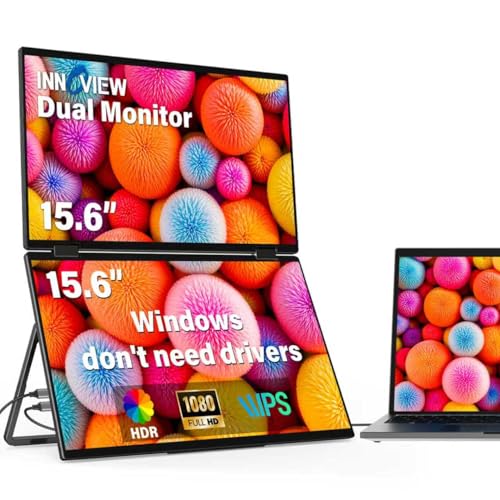
InnoView 15.6" Foldable Dual Stacked Monitor
Best for: stacked dual-screen productivity on Windows
- Screen Size
- 15.6"
- Resolution
- 1920x1080
- Panel Type
- IPS
- Connectivity
- USB-C, HDMI
- Weight
- 3.1 pounds
- Features
- Foldable
View on Amazon: InnoView 15.6" Foldable Dual Stacked Monitor
This setup pairs two stacked 15.6-inch 1080p FHD IPS panels in a single 3.1-pound foldable frame. You connect via USB-C or HDMI, using the integrated 180-degree stand and 315-degree screen adjustment to arrange displays vertically or share screens. It provides extended and mirror display modes without drivers on Windows, making it ideal if you need a dual-screen productivity workstation that packs flat into a bag.
Pros
- Dual 15.6-inch 1080p FHD IPS panels in a single foldable frame
- Built-in 180-degree stand with 315-degree panel adjustment
- Automatic 180-degree screen rotation via built-in gravity sensor
- Driver-free plug-and-play support on Windows
Cons
- Requires driver download and setup for extended mode on macOS
- Requires connection to a 30W or higher power adapter
- Weighs 3.1 pounds, heavier than standard single displays
Good fit if
- You want two stacked 15.6-inch 1080p screens in one foldable unit.
- You work on Windows and need driver-free multi-display extension.
Skip if
- You use macOS and prefer a native driver-free dual display setup.
- You want a single lightweight screen under two pounds.
Verdict: InnoView 15.6" Dual Foldable Portable Monitor provides two stacked 1080p screens in one foldable unit with an integrated 180-degree stand. It streamlines mobile multitasking on Windows, though macOS users must install drivers and travel with a 30W power source.

InnoView 18.5-Inch 100Hz Portable Monitor
Best for: large-screen mobile multitasking and HDR media
- Screen Size
- 18.5"
- Resolution
- 1080p FHD
- Refresh Rate
- 100Hz
- Panel Type
- IPS
- Connectivity
- USB-C, HDMI
- Color Gamut
- 120% sRGB
This 18.5-inch portable display gives you an expanded workspace paired with HDR support and 120% sRGB color coverage. It features a 1080p IPS panel with a 100Hz refresh rate and FreeSync for fluid movement. Connectivity covers two USB-C ports and one standard HDMI input, supported by an integrated stand. It suits you if you want a larger travel screen for work, multimedia, and gaming.
Pros
- 18.5-inch IPS panel with 120% sRGB color coverage and HDR
- 100Hz refresh rate with FreeSync support
- Equipped with two USB-C ports and a standard HDMI port
- Built-in stand supports desktop placement and wall mounting
Cons
- Weighs 3.31 pounds, making it heavier than smaller portable panels
- FHD 1080p resolution across an 18.5-inch panel lowers pixel density
- Requires external 20W+ power if the host port output is insufficient
Good fit if
- You want a spacious 18.5-inch screen with HDR and wide 120% sRGB color.
- You need a 100Hz refresh rate with FreeSync for smoother video or gaming.
- You prefer standard HDMI and dual USB-C ports for direct device connections.
Skip if
- You need a higher resolution than 1080p on an 18.5-inch display.
- You prioritize ultralight travel gear under 3 pounds.
- You plan to connect a Switch 2 via USB-C rather than HDMI.
Verdict: InnoView 18.5" 100Hz HDR Portable Monitor pairs an expansive IPS panel with wide color and FreeSync support for mobile setups. Its 3.31-pound weight and 1080p resolution trade fine pixel density for larger physical screen area.

InnoView 18.5" Dual Screen Folding Monitor
Best for: vertical dual-screen multitasking and large spreadsheets
- Screen Size
- 18.5"
- Resolution
- 1080p
- Refresh Rate
- 100Hz
- Panel Type
- IPS
- Connectivity
- Type-C, HDMI
- Color Gamut
- 100% sRGB, 115% sRGB
The InnoView 18.5-Inch Dual Stacked Portable Monitor gives you two stacked 18.5-inch 1080p IPS displays in a single folding unit. It features a 100Hz refresh rate, built-in speakers, and an integrated 180-degree adjustable stand with auto-rotation. If you manage large spreadsheets or need multiple windows open simultaneously without setting up separate standalone displays, this dual-screen setup expands your desktop workspace using dual USB-C connections.
Pros
- Dual 18.5-inch 1080p IPS screens in a folding stacked design
- Smooth 100Hz refresh rate
- Built-in 180-degree adjustable stand and gravity auto-rotation
- Integrated built-in speakers
Cons
- HDMI connection only supports splicing and duplication modes
- macOS requires a driver download for Type-C extension mode
- Requires using the included dedicated power adapter
Good fit if
- You need stacked dual 18.5-inch screens for spreadsheets and multitasking.
- You connect via USB-C to extend your Windows workspace without drivers.
- You want a 100Hz refresh rate across dual portable screens.
Skip if
- You need dual extended displays using an HDMI connection.
- You use macOS and want dual-screen extension without installing software drivers.
- You prefer a compact, single-panel screen for lightweight travel.
Verdict: InnoView 18.5-Inch Dual Stacked Portable Monitor pairs two full-sized 1080p 100Hz screens into a folding hinge design for heavy multitasking. It delivers expansive screen real estate via USB-C, though macOS users must install drivers to use extension mode.

InnoView 16-Inch 2K 240Hz Portable Monitor
Best for: high-refresh gaming and sharp 2K portable productivity
- Screen Size
- 16"
- Resolution
- 2560x1600
- Refresh Rate
- 240Hz
- Panel Type
- IPS
- Connectivity
- 2 Type-C, 1 HDMI
- Color Gamut
- 100% sRGB
The InnoView 16-Inch 2K 240Hz Portable Monitor delivers a 2560x1600 resolution IPS panel paired with an ultra-high 240Hz refresh rate. You get 100% sRGB color space coverage for accurate visuals, built-in speakers, and dual full-featured USB-C ports alongside an HDMI input. It suits you if you need a sharp, fast-refreshing second screen for competitive gaming, motion clarity, and detailed photo or video work on the go.
Pros
- 2560x1600 2K resolution IPS panel with 100% sRGB
- 240Hz refresh rate for low latency and smooth motion
- Two full-featured USB-C ports plus HDMI connectivity
- Integrated built-in speakers
Cons
- Requires an HDMI 2.1 or newer port on source devices to reach 240Hz
- No integrated battery included for standalone power
Good fit if
- You want a 2560x1600 resolution screen with 100% sRGB coverage.
- You play fast-paced games requiring a 240Hz refresh rate.
- You connect using modern USB-C or HDMI 2.1 hardware.
Skip if
- You only need a basic 1080p 60Hz screen for simple office tasks.
- You lack video source hardware capable of outputting a 240Hz signal.
Verdict: InnoView 16-Inch 2K 240Hz Portable Monitor provides the highest resolution and fastest refresh rate in the lineup. It delivers sharp 2560x1600 visuals and smooth motion for gaming or color-sensitive tasks.
Specifications side by side
| Spec | InnoView 15.6-Inch 1080p Portable Monitor | InnoView 15.6" 1080p Monitor with Built-In Stand | InnoView 23.8-Inch 100Hz Portable Monitor | InnoView 15.6" Foldable Dual Stacked Monitor | InnoView 18.5-Inch 100Hz Portable Monitor | InnoView 18.5" Dual Screen Folding Monitor | InnoView 16-Inch 2K 240Hz Portable Monitor |
|---|---|---|---|---|---|---|---|
| Screen Size | 15.6 Inch | 15.6" | 23.8" | 15.6" | 18.5" | 18.5" | 16" |
| Resolution | 1920*1080P | 1080P | 1080P | 1920x1080 | 1080p FHD | 1080p | 2560x1600 |
| Refresh Rate | not specified | not specified | 100Hz | not specified | 100Hz | 100Hz | 240Hz |
| Panel Type | IPS | IPS | IPS | IPS | IPS | IPS | IPS |
| Connectivity | Type-C, HDMI | 2 Type-C, 1 standard HDMI | USB-C, HDMI, DP | USB-C, HDMI | USB-C, HDMI | Type-C, HDMI | 2 Type-C, 1 HDMI |
| Color Gamut | not specified | not specified | 100% sRGB | not specified | 120% sRGB | 100% sRGB, 115% sRGB | 100% sRGB |
| Weight | 2.65 pounds | 1.5 pounds | 2.2 kg | 3.1 pounds | 3.31 pounds | not specified | not specified |
| Features | Built-in Speakers | Kickstand | Kickstand | Foldable | HDR, Kickstand | Built-in Speakers, Foldable | Built-in Speakers |
| Use | not specified | not specified | not specified | not specified | Travel | not specified | Gaming |
| Size | 15.6 Inches | 15.6 Inches | 23.8" 1080P 100Hz | 15.6 inch-FHD | 18.5 Inch | 18.5 Inch | 16 inch 240Hz |
| Recommended Use | Desk | not specified | not specified | not specified | not specified | not specified | not specified |
| Dimensions | 9 × 14.4 × 0.2 inches | 0.26 × 14 × 8.69 inches | 18.3 × 12 × 2.01 inches | 8.5 × 14 × 0.85 inches | 0.38 × 16.7 × 10.2 inches | 10.1 × 16.7 × 0.96 inches | 9.45 × 14.1 × 0.53 inches |
| Color | Black | Black | black | black | black | black | Black |
| Model | INVPM406 | INVPM001 | 23.8" FHD 100Hz | INVPM009 | INVPM501 | INVPM509-02B | CA-PM408-A |
InnoView Portable Monitor Lineup Overview
Single-screen panels serve mobile work or specialized desk setups. The InnoView 15.6-Inch 1080p Portable Monitor provides 1080p resolution and USB-C connectivity for dual-screen travel. If you need higher visual speed, the InnoView 16-Inch 2K 240Hz Portable Monitor offers a 2K display and a 240Hz refresh rate. For larger workspaces, the InnoView 23.8-Inch 100Hz Portable Monitor includes DisplayPort connectivity and an IPS panel.
Foldable displays target multitasking without extra hardware. The InnoView 15.6" Foldable Dual Stacked Monitor combines two 1080p screens on one hinge using USB-C and HDMI. Choose single displays for lightweight packing and basic computing. Select foldable or high-refresh units when you need vertical stacked screen space or fast frame rates.
Where InnoView Fits Your Workspace
The InnoView lineup suits you if you need mid-sized to large secondary screens. Display sizes range from 15.6 inches up to 23.8 inches. Physical designs include single panels with kickstands and dual-screen folding units. Panel choices span 1080p IPS displays with HDR to a 240Hz 2K gaming screen.
Clear hardware gaps exist across the catalog. You will not find compact panels under 15.6 inches for smaller bags. The brand also lacks 4K resolution, touchscreen functionality, and internal battery power. You must connect to external power and rely on traditional mouse and keyboard inputs.
If you research other compact gear, you can compare dimensions and power ratings for the best portable saunas.
Key Specs to Check Before Buying
-
Screen Resolution and Clarity
Check the resolution spec before choosing your display. InnoView offers 1080p Full HD alongside 2K options. A standard 1080p panel fits general administrative tasks and browsing. If you handle detailed graphics, gaming, or large canvas editing, look at the InnoView 16-Inch 2K 240Hz Portable Monitor for its 2560x1600 resolution. Higher resolutions deliver sharper text and finer visual fidelity on smaller panels, while 1080p displays require less processing power from your connected laptop graphics hardware.
-
Single Versus Dual Displays
Decide between a standalone screen and a folding dual-panel display. Single monitors pack flat and suit simple travel. If you manage simultaneous data sheets or reference code, look at dual stacked models like the InnoView 15.6" Foldable Dual Stacked Monitor. Foldable designs double your viewing area using an integrated hinge. Review your operating system support before buying, because dual setups often require driver installation on macOS and dedicated external power supplies up to 30W.
-
Refresh Rate Requirements
Evaluate the refresh rate specification to match your motion requirements. Standard monitors update at 60Hz, but InnoView offers panels reaching 100Hz and up to 240Hz. A 100Hz rate reduces motion blur and delivers smoother cursor tracking during long spreadsheet sessions. If you play fast-paced games, prioritize panels that support higher refresh rates. Ensure your laptop output port supports high-refresh video bandwidth before selecting a screen designed for 100Hz or faster display output.
-
Desktop Port Compatibility
Inspect the video input ports to match your hardware outputs. Most portable displays rely on USB-C and standard HDMI ports. If you work from desktop graphics cards or older docking stations lacking video-enabled USB-C, look for native DisplayPort connectivity. The InnoView 23.8-Inch 100Hz Portable Monitor includes a DisplayPort input alongside HDMI and USB-C. Choosing a monitor with the exact physical port you use eliminates the need to carry external signal adapters between workstations.
-
Panel Size and Footprint
Consider panel dimensions against your available desk area and travel bag size. A 15.6-inch panel balances screen area with mobile portability. If you need a larger display for split-window productivity at permanent desks, larger panels offer expanded viewing without requiring external monitor arms. Models like the InnoView 18.5-Inch 100Hz Portable Monitor provide greater screen space, but they measure 16.7 inches wide and weigh 3.31 pounds. Measure your workspace depth before choosing larger panels.
-
Kickstands and Protective Covers
Check how each monitor props itself up on your desk. Some models use folding magnetic folio cases that double as stands, while others feature integrated mechanical hinges built directly into the chassis. The InnoView 15.6" 1080p Monitor with Built-In Stand includes an integrated kickstand for fast angle adjustments without wrapping a case around the frame. Built-in hinges provide stable footing on compact surfaces, while folding folio covers offer extra screen protection inside your bag.
Frequently asked questions
Do InnoView portable monitors work with macOS?
Yes, but compatibility varies depending on the specific model. Single-screen displays like the 15.6-inch INVPM406 work without extra drivers over standard USB-C or HDMI connections. Foldable dual-screen units, including the 15.6-inch INVPM009 and 18.5-inch INVPM509-02B, require you to install drivers to enable extended desktop mode on macOS. The foldable 15.6-inch model also needs a 30W power source.
Which InnoView portable monitor is best for high-refresh gaming?
The InnoView 16-Inch 2K 240Hz monitor is the dedicated gaming option in the lineup. It delivers a fast 240Hz refresh rate and a sharp 2560x1600 resolution for smooth motion. It includes an HDMI port and built-in speakers. Alternatively, the 18.5-inch INVPM501 features a 100Hz refresh rate paired with FreeSync support and an HDR-capable IPS panel for smoother gameplay.
Can you connect an InnoView portable monitor using DisplayPort?
Yes, the InnoView 23.8-Inch 100Hz monitor includes a dedicated DisplayPort input alongside HDMI and USB-C ports. Most portable monitors only provide USB-C or HDMI, making this model unique in the lineup. The 23.8-inch display features an IPS panel, a 100Hz refresh rate, and an integrated kickstand. At 3.31 pounds, it suits multi-desk setups that connect to standard desktop computer video outputs.
How do InnoView foldable dual-screen monitors get power?
Power needs depend on the monitor model and your host hardware. Foldable dual displays like the 15.6-inch INVPM009 connect through USB-C or HDMI but require a 30W external power source to run both panels properly. A standard laptop port might not supply sufficient wattage. Connecting an external adapter ensures both stacked screens receive adequate power for continuous multitasking without screen flickering or shutoffs.
Do InnoView portable monitors include built-in speakers?
Several InnoView models feature built-in audio. The 15.6-inch INVPM406, the 16-inch 2K 240Hz gaming panel, and the dual-screen 18.5-inch INVPM509-02B all include integrated speakers. Audio passes directly across your HDMI or USB-C connection without requiring separate sound cables. This setup lets you play system sounds, participate in calls, or stream video content without needing to attach external desktop speakers or plug in headphones.
Which InnoView portable monitor is the lightest for travel?
The InnoView 15.6-inch monitor with built-in stand (INVPM001) is the lightest model, weighing 2.0 pounds. It features an integrated kickstand hinge and measures 0.26 inches thick, keeping pack weight low. By comparison, the standard 15.6-inch INVPM406 weighs 2.65 pounds, the foldable dual-screen 15.6-inch INVPM009 weighs 3.1 pounds, and the single 18.5-inch INVPM501 weighs 3.31 pounds.
Do you need extra software to run an InnoView monitor?
Most single-screen InnoView monitors run without additional software or drivers. The 15.6-inch INVPM406 and INVPM001 work immediately when connected via USB-C or HDMI. In contrast, dual-screen units require software under certain operating systems. The 15.6-inch INVPM009 and 18.5-inch INVPM509-02B run plug-and-play on Windows, but you must install driver software to enable display extension when connecting them to an Apple macOS computer.