8 Best Laptop Cooling Pads Under $30, Compared
As an Amazon Associate we earn from qualifying purchases. Links on this page are affiliate links.
Finding the best laptop cooling pads under $30 requires looking at practical specs. We compared 8 models based on their published listing data. The top pick is the Havit 15.6-17 Inch Three-Fan Laptop Cooling Pad. It leads because it offers quiet cooling for large laptops while weighing only 1.54 pounds. This guide helps you decide which cooler fits your laptop size and portability needs. You can choose between slim profiles or high fan counts based on your specific requirements.
Quick picks
The best fit for you
- You need quiet cooling for a large laptop Havit 15.6-17 Inch Three-Fan Laptop Cooling Pad It features three fans designed for quiet operation while supporting 15.6 to 17-inch screens.
- You want manual airflow control and ergonomic height Kootek 12-17 Inch 5-Fan Laptop Cooling Pad This model includes five fans and a kickstand for customizable airflow and tilt adjustments.
- You prefer a slim design with dual USB ports TECKNET 12-17" Triple-Fan Laptop Cooling Pad It offers a compact profile with dual USB ports and triple fans for moderate cooling.
- You want LCD fan speed monitoring for gaming ICE Coorel 17.3-Inch 6-Fan Laptop Cooling Pad It provides an LCD screen for monitoring fan speeds alongside six fans and RGB lighting.
Our 8 picks

Havit 15.6-17 Inch Three-Fan Laptop Cooling Pad
Best for: quiet cooling of large laptops
- Compatible Laptop Size
- 15.6-17 Inch
- Surface Material
- metal mesh
- Dimensions
- 15 × 1.18 × 11 inches
- Weight
- 1.54 pounds
View on Amazon: Havit 15.6-17 Inch Three-Fan Laptop Cooling Pad
The Havit HV-F2056 is a slim laptop cooling pad designed for 15.6 to 17-inch devices. It features three ultra-quiet fans and a metal mesh surface for stability. The unit doubles as an ergonomic stand with two adjustable height settings. At 1.18 inches thick and 1.54 pounds, it remains portable. An extra USB port allows you to connect additional peripherals while cooling your machine.
Pros
- Three ultra-quiet fans for noise-free operation
- Metal mesh surface provides stable support
- Two adjustable height settings for ergonomic comfort
- Extra USB port for connecting more devices
Cons
- Limited to 15.6–17 inch laptops
- Only two height adjustment levels
- Requires USB to USB connection, Type C needs an adapter
Good fit if
- You use a 15.6 or 17-inch laptop
- You need a stable, flat surface for travel
- You prefer quiet operation with minimal height options
Skip if
- You own a laptop larger than 17 inches
- You require more than two height settings
- You need native Type C connectivity without adapters
Verdict: Havit HV-F2056 15.6-17" Cooling Pad is a practical choice for users with 17-inch laptops who prioritize portability and quiet fans over extensive adjustability.

Kootek 12-17 Inch 5-Fan Laptop Cooling Pad
Best for: Manual airflow control and ergonomic height adjustment
- Compatible Laptop Size
- 12–17 in
- Fan Count
- 5
- Height Adjustment Levels
- 6
- USB Port Count
- 2
- Fan Diameter
- 4.72 in, 2.76 in
- Lighting
- Blue LED
This Kootek cooling pad uses five fans to cool laptops from 12 to 17 inches. It includes one large 4.72-inch fan and four smaller 2.76-inch fans. You can control the airflow with two switches. The stand offers six height settings for better ergonomics. It also features a dual USB hub for extra connectivity. Blue LEDs indicate when the fans are running.
Pros
- Five fans with independent control switches
- Six adjustable height settings for comfort
- Built-in dual USB hub for peripherals
- Supports laptops from 12 to 17 inches
Cons
- Requires a Type-C to USB adapter for modern devices
- No automatic speed control or smart sensors
- Blue LEDs may be distracting in dark rooms
Good fit if
- You need adjustable height for better posture
- You want to connect multiple USB devices
- You have a laptop between 12 and 17 inches
Skip if
- You require automatic fan speed adjustment
- You prefer a silent operation without LED lights
- You need native Type-C connectivity without adapters
Verdict: Kootek 5-Fan Cooling Pad for 12-17 Inch Laptops fits users who value manual control and ergonomic adjustments. It is ideal for those who need extra USB ports and customizable airflow for larger laptops.

TECKNET 12-17" Triple-Fan Laptop Cooling Pad
Best for: users wanting slim design and dual USB ports
- Compatible Laptop Size
- 12"-17"
- Fan Count
- 3
- Maximum Fan Speed
- 1200 RPM
- Fan Diameter
- 110 mm
- Lighting
- Blue LED
- Surface Material
- Alloy Material Mesh
View on Amazon: TECKNET 12-17" Triple-Fan Laptop Cooling Pad
This TECKNET cooling pad uses three 110 mm fans spinning at 1200 RPM to draw cool air into your device. It connects via a single USB cable that also provides a second port for peripherals. The slim design measures 1.06 inches thick and includes two adjustable height settings. It fits laptops from 12 to 17 inches and features blue LED indicators to show operation.
Pros
- Three 110 mm fans operate at 1200 RPM
- Dual USB ports for power and peripherals
- Two adjustable height settings for ergonomics
- Slim 1.06 inch profile
Cons
- Only three fans compared to competitors with up to 12
- 1200 RPM is lower than many high-speed alternatives
- Uses a USB-A to USB-A cable
Good fit if
- You need a slim cooler for 12-17 inch laptops
- You want extra USB ports for peripherals
- You prefer adjustable viewing angles
Skip if
- You require maximum airflow with many fans
- You need high-speed fan options above 1200 RPM
- You prefer wireless or battery-powered operation
Verdict: TECKNET Slim Laptop Cooler for 12-17 in fits users who value a compact profile and extra USB connectivity over raw cooling power. It is a solid choice for standard laptops where moderate airflow and ergonomic adjustments matter most.

ICE Coorel 17.3-Inch 6-Fan Laptop Cooling Pad
Best for: Gamers wanting LCD fan speed monitoring
- Compatible Laptop Size
- 15–17.3 in
- Fan Count
- 6
- Height Adjustment Levels
- 6
- USB Port Count
- 2
- Lighting
- RGB
- Features
- Kickstand, Adjustable Height, RGB Lighting, 2 USB Ports
View on Amazon: ICE Coorel 17.3-Inch 6-Fan Laptop Cooling Pad
The ICE Coorel K9 cooling pad supports laptops from 15 to 17.3 inches. It uses six transparent fans to provide dynamic cooling. You can adjust the height across six levels to find a comfortable typing angle. The unit includes an LCD display to show fan speed and RGB lighting controls. It also features two USB ports for connectivity. This setup suits users who want visible performance metrics and customizable lighting.
Pros
- Six transparent cooling fans for efficient heat dissipation
- Six height adjustment levels for ergonomic comfort
- LCD display shows real-time fan speed
- Two USB ports for added connectivity
- Seven RGB light modes for atmosphere
Cons
- Larger 16 by 12 inch footprint limits portability
- Heavier 3 pound build reduces ease of transport
- No mention of pass-through charging for laptops
Good fit if
- You need precise fan speed monitoring via an LCD screen
- You want to customize RGB lighting for your setup
- You require multiple height angles for neck relief
Skip if
- You prioritize a lightweight and compact travel design
- You need a cooling pad for laptops under 15 inches
- You prefer a minimalist aesthetic without RGB lights
Verdict: ICE Coorel 15-17.3" RGB Cooling Pad fits gamers who value detailed fan control and visual customization over portability. The LCD screen and six height settings offer practical comfort for long sessions.
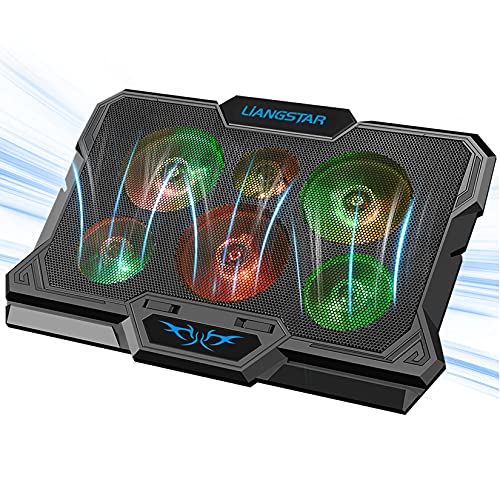
LIANGSTAR 6-Fan RGB Laptop Cooling Pad
Best for: users needing USB ports and RGB feedback
- Compatible Laptop Size
- 12”- 17.3”
- Fan Count
- 6
- Height Adjustment Levels
- 2
- USB Port Count
- 2 ports
- Lighting
- RGB 7 Color Light
- Features
- Kickstand, RGB Lighting
This LIANGSTAR cooling pad supports laptops from 12 to 17.3 inches. It uses six fans for cooling and includes RGB lighting with seven color options. You get two USB ports for extra connectivity. The stand offers two height levels for better ergonomics. It weighs 2.31 pounds and fits most standard laptops. This unit suits users who want adjustable airflow and visual customization.
Pros
- Six fans provide rapid cooling for laptops up to 17.3 inches
- Two USB ports allow connection of additional devices
- Two height adjustment levels improve viewing angles
- RGB lighting shows fan operation with seven colors
Cons
- Only two height levels limit ergonomic customization
- No mention of individual fan speed controls per zone
- Heavier at 2.31 pounds compared to lighter slim models
Good fit if
- You need extra USB ports for peripherals
- You want RGB lighting to indicate fan status
- You use laptops up to 17.3 inches
Skip if
- You prefer a lightweight pad under two pounds
- You need more than two height settings
- You do not want LED lighting effects
Verdict: LIANGSTAR 17-Inch RGB Cooling Pad delivers solid cooling for larger laptops with added USB ports. It fits gamers who want visual feedback and adjustable height.

Trullypine 17.3-Inch 12-Fan Cooling Pad
Best for: Large laptops needing strong airflow and phone storage
- Compatible Laptop Size
- 12–17.3 in
- Fan Count
- 12
- Height Adjustment Levels
- 5 levels
- USB Port Count
- 2 ports
- Lighting
- LED
- Surface Material
- Metal mesh
This Trullypine cooling pad uses 12 fans for deep cooling across 12–17.3 inch laptops. The metal mesh surface and five height levels help manage heat and posture. You get two USB ports and a side phone stand. The LED lights add visual effects. It suits users who want strong airflow and device organization in one slim unit.
Pros
- 12 high-speed silent fans for 360-degree cooling
- Metal mesh surface for better heat dissipation
- 5-level ergonomic height adjustment
- Side-mounted phone holder for easy access
- Dual USB 2.0 ports for extra connectivity
Cons
- Heavier at 2.4 pounds compared to lighter pads
- LED lights cannot be fully disabled, only dimmed or cycled
- No Bluetooth or wireless connectivity options
Good fit if
- You need strong cooling for larger 17-inch laptops
- You want to charge or connect extra USB devices
- You prefer adjustable angles for better ergonomics
Skip if
- You prioritize ultra-portability and minimal weight
- You need a completely silent operation without any light
- You only use small 12-inch laptops and need a compact pad
Verdict: Trullypine 12-Fan Cooling Pad with Phone Holder delivers robust cooling for large laptops through its 12-fan array and metal mesh. It is a solid choice for gamers or heavy users who value airflow and built-in phone storage over lightweight portability.

KLIM Wind 4-Fan Laptop Cooling Pad
Best for: Large laptops needing stable cooling
- Compatible Laptop Size
- 11–19 in
- Fan Count
- 4
- Maximum Fan Speed
- 1200 RPM
- USB Port Count
- 2
- Features
- Kickstand
- Dimensions
- 1.22 × 10.7 × 1.22 inches
The KLIM Wind offers cooling for laptops from 11 to 19 inches. It uses four fans spinning at 1200 RPM to lower temperatures. The pad includes two extra USB ports and a kickstand for angle adjustment. It weighs 1.61 pounds and measures 10.7 inches wide. This setup suits users needing broad compatibility and durable construction for various laptop sizes.
Pros
- Four fans run at 1200 RPM for consistent cooling
- Supports laptop sizes from 11 to 19 inches
- Includes two additional USB ports for connectivity
- Features a kickstand for ergonomic viewing angles
Cons
- Only four fans compared to competitors with five or more
- Maximum fan speed of 1200 RPM is lower than high-performance models
- No mention of adjustable fan speed controls in the data
Good fit if
- You need a cooler for laptops larger than 15.6 inches
- You want extra USB ports on your cooling setup
- You prefer a stable pad with a kickstand
Skip if
- You require adjustable fan speeds for precise control
- You need maximum airflow with six or more fans
- You prefer a pad under 1.5 pounds in weight
Verdict: KLIM Wind 4-Fan Cooling Pad fits users with large laptops who value stability and extra USB ports over maximum fan speed.

TECKNET 15.6-Inch 9-Fan Laptop Cooling Pad
Best for: Small laptops needing extra USB ports
- Compatible Laptop Size
- 12–15.6 in
- Fan Count
- 9
- Maximum Fan Speed
- 2600 RPM
- Height Adjustment Levels
- 5
- USB Port Count
- 2
- Lighting
- LED
The TECKNET F9 offers 9 fans with stepless speed control up to 2600 RPM for 360° cooling. It includes dual USB ports to keep your laptop ports free. Five height settings allow ergonomic adjustments up to 34°. The mesh surface aids heat dissipation while a built-in phone stand adds convenience. This pad fits 12-15.6 inch laptops and operates quietly under 40 dB.
Pros
- 9 fans with 2600 RPM max speed
- Dual USB ports for extra devices
- 5 height adjustment levels
- Built-in phone stand
- Quiet operation under 40 dB
Cons
- Only fits laptops up to 15.6 inches
- No app or Bluetooth control
- Fixed LED brightness syncs with speed
Good fit if
- You use a 12 to 15.6 inch laptop
- You need extra USB ports for peripherals
- You want ergonomic height adjustments
Skip if
- You have a 17 inch laptop
- You require wireless fan control
- You need adjustable LED colors
Verdict: The TECKNET F9 15.6" Cooling Pad suits users with smaller laptops who value extra USB connectivity and ergonomic tilting. It delivers strong airflow for its size but lacks support for larger gaming rigs.
Specifications side by side
| Spec | Havit 15.6-17 Inch Three-Fan Laptop Cooling Pad | Kootek 12-17 Inch 5-Fan Laptop Cooling Pad | TECKNET 12-17" Triple-Fan Laptop Cooling Pad | ICE Coorel 17.3-Inch 6-Fan Laptop Cooling Pad | LIANGSTAR 6-Fan RGB Laptop Cooling Pad | Trullypine 17.3-Inch 12-Fan Cooling Pad | KLIM Wind 4-Fan Laptop Cooling Pad | TECKNET 15.6-Inch 9-Fan Laptop Cooling Pad |
|---|---|---|---|---|---|---|---|---|
| Compatible Laptop Size | 15.6-17 Inch | 12–17 in | 12"-17" | 15–17.3 in | 12”- 17.3” | 12–17.3 in | 11–19 in | 12–15.6 in |
| Fan Count | not specified | 5 | 3 | 6 | 6 | 12 | 4 | 9 |
| Maximum Fan Speed | not specified | not specified | 1200 RPM | not specified | not specified | not specified | 1200 RPM | 2600 RPM |
| Height Adjustment Levels | not specified | 6 | not specified | 6 | 2 | 5 levels | not specified | 5 |
| USB Port Count | not specified | 2 | not specified | 2 | 2 ports | 2 ports | 2 | 2 |
| Fan Diameter | not specified | 4.72 in, 2.76 in | 110 mm | not specified | not specified | not specified | not specified | not specified |
| Lighting | not specified | Blue LED | Blue LED | RGB | RGB 7 Color Light | LED | not specified | LED |
| Surface Material | metal mesh | not specified | Alloy Material Mesh | not specified | not specified | Metal mesh | not specified | Alloy mesh |
| Features | not specified | Kickstand, Adjustable Height | not specified | Kickstand, Adjustable Height, RGB Lighting, 2 USB Ports | Kickstand, RGB Lighting | Kickstand, Adjustable Height, 2 USB Ports, Phone Holder | Kickstand | Kickstand |
| Use | not specified | not specified | not specified | Gaming | Gaming | Gaming | not specified | not specified |
| Size | not specified | not specified | N8 | 17.3 Inch | not specified | 17.3 Inch | not specified | not specified |
| Dimensions | 15 × 1.18 × 11 inches | 15 × 1.38 × 11.8 inches | 10.7 × 1.06 × 14.6 inches | 16 × 12 × 1.4 inches | 16.1 × 11.8 × 1.18 inches | 14.3 × 10.2 × 1.3 inches | 1.22 × 10.7 × 1.22 inches | 15 × 14 × 1.5 inches |
| Weight | 1.54 pounds | 2.56 pounds | 1.44 pounds | 3 pounds | 2.31 pounds | 2.4 pounds | 1.61 pounds | 1.5 pounds |
| Color | Black+Blue | Blue | Black | Black | Black RGB | F12Fan-Gear | Blue | Black |
| Model | HV-F2056 | LCP04 | FBA_841294 | ICE K9 | not specified | Gear | K2N | F9 |
If you configure a desktop setup instead, see best water cooling parts under 30 to compare radiator dimensions.
How to choose the right cooling pad
-
Check the laptop size
You must match the pad dimensions to your laptop screen size. The Havit model supports 15.6 to 17-inch devices with a length of 15 inches. The TECKNET slim version measures 10.7 inches in length, making it better for smaller 12-inch laptops. If you have a large 17.3-inch gaming rig, you need a pad like the ICE Coorel or Trullypine, which list specific 17.3-inch compatibility. Using a pad that is too small will leave parts of your laptop unsupported, leading to uneven cooling and potential stability issues.
-
Count the fans needed
Fan count directly impacts airflow capacity for your specific device. Smaller laptops often suffice with three or four fans, as seen in the Havit and KLIM models. Larger machines generate more heat and benefit from five, six, or even twelve fans. The Trullypine pad offers a robust 12-fan array for heavy-duty use. The TECKNET F9 provides nine fans for a 15.6-inch screen. More fans generally mean better heat dissipation, but you should also consider the noise level and power requirements associated with higher fan counts.
-
Look for height adjustment
Ergonomic comfort is improved by adjustable height settings. The Kootek pad includes a kickstand for manual tilt adjustments, allowing you to find a comfortable typing angle. The ICE Coorel model offers six height settings for precise customization. The TECKNET slim pad also features ergonomic adjustments. Fixed-height pads are thinner and more portable, but adjustable models reduce neck strain during long sessions. Check if the pad includes a kickstand or multiple settings to ensure it fits your desk setup and posture needs.
-
Verify USB port count
Extra USB ports can be useful for connecting peripherals without using your laptop. The Kootek pad provides additional ports for manual airflow control. The ICE Coorel and Trullypine models both include two USB ports, which is helpful for gaming setups. The TECKNET F9 also offers extra connectivity for smaller laptops. If your laptop has limited ports, a cooling pad with built-in USB hubs can save you from needing a separate dongle. Check the listed features to see how many ports are included in the design.
-
Consider weight and portability
Weight affects how easy the pad is to carry. The TECKNET slim model weighs only 1.44 pounds, making it highly portable. The Havit pad is slightly heavier at 1.54 pounds but remains compact. Heavier pads like the ICE Coorel at 3 pounds offer stability and more features but are less convenient for travel. If you move your workspace frequently, choose a lighter model. For a stationary desk setup, a heavier pad may provide better stability and cooling performance for your specific laptop size.
Frequently asked questions
Do laptop cooling pads actually work?
Yes, they improve airflow and reduce surface temperatures. The Havit model uses three fans to cool 15.6 to 17-inch laptops quietly. The Trullypine pad uses a 12-fan array for robust cooling on large devices. These designs move air away from heat sources.
Which cooling pad is best for gaming?
The ICE Coorel pad is ideal for gamers. It includes six fans, RGB lighting, and an LCD screen for fan speed monitoring. It offers six height settings for ergonomic comfort during long sessions. The LIANGSTAR pad is another option with RGB feedback and adjustable height.
Do cooling pads have adjustable height?
Many models include kickstands for ergonomic adjustments. The Kootek pad features a kickstand for customizable airflow and tilt. The ICE Coorel and Trullypine pads also offer adjustable height settings. These features help you position your laptop for better typing comfort and ventilation.
Are there cooling pads with USB ports?
Several models provide extra USB connectivity. The ICE Coorel and Trullypine pads each include two USB ports. The TECKNET slim version also offers dual USB ports. These ports allow you to connect peripherals without using your laptop’s limited connections.
How heavy are laptop cooling pads?
Weight varies by fan count and build. The TECKNET slim model weighs 1.44 pounds, making it highly portable. The Havit pad weighs 1.54 pounds. Heavier options like the ICE Coorel weigh 3 pounds due to six fans and a metal mesh design.
Can cooling pads hold a phone?
The Trullypine pad includes a built-in phone holder. This feature adds convenience for users who want to keep their phone accessible while gaming or working. It supports large laptops with its 12-fan array and metal mesh design, combining cooling and storage in one device.