Best Triple Monitor Portable Monitors: 13 Spec-Based Picks
As an Amazon Associate we earn from qualifying purchases. Links on this page are affiliate links.
A triple monitor portable monitor expands your laptop display into a three-screen workstation wherever you set up. Adding dual external panels gives you room to reference documents, manage communication tools, and track active tasks side by side.
The KEFEYA 15.6-Inch Triple Screen Extender leads with its 120% sRGB coverage and 235-degree rotation for laptops up to 17.3 inches. We compared 13 products based on the specifications published on the listings. This guide helps you choose the right panel size, mounting style, and cable connection for your workstation.
Quick picks
The best fit for you
- You need extra screen space for a large laptop KEFEYA 15.6-Inch Triple Screen Extender It accommodates laptops up to 17.3 inches and provides dual 1080p displays with 235-degree rotation.
- You want a lightweight setup for mobile travel AYY 14-Inch Triple Screen Extender Its 14-inch aluminum frame weighs 2.2 pounds and includes an integrated kickstand.
- You prefer a vertical folding dual display setup UPERFECT Delta 15.6" Foldable Dual Monitor It features a 360-degree folding design with dual 15.6-inch 1080p panels and an integrated kickstand.
- You want a compact setup for your MacBook Alecewey 12-Inch Mac Triple Screen Extender It runs over a single Type-C connection and provides 12-inch 1080p panels with 207-degree hinges.
Our 13 picks

KEFEYA 15.6-Inch Triple Screen Extender
Best for: triple-screen multitasking on large laptops
- Display Support
- Triple Monitor (what this guide is about)
- Screen Size
- 15.6"
- Resolution
- 1920x1080
- Panel Type
- IPS
- Connectivity
- USB-C, USB-A, HDMI
- Color Gamut
- 120% sRGB
This setup adds two displays to your 13-inch to 17.3-inch laptop to create a triple-screen workstation. Each 1080p full HD IPS panel features a 120% sRGB color gamut, a 1000:1 contrast ratio, and 235-degree rotation for landscape or portrait viewing. The detachable design connects via USB-C or USB-A with HDMI without drivers, making it suitable if you need extensive screen real estate for multitasking across compatible operating systems.
Pros
- 1080p IPS panels with 120% sRGB color gamut and 1000:1 contrast ratio
- Screens rotate up to 235 degrees with support for portrait, landscape, and mirror modes
- Driver-free plug-and-play setup via USB-C or USB-A plus HDMI
- Compatible with laptop sizes from 13 inches to 17.3 inches
Cons
- Listed weight is 8.8 pounds
- Base Apple M1, M2, M3, and M4 chips require a separate H5-T adapter
- Required H5-T adapter for base Apple silicon is not included
Good fit if
- You use a 13-inch to 17.3-inch laptop and need dual auxiliary displays.
- You need 120% sRGB color gamut coverage on an IPS panel.
- You want driver-free connectivity over USB-C or USB-A and HDMI.
Skip if
- You use a base Apple M1, M2, M3, or M4 laptop and do not have an external adapter.
- You need an ultralight setup for travel, given its 8.8-pound weight.
Verdict: KEFEYA 15.6-Inch Detachable Triple Screen Extender delivers wide 120% sRGB coverage and flexible 235-degree rotation for laptops up to 17.3 inches. It provides driver-free triple-display expansion for systems with compatible multi-monitor output support.

Anyking 15.6-Inch Freestanding Screen Extender
Best for: freestanding multi-screen setups on Apple silicon laptops
- Display Support
- Triple Monitor (what this guide is about)
- Screen Size
- 15.6"
- Resolution
- 1920 × 1080
- Refresh Rate
- 60Hz
- Panel Type
- IPS
- Connectivity
- USB-C, USB-A, PD
View on Amazon: Anyking 15.6-Inch Freestanding Screen Extender
This setup adds two 15.6-inch 1080p IPS displays to your laptop using a single USB-C cable. Its freestanding frame supports laptops up to 17.3 inches without clamping to your display lid. The panels deliver 280 nits of brightness at 60Hz and fold inward for transport. It suits multi-window workflows on Windows or Apple silicon Mac laptops when you need expanded screen area without stressing your laptop hinge.
Pros
- Runs two displays via a single full-featured USB-C cable
- Freestanding frame avoids clamping weight onto your laptop lid
- Compatible with Windows and M1, M2, and M3 Macs
- Includes two 1080p 60Hz IPS panels with aluminum housings
Cons
- Requires driver installation from the included USB drive before first use
- Panel brightness is limited to 280 nits
- Total weight is 3.9 pounds without accessories
Good fit if
- You want a freestanding triple-screen setup that keeps weight off your laptop display lid
- You use an M1, M2, or M3 Mac and need dual external screens over a single cable
- You have a laptop up to 17.3 inches in size
Skip if
- You cannot install display drivers on an IT-restricted work computer
- You need high-brightness panels exceeding 280 nits for bright outdoor environments
Verdict: Anyking 15.6" Freestanding Triple Screen Extender provides dual 1080p displays through a single USB-C cable without clamping onto your laptop lid. It offers an effective desktop setup for Windows and Apple silicon Mac systems that accept driver installations.

Synnov 15.6-Inch Triple Screen Laptop Extender
Best for: users wanting a sturdy no-clip multi-screen setup
- Display Support
- Triple Monitor (what this guide is about)
- Screen Size
- 15.6"
- Resolution
- 1080P FHD
- Panel Type
- IPS
- Connectivity
- USB-C, HDMI
- Weight
- 4 lbs
View on Amazon: Synnov 15.6-Inch Triple Screen Laptop Extender
The Synnov 15.6-inch triple monitor extender adds two 1080p FHD IPS displays to your 12-inch to 17.3-inch laptop. Built with an aluminum alloy chassis and integrated metal stand, it weighs 4 pounds and avoids clipping onto your laptop hinge. You connect it using two full-featured USB-C cables or a combination of USB-C and HDMI. It suits mobile professionals seeking a dual-screen expansion with portrait, mirror, or extend display modes.
Pros
- Dual 15.6-inch 1080p IPS screens with 178-degree viewing angles
- Aluminum alloy frame with built-in metal stand and no-clip design
- Includes all connection cables, power adapter, and leather carry bag
- Supports portrait, mirror, and extend display modes with 180-degree rotation
Cons
- Incompatible with Apple M1, M2, and M3 chip MacBooks
- Weighs 4 pounds, adding noticeable bulk to your bag
- Requires at least one full-featured USB-C port on your laptop
Good fit if
- You have a 12-inch to 17.3-inch laptop with at least one full-featured USB-C port.
- You want a free-standing metal mount that avoids stress on laptop hinges.
- You need dual 1080p panels that support both landscape and portrait orientations.
Skip if
- You use a MacBook powered by standard M1, M2, or M3 chips.
- You need an ultralight setup that weighs under 4 pounds.
- Your laptop lacks a full-featured USB-C port.
Verdict: Synnov 15.6-Inch Triple Monitor Extender delivers durable aluminum construction and dual 1080p IPS displays without stressing your laptop hinges. It provides versatile multi-screen expansion for compatible Windows, Chrome, and Linux machines.
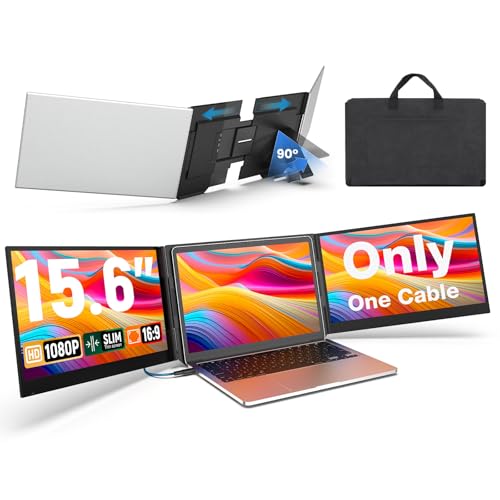
UK Bonitoys 15.6-Inch Triple Screen Extender
Best for: MacBook users needing single-cable dual screen expansion
- Display Support
- Triple Monitor (what this guide is about)
- Screen Size
- 15.6"
- Resolution
- 1920x1080
- Panel Type
- IPS
- Connectivity
- USB-C, USB-A
- Aspect Ratio
- 16:9
View on Amazon: UK Bonitoys 15.6-Inch Triple Screen Extender
The UK Bonitoys 15.6-inch screen extender adds two 1080p IPS displays to your 13-inch to 17.3-inch laptop using a single USB-C connection. It includes an adjustable kickstand and an aluminum frame weighing 4 pounds. Because it relies on an included driver, it supports both Windows and macOS systems, including Apple M-series chips. This setup fits you if you want a dual-screen expansion without running multiple display cables.
Pros
- Runs two displays over a single USB-C cable for video and power
- Compatible with macOS M1 through M5 chips as well as Windows
- Dual 15.6-inch 1080p IPS panels with 178-degree viewing angles
- Aluminum frame with an integrated adjustable kickstand
Cons
- Requires driver installation before displays can output video
- Adds 4 pounds of total weight to your mobile setup
- Incompatible with laptops wider than 15.85 inches
Good fit if
- You use an Apple Silicon Mac and need driver-based dual external display support.
- You want to connect two auxiliary screens using a single USB-C cable.
- You own a laptop between 13 and 17.3 inches with a width under 15.85 inches.
Skip if
- You cannot install third-party drivers on a locked-down work laptop.
- You have a laptop with a chassis width exceeding 15.85 inches.
- You need an ultralight setup that adds less than 4 pounds to your gear.
Verdict: UK Bonitoys 15.6-Inch One-Cable Triple Monitor delivers two full HD displays over a single cable, making it an effective multi-screen solution for Mac and Windows users who do not mind installing drivers.

AYY 14-Inch Triple Screen Extender
Best for: single-cable multi-screen travel on midsize laptops
- Display Support
- Triple Monitor (what this guide is about)
- Screen Size
- 14"
- Resolution
- 1200P
- Connectivity
- USB-C
- Weight
- 2.2 pounds
- Features
- Kickstand
The AYY 14-Inch Triple Screen Extender adds two 1080p displays to your 13-inch to 17-inch laptop. It features an aluminum alloy frame with an integrated kickstand, weighs 2.2 pounds, and connects using a single USB-C cable for both video and power. It also includes a magnetic protective sleeve. If you need a lightweight dual-screen attachment for mobile multi-tasking across Windows or macOS without carrying separate power supplies, this fits your setup.
Pros
- Single USB-C cable handles both power and display signal
- Lightweight aluminum build weighing 2.2 pounds
- Native support for Windows and macOS, including M-series processors
- Comes with an integrated kickstand and magnetic leather sleeve
Cons
- Display resolution capped at standard 1080p
- Screen size limited to 14 inches compared to larger alternatives
- Frame mounting restricted to 13-inch to 17-inch laptop sizes
Good fit if
- You use a 13-inch to 17-inch laptop running Windows or macOS.
- You want a single-cable USB-C connection without separate power bricks.
- You prioritize an aluminum frame with an included travel sleeve.
Skip if
- You need screen resolutions higher than 1080p.
- You prefer larger 15.6-inch or 16-inch display panels.
- You work with a laptop outside the 13-inch to 17-inch range.
Verdict: AYY 14-Inch Triple Screen Extender pairs dual 1080p displays with a rigid aluminum build and single-cable connection. It delivers a complete three-screen mobile workspace that packs down into an included magnetic travel sleeve.

Xebec Tri-Screen 3 Dual 13.3-Inch Extender
Best for: durable, single-cable triple-screen mobile setups
- Display Support
- Triple Monitor (what this guide is about)
- Screen Size
- 13.3"
- Connectivity
- USB-C
- Weight
- 3.6 lbs
- Dimensions
- 1.7 × 12.7 × 7.6 inches
The Xebec Tri-Screen 3 adds two 13.3-inch displays to your laptop to create a triple-screen workstation. It mounts using a tension-fit bracket without magnets or adhesive and draws video and power through a single embedded USB-C cable. The unit supports 60W pass-through charging and features an aluminum chassis. It suits you if you need a durable, dual-screen setup that keeps cable clutter down while powering your laptop directly from one connection.
Pros
- Dual 13.3-inch displays powered by a single embedded USB-C cable
- Supports 60W USB-C pass-through charging to power your laptop
- Aluminum construction with tension-fit bracket requiring no adhesives
- Includes a protective travel case
Cons
- Resolution and panel type are omitted from the published specifications
- 13.3-inch screens provide less display area than 14-inch or 15.6-inch options
- Listed package weight reaches 4.67 pounds
Good fit if
- You want single-cable operation with 60W pass-through charging.
- You prefer a tension-fit aluminum mount over magnetic plates or adhesives.
- You want a dual-monitor extender that includes a protective travel case.
Skip if
- You need larger 14-inch or 15.6-inch panels for your workflow.
- You require verified display specifications such as resolution and panel technology before purchasing.
Verdict: Xebec Tri-Screen 3 Dual 13.3-Inch Extender delivers a sturdy aluminum triple-display solution powered by a single USB-C cable with 60W pass-through charging. It is a solid choice if you value clean cable management and adhesive-free mounting over maximum screen size.

Alecewey 12-Inch Mac Triple Screen Extender
Best for: MacBook users wanting single-cable triple displays
- Display Support
- Triple Monitor (what this guide is about)
- Screen Size
- 12"
- Resolution
- 1080P
- Connectivity
- 2 x Type-C
- Weight
- 3.46 pounds
- Dimensions
- 8.46 × 13.4 × 1.45 inches
The Alecewey 12-Inch Mac Triple Screen Extender adds two 1080p FHD screens to your Mac OS laptop. It clips directly onto 13-inch to 16.5-inch machines and uses a single USB-C cable for connection. Both anti-glare displays rotate up to 207 degrees, supported by an integrated back kickstand. If you run macOS and need a compact multi-display setup without installing extra drivers, this 3.46-pound unit gives you dual extended screens on the go.
Pros
- Single-cable USB-C connection for video and power
- Driver-free plug-and-play operation on macOS
- Screens rotate up to 207 degrees for flexible angles
- Built-in adjustable rear bracket supports laptop display
Cons
- Restricted to Mac OS systems only
- Requires a laptop with a full-featured Type-C port
- Smaller 12-inch panel size compared to 14-inch or 15.6-inch alternatives
Good fit if
- You use a 13-inch to 16.5-inch Mac OS laptop with a full-featured Type-C port.
- You want a single-cable multi-monitor setup without manual driver installation.
- You need screens that rotate up to 207 degrees for flexible viewing.
Skip if
- You run a Windows, ChromeOS, or Linux operating system.
- You want larger 14-inch or 15.6-inch displays for larger workspace area.
Verdict: Alecewey 12-Inch Mac Triple Screen Extender delivers a streamlined dual-panel expansion for macOS laptops using a single Type-C connection. Its 1080p anti-glare panels and 207-degree hinge angle suit Mac users who need portable multi-window setups.

KEFEYA 14.2-Inch Lightweight Triple Screen Extender
Best for: travelers wanting lightweight multi-screen laptop setups
- Display Support
- Triple Monitor (what this guide is about)
- Screen Size
- 14.2"
- Resolution
- 1920*1080
- Panel Type
- IPS
- Connectivity
- USB-C, HDMI
- Aspect Ratio
- 16:9
View on Amazon: KEFEYA 14.2-Inch Lightweight Triple Screen Extender
The KEFEYA 14.2-Inch Lightweight Triple Screen Extender mounts onto 13-inch to 17.3-inch laptops to give you two additional 1080p IPS displays. At 2.2 pounds and 0.16 inches thick per panel, it maintains a small footprint while offering 300 nits brightness and 180-degree screen rotation. It suits mobile workers whose laptops feature dual video-out connections.
Pros
- Weighs 2.2 pounds with 0.16-inch panel profiles
- Dual 1080p IPS displays with 300 nits brightness
- Screens independently rotate up to 180 degrees
- Supports reverse pass-through charging with a 65W PD adapter
Cons
- Requires an extra conversion cable for base M1, M2, and M3 MacBooks
- External power adapters are not included
- Demands two compatible video-out ports on your laptop
Good fit if
- You want a dual-screen laptop attachment that stays under 2.5 pounds.
- You have a 13-inch to 17.3-inch laptop with two functional video ports.
- You need screens that fold back up to 180 degrees for angle adjustments.
Skip if
- You own a base M1, M2, or M3 Mac laptop and prefer not to buy specialized adapters.
- Your laptop has only one video-capable output port.
Verdict: KEFEYA 14.2-Inch Lightweight Triple Screen Extender offers a compact, 2.2-pound aluminum dual-display expansion for multi-port laptops. It functions well as a portable workstation expander if your hardware supports two external video channels.

FOPO 15.6-Inch Triple Portable Monitor
Best for: face-to-face presentations and three-screen multitasking
- Display Support
- Triple Monitor (what this guide is about)
- Screen Size
- 15.6"
- Resolution
- 1920*1080P
- Refresh Rate
- 60HZ
- Panel Type
- IPS
- Connectivity
- USB-C, HDMI, Mini HDMI
The FOPO 15.6-Inch Triple Portable Monitor expands your 13-inch to 17-inch laptop into a three-screen workstation using two 1080p IPS panels. Each screen provides a 60Hz refresh rate and a 1200:1 contrast ratio, supported by an integrated back stand. The displays swivel outward to share visuals across a table. This setup suits you if you need expansive screen space for multitasking or collaborative work without installing drivers.
Pros
- Dual 15.6-inch 1080p IPS panels with 1200:1 contrast ratio
- Swiveling design with up to 245-degree rotation on the left panel
- Driver-free plug-and-play operation over USB-C or HDMI
- Includes integrated kickstand, carrying bag, and connection cables
Cons
- Incompatible with base Apple M1, M2, and M3 processors
- Total hardware weight is 3 pounds
Good fit if
- You use a compatible 13-inch to 17-inch laptop with USB-C or HDMI ports.
- You want wide screen rotation angles for collaborative screen sharing.
- You need dual extended displays without third-party driver installations.
Skip if
- You own a MacBook powered by a standard base M1, M2, or M3 chip.
- You require an ultra-lightweight travel display under three pounds.
Verdict: FOPO 15.6-Inch Triple Portable Monitor delivers dual 1080p IPS screens with flexible swivel angles for compatible 13-inch to 17-inch laptops. It gives you a stable three-display workspace with driver-free connectivity.

UPERFECT Delta 15.6" Foldable Dual Monitor
Best for: vertical stacked multi-device portable productivity
- Display Support
- Triple Monitor (what this guide is about)
- Screen Size
- 15.6"
- Resolution
- 1080P
- Panel Type
- IPS
- Connectivity
- Type-C
- Color Gamut
- 100% sRGB
The UPERFECT Delta 15.6" Foldable Dual Monitor gives you two stacked 1080p FHD IPS displays with a 360-degree folding hinge and a built-in 180-degree adjustable stand. Each panel covers 100 percent sRGB color with Delta E under two. You can connect it via a single USB-C cable or hook up two separate devices at once. It suits you if you want a vertical multi-screen workspace without attaching hardware directly to your laptop.
Pros
- 0 to 360-degree folding hinge with 180-degree gravity auto-rotation
- 100% sRGB color gamut coverage with Delta E under 2
- Independent inputs allow simultaneous connection to two different devices
- Integrated 180-degree adjustable stand supports tilt, swivel, and pivot
Cons
- External power supply is recommended for optimal operation
- Native resolution is limited to 1080p FHD
Good fit if
- You want a vertically stacked dual-screen setup with full 360-degree folding capability.
- You need verified color accuracy with 100% sRGB coverage and Delta E under 2.
- You plan to display inputs from two separate host computers at the same time.
Skip if
- You prefer side-by-side screens that clip directly onto your laptop chassis.
- You require display resolutions higher than standard 1080p FHD.
Verdict: UPERFECT Delta 15.6" Foldable Dual Monitor delivers a flexible 360-degree folding vertical display with accurate 100% sRGB color and independent dual-device inputs. Its freestanding design is ideal if you want multi-screen capability without clamping extra weight to your laptop lid.

FOPO 16-Inch 1200p Triple Portable Monitor
Best for: large laptops needing 16:10 presentation displays
- Display Support
- Triple Monitor (what this guide is about)
- Screen Size
- 16"
- Resolution
- 1920x1200
- Refresh Rate
- 60 HZ
- Panel Type
- IPS
- Connectivity
- HDMI, USB-C
This dual-screen attachment clips to your 12-to-18.5-inch laptop to create a portable triple display. You get two 16-inch 1920x1200 IPS panels with a taller 16:10 aspect ratio and 60 Hz refresh rates. The left panel rotates up to 360 degrees for presentations. At 4.4 pounds, it suits mobile professionals and remote workers who need extra vertical screen real estate without installing external drivers on compatible systems.
Pros
- 1920x1200 resolution with a taller 16:10 aspect ratio
- Left panel supports 360-degree rotation with auto-sensing display
- Fits laptops from 12 inches up to 18.5 inches
- Driver-free plug-and-play operation over full-featured USB-C or HDMI
Cons
- Incompatible with base Apple M1, M2, and M3 chips
- Weighs 4.4 pounds without the host laptop included
Good fit if
- You want 16:10 vertical workspace on a laptop between 12 and 18.5 inches.
- You share screens across a table using a 360-degree rotating panel.
- You have full-featured USB-C or HDMI ports that handle video output.
Skip if
- You run a Mac laptop powered by a standard base M1, M2, or M3 chip.
- You need a lightweight triple-monitor setup that weighs under 4 pounds.
Verdict: FOPO 16-Inch 1200p Triple Portable Monitor delivers 16:10 workspace expansion and flexible screen rotation for supported 12-to-18.5-inch laptops. Its driver-free connectivity makes it a capable multi-display tool if your hardware meets the specific port and chipset requirements.

Screnex 14.2-Inch Triple Portable Monitor
Best for: laptops with USB-A and HDMI ports
- Display Support
- Triple Monitor (what this guide is about)
- Screen Size
- 14.2"
- Resolution
- 1080P
- Panel Type
- IPS
- Connectivity
- Type-C, HDMI, USB-A
- Weight
- 4.85 pounds
You get two 14.2-inch 1080p IPS screens that attach to your laptop for a three-display workstation. Connectivity covers USB-A, USB-C, and HDMI without driver setup. The panels feature anti-glare coatings, independent brightness controls, and built-in speakers. At 4.85 pounds, this unit suits desks and mobile setups where your computer has the necessary video outputs to run dual external monitors.
Pros
- Dual 14.2-inch 1080p IPS panels with anti-glare coating
- Driver-free connectivity across USB-A, USB-C, and HDMI
- Independent brightness controls and built-in speakers
Cons
- Weighs 4.85 pounds
- Requires a separate conversion cable for base M1, M2, and M3 MacBooks
- Requires two USB-C ports or one USB-C port combined with an HDMI port
Good fit if
- You want flexible connection options including USB-A, USB-C, and HDMI.
- You need independent display adjustments and built-in audio.
- You use a compatible laptop that supports dual external video outputs.
Skip if
- You use a standard M1, M2, or M3 MacBook without purchasing an extra adapter.
- You require an ultralight portable display under 4 pounds.
Verdict: Screnex 14.2-Inch Triple Portable Monitor delivers a driver-free three-screen setup with broad USB-A, USB-C, and HDMI support. It is a solid productivity expansion if your laptop has the required ports and can handle its 4.85-pound frame.

FOPO 14" Triple Monitor Extender
Best for: 14-inch triple-display laptop setups
- Display Support
- Triple Monitor (what this guide is about)
- Screen Size
- 14"
- Dimensions
- 1.6 × 1.5 × 6 inches
The FOPO 14" Triple Monitor Extender gives you a three-display setup built around a 14-inch screen size. Finished in black, the unit has published dimensions of 1.6 inches by 1.5 inches by 6 inches. If you need triple-screen coverage for mobile productivity without stepping up to larger panels, this hardware provides dedicated triple monitor support.
Pros
- 14-inch display size class
- Triple monitor display support
- Compact 1.6 x 1.5 x 6-inch published dimensions
- Black color finish
Cons
- Screen resolution and panel type are not specified
- Video input ports and cable requirements are not listed
Good fit if
- You want a 14-inch triple monitor setup for your laptop.
- You prefer hardware with a black finish.
Skip if
- You require verified panel resolution specifications before buying.
- You need documented port compatibility details like USB-C or HDMI.
Verdict: FOPO 14" Triple Monitor Extender delivers triple-display capability in a 14-inch black chassis. It provides multi-screen coverage for users seeking this specific display class.
Specifications side by side
| Spec | KEFEYA 15.6-Inch Triple Screen Extender | Anyking 15.6-Inch Freestanding Screen Extender | Synnov 15.6-Inch Triple Screen Laptop Extender | UK Bonitoys 15.6-Inch Triple Screen Extender | AYY 14-Inch Triple Screen Extender | Xebec Tri-Screen 3 Dual 13.3-Inch Extender | Alecewey 12-Inch Mac Triple Screen Extender | KEFEYA 14.2-Inch Lightweight Triple Screen Extender | FOPO 15.6-Inch Triple Portable Monitor | UPERFECT Delta 15.6" Foldable Dual Monitor | FOPO 16-Inch 1200p Triple Portable Monitor | Screnex 14.2-Inch Triple Portable Monitor | FOPO 14" Triple Monitor Extender |
|---|---|---|---|---|---|---|---|---|---|---|---|---|---|
| Screen Size | 15.6" | 15.6" | 15.6" | 15.6" | 14" | 13.3" | 12" | 14.2" | 15.6" | 15.6" | 16" | 14.2" | 14" |
| Resolution | 1920x1080 | 1920 × 1080 | 1080P FHD | 1920x1080 | 1200P | not specified | 1080P | 1920*1080 | 1920*1080P | 1080P | 1920x1200 | 1080P | not specified |
| Refresh Rate | not specified | 60Hz | not specified | not specified | not specified | not specified | not specified | not specified | 60HZ | not specified | 60 HZ | not specified | not specified |
| Panel Type | IPS | IPS | IPS | IPS | not specified | not specified | not specified | IPS | IPS | IPS | IPS | IPS | not specified |
| Connectivity | USB-C, USB-A, HDMI | USB-C, USB-A, PD | USB-C, HDMI | USB-C, USB-A | USB-C | USB-C | 2 x Type-C | USB-C, HDMI | USB-C, HDMI, Mini HDMI | Type-C | HDMI, USB-C | Type-C, HDMI, USB-A | not specified |
| Color Gamut | 120% sRGB | not specified | not specified | not specified | not specified | not specified | not specified | not specified | not specified | 100% sRGB | not specified | not specified | not specified |
| Aspect Ratio | not specified | not specified | not specified | 16:9 | not specified | not specified | not specified | 16:9 | not specified | not specified | 16:10 | not specified | not specified |
| Weight | 8.8 pounds | 3.9 lb | 4 lbs | 4 lbs | 2.2 pounds | 3.6 lbs | 3.46 pounds | 2.2 LB | 3 pounds | not specified | not specified | 4.85 pounds | not specified |
| Features | not specified | not specified | not specified | not specified | Kickstand | not specified | not specified | HDR | not specified | HDR, Kickstand, Foldable | not specified | not specified | not specified |
| Use | not specified | not specified | Travel | not specified | not specified | not specified | not specified | Travel | not specified | not specified | not specified | not specified | not specified |
| Display Support | Triple Monitor | Triple Monitor | Triple Monitor | Triple Monitor | Triple Monitor | Triple Monitor | Triple Monitor | Triple Monitor | Triple Monitor | Triple Monitor | Triple Monitor | Triple Monitor | Triple Monitor |
| Size | 17.3 Inch | 15.6" Triple Screen | 17.3 Inch | 17.3 Inch | 14 Inch | not specified | P2S MAC-12 inch | 17.3 Inch | 16'' | 15.6" | 16" | 14.2" | not specified |
| Material | not specified | not specified | not specified | not specified | Aluminum | not specified | not specified | not specified | not specified | not specified | not specified | not specified | not specified |
| Dimensions | 14.2 × 0.96 × 8.8 inches | 15 × 0.87 × 9.39 inches | 9.4 × 15 × 0.87 inches | 9.37 × 15.9 × 0.86 inches | 0.6 × 14.1 × 9.2 inches | 1.7 × 12.7 × 7.6 inches | 8.46 × 13.4 × 1.45 inches | 15.7 × 10.9 × 2.64 inches | 1.5 × 15.5 × 9.2 inches | 0.8 × 14 × 8.7 inches | 1.96 × 13.3 × 8.93 inches | 13.9 × 1.52 × 8.08 inches | 1.6 × 1.5 × 6 inches |
| Color | Black | 15.6" Silver | Sliver | silver | Black | Black | black | Black | Grey | Black | Gary | Black | Black |
| Model | S6 | P7 Pro | P7 | P7 pro-SJMP | W14FPC-A | XTS3 | Alecewey P2S Mac OS | S8 Pro | S10 | M156E15 | S11 | S2 | S7 |
Is a triple monitor setup worth it for your laptop?
Triple monitor setups add two independent displays to your workspace, giving you three total active screens. This configuration lets you position panels at wide viewing angles, with select models offering between 207 and 235 degrees of hinge rotation for shared viewing. Units function as freestanding folding structures or attach directly to your laptop chassis. Adding two displays increases total carrying weight up to 8.8 pounds and requires compatible multi-display ports or driver support.
Worth it if
- You need three simultaneous 1080p screens open at once to track separate windows side by side.
- You present across a table using panels with 207-degree to 235-degree rotation angles.
- You want a freestanding dual-display structure that operates without hanging weight on your laptop lid.
Skip it if
- You want the lightest possible bag, as multi-screen frames weigh between 2.2 and 8.8 pounds.
- You use a system that lacks support for driver installations or dual external video output.
If you also need air care, see our list of best portable humidifiers ranked by specs.
How We Picked Triple Monitors
To build this guide of 13 models, you see options identified by their published display support. A portable monitor is included when its listing explicitly states triple monitor support in the title or feature specifications. Only one size or variant from each product family is featured. Products are not physically handled, and every detail comes directly from published specifications.
The selections appear with products in stock first, then by Amazon sales rank, placing better-selling products first. You can evaluate specs like panel dimensions, resolution, and connectivity to find the right configuration for your mobile setup.
How to Choose a Triple Portable Monitor
-
Compare Total Carry Weight
Total weight determines how easily you can travel with an extender. Extenders add noticeable bulk to your bag, ranging from lightweight 2.2-pound designs to heavy hardware approaching 9 pounds. If you work from coffee shops or commute daily, check the published unit weight carefully. Compact options like the AYY 14-Inch Triple Screen Extender weigh just 2.2 pounds, making transport practical. Heavier models offer rigid structures but demand a sturdy bag and a permanent desk surface to avoid fatigue during travel.
-
Evaluate Mounting and Stand Design
You should consider how the external screens attach to your workstation. Some extenders clamp directly onto the edges of your laptop display, which adds physical strain to the lid hinges over time. If your laptop hinges feel loose or you prefer avoiding mechanical pressure on your screen lid, look for freestanding designs. Models like the Anyking 15.6-Inch Freestanding Screen Extender rest independently on your desk surface using their own built-in base, giving you dual displays without latching onto your computer frame.
-
Select the Display Aspect Ratio
Resolution and aspect ratio dictate how much content you can view at once without scrolling. Most portable extenders feature standard 1080p full HD displays with a 16:9 widescreen ratio, which suits video playback and standard window placement. If you review lengthy spreadsheets, write code, or read extensive documentation, consider taller aspect ratios. The FOPO 16-Inch 1200p Triple Portable Monitor delivers a 16:10 vertical layout, providing extra vertical pixels so you can fit more lines of text on each screen simultaneously.
-
Match Panel Size to Laptop
Extender dimensions must match the size of your laptop chassis to fit securely. Extender panels generally span from 12 inches to 16 inches. Buying screens larger than your laptop frame can cause instability or overhang, while panels that are too small may limit your readable workspace. If you carry an ultraportable laptop with a compact screen, small units suit your gear best. For example, the Alecewey 12-Inch Mac Triple Screen Extender pairs specifically with smaller machines to maintain a balanced, stable physical footprint.
-
Verify Pass-Through Power Delivery
Running two external screens simultaneously draws substantial battery power from your laptop. When you work away from wall outlets, this extra draw quickly depletes your battery. Check whether an extender supports power pass-through charging via USB-C to solve this issue. Hardware like the Xebec Tri-Screen 3 Dual 13.3-Inch Extender supports 60W power pass-through, routing power directly from your charger into your laptop through the display hub. This configuration keeps your laptop charged while powering both external displays over the same connection.
-
Inspect Color Gamut Coverage
Color accuracy matters if you edit images, evaluate graphics, or design visual layouts across multiple screens. Standard office monitors often cover basic color spaces, which can look washed out next to modern laptop screens. If visual precision is essential to your daily tasks, check the published color gamut rating before buying. For instance, the UPERFECT Delta 15.6" Foldable Dual Monitor provides 100% sRGB coverage, ensuring your secondary screens render consistent color tones, accurate contrast, and saturated hues that align with professional photo standards.
Frequently asked questions
Can you run a triple monitor portable extender with an Apple silicon Mac?
Yes, you can use select triple monitor extenders with Apple silicon Macs if you install compatible display drivers. For example, the Anyking 15.6-Inch and Alecewey 12-Inch models support macOS setups over a single USB-C connection using software drivers. Without driver installations, standard Apple silicon base chips typically restrict dual external video signals over a single port.
Do all triple screen extenders clamp onto your laptop screen?
No, several models use freestanding or kickstand designs instead of clamping directly onto your laptop screen. Extenders like the Synnov 15.6-Inch and Anyking 15.6-Inch stand independently on your desk to prevent mechanical strain on your display hinges. The UPERFECT Delta also uses a built-in kickstand to support its stacked folding panels without attaching any extra weight to your laptop lid.
What display resolutions do portable triple monitors offer?
Most portable triple monitors feature 1080p Full HD resolution across both secondary screens. Models such as the KEFEYA S6, AYY 14-Inch, and UK Bonitoys provide dual 1080p displays for routine multitasking and document viewing. If you require taller vertical viewing area, units like the FOPO 16-Inch S11 provide a 1200p panel configuration with a 16:10 aspect ratio instead.
Can a portable triple monitor charge your laptop while in use?
Yes, select triple screen extenders support power pass-through to keep your laptop battery charged during use. The Xebec Tri-Screen 3 provides 60W pass-through charging when connected via USB-C. This design lets you connect an external power supply to the extender hardware, which routes power directly into your laptop while operating both displays simultaneously.
Can you connect two separate computers to one portable dual screen?
Yes, specific folding multi-screen monitors offer independent video inputs to support two separate host devices at once. For example, the UPERFECT Delta 15.6-Inch monitor provides independent dual-device inputs alongside a 360-degree folding vertical layout. You can connect one computer to the upper screen and a completely different machine to the lower display without needing two separate monitor stands.
Do portable triple monitors require driver installations to work?
It depends on the specific hardware architecture of the extender and your computer ports. Units like the KEFEYA S6, FOPO S10, and Screnex S2 operate driver-free when your laptop provides native multi-display outputs via USB-C or HDMI. However, single-cable models like the Anyking P7 Pro and UK Bonitoys require software driver installations to run two external displays from one port.
Do portable triple monitors support HDR content?
Yes, select portable multi-screen models include HDR video processing. Both the UPERFECT Delta 15.6-inch dual monitor and the KEFEYA 14.2-inch S8 Pro list HDR capabilities in their specifications. When connected to a compatible operating system and video source, HDR mode enhances contrast and color range across your secondary displays for supported media.