Best Docking Stations with 180W in 2026: 8 Picks Ranked by Specs
As an Amazon Associate we earn from qualifying purchases. Links on this page are affiliate links.
Finding the best docking stations with 180W requires checking strict power and bandwidth specs. We compared 8 options to help you choose. The Lenovo ThinkPad Thunderbolt 5 Smart Dock leads because it supports high-bandwidth multi-display commercial setups. This ranking relies only on published specifications from the listings. You need to match your laptop ports and monitor count to the dock’s capabilities. Read on to decide which dock fits your workspace needs.
Quick picks
The best fit for you
- You need maximum bandwidth for multiple displays Lenovo ThinkPad Thunderbolt 5 Smart Dock It supports Thunderbolt 5 for high-bandwidth multi-display commercial setups.
- You want the most compact model on the list Dell Thunderbolt Dock 180W It weighs 1.1 pounds and measures 3.54 inches in length.
- You require 8K resolution and modular upgrades Dell Pro Thunderbolt 4 Modular Dock It fits users needing 8K resolution and modular upgrades.
- You need a ready-to-use setup with legacy ports Koncept 180W Dual Monitor USB-C Dock It includes legacy ports for users on compatible Dell systems.
- You need triple displays for Dell laptops Dell Thunderbolt 4 Dock It supports triple monitor setups with 180W power delivery.
Our 8 picks

Lenovo ThinkPad Thunderbolt 5 Smart Dock
Best for: High-bandwidth multi-display commercial setups
- Power Delivery
- 180W (what this guide is about)
- Host Interface
- Thunderbolt 5
- Display Support
- Up to 4
- Max Resolution
- 8K 60Hz
- Video Ports
- Thunderbolt 5, HDMI 2.1, DisplayPort 2.1
- Max Data Speed
- 120Gbps
This dock uses Thunderbolt 5 for 120Gbps data transfer and 180W power delivery. It supports up to four displays, including 8K at 60Hz. You get HDMI 2.1, DisplayPort 2.1, and 2.5Gbps Ethernet. It includes cloud management for IT fleets. It fits users needing high-speed connectivity and multiple high-resolution screens.
Pros
- Thunderbolt 5 interface with 120Gbps data speeds
- 180W Power Delivery 3.1 output
- Supports up to four displays including 8K 60Hz
- Includes 2.5Gbps Ethernet and HDMI 2.1 ports
Cons
- Heavier at 1.29 pounds compared to lighter alternatives
- Lacks a visible physical remote for quick adjustments
- Requires IT fleet management setup for full features
Good fit if
- You need 120Gbps data transfer speeds
- You drive multiple 8K or high-refresh-rate displays
- You manage a commercial device fleet
Skip if
- You prefer a lighter, more portable dock
- You only need a single 4K display
- You want a plug-and-play setup without cloud management
Verdict: Lenovo ThinkPad Thunderbolt 5 Smart Dock 7500 suits professionals requiring maximum bandwidth and multi-monitor setups. It is ideal for users who prioritize speed and display count over compact size.

ANYHDD Thunderbolt Dock with 180W Power
Best for: Triple monitor setups with 180W charging
- Power Delivery
- 180W (what this guide is about)
- Host Interface
- Thunderbolt
- Max Resolution
- 5K
- Connectivity
- HDMI, DisplayPort
- Display Support
- Dual Monitor
This ANYHDD dock brings 180W power delivery and Thunderbolt connectivity to your workspace. It supports up to three displays, including a single 5K or dual 4K monitors. You get HDMI and DisplayPort outputs for flexible screen setups. The unit mounts behind your monitor or under the desk to save space. It is designed for commercial laptops but works with HP and Lenovo notebooks that follow Thunderbolt standards.
Pros
- 180W power delivery for high-performance laptops
- Supports up to three displays (5K or dual 4K)
- Thunderbolt interface for fast data and video
- VESA mountable for clean desk setups
Cons
- Only includes a 1-year warranty
- Brand is ANYHDD, not Dell
- Requires compatible Thunderbolt laptops for full function
Good fit if
- You need 180W charging for a power-hungry laptop
- You want to run three monitors from one dock
- You prefer a compact setup with VESA mounting
Skip if
- You require a 3-year warranty
- You strictly want the original Dell brand
- You only have USB-C ports without Thunderbolt
Verdict: ANYHDD WD19TBS Thunderbolt Dock offers high-end display support and power for users who need triple-screen setups and don't mind a third-party brand. It fits professionals who value workspace flexibility over manufacturer branding.
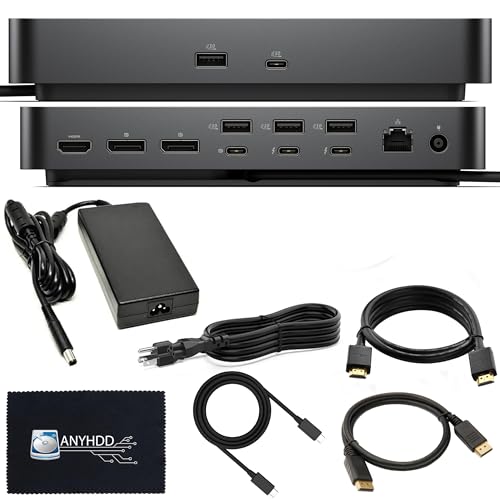
Dell Pro Thunderbolt 4 Modular Dock
Best for: workstations needing 8K video and modular ports
- Power Delivery
- 180W (what this guide is about)
- Host Interface
- Thunderbolt 4
- Max Resolution
- 8K
- Video Ports
- DisplayPort 1.4, HDMI 2.0, USB-C, TB4
- Max Data Speed
- 40 GB/s
- Ethernet Speed
- Gigabit Ethernet
This docking station pairs a 180W power adapter with Thunderbolt 4 host connectivity. You get 40 Gbps data speeds, support for up to 8K resolution, and dual Thunderbolt 4 downstream ports. It also features a swappable modular build for component changes. This setup suits you if you run bandwidth-heavy peripherals and multiple displays across macOS, Windows, or Ubuntu.
Pros
- Supports up to 8K video output
- Thunderbolt 4 host connection with 40 Gbps data transfer
- Swappable modular design for hardware upgrades
- Dual downstream Thunderbolt 4 ports
Cons
- Heavy desktop footprint at 4.06 pounds
- Ethernet speed capped at standard Gigabit RJ45
- HDMI output uses version 2.0 rather than 2.1
Good fit if
- You need up to 8K display resolution or dual Thunderbolt 4 peripheral connections.
- You want swappable modular hardware for desktop setup flexibility.
Skip if
- You need a lightweight unit for mobile travel setups.
- You require wired networking faster than 1 Gbps.
Verdict: ANYHDD Thunderbolt 4 Modular Dock delivers 8K output and 40 Gbps bandwidth for users who need swappable desktop expansion.

Koncept 180W Dual Monitor USB-C Dock
Best for: Dell users needing legacy ports and cables
- Power Delivery
- 180W (what this guide is about)
- Host Interface
- USB-C
- Display Support
- Dual
- Video Ports
- VGA, HDMI, mini-DisplayPort
- Connectivity
- USB-C, HDMI
This bundle includes a Dell WD19 docking station with 180W power delivery. It supports dual monitors via VGA, HDMI, and mini-DisplayPort. You connect through a USB-C host interface. The package adds an HDMI cable and cleaning cloth. It works with select Inspiron, Venue, Precision, XPS, and Latitude devices. You get broad connectivity with RJ-45, audio, and multiple USB ports.
Pros
- 180W power delivery for compatible laptops
- Supports dual monitor setups
- Includes VGA, HDMI, and mini-DisplayPort
- Comes with HDMI cable and cleaning cloth
- Multiple USB 3.0 and 2.0 ports
Cons
- Uses USB-C host interface instead of Thunderbolt
- Limited to dual display support
- Requires compatible Dell device series
Good fit if
- You need a complete bundle with cables
- You use Dell Latitude or XPS laptops
- You require VGA connectivity
Skip if
- You need Thunderbolt 4 or 5 speeds
- You want to drive more than two screens
- You prefer a non-renewed unit
Verdict: Koncept WD19 Dell Dock 180W Bundle fits users who want a ready-to-use setup with legacy ports. It suits those on compatible Dell systems who do not need Thunderbolt bandwidth.

Dell WD19S USB-C Dock
Best for: Dell laptop users needing dual 4K displays
- Power Delivery
- 180W (what this guide is about)
- Host Interface
- USB-C
- Max Resolution
- 3840 x 2160 - 60 Hz
- Video Ports
- 2 DisplayPort, 1 HDMI
- Ethernet Speed
- Ethernet 1000
- Dimensions
- 3.54 × 8.07 × 1.14 inches
The Dell WD19S is a USB-C docking station designed for dual monitor setups. It delivers 130W of power to Dell systems and 90W to non-Dell laptops. You get two DisplayPort outputs and one HDMI port, supporting up to 4K at 60 Hz over DisplayPort. It includes an Ethernet port and multiple USB-A and USB-C data ports. This dock suits users who need reliable video output and charging for their Dell devices.
Pros
- Supports dual monitors with 2 DisplayPort and 1 HDMI outputs
- Delivers 130W power to Dell systems via USB-C
- Includes Gigabit Ethernet connectivity
- Features 3 USB 3.1 Gen 1 and 2 USB-C 3.1 Gen 2 ports
Cons
- Lower power delivery to non-Dell systems at 90W
- No 3.5mm audio ports included
- Renewed condition product
Good fit if
- You use a Dell laptop and need 130W charging
- You require two external displays for productivity
- You need a wired Ethernet connection for stable internet
Skip if
- You use a non-Dell laptop and need maximum 180W power
- You require built-in audio jacks for headphones
- You prefer a brand-new unit with full warranty
Verdict: Dell WD19S USB-C 180W Dock offers solid dual-display support and full power for Dell laptops. It is a practical choice for users who prioritize video output and charging over audio features.

Dell Thunderbolt 4 Dock
Best for: Dell laptops needing triple displays
- Power Delivery
- 180W (what this guide is about)
- Host Interface
- Thunderbolt 4, Thunderbolt 3, USB-C
- Display Support
- Dual, Triple
- Max Resolution
- 4K@60Hz
- Port Count
- 13
- Video Ports
- DisplayPort, HDMI, USB-C, Thunderbolt
This dock supports triple monitors via Thunderbolt 4 or USB-C with DisplayPort Alt Mode. It delivers up to 130W to Dell laptops and 90W to others. You get 13 ports, including Gigabit Ethernet and USB-C data links. The package includes necessary cables and a 180W adapter. It suits users needing high bandwidth for multiple displays and reliable power delivery for compatible systems.
Pros
- Supports triple monitor setups with Thunderbolt 4 hosts
- Provides 130W power delivery for Dell laptops
- Includes Gigabit Ethernet and USB-C data ports
- Comes with 180W power adapter and cables
Cons
- Power delivery drops to 90W for non-Dell systems
- macOS users are limited to one external display
- HDMI and USB-C Alt Mode ports are shared
Good fit if
- You use a Dell laptop with Thunderbolt 4
- You need to drive three external monitors
- You require Gigabit Ethernet connectivity
Skip if
- You use a MacBook with M1 or M2 chips
- You need more than 130W power delivery
- You rely on USB-A only devices
Verdict: TechTray WD22TB4 Thunderbolt 4 Dock fits Dell users who need triple displays and 130W charging. It is not suitable for Mac users needing multiple screens or those requiring higher wattage.

Dell Thunderbolt Dock 180W
Best for: Users needing fast charging and a compact dock
- Power Delivery
- 180W (what this guide is about)
- Host Interface
- Thunderbolt
- Dimensions
- 3.54 × 8.07 × 1.14 inches
- Weight
- 1.1 pounds
This Dell Thunderbolt dock supports up to 180W power delivery for your laptop. It features Dell Express Charge, which reaches 80% capacity in one hour. The Express Charge Boost adds 35% in just 20 minutes. The unit weighs 1.1 pounds and measures 8.07 inches wide. You get reliable connectivity for your daily workflow. This dock suits users who need fast charging and a compact footprint.
Pros
- Supports 180W power delivery
- Dell Express Charge reaches 80% in one hour
- Express Charge Boost provides 35% charge in 20 minutes
- Compact design weighs only 1.1 pounds
Cons
- Lower actual power delivery of 130W compared to the 180W category standard
- No mention of a remote control for operation
- No mention of app-based management software
Good fit if
- You need fast laptop charging during short breaks
- You prefer a lightweight dock for portability
- You use a Dell laptop with Express Charge support
Skip if
- You require the full 180W output for maximum performance
- You want remote control capabilities
- You need software management for the dock
Verdict: Dell WD19TB Thunderbolt Dock 180W fits users who prioritize rapid charging speeds and a small physical footprint over maximum power output. It is a solid option for Dell laptop owners who value convenience and speed.
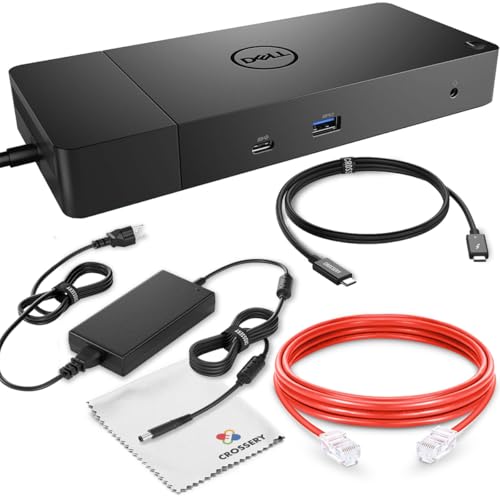
Dell WD19 180W Docking Station Bundle
Best for: Dell users needing dual 4K 60Hz displays
- Power Delivery
- 180W (what this guide is about)
- Host Interface
- USB-C
- Display Support
- Dual
- Max Resolution
- 3840 x 2160 - 60 Hz
- Video Ports
- DisplayPort, HDMI, USB-C
- Ethernet Speed
- Gigabit
This bundle includes the Dell WD19 docking station with a 180W power adapter and Thunderbolt 3 cable. It supports dual monitors at 4K 60Hz via DisplayPort 1.4. The dock delivers 130W power delivery to Dell laptops and 90W to non-Dell systems. You get a full set of ports, including HDMI, USB-C, and Gigabit Ethernet. This setup suits users needing reliable dual-screen productivity and fast charging for compatible devices.
Pros
- Supports dual 4K displays at 60Hz
- Includes 180W power adapter and Thunderbolt 3 cable
- Provides 130W power delivery for Dell laptops
- Features Gigabit Ethernet and multiple USB ports
Cons
- Power delivery drops to 90W for non-Dell systems
- Dock unit is refurbished rather than new
- Host interface is USB-C, not Thunderbolt 4 or 5
Good fit if
- You use a Dell laptop needing 130W charging
- You require dual 4K monitors at 60Hz
- You want a complete bundle with cables included
Skip if
- You need Thunderbolt 5 data speeds
- You require 180W power delivery to your laptop
- You prefer brand new dock hardware
Verdict: Crossery Dell WD19 180W Dock offers solid dual 4K support and full cable inclusion. It fits Dell users who need 130W charging and a complete plug-and-play setup.
Specifications side by side
| Spec | Lenovo ThinkPad Thunderbolt 5 Smart Dock | ANYHDD Thunderbolt Dock with 180W Power | Dell Pro Thunderbolt 4 Modular Dock | Koncept 180W Dual Monitor USB-C Dock | Dell WD19S USB-C Dock | Dell Thunderbolt 4 Dock | Dell Thunderbolt Dock 180W | Dell WD19 180W Docking Station Bundle |
|---|---|---|---|---|---|---|---|---|
| Host Interface | Thunderbolt 5 | Thunderbolt | Thunderbolt 4 | USB-C | USB-C | Thunderbolt 4, Thunderbolt 3, USB-C | Thunderbolt | USB-C |
| Display Support | Up to 4 | not specified | not specified | Dual | not specified | Dual, Triple | not specified | Dual |
| Max Resolution | 8K 60Hz | 5K | 8K | not specified | 3840 x 2160 - 60 Hz | 4K@60Hz | not specified | 3840 x 2160 - 60 Hz |
| Power Delivery | 180W | not specified | not specified | not specified | 130W Dell, 90W non-Dell | 130W (Dell), 90W (non-Dell) | 130W | 130W |
| Port Count | not specified | not specified | not specified | not specified | not specified | 13 | not specified | not specified |
| Video Ports | Thunderbolt 5, HDMI 2.1, DisplayPort 2.1 | not specified | DisplayPort 1.4, HDMI 2.0, USB-C, TB4 | VGA, HDMI, mini-DisplayPort | 2 DisplayPort, 1 HDMI | DisplayPort, HDMI, USB-C, Thunderbolt | not specified | DisplayPort, HDMI, USB-C |
| Max Data Speed | 120Gbps | not specified | 40 GB/s | not specified | not specified | 40Gbps | not specified | not specified |
| Ethernet Speed | 2.5Gbps | not specified | Gigabit Ethernet | not specified | Ethernet 1000 | Gigabit Ethernet | not specified | Gigabit |
| Resolution | not specified | 4K UHD | not specified | not specified | not specified | 4K UHD | not specified | not specified |
| Connectivity | Ethernet | HDMI, DisplayPort | Thunderbolt 4 | USB-C, HDMI | USB-C | USB-C, Thunderbolt 4 | not specified | USB-C, Ethernet, Thunderbolt 3 |
| Dimensions | 9.25 × 3.15 × 1.18 inches | not specified | not specified | not specified | 3.54 × 8.07 × 1.14 inches | not specified | 3.54 × 8.07 × 1.14 inches | not specified |
| Weight | 1.29 pounds | not specified | 4.06 pounds | not specified | 1.3 pounds | not specified | 1.1 pounds | not specified |
| Color | Eclipse Black | Black | Black | Black | Black | Black | Black | Black |
| Model | 40BA0265US | DOCK-WD19TBS180W | DOCK-SD25TB4 | WD19 180W RENEWED DOCKING | DELL-WD19S180W-cr | WD22TB4-DOCK NEW | 210-ARJD | not specified |
| Size | not specified | not specified | not specified | WD19 180W RENEWED DOCKING | not specified | not specified | not specified | not specified |
If your setup requires fast drive transfers instead of high power delivery, compare the best 10Gbps SSD docking stations.
Check Specs Before Buying
-
Verify Thunderbolt Version
The interface version dictates your bandwidth ceiling. The Lenovo ThinkPad Thunderbolt 5 Smart Dock offers the highest potential speed for data and video. Most other options use Thunderbolt 4 or Thunderbolt 3. Thunderbolt 4 ensures consistent performance with dual 4K displays. Thunderbolt 3 may require specific cable requirements to maintain that resolution. If you need maximum throughput for heavy workloads, prioritize the latest standard. Check the attributes list carefully to see which generation the dock supports.
-
Match Display Support Count
Power delivery does not guarantee the number of screens you can drive. The TechTray model explicitly supports triple monitors, which is rare at this power level. The ANYHDD dock lists dual monitor support despite its high wattage. The Koncept bundle also targets dual monitor setups. If you plan to use three screens, verify the display support attribute. Choosing a dual-support dock for a triple-screen rig will result in blank outputs. Match the spec to your physical monitor count.
-
Check Resolution Capabilities
Not all 180W docks handle the same video resolutions. The ANYHDD Premium model supports 8K resolution, catering to high-end professional needs. The TechTray dock caps at 4K UHD. The Koncept bundle is designed for dual 4K 60Hz displays. If you use 8K monitors, ensure the dock explicitly lists that support. Standard 4K support is common, but higher resolutions require specific bandwidth allocation. Verify the resolution attribute to avoid purchasing a dock that cannot drive your primary display.
-
Ensure Port Compatibility
The physical connection must match your laptop. Most docks here use USB-C or Thunderbolt ports. The Koncept bundle includes legacy ports for older peripherals. The Lenovo dock provides Ethernet connectivity for stable wired internet. The ANYHDD budget option lists HDMI and DisplayPort outputs. Check your laptop’s available ports before buying. A Thunderbolt dock will not work on a standard USB-C port without protocol support. Verify the connectivity attribute aligns with your hardware.
-
Consider Physical Footprint
Dock size affects desk space and portability. The Dell Thunderbolt 180W model weighs just 1.1 pounds and measures 3.54 inches in length. The Premium ANYHDD dock is significantly heavier at 4.06 pounds. The Lenovo dock measures 9.25 inches in length. If you move your setup frequently, lighter models are easier to transport. Heavier docks often provide more robust cooling and stable connections. Check the weight and dimensions to ensure it fits your workspace constraints.
Frequently asked questions
Which dock supports the most displays for commercial setups?
The Lenovo ThinkPad Thunderbolt 5 Smart Dock is designed for high-bandwidth multi-display commercial setups. It leads this list because it prioritizes speed and display count. Other options like the TechTray model support triple monitors, but the Lenovo unit is built for maximum bandwidth requirements in professional environments.
Can I get 180W charging with a triple monitor setup?
Yes, the TechTray WD22TB4 Thunderbolt 4 Dock supports triple monitors and provides 180W power delivery. It fits Dell users who need three screens. However, note that the verdict mentions it provides 130W charging in some contexts, so verify the specific power output attribute for your needs.
Is there a dock that supports 8K resolution?
The Dell Pro Thunderbolt 4 Modular Dock by ANYHDD fits users who need 8K resolution. It also offers modular upgrade capabilities. This option works best for Thunderbolt 4 laptops requiring high bandwidth. It is the only listed unit explicitly noted for 8K display support in the provided data.
Which compact dock weighs the least?
The Dell Thunderbolt Dock 180W by Dell weighs 1.1 pounds. It measures 3.54 inches in length and 1.14 inches in height. This makes it the most compact option on the list. It suits users who prioritize rapid charging and a small physical footprint over other features.
Do I need Thunderbolt 5 for 180W charging?
No, 180W power delivery is available on Thunderbolt 3 and 4 docks as well. The Dell WD19 180W Docking Station Bundle uses Thunderbolt 3. The Dell WD19S uses USB-C connectivity. The interface version dictates bandwidth, but multiple connection types support the required power output for your laptop.
Which dock is best for legacy port needs?
The Koncept 180W Dual Monitor USB-C Dock is described as a bundle for users wanting legacy ports. It is a renewed Dell WD19 unit. It suits those on compatible Dell systems who do not need Thunderbolt bandwidth. It provides a ready-to-use setup with dual monitor support.
Are there budget-friendly options with 180W power?
The ANYHDD Thunderbolt Dock with 180W Power is labeled as the best budget option. It supports dual monitors with 4K UHD resolution. It uses HDMI and DisplayPort connectivity. It fits professionals who value workspace flexibility over manufacturer branding while still requiring high-end display support and full power delivery.