Best 7-in-1 Docking Stations: 9 Spec-Based Picks
As an Amazon Associate we earn from qualifying purchases. Links on this page are affiliate links.
Choosing the best 7-in-1 docking stations requires looking at port counts and video output limits. The UGREEN 7-in-1 Dual 4K HDMI USB-C Dock leads because it supports dual 4K@60Hz monitors for Windows users. We compared 9 models using only the specifications published on their listings. This guide helps you decide which hub fits your monitor setup and connectivity needs.
Quick picks
The best fit for you
- You need dual 4K monitors on Windows UGREEN 7-in-1 Dual 4K HDMI USB-C Dock It supports dual 4K@60Hz video output via USB-C.
- You use macOS and need dual 4K displays Plugable 7-in-1 Dual 4K HDMI USB-C Dock It uses DisplayLink technology to enable dual 4K screens.
- You travel and need fast Ethernet connectivity Dell 7-in-1 USB-C Travel Hub It includes an Ethernet port and a compact travel form factor.
- You want the lightest and thinnest hub Satechi Pro Slim 7-in-1 USB-C Hub It weighs only 1.45 ounces and measures 0.31 inches thick.
Our 9 picks

UGREEN 7-in-1 Dual 4K HDMI USB-C Dock
Best for: Windows users needing dual 4K@60Hz monitors
- Port Count
- 7-in-1 (what this guide is about)
- Host Interface
- USB-C
- Display Support
- Dual
- Max Resolution
- 4K@60Hz
- Power Delivery
- 100W
- Video Ports
- HDMI
This UGREEN 7-in-1 docking station features dual HDMI ports supporting 4K@60Hz resolution. It includes two 10Gbps USB-A ports and two 10Gbps USB-C ports for data transfer. The single USB-C port delivers 100W Power Delivery for fast charging. The aluminum build keeps the device at 3.21 ounces. It suits Windows users needing extended dual monitors, though macOS users are limited to mirror mode.
Pros
- Dual HDMI ports support 4K@60Hz display output
- Two 10Gbps USB-A and two 10Gbps USB-C data ports
- 100W Power Delivery charging capability
- Compact aluminum design weighing 3.21 ounces
Cons
- macOS devices only support mirror mode, not extended displays
- USB-A and USB-C data ports do not support video or audio
- Charging cable and power adapter are not included
Good fit if
- You need dual 4K@60Hz monitors on a Windows laptop
- You require 10Gbps data transfer speeds for peripherals
- You want a compact aluminum dock for travel
Skip if
- You use macOS and need extended dual-screen support
- You need video output through the USB-A or USB-C data ports
- You prefer a dock that includes a charging cable
Verdict: UGREEN 7-in-1 USB-C Aluminum Dock provides reliable dual 4K@60Hz video and fast data transfer for Windows laptops. It fits users who prioritize high-speed connectivity and a sturdy aluminum build over macOS extended display features.

MOKiN Dual HDMI USB-C Docking Station
Best for: Windows laptops with Thunderbolt needing dual 4K monitors
- Port Count
- 7-in-1 (what this guide is about)
- Host Interface
- USB-C, Thunderbolt 3/4
- Display Support
- Dual
- Max Resolution
- 4K@60Hz
- Power Delivery
- 100W
- Video Ports
- HDMI
The MOKiN 13-in-1 docking station expands your laptop into a full workstation. It supports dual 4K@60Hz displays via two HDMI ports, provided your laptop has Thunderbolt 3, Thunderbolt 4, or a full-function USB-C port. You get four USB-C 3.0 ports, two USB-A 3.0 ports, two USB-A 2.0 ports, and a 1000Mbps Ethernet jack. It delivers up to 100W Power Delivery to your computer. macOS users must note that dual monitors will mirror rather than extend.
Pros
- Supports dual 4K@60Hz displays for expanded workspace
- Includes 1000Mbps RJ45 Ethernet for stable wired networking
- Offers 100W Power Delivery to charge your laptop
- Features 5Gbps data transfer on USB-C 3.0 ports
- Includes a physical screen lock button for privacy
Cons
- macOS laptops only support single display mirroring mode
- Requires a separate 100W power adapter not included
- Only compatible with laptops having Thunderbolt 3/4 or full-function USB-C
Good fit if
- You need to run two external monitors at 4K resolution
- You require a wired Ethernet connection for stable internet
- You want to charge your laptop through the dock
Skip if
- You use a macOS laptop and need extended desktop mode
- Your laptop lacks Thunderbolt 3, Thunderbolt 4, or full-function USB-C
- You prefer a plug-and-play solution without extra power adapters
Verdict: MOKiN 13-in-1 USB-C Docking Station is ideal for Windows users with Thunderbolt laptops who need dual 4K displays and wired networking. It is not suitable for macOS users needing extended desktops or those without compatible host ports.

Anker 7-in-1 Dual HDMI USB-C Hub
Best for: dual 1080p setups needing 10Gbps data speeds
- Port Count
- 7-in-1 (what this guide is about)
- Host Interface
- USB-C, USB4, Thunderbolt
- Display Support
- Dual
- Max Resolution
- 1080p@60Hz
- Power Delivery
- 85W
- Max Data Speed
- 10Gbps
You get a dual-display hub running over USB-C, USB4, or Thunderbolt host connections. It delivers up to 85W Power Delivery to your laptop from a 100W input and transfers data at up to 10Gbps. Video output tops out at 1080p@60Hz across dual screens. This hub suits you if you run standard dual monitors and move large files regularly.
Pros
- 10Gbps maximum data transfer speed
- 85W Power Delivery output to host laptop
- Dual monitor support at 1080p@60Hz
- 18-month warranty included
Cons
- Video resolution tops out at 1080p@60Hz
- Incompatible with Linux operating systems
- Wall charger not included
Good fit if
- You use dual 1080p monitors at 60Hz.
- You transfer large files at 10Gbps speeds.
- You need up to 85W charging power for your laptop.
Skip if
- You require 4K display resolution.
- You run a Linux operating system.
Verdict: Anker 7-in-1 Dual Display USB-C Hub provides 10Gbps file transfer speeds and 85W laptop charging for dual 1080p workstation setups on Windows, macOS, or ChromeOS.

Baseus 7-in-1 USB-C Hub with 3 USB-A Ports
Best for: single monitor setups with card needs
- Port Count
- 7-in-1 (what this guide is about)
- Host Interface
- USB-C
- Max Resolution
- 4K@60Hz
- Power Delivery
- 100W
- Video Ports
- HDMI
- Max Data Speed
- 5Gbps
This Baseus 7-in-1 dock offers a single HDMI port for 4K@60Hz video output. It includes three USB 3.0 ports for 5Gbps data transfer and SD/TF card slots. The USB-C input supports 100W Power Delivery. It is a compact option for users who need basic expansion without dual monitors. The device fits well for travelers or those with limited desk space who prioritize card access and charging.
Pros
- HDMI port supports 4K resolution at 60Hz
- Three USB 3.0 ports with 5Gbps transfer speeds
- Built-in SD and TF card readers
- USB-C input supports up to 100W Power Delivery
Cons
- Single HDMI port limits you to one external display
- No Ethernet port for wired network connections
- Lacks USB4 or Thunderbolt connectivity for higher speeds
Good fit if
- You need to read SD or TF memory cards directly
- You only require one external monitor
- You want a compact hub for travel
Skip if
- You need to connect two external monitors simultaneously
- You require wired Ethernet connectivity
- You need USB4 or Thunderbolt data speeds
Verdict: Baseus 7-in-1 USB-C Hub is a solid choice for users who prioritize card readers and charging over multiple video outputs. It suits those who only need one external display and value a compact footprint.

Dell 7-in-1 USB-C Travel Hub
Best for: Single-display travelers needing fast Ethernet
- Port Count
- 7-in-1 (what this guide is about)
- Host Interface
- USB-C
- Video Ports
- HDMI, DisplayPort
- Ethernet Speed
- 2.5Gbps
- Connectivity
- USB-C, HDMI, Ethernet
- Use
- Travel
The Dell DA326 is a compact 7-in-1 USB-C travel hub designed for professionals on the move. It features an HDMI 2.1 port, a DisplayPort 1.4, and a 2.5Gbps Ethernet connection. The unit weighs just 3.36 ounces and includes Smart Power Management to balance power dynamically. It suits users who need reliable wired connectivity and fast internet in a small, portable form factor.
Pros
- Includes HDMI 2.1 and DisplayPort 1.4 for versatile video output
- Features 2.5Gbps Ethernet for faster wired internet speeds
- Weighs only 3.36 ounces for easy portability
- Uses Smart Power Management to balance device power
Cons
- Only supports single-monitor video output
- Lacks dual HDMI ports found in many competitors
- Does not include a built-in USB-A data port for direct peripheral connection
Good fit if
- You need a 2.5Gbps Ethernet connection for faster wired internet
- You travel frequently and need a lightweight hub under 4 ounces
- You use Dell devices and want to optimize performance with their manager app
Skip if
- You require dual monitor support for productivity workflows
- You need multiple USB-A ports for direct peripheral connection
- You prefer a docking station with more than one video output
Verdict: Dell DA326 7-in-1 Travel Hub fits travelers who prioritize fast Ethernet and portability over multi-monitor setups. It is a solid choice for single-display users who value compact size and brand-specific optimization.
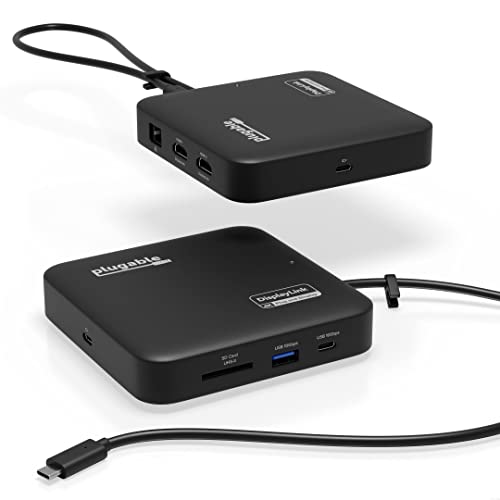
Plugable 7-in-1 Dual 4K HDMI USB-C Dock
Best for: macOS users needing dual 4K displays
- Port Count
- 7-in-1 (what this guide is about)
- Host Interface
- USB-C
- Display Support
- Dual
- Max Resolution
- 4K@60Hz
- Power Delivery
- 82W
- Video Ports
- HDMI
This Plugable dock adds dual 4K 60Hz HDMI outputs to laptops lacking native video support. It uses DisplayLink technology to drive two extended displays. The unit accepts up to 100W input and provides 82W pass-through charging. It includes Gigabit Ethernet, USB-A, and an SD card slot. You get a compact aluminum build that fits travel needs. This setup suits users needing extra screens on older hardware.
Pros
- Dual 4K 60Hz HDMI outputs via DisplayLink
- 82W pass-through power delivery
- Includes Gigabit Ethernet and SD slot
- Compact travel-ready design
Cons
- Requires DisplayLink driver installation on macOS
- Lower 82W pass-through output than 100W competitors
- Charging cable sold separately
Good fit if
- You need dual monitors on a laptop without native video support
- You use macOS and need reliable dual display expansion
- You want an SD card slot for file transfers
Skip if
- You require 100W pass-through charging to your laptop
- You want a plug-and-play solution without driver installation
- You prefer a dock with included charging cables
Verdict: Plugable 7-in-1 USB-C DisplayLink Dock enables dual 4K displays on systems that lack native video support, making it ideal for macOS users or older Windows laptops needing expanded workspace.

Satechi Pro Slim 7-in-1 USB-C Hub
Best for: MacBook users needing 4K video and fast data
- Port Count
- 7-in-1 (what this guide is about)
- Host Interface
- USB-C
- Max Resolution
- 4K
- Power Delivery
- 100W
- Video Ports
- HDMI
- Max Data Speed
- 10Gbps
This Satechi hub offers a compact 7-in-1 setup with 4K HDMI output and 100W power delivery. Its slim aluminum design plugs directly into your MacBook, eliminating extra cables. It includes two USB 3.2 ports and an SD card reader. This hub suits users who prioritize a clean, integrated look and need reliable data transfer speeds for their daily workflow.
Pros
- Supports 4K HDMI video output
- Provides 100W charging pass-through
- Includes two USB 3.2 Gen 2 ports
- Features an SD card reader
- Slim aluminum build attaches directly to port
Cons
- Only one HDMI port for single monitor use
- No Ethernet port for wired internet
- Limited to USB-C host interface
Good fit if
- You use a MacBook and want a seamless, cable-free connection
- You need fast 10Gbps data transfer for creative files
- You prefer a slim, aluminum accessory that matches your device
Skip if
- You require dual monitor support for productivity
- You need a wired Ethernet connection for stable internet
- You want multiple USB-A ports for legacy peripherals
Verdict: Satechi 7-in-1 USB-C Hub Slim is a tidy solution for MacBook users who need 4K video and fast data without extra cables. It fits those who value a minimalist desk setup over multi-monitor capability.

NOVOO 7-in-1 USB-C Hub with Gigabit Ethernet
Best for: Single monitor setups with wired internet needs
- Port Count
- 7-in-1 (what this guide is about)
- Host Interface
- USB-C
- Max Resolution
- 4K@60Hz
- Power Delivery
- 88W
- Video Ports
- HDMI
- Max Data Speed
- 5Gbps
View on Amazon: NOVOO 7-in-1 USB-C Hub with Gigabit Ethernet
The NOVOO 7-in-1 hub delivers 4K@60Hz video output over a single HDMI port. It includes a 1Gbps Ethernet connection and 100W Power Delivery for charging. The unit features three USB-A ports and one USB-C data port for 5Gbps transfers. A dedicated screen-off button allows quick privacy control. This compact device suits users who need a stable wired connection and efficient power delivery in a small form factor.
Pros
- 4K@60Hz HDMI output for clear visuals
- 1Gbps Ethernet for stable wired internet
- 100W Power Delivery with 88W output
- Dedicated one-click screen-off privacy button
- 5Gbps data transfer speeds on USB ports
Cons
- Only one HDMI port for video
- No dual monitor support
- Limited to 5Gbps data speeds
Good fit if
- You need a single high-resolution external display
- You require a stable wired Ethernet connection
- You want a compact hub with privacy controls
Skip if
- You need to connect two external monitors
- You require Thunderbolt or USB4 connectivity
- You need USB 3.2 Gen 2 data speeds
Verdict: The NOVOO 7-in-1 USB-C Hub fits users who prioritize a single 4K@60Hz display and reliable wired networking. It offers essential ports without the bulk of a full docking station.
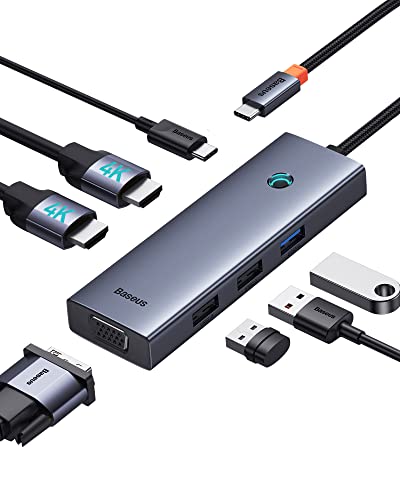
Baseus 7-in-1 USB-C Dock with VGA & Dual HDMI
Best for: legacy VGA connections and triple displays
- Port Count
- 7-in-1 (what this guide is about)
- Host Interface
- USB-C
- Display Support
- Triple
- Max Resolution
- 4K@60Hz
- Power Delivery
- 100W
- Video Ports
- HDMI, VGA
View on Amazon: Baseus 7-in-1 USB-C Dock with VGA & Dual HDMI
This Baseus 7-in-1 docking station supports triple displays via two HDMI ports and one VGA port. It delivers 4K resolution at 60Hz through HDMI 1. The aluminum alloy build includes a 100W USB-C power delivery port for charging laptops. It also features one USB 3.0 port for fast data transfer and two USB 2.0 ports for peripherals. This compact hub is designed for users needing legacy VGA connectivity alongside modern HDMI standards.
Pros
- Supports triple monitor setups with dual HDMI and VGA outputs
- Provides 100W power delivery to charge connected laptops
- Includes USB 3.0 port for high-speed data transfer
- Compact aluminum alloy construction for portability
Cons
- macOS users are limited to mirrored display mode only
- Only one HDMI port supports 4K@60Hz resolution
- Lacks DisplayLink technology for expanded Windows desktop functionality
Good fit if
- You need a VGA port for older projectors or monitors
- You want to drive three screens from a single laptop
- You require 100W charging for your laptop while docked
Skip if
- You use a Mac and need independent extended displays
- You require dual 4K@60Hz HDMI outputs
- You need native DisplayLink support for Windows multitasking
Verdict: Baseus 7-in-1 Dock with VGA is a practical option for Windows users who need legacy VGA support and triple display capability. It suits those who prioritize port count and charging speed over advanced macOS display management.
Specifications side by side
| Spec | UGREEN 7-in-1 Dual 4K HDMI USB-C Dock | MOKiN Dual HDMI USB-C Docking Station | Anker 7-in-1 Dual HDMI USB-C Hub | Baseus 7-in-1 USB-C Hub with 3 USB-A Ports | Dell 7-in-1 USB-C Travel Hub | Plugable 7-in-1 Dual 4K HDMI USB-C Dock | Satechi Pro Slim 7-in-1 USB-C Hub | NOVOO 7-in-1 USB-C Hub with Gigabit Ethernet | Baseus 7-in-1 USB-C Dock with VGA & Dual HDMI |
|---|---|---|---|---|---|---|---|---|---|
| Host Interface | USB-C | USB-C, Thunderbolt 3/4 | USB-C, USB4, Thunderbolt | USB-C | USB-C | USB-C | USB-C | USB-C | USB-C |
| Display Support | Dual | Dual | Dual | not specified | not specified | Dual | not specified | not specified | Triple |
| Max Resolution | 4K@60Hz | 4K@60Hz | 1080p@60Hz | 4K@60Hz | not specified | 4K@60Hz | 4K | 4K@60Hz | 4K@60Hz |
| Power Delivery | 100W | 100W | 85W | 100W | not specified | 82W | 100W | 88W | 100W |
| Port Count | 7 | 13 | 7 | 7 | 7 | 7 | 7 | 7 | 7 |
| Video Ports | HDMI | HDMI | not specified | HDMI | HDMI, DisplayPort | HDMI | HDMI | HDMI | HDMI, VGA |
| Max Data Speed | 10Gbps | 5Gbps | 10Gbps | 5Gbps | not specified | not specified | 10Gbps | 5Gbps | not specified |
| Ethernet Speed | not specified | 1000Mbps | not specified | not specified | 2.5Gbps | Gigabit | not specified | 1Gbps | not specified |
| Resolution | not specified | not specified | not specified | 4K UHD | not specified | 4K UHD | 4K UHD | 4K UHD | 4K UHD |
| Connectivity | USB-C | USB-C, HDMI | USB-C, HDMI | USB-C, HDMI, USB-A | USB-C, HDMI, Ethernet | USB-C, HDMI | USB-C, HDMI | USB-C, HDMI, Ethernet, USB-A | USB-C, HDMI, VGA |
| Refresh Rate | not specified | not specified | not specified | 60Hz | not specified | 60Hz | not specified | not specified | not specified |
| Features | not specified | not specified | not specified | Card Reader | not specified | DisplayLink | not specified | not specified | not specified |
| Use | not specified | not specified | not specified | not specified | Travel | not specified | not specified | not specified | not specified |
| Material | Aluminum | not specified | not specified | not specified | not specified | not specified | not specified | not specified | not specified |
| Dimensions | 3.1 × 0.8 × 0.49 inches | not specified | 4.5 × 2.1 × 0.7 inches | 5.31 × 1.93 × 0.63 inches | 2.8 × 2.8 × 1.03 inches | 4.72 × 4.72 × 1.02 inches | 4.92 × 1.18 × 0.31 inches | 1.57 × 0.39 × 3.94 inches | 4.33 × 1.46 × 0.55 inches |
| Weight | 3.21 ounces | 5.61 ounces | 3.39 ounces | not specified | 3.36 ounces | 8.82 ounces | 1.45 ounces | 2.79 ounces | 2.26 ounces |
| Size | 7 in 1 | 13-in-1 | not specified | 7 in 1 | not specified | not specified | not specified | 7-in-1 | 6 in 1 |
| Color | Black or grey | Grey | Gray | Black | Black | Black | Midnight | Champagne | not specified |
| Model | 45365 | not specified | A8374 | 7 in 1 | DA326 | USBC-6950PDZ | ST-HUCPHSD | NH07D-168D | not specified |
If you need integrated NVMe storage alongside port expansion, compare the best 10Gbps SSD docking stations for transfer speed specs.
How to Choose the Right 7-in-1 Dock
-
Check Display Support Limits
Verify how many external screens the dock supports. The UGREEN 45365 handles dual 4K@60Hz monitors, which suits users needing expanded workspace on Windows. In contrast, the Dell DA326 limits you to a single display, making it better for travelers who prioritize portability over multi-monitor setups. Ensure the port count matches your video needs before purchasing. If you require three screens, the Baseus dock with VGA and dual HDMI offers triple display capability for legacy connections.
-
Match Connectivity to Ports
Look at the specific ports available on the device. The MOKiN dock includes wired networking via Ethernet, ideal for Windows laptops with Thunderbolt that need stable internet. The NOVOO hub also provides Gigabit Ethernet alongside USB-A ports for legacy devices. If you only need HDMI and USB-C, the Anker A8374 offers a streamlined setup. Check that the connectivity options align with your current peripherals to avoid needing extra adapters later.
-
Consider Power Delivery Needs
Check if the dock charges your laptop while connected. Many models, including the Baseus 7-in-1 and the Satechi ST-HUCPHSD, support 100W Power Delivery. This allows you to power high-performance laptops through a single cable. The Plugable USBC-6950PDZ also offers 100W charging. If your laptop requires more power or the dock lacks this feature, you will need a separate charger. Verify the wattage matches your device’s requirements for reliable operation.
-
Evaluate Resolution and Refresh
Confirm the maximum resolution and refresh rate supported. The Anker A8374 delivers dual 1080p@60Hz displays, which is sufficient for basic productivity but not for high-resolution tasks. The Satechi ST-HUCPHSD supports 4K UHD video for sharper images on MacBook setups. The NOVOO hub also handles 4K@60Hz. If you need high clarity for design work, prioritize models listing 4K UHD support over those limited to 1080p.
-
Assess Material and Build
Consider the physical build quality and dimensions. The UGREEN dock uses an aluminum body, providing a sturdy feel and better heat dissipation. The Satechi ST-HUCPHSD is notably slim at 0.31 inches tall and weighs only 1.45 ounces, making it highly portable. The MOKiN dock is heavier at 5.61 ounces. If you carry your setup daily, choose a lighter model with a compact footprint to reduce bag weight and bulk.
-
Check OS Compatibility
Ensure the dock works with your operating system. The Plugable USBC-6950PDZ uses DisplayLink technology, enabling dual 4K displays on macOS systems that lack native support. Most other models, like the UGREEN and Anker, are optimized for Windows. The MOKiN dock is also best suited for Windows users with Thunderbolt. If you use a Mac, verify that the dock supports extended desktops natively or via DisplayLink drivers to avoid display limitations.
Frequently asked questions
Can a 7-in-1 dock support dual 4K monitors on Windows?
Yes, several models support dual 4K@60Hz displays on Windows systems. The UGREEN 45365 provides reliable dual 4K output with an aluminum build. The Plugable USBC-6950PDZ uses DisplayLink technology to enable dual 4K screens on systems lacking native video support. Both options suit users needing expanded workspace without macOS restrictions.
Which 7-in-1 hub is best for macOS users needing dual screens?
The Plugable USBC-6950PDZ is ideal for macOS users requiring dual 4K displays. It utilizes DisplayLink technology to overcome native display limitations on many Mac systems. Other models like the UGREEN 45365 are better suited for Windows users, as they prioritize high-speed connectivity over macOS extended display features.
Do 7-in-1 docking stations include Ethernet ports for wired internet?
Some models include Ethernet ports for stable wired networking. The Dell DA326 Travel Hub features an Ethernet port, making it suitable for travelers needing fast connectivity. The NOVOO NH07D-168D also offers Gigabit Ethernet alongside a single 4K display output. These options prioritize wired internet reliability over multi-monitor setups.
What is the lightest 7-in-1 USB-C hub available?
The Satechi ST-HUCPHSD is the lightest option at 1.45 ounces. Its slim design fits MacBook users who need 4K video and fast data transfer without extra bulk. The NOVOO NH07D-168D is another lightweight choice at 2.79 ounces, offering essential ports including Gigabit Ethernet and USB-A connectivity.
Can a 7-in-1 dock connect to three monitors?
The Baseus dock with VGA supports triple display capability. It combines VGA legacy support with HDMI outputs for Windows users needing multiple screens. Most other 7-in-1 hubs limit you to one or two displays. The UGREEN 45365 and MOKiN models support dual 4K monitors but not triple setups.
Which 7-in-1 hub offers the best portability for travel?
The Dell DA326 Travel Hub is designed for portability with a compact size. It fits users who prioritize fast Ethernet and a single display while on the go. The Satechi ST-HUCPHSD is also highly portable due to its slim profile and low weight, making it tidy for minimalist desk setups.