9 Best Docking Stations with Card Reader, Compared
As an Amazon Associate we earn from qualifying purchases. Links on this page are affiliate links.
A dedicated docking station with card reader streamlines your desk setup by combining high-speed memory card access with essential peripheral connectivity. We compared 9 models based strictly on the specifications published on their product listings. The HODO 8-in-2 MacBook USB-C Hub leads the group because of its direct dual-port attachment offering Thunderbolt 3 connectivity and 100W power delivery.
Whether you need multi-display outputs, wired Ethernet, or a compact travel solution, this guide helps you decide which model matches your port needs and hardware setup.
Quick picks
The best fit for you
- You need a dual-port hub for your MacBook HODO 8-in-2 MacBook USB-C Hub It provides Thunderbolt 3 connectivity and an integrated card reader in a direct 8-in-2 attachment.
- You need triple display support and high port capacity MOKiN 13-in-1 USB-C Docking Station This 13-in-1 dock provides triple monitor support, 100W power delivery, and an integrated card reader.
- You want the lightest portable hub for travel NOVOO 6-in-1 USB-C Hub Weighing 0.119 pounds, this 6-in-1 hub pairs 100W power delivery with an integrated card reader.
- You require Thunderbolt connectivity for your workstation setup CalDigit TS3 Plus Thunderbolt 3 Dock It combines Thunderbolt 4 connectivity, DisplayPort, and a card reader for high-bandwidth workstation expansion.
Our 9 picks

HODO 8-in-2 MacBook USB-C Hub
Best for: MacBook users needing high-speed card offloading
- Features
- Card Reader (what this guide is about)
- Host Interface
- USB-C
- Max Resolution
- 5K
- Power Delivery
- 100W
- Port Count
- 8
- Video Ports
- HDMI, Thunderbolt 3
This dual USB-C hub attaches flush to your MacBook Pro or MacBook Air, turning two host ports into eight. For card management, it includes both SD and microSD slots rated up to 104 MB/s. You also get a 40 Gbps Thunderbolt 3 port supporting 100W charging, a 4K HDMI output, and two 10 Gbps USB 3.1 ports. It suits MacBook users needing fast memory card transfers and versatile peripheral access without cable clutter.
Pros
- SD and microSD card slots supporting speeds up to 104MB/s
- Thunderbolt 3 port supporting 40Gbps data, 5K display, and 100W power
- Two USB 3.1 ports with transfer rates up to 10Gbps
- Dedicated 4K UHD HDMI video output port
Cons
- Will not attach properly if your laptop uses a protective case
- Incompatible with Logitech mice and keyboards
- Supports only one connected HDD or SSD at a time
Good fit if
- You use a dual USB-C MacBook Pro or MacBook Air without a protective case.
- You frequently offload photos and videos using SD or microSD cards.
- You need 100W passthrough charging alongside high-speed 10Gbps USB-A ports.
Skip if
- You keep a snap-on case installed on your MacBook.
- You rely on Logitech wireless keyboards or mice.
- You need to run two external hard drives or SSDs simultaneously.
Verdict: HODO 8-in-2 MacBook USB-C Hub delivers fast SD card transfers and 100W power delivery in a direct dual-port attachment. It is an efficient expansion solution if your MacBook remains uncased.

Baseus 7-in-1 USB-C Hub with 3 USB-A Ports
Best for: single-monitor setups needing fast memory card transfers
- Features
- Card Reader (what this guide is about)
- Host Interface
- USB-C
- Max Resolution
- 4K@60Hz
- Power Delivery
- 100W
- Port Count
- 7
- Video Ports
- HDMI
The Baseus 7-in-1 USB-C Hub combines an integrated SD and TF card reader with 4K video output at 60Hz. You get three 5Gbps USB 3.0 ports for external accessories and flash drives, along with a 100W USB-C Power Delivery input to charge your laptop during operation. It suits you if you need reliable memory card access, basic desktop connectivity, and a single high-refresh external display without bulky hardware.
Pros
- Supports 4K video output at 60Hz and 1080p at 120Hz via HDMI
- Includes both SD and TF memory card slots
- 100W USB-C Power Delivery pass-through input
- Three 5Gbps USB 3.0 Type-A data ports
Cons
- No built-in Ethernet port
- Single display output limited to one HDMI port
- USB-C port handles power input only, not data
Good fit if
- You need built-in SD and TF slots alongside standard USB-A ports.
- You want 4K video output running at 60Hz on a single monitor.
- You require pass-through laptop charging up to 100W.
Skip if
- You require a wired Gigabit Ethernet connection.
- You want to drive two or more external displays.
Verdict: Baseus 7-in-1 USB-C Hub with Card Reader delivers reliable SD/TF card access and 4K 60Hz display output in a compact footprint. It provides essential ports and 100W power delivery for single-monitor portable setups.

MOKiN 13-in-1 USB-C Docking Station
Best for: simultaneous card reading and multi-monitor workstations
- Features
- Card Reader (what this guide is about)
- Host Interface
- USB-C
- Display Support
- Triple
- Max Resolution
- 4K
- Power Delivery
- 85W
- Port Count
- 13
The MOKiN 13-in-1 USB-C Docking Station expands your laptop with thirteen ports, including dedicated SD and microSD card slots that read data at the same time. You get two HDMI ports and a DisplayPort for driving up to three displays, alongside three 10Gbps USB 3.1 ports for fast external storage. With 85W pass-through charging and Gigabit Ethernet built in, it serves setups requiring heavy data transfer alongside multi-monitor desktop configurations.
Pros
- Dual SD and microSD slots support simultaneous data reading
- Three USB 3.1 ports deliver transfer speeds up to 10Gbps
- Triple display support through two HDMI ports and one DisplayPort
- Pass-through charging supplies up to 85W to connected laptops
Cons
- macOS extended mode is limited to one external display
- Triple display output caps resolution at 1080p at 60Hz
- Does not support display signal converters
Good fit if
- You need to read SD and microSD cards simultaneously.
- You transfer large files using 10Gbps USB-C or USB-A storage.
- You run up to three external displays from a compatible Windows computer.
Skip if
- You use a Mac and require multiple extended external screens.
- Your laptop requires more than 85W of continuous power delivery.
Verdict: MOKiN 13-in-1 USB-C Docking Station provides high-speed 10Gbps data routing and simultaneous card reading for productive multi-monitor desks. It fits Windows users needing extensive port variety and multi-screen video support from a single hub.

Baseus 12-in-1 Triple 4K Docking Station
Best for: multi-monitor desks needing integrated card readers
- Features
- Card Reader (what this guide is about)
- Host Interface
- USB-C
- Display Support
- Triple
- Max Resolution
- 4K
- Power Delivery
- 85W
- Port Count
- 12
This Baseus docking station pairs integrated SD and TF card readers with triple 4K display connectivity across HDMI and DisplayPort. It delivers 12-in-1 port expansion, including three USB-A 3.0 ports, one USB-C 3.0 port, Gigabit Ethernet, an audio jack, and 85W power delivery from a 100W input. Its built-in stand elevates your laptop for airflow, making it a solid desk centerpiece if you transfer media files across multiple monitors.
Pros
- Built-in SD and TF card readers for media cards
- Supports triple 4K displays using HDMI and DisplayPort
- Supplies up to 85W laptop power from 100W PD input
- Ergonomic stand structure helps laptop heat dissipation
- Includes Gigabit Ethernet and four USB 3.0 data ports
Cons
- Maximum laptop power delivery is limited to 85W
- Weighs nearly 0.75 pounds, making it less travel-friendly
Good fit if
- You need SD and TF card access combined with triple 4K display outputs.
- You want an integrated stand base to raise your laptop and manage heat.
- You require wired Gigabit Ethernet and multiple USB 3.0 peripheral ports.
Skip if
- You need more than 85W of pass-through power for your laptop.
- You want an ultra-compact adapter strictly for travel.
Verdict: Baseus 12-in-1 Triple 4K Docking Station combines memory card slots, multi-display video, and an elevated stand into a unified desktop setup. It handles high-resolution outputs and daily data transfer while supplying up to 85W of power delivery.

NOVOO 6-in-1 USB-C Hub
Best for: Travelers needing SD card access and 100W charging
- Features
- Card Reader (what this guide is about)
- Host Interface
- USB-C
- Max Resolution
- 4K
- Power Delivery
- 100W
- Port Count
- 6
- Video Ports
- HDMI
This compact NOVOO 6-in-1 USB-C hub expands your laptop with a 4K UHD HDMI port, two USB 3.0 connections, and an integrated SD/TF card reader. It delivers up to 100W Power Delivery pass-through charging while you transfer media or run an external monitor. Weighing approximately 0.12 pounds, it suits mobile users who need memory card access and basic display connectivity in a lightweight footprint.
Pros
- Supports up to 100W USB-C Power Delivery
- Integrated SD and TF card reader slots
- Single 4K UHD HDMI output
- Lightweight design at approximately 0.12 pounds
Cons
- Single HDMI port limits setups to one external display
- No Ethernet network port included
- Limited to two standard USB 3.0 ports
Good fit if
- You need an SD and TF card reader with 100W pass-through charging.
- You only require a single 4K external display output.
- You prioritize a lightweight accessory weighing roughly 0.12 pounds.
Skip if
- You need dual or triple external monitor support.
- You require a wired Ethernet port for internet access.
- You have more than two USB-A peripherals to connect at once.
Verdict: NOVOO 6-in-1 USB-C Hub provides essential SD/TF card reading and 100W Power Delivery in a compact build. It handles single-monitor productivity without adding bulk to your mobile bag.
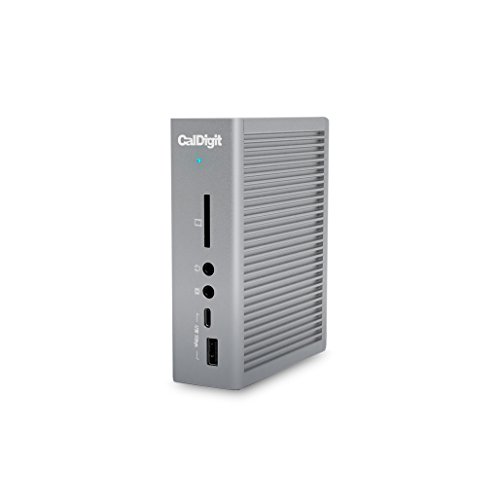
CalDigit TS3 Plus Thunderbolt 3 Dock
Best for: Thunderbolt workstations requiring fast SD card transfers
- Features
- Card Reader (what this guide is about)
- Host Interface
- Thunderbolt 3
- Display Support
- Dual
- Max Resolution
- 5K@60Hz
- Power Delivery
- 87W
- Port Count
- 15
The CalDigit TS3 Plus Thunderbolt Dock connects your laptop through a single Thunderbolt connection to expand your setup with 15 ports. It features a UHS-II SD card reader capable of 312 MB/s bus speeds, along with up to 87W host charging and dual 4K display output. This dock suits you if you need fast memory card transfers, dedicated audio inputs and outputs, and multiple high-speed USB connections for your workstation.
Pros
- UHS-II SD card reader with bus speeds up to 312 MB/s
- Supplies up to 87W host charging to your laptop
- 15 total ports including Thunderbolt 3, DisplayPort, and optical audio
- Supports dual 4K at 60Hz displays or a single 5K screen
Cons
- Requires a host computer with Thunderbolt 3 or newer
- DisplayPort conversion to HDMI requires an active adapter
- Does not support dual displays on base M1 Macs
Good fit if
- You need high-speed UHS-II SD card transfers up to 312 MB/s.
- You use a Thunderbolt-equipped Mac or Windows laptop needing up to 87W power.
- You want to connect dual 4K monitors or a single 5K display.
Skip if
- You have a host computer without at least a Thunderbolt 3 port.
- You use a base M1 Mac and expect dual external monitors.
- You require built-in native HDMI ports without using adapters.
Verdict: CalDigit TS3 Plus Thunderbolt Dock delivers comprehensive workstation connectivity with fast UHS-II SD card speeds and 87W charging. It is a solid choice for Thunderbolt users who need extensive port expansion.

Baseus Triple Display Dock with SD and TF Reader
Best for: Multi-monitor desks needing SD card access
- Features
- Card Reader (what this guide is about)
- Host Interface
- USB-C
- Display Support
- Dual
- Max Resolution
- 4K@120Hz
- Power Delivery
- 85W
- Video Ports
- HDMI, DisplayPort
View on Amazon: Baseus Triple Display Dock with SD and TF Reader
This Baseus docking station expands your laptop with SD and TF card slots rated up to 104MB/s, dual HDMI ports, and a DisplayPort connector supporting single-screen output up to 4K at 120Hz. It adds Gigabit Ethernet, two 5Gbps USB-A ports, one USB 2.0 port, and pass-through power delivery delivering up to 85W to your machine. It suits creators and desk setups needing fast photo offloading alongside multiple external monitors.
Pros
- Built-in SD and TF card slots support transfer speeds up to 104MB/s
- Single-display video output supports resolutions up to 4K at 120Hz
- Includes 1000Mbps Gigabit Ethernet port for wired networks
- Supplies up to 85W laptop charging pass-through from a 100W input
Cons
- Internal hardware consumes 15W of power from connected power supplies
- Includes one slower USB 2.0 port among its three USB-A connections
- No downstream USB-C data ports listed in specifications
Good fit if
- You need integrated SD and TF slots alongside dual HDMI and DisplayPort outputs.
- You want high-refresh single-display support up to 4K at 120Hz.
- You require a dedicated 1000Mbps wired Ethernet connection.
Skip if
- You need a full 100W pass-through charge without the dock drawing 15W.
- You require downstream USB-C ports for external drives.
Verdict: Baseus Triple Display Dock with SD and TF Reader pairs memory card access with multi-display video output up to 4K at 120Hz. It gives desktop workstations reliable media transfers, display expansion, and wired networking.

MOKiN 13-in-1 Triple Display USB-C Dock
Best for: Windows multi-display desks needing dual card reading
- Features
- Card Reader (what this guide is about)
- Host Interface
- USB-C
- Display Support
- Triple
- Max Resolution
- 4K
- Power Delivery
- 87W
- Port Count
- 13
The MOKiN 13-in-1 Triple Display USB-C Dock connects peripherals and displays through a single USB-C port. For media management, it features SD and TF card slots that support reading two cards at once. It also provides two 4K HDMI ports, one DisplayPort, Gigabit Ethernet, and 87W laptop charging. This setup fits you if you run multiple external monitors on Windows while transferring data from memory cards.
Pros
- Simultaneous data access on SD and TF card slots
- Triple display outputs with two HDMI and one DisplayPort
- Supports up to 87W charging output for laptops
- Gigabit Ethernet port supporting 1000Mbps wired networks
Cons
- Triple extended display is not supported on macOS
- Power delivery charging output is capped at 87W
Good fit if
- You need to read SD and micro SD cards simultaneously.
- You use a Windows laptop with dual HDMI and DisplayPort screens.
- You require Gigabit Ethernet and multiple USB connections.
Skip if
- You use macOS and need multiple extended external monitors.
- You require more than 87W of charging power for your laptop.
Verdict: MOKiN 13-in-1 Triple Display USB-C Dock delivers dual card slot reading and triple display support for Windows workstations. It combines fast networking, high-resolution video outputs, and 87W charging into a compact desk hub.
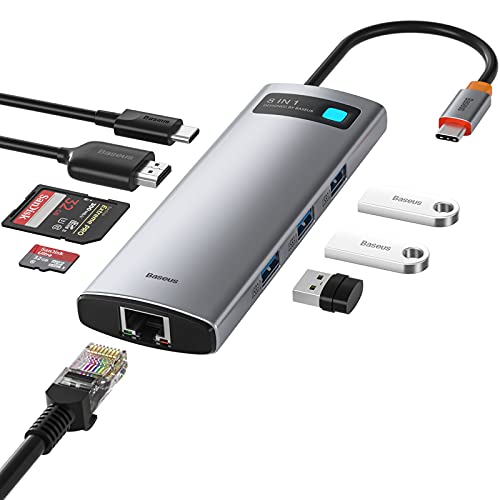
Baseus 8-in-1 USB-C Hub with Card Reader
Best for: compact setups needing Ethernet and card readers
- Features
- Card Reader (what this guide is about)
- Host Interface
- USB-C
- Max Resolution
- 4K
- Power Delivery
- 100W
- Port Count
- 8
- Video Ports
- HDMI
The Baseus 8-in-1 USB-C Hub expands a single USB-C port into an eight-port workstation adapter for your setup. It provides both SD and TF card slots transferring up to 60MB/s alongside three 5Gbps USB 3.0 ports. You also get a 4K HDMI output, Gigabit Ethernet, and 100W USB-C pass-through power delivery. It suits you if you need compact card offloading, wired networking, and display output on the go.
Pros
- Dedicated SD and TF card slots with read speeds up to 60MB/s
- 100W USB-C pass-through power delivery input
- Three 5Gbps USB 3.0 ports supporting 5V/1.5A charging
- Gigabit Ethernet port supporting 10/100/1000Mbps network speeds
Cons
- Card reader data transfer rate is capped at 60MB/s
- USB-C PD port functions solely for power input, not data or video
- Includes only one HDMI port with no second display output
Good fit if
- You need both SD and TF card slots alongside a Gigabit Ethernet port.
- You want 100W pass-through charging to power your laptop using a single cable.
- You connect multiple standard USB accessories using three USB 3.0 ports.
Skip if
- You require SD card transfer speeds faster than 60MB/s.
- You want to drive dual external monitors from a single dock.
- You need downstream USB-C data transfer or peripheral charging.
Verdict: Baseus 8-in-1 USB-C Hub with Card Reader combines dual memory card slots, Gigabit Ethernet, and 100W pass-through charging into a lightweight design. It is a solid match if you need everyday card access and essential desktop ports in one unit.
Specifications side by side
| Spec | HODO 8-in-2 MacBook USB-C Hub | Baseus 7-in-1 USB-C Hub with 3 USB-A Ports | MOKiN 13-in-1 USB-C Docking Station | Baseus 12-in-1 Triple 4K Docking Station | NOVOO 6-in-1 USB-C Hub | CalDigit TS3 Plus Thunderbolt 3 Dock | Baseus Triple Display Dock with SD and TF Reader | MOKiN 13-in-1 Triple Display USB-C Dock | Baseus 8-in-1 USB-C Hub with Card Reader |
|---|---|---|---|---|---|---|---|---|---|
| Host Interface | USB-C | USB-C | USB-C | USB-C | USB-C | Thunderbolt 3 | USB-C | USB-C | USB-C |
| Display Support | not specified | not specified | Triple | Triple | not specified | Dual | Dual | Triple | not specified |
| Max Resolution | 5K | 4K@60Hz | 4K | 4K | 4K | 5K@60Hz | 4K@120Hz | 4K | 4K |
| Power Delivery | 100W | 100W | 85W | 85W | 100W | 87W | 85W | 87W | 100W |
| Port Count | 8 | 7 | 13 | 12 | 6 | 15 | not specified | 13 | 8 |
| Video Ports | HDMI, Thunderbolt 3 | HDMI | HDMI, DisplayPort | HDMI, DisplayPort | HDMI | DisplayPort, Thunderbolt 3 | HDMI, DisplayPort | 2 HDMI, 1 DP | HDMI |
| Max Data Speed | 40Gbps | 5Gbps | 10Gbps | not specified | not specified | 40Gb/s | 5Gbps | 5Gb/s | 5Gbps |
| Ethernet Speed | not specified | not specified | Gigabit | Gigabit | not specified | Gigabit Ethernet | 1000Mbps | 1000Mbps | Gigabit Ethernet |
| Resolution | not specified | 4K UHD | 4K UHD | 4K UHD | 4K UHD | not specified | 4K UHD | 4K UHD | 4K UHD |
| Connectivity | USB-C, HDMI, Thunderbolt 3 | USB-C, HDMI, USB-A | USB-C, HDMI, DisplayPort, Ethernet | HDMI, DisplayPort, Ethernet, USB-A | USB-C, HDMI | USB-C, DisplayPort, Ethernet, Thunderbolt 4, Thunderbolt 3 | USB-C, HDMI, DisplayPort, Ethernet, USB-A | USB-C, HDMI, DisplayPort, Ethernet | USB-C, HDMI, Ethernet |
| Refresh Rate | not specified | 60Hz | not specified | not specified | not specified | not specified | not specified | not specified | not specified |
| Features | Card Reader | Card Reader | Card Reader | Card Reader | Card Reader | Card Reader | Card Reader | Card Reader | Card Reader |
| Weight | 3.63 ounces | not specified | 4.66 ounces | 12 ounces | 1.9 ounces | 1.32 pounds | 7.04 ounces | 3.88 ounces | 2.15 ounces |
| Dimensions | not specified | 5.31 × 1.93 × 0.63 inches | not specified | not specified | 4.42 × 1.17 × 0.45 inches | 6.8 × 5.4 × 4.8 inches | 5.9 × 2.8 × 2.91 inches | 7 × 3 × 0.6 inches | 5.16 × 1.73 × 0.63 inches |
| Size | 8-in-2 | 7 in 1 | 13 IN 1 | not specified | 6 in 1 | 0.8 Meter Cable | not specified | 13 in 1(2 HDMI+DP) | 8 in 1 |
| Color | Space Gray | Black | Gray | Silver | Grey | TS3 Plus - Space Gray | Gray | 13 ports 2HDMI+DP | 8 in 1 |
| Model | HD2c03H | 7 in 1 | 0231 | not specified | NVHUBSG2U6PXL-SJ | TS3PLUS-US07-SG | not specified | MUC0219US | AT01 |
How to Choose a Card Reader Dock
-
Verify Power Delivery Wattage
Check the exact Power Delivery specification of the dock to ensure it matches your laptop charging needs. Portable hubs frequently support up to 100W pass-through charging, but stationary desktop units may deliver fixed power levels. For example, the Baseus 12-in-1 Triple 4K Docking Station provides up to 85W of power delivery. If your notebook requires higher wattage under sustained workloads, verify whether the dock routes full power to the host or reserves a portion for connected card readers and USB peripherals.
-
Check Card Reader Bus Speeds
Examine the card reader interface standard before purchasing. Basic hubs provide memory card access for standard transfers, but heavy photo and video workflows benefit from faster bus support. The CalDigit TS3 Plus Thunderbolt 3 Dock includes an integrated card slot rated for UHS-II SD card speeds. If you frequently move high-bitrate media files from full-size memory cards, selecting a dock with verified UHS-II transfer capabilities cuts your waiting time compared to basic card readers wired across standard USB channels.
-
Confirm Dual Card Concurrency
Look at whether the docking station allows you to read both SD and microSD cards at the same time. Some basic multi-port hubs share a single internal data channel, requiring you to access one card slot at a time. Workstation models like the MOKiN 13-in-1 USB-C Docking Station feature simultaneous card reading alongside 10Gbps data routing. If your setup requires copying files directly between two cards or offloading multiple cameras at once, confirm the hardware supports concurrent data operations.
-
Evaluate Display Refresh Rates
Check the supported display refresh rate alongside the resolution ceiling if you connect high-resolution external monitors. While many standard multi-port hubs output 4K video at 60Hz, specific desktop models provide higher refresh rates for smoother visual output. The Baseus Triple Display Dock with SD and TF Reader supports video output up to 4K at 120Hz. If you operate monitors that support elevated refresh rates, ensure the dock explicitly lists 120Hz output rather than limiting your setup to the standard 60Hz ceiling.
-
Assess Wired Ethernet Requirements
Determine if you require a dedicated wired network connection at your desk. Compact travel hubs often drop network jacks to minimize size, relying purely on wireless connections. If your workflow involves transferring large media batches from your SD card directly onto network storage or local servers, look for integrated networking. The Baseus 8-in-1 USB-C Hub with Card Reader includes Gigabit Ethernet alongside its dual memory card slots, ensuring stable wired transfer speeds without taking up an extra laptop port.
-
Account for Weight and Portability
Review the physical dimensions and weight if you plan to carry your dock between locations. Stationary desktop models often weigh over a pound, making them bulky for mobile bags. In contrast, ultra-portable options keep weight minimal while still retaining essential memory card access. The NOVOO 6-in-1 USB-C Hub weighs just 0.119 pounds with dimensions under five inches long. For mobile kits where every ounce counts, prioritize lightweight designs that pack flat without sacrificing the specific SD slots you need.
Frequently asked questions
Can you read both SD and TF cards at the same time?
Some docking stations support simultaneous dual card reading, while others limit you to one slot at a time. For example, the MOKiN 13-in-1 USB-C Docking Station and MOKiN MUC0219US explicitly support simultaneous reading across both memory card slots. Hubs like the Baseus 8-in-1 also provide dual card slots for both standard SD and TF cards, allowing media offloading without swapping cards back and forth.
Do docking stations with card readers support high refresh rate displays?
Yes, specific docking stations support refresh rates beyond standard 60Hz. The Baseus Triple Display Dock with SD and TF Reader provides 4K video output at up to 120Hz over its HDMI and DisplayPort connections. In contrast, smaller portable options such as the Baseus 7-in-1 USB-C Hub support 4K UHD resolution capped at 60Hz. Always confirm port video specifications if you need higher refresh rates.
Can you connect Thunderbolt devices to a USB-C card reader dock?
You can connect Thunderbolt devices if the dock specifically includes Thunderbolt hardware controllers and ports. The CalDigit TS3 Plus features dedicated Thunderbolt 3 and Thunderbolt 4 connectivity alongside an integrated UHS-II SD card reader and 87W charging. Similarly, the HODO 8-in-2 MacBook hub includes a Thunderbolt 3 pass-through port. Standard USB-C hubs lacking dedicated Thunderbolt controllers will operate strictly at base USB speeds.
What is the lightest portable docking station with a card reader?
The NOVOO 6-in-1 USB-C Hub is the lightest option in this comparison. It weighs 0.119 pounds and measures 4.41 inches long by 1.17 inches wide. Despite its small footprint, it provides integrated SD and TF card slots, 100W Power Delivery, and 4K HDMI video output. This makes it an ideal pick if you prioritize minimizing bag weight during travel.
What video outputs are available on multi-monitor card reader docks?
Multi-monitor docks typically combine HDMI and DisplayPort connections to route video to external screens. Models like the MOKiN 13-in-1, Baseus 12-in-1, and Baseus Triple Display Dock incorporate both HDMI and DisplayPort outputs alongside their SD card readers. These configurations let you run dual or triple external displays, depending on whether your laptop operating system supports multi-stream transport.
Do docking stations require external power to read SD cards?
Most compact USB-C hubs can read SD cards using bus power drawn directly from your laptop. Models like the Baseus 7-in-1 and NOVOO 6-in-1 draw operational power from your computer, though they also accept up to 100W Power Delivery pass-through chargers. Larger desktop options like the CalDigit TS3 Plus or Baseus 12-in-1 supply dedicated power outputs ranging from 85W to 87W directly to connected machines.
Which docking station works without a connecting cable?
The HODO 8-in-2 MacBook USB-C Hub attaches directly to your computer without an extension cable. It plugs straight into two side-by-side Thunderbolt ports on compatible MacBooks. This creates a flush attachment that provides an integrated card reader, Thunderbolt 3, HDMI, and 100W charging. However, you cannot use this form factor if your laptop is housed in a protective clip-on case.