8 Best Portable Monitors Under $300, Compared
As an Amazon Associate we earn from qualifying purchases. Links on this page are affiliate links.
Finding the right portable monitor under 300 depends on your specific workspace needs. We compared 8 displays using only the specifications published on their listings. The Anyuse 18.5" 100Hz IPS Portable Monitor takes the top position because its 18.5-inch 1080p IPS panel and 100Hz refresh rate deliver an expansive viewing area with smooth motion.
Whether you need multi-panel screen extenders, a compact 4K travel display, or auxiliary touchscreens, this guide helps you decide which panel specs match your mobile setup.
Quick picks
The best fit for you
- You need a large screen with smooth motion Anyuse 18.5" 100Hz IPS Portable Monitor Its 18.5-inch IPS panel provides 1080p resolution paired with a 100Hz refresh rate.
- You want sharp 4K visuals in lightweight form Cocopar 15.6" 4K 60Hz Portable Monitor It delivers 4K UHD resolution on a 15.6-inch panel weighing just 1.55 pounds.
- You need a lightweight multi-screen laptop setup Vixtan 14.1-Inch Triple Laptop Screen Extender This 14.1-inch triple screen extender provides two extra displays at 2.2 pounds total weight.
- You want a dedicated auxiliary touchscreen for widgets Corsair XENEON Edge 14.5" Touchscreen Monitor Its 14.5-inch 2K panel provides responsive touch input in a 1.57-pound chassis.
Our 8 picks
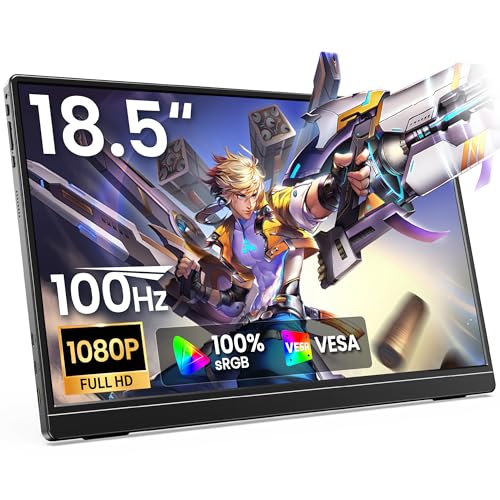
Anyuse 18.5" 100Hz IPS Portable Monitor
Best for: multitasking on a large portable display
- Screen Size
- 18.5"
- Resolution
- FHD
- Refresh Rate
- 100Hz
- Panel Type
- IPS
- Connectivity
- USB-C, HDMI
- Dimensions
- 1 × 1 × 1 inches
View on Amazon: Anyuse 18.5" 100Hz IPS Portable Monitor (paid link)
The Anyuse 18.5" 100Hz IPS Portable Monitor expands your mobile workspace with an 18.5-inch 1080p IPS panel and a 100Hz refresh rate. It connects via full-feature USB-C or standard HDMI and includes an integrated adjustable kickstand alongside dual speakers. If you need a larger display than typical 15.6-inch screens for spreadsheets or multitasking without carrying separate mounting accessories, this display fits your portable desk setup.
Pros
- Large 18.5-inch IPS display with 1080p resolution
- 100Hz refresh rate for smoother motion than standard 60Hz panels
- Built-in adjustable kickstand for quick deployment
- Single-cable USB-C and standard HDMI connectivity
Cons
- 1080p resolution provides lower pixel density across an 18.5-inch screen
- Larger footprint requires more desk and bag space than standard 15.6-inch panels
Good fit if
- You want an 18.5-inch display for expanded workspace and multitasking.
- You prefer a 100Hz refresh rate for smoother motion during work or casual gaming.
- You want an integrated kickstand without carrying extra cases or stands.
Skip if
- You need higher resolutions such as 2.5K or 4K.
- You require a compact screen that fits standard 14-inch or 15.6-inch sleeves.
Verdict: Anyuse 18.5" 100Hz IPS Portable Monitor delivers a large viewing area and a smooth 100Hz refresh rate for your mobile workspace. Its integrated kickstand and dual connectivity options make it practical when you prioritize screen size over ultra-compact portability.

KEFEYA 15.6-Inch Triple Screen Extender
Best for: triple-display multitasking on compatible laptops
- Screen Size
- 15.6"
- Resolution
- 1920x1080
- Panel Type
- IPS
- Connectivity
- USB-C, USB-A, HDMI
- Color Gamut
- 120% sRGB
- Weight
- 8.8 pounds
View on Amazon: KEFEYA 15.6-Inch Triple Screen Extender (paid link)
The KEFEYA 15.6-Inch Triple Screen Extender attaches to 13 to 17.3-inch laptops to add two displays. It features 1080p full HD IPS panels with a 1000:1 contrast ratio and 120% sRGB coverage. The screens rotate up to 235 degrees and detach for modular arrangements. You connect via USB-C or USB-A plus HDMI. It suits multitaskers who need a triple-display workstation on the go.
Pros
- 1080p IPS panels with 120% sRGB color gamut and 1000:1 contrast ratio
- Screens rotate 235 degrees with support for horizontal and vertical orientations
- Detachable design with included leather bag
- Driver-free connectivity using USB-C or USB-A with HDMI
Cons
- Total weight is 8.8 pounds
- Requires a separate adapter for base Apple M1, M2, M3, and M4 chips
Good fit if
- You use a 13 to 17.3-inch laptop and need a dual-screen expansion.
- You require 120% sRGB color gamut coverage on secondary displays.
- You want screens that detach or rotate up to 235 degrees.
Skip if
- You run a base Apple M1, M2, M3, or M4 chip without an additional adapter.
- You require an ultralight setup that adds minimal carry weight.
Verdict: KEFEYA 15.6-Inch Triple Screen Extender delivers dual-panel expansion with high color coverage for larger laptops. Its 8.8-pound listed weight requires a sturdy desk setup.

SMISEACOW 15.6" Triple Screen Extender
Best for: vertical multi-screen laptop setups on the go
- Screen Size
- 15.6"
- Resolution
- 1920×1080
- Refresh Rate
- 60Hz
- Panel Type
- IPS
- Connectivity
- USB-C, HDMI, USB-A
- Color Gamut
- 100% sRGB
View on Amazon: SMISEACOW 15.6" Triple Screen Extender (paid link)
This setup adds two 15.6-inch 1080p IPS displays to your laptop in a vertically stacked layout. Key specs include 100% sRGB color coverage, 330 cd/m² brightness, and a 60Hz refresh rate. You connect via USB-C, HDMI, or USB-A without extra drivers. It also features 75x75mm VESA mount support and built-in dual speakers. It suits you if you need vertical multi-screen space for spreadsheets or coding while traveling.
Pros
- Dual 15.6-inch 1080p IPS displays in a vertical stacked orientation
- 100% sRGB color gamut and 330 cd/m² brightness
- Standard 75×75mm VESA mount compatibility
- Plug-and-play operation via USB-C, HDMI, and USB-A
Cons
- Standard 60Hz refresh rate rather than a high-refresh display
- Full HD 1080p resolution rather than 1440p or 4K
Good fit if
- You want two vertically stacked 15.6-inch screens to save desk space.
- You need 75×75mm VESA mounting support for monitor arms.
- You connect across Windows, macOS, or Android hardware.
Skip if
- You need a panel refresh rate above 60Hz.
- You require display resolution higher than 1080p.
Verdict: SMISEACOW 15.6" Stacked Triple Screen Extender provides two vertical 1080p IPS displays with 100% sRGB coverage and VESA mounting support. It gives you a compact multi-screen workstation without occupying wide horizontal desk space.

Cocopar 15.6" 4K 60Hz Portable Monitor
Best for: sharp 4K travel productivity and color accuracy
- Screen Size
- 15.6"
- Resolution
- 4K UHD
- Refresh Rate
- 60Hz
- Connectivity
- USB-C, HDMI
- Color Gamut
- 145% sRGB
- Weight
- 1.55 lbs
View on Amazon: Cocopar 15.6" 4K 60Hz Portable Monitor (paid link)
The Cocopar 15.6" 4K 60Hz Portable Monitor provides an ultra-high-definition display for your mobile workstation. It features a 4K UHD resolution, 145% sRGB color coverage, and a standard 60Hz refresh rate across a 15.6-inch matte screen. At 1.55 pounds with an integrated kickstand and dual USB-C ports, it suits you if you need detailed visual work or a sharp secondary display while traveling.
Pros
- 4K UHD resolution with 145% sRGB coverage and 1500:1 contrast ratio
- Lightweight 1.55-pound metal chassis with integrated kickstand
- Dual USB-C ports and one HDMI port for connectivity
- Includes matte anti-glare display and protective fabric sleeve
Cons
- Refresh rate capped at standard 60Hz
- Requires Thunderbolt or DP Alt Mode on host device for single-cable USB-C connection
Good fit if
- You need 4K resolution and high color coverage on a 15.6-inch screen.
- You travel frequently and want a lightweight display with a built-in stand.
- You want VESA-mount compatibility for a desktop arm or stand.
Skip if
- You require refresh rates above 60Hz for fast-paced motion.
- You lack a video-capable USB-C or HDMI output on your computer.
Verdict: Cocopar 15.6" 4K 60Hz Portable Monitor delivers sharp 4K visuals and broad color coverage in a slim 1.55-pound metal chassis. It is a practical travel screen if you value pixel density over high refresh rates.

Corsair XENEON Edge 14.5" Touchscreen Monitor
Best for: PC monitoring and auxiliary desktop widgets
- Screen Size
- 14.5"
- Resolution
- 2560x720
- Refresh Rate
- 60Hz
- Panel Type
- LCD
- Connectivity
- HDMI, USB-C
- Weight
- 1.57 pounds
View on Amazon: Corsair XENEON Edge 14.5" Touchscreen Monitor (paid link)
The Corsair XENEON Edge is an ultrawide 14.5-inch secondary monitor designed for versatile mounting. You get a 2560x720 2K resolution panel with a 60Hz refresh rate and a five-point capacitive touchscreen. It connects via USB-C or HDMI and includes a desk stand, 14 mounting magnets, and 360mm fan-bracket screw mounts. It suits you if you want a dedicated companion display for desktop metrics, widgets, or auxiliary applications alongside your main setup.
Pros
- 2560x720 2K resolution with wide viewing angles
- Five-point capacitive multi-touch functionality
- Dual connectivity via USB-C and HDMI ports
- Versatile mounting with included stand, 14 magnets, or 360mm fan screw positions
Cons
- Ultrawide 2560x720 aspect ratio is not built for primary full-screen tasks
- Refresh rate is limited to 60Hz
Good fit if
- You want a dedicated auxiliary screen for system metrics, chat channels, or widgets
- You need touchscreen input for fast app interactions
- You want the option to mount your monitor inside a PC case or on your desk
Skip if
- You need a standard 16:9 or 16:10 aspect ratio for full-size documents
- You require a refresh rate higher than 60Hz
Verdict: Corsair XENEON Edge 14.5" 2K Touchscreen Monitor provides an ultrawide 2560x720 panel with flexible magnet, screw, and stand mounting choices. It serves reliably as an auxiliary touch display for metrics, tools, and widgets.
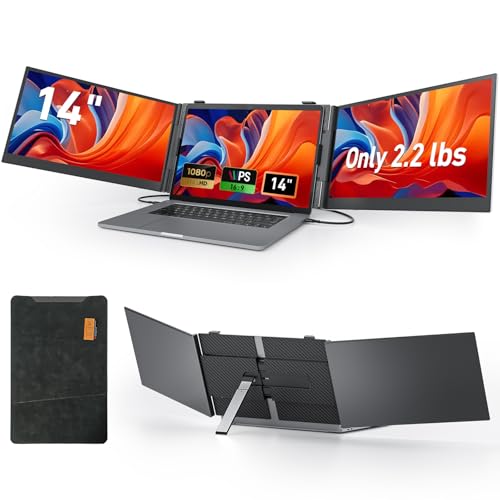
Vixtan 14.1-Inch Triple Laptop Screen Extender
Best for: Lightweight dual-screen laptop multitasking on the go
- Screen Size
- 14.1"
- Resolution
- 1920x1080
- Panel Type
- IPS
- Connectivity
- Type-C, HDMI
- Color Gamut
- 100% sRGB
- Weight
- 2.2 lbs
View on Amazon: Vixtan 14.1-Inch Triple Laptop Screen Extender (paid link)
The Vixtan 14.1-Inch Triple Laptop Screen Extender attaches to 13–17 inch laptops to provide two additional 1080p displays. It weighs 2.2 pounds and features IPS panels with 300 nits brightness and 100% sRGB color coverage. The built-in aluminum stand rotates 180 degrees for flexible viewing angles. Because it lacks an internal battery, you must power it via your laptop or a 5V/2A adapter. It fits mobile workflows needing extra screen real estate.
Pros
- Weighs 2.2 pounds for portable multi-screen travel
- FHD 1080p IPS panels with 300 nits brightness and 100% sRGB
- Widened aluminum stand rotates 180 degrees
- Compatible with 13- to 17-inch laptops
Cons
- No integrated battery; requires host power or external 5V/2A adapter
- Requires driver installation for Apple M1, M2, and M3 chips
Good fit if
- You need two extra screens in a portable 2.2-pound package.
- You use a 13- to 17-inch laptop and need portrait, extended, or mirrored display modes.
- You require 100% sRGB coverage for color-sensitive work.
Skip if
- You want an extender with an integrated internal battery.
- You use an Apple Silicon Mac and require driverless plug-and-play operation.
Verdict: Vixtan 14.1-Inch Triple Laptop Screen Extender expands 13- to 17-inch laptops with two color-accurate 1080p panels at a low carry weight. It requires sufficient port power or a 5V/2A adapter to run.
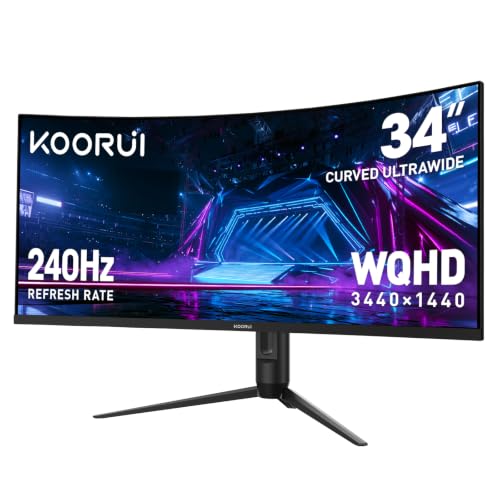
KOORUI 34-Inch 240Hz Curved Ultrawide Monitor
Best for: stationary desk setups requiring ultrawide multitasking
- Screen Size
- 34"
- Resolution
- 3440 x 1440
- Refresh Rate
- 240Hz
- Connectivity
- HDMI 2.1, DisplayPort 1.4
- Color Gamut
- 98% DCI-P3
- Aspect Ratio
- 21:9
View on Amazon: KOORUI 34-Inch 240Hz Curved Ultrawide Monitor (paid link)
This 34-inch curved ultrawide desktop display stands apart from typical travel screens by offering a massive 3440x1440 WQHD panel with a fast 240Hz refresh rate. It delivers a 1500R curvature, 4000:1 contrast ratio, and 98% DCI-P3 color coverage. If you need expansive desk workspace with picture-in-picture multitasking or high-speed gaming capabilities rather than mobile portability, this display gives you desktop-class visual real estate.
Pros
- 240Hz refresh rate with 1ms response time and adaptive sync
- 3440x1440 WQHD resolution with 21:9 ultrawide 1500R curved screen
- 4000:1 contrast ratio with 98% DCI-P3 color gamut and HDR400
- Built-in Picture-in-Picture (PIP) and Picture-by-Picture (PBP) support
- Adjustable stand with 110mm height, tilt, and swivel adjustments
Cons
- Weighs 17.6 pounds, making it unsuitable for travel bags
- Lacks USB-C video input, providing only HDMI 2.1 and DisplayPort 1.4
- Large 31.8-inch desktop footprint requires substantial desk space
Good fit if
- You want a stationary 34-inch ultrawide display with 240Hz motion clarity.
- You need PIP or PBP multitasking across two separate input devices.
- You require physical height, tilt, and swivel adjustments on your desk.
Skip if
- You need a lightweight, portable screen to carry in a backpack.
- You rely on a single-cable USB-C video and power connection.
Verdict: KOORUI 34-Inch 240Hz Curved Ultrawide Monitor delivers high-refresh WQHD screen real estate and multi-source workflows for stationary workstation setups. It is not designed for mobile travel due to its 17.6-pound weight and desktop form factor.

KTC 27-Inch 4K 160Hz Fast IPS Monitor
Best for: stationary high-refresh 4K gaming and desktop setups
- Screen Size
- 27"
- Resolution
- 3840 x 2160
- Refresh Rate
- 160Hz
- Panel Type
- Fast IPS
- Connectivity
- HDMI 2.1, DP 1.4
- Color Gamut
- 132% sRGB
View on Amazon: KTC 27-Inch 4K 160Hz Fast IPS Monitor (paid link)
The KTC 27-Inch 4K 160Hz Fast IPS Monitor gives you a full-sized desktop display with 3840 x 2160 resolution and a fast 160Hz refresh rate. It features two HDMI 2.1 ports, two DisplayPort 1.4 inputs, and a fully adjustable stand that tilts, swivels, pivots, and shifts height. Weighing 18.3 pounds, this display suits you if you need stationary 4K gaming and high-refresh productivity rather than a lightweight travel screen.
Pros
- 3840 x 2160 4K UHD Fast IPS panel with 160Hz refresh rate
- Dual HDMI 2.1 and dual DisplayPort 1.4 connectivity
- Tilt, height, pivot, and swivel adjustable ergonomic stand
- FreeSync and G-Sync compatibility with 132% sRGB coverage
Cons
- Heavy weight at 18.3 pounds reduces portability
- No USB Type-C video or power inputs listed
Good fit if
- You want 4K UHD clarity with a high 160Hz refresh rate for gaming.
- You need a versatile stand with height, tilt, swivel, and pivot adjustments.
- You connect via standard HDMI 2.1 or DisplayPort 1.4 interfaces.
Skip if
- You need a lightweight, backpack-friendly monitor for daily travel.
- You rely on a single USB-C cable to supply video and power from your laptop.
Verdict: KTC 27-Inch 4K 160Hz Fast IPS Monitor delivers sharp 4K visuals, smooth 160Hz motion, and full ergonomic adjustments for a dedicated desk setup. Its 18.3-pound weight and standard display ports make it best suited for stationary workstations.
Specifications side by side
| Spec | Anyuse 18.5" 100Hz IPS Portable Monitor | KEFEYA 15.6-Inch Triple Screen Extender | SMISEACOW 15.6" Triple Screen Extender | Cocopar 15.6" 4K 60Hz Portable Monitor | Corsair XENEON Edge 14.5" Touchscreen Monitor | Vixtan 14.1-Inch Triple Laptop Screen Extender | KOORUI 34-Inch 240Hz Curved Ultrawide Monitor | KTC 27-Inch 4K 160Hz Fast IPS Monitor |
|---|---|---|---|---|---|---|---|---|
| Screen Size | 18.5" | 15.6" | 15.6" | 15.6" | 14.5" | 14.1" | 34" | 27" |
| Resolution | FHD | 1920x1080 | 1920×1080 | 4K UHD | 2560x720 | 1920x1080 | 3440 x 1440 | 3840 x 2160 |
| Refresh Rate | 100Hz | not specified | 60Hz | 60Hz | 60Hz | not specified | 240Hz | 160Hz |
| Panel Type | IPS | IPS | IPS | not specified | LCD | IPS | not specified | Fast IPS |
| Connectivity | USB-C, HDMI | USB-C, USB-A, HDMI | USB-C, HDMI, USB-A | USB-C, HDMI | HDMI, USB-C | Type-C, HDMI | HDMI 2.1, DisplayPort 1.4 | HDMI 2.1, DP 1.4 |
| Color Gamut | not specified | 120% sRGB | 100% sRGB | 145% sRGB | not specified | 100% sRGB | 98% DCI-P3 | 132% sRGB |
| Aspect Ratio | not specified | not specified | not specified | not specified | not specified | not specified | 21:9 | not specified |
| Weight | not specified | 8.8 pounds | not specified | 1.55 lbs | 1.57 pounds | 2.2 lbs | 17.6 pounds | 18.3 lbs |
| Features | not specified | not specified | not specified | Built-in Speakers, VESA Mountable, Kickstand | Touchscreen | not specified | not specified | not specified |
| Use | not specified | not specified | Travel | Travel | not specified | not specified | Gaming | Gaming |
| Display Support | not specified | Triple Monitor | not specified | not specified | not specified | not specified | not specified | not specified |
| Size | 18.5" FHD | 17.3 Inch | 15.6"- Triple Screen Extender | 15.6 Inches | not specified | 14.1" Ultra-Light Triple Monitor | 34inch 240Hz/WQHD/Curved | 27-Inch |
| Dimensions | 1 × 1 × 1 inches | 14.2 × 0.96 × 8.8 inches | 14 × 0.95 × 8.8 inches | 0.2 × 14 × 8.66 inches | 14.6 × 4.72 × 0.87 inches | 0.59 × 8.3 × 14.3 inches | 10.6 × 31.8 × 20.2 inches | 7.09 × 30.7 × 19.1 inches |
| Color | Black | Black | 15.6"-black | black | Translucent Smoke | 14" Dark Grey | Black | Black |
| Model | AH185 | S6 | Laptop Screen Extender 15.6 M4 | Y156ULH | CC-9011357-WW | S8 PRO | G3441XC | H27P22S |
Trade-Offs Across Displays Under $300
Choosing a display Under $300 requires balancing resolution, refresh rate, and portability. Portable models prioritize 1080p FHD resolution or 60Hz refresh rates, trading higher pixel density for travel convenience. Multi-display extenders add screen real estate through triple monitor support, but they cap resolution at 1080p and increase weight up to 8.8 pounds. When models provide 4K UHD resolution paired with 160Hz or 240Hz refresh rates, form factors shift to stationary desktop hardware weighing over 17 pounds. Touchscreen features remain limited to auxiliary ultrawide displays.
- Refresh rate limits on 4K portable screens: The 4K UHD portable model caps refresh rate at 60Hz.
- Resolution caps on multi-display setups: Triple monitor extenders restrict display resolution to 1080p FHD.
- Weight compromises for high refresh rates: Displays with 160Hz or 240Hz refresh rates weigh between 17.6 and 18.3 pounds.
- Dedicated power delivery requirements: Multi-panel travel setups require external 5V/2A power adapter support.
If your setup prioritizes horizontal desktop workspace over travel portability, you can evaluate an ultrawide monitor under 300 instead of a compact secondary panel.
How We Picked These Monitors
To help you compare monitors Under $300, we select options strictly through published specifications and feature lists. We do not physically test the displays. You will see only one size or variant per product family to keep options clear. The 8 selections are ordered with products in stock first, then by Amazon sales rank, placing better-selling products first.
Monitors enter or leave this guide based on whether they currently qualify for Under $300. Availability updates live on the page at least daily. Because listing details change frequently, you may notice monitors shift positions or move off the list. This tracking ensures you always review qualifying options throughout 2026.
How to Choose the Right Portable Monitor
-
Match Resolution to Your Workload
Resolution controls desktop clarity and workspace scaling. A 1080p Full HD display suits routine text editing, spreadsheets, and web browsing without straining your laptop graphics hardware. If you edit high-resolution media or read dense spreadsheets, a 4K UHD panel like the Cocopar provides four times the pixel count of standard Full HD. This extra sharpness keeps tiny fonts readable and improves image detail. Specialized ultrawide options offer unique horizontal pixel dimensions for secondary utility windows, so match your panel resolution directly to your primary computing tasks.
-
Assess Refresh Rate Needs
Refresh rate measures how many times the screen updates each second. Standard 60Hz displays handle typical office tasks, video playback, and general web browsing without issue. Upgrading to a 100Hz display like the Anyuse produces visibly smoother mouse tracking, fluid page scrolling, and reduced perceived motion blur. Stationary monitors push higher rates up to 160Hz or 240Hz, which primarily benefits gaming and high-speed motion. Check your laptop display output specifications first to verify that your hardware can drive higher refresh rates over your selected video cable.
-
Verify Power Delivery Requirements
Portable monitors draw power directly from your laptop or an external wall brick. A single-screen monitor often runs over one USB-C cable that carries video and power together. Multi-screen setups demand substantially more current to illuminate multiple panels simultaneously. For example, the Vixtan triple screen setup specifies host port power or an external 5V/2A power adapter to maintain reliable operation. Review your computer port output ratings before buying. Using an external power source ensures stable brightness levels and prevents unexpected monitor shutdowns during heavy mobile multitasking sessions.
-
Prioritize IPS Panel Technology
Panel technology dictates contrast, viewing angles, and color consistency. In-Plane Switching (IPS) panels are the preferred choice for portable displays because they maintain accurate colors and sharp contrast from wide side angles. This feature becomes critical when you position secondary screens beside your laptop or angle displays toward colleagues. The SMISEACOW stacked screen configuration relies on IPS panels with full sRGB color coverage to keep text legible from varied vertical viewing positions. Look for IPS or Fast IPS panel specifications to avoid color shifting and image washing out when viewing off-center.
-
Examine Mounting and Stands
Mounting options dictate how you position your secondary screen across different workspaces. Simple portable monitors include built-in kickstands for rapid tabletop setup. Other models offer VESA mounting holes, which let you attach the screen to desktop arms or monitor stands. Specialized auxiliary displays like the Corsair XENEON Edge support magnetic, screw, and stand mounting methods for unique desktop widget placement. Check the mounting hardware specifications before choosing. If you plan to switch between travel desks and fixed home setups, select a screen that offers versatile mounting support to match your environment.
-
Check Display Port Connectivity
Physical connectivity determines how easily your monitor connects to source devices. Most portable displays feature USB-C and HDMI ports. A full-featured USB-C port transfers video, audio, and power through a single cable, reducing clutter on your desk. HDMI inputs ensure compatibility with older laptops, game consoles, and desktop PCs, but they require a separate cable for power delivery. If your laptop lacks DisplayPort-enabled USB-C ports, verify that the monitor includes HDMI connectivity and the appropriate cables. Inspecting port specifications ensures seamless plug-and-play operation without requiring extra adapters or converter dongles.
Frequently asked questions
What video inputs do portable monitors typically use?
Most portable monitors connect using USB-C or HDMI ports. Single USB-C connections carry both video signal and power if your host laptop supports DisplayPort Alt Mode. The Anyuse AH185, Cocopar Y156ULH, and Corsair XENEON Edge include both USB-C and HDMI connections, letting you switch between modern laptops, older video sources, or game consoles. Check your laptop port capabilities to see whether you need an adapter or dedicated power source.
Can you power a multi-screen laptop extender directly from a laptop?
You can run some screen extenders directly from your laptop if the ports output sufficient wattage. When host ports supply inadequate current, you must attach an external power supply. For instance, the Vixtan S8 PRO multi-panel extender relies on your laptop ports for electricity, but it specifies a 5V/2A external adapter if your machine cannot deliver enough power to drive both attached panels simultaneously.
What is the advantage of an ultrawide auxiliary screen like the Corsair XENEON Edge?
An ultrawide auxiliary screen provides a specialized secondary display format for status monitoring, toolbars, and streaming widgets. The Corsair XENEON Edge features an unusual 2560x720 2K resolution across a 14.5-inch panel. Its integrated touchscreen functionality lets you tap controls directly, while magnetic, screw, and desktop stand mount choices let you position the 1.57-pound screen beside keyboards or inside compatible desktop PC setups.
Why would you choose a stacked vertical screen extender instead of horizontal wings?
Stacked vertical extenders save horizontal surface area in compact workspaces like coffee shops, airline trays, or cramped desks. Instead of swinging out dual panels to the sides, the SMISEACOW Laptop Screen Extender 15.6 M4 stacks two 1080p IPS panels vertically. This setup preserves side clearance, maintains 100% sRGB color coverage, and includes VESA mounting support for users who want vertical multi-panel alignment on compatible monitor arms.
Can stationary gaming monitors serve as portable displays?
Heavy desktop monitors are not suitable for mobile setups due to their mass and physical dimensions. For example, the KOORUI G3441XC weighs 17.6 pounds with a 31.8-inch width, and the KTC H27P22S weighs 18.3 pounds. While they deliver high refresh rates up to 240Hz or 4K IPS clarity for stationary desks, their bulk and standard desk stands prevent them from fitting into laptop bags.
What are the trade-offs of choosing an 18.5-inch portable screen?
An 18.5-inch portable screen offers significantly more workspace than common 15.6-inch displays, but it demands more space in your carrying bag. The Anyuse AH185 provides an expansive 1080p IPS viewing area paired with a 100Hz refresh rate and an integrated kickstand. You gain larger spreadsheet columns and smoother motion, but the larger diagonal panel requires a bigger backpack compartment compared to standard travel screens.