The Best ASUS Portable Monitors in 2026: 11 Picks
As an Amazon Associate we earn from qualifying purchases. Links on this page are affiliate links.
Finding the right ASUS portable monitor depends on how you configure your mobile workspace. The brand offers displays ranging from 14 to 24 inches, featuring 1080p Full HD IPS panels, USB-C, HDMI, and VGA ports, along with touchscreens, integrated kickstands, and built-in batteries. The ASUS ZenScreen 16-Inch Portable Monitor leads the lineup because it provides slim single-cable Full HD dual-screen productivity.
This guide compares 11 options strictly using the specifications published on the listings to help you decide.
Quick picks
Our 11 picks

ASUS ZenScreen 16-Inch Portable Monitor
Best for: everyday mobile productivity and dual-screen laptop setups
- Screen Size
- 15.6"
- Resolution
- 1920 x 1080
- Panel Type
- IPS
- Connectivity
- USB-C
- Weight
- 3.2 lbs
- Size
- 16 Inch
This ASUS ZenScreen is a 15.6-inch 1080p FHD portable display built with an anti-glare IPS panel. It runs power and video through a single hybrid-signal USB Type-C connection compatible with Type-C and Type-A ports. It includes a foldable smart case stand and supports automatic screen rotation between landscape and portrait. It suits you if you need a slim 0.31-inch secondary screen for dual-display laptop work during mobile client meetings.
Pros
- Hybrid-signal USB-C handles video and power over one cable
- Auto-rotation detects orientation for landscape and portrait modes
- Slim 0.31-inch profile with included foldable smart case stand
- TÜV Rheinland-certified flicker-free and low blue light filtering
Cons
- Lacks HDMI or Mini HDMI connectivity
- No touchscreen functionality listed
- No integrated battery or speakers listed in specs
Good fit if
- You want a single-cable USB-C or Type-A video and power setup.
- You switch frequently between portrait and landscape orientations.
Skip if
- You need dedicated HDMI input for non-USB devices.
- You require touch controls or built-in audio playback.
Verdict: ASUS ZenScreen 15.6-Inch USB-C Portable Monitor delivers reliable dual-orientation Full HD workspace extension through a slim single-cable design. It covers everyday mobile productivity requirements without adding extra bulk.

ASUS ZenScreen 15.6-Inch USB-C Monitor
Best for: mobile dual-screen laptop productivity
- Screen Size
- 15.6 Inch
- Resolution
- 1920x1080
- Panel Type
- IPS
- Connectivity
- USB Type-C
- Weight
- 1.83 pounds
- Size
- 16 Inch
This portable display gives you a 15.6-inch Full HD IPS panel running at 1080p resolution with an anti-glare finish. Weighing 1.83 pounds with a 0.41-inch profile, it connects through a single hybrid USB-C port for both power and video transmission. A built-in kickstand props the panel in landscape or portrait orientation, making it a dependable second screen if you travel frequently with a laptop.
Pros
- Weighs 1.83 pounds with a slim 0.41-inch profile
- Built-in kickstand supports landscape and portrait orientation
- Hybrid-signal USB-C handles video and power delivery
- Comes with a 3-year warranty with replacement service
Cons
- Lacks dedicated HDMI or DisplayPort inputs
- Resolution capped at standard 1080p
- No touchscreen support included
Good fit if
- You need a lightweight 1.83-pound display for mobile work setups.
- You want single-cable USB-C video and power delivery.
- You regularly switch between portrait and landscape orientations.
Skip if
- You need direct HDMI inputs for legacy hardware.
- You require touch support or higher than 1080p resolution.
Verdict: ASUS ZenScreen 15.6-Inch Portable Monitor delivers reliable dual-orientation viewing and single-cable USB-C convenience in an ultrathin frame. It is a practical, lightweight display upgrade for working away from your desk.

ASUS 22-Inch 1080P IPS Touchscreen Monitor
Best for: legacy setups requiring VGA and touch input
- Screen Size
- 21.5"
- Resolution
- 1080P Full HD
- Panel Type
- IPS
- Connectivity
- HDMI, VGA
- Weight
- 7.01 pounds
- Features
- Touchscreen
This ASUS display gives you a 21.5-inch 1080p Full HD IPS panel equipped with 10-point multi-touch capability. Unlike most modern portable screens that rely solely on USB-C, it includes both HDMI and VGA video inputs to support legacy desktop or laptop hardware. At 7.01 pounds, it is heavier than typical travel displays, making it ideal if you need a touch workstation with wide 178-degree viewing angles.
Pros
- Native VGA and HDMI video connectivity
- 10-point multi-touch 1080p IPS panel
- Wide 178-degree horizontal and vertical viewing angles
- Flicker-free backlighting with blue light filter
Cons
- Heavier build at 7.01 pounds
- No USB-C connectivity included
Good fit if
- You need a display that connects directly using VGA or HDMI.
- You want an interactive 21.5-inch 10-point touchscreen.
- You require wide 178-degree IPS viewing angles.
Skip if
- You require a lightweight screen for daily mobile travel.
- You want a single-cable USB-C video connection.
Verdict: ASUS 22-Inch Touchscreen Monitor delivers a responsive 1080p multi-touch IPS display paired with standard HDMI and VGA ports. It provides reliable interactive workspace utility whenever legacy video compatibility is required.

ASUS ZenScreen 24-Inch Portable Monitor
Best for: large-screen multi-workspace desk setups
- Screen Size
- 23.8"
- Resolution
- 1080p
- Panel Type
- IPS
- Connectivity
- USB-C, HDMI
- Weight
- 2.8 kg
- Dimensions
- 21.2 × 0.93 × 13.6 inches
The ASUS 24-Inch USB-C Portable Monitor is a large-format portable display designed for flexible desk setups. It features a 23.8-inch 1080p IPS panel with anti-glare coating and built-in speakers. You get versatile mounting options, including a C-clamp arm, partition hooks, and an integrated kickstand handle. With full-function USB-C supporting 60-watt power delivery and HDMI, it suits you if you want desktop-grade screen area you can relocate.
Pros
- 23.8-inch 1080p IPS anti-glare display
- USB-C port with 60-watt power delivery and HDMI input
- Includes C-clamp desk stand, partition hooks, and carry handle
- Built-in speakers and earphone jack
Cons
- Weight of 2.8 kg limits handheld mobile use
- 1080p resolution provides lower pixel density on a 23.8-inch panel
- No touchscreen support
Good fit if
- You need a large 23.8-inch screen that clamps to a desk or hangs on a partition.
- You want single-cable USB-C connectivity with 60W laptop charging.
- You move between fixed work locations rather than working in transit.
Skip if
- You need a lightweight display to fit inside a standard laptop backpack.
- You want a resolution higher than 1080p on a 24-inch panel.
- You require touch input for your workflow.
Verdict: ASUS 24-Inch USB-C Portable Monitor delivers desktop-sized workspace and 60W charging in a transportable format. It is a practical fit if you need maximum display area across temporary or multi-desk setups.

ASUS ZenScreen 15.6-Inch USB-C Monitor
Best for: hybrid USB-C and USB-A mobile setups
- Screen Size
- 15.6"
- Resolution
- 1920 x 1080
- Panel Type
- IPS
- Connectivity
- USB Type-C, USB Type-A
- Weight
- 1.7 pounds
- Size
- 16 Inch
This 15.6-inch portable monitor gives you a Full HD 1080p IPS display in a slim 0.3-inch profile. Weighing 1.72 pounds, it pairs with laptops using a single hybrid USB-C connection or USB Type-A with a driver. You can switch between landscape and portrait orientations using the included Smart Cover. It suits mobile workers who need an ultra-thin second screen for dual-display productivity on standard USB connections.
Pros
- Weighs 1.72 pounds with a 0.3-inch profile
- Full HD 1080p IPS panel with 178-degree viewing angles
- Hybrid USB-C connectivity supports both Type-C and Type-A hosts
- Includes Smart Cover and pen hole for landscape and portrait setups
- Three-year warranty with advanced replacement coverage
Cons
- Requires a DisplayLink driver for USB Type-A video output
- No direct HDMI video input listed
- No integrated audio speakers listed
Good fit if
- You need a lightweight 1.72-pound secondary screen for travel.
- You connect to host devices via USB-C or legacy USB-A ports.
- You frequently switch between landscape and portrait viewing orientations.
Skip if
- You need a dedicated HDMI port for your video source.
- You cannot install required DisplayLink drivers on a USB-A laptop.
Verdict: ASUS 15.6-Inch Slim USB-C Portable Monitor provides a practical 1080p IPS workspace with flexible hybrid USB connectivity and a 0.3-inch profile. It is a solid choice if you need portable dual-display capability across both USB-C and USB-A devices.

ASUS ZenScreen 15.6-Inch Portable Monitor
Best for: mobile dual-screen laptop productivity
- Screen Size
- 15.6"
- Resolution
- 1080P
- Panel Type
- IPS
- Connectivity
- USB Type-C, Type A
- Weight
- 1.8 lbs
- Dimensions
- 14.1 × 0.4 × 8.9 inches
The ASUS ZenScreen 15.6-Inch Portable Monitor gives you a 1080p Full HD IPS display in an anti-glare finish. At 1.8 pounds and 0.4 inches thick, this screen travels easily in your bag alongside your laptop. You can connect it via USB-C or USB Type-A using the included cables. A built-in kickstand supports landscape and portrait orientations, making it a functional second screen for on-the-go work setups.
Pros
- Weighs 1.8 pounds with a 0.4-inch slim profile
- Built-in kickstand supports landscape and portrait modes
- Standard 1/4-inch tripod thread for mounting
- Supports both USB Type-C and USB Type-A connections
Cons
- No HDMI video port listed
- Limited to 1080p FHD resolution
Good fit if
- You want a 1.8-pound 1080p secondary screen for travel.
- You need a built-in kickstand that supports portrait and landscape orientations.
- You want to mount the monitor on a standard 1/4-inch tripod screw.
Skip if
- You need an HDMI input for older video sources.
- You want a display resolution higher than 1080p.
Verdict: ASUS ZenScreen 15.6-Inch Portable Monitor delivers 1080p IPS visuals in a lightweight 1.8-pound package with flexible orientation options. Its hybrid USB connectivity and integrated kickstand make it a practical display for mobile setups.

ASUS ROG 17.3-Inch 240Hz Portable Monitor
Best for: high-refresh mobile gaming away from power outlets
- Screen Size
- 17.3"
- Resolution
- 1920 x 1080
- Refresh Rate
- 240Hz
- Panel Type
- IPS
- Connectivity
- USB-C, Micro HDMI
- Weight
- 2.34 lbs
This 17.3-inch Full HD portable gaming display features an IPS panel with a 240Hz refresh rate, 3ms response time, and Adaptive-Sync support. An integrated battery delivers up to 3 hours of operation at 240Hz without requiring an external power outlet. Connectivity options include hybrid-signal USB-C and micro-HDMI. It suits gamers and mobile power users who need high-framerate performance on a large portable screen away from wall outlets.
Pros
- Built-in battery runs up to 3 hours at 240Hz
- Fast 240Hz refresh rate with 3ms GTG response time
- Adaptive-Sync support for tear-free gaming
- Hybrid-signal USB-C and micro-HDMI connectivity
Cons
- Micro-HDMI port requires a specific cable or adapter instead of full-size HDMI
- Full HD 1080p resolution provides standard pixel density on a 17.3-inch panel
Good fit if
- You need an internal battery to play games without wall power.
- You want a fast 240Hz refresh rate with Adaptive-Sync.
- You prefer a larger 17.3-inch display over standard portable sizes.
Skip if
- You require a higher resolution than 1080p Full HD.
- You want standard full-sized HDMI connectivity without adapters.
Verdict: ASUS ROG Strix 17.3-Inch 240Hz Portable Monitor provides high-refresh gaming and up to 3 hours of cordless power. Its large 17.3-inch IPS panel and Adaptive-Sync support deliver smooth visuals on the go.
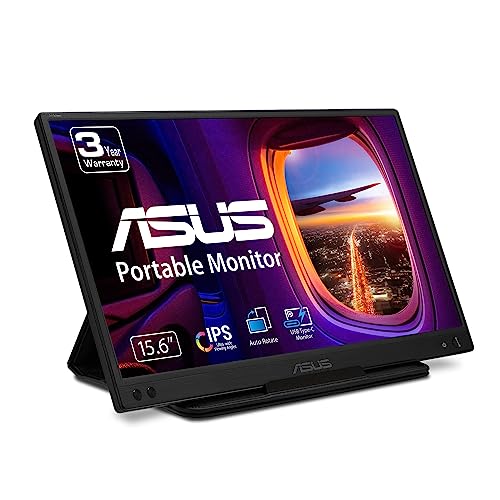
ASUS ZenScreen 15.6-Inch USB-C Monitor
Best for: mobile workers needing a lightweight USB-C display
- Screen Size
- 15.6"
- Resolution
- 1080P
- Panel Type
- IPS
- Connectivity
- USB Type-C
- Weight
- 1.72 pounds
- Dimensions
- 8.88 × 14.2 × 0.46 inches
This 15.6-inch portable monitor delivers Full HD 1080p resolution on an anti-glare IPS display. It weighs 1.72 pounds and measures 0.46 inches thick, connecting to your host device through a single USB-C cable using DisplayPort Alt Mode. You get an embedded tripod socket on the back and an included foldable sleeve. It suits mobile professionals seeking a dual-screen setup who need straightforward connectivity from a compatible laptop.
Pros
- Weighs 1.72 pounds with a 0.46-inch slim profile
- Full HD 1080p IPS panel with anti-glare surface
- Rear embedded tripod socket for flexible mounting
- Single USB-C connection carries power and video signal
Cons
- Auto-rotate requires DisplayWidget drivers and supports Windows only
- Requires a host device with USB-C DisplayPort Alt Mode
- No HDMI input available
Good fit if
- You want a lightweight 1.72-pound secondary display for travel.
- You plan to mount your portable screen using a standard tripod.
- You have a laptop with a video-enabled USB-C port.
Skip if
- You need to connect using a standard HDMI cable.
- You use macOS and require automatic screen rotation.
Verdict: ASUS ZenScreen 15.6-Inch USB-C Monitor offers dependable 1080p visual expansion in a slim 1.72-pound frame with convenient tripod mounting.

ASUS 15.6-Inch Portable Kickstand Monitor
Best for: dual-orientation use on desks and tripods
- Screen Size
- 15.6"
- Resolution
- 1080P
- Panel Type
- IPS
- Connectivity
- USB Type-C
- Weight
- 1.8 pounds
- Features
- Kickstand
This 15.6-inch portable monitor delivers 1080p Full HD resolution across an anti-glare IPS panel. You get an integrated kickstand supporting portrait and landscape modes, along with a standard 1/4-inch tripod thread. Its hybrid-signal connection carries power and video over USB-C or USB-A ports using cables provided in the box. At 1.8 pounds and 0.4 inches thick, it gives you a dual-orientation display for working away from a desk.
Pros
- Built-in kickstand supports portrait and landscape orientations
- Hybrid-signal connectivity runs over USB Type-C or Type-A
- Standard 1/4-inch screw thread for tripod or clamp mounting
- Weighs 1.8 pounds with a 0.4-inch slim profile
Cons
- No HDMI or DisplayPort inputs listed
- No touchscreen capability
Good fit if
- You want a built-in kickstand that supports both portrait and landscape viewing.
- You need hybrid-signal video and power over USB-C or USB-A.
- You mount displays using standard 1/4-inch tripod threads.
Skip if
- You require dedicated HDMI connectivity for your video source.
- You need touchscreen input for your workflow.
Verdict: ASUS 15.6-Inch Portable Kickstand Monitor provides flexible landscape and portrait orientation via its integrated kickstand and hybrid USB connectivity. It delivers an anti-glare 1080p IPS display in a lightweight 1.8-pound build.

ASUS ProArt 14-Inch Touchscreen Monitor
Best for: color-accurate creative work on a compact screen
- Screen Size
- 14 Inch
- Resolution
- 1080P
- Panel Type
- IPS
- Connectivity
- USB Type-C, Micro HDMI
- Color Gamut
- 100% sRGB, 100% Rec. 709
- Weight
- 1.63 pounds
The ASUS ProArt 14-Inch Touchscreen Monitor gives you a 14-inch 1080p IPS display built for color accuracy and mobile use. It features 100% sRGB and 100% Rec. 709 color coverage, factory pre-calibrated to a Delta E under 2. You also get 10-point multitouch, an integrated ASUS Dial for controls, and a built-in metal kickstand with a tripod socket. This display suits you if you need precise color handling on a compact second screen.
Pros
- Factory pre-calibrated Delta E < 2 with 100% sRGB and Rec. 709 coverage
- Capacitive 10-point multitouch on an anti-glare IPS panel
- Dual USB-C ports with DP Alt mode plus Micro HDMI
- Built-in metal kickstand and standard tripod socket
- Lightweight design at 1.63 pounds
Cons
- Smaller 14-inch screen area than 15.6-inch alternatives
- Resolution capped at 1080p FHD rather than 4K
- Requires Micro HDMI rather than full-sized HDMI
Good fit if
- You need verified color accuracy with 100% sRGB and Rec. 709 coverage.
- You want 10-point multitouch input and physical dial control on the go.
- You prefer a compact display weighing 1.63 pounds.
Skip if
- You prefer a larger 15.6-inch or 17.3-inch workspace.
- You require 4K resolution for fine graphical detail.
- You need a full-sized HDMI port without using adapter cables.
Verdict: ASUS ProArt 14-Inch Touchscreen Monitor delivers verified color accuracy and responsive touch controls in a compact, travel-friendly package. Its integrated kickstand and dual USB-C ports make setup straightforward for creative work on the move.

ASUS 15.6-Inch Full HD USB Portable Monitor
Best for: single-cable USB 3.0 laptop setups
- Screen Size
- 15.6"
- Resolution
- 1920x1080
- Panel Type
- IPS
- Connectivity
- USB 3.0
- Aspect Ratio
- 16:9
- Weight
- 1.76 pounds
The ASUS 15.6-Inch Full HD USB Portable Monitor provides a 1080p IPS display designed for portable laptop setups. It runs power and video through a single USB 3.0 cable, removing the need for separate power adapters. Measuring about 0.33 inches thick and weighing under 1.8 pounds, this screen suits you if you want a lightweight second monitor for everyday productivity without dealing with extra power cords.
Pros
- 1080p Full HD resolution on an IPS panel
- Single USB 3.0 cable delivers both power and data
- Slim depth measuring approximately 0.33 inches
- Lightweight build at under 1.8 pounds
Cons
- Viewing angles are limited to 160 degrees horizontally and vertically
- No HDMI or dedicated video ports listed
Good fit if
- You want a secondary 1080p display that runs entirely over a single USB 3.0 cable.
- You need a slim 15.6-inch monitor weighing under 1.8 pounds for travel.
Skip if
- You require HDMI inputs to connect other video sources.
- You need standard 178-degree viewing angles.
Verdict: ASUS 15.6-Inch Full HD USB Portable Monitor delivers a 1080p IPS display powered entirely over a single USB 3.0 connection. It gives you a lightweight, low-profile second screen for dual-display laptop work.
Specifications side by side
| Spec | ASUS ZenScreen 16-Inch Portable Monitor | ASUS ZenScreen 15.6-Inch USB-C Monitor | ASUS 22-Inch 1080P IPS Touchscreen Monitor | ASUS ZenScreen 24-Inch Portable Monitor | ASUS ZenScreen 15.6-Inch USB-C Monitor | ASUS ZenScreen 15.6-Inch Portable Monitor | ASUS ROG 17.3-Inch 240Hz Portable Monitor | ASUS ZenScreen 15.6-Inch USB-C Monitor | ASUS 15.6-Inch Portable Kickstand Monitor | ASUS ProArt 14-Inch Touchscreen Monitor | ASUS 15.6-Inch Full HD USB Portable Monitor |
|---|---|---|---|---|---|---|---|---|---|---|---|
| Screen Size | 15.6" | 15.6 Inch | 21.5" | 23.8" | 15.6" | 15.6" | 17.3" | 15.6" | 15.6" | 14 Inch | 15.6" |
| Resolution | 1920 x 1080 | 1920x1080 | 1080P Full HD | 1080p | 1920 x 1080 | 1080P | 1920 x 1080 | 1080P | 1080P | 1080P | 1920x1080 |
| Refresh Rate | not specified | not specified | not specified | not specified | not specified | not specified | 240Hz | not specified | not specified | not specified | not specified |
| Panel Type | IPS | IPS | IPS | IPS | IPS | IPS | IPS | IPS | IPS | IPS | IPS |
| Connectivity | USB-C | USB Type-C | HDMI, VGA | USB-C, HDMI | USB Type-C, USB Type-A | USB Type-C, Type A | USB-C, Micro HDMI | USB Type-C | USB Type-C | USB Type-C, Micro HDMI | USB 3.0 |
| Color Gamut | not specified | not specified | not specified | not specified | not specified | not specified | not specified | not specified | not specified | 100% sRGB, 100% Rec. 709 | not specified |
| Aspect Ratio | not specified | not specified | not specified | not specified | not specified | not specified | not specified | not specified | not specified | not specified | 16:9 |
| Weight | 3.2 lbs | 1.83 pounds | 7.01 pounds | 2.8 kg | 1.7 pounds | 1.8 lbs | 2.34 lbs | 1.72 pounds | 1.8 pounds | 1.63 pounds | 1.76 pounds |
| Features | not specified | not specified | Touchscreen | not specified | not specified | not specified | Built-in Battery | not specified | Kickstand | Touchscreen | not specified |
| Use | not specified | not specified | not specified | not specified | not specified | not specified | Gaming | not specified | not specified | not specified | not specified |
| Size | 16 Inch | 16 Inch | 22 Inch | 24 Inch | 16 Inch | not specified | 17.3 Inch | 8.9"x14.2"x0.5" | 3.23 | 14 Inch | 15.6 Inches |
| Dimensions | 14.2 × 8.91 × 0.31 inches | 8.85 × 14.1 × 0.41 inches | 19.4 × 8 × 11.8 inches | 21.2 × 0.93 × 13.6 inches | 8.9 × 0.3 × 14.2 inches | 14.1 × 0.4 × 8.9 inches | 9.86 × 15.7 × 0.39 inches | 8.88 × 14.2 × 0.46 inches | 14.1 × 0.4 × 8.9 inches | 8.05 × 12.8 × 0.47 inches | 0.33 × 14.9 × 9.29 inches |
| Color | Dark Gray | BLACK | BLACK | BLACK | Black | BLACK | BLACK | BLACK | BLACK | BLACK | Black |
| Model | MB16ACE | MB16ACV | VT229H | MB249C | MB16AC | MB16ACVR | XG17AHPE | MB166C | MB16ACVR | PA148CTV | 90LM0183-B01170 |
The ASUS Portable Monitor Lineup
Most models focus on everyday travel. Displays like the ASUS ZenScreen 16-Inch Portable Monitor provide 1080p IPS visuals over single-cable USB-C connections, weighing under four pounds for dual-screen laptop work. If you prioritize standalone support without extra accessories, options like the ASUS 15.6-Inch Portable Kickstand Monitor add built-in hinges for landscape and portrait tasks on mobile desks.
Specialized setups require distinct hardware. The ASUS ROG 17.3-Inch 240Hz Portable Monitor targets gaming with high refresh rates and a built-in battery for cordless power. For touch interaction or larger workstations, choices range from the compact ASUS ProArt 14-Inch Touchscreen Monitor with HDMI to 22-inch and 24-inch panels offering VGA inputs or 60W charging.
Where ASUS Fits Your Workspace
This lineup suits users who need dependable Full HD secondary displays for travel or desk setups. Sizes span from a 14-inch panel weighing 1.63 pounds up to a 24-inch screen at 10.67 pounds, though most models measure 15.6 to 16 inches. Hardware configurations include flat IPS panels with USB-C, HDMI, or VGA inputs, alongside features like touch input, kickstands, and a 240Hz refresh rate with battery power.
Notable gaps exist across the catalog. Every monitor is limited to 1080p resolution, leaving you without 1440p or 4K choices. The lineup also provides no OLED panels and no screens smaller than 14 inches.
If you need more screen real estate, consider the best ASUS ultrawide monitors instead.
How to Choose an ASUS Portable Monitor
-
Screen Size and Portability
You need to balance viewable screen space against the total weight in your gear bag. Compact 14-inch and 15.6-inch displays weigh between 1.63 and 1.83 pounds, fitting easily alongside your laptop. If your setup stays mostly on a desk or moves between fixed locations, larger options like the ASUS ZenScreen 24-Inch Portable Monitor provide more room at 10.67 pounds. Check your bag dimensions and how often you travel to decide whether lightweight portability or maximum workspace fits your daily workflow.
-
Port Connectivity and Cables
Check your host computer video ports before choosing a display. Most models use a single USB-C cable for both video and power. This setup reduces cable clutter on modern laptops. If you connect to older desktop towers or legacy office equipment, look for dedicated HDMI or VGA connections instead. The ASUS 22-Inch 1080P IPS Touchscreen Monitor includes HDMI and VGA ports for non-USB-C systems. Verify whether your laptop port supports video output over USB-C or if you need standard video inputs.
-
Touchscreen Controls
Decide if your work requires direct on-screen interaction or if standard mouse navigation is enough. Touchscreen panels let you tap, swipe, and draw directly on the glass surface. This capability is useful for presentation control, creative applications, and quick form navigation. The ASUS ProArt 14-Inch Touchscreen Monitor combines interactive touch with a compact 1080p panel. If you only view static documents, spreadsheets, or code, a non-touch screen eliminates extra driver steps while providing the same Full HD resolution.
-
Built-in Battery Power
Standard portable screens draw electricity directly from your laptop battery, which reduces laptop runtime when working untethered. A monitor with an integrated battery runs independently and preserves your host machine charge during mobile sessions. The ASUS ROG 17.3-Inch 240Hz Portable Monitor includes a built-in battery that provides up to 3 hours of cordless operation away from wall outlets. If you regularly work in transit without access to AC power, check the battery specifications before choosing a bus-powered display.
-
Refresh Rate Requirements
Standard 60Hz displays are designed for typical office work, document editing, and web browsing. If you need smooth motion handling for fast gaming or video evaluation, look for a high-refresh display. Panels reaching up to 240Hz with Adaptive-Sync reduce motion blur and visual tearing during fast screen movement. Everyday mobile office productivity does not require high frame rates. Check the refresh rate specification to ensure the panel matches your software demands without adding unneeded gaming features to standard productivity setups.
-
Mounting and Stand Support
Consider how you intend to prop up the display during daily use. Some screens rely on separate folio cases, while others feature built-in hardware. Models like the ASUS 15.6-Inch Portable Kickstand Monitor include an integrated kickstand that supports quick switching between landscape and portrait orientations without extra stands. Other models include standard tripod sockets for elevated positioning behind a laptop. Check the rear chassis specifications to ensure the monitor supports your preferred viewing angle, desk orientation, and mounting accessories.
Frequently asked questions
Can you connect an ASUS portable monitor using a single USB cable?
Yes, several ASUS models support video transmission and power delivery through a single USB cable. The ZenScreen MB16ACE and MB16ACV connect to laptops using one USB-C cable for display output and power. Other models, like the ZenScreen MB16AC, feature hybrid USB connectivity for USB-C and USB-A ports, while the 15.6-inch 90LM0183-B01170 operates over a dedicated USB 3.0 connection.
Which ASUS portable monitors include touchscreen support?
ASUS offers touchscreen functionality on select portable and desktop-format monitors. The 14-inch ASUS ProArt PA148CTV features a 1080p IPS multi-touch display alongside dual USB-C and HDMI connectivity for creative work. For larger setups requiring interactive inputs, the 22-inch ASUS VT229H provides a 1080p IPS touchscreen paired with both HDMI and VGA video ports.
Do ASUS portable monitors have built-in batteries for cordless use?
Most ASUS portable monitors draw power directly from your connected device, but select gaming displays feature integrated batteries. The ASUS ROG Strix XG17AHPE includes a built-in battery offering up to 3 hours of cordless operation. This 17.3-inch 1080p IPS monitor features a 240Hz refresh rate with Adaptive-Sync, connecting via USB-C or HDMI without requiring an external wall outlet.
Can you use an ASUS portable monitor with an HDMI connection?
Yes, select ASUS portable monitors include HDMI ports alongside standard USB connections. While travel-focused screens like the ZenScreen MB16ACE use USB-C only, displays such as the ASUS ProArt PA148CTV and ASUS ROG Strix XG17AHPE incorporate HDMI inputs. Additionally, the 22-inch ASUS VT229H features dedicated HDMI and VGA ports, allowing direct connections to devices lacking DisplayPort over USB-C.
What is the largest portable monitor available in the ASUS lineup?
The ASUS ZenScreen MB249C is the largest option in the lineup, featuring a 24-inch display. It provides a 1080p Full HD resolution, USB-C connectivity, and 60W power delivery. Weighing 10.67 pounds with dimensions of 21.23 by 13.63 inches, it suits users who need desktop-grade screen space across temporary workstations rather than ultra-compact travel bags.
How do you prop up an ASUS portable monitor on a desk?
ASUS monitors utilize built-in kickstands, tripod mounting points, or protective folding cases for desk placement. For example, the ASUS MB16ACVR and ProArt PA148CTV include integrated kickstands supporting landscape and portrait orientations without extra gear. Other models, such as the ZenScreen MB166C, feature standard tripod socket mounts, while the MB16ACE uses an ultra-slim chassis designed for quick desktop positioning.
Which ASUS portable monitor is the lightest for travel?
The 14-inch ASUS ProArt PA148CTV is the lightest display on the list, weighing 1.63 pounds. If you need a larger display, 15.6-inch models like the ZenScreen MB16AC and ZenScreen MB166C weigh 1.72 pounds each. The ZenScreen MB16ACVR weighs 1.8 pounds, ensuring you can carry a dual-screen Full HD setup in your laptop bag without substantial weight.