8 Best 10-in-1 Docking Stations, Compared
As an Amazon Associate we earn from qualifying purchases. Links on this page are affiliate links.
We compared 8 options to find the best 10-in-1 docking stations for your setup. Our top pick is the Anker 10-in-1 Triple Display USB-C Dock, which leads because it supports triple monitor output from a single port. Each selection relies strictly on the specifications published on the product listings. We evaluated port counts, display support, and connectivity types to ensure accuracy. This guide helps you decide which hub matches your specific hardware requirements and workflow needs.
Quick picks
The best fit for you
- You need to drive three screens from one port Anker 10-in-1 Triple Display USB-C Dock It features DisplayLink technology to support triple monitor output.
- You want Windows users to get three 4K displays Mukiya 10-in-1 Triple Display Laptop Stand Dock It supports triple 4K UHD resolution with a built-in kickstand.
- You need 120Hz refresh rate on one screen Baseus 10-in-1 Dual 4K HDMI USB-C Dock It delivers high refresh rates for smoother visual performance.
- You want to expand storage with NVMe drives UGREEN Revodok 10-in-1 NVMe Dock It includes an NVMe slot for local storage expansion.
Our 8 picks
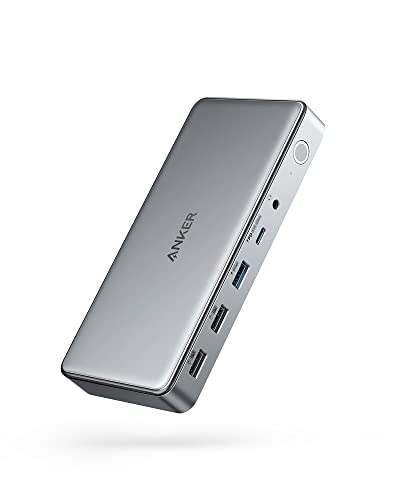
Anker 10-in-1 Triple Display USB-C Dock
Best for: Triple monitor setups from one port
- Port Count
- 10-in-1 (what this guide is about)
- Host Interface
- USB-C
- Display Support
- Triple
- Max Resolution
- 4K@30Hz
- Power Delivery
- 100W
- Video Ports
- HDMI, DisplayPort
The Anker DL6350 is a 10-in-1 USB-C docking station that supports triple displays via DisplayLink technology. It offers two HDMI ports and one DisplayPort, allowing for 4K@30Hz on the primary screen and 1080p@60Hz on the others. It includes a 100W Power Delivery port for your laptop and a 30W USB-C port for devices. The unit weighs 1.6 ounces and measures 3.15 by 0.96 by 6.7 inches.
Pros
- Supports triple monitor setups with DisplayLink
- 100W Power Delivery for laptop charging
- Includes Gigabit Ethernet and AUX ports
- Compact 1.6-ounce build
Cons
- Primary display limited to 4K@30Hz
- Requires DisplayLink driver installation
- No USB 3.1 Gen 2 or 10Gbps data speeds
Good fit if
- You need three monitors from a single USB-C port
- You use a MacBook Pro or similar laptop
- You require Ethernet and audio connectivity
Skip if
- You need 4K@60Hz on your main display
- You want plug-and-play without drivers
- You prefer USB 3.1 Gen 2 speeds
Verdict: Anker DL6350 10-in-1 Triple Display Dock is best for users who need to drive three screens from one laptop port. It fits professionals who value port expansion over maximum video refresh rates.

ABIWAZY 10-in-1 USB-C Hub
Best for: Users needing Ethernet and SD access
- Port Count
- 10-in-1 (what this guide is about)
- Connectivity
- USB-C
This ABIWAZY hub expands your laptop with ten ports, including 4K@60Hz HDMI, Gigabit Ethernet, and 100W PD charging. It adds four USB-A ports, one USB-C data port, and SD/Micro SD readers. The aluminum body is compact. It suits users needing stable wired internet and fast charging while maintaining a small footprint on their desk or during travel.
Pros
- 4K@60Hz HDMI output for clear video
- 100W PD charging keeps laptop powered
- Gigabit Ethernet for stable wired internet
- SD and Micro SD card readers
- Compact aluminum design saves space
Cons
- No triple display support like competitors
- Only one HDMI port limits multi-monitor setups
- No DisplayLink technology for extended desktops
Good fit if
- You need stable wired internet for work
- You want fast 100W charging while using ports
- You carry SD cards for photo transfers
Skip if
- You require three simultaneous monitors
- You need DisplayLink for extended desktops
- You prefer wireless connectivity over Ethernet
Verdict: ABIWAZY 10-in-1 USB-C Hub offers essential expansion for users prioritizing wired networking and charging. It fits professionals who need reliable connectivity without the bulk of advanced docking stations.

Mukiya 10-in-1 Triple Display Laptop Stand Dock
Best for: Windows users needing triple 4K displays
- Port Count
- 10-in-1 (what this guide is about)
- Host Interface
- USB-C
- Display Support
- Triple
- Max Resolution
- 4K@60Hz
- Power Delivery
- 100W
- Video Ports
- HDMI, DisplayPort
View on Amazon: Mukiya 10-in-1 Triple Display Laptop Stand Dock
The Mukiya 10-in-1 dock combines a laptop stand with triple display support. It offers two HDMI and one DisplayPort for 4K@60Hz output. A 100W PD port charges your laptop while you work. The aluminum stand adjusts to nine heights for better ergonomics. It includes USB 3.0 ports and SD/TF card slots. This setup suits users who want a clean desk with multiple screens.
Pros
- Supports triple monitors at 4K@60Hz via HDMI and DisplayPort
- 100W Power Delivery charges laptops up to 85W
- Adjustable aluminum stand with nine height levels
- Includes SD and TF card slots
Cons
- macOS only supports mirror mode, not extended displays
- Data transfer speed limited to 5Gbps
- Requires Windows DP1.4 support for full triple display expansion
Good fit if
- You need three screens for productivity
- You want an adjustable laptop stand
- You use a Windows PC
Skip if
- You primarily use a MacBook
- You need high-speed data transfer above 5Gbps
- You prefer a single monitor setup
Verdict: Mukiya 10-in-1 Triple Monitor Dock fits Windows users who want a sturdy stand and three 4K displays. It is not suitable for macOS users needing extended desktop space.

Baseus 10-in-1 Dual 4K HDMI USB-C Dock
Best for: Windows users needing 120Hz on one screen
- Port Count
- 10-in-1 (what this guide is about)
- Host Interface
- USB-C
- Display Support
- Dual
- Max Resolution
- 4K@120Hz
- Power Delivery
- 85W
- Video Ports
- HDMI
The Baseus 10-in-1 USB C Hub offers dual monitor support with a unique 4K@120Hz option on one HDMI port for Windows. It provides 10Gbps data transfer and 85W power delivery. The compact design includes an Ethernet port and SD card reader. This docking station suits users who need high refresh rates on a primary screen while maintaining a portable footprint for their laptop setup.
Pros
- Single HDMI supports 4K@120Hz on Windows
- 10Gbps data transfer speeds via USB 3.2
- 85W PD charging output for laptops
- Built-in screen lock button for privacy
Cons
- Dual 4K@60Hz setup limited to mirror mode on macOS
- Power adapter and input cable not included
- SD card read speed capped at 104MB/s
Good fit if
- You need a 120Hz display for one monitor on Windows
- You require fast 10Gbps file transfers
- You want a compact hub with an Ethernet port
Skip if
- You use macOS and need dual extended 4K@60Hz monitors
- You need the power adapter included in the box
- You require higher than 104MB/s SD card speeds
Verdict: Baseus 10-in-1 USB C Hub is a practical choice for Windows users who want a 120Hz display on one screen. It fits those needing fast data transfer and stable charging in a small form factor.

Intpw 10-in-1 Angled USB-C Hub
Best for: Wired networking and ergonomic port access
- Port Count
- 10-in-1 (what this guide is about)
- Host Interface
- USB-C
- Max Resolution
- 4K@30Hz
- Power Delivery
- 100W
- Video Ports
- HDMI
- Max Data Speed
- 5Gbps
The Intpw P9R is a 10-in-1 USB-C hub with an ergonomic 28-degree angled design. It features a 1Gbps Ethernet port, 100W PD charging, and a 4K@30Hz HDMI output. The aluminum body helps with heat dissipation. This hub suits users who need stable wired networking and frequent port access without lifting their laptop.
Pros
- 28-degree angled port layout for easy access
- 1Gbps Ethernet for stable wired connections
- 100W Power Delivery pass-through charging
- Aluminum unibody construction for heat dissipation
Cons
- HDMI output limited to 4K@30Hz resolution
- USB 3.0 data speed capped at 5Gbps
- No dual monitor support for extended displays
Good fit if
- You need a reliable 1Gbps Ethernet connection for work
- You want an angled hub to avoid lifting your laptop
- You require 100W PD charging while using multiple ports
Skip if
- You need 4K@60Hz video output for smooth motion
- You want to connect two external monitors simultaneously
- You prefer a shorter cable for tight desk setups
Verdict: Intpw P9R 10-in-1 USB-C Hub is a practical choice for professionals who prioritize stable Ethernet connectivity and ergonomic port access over high-refresh-rate video output.

UGREEN Revodok 10-in-1 NVMe Dock
Best for: Users needing NVMe storage expansion
- Port Count
- 10-in-1 (what this guide is about)
- Max Resolution
- 4K@60Hz
- Power Delivery
- 100W
- Video Ports
- HDMI
- Max Data Speed
- 10Gbps
- Ethernet Speed
- Gigabit
The UGREEN Revodok NVMe 10-in-1 Docking Station offers 10 ports, including a dedicated M.2 NVMe SSD slot for local storage expansion. It supports 4K@60Hz video via HDMI and delivers 100W power delivery to your laptop. With Gigabit Ethernet and 10Gbps data transfer speeds, it suits users needing high-speed connectivity and extra storage in a single compact hub.
Pros
- Includes M.2 NVMe SSD slot for instant storage expansion
- Supports 4K@60Hz HDMI video output
- Provides 100W power delivery for laptop charging
- Features 10Gbps USB-C and USB-A data ports
Cons
- Only one HDMI video port, limiting multi-monitor setups
- No DisplayLink support for triple external displays
- Lacks Wi-Fi 6 or higher wireless connectivity
Good fit if
- You need to add fast NVMe storage to your laptop
- You want a single dock for video, data, and charging
- You use a laptop that supports 100W power delivery
Skip if
- You require three simultaneous external monitors
- You need dual HDMI ports for independent displays
- You prefer a docking station with built-in Wi-Fi
Verdict: UGREEN NVMe 10-in-1 Dock is ideal for users who prioritize local storage expansion and high-speed data transfer over multi-monitor video output.

UGREEN Dual 4K HDMI 10-in-1 USB-C Dock
Best for: Windows users needing dual 4K screens
- Port Count
- 10-in-1 (what this guide is about)
- Host Interface
- USB-C
- Display Support
- Dual
- Max Resolution
- 4K@60Hz
- Power Delivery
- 85W
- Video Ports
- HDMI
This UGREEN 10-in-1 dock expands your laptop via a single USB-C host. It supports dual 4K@60Hz HDMI displays and includes a 1000Mbps Ethernet port. You get two 10Gbps USB-C data ports and two USB-A 3.0 ports for peripherals. The USB-C PD port delivers 85W pass-through charging. It fits users needing stable wired connections and dual screens without complex drivers.
Pros
- Dual HDMI ports support 4K@60Hz output
- 1000Mbps RJ45 Ethernet port included
- Two 10Gbps USB-C data ports
- 85W USB-C PD pass-through charging
- SD and Micro SD card readers
Cons
- MacBooks mirror displays instead of extending
- USB ports do not support video output
- 85W charging is lower than 100W
Good fit if
- You need dual 4K displays at 60Hz
- You require a wired Gigabit connection
- You want native plug-and-play setup
Skip if
- You use a MacBook for extended desktop mode
- You need USB ports for video output
- You require 100W pass-through charging
Verdict: UGREEN 10-in-1 Dual HDMI Dock is a practical choice for Windows users who need dual 4K screens and reliable Ethernet. It delivers solid data speeds and ample ports for a compact workspace.

Giq 10-in-1 Dual HDMI USB-C Hub
Best for: Dual monitor setups with wired networking needs
- Port Count
- 10-in-1 (what this guide is about)
- Host Interface
- USB-C
- Max Resolution
- 4K@60Hz
- Power Delivery
- 100W
- Video Ports
- HDMI
- Max Data Speed
- 5Gbps
This 10-in-1 docking station expands your laptop connectivity through a single USB-C host interface. It features dual HDMI ports supporting 4K resolution at 60Hz, allowing you to drive two external displays. The dock includes Gigabit Ethernet for stable wired networking and offers 100W Power Delivery pass-through charging. With five color options, you can match your workspace aesthetic while gaining SD and TF card reader slots for media workflows.
Pros
- Dual HDMI ports output 4K@60Hz video signals
- 100W PD pass-through charging supports fast power delivery
- Gigabit Ethernet port ensures stable network connectivity
- Built-in SD and TF card reader slots
Cons
- USB-C data ports are limited to 5Gbps speeds
- SD and TF cards cannot be read simultaneously
- Only one video output port type (HDMI) is available
Good fit if
- You need dual monitor support for productivity tasks
- You require Gigabit Ethernet for reliable internet access
- You frequently transfer photos via SD or TF cards
Skip if
- You need Thunderbolt 3 or 4 speeds for data transfer
- You require simultaneous access to both SD and TF cards
- You prefer USB-C video output over HDMI
Verdict: Giq 10-in-1 USB-C Docking Station is a solid choice for users who need dual 4K displays and wired networking without complex setup. It fits professionals who prioritize stable connectivity and media card access over high-speed data transfer.
Specifications side by side
| Spec | Anker 10-in-1 Triple Display USB-C Dock | ABIWAZY 10-in-1 USB-C Hub | Mukiya 10-in-1 Triple Display Laptop Stand Dock | Baseus 10-in-1 Dual 4K HDMI USB-C Dock | Intpw 10-in-1 Angled USB-C Hub | UGREEN Revodok 10-in-1 NVMe Dock | UGREEN Dual 4K HDMI 10-in-1 USB-C Dock | Giq 10-in-1 Dual HDMI USB-C Hub |
|---|---|---|---|---|---|---|---|---|
| Host Interface | USB-C | not specified | USB-C | USB-C | USB-C | not specified | USB-C | USB-C |
| Display Support | Triple | not specified | Triple | Dual | not specified | not specified | Dual | not specified |
| Max Resolution | 4K@30Hz | not specified | 4K@60Hz | 4K@120Hz | 4K@30Hz | 4K@60Hz | 4K@60Hz | 4K@60Hz |
| Power Delivery | 100W | not specified | 100W | 85W | 100W | 100W | 85W | 100W |
| Port Count | 10 | not specified | 10 | 10 | 10 | 10 | 10 | 10 |
| Video Ports | HDMI, DisplayPort | not specified | HDMI, DisplayPort | HDMI | HDMI | HDMI | HDMI | HDMI |
| Max Data Speed | 5 Gbps | not specified | 5Gbps | 10Gbps | 5Gbps | 10Gbps | 10Gbps | 5Gbps |
| Ethernet Speed | not specified | not specified | not specified | not specified | 1Gbps | Gigabit | 1000Mbps | Gigabit Ethernet |
| Resolution | not specified | not specified | 4K UHD | not specified | 4K UHD | 4K UHD | 4K UHD | not specified |
| Connectivity | not specified | USB-C | USB-C, HDMI, DisplayPort | USB-C, HDMI | USB-C, HDMI, Ethernet | HDMI | USB-C | USB-C, Ethernet |
| Refresh Rate | not specified | not specified | not specified | not specified | not specified | 60Hz | 60Hz | not specified |
| Features | DisplayLink | not specified | Kickstand | not specified | not specified | not specified | not specified | not specified |
| Dimensions | 6.7 × 3.15 × 0.96 inches | not specified | not specified | 5.31 × 1.93 × 0.63 inches | 8.27 × 4.72 × 2.2 inches | 0.79 × 0.39 × 0.39 inches | 5.91 × 2.27 × 0.63 inches | 5.02 × 2.38 × 0.57 inches |
| Weight | 1.6 ounces | not specified | not specified | 3.88 ounces | 8.82 ounces | 0.71 ounces | 2.15 ounces | not specified |
| Color | Gray | Grey | Silver | Black | Silver White | Grey | Space Grey | Green |
| Model | A83951A1 | not specified | HUB-M94 | B00061800123-00 | P9R | 55735 | 45366 | UCN3403 |
| Size | not specified | 10-in-1 | not specified | 10 in 1 | 1.64ft | not specified | not specified | not specified |
If you need integrated drive bays alongside port expansion, our guide compares the best 10Gbps SSD docking stations.
How to choose the right one
-
Check display support limits
Most 10-in-1 docks support only one or two screens. If you need three displays, you must choose a model with DisplayLink technology or native triple output. This limits your choices to specific units like the Anker or Mukiya. For standard dual setups, the Baseus or UGREEN models offer reliable dual HDMI connections. Verify the display support attribute before purchasing to ensure the dock can handle your monitor count without requiring additional adapters or complex software installations.
-
Verify Ethernet connectivity
Wired networking provides stable internet speeds for video calls and large file transfers. The ABIWAZY and Intpw models include dedicated Ethernet ports for this purpose. The Intpw P9R is angled specifically to make accessing these ports easier. If you rely on Wi-Fi, this feature is less critical. However, for professionals needing consistent bandwidth, prioritizing a dock with an integrated Ethernet controller ensures your connection remains uninterrupted even when other USB ports are busy with data transfer tasks.
-
Assess refresh rate needs
Refresh rate determines how smoothly motion appears on your screen. The Baseus dock supports 120Hz on one screen, which benefits gamers or users editing fast-paced video. Most other docks, like the UGREEN NVMe or standard Dual HDMI models, cap at 60Hz. If you do not play competitive games or work with high-frame-rate media, 60Hz is sufficient. Check the specs to see if the dock can deliver the smoothness you require for your specific workflow.
-
Review power delivery specs
Power delivery charges your laptop while using the dock. The Mukiya dock offers 100W power delivery, suitable for high-performance laptops that need substantial energy. Other models may offer lower wattage, which might not charge a power-hungry device quickly. Ensure the dock’s output matches your laptop’s charging requirements. If you use a high-power laptop, a lower wattage dock may charge slowly or not at all while the system is under heavy load.
-
Consider storage expansion
Some docks include slots for NVMe drives to expand local storage. The UGREEN Revodok 10-in-1 NVMe Dock is designed for users who need fast, local storage access. This is ideal for video editors or photographers who handle large files. If you primarily use cloud storage or external drives, this feature is unnecessary. Check the product attributes to see if a dock includes internal storage support, as this significantly changes the device’s utility for data-heavy tasks.
Frequently asked questions
Can a 10-in-1 dock drive three monitors?
Yes, but only specific models support triple displays. The Anker 10-in-1 Triple Display USB-C Dock uses DisplayLink technology to drive three screens from one port. The Mukiya 10-in-1 Triple Display Laptop Stand Dock also supports triple 4K UHD output. Most other 10-in-1 hubs are limited to dual monitor setups.
Which 10-in-1 dock supports 120Hz refresh rates?
The Baseus 10-in-1 Dual 4K HDMI USB-C Dock supports a 120Hz refresh rate on one screen. This makes it suitable for Windows users who need faster visual updates. Other models in this category, such as the UGREEN Revodok, typically cap at 60Hz for standard video output.
Do these docks include Ethernet ports for wired internet?
Many 10-in-1 options include Ethernet for stable wired networking. The ABIWAZY 10-in-1 USB-C Hub offers essential wired connectivity. The Intpw 10-in-1 Angled USB-C Hub and the Giq 10-in-1 Dual HDMI USB-C Hub also provide Ethernet ports. This is useful for professionals prioritizing stable connections over wireless options.
Can I use a 10-in-1 dock with macOS?
Compatibility varies by model. The Mukiya 10-in-1 Triple Display Laptop Stand Dock is not suitable for macOS users needing extended desktop space. The Anker 10-in-1 Triple Display USB-C Dock fits professionals who value port expansion. Always check the specific system requirements for triple display features, as they often rely on Windows drivers.
Which dock is best for expanding local storage?
The UGREEN Revodok 10-in-1 NVMe Dock is designed for local storage expansion. It prioritizes high-speed data transfer and NVMe drive support over multi-monitor video output. This makes it ideal for users who need fast access to large files rather than driving multiple external displays.
Do these hubs support 4K resolution?
Several models support 4K UHD resolution. The Mukiya, Intpw, UGREEN Revodok, UGREEN Dual 4K HDMI, and Giq docks all list 4K UHD support. The Baseus model supports dual 4K HDMI output. Ensure your laptop and cables match these resolution requirements for proper functionality.
Is there a dock with a built-in stand?
Yes, the Mukiya 10-in-1 Triple Display Laptop Stand Dock includes a built-in kickstand. It provides a sturdy setup for Windows users needing triple 4K displays. Other models like the Baseus and Intpw are compact hubs without integrated stands, relying on external support or flat placement.