15 Best 17.3 Inch Portable Monitors, Compared
As an Amazon Associate we earn from qualifying purchases. Links on this page are affiliate links.
A 173 inch portable monitor provides expansive screen space when you work or game away from a desk. We compared 15 displays based strictly on the specifications published on their listings. The Anyuse 17.3-Inch 144Hz Portable Monitor leads the list with its 144Hz refresh rate and 1080p IPS panel.
Screen sizes, weights, and refresh rates vary across single-screen and multi-panel units. This guide helps you decide which display resolution, port options, and frame format match your travel needs and everyday workflow.
Quick picks
The best fit for you
- You want a large high-refresh display for gaming Anyuse 17.3-Inch 144Hz Portable Monitor It features a 17.3-inch 1080p IPS panel paired with a fast 144Hz refresh rate.
- You need a multi-screen workstation attached to your laptop KEFEYA 15.6-Inch Triple Screen Extender It mounts onto laptops up to 17.3 inches to add dual 1080p IPS screens.
- You want maximum sharpness for creative and detail-oriented work Cocopar 17.3-Inch 4K Portable Monitor Its 3840x2160 4K UHD resolution delivers sharp visuals in a 1.7-pound chassis.
- You want sharp resolution combined with fast motion clarity VILVA 17.3-Inch QHD 165Hz Portable Monitor It pairs a 1440p QHD panel with a rapid 165Hz refresh rate over USB-C and HDMI.
Our 15 picks

Anyuse 17.3-Inch 144Hz Portable Monitor
Best for: gamers needing a fast 17.3-inch portable display
- Size
- 17.3 Inch (what this guide is about)
- Screen Size
- 17.3"
- Resolution
- 1920x1080
- Refresh Rate
- 144Hz
- Panel Type
- IPS
- Connectivity
- USB-C, HDMI
The Anyuse 17.3-Inch 144Hz IPS Portable Monitor gives you an expanded 1080p workspace with a high 144Hz refresh rate. It connects via two full-feature USB-C ports or HDMI, allowing single-cable operation with compatible devices. At 4.96 pounds with an included PU leather stand cover, it suits you if you need a large secondary display for fast-paced gaming or multi-window productivity.
Pros
- 144Hz refresh rate on a 17.3-inch 1080p IPS panel
- Two full-feature USB-C ports plus HDMI input
- Single-cable power and display delivery over USB-C
- Includes PU leather smart cover that doubles as a stand
Cons
- Carrying weight is 4.96 pounds
- Resolution is limited to 1080p
- Glossy screen surface reflects ambient light
Good fit if
- You want a 144Hz refresh rate for smoother motion in games.
- You need dual full-feature USB-C ports for single-cable laptop connections.
- You want an included protective cover that doubles as a stand.
Skip if
- You need a resolution higher than 1080p.
- You want a lightweight display under four pounds.
- You prefer a matte screen finish instead of a glossy panel.
Verdict: Anyuse 17.3-Inch 144Hz IPS Portable Monitor delivers a large 1080p display with a fast 144Hz refresh rate and flexible USB-C connectivity. It works well if you want smooth visuals on a big portable screen and do not mind the 4.96-pound weight.

KEFEYA 15.6-Inch Triple Screen Extender
Best for: laptop users needing triple-display multitasking
- Size
- 17.3 Inch (what this guide is about)
- Screen Size
- 15.6"
- Resolution
- 1920x1080
- Panel Type
- IPS
- Connectivity
- USB-C, USB-A, HDMI
- Color Gamut
- 120% sRGB
This KEFEYA display setup adds two 15.6-inch 1080p FHD IPS panels directly to your 13-to-17.3-inch laptop, expanding your workspace into a triple-screen station. Each screen delivers a 1000:1 contrast ratio, 120% sRGB color gamut coverage, and 235-degree rotation for landscape or portrait viewing. It connects via USB-C or USB-A with HDMI without extra drivers. It suits mobile professionals needing multi-window productivity across spreadsheets, coding tools, and reference documents simultaneously.
Pros
- Dual 1080p FHD IPS panels with 120% sRGB color gamut and 1000:1 contrast ratio
- Supports 235-degree rotation with landscape and portrait viewing modes
- Mounts directly to laptops sized from 13 to 17.3 inches
- Includes a leather carrying bag for transport
Cons
- Weighs 8.8 pounds, which adds significant bulk to carry
- Requires a separate H5-T adapter to work with base Apple M1, M2, M3, or M4 chips
Good fit if
- You need a dual-screen expansion clamped onto your 13-to-17.3-inch laptop.
- You want screens that rotate up to 235 degrees for flexible viewing angles.
- You work with applications requiring wide 120% sRGB color coverage.
Skip if
- You use a base Apple M1, M2, M3, or M4 Mac without purchasing an extra adapter.
- You require an ultralight portable display setup, given the 8.8-pound weight.
Verdict: KEFEYA 15.6-Inch Triple Screen Extender turns your 13-to-17.3-inch laptop into a multi-monitor workstation with rotating 1080p IPS displays. Its 8.8-pound weight limits easy portability, but the flexible mounting and wide color gamut suit stationary multi-window work.

ForHelp 17.3-Inch 144Hz HDR Portable Monitor
Best for: high-refresh portable gaming and HDR content
- Size
- 17.3 Inch (what this guide is about)
- Screen Size
- 17.3"
- Resolution
- 1920 x 1080
- Refresh Rate
- 144Hz
- Panel Type
- IPS
- Connectivity
- Mini HDMI, 2x Type-C
View on Amazon: ForHelp 17.3-Inch 144Hz HDR Portable Monitor
The ForHelp 17.3-Inch 144Hz IPS Portable Monitor pairs a 1920 x 1080 resolution IPS panel with a 144Hz refresh rate and HDR support. Weighing 2.12 pounds, it includes two full-featured USB-C ports, a mini HDMI input, built-in speakers, and a magnetic PU cover that doubles as a stand. It suits you if you need a high-refresh external display for gaming or multitasking across horizontal and vertical orientations while traveling.
Pros
- 144Hz refresh rate for fast motion clarity
- Supports HDR and features an IPS panel
- Dual full-featured USB-C ports and mini HDMI connectivity
- Comes with magnetic PU smart cover, wall charger, and cables
Cons
- 1080p resolution provides modest pixel density at 17.3 inches
- Uses mini HDMI rather than a standard full-size HDMI port
- Relies on a folding magnetic case rather than a built-in kickstand
Good fit if
- You want a 144Hz refresh rate with HDR capability for fast-paced gaming.
- You use a single USB-C cable connection for both power and display signal.
- You switch between landscape and portrait viewing modes on the road.
Skip if
- You require 1440p or 4K resolution on a 17.3-inch screen.
- You prefer an integrated metal kickstand instead of a magnetic folio cover.
Verdict: ForHelp 17.3-Inch 144Hz IPS Portable Monitor delivers smooth 144Hz visuals and HDR support on an expansive 1080p canvas. It provides versatile multi-mode display capability with dual USB-C ports and an included magnetic stand cover.

Orfibz 14.2-Inch Laptop Screen Extender
Best for: travelers wanting an attached laptop second screen
- Size
- 17.3 Inch (what this guide is about)
- Screen Size
- 14.2"
- Resolution
- 1080p FHD
- Panel Type
- IPS
- Connectivity
- USB-C, HDMI, USB-A
- Weight
- 1.87 lbs
The Orfibz screen extender mounts directly to 14-inch to 17.3-inch laptops, adding a secondary 14.2-inch 1080p IPS panel to your mobile workstation. It weighs 1.87 pounds and outputs 300 nits of brightness with a 226-degree hinge. You can connect it via full-function USB-C or HDMI with USB-A power. This setup suits you if you need a lightweight, attachable dual-display solution for travel.
Pros
- Lightweight build at 1.87 pounds
- Full HD 1080p IPS display with 300 nits brightness
- Wide 0 to 226-degree adjustable hinge
- Flexible connectivity via USB-C or HDMI plus USB-A
Cons
- Display panel measures 14.2 inches rather than a full 17.3 inches
- Requires USB-A connection alongside HDMI when using laptops without full-function USB-C
Good fit if
- You use a 14-inch to 17.3-inch laptop and want an attached second screen.
- You travel frequently and need a secondary display under 2 pounds.
- You need support for landscape, portrait, and mirror display modes.
Skip if
- You need a standalone monitor that does not clamp to your laptop.
- You require a full 17.3-inch display panel rather than a 14.2-inch screen.
Verdict: Orfibz 14.2-Inch Laptop Screen Extender attaches directly to your laptop chassis to provide a compact 1080p second screen under two pounds. It delivers flexible dual-cable connectivity and wide hinge rotation without requiring a separate desk stand.

ZUMWALT 15.6-Inch Dual Screen Extender
Best for: triple-screen laptop multitasking on the go
- Size
- 17.3 Inch (what this guide is about)
- Screen Size
- 15.6"
- Resolution
- 1080P FHD
- Connectivity
- USB-C, HDMI, USB-A
- Weight
- 4 lbs (1.8 kg)
- Use
- Travel
This screen extender mounts to laptops between 13 and 17.3 inches, giving you two 15.6-inch 1080p FHD displays for a triple-monitor setup. Built with an aluminum alloy shell, the 4-pound unit delivers 280 nits of brightness and 178-degree viewing angles. It suits you if you need to run multiple windows across two additional panels using two full-function USB-C cables, without permanently clipping onto your laptop screen.
Pros
- Dual 15.6-inch 1080p FHD displays fit laptops from 13 to 17.3 inches
- Durable aluminum alloy shell weighing 4 lbs
- 280 nits brightness with 178° viewing angles
- Requires only two USB-C cables when host laptop supports full functionality
- Includes leather carrying bag and power adapter
Cons
- Apple Silicon M1, M2, and M3 MacBooks require specialized cabling and driver installation
- 280 nits brightness may struggle in bright outdoor light
- 4-pound overall weight adds heft to travel gear
Good fit if
- You want two additional 15.6-inch screens attached to your 13-inch to 17.3-inch laptop.
- You have a laptop with two full-featured USB-C ports for straightforward connection.
- You prefer an aluminum casing without top baffles or clamps.
Skip if
- You only want a single standalone 17.3-inch monitor rather than a dual-screen mount.
- You use an Apple Silicon Mac and prefer not to install third-party display drivers.
- You need a high-brightness panel for direct sunlight use.
Verdict: ZUMWALT Dual Screen Laptop Extender adds two 1080p screens to your laptop without requiring top clips. It offers a solid aluminum frame and practical multi-screen expansion for compatible laptops.

Cocopar 17.3-Inch 4K Portable Monitor
Best for: color-accurate creative work and sharp mobile productivity
- Size
- 17.3 Inch (what this guide is about)
- Screen Size
- 17.3 Inch
- Resolution
- 3840×2160
- Refresh Rate
- 60Hz
- Connectivity
- dual USB-C, one HDMI
- Color Gamut
- 150% sRGB
This 17.3-inch portable display pairs a 4K UHD 3840×2160 panel with a 150% sRGB color gamut and up to 600 nits of brightness. At 1.7 pounds, it provides an expansive workspace without excessive weight. It connects through dual USB-C or HDMI ports and includes an integrated kickstand plus VESA mount holes. It suits you if you need high-resolution detail and wide color coverage for visual work on the go.
Pros
- 3840×2160 4K UHD resolution with 150% sRGB color gamut
- Reaches up to 600 nits brightness with the included power adapter
- Lightweight 1.7-pound aluminum frame with integrated kickstand
- Dual USB-C ports, HDMI input, and rear VESA mounting holes
Cons
- Standard 60Hz refresh rate rather than high-refresh gaming speeds
- Requires external power adapter connection to reach peak 600 nits brightness
Good fit if
- You need sharp 4K resolution and 150% sRGB coverage for detailed visual tasks.
- You want a spacious 17.3-inch display that weighs under 2 pounds for transport.
- You require flexible setup options with an integrated stand and VESA support.
Skip if
- You prioritize high refresh rates above 60Hz for fast-paced gaming.
- You want maximum screen brightness using only single-cable laptop power.
Verdict: Cocopar 17.3" 4K UHD Portable Monitor offers sharp 3840×2160 resolution and broad color coverage in a 1.7-pound build. Its 60Hz limit targets creative and office productivity rather than high-frame-rate gaming.
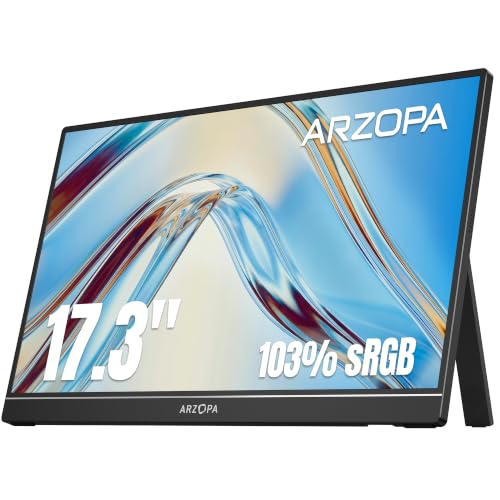
ARZOPA 17.3" 1080p IPS Portable Monitor
Best for: large-screen mobile multitasking and console gaming
- Size
- 17.3 Inch (what this guide is about)
- Screen Size
- 17.3"
- Resolution
- 1080P FHD
- Panel Type
- IPS
- Connectivity
- Type-C, Mini HDMI
- Color Gamut
- 103% sRGB
The ARZOPA 17.3-inch portable monitor pairs a 1080p Full HD IPS panel with a 103% sRGB color gamut. You get a built-in stand that supports both landscape and portrait orientation, alongside mini HDMI and USB-C inputs. A single USB-C cable carries both power and display signals for compatible devices. It suits you if you need an expansive secondary screen for mobile productivity or gaming.
Pros
- 17.3-inch IPS panel with 103% sRGB color gamut
- Built-in stand supports landscape and portrait orientations
- Single-cable USB-C setup for power and video signal
- Dual connectivity via USB-C and mini HDMI ports
Cons
- Relatively heavy at 3.55 pounds
- Uses mini HDMI rather than a full-size HDMI port
- Resolution tops out at 1080p Full HD
Good fit if
- You want a large 17.3-inch IPS display with an integrated multi-angle stand.
- You prefer running display signal and power through a single USB-C cable.
- You need a wide 103% sRGB color gamut for multimedia or gaming.
Skip if
- You want a display resolution higher than 1080p.
- You need a lightweight travel monitor under three pounds.
- You require a standard full-size HDMI port.
Verdict: ARZOPA 17.3-Inch 1080p Portable Monitor delivers broad screen area, solid 103% sRGB color coverage, and an integrated multi-orientation stand for straightforward dual-screen setups. It serves as a dependable large-format display for mobile workstations and console gaming.

Vixtan 14-Inch Triple Screen Laptop Extender
Best for: triple-screen multitasking on 13 to 17.3-inch laptops
- Size
- 17.3 Inch (what this guide is about)
- Screen Size
- 14"
- Resolution
- 1920×1080
- Panel Type
- IPS
- Connectivity
- USB-C, HDMI
- Color Gamut
- 100% sRGB
View on Amazon: Vixtan 14-Inch Triple Screen Laptop Extender
This setup adds two 14-inch displays to your laptop frame, clamping onto notebooks sized from 13 inches up to 17.3 inches. You get 1080p full HD IPS panels with 300 nits of brightness and 100% sRGB coverage. At 3.0 pounds, it suits you if you need a triple-screen workstation for multitasking on the go.
Pros
- Mounts onto laptops measuring from 13 inches up to 17.3 inches
- Dual 14-inch 1080p IPS panels with 100% sRGB color gamut
- Lightweight 3.0-pound frame with 180-degree horizontal rotation
- Includes two USB-C cables, a USB-C to USB-A cable, and an HDMI cable
Cons
- Requires a DisplayLink adapter for multi-display support on M-series MacBooks
- May require an external 5V/3A power adapter to prevent screen flickering
- Display panels measure 14 inches rather than full 17.3 inches
Good fit if
- You have a 13-inch to 17.3-inch laptop and want dual attached auxiliary displays.
- You need 100% sRGB color accuracy for portable multitasking.
- You want an ultra-thin 0.3-inch folding frame that weighs 3.0 pounds.
Skip if
- You want full-sized 17.3-inch standalone portable displays.
- You use an M-series MacBook and do not want to use an external DisplayLink adapter.
Verdict: Vixtan 14-Inch Triple Laptop Screen Extender mounts directly onto laptops up to 17.3 inches to create a portable three-screen workspace with 1080p IPS panels. It delivers compact multitasking, though M-series Mac systems require an extra adapter.
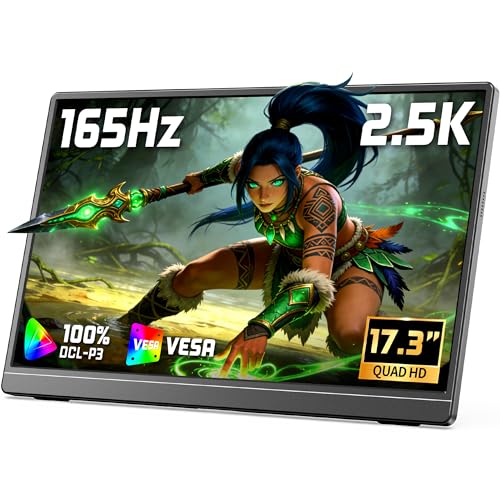
VILVA 17.3-Inch QHD 165Hz Portable Monitor
Best for: high-refresh 1440p gaming and multitasking
- Size
- 17.3 Inch (what this guide is about)
- Screen Size
- 17.3"
- Resolution
- 2560×1440
- Refresh Rate
- 165Hz
- Connectivity
- USB-C, HDMI
- Use
- Gaming
The VILVA 17.3-Inch QHD 165Hz Portable Monitor provides a 2560x1440 resolution display with a rapid 165Hz refresh rate. Built inside a metal chassis measuring 15.7 by 9.52 by 0.45 inches, it features an integrated adjustable stand and connects via full-featured USB-C or HDMI. If you need a larger mobile display that delivers sharper detail and smoother motion than standard 1080p 60Hz panels for work or console gaming, this setup fits your desk.
Pros
- 2560x1440 QHD resolution on a 17.3-inch screen
- Fast 165Hz refresh rate for smooth motion
- Durable metal body with a built-in adjustable stand
- Single-cable power and video delivery via USB-C
Cons
- No built-in speakers listed in specifications
- Thicker profile at 0.45 inches compared to 0.3-inch alternatives
- Lacks an internal battery for cord-free operation
Good fit if
- You want 1440p resolution and a 165Hz refresh rate on a large 17.3-inch display.
- You prefer an integrated metal kickstand instead of a folding magnetic cover.
- You use compatible USB-C hardware for single-cable display and power.
Skip if
- You need an ultra-thin screen under 0.4 inches for tight travel sleeves.
- You require an integrated battery to power the monitor without host device draw.
Verdict: VILVA 17.3-Inch QHD 165Hz Portable Monitor pairs a sharp 1440p resolution with a 165Hz refresh rate in a durable metal chassis. It delivers smooth visuals and straightforward connectivity using full-featured USB-C and HDMI ports.

Yxk 17.3-Inch 144Hz Portable Monitor
Best for: high-refresh mobile gaming and laptop multitasking
- Size
- 17.3 Inch (what this guide is about)
- Screen Size
- 17.3"
- Resolution
- 1920x1080
- Refresh Rate
- 144Hz
- Panel Type
- IPS
- Connectivity
- USB-C, Mini HDMI
The Yxk 17.3-Inch 144Hz Portable Monitor gives you a large workspace with a 1080p IPS panel and a fast 144Hz refresh rate. It weighs 2.12 pounds and measures 0.39 inches at its thickest point. You connect devices via two full-featured USB-C ports or mini HDMI. It suits you if you need a responsive, fast-refresh secondary display for mobile productivity, multimedia streaming, or console gaming on the road.
Pros
- 144Hz refresh rate for fluid motion
- 17.3-inch 1080p IPS display with narrow bezels
- Weighs 2.12 pounds with slim 0.2-inch top profile
- Two full-featured USB-C ports and mini HDMI connectivity
- Includes magnetic smart cover stand, wall charger, and cables
Cons
- 1080p resolution provides modest pixel density at 17.3 inches
- Mini HDMI port requires specific cables or adapters
Good fit if
- You want a 144Hz refresh rate for fluid visuals on a 17.3-inch screen.
- You need a lightweight panel under 2.2 pounds with an included smart cover stand.
- You prefer a single-cable USB-C setup for display and power delivery.
Skip if
- You need higher than 1080p resolution, like 1440p or 4K, for detailed editing.
- You require a full-sized standard HDMI port rather than mini HDMI.
Verdict: Yxk 17.3-Inch 144Hz Portable Monitor balances a fast 144Hz IPS panel with a lightweight 2.12-pound build. It delivers expansive screen area and smooth motion without adding heavy bulk to your travel bag.

Screnex 15.6-Inch Triple Screen Extender
Best for: freestanding triple-screen laptop setups
- Size
- 17.3 Inch (what this guide is about)
- Screen Size
- 15.6"
- Resolution
- 1080P FHD
- Panel Type
- IPS
- Connectivity
- USB-C, HDMI
- Weight
- 3.9 lbs
The Screnex Triple Screen Extender provides two 15.6-inch 1080p IPS displays designed to pair with 13 to 17.3-inch laptops. Instead of clamping to your laptop lid, it features a freestanding aluminum base that sits behind your machine to eliminate hinge strain. It connects with two USB-C cables on supported devices and weighs 3.9 pounds. This setup suits you if you need a portable dual-screen expansion for mobile multitasking.
Pros
- Freestanding design avoids clamping onto laptop lid and hinges
- Dual 15.6-inch 1080p IPS panels with 178-degree viewing angles
- Includes carry handbag, power adapter, and USB-C and HDMI cables
- Aluminum alloy frame with 0.16-inch panel thickness
Cons
- Individual panels are 15.6 inches rather than full 17.3-inch displays
- Requires extra H5-T cable and driver installation for M1 to M3 MacBooks
- Total unit weight is 3.9 pounds
Good fit if
- You want two additional screens without adding weight to your laptop lid
- You own a 13 to 17.3-inch laptop with two full-function USB-C ports
- You need a portable triple-display station that packs into an included bag
Skip if
- You require native 17.3-inch panel sizes rather than dual 15.6-inch displays
- You want a single lightweight secondary monitor rather than a 3.9-pound dual-screen unit
Verdict: Screnex Triple 15.6-Inch Freestanding Screen Extender delivers two independent displays on a standalone base, preventing stress on your laptop hinges. It provides an all-in-one dual-panel workstation for compatible USB-C laptops.

Synnov 15.6-Inch Triple Screen Laptop Extender
Best for: multi-screen productivity on full-featured USB-C laptops
- Size
- 17.3 Inch (what this guide is about)
- Screen Size
- 15.6"
- Resolution
- 1080P FHD
- Panel Type
- IPS
- Connectivity
- USB-C, HDMI
- Weight
- 4 lbs
View on Amazon: Synnov 15.6-Inch Triple Screen Laptop Extender
The Synnov 15.6-Inch Triple Laptop Screen Extender adds two 1080p FHD IPS displays to your existing setup. It fits laptops from 12 to 17.3 inches using a free-standing metal mount and aluminum body. Weighing 4 pounds, it connects via two full-featured USB-C ports or USB-C plus HDMI. You get a three-screen workflow for multitasking on Windows, Chrome, Linux, or compatible macOS systems.
Pros
- Adds two 15.6-inch 1080p FHD IPS displays
- No-clip aluminum alloy body with integrated metal stand
- Includes cables, power adapter, and leather carry bag
- Supports extend, mirror, and portrait display modes
Cons
- Weighs 4 pounds, adding bulk to travel gear
- Incompatible with standard M1, M2, and M3 MacBooks
- Requires at least one full-featured USB-C port to operate
Good fit if
- You want a three-screen workstation that fits laptops up to 17.3 inches.
- You have a compatible laptop with full-featured USB-C connectivity.
- You need a free-standing aluminum frame that avoids clamping directly to your laptop screen.
Skip if
- You use a MacBook powered by standard M1, M2, or M3 base processors.
- You want a single lightweight 17.3-inch standalone screen.
- You lack full-featured USB-C ports on your host computer.
Verdict: Synnov 15.6-Inch Triple Laptop Screen Extender delivers a dual-panel add-on for laptops up to 17.3 inches, provided your host machine supports multi-display USB-C video output.
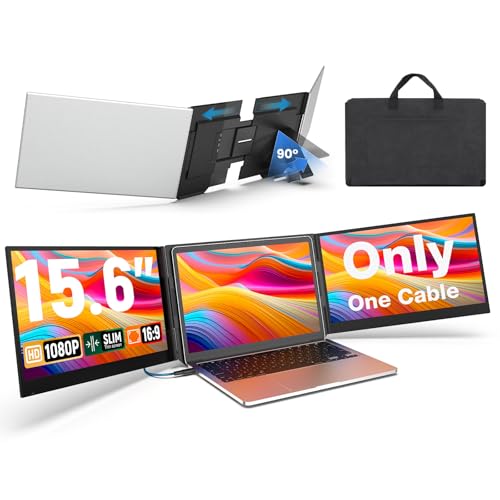
UK Bonitoys 15.6-Inch Triple Screen Extender
Best for: triple-display productivity on compatible laptops
- Size
- 17.3 Inch (what this guide is about)
- Screen Size
- 15.6"
- Resolution
- 1920x1080
- Panel Type
- IPS
- Connectivity
- USB-C, USB-A
- Aspect Ratio
- 16:9
View on Amazon: UK Bonitoys 15.6-Inch Triple Screen Extender
The UK Bonitoys 15.6-Inch Triple Screen Extender attaches behind your 13-inch to 17.3-inch laptop to add two 1080p FHD IPS displays. It runs both screens through a single USB-C cable for power and video, or via USB-A using the included adapter. With an aluminum frame and a total weight of 4 pounds, it suits mobile workers who need a dual-display workstation expansion without balancing separate standalone monitors.
Pros
- Dual 15.6-inch 1080p FHD IPS panels with 178-degree viewing angles
- Runs both displays over a single USB-C connection
- Telescoping bracket fits laptops from 13 inches up to 17.3 inches
- Aluminum shell with included carrying case and power adapter
Cons
- Requires driver installation before first use
- Individual display panels are 15.6 inches rather than full 17.3 inches
- Laptop width cannot exceed 15.85 inches
Good fit if
- You want two additional screens powered through a single USB-C cable.
- You use a 13-inch to 17.3-inch laptop with a chassis width under 15.85 inches.
- You need a bracket-mounted setup that does not clamp directly to your laptop bezel.
Skip if
- You need native 17.3-inch panels instead of dual 15.6-inch displays.
- You cannot install third-party drivers on your computer.
- Your laptop body exceeds 15.85 inches in width.
Verdict: UK Bonitoys 15.6-Inch Triple Screen Extender provides a dual-screen expansion for laptops up to 17.3 inches using a single cable. It delivers reliable 1080p multi-tasking workspace, provided you can install the necessary drivers.
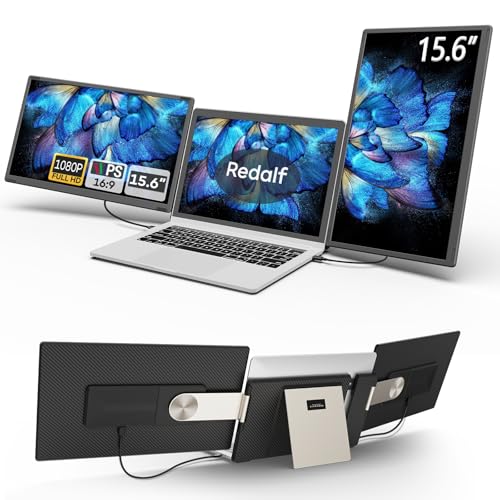
Redalf 15.6-Inch Detachable Dual Screen Extender
Best for: modular multi-screen setups on larger laptops
- Size
- 17.3 Inch (what this guide is about)
- Screen Size
- 15.6"
- Resolution
- 1080P FHD
- Panel Type
- IPS
- Connectivity
- USB-C, USB-A, HDMI
- Weight
- 2.1 pounds
View on Amazon: Redalf 15.6-Inch Detachable Dual Screen Extender
This Redalf screen extender mounts two 15.6-inch 1080p IPS displays to your 13-inch to 17.3-inch laptop. It features a detachable stand with 235-degree horizontal and 90-degree vertical rotation, letting you detach screens or configure them in landscape, portrait, or stacked modes. Weighing 2.1 pounds per side, it suits you if you need a modular multi-monitor setup with built-in speakers, USB-C, and HDMI connectivity across Windows, Chrome, or compatible Mac systems.
Pros
- Dual 15.6-inch 1080p IPS anti-glare panels
- Detachable design allows single-screen use at 2.1 pounds
- Stand supports 235-degree horizontal and 90-degree vertical rotation
- Fits 13-inch to 17.3-inch laptops without requiring drivers
- Built-in speakers included on displays
Cons
- Does not support base Apple M1, M2, or M3 processors
- HDMI connection requires an additional USB cable for power
- Provides 15.6-inch screens rather than a native 17.3-inch display
Good fit if
- You use a 13-inch to 17.3-inch laptop and want two additional displays.
- You need flexible rotation options including portrait, landscape, and stacked layouts.
- You want detachable panels that can be used or transported independently.
Skip if
- You use a Mac powered by a base M1, M2, or M3 chip.
- You want a single standalone 17.3-inch display instead of dual 15.6-inch panels.
- You prefer a single-cable HDMI setup that requires no extra power connection.
Verdict: Redalf 15.6-Inch Detachable Dual Screen Extender delivers a versatile triple-screen setup with flexible rotation and detachable panels for laptops up to 17.3 inches. It gives you expansive multi-window workspace options as long as your computer hardware is compatible.

VisionOwl 17.3-Inch 4K Portable Monitor
Best for: bright workspaces needing 4K detail
- Size
- 17.3 Inch (what this guide is about)
- Screen Size
- 17.3"
- Resolution
- 3840x2160
- Panel Type
- IPS
- Connectivity
- USB-C, Standard HDMI
- Color Gamut
- 150% sRGB
The VisionOwl 17.3-Inch 4K Portable Monitor gives you a 3840x2160 UHD IPS panel in a 1.75-pound frame. It reaches up to 600 nits of brightness with its included power adapter, or 500 nits via single USB-C cable operation. It features full-size standard HDMI alongside USB-C, a built-in kickstand, and VESA mount capability. This display suits travelers and professionals who need high pixel density and wide color coverage away from a desk.
Pros
- 3840x2160 4K UHD resolution on an IPS panel
- High brightness up to 600 nits with included power adapter
- Full-size standard HDMI port and dual USB-C ports
- Weighs 1.75 pounds with an included protective sleeve case
Cons
- Reaching maximum 600-nit brightness requires the external power adapter
- Large 15.4-inch width requires substantial bag space during travel
Good fit if
- You need 3840x2160 resolution for high visual detail and multitasking.
- You work in bright settings where up to 600 nits of brightness helps visibility.
- You prefer standard full-size HDMI connectivity over mini-HDMI connectors.
Skip if
- You want maximum peak brightness without using an external power brick.
- You prefer a more compact screen with a footprint smaller than 15.4 inches.
Verdict: VisionOwl 17.3-Inch 4K Portable Monitor delivers 3840x2160 resolution and up to 600 nits of brightness in a lightweight 1.75-pound build. It is well-suited for users who need sharp visuals and standard HDMI connectivity on the go.
Specifications side by side
| Spec | Anyuse 17.3-Inch 144Hz Portable Monitor | KEFEYA 15.6-Inch Triple Screen Extender | ForHelp 17.3-Inch 144Hz HDR Portable Monitor | Orfibz 14.2-Inch Laptop Screen Extender | ZUMWALT 15.6-Inch Dual Screen Extender | Cocopar 17.3-Inch 4K Portable Monitor | ARZOPA 17.3" 1080p IPS Portable Monitor | Vixtan 14-Inch Triple Screen Laptop Extender | VILVA 17.3-Inch QHD 165Hz Portable Monitor | Yxk 17.3-Inch 144Hz Portable Monitor | Screnex 15.6-Inch Triple Screen Extender | Synnov 15.6-Inch Triple Screen Laptop Extender | UK Bonitoys 15.6-Inch Triple Screen Extender | Redalf 15.6-Inch Detachable Dual Screen Extender | VisionOwl 17.3-Inch 4K Portable Monitor |
|---|---|---|---|---|---|---|---|---|---|---|---|---|---|---|---|
| Screen Size | 17.3" | 15.6" | 17.3" | 14.2" | 15.6" | 17.3 Inch | 17.3" | 14" | 17.3" | 17.3" | 15.6" | 15.6" | 15.6" | 15.6" | 17.3" |
| Resolution | 1920x1080 | 1920x1080 | 1920 x 1080 | 1080p FHD | 1080P FHD | 3840×2160 | 1080P FHD | 1920×1080 | 2560×1440 | 1920x1080 | 1080P FHD | 1080P FHD | 1920x1080 | 1080P FHD | 3840x2160 |
| Refresh Rate | 144Hz | not specified | 144Hz | not specified | not specified | 60Hz | not specified | not specified | 165Hz | 144Hz | not specified | not specified | not specified | not specified | not specified |
| Panel Type | IPS | IPS | IPS | IPS | not specified | not specified | IPS | IPS | not specified | IPS | IPS | IPS | IPS | IPS | IPS |
| Connectivity | USB-C, HDMI | USB-C, USB-A, HDMI | Mini HDMI, 2x Type-C | USB-C, HDMI, USB-A | USB-C, HDMI, USB-A | dual USB-C, one HDMI | Type-C, Mini HDMI | USB-C, HDMI | USB-C, HDMI | USB-C, Mini HDMI | USB-C, HDMI | USB-C, HDMI | USB-C, USB-A | USB-C, USB-A, HDMI | USB-C, Standard HDMI |
| Color Gamut | not specified | 120% sRGB | not specified | not specified | not specified | 150% sRGB | 103% sRGB | 100% sRGB | not specified | not specified | not specified | not specified | not specified | not specified | 150% sRGB |
| Aspect Ratio | not specified | not specified | 16:9 | not specified | not specified | not specified | not specified | not specified | not specified | not specified | not specified | not specified | 16:9 | not specified | not specified |
| Weight | 4.96 pounds | 8.8 pounds | 2.12 lbs | 1.87 lbs | 4 lbs (1.8 kg) | 1.7 lbs | 3.55 lbs | 3.0 lbs | not specified | 2.12 lbs | 3.9 lbs | 4 lbs | 4 lbs | 2.1 pounds | 1.75 lbs |
| Features | not specified | not specified | Built-in Speakers, HDR | not specified | not specified | Built-in Speakers, VESA Mountable, Kickstand | not specified | not specified | not specified | Built-in Speakers, VESA Mountable, Kickstand | not specified | not specified | not specified | not specified | Built-in Speakers, VESA Mountable, Kickstand |
| Use | not specified | not specified | Travel, Gaming | Travel | Travel | Travel | Gaming | not specified | Gaming | Travel | Travel | Travel | not specified | not specified | Travel |
| Display Support | not specified | Triple Monitor | not specified | not specified | Dual Monitor | not specified | not specified | not specified | not specified | not specified | not specified | Triple Monitor | Triple Monitor | Dual Monitor | not specified |
| Size | 17.3 Inch | 17.3 Inch | 17.3 Inch | 17.3 Inch | 17.3 Inch | 17.3 Inch | 17.3 Inch | 17.3 Inch | 17.3 Inch | 17.3 Inch | 17.3 Inch | 17.3 Inch | 17.3 Inch | 17.3 Inch | 17.3 Inch |
| Dimensions | not specified | 14.2 × 0.96 × 8.8 inches | not specified | 5 × 4 × 0.4 inches | 10 × 6 × 1.11 inches | 0.5 × 15.4 × 9.5 inches | 3.94 × 1.97 × 0.5 inches | 0.59 × 8.3 × 14.3 inches | 15.7 × 9.52 × 0.45 inches | 0.1 × 0.1 × 0.1 inches | 2.5 × 13 × 17 inches | 9.4 × 15 × 0.87 inches | 9.37 × 15.9 × 0.86 inches | 13.9 × 8.15 × 1.5 inches | 0.5 × 15.4 × 9.5 inches |
| Color | black | Black | 17.3"1080p | 14.2" Black | 15.6" Silver | black | Black | 14" Black | 17.3 QHD Light Black | Black | Silver | Sliver | silver | Charcoal Gray | black |
| Model | PM156 | S6 | 17.3 inch | A3 | P7 | Y173ULH | A1M | S10 PRO | V173F1-N | Y173F1 | P7 | P7 | P7 pro-SJMP | S6 | V173UH |
Is a 17.3-inch portable monitor worth it?
A 17.3-inch display expands your visual workspace compared to smaller portable screens. Panels in this size class measure over 15 inches wide and offer resolutions from 1080p FHD up to 4K UHD. Refresh rates reach up to 165Hz on select models. Standalone displays weigh between 1.7 pounds and 4.96 pounds, using USB-C and HDMI ports for connectivity. This form factor gives you larger viewable dimensions and desktop-style mounting via VESA holes or integrated kickstands, but requires adequate bag space to carry a 15-inch chassis.
Worth it if
- You need high resolutions like 1440p QHD or 4K UHD on a single portable screen.
- You want high refresh rates up to 165Hz with USB-C and HDMI connectivity.
- You plan to mount your display using standard VESA holes or built-in kickstands.
Skip it if
- You carry compact bags that cannot accommodate a 15-inch display frame.
- You prioritize the lowest possible pack weight over a large viewing area.
How We Chose These Monitors
You see monitors selected specifically for the 17.3-inch screen size stated in their title or feature list. We show only one size or variant from each product family. All specifications come directly from published product data, as we do not physically handle the devices. Live availability updates at least daily on the page.
To help you evaluate the 15 options for 2026, products in stock appear first, then by Amazon sales rank (better-selling products first). This lets you easily compare verified specs such as resolution, refresh rate, and display connectivity to find what fits your mobile setup.
How to Choose a 17.3-Inch Portable Monitor
-
Assess Screen Resolution
Assess the display resolution you need for your primary tasks. Standard 1080p FHD provides sufficient clarity for general web browsing and document editing on a 17.3-inch screen. If you edit high-resolution images or manage extensive spreadsheets, choose 4K UHD with a 3840x2160 pixel grid. Displays like the VisionOwl 17.3-Inch 4K Portable Monitor offer this high pixel count to render fine text and graphics crisply. Select 1440p QHD if you want a balance between graphical sharpness and processing load.
-
Select the Refresh Rate
Check the refresh rate based on your content type. A baseline 60Hz panel handles standard office workflows, video playback, and general web browsing without issue. If you play fast-paced video games or prefer smoother cursor tracking, look for panels with 144Hz or 165Hz refresh rates. The VILVA 17.3-Inch QHD 165Hz Portable Monitor delivers high-frame-rate rendering to minimize motion blur during fast action. Match the screen refresh rate to your computer graphics hardware output to ensure the monitor operates at its full speed.
-
Check Physical Connectivity Ports
Review the physical video input ports against your host device capabilities. Some monitors rely exclusively on USB-C connections, requiring a laptop that supports DisplayPort alternate mode or driver software over that specific port. If you plan to connect gaming consoles, desktop computers, or older laptops, select a model that includes dedicated HDMI ports alongside USB-C. The Anyuse 17.3-Inch 144Hz Portable Monitor provides both USB-C and HDMI ports, offering broader device versatility across multiple hardware sources without needing specialized adapter dongles.
-
Evaluate Mounting and Stands
Evaluate how you plan to position the monitor on your desk. Portable displays with integrated kickstands allow quick deployment without packing separate stands or propping the panel against loose objects. If you plan to use an ergonomic monitor arm or wall bracket, check for standard VESA mounting holes on the back panel. The Yxk 17.3-Inch 144Hz Portable Monitor includes both an integrated kickstand and VESA mounting options. This hardware flexibility lets you alternate between mobile desk setups and permanent desktop arm installations easily.
-
Confirm Host Machine Compatibility
Verify the software drivers and hardware architecture your laptop requires before choosing multi-screen hardware. Some multi-display add-ons use driver installations to push dual video feeds through one standard USB port. Other configurations demand native multi-display video output directly from the host USB-C port. For example, the Vixtan 14-Inch Triple Screen Laptop Extender notes that Apple M-series systems require an additional adapter to run multiple external screens. Confirm that your operating system and graphics chipset natively support the required display channels to avoid setup complications.
-
Consider Speakers and HDR Support
Examine onboard audio and high dynamic range specifications if you use the monitor for media consumption or presentations. Built-in stereo speakers eliminate the need to carry external audio peripherals when sharing audio or gaming on the road. High dynamic range, or HDR, enhances luminance contrast between bright highlights and deep shadows in supported video feeds. The ForHelp 17.3-Inch 144Hz HDR Portable Monitor includes both HDR capability and internal speakers. These integrated hardware features simplify your gear bag while supporting rich audiovisual playback from compatible sources.
Frequently asked questions
What ports do you need to connect a 17.3-inch portable monitor?
You generally need either a full-featured USB-C port or an HDMI port paired with power. Standalone displays such as the Anyuse and Cocopar include both USB-C and HDMI interfaces. A full-featured USB-C port transfers audio, video, and power over one cable, whereas an HDMI connection requires an additional USB connection to supply electrical power to the display.
Can you use a 17.3-inch portable monitor for fast-paced gaming?
Yes, you can choose high-refresh models specifically designed to handle fast-paced gaming. The VILVA features a 165Hz refresh rate at 1440p resolution, while the Anyuse, ForHelp, and Yxk provide 144Hz refresh rates on 1080p IPS panels. These high refresh rates minimize motion blur during fast camera movements compared to standard 60Hz panels, provided your hardware outputs sufficient frame rates.
How much do 17.3-inch portable monitors typically weigh?
Standalone 17.3-inch displays generally weigh between 1.75 and 5 pounds, while multi-panel extenders weigh significantly more. For example, the VisionOwl weighs 1.75 pounds, and the ForHelp and Yxk weigh 2.12 pounds each. In contrast, multi-screen extender brackets like the KEFEYA reach 8.8 pounds because they incorporate multiple display panels and heavy-duty chassis mounting hardware.
Are 17.3-inch portable monitors compatible with Apple MacBooks?
Most standalone 17.3-inch displays work with MacBooks over standard USB-C or HDMI connections, but multi-display extenders may have hardware limitations. For instance, the Vixtan triple screen extender requires an extra adapter to function with Apple M-series Mac systems due to native external display limits. You must verify your specific laptop model supports multiple external display signals before attaching multi-screen extenders.
Can you mount a 17.3-inch portable monitor on an arm?
You can mount specific models that come equipped with standard VESA mounting patterns. Options such as the Cocopar 4K, VisionOwl 4K, and Yxk 144Hz explicitly list VESA mount support alongside their integrated kickstands. If you plan to use an articulated desk arm or wall bracket, confirm the monitor specifications indicate VESA holes rather than relying solely on folding folio covers.
What is the difference between a standalone portable monitor and an extender?
A standalone monitor rests on its own integrated kickstand beside your computer, whereas an extender attaches directly to your laptop frame. Standalone units like the ARZOPA supply an independent secondary screen. Extenders such as the ZUMWALT, Synnov, and Redalf clamp onto compatible laptops to add dual displays on either side, creating a three-screen setup without consuming extra desk surface.
Do 17.3-inch portable monitors have built-in audio speakers?
Many standalone 17.3-inch models include integrated speakers directly inside the monitor housing. Displays including the ForHelp, Cocopar, Yxk, and VisionOwl feature built-in audio hardware alongside their video connections. These speakers receive audio directly through your connected HDMI or USB-C cable, eliminating the need to pack separate external desktop speakers when you travel or work away from your desk.