Smartlinx Thunderbolt 4 21-Port Dock Alternatives: 6 Similar Picks Compared
As an Amazon Associate we earn from qualifying purchases. Links on this page are affiliate links.
The Smartlinx Thunderbolt 4 21-Port Dock delivers extensive connectivity with 21 ports, 90W power delivery, and dual 4K display support. It is designed for 8th Gen Intel laptops and Windows systems, offering 40Gbps data speeds and 8K resolution capabilities. If you need these specific specs, it remains a strong option. However, you might look for smartlinx thunderbolt 4 dock alternatives if your workflow requires different priorities. Some users need higher wattage charging for power-hungry devices, while others prefer a smaller footprint or universal USB-C compatibility without Thunderbolt requirements. Budget constraints or brand loyalty to Dell or Lenovo may also drive your search.
We compared 6 similar docks that share core features with the original, such as dual monitor support and USB-C connectivity. The list includes options with 130W or 180W charging for high-performance laptops, and compact hubs for minimal desk space. We selected these picks because their specifications overlap with the Smartlinx model, ensuring you find a viable replacement. Whether you need more ports, faster charging, or a different form factor, these alternatives cover the essential requirements. Each option offers distinct advantages based on its published data, allowing you to match the dock to your specific hardware and setup needs.
How these docks differ from Smartlinx
Lenovo USB-C Universal Business Dock
The Lenovo USB-C Universal Business Dock uses standard USB-C connectivity rather than Thunderbolt 4. This means it lacks the 40Gbps data speed found in the Smartlinx dock. It also has fewer ports, offering only nine connections compared to the 21 ports on the Smartlinx model. However, it maintains 90W power delivery and supports dual 4K displays. The Lenovo unit is lighter and more compact, weighing 9.12 ounces versus 12.8 ounces for the Smartlinx. You should choose this dock if you prioritize universal compatibility and a smaller footprint over high-speed data transfer and maximum port density. It is ideal for users who do not need Thunderbolt 4 speeds.
ANYHDD ThinkPad Dual 4K USB-C Dock
The ANYHDD ThinkPad Dual 4K USB-C Dock focuses on display clarity and included accessories. It supports dual 4K resolution but does not mention 8K capabilities like the Smartlinx dock. The ANYHDD model is heavier at 1 pound, compared to the Smartlinx 12.8 ounces. It also lacks Thunderbolt 4 certification, relying on standard USB-C and DisplayPort connections. You get 90W power delivery similar to the Smartlinx. This dock is a practical choice if you need a sturdy, heavier unit with included cables. It suits users who value included accessories and standard dual-screen performance over the high-speed data transfer and 8K potential of the Thunderbolt 4 Smartlinx dock.
Koncept Dual Monitor 130W USB-C Dock
The Koncept Dual Monitor 130W USB-C Dock offers significantly higher power delivery at 130W, compared to the 90W on the Smartlinx dock. This makes it better suited for power-hungry Dell laptops. However, it lacks Thunderbolt 4 speeds and high port count. It uses HDMI and USB-C connections. The Koncept unit is much heavier at 2.5 pounds, whereas the Smartlinx is 12.8 ounces. It supports dual displays but does not offer the 8K resolution of the Smartlinx. Pick this dock if your primary need is charging high-power laptops reliably. It is a practical option for Dell users who do not require Thunderbolt 4 data speeds or extensive port variety.
Koncept 180W Dual Monitor USB-C Dock
The Koncept 180W Dual Monitor USB-C Dock provides the highest power delivery in this group at 180W. This exceeds the 90W output of the Smartlinx dock. It is designed for high-power charging needs. Like the other Koncept model, it lacks Thunderbolt 4 speeds and focuses on HDMI and USB-C connectivity. It supports dual displays but does not offer the 8K resolution capability of the Smartlinx. The Koncept 180W dock is a renewed unit, which may differ in cosmetic condition. Choose this option if you need maximum charging wattage for demanding laptops. It is best for users who prioritize power delivery over high-speed data transfer and advanced resolution support.
Belkin Connect 5-in-1 Thunderbolt 4 Hub
The Belkin Connect 5-in-1 Thunderbolt 4 Hub is significantly more compact than the Smartlinx dock. It measures 5.3 x 2.9 x 0.7 inches, compared to the Smartlinx 7.5 x 3.2 x 1.2 inches. It offers only five ports, whereas the Smartlinx provides 21. However, it retains Thunderbolt 4 speeds and supports dual 4K displays. The Belkin unit delivers 96W power, slightly more than the Smartlinx 90W. It is lighter at 1.98 pounds, but the Smartlinx is lighter at 12.8 ounces. Pick this dock if you need a small footprint and Thunderbolt 4 speeds. It is ideal for users who do not need extensive port variety and prefer a minimalist setup.
Lenovo ThinkPad USB-C Dock
The Lenovo ThinkPad USB-C Dock by ANYHDD focuses on wired networking and basic display support. It lacks Thunderbolt 4 speeds, relying on USB-C, HDMI, and DisplayPort connections. It supports dual 4K displays, matching the Smartlinx dual monitor capability but without the 8K option. It offers 90W power delivery, same as the Smartlinx. The model does not list a weight or dimensions, but it is designed for stable single-monitor workstation setups. It is a practical choice for users who prioritize Ethernet connectivity and reliable dual-screen performance. Choose this dock if you do not need Thunderbolt 4 speeds or high port counts. It suits professionals who need a stable, wired connection for their workstation.
Quick picks
Our 7 picks

Smartlinx Thunderbolt 4 21-Port Dock
Best for: Intel users needing 21 ports and 90W charging
- Host Interface
- Thunderbolt 4
- Display Support
- Dual
- Max Resolution
- 8K@60Hz
- Power Delivery
- 90W
- Port Count
- 21
- Max Data Speed
- 40Gbps
View on Amazon: Smartlinx Thunderbolt 4 21-Port Dock Affiliate link
This Smartlinx dock offers 21 ports via a Thunderbolt 4 connection. It supports dual 4K displays at 60Hz on macOS and Windows, plus an 8K output option. The unit delivers 90W of power delivery to your laptop and 20W to mobile devices. It measures 7.5 by 3.2 by 1.2 inches and weighs 12.8 ounces. You get a 12-month warranty and compatibility with 8th Gen Intel processors or newer.
Pros
- 21 ports for extensive connectivity
- Thunderbolt 4 host interface with 40Gbps data speed
- Supports dual 4K@60Hz displays
- 90W power delivery for laptops
- 12-month manufacturer warranty
Cons
- Limited to 8th Gen Intel processors or newer
- Does not support M1 Macs for dual display
- Charging may be unstable for devices over 90W
Good fit if
- You need a high port count for multiple peripherals
- You use Windows or Intel-based macOS laptops
- You require 90W power delivery for your laptop
Skip if
- You own a 7th Gen Intel processor or older
- You use an M1 Mac for dual monitor setups
- Your laptop requires more than 90W of charging power
Verdict: Smartlinx Thunderbolt 4 21-Port Dock fits users with 8th Gen Intel laptops who need extensive connectivity and dual monitor support. It avoids M1 Mac compatibility issues by excluding them from its dual display capabilities.

Lenovo USB-C Universal Business Dock
Best for: Universal USB-C dual monitor setups
- Host Interface
- USB-C
- Display Support
- Dual
- Max Resolution
- 4K
- Power Delivery
- 65W
- Port Count
- 9
- Video Ports
- DP 1.4, HDMI 2.0
View on Amazon: Lenovo USB-C Universal Business Dock Affiliate link
This Lenovo docking station connects via USB-C to support dual 4K displays using DisplayPort 1.4 and HDMI 2.0. It includes nine expansion ports and delivers up to 65W of power delivery to your laptop. The compact unit measures 6.06 by 3.15 inches and weighs just 9.12 ounces. It fits users who need a reliable, clutter-free workspace solution with standard connectivity options.
Pros
- Supports dual 4K monitors via DP 1.4 and HDMI 2.0
- Provides 65W power delivery for compatible laptops
- Includes nine expansion ports for peripherals
- Compact and lightweight design at 9.12 ounces
Cons
- Lower 65W power delivery compared to competitors offering 90W or 180W
- Uses USB-C host interface instead of Thunderbolt 4
- Lacks Thunderbolt certification for maximum bandwidth
Good fit if
- You need a universal USB-C dock for mixed PC environments
- You require dual 4K display support with standard video ports
- You prefer a compact, lightweight docking station for travel
Skip if
- You require Thunderbolt 4 connectivity for high-speed data transfer
- You need more than 65W of power delivery for your laptop
- You are looking for a dock with 21 ports
Verdict: Lenovo USB-C Universal Business Dock offers solid dual 4K support and nine ports in a compact form factor. It suits professionals who prioritize universal USB-C compatibility over Thunderbolt speed or high-wattage charging.

ANYHDD ThinkPad Dual 4K USB-C Dock
Best for: Dual 4K display setups with moderate power needs
- Host Interface
- Thunderbolt 4
- Display Support
- Dual
- Max Resolution
- 4K
- Power Delivery
- 90W
- Video Ports
- HDMI, DisplayPort
- Connectivity
- USB-C, HDMI, DisplayPort
View on Amazon: ANYHDD ThinkPad Dual 4K USB-C Dock Affiliate link
This ANYHDD docking station uses a Thunderbolt 4 host interface to support dual 4K displays via HDMI and DisplayPort. It includes a 90W power adapter for connected devices. The compact black unit measures 8 by 3 inches and weighs one pound. You get included cables for immediate setup. It suits users needing a reliable dual-monitor workspace with standard connectivity options.
Pros
- Thunderbolt 4 and USB-C host interface
- Supports dual 4K UHD displays
- Includes HDMI and DisplayPort cables
- 90W power delivery adapter included
Cons
- Lower 90W power delivery compared to competitors offering 130W or 180W
- Only two video ports limit multi-monitor setups beyond dual displays
- Requires firmware updates for compatibility with some computers
Good fit if
- You need dual 4K monitors for productivity
- You prefer a compact dock with included cables
- You use a Thunderbolt 4 or USB-C compatible computer
Skip if
- You require more than 90W of power delivery
- You need to connect three or more displays
- You want a dock with higher power wattage like 130W or 180W
Verdict: ANYHDD Thunderbolt 4 21-Port Dock 90W provides solid dual 4K support for users who prioritize display clarity and included cables over high-wattage charging. It is a practical option for standard dual-screen workflows.

Koncept Dual Monitor 130W USB-C Dock
Best for: Dell laptops needing 130W charging and dual displays
- Host Interface
- USB-C
- Display Support
- Dual
- Video Ports
- HDMI, mini-DisplayPort
- Connectivity
- USB-C, HDMI, DisplayPort, USB-A
- Power Delivery
- 130W
- Dimensions
- 7 × 6.5 × 1 inches
View on Amazon: Koncept Dual Monitor 130W USB-C Dock Affiliate link
This Koncept WD19S dock delivers 130W power delivery through a USB-C host interface. It supports dual monitors via HDMI and mini-DisplayPort outputs. The unit includes three USB-A 3.0 ports, two USB-C ports, and an RJ-45 ethernet connection. It measures 6.5 by 7 inches and weighs 2.5 pounds. You will find it suitable for Dell Latitude, Inspiron, and Precision laptops that support DisplayPort over USB-C or Thunderbolt 3.
Pros
- Provides 130W power delivery for connected laptops
- Supports dual monitor setups with HDMI and mini-DisplayPort
- Includes RJ-45 ethernet and multiple USB-A 3.0 ports
Cons
- Uses mini-DisplayPort instead of full-size DisplayPort
- No Thunderbolt 4 certification for higher bandwidth
- Sold as a renewed item rather than new
Good fit if
- You need 130W power delivery for your laptop
- You use Dell Latitude, Inspiron, or Precision devices
- You require an ethernet connection for stable networking
Skip if
- You need Thunderbolt 4 certified high-speed data transfer
- You prefer full-size DisplayPort over mini-DisplayPort
- You require a brand-new unit rather than renewed
Verdict: Koncept WD19S 130W Dell Dock fits users who need reliable 130W charging and dual display support for Dell laptops without requiring Thunderbolt 4 speeds.

Koncept 180W Dual Monitor USB-C Dock
Best for: High-power charging and multi-port video setups
- Host Interface
- USB-C
- Display Support
- Dual
- Video Ports
- VGA, HDMI, Mini-DisplayPort
- Connectivity
- USB-C, HDMI, DisplayPort, Ethernet, VGA
- Power Delivery
- 180W
View on Amazon: Koncept 180W Dual Monitor USB-C Dock Affiliate link
The Koncept WD19 180W dock provides dual monitor support via USB-C connectivity. It delivers 180W power delivery to keep your laptop charged while connected. You get VGA, HDMI, and mini-DisplayPort options for flexible screen setups. The bundle includes an HDMI cable for immediate use. This setup suits users needing a reliable wired connection for office peripherals and multiple displays.
Pros
- 180W power delivery for fast laptop charging
- Supports dual monitor configurations
- Includes VGA, HDMI, and mini-DisplayPort outputs
- Bundle includes HDMI cable for easy setup
Cons
- Uses USB-C host interface instead of Thunderbolt 4
- Only offers two USB 3.0 ports for peripherals
- Lacks native Thunderbolt certification for daisy-chaining
Good fit if
- You need high-power charging for compatible laptops
- You want multiple video output options like VGA
- You prefer a complete bundle with included cables
Skip if
- You require Thunderbolt 4 bandwidth for high-speed data
- You need more than two USB 3.0 ports
- You want a dock with native Thunderbolt certification
Verdict: The Koncept WD19 180W dock fits users who prioritize high-power charging and versatile video ports over Thunderbolt 4 speeds. It is a practical choice for office setups needing dual displays and included cables.

Belkin Connect 5-in-1 Thunderbolt 4 Hub
Best for: Compact setups needing 96W charging
- Host Interface
- Thunderbolt 4
- Display Support
- Dual
- Max Resolution
- 8K@30Hz
- Power Delivery
- 96W
- Port Count
- 5
- Max Data Speed
- 40Gbps
View on Amazon: Belkin Connect 5-in-1 Thunderbolt 4 Hub Affiliate link
The Belkin Thunderbolt 4 hub offers a compact 5-in-1 solution for users needing reliable connectivity. It supports dual 4K monitors at 60Hz or a single 8K display at 30Hz. The 96W power delivery keeps your laptop charged while you work. Its small footprint fits easily on any desk. You get high-speed 40Gbps data transfer and daisy-chaining for up to six devices. It is ideal for those who want a simple, certified dock without excess ports.
Pros
- Supports dual 4K displays at 60Hz
- 96W power delivery for fast charging
- Compact size at 5.3 x 2.9 inches
- 40Gbps data transfer speed
Cons
- Only 5 ports compared to 21-port alternatives
- 8K resolution limited to 30Hz
- Heavier at 1.98 pounds for its size
Good fit if
- You need a compact dock for a small desk
- You require 96W charging for your laptop
- You want dual 4K monitors at 60Hz
Skip if
- You need more than 5 ports
- You require 180W power delivery
- You need a 21-port docking station
Verdict: Belkin Thunderbolt 4 5-Port Hub fits users who prioritize a compact footprint and reliable 4K dual-monitor support over high port counts.
Lenovo ThinkPad USB-C Dock
Best for: Users needing USB-C docking with Ethernet
- Host Interface
- USB-C
- Display Support
- Dual
- Max Resolution
- 4K@60Hz
- Video Ports
- HDMI, DisplayPort
- Ethernet Speed
- Gigabit
- Connectivity
- USB-C, HDMI, DisplayPort
View on Amazon: Lenovo ThinkPad USB-C Dock Affiliate link
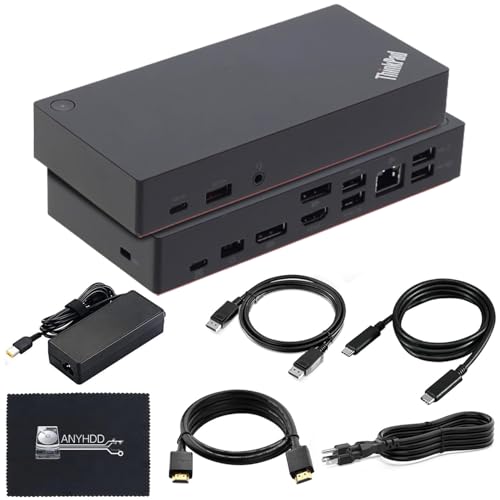
This dock offers dual display support via one HDMI and two DisplayPort outputs. It delivers 90W power delivery to keep your laptop charged while connected. The unit includes a gigabit Ethernet port for stable wired networking. It supports 4K resolution at 60Hz, provided your host system allows it. You get a complete cable kit for immediate setup. It is a solid option for users needing reliable video and data connectivity.
Pros
- Supports 4K resolution at 60Hz
- Includes 90W power delivery
- Features gigabit Ethernet port
- Provides three video outputs
Cons
- 90W power delivery is lower than competitors
- Only supports one external monitor
- Host interface is USB-C, not Thunderbolt 4
Good fit if
- You need a reliable USB-C dock for daily office tasks
- You require a gigabit Ethernet connection for stable internet
- You want a dock with included cables for quick setup
Skip if
- You require Thunderbolt 4 bandwidth for high-speed data transfer
- You need to drive two external monitors simultaneously
- You require more than 90W of power delivery for your laptop
Verdict: ANYHDD Lenovo 40AS0090US USB-C Dock is a practical choice for users who prioritize wired networking and basic dual-display capability over Thunderbolt speeds. It fits professionals who need a stable, single-monitor workstation setup with included cables.
Specifications side by side
| Spec | Smartlinx Thunderbolt 4 21-Port Dock | Lenovo USB-C Universal Business Dock | ANYHDD ThinkPad Dual 4K USB-C Dock | Koncept Dual Monitor 130W USB-C Dock | Koncept 180W Dual Monitor USB-C Dock | Belkin Connect 5-in-1 Thunderbolt 4 Hub | Lenovo ThinkPad USB-C Dock |
|---|---|---|---|---|---|---|---|
| Host Interface | Thunderbolt 4 | USB-C | Thunderbolt 4 | USB-C | USB-C | Thunderbolt 4 | USB-C |
| Display Support | Dual | Dual | Dual | Dual | Dual | Dual | Dual |
| Max Resolution | 8K@60Hz | 4K | 4K | not stated | not stated | 8K@30Hz | 4K@60Hz |
| Power Delivery | 90W | 65W | 90W | not stated | not stated | 96W | not stated |
| Port Count | 21 | 9 | not stated | not stated | not stated | 5 | not stated |
| Video Ports | not stated | DP 1.4, HDMI 2.0 | HDMI, DisplayPort | HDMI, mini-DisplayPort | VGA, HDMI, Mini-DisplayPort | not stated | HDMI, DisplayPort |
| Max Data Speed | 40Gbps | not stated | not stated | not stated | not stated | 40Gbps | not stated |
| Ethernet Speed | not stated | not stated | not stated | not stated | not stated | not stated | Gigabit |
| Resolution | 4K UHD | not stated | 4K UHD | not stated | not stated | 4K UHD | 4K UHD |
| Connectivity | USB-C, Thunderbolt 4 | USB-C, HDMI, DisplayPort, USB-A | USB-C, HDMI, DisplayPort | USB-C, HDMI, DisplayPort, USB-A | USB-C, HDMI, DisplayPort, Ethernet, VGA | USB-C, Thunderbolt 4 | USB-C, HDMI, DisplayPort |
| Slot Count | 1 Slot | not stated | not stated | not stated | not stated | 1 Slot | not stated |
| Dimensions | 7.5 × 3.2 × 1.2 inches | 6.06 × 3.15 × 0.94 inches | not stated | 7 × 6.5 × 1 inches | not stated | 5.3 × 2.9 × 0.7 inches | not stated |
| Weight | 12.8 ounces | 9.12 ounces | 1 pounds | 2.5 pounds | not stated | 1.98 pounds | not stated |
| Color | Gray | Multicolor | Black | Black | Black | Gray | Black |
| Model | SL-019 | 40B30090US | DOCK-40AY0090US-New | WD19S 130W RENEWED DOCKING | WD19 180W RENEWED DOCKING | INW017ttSGY | DOCK-40AS0090US |
| Size | not stated | not stated | 8 x 3 inch | WD19S 130W RENEWED DOCKING | WD19 180W RENEWED DOCKING | 5.3 x 2.9 x 0.7 Inch | not stated |
Frequently asked questions
Does the Smartlinx dock support dual monitors on M1 Macs?
No. The Smartlinx Thunderbolt 4 21-Port Dock excludes M1 Mac compatibility from its dual display capabilities. It is designed for 8th Gen Intel laptops and Windows systems. If you use an Apple Silicon Mac, this dock will not support dual monitor output due to hardware limitations.
Which alternative dock offers the highest power delivery?
The Koncept 180W Dual Monitor USB-C Dock provides the highest power delivery at 180W. It is ideal for users needing high-power charging for laptops that require more than 90W or 130W. This dock supports dual displays and includes versatile video ports for office setups.
Is there a compact option for limited desk space?
Yes. The Belkin Connect 5-in-1 Thunderbolt 4 Hub is designed for compact setups. It features a small footprint and provides reliable 4K dual-monitor support. It delivers 96W charging and fits users who prioritize a minimal desk presence over high port counts or extensive connectivity.
Can I use a dock with Dell laptops that need 130W charging?
Yes. The Koncept WD19S 130W Dell Dock is built for Dell laptops requiring 130W charging. It offers dual display support without needing Thunderbolt 4 speeds. This makes it a practical choice for professionals who need reliable power delivery and stable video output for their Dell devices.
Which dock includes Ethernet for wired networking?
The ANYHDD Lenovo ThinkPad USB-C Dock includes Ethernet for wired networking. It is a practical choice for users who prioritize stable internet connections over Thunderbolt speeds. It supports basic dual-display capability and delivers 90W power delivery, making it suitable for standard workstation setups.
What is the best option for universal USB-C compatibility?
The Lenovo USB-C Universal Business Dock offers solid universal USB-C compatibility. It supports dual 4K displays and includes nine ports in a compact form factor. This dock suits professionals who need broad connectivity across various laptops without requiring Thunderbolt 4 speeds or high-wattage charging.
Does the ANYHDD ThinkPad dock support 4K resolution?
Yes. The ANYHDD ThinkPad Dual 4K USB-C Dock supports 4K UHD resolution on dual monitors. It is designed for users who prioritize display clarity and included cables. It provides 90W power delivery, making it a practical option for standard dual-screen workflows that require sharp visuals.