6 Best Alternatives to the MOKiN 5-in-1 Dual USB-C Monitor (2026)
As an Amazon Associate we earn from qualifying purchases. Links on this page are affiliate links.
The MOKiN 5-in-1 Dual USB-C Monitor Hub is a compact splitter that delivers dual 4K@60Hz video for Windows laptops with Thunderbolt 4 or USB 4 ports. It is a strong option if you need a small footprint and fast data transfer alongside your display setup. However, you might look for mokin USB c splitter dual alternatives if you require macOS compatibility, additional ports like Ethernet, or a different form factor. Some users prefer a docking station with more connectivity, while others need a single-monitor solution for simplicity.
The products listed here were chosen because their specifications overlap with the original MOKiN hub. Each alternative supports dual 4K@60Hz output or high-resolution single displays, ensuring you maintain visual clarity. You will find options tailored to specific needs, such as gigabit Ethernet for stable connections or premium build quality for professional environments. This guide helps you compare features like port counts, power delivery, and physical dimensions to find the right fit for your workspace.
How alternatives compare to MOKiN
Selore&S-Global 5-in-1 Dual 4K 60Hz USB-C Hub
The Selore&S-Global hub matches the MOKiN in port count and dual 4K@60Hz output for Windows laptops. Both devices rely on Thunderbolt 4 or USB 4 hosts for MST functionality. The Selore unit offers a similar compact form factor but requires you to provide your own 100W charger, whereas the MOKiN includes 87W pass-through charging. You get identical video performance, but the MOKiN provides a more complete out-of-the-box power solution. Choose the Selore option if you already have a high-wattage charger and want a comparable splitter without the extra weight of the MOKiN's internal power handling.
Plugable Dual 4K USB-C Docking Station
The Plugable dock targets Mac users, a segment the MOKiN explicitly excludes for dual-monitor use. While the MOKiN is a compact splitter for Windows, the Plugable UD-6950PDH is a larger docking station with HDMI and DisplayPort outputs. It supports dual 4K@60Hz on macOS, which the MOKiN cannot do. The Plugable unit is significantly heavier at 11.7 ounces and measures nearly nine inches long. You sacrifice portability for macOS compatibility and a wider array of connection options. Pick this dock if you use a Mac and need a stable, multi-port workspace rather than a tiny USB-C adapter.
NOVOO 14-in-1 USB-C Dock with VGA
The NOVOO dock expands connectivity far beyond the MOKiN’s five ports. It adds gigabit Ethernet and VGA support, making it suitable for wired network connections and legacy displays. Both devices support dual 4K@60Hz on Windows, but the NOVOO offers 100W Power Delivery compared to the MOKiN’s 87W. The NOVOO is heavier and bulkier, weighing 4.8 ounces with a larger footprint. You gain extensive peripheral support and network capability. Choose the NOVOO if you need a desktop replacement dock with Ethernet and VGA, rather than a portable splitter for on-the-go use.
Acer 5-in-1 4K 60Hz USB-C Hub
The Acer hub simplifies the setup by supporting only a single 4K@60Hz display, unlike the MOKiN’s dual-monitor capability. It retains the 5-in-1 port count and USB-C connectivity but drops the second video output. This makes it lighter and potentially more portable for users who do not need two screens. You gain a simpler device focused on one high-resolution monitor and reliable charging. Select the Acer hub if your workflow requires only one 4K display and you want to avoid the complexity of dual-monitor synchronization over a single USB-C connection.
HODO 5-in-1 Dual 4K 60Hz USB-C Hub
The HODO hub matches the MOKiN in offering dual 4K@60Hz output for Thunderbolt 4 laptops. Both are compact 5-in-1 hubs, but the HODO supports 100W Power Delivery, exceeding the MOKiN’s 87W pass-through charging. The HODO is slightly heavier at 2.47 ounces compared to the MOKiN’s 1.92 ounces. It requires Thunderbolt 4 or USB 4 compatibility, just like the MOKiN. You get more charging power with the HODO. Choose this alternative if you need higher wattage pass-through charging for power-hungry laptops while maintaining dual 4K display support on Windows.
MOKiN 5-in-1 USB-C Hub with 4K 60Hz Video
This MOKiN variant focuses on single-monitor use, offering one 4K@60Hz output instead of the dual setup in the original. It retains the 5-in-1 port count and supports fast data transfer via Thunderbolt or USB4. The charging capability is listed at 85W, slightly less than the original’s 87W. You sacrifice the second display for a potentially simpler cable management setup. This model suits users who prefer a single large 4K screen and do not need the productivity boost of a dual-monitor workspace. It is a streamlined version of the original hub.
Quick picks
Our 7 picks
MOKiN 5-in-1 Dual USB-C Monitor Hub
Best for: Windows laptops with Thunderbolt 4 or USB 4
- Host Interface
- USB4, Thunderbolt 4
- Display Support
- Dual
- Max Resolution
- 4K@60Hz
- Power Delivery
- 87W
- Port Count
- 5
- Video Ports
- USB-C
View on Amazon: MOKiN 5-in-1 Dual USB-C Monitor Hub Affiliate link
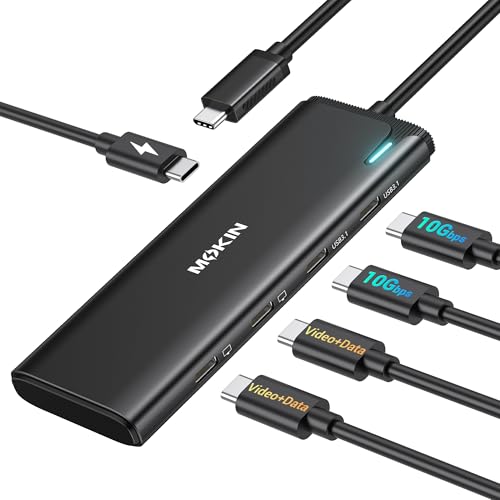
This MOKiN hub splits one USB-C port into two 4K@60Hz displays via DisplayPort Alt Mode. It supports MST on Windows laptops with Thunderbolt 4 or USB 4. The device includes two 10Gbps data ports and a 100W PD input for pass-through charging. It weighs 1.92 ounces and fits in a small case. You get a dual-monitor setup without needing a docking station.
Pros
- Delivers dual 4K@60Hz video output via DP Alt Mode
- Supports MST for extended desktops on Windows
- Includes two 10Gbps USB-C data ports
- Accepts up to 100W PD for pass-through charging
- Compact 1.92-ounce build
Cons
- Dual monitor MST is not supported on macOS
- Requires Thunderbolt 4 or USB 4 host compatibility
- Only supports USB-C video output, no HDMI ports
Good fit if
- You use a Windows laptop with Thunderbolt 4 or USB 4
- You need two 4K@60Hz displays from a single port
- You want to pass power through to your laptop
Skip if
- You use a macOS system for dual monitors
- Your laptop lacks Thunderbolt 4 or USB 4 support
- You require HDMI video output connections
Verdict: MOKiN 5-in-1 USB-C Dual 4K Hub is a compact splitter for Windows users with Thunderbolt 4 or USB 4 ports who need two 4K@60Hz displays. It does not support dual monitors on macOS.

Selore&S-Global 5-in-1 Dual 4K 60Hz USB-C Hub
Best for: Thunderbolt 4 laptops needing dual 4K monitors
- Host Interface
- USB-C
- Display Support
- Dual
- Max Resolution
- 4K@60Hz
- Power Delivery
- 87W
- Port Count
- 5
- Video Ports
- USB-C
View on Amazon: Selore&S-Global 5-in-1 Dual 4K 60Hz USB-C Hub Affiliate link
This Selore&S-Global hub extends one USB-C port into five, supporting dual 4K@60Hz displays via DP Alt Mode 1.4. It includes two 10Gbps data ports and a 100W PD charging input. You need a Thunderbolt 4 or USB4 host and a 100W charger for full functionality. macOS users cannot use dual displays due to lack of MST support. This compact silver unit fits users needing high-bandwidth video output from a single cable.
Pros
- Supports dual 4K@60Hz video output via DP Alt Mode 1.4
- Includes two 10Gbps USB-C data transfer ports
- Features a 100W PD charging port for laptop power
- Compact 1.1-inch height design in silver finish
Cons
- macOS does not support MST, preventing dual display use
- Requires a separate 100W charger for pass-through power
- Host device must be USB4 or Thunderbolt 4 compatible
Good fit if
- You have a Thunderbolt 4 or USB4 laptop
- You need dual 4K@60Hz monitors from one port
- You want to pass 87W of power to your laptop
Skip if
- You use a macOS computer for dual displays
- You lack a 100W USB-C charger for the hub
- Your laptop does not support USB4 or Thunderbolt 4
Verdict: Selore&S-Global 5-in-1 USB-C Splitter delivers reliable dual 4K@60Hz video for Windows users with Thunderbolt 4 or USB4 hosts, provided you supply your own 100W charger.

Plugable Dual 4K USB-C Docking Station
Best for: Mac users needing dual 4K displays
- Host Interface
- Thunderbolt, USB4, USB-C
- Display Support
- Dual
- Max Resolution
- 4K@60Hz
- Power Delivery
- 100W
- Port Count
- 14
- Video Ports
- HDMI, DisplayPort
View on Amazon: Plugable Dual 4K USB-C Docking Station Affiliate link
This Plugable dock adds a second 4K@60Hz display to Macs that natively support only one. It uses DisplayLink technology to bypass hardware limits. The aluminum housing includes 14 ports, 100W power delivery, and front-facing USB-C access. It suits office and hybrid work setups where dual monitors boost productivity on M1-M5 MacBooks.
Pros
- Enables dual 4K@60Hz displays on Macs with single-display limits
- 14-in-1 port count with HDMI and DisplayPort outputs
- 100W Power Delivery for laptop charging
- Premium aluminum housing with space gray finish
- Front-facing USB-C port for easy device access
Cons
- Requires driver installation for full functionality
- HDCP not supported for protected content
- Heavier and bulkier than standard USB-C hubs
Good fit if
- You use an M1-M5 Mac and need two 4K screens
- You want a durable aluminum dock with many ports
- You need 100W power delivery for your laptop
Skip if
- You want a plug-and-play setup without drivers
- You need HDCP support for protected media
- You prefer a lightweight, compact USB-C hub
Verdict: Plugable Dual 4K USB-C Dock is the right choice for Mac users who need to overcome single-display limits with a robust, port-rich docking station. It fits professionals who prioritize build quality and dual 4K@60Hz output over compactness.

NOVOO 14-in-1 USB-C Dock with VGA
Best for: Windows users needing gigabit Ethernet and dual 4K monitors
- Host Interface
- USB-C, Thunderbolt 3
- Display Support
- Quad Display
- Max Resolution
- 8K@30Hz
- Power Delivery
- 100W
- Port Count
- 14
- Video Ports
- HDMI, DisplayPort, VGA
View on Amazon: NOVOO 14-in-1 USB-C Dock with VGA Affiliate link
This NOVOO docking station expands a single USB-C port into 14 connections. It supports quad displays, including dual 4K@60Hz HDMI outputs and an 8K@30Hz DisplayPort. You get a gigabit Ethernet port for stable wired networking, 100W power delivery, and multiple USB 3.1 data ports. It suits users who need a comprehensive desktop replacement with reliable connectivity and high-resolution video support for multiple screens.
Pros
- Gigabit Ethernet port for stable wired connection
- Supports dual 4K@60Hz monitors via HDMI
- 100W Power Delivery for laptop charging
- 14-in-1 port count including SD/TF readers
Cons
- Maximum resolution limited to 8K@30Hz
- MacBooks only support single monitor extension
- Only one HDD or SSD can connect at a time
Good fit if
- You need a wired gigabit Ethernet connection
- You want to run dual 4K monitors at 60Hz
- You require multiple peripheral ports in one dock
Skip if
- You use a MacBook and need dual external displays
- You require 8K refresh rates above 30Hz
- You need to connect multiple external drives simultaneously
Verdict: NOVOO 14-in-1 USB-C Docking Station delivers extensive connectivity with gigabit Ethernet and dual 4K@60Hz support, making it a strong fit for Windows users needing a robust desktop setup.

Acer 5-in-1 4K 60Hz USB-C Hub
Best for: single 4K@60Hz display setups
- Host Interface
- USB-C
- Max Resolution
- 4K@60Hz
- Power Delivery
- 90W
- Port Count
- 5
- Video Ports
- HDMI
- Max Data Speed
- 5Gbps
View on Amazon: Acer 5-in-1 4K 60Hz USB-C Hub Affiliate link
This Acer hub expands a single USB-C port into a compact workstation. It supports 4K@60Hz video output via HDMI, ensuring smooth visuals for editing or streaming. The 100W PD pass-through delivers up to 90W to your laptop, keeping it charged during use. You get 5Gbps data transfer on the USB-C and USB-A 3.0 ports. Its aluminum shell aids heat dissipation while maintaining a portable profile.
Pros
- True 4K@60Hz HDMI output for clear, smooth video
- 100W PD input with 90W stable output for fast charging
- 5Gbps data speeds on USB-C and USB-A 3.0 ports
- Aluminum shell design for improved heat dissipation
Cons
- Supports only one external display, not dual monitors
- Includes only one USB-A 2.0 port for peripherals
- Does not support ultrawide monitors
Good fit if
- You need a single 4K@60Hz display connected to a laptop
- You want a compact hub with strong power delivery
- You prefer a durable aluminum build for travel
Skip if
- You require dual monitor support from one adapter
- You need to connect an ultrawide monitor
- You need multiple high-speed USB-A 3.0 ports
Verdict: Acer 5-in-1 USB-C Hub 4K@60Hz is a solid choice for users needing a single high-resolution display and reliable charging. It suits professionals who prioritize video clarity and portability over multi-monitor setups.

HODO 5-in-1 Dual 4K 60Hz USB-C Hub
Best for: Thunderbolt 4 laptops needing dual 4K displays
- Host Interface
- USB-C
- Display Support
- Dual
- Max Resolution
- 4K@60Hz
- Power Delivery
- 87W
- Video Ports
- USB-C
- Max Data Speed
- 10Gbps
View on Amazon: HODO 5-in-1 Dual 4K 60Hz USB-C Hub Affiliate link
The HODO USB-C Hub offers dual video output for compatible laptops. It supports 8K@30Hz or 4K@60Hz resolution. The device includes a 100W Power Delivery port for charging. It also provides 10Gbps data transfer speeds. This compact adapter suits users needing high-resolution displays and fast data sync. It requires a Thunderbolt 4 or USB4 host port for full functionality.
Pros
- Supports 8K@30Hz and 4K@60Hz video output
- 100W Power Delivery for laptop charging
- 10Gbps high-speed data transfer port
- Compact dimensions at 5.7 inches long
Cons
- Video and data cannot use the same port simultaneously
- Requires Thunderbolt 4 or USB4 host port
- Power cord not included
Good fit if
- You need dual 4K@60Hz displays
- You require fast 10Gbps data transfer
- You want 100W charging capability
Skip if
- You only have standard USB-C ports
- You need simultaneous video and data on one port
- You want an included power cable
Verdict: HODO USB-C Dual 4K@60Hz Hub fits users with Thunderbolt 4 laptops who need dual high-resolution screens and fast data transfer. It is not suitable for standard USB-C connections.

MOKiN 5-in-1 USB-C Hub with 4K 60Hz Video
Best for: Single 4K@60Hz display with fast data transfer
- Host Interface
- USB-C
- Max Resolution
- 4K@60Hz
- Power Delivery
- 85W
- Port Count
- 5
- Video Ports
- USB4 DisplayPort
- Max Data Speed
- 10Gbps
View on Amazon: MOKiN 5-in-1 USB-C Hub with 4K 60Hz Video Affiliate link
This MOKiN hub expands your laptop with a 4K@60Hz USB-C DisplayPort and three 10Gbps data ports. It supports 85W power delivery for stable charging. You get high-speed file transfers and clear video output. It works with Thunderbolt 3/4 and USB4 laptops. This setup suits users who need a single connection for video, data, and power.
Pros
- 4K@60Hz video output via USB-C DisplayPort
- 10Gbps data transfer on three USB-C ports
- 85W continuous power delivery for laptop charging
- Compatible with Thunderbolt 3/4 and USB4 hosts
Cons
- Video output requires a host port with DisplayPort Alt Mode
- Power delivery caps at 85W, not 100W
- Only one video port available for dual monitor setups
Good fit if
- You need 4K@60Hz video on a single external display
- You want fast 10Gbps data transfer speeds
- Your laptop supports USB-C DisplayPort Alt Mode
Skip if
- You require HDMI or DisplayPort physical connectors
- You need more than one video output port
- Your laptop lacks USB-C with video support
Verdict: MOKiN 5-in-1 USB-C Splitter 4K@60Hz fits users who need a reliable single-monitor setup with fast data speeds. It is ideal for Thunderbolt or USB4 laptops requiring 4K@60Hz output and steady 85W charging.
Specifications side by side
| Spec | MOKiN 5-in-1 Dual USB-C Monitor Hub | Selore&S-Global 5-in-1 Dual 4K 60Hz USB-C Hub | Plugable Dual 4K USB-C Docking Station | NOVOO 14-in-1 USB-C Dock with VGA | Acer 5-in-1 4K 60Hz USB-C Hub | HODO 5-in-1 Dual 4K 60Hz USB-C Hub | MOKiN 5-in-1 USB-C Hub with 4K 60Hz Video |
|---|---|---|---|---|---|---|---|
| Host Interface | USB4, Thunderbolt 4 | USB-C | Thunderbolt, USB4, USB-C | USB-C, Thunderbolt 3 | USB-C | USB-C | USB-C |
| Display Support | Dual | Dual | Dual | Quad Display | not stated | Dual | not stated |
| Max Resolution | 4K@60Hz | 4K@60Hz | 4K@60Hz | 8K@30Hz | 4K@60Hz | 4K@60Hz | 4K@60Hz |
| Power Delivery | 87W | 87W | 100W | 100W | 90W | 87W | 85W |
| Port Count | 5 | 5 | 14 | 14 | 5 | not stated | 5 |
| Video Ports | USB-C | USB-C | HDMI, DisplayPort | HDMI, DisplayPort, VGA | HDMI | USB-C | USB4 DisplayPort |
| Max Data Speed | 10Gbps | 10Gbps | not stated | 5Gbps | 5Gbps | 10Gbps | 10Gbps |
| Ethernet Speed | not stated | not stated | not stated | Gigabit Ethernet | not stated | not stated | not stated |
| Resolution | 4K UHD | 4K UHD | 4K UHD | 4K UHD | 4K UHD | 4K UHD | 4K UHD |
| Connectivity | USB-C, DisplayPort | USB-C, DisplayPort | USB-C, HDMI, DisplayPort | USB-C, HDMI, DisplayPort, Ethernet, VGA | USB-C, HDMI, USB-A | USB-C, DisplayPort | USB-C, DisplayPort |
| Refresh Rate | 60Hz | 60Hz | 60Hz | 60Hz | 60Hz | 60Hz | 60Hz |
| Features | not stated | not stated | DisplayLink | not stated | not stated | not stated | not stated |
| Weight | 1.92 ounces | not stated | 11.7 ounces | 4.8 ounces | not stated | 2.47 ounces | not stated |
| Dimensions | not stated | not stated | 9.4 × 3.1 × 1.2 inches | 2.36 × 0.65 × 5.7 inches | not stated | 5.7 × 2.32 × 0.47 inches | not stated |
| Size | 5-in-1-Black | Alt Mode 5-in-1 | 1.0" × 8.9" × 3.3" | 14 in 1 | not stated | not stated | 5-in-1 USB C Hub |
| Color | Grey | Silvery | Space Grey | Grey | Grey | not stated | 5 in 1 USB C Hub |
| Model | UC2208 | USB C 4K@60Hz DP Alt Mode | UD-6950PDH | NHM14S-632B2 | ODK5U0 | not stated | not stated |
Readers of this guide also look at sabrent rocket RGB USB c alternatives.
Frequently asked questions
Does the MOKiN 5-in-1 dual monitor hub work with Mac?
No, the MOKiN 5-in-1 USB-C Dual 4K Hub does not support dual monitors on macOS. It is designed specifically for Windows laptops with Thunderbolt 4 or USB 4 ports. If you use a Mac and need dual 4K displays, consider the Plugable Dual 4K USB-C Dock instead. That model is the recommended choice for Mac users seeking robust build quality and reliable dual-screen output.
What is the best budget alternative for dual 4K monitors?
The Selore&S-Global 5-in-1 Dual 4K 60Hz USB-C Hub is the best budget option. It delivers reliable dual 4K@60Hz video for Windows users with Thunderbolt 4 or USB4 hosts. You must supply your own 100W charger for this device. It matches the MOKiN in port count and output but requires an external power source for your laptop.
Which hub is best for Mac users needing dual 4K?
The Plugable Dual 4K USB-C Docking Station is the best choice for Mac users. It overcomes single-display limits with a port-rich design. This dock supports dual 4K@60Hz output and prioritizes build quality over compactness. It fits professionals who need a robust desktop setup rather than a small splitter.
Do I need Thunderbolt 4 for these dual monitor hubs?
Yes, most dual 4K hubs require Thunderbolt 4 or USB 4 hosts for MST functionality. The MOKiN, Selore&S-Global, and HODO hubs specifically need these high-bandwidth connections. Standard USB-C ports may not support dual 4K@60Hz output on these devices. Check your laptop specifications to ensure it has the required port type before purchasing.
Which option includes built-in Ethernet for a desktop setup?
The NOVOO 14-in-1 USB-C Dock with VGA includes built-in gigabit Ethernet. It is ideal for Windows users needing extensive connectivity. This dock supports dual 4K@60Hz displays and offers a robust desktop setup. It also features VGA and HDMI ports, making it a strong fit for environments requiring wired network connections alongside video output.
Is there a single monitor alternative to the MOKiN dual setup?
The Acer 5-in-1 4K 60Hz USB-C Hub is a solid single-monitor choice. It suits professionals who prioritize video clarity and portability over multi-monitor setups. This hub delivers a single 4K@60Hz display with reliable charging. If you do not need two screens, this option provides high-resolution output in a compact form factor.
Does the HODO hub support standard USB-C connections?
No, the HODO USB-C Dual 4K@60Hz Hub is not suitable for standard USB-C connections. It is designed specifically for Thunderbolt 4 laptops. This hub supports dual high-resolution screens and fast data transfer, but it requires the higher bandwidth of Thunderbolt 4. Ensure your laptop has a Thunderbolt 4 port before using this device.