Looking Beyond the Hortore 12-in-1 Triple Display USB-C? 6 Alternatives Worth a Look
As an Amazon Associate we earn from qualifying purchases. Links on this page are affiliate links.
You might be looking for hortore docking station USB c alternatives if the Hortore 12-in-1 Triple Display USB-C Dock does not match your exact needs. This dock supports three external monitors and includes a 1000Mbps Ethernet port. It also delivers up to 92W of power delivery. These specs make it strong for office setups requiring wired networking and high resolution. However, you may need a different port layout or a specific video interface. Some users prefer DisplayPort over HDMI. Others want a smaller footprint or a different brand reputation. You might also need fewer ports for a lighter travel setup.
The 6 alternatives listed here were chosen because their specifications overlap with the original product. They share core capabilities like triple display support or high-speed data transfer. Each option offers a unique combination of ports and connectivity. This list helps you compare actual features rather than marketing claims. You can find a dock that fits your specific screen count and device requirements. The selections cover various port counts and video outputs. This ensures you can find a practical solution for your workstation without compromising on essential connectivity.
How each alternative compares
UGREEN Triple Display 4K USB-C Dock
The UGREEN Triple Display 4K USB-C Dock swaps the Hortore’s VGA and Ethernet ports for a DisplayPort output. It supports triple 4K monitors on Windows, matching the Hortore’s three-screen capability. You lose the built-in wired internet connection found in the Hortore model. The UGREEN unit is slightly longer but weighs 8.47 ounces. It is a solid choice for Windows users who need DisplayPort connectivity. You should pick this if you do not require VGA legacy support or Ethernet. It offers versatile connectivity for standard office setups.
UGREEN 8-in-1 Triple Display USB-C Dock
The UGREEN 8-in-1 USB-C Dock retains the VGA port found in the Hortore dock, which the other UGREEN model lacks. It also includes a 100W Power Delivery port, offering more charging power than the Hortore’s 92W. This dock supports triple monitors on Windows but does not support macOS for extended desktops. You gain legacy compatibility and faster charging. You give up the Ethernet port present in the Hortore unit. This option suits Windows users who need VGA support. It is practical for offices with older displays. Mac users should look elsewhere for triple display support.
Anker 332 5-in-1 USB-C Hub
The Anker 332 5-in-1 USB-C Hub drops the multi-monitor capability entirely. It supports only a single 4K display via HDMI. You gain a much smaller form factor, measuring 4.78 inches in length. The Anker unit weighs just 1.44 ounces, making it highly portable. You lose the ability to run two or three external screens. It lacks Ethernet and VGA ports. This hub is best for users who only need one external monitor. It fits those who value portability over screen real estate. It is a practical choice for single-display setups. You should pick this if you do not need multiple displays.
Selore 8-in-1 Dual HDMI USB-C Dock
The Selore 8-in-1 Dual HDMI USB-C Dock supports two 4K monitors instead of three. You lose one screen but gain a more compact design. The Selore unit weighs 3.53 ounces and is thinner than the Hortore dock. It is designed for Windows users. It lacks Ethernet and VGA ports. You get reliable dual 4K output and fast charging. This option fits professionals who prioritize screen space over maximum port count. It is a solid choice for dual-monitor setups. You should pick this if you do not need three screens. It is not suitable for macOS extended desktops.
HODO 8-in-2 MacBook USB-C Hub
The HODO 8-in-2 MacBook USB-C Hub introduces Thunderbolt 3 connectivity, which the Hortore dock does not offer. It supports 4K HDMI output but does not support triple displays. You gain high-speed data transfer and card reading capabilities. The HODO unit is designed specifically for MacBook users. It lacks Ethernet and VGA ports. You lose multi-monitor expansion for extended desktops. This hub is best for users needing Thunderbolt 3 speeds. It offers essential expansion without extra bulk. You should pick this if you use a MacBook. It is not ideal for Windows multi-monitor setups.
VVB 14-in-1 USB-C Triple Display Dock
The VVB 14-in-1 USB-C Triple Display Dock offers more ports than the Hortore dock. It supports triple displays but lacks extended desktop support for Mac users. You gain a wider array of connectivity options. The VVB unit is shorter but slightly taller than the Hortore model. It weighs only 1 ounce. You lose some of the specific port configuration found in the Hortore dock. This dock fits Windows users needing dual 4K displays and networking. It is a practical choice for heavy port needs. You should pick this if you require more ports. It is not suitable for macOS extended desktops.
Quick picks
Our 7 picks

Hortore 12-in-1 Triple Display USB-C Dock
Best for: Users needing three monitors and wired Ethernet
- Host Interface
- USB-C
- Display Support
- Triple
- Max Resolution
- 4K@60Hz
- Power Delivery
- 92W
- Port Count
- 12
- Video Ports
- HDMI, VGA
View on Amazon: Hortore 12-in-1 Triple Display USB-C Dock Affiliate link
This 12-in-1 USB-C docking station supports triple external displays via DisplayLink technology. It includes dual HDMI and VGA ports, with one HDMI outputting 4K at 60Hz. The hub delivers 92W of power delivery to your laptop and features a 1000Mbps Ethernet port. You get fast data transfer through USB 3.0 and card readers. It fits Windows and macOS systems with video-enabled USB-C ports.
Pros
- Supports triple monitor expansion with Extend, Mirror, and MST modes
- One HDMI port outputs sharp 4K resolution at 60Hz
- Provides 92W power delivery while running all dock functions
- Includes 1000Mbps Ethernet for stable wired internet connection
- USB 3.0 port offers 5Gbps data transfer speeds
Cons
- Ethernet speed is limited to 1000Mbps, not 2.5Gbps
- Requires Windows or macOS with video-enabled USB-C ports
- Uses DisplayLink chip which may add slight input delay
Good fit if
- You need to connect three monitors to a single laptop
- You require a wired 1000Mbps Ethernet connection for stability
- You want 92W charging while using multiple displays
Skip if
- You only need dual monitor support and want a simpler setup
- Your laptop lacks video-enabled USB-C ports
- You need 2.5Gbps Ethernet speeds for heavy network tasks
Verdict: Hortore 12-in-1 USB-C Triple Display Dock is a solid choice for users needing three screens and reliable wired networking. It suits professionals who require stable connections and high-resolution output for extended desktop work.

UGREEN Triple Display 4K USB-C Dock
Best for: Windows users needing triple 4K monitors
- Host Interface
- USB-C
- Display Support
- Triple
- Max Resolution
- 8K@30Hz
- Power Delivery
- 85W
- Port Count
- 8
- Video Ports
- HDMI, DisplayPort
View on Amazon: UGREEN Triple Display 4K USB-C Dock Affiliate link
The UGREEN 8-in-1 USB-C Docking Station supports triple 4K displays on Windows systems. It features two HDMI and one DisplayPort for video output. You get two 10 Gbps USB-C and two USB-A ports for data. The dock delivers 85W of pass-through charging to your laptop. It works with most USB-C devices, including MacBooks and Windows laptops.
Pros
- Supports triple 4K display output on Windows
- Includes 10 Gbps USB-C and USB-A data ports
- Provides 85W power delivery for laptop charging
- Compatible with a wide range of USB-C devices
Cons
- Mac systems are limited to dual displays via SST
- The 10Gbps USB-C port does not support video or charging
- Requires Windows OS for true triple monitor functionality
Good fit if
- You use a Windows laptop and need three screens
- You want fast 10 Gbps data transfer speeds
- You need a single dock for charging and connectivity
Skip if
- You use a Mac and require three monitors
- You need the USB-C port to output video
- You require more than 85W of charging power
Verdict: UGREEN 8-in-1 USB-C Triple Display Dock is a solid choice for Windows users needing a triple monitor setup. It offers versatile connectivity and adequate charging for most laptops.

UGREEN 8-in-1 Triple Display USB-C Dock
Best for: Windows users needing VGA compatibility
- Host Interface
- USB-C
- Display Support
- Triple
- Max Resolution
- 4K
- Power Delivery
- 85W
- Port Count
- 8
- Video Ports
- HDMI, VGA
View on Amazon: UGREEN 8-in-1 Triple Display USB-C Dock Affiliate link
This UGREEN hub supports triple displays via two HDMI and one VGA port. It delivers 4K resolution on HDMI and 1080p on VGA. You get 10 Gbps data speeds on USB-C and USB-A ports. The 85W power delivery keeps your laptop charged. It works with Windows for true triple screens, but Mac users are limited to dual displays due to system constraints.
Pros
- Supports triple monitor setups with HDMI and VGA outputs
- Includes legacy VGA port for older projectors
- 10 Gbps data transfer on USB-C and USB-A ports
- 85W pass-through charging for connected laptops
Cons
- Mac systems only support dual displays, not triple
- VGA output is limited to 1080p resolution
- USB-C data port does not support video output
Good fit if
- You need to connect an older VGA display
- You use a Windows laptop for triple screen setups
- You require fast 10 Gbps data transfer speeds
Skip if
- You use a Mac and need three monitors
- You require 4K resolution on all three screens
- You need video output through the USB-C data port
Verdict: UGREEN 8-in-1 USB-C Docking Station with VGA is a practical option for Windows users who need to connect a legacy VGA display alongside two HDMI monitors. It offers solid data speeds and charging, but Mac users should look elsewhere for triple display support.

Anker 332 5-in-1 USB-C Hub
Best for: single 4K display setups
- Host Interface
- USB-C
- Display Support
- 1
- Max Resolution
- 4K@30Hz
- Power Delivery
- 85W
- Port Count
- 5
- Video Ports
- HDMI
View on Amazon: Anker 332 5-in-1 USB-C Hub Affiliate link
The Anker 5-in-1 USB-C Hub offers a single 4K@30Hz HDMI port for external displays. It includes two USB-A and one USB-C data ports for peripherals. The hub supports up to 85W pass-through charging for your laptop. It is compatible with macOS, Windows, and ChromeOS devices. This compact adapter suits users who need basic video output and data connectivity without the complexity of triple-monitor setups.
Pros
- 4K@30Hz HDMI video output
- 85W pass-through charging support
- 5 Gbps data transfer speeds
- Compact 1.44-ounce build
Cons
- Single HDMI port limits multi-monitor setups
- USB-C port does not support video output
- Not compatible with Linux operating systems
Good fit if
- You need a simple 4K display connection
- You want pass-through charging for your laptop
- You prefer a lightweight and compact hub
Skip if
- You require triple monitor support
- You use a Linux-based computer
- You need high refresh rate video
Verdict: Anker 5-in-1 USB-C Hub 4K HDMI is a practical choice for single-monitor users who value portability and reliable charging. It fits those who do not need multiple displays or Linux compatibility.

Selore 8-in-1 Dual HDMI USB-C Dock
Best for: Windows users needing dual 4K monitors and charging
- Host Interface
- USB-C
- Display Support
- Dual
- Max Resolution
- 4K@60Hz
- Power Delivery
- 85W
- Port Count
- 8
- Video Ports
- HDMI
View on Amazon: Selore 8-in-1 Dual HDMI USB-C Dock Affiliate link
This Selore docking station expands your laptop into a dual-monitor setup via two HDMI ports supporting 4K@60Hz. It includes a 100W PD port delivering 85W to your computer, plus USB 3.0 and SD card slots. You need a full-featured USB-C or Thunderbolt port for video output. It suits Windows users seeking extended displays, though macOS support is limited to mirroring.
Pros
- Dual HDMI ports support 4K@60Hz resolution for extended desktops on Windows
- 100W Power Delivery input provides up to 85W output for laptop charging
- Includes SD and microSD card readers with 104 Mbps transfer speeds
- Three USB 3.0 ports offer 5Gbps data transfer for peripherals
Cons
- macOS devices only support screen mirroring, not extended dual monitors
- Power charger and cable are not included in the package
- Requires a laptop with a full-featured USB-C or Thunderbolt port
Good fit if
- You use a Windows laptop and need two separate external displays
- You want to charge your laptop while connecting dual monitors
- You need SD card access without using laptop slots
Skip if
- You use a Mac and require true dual-screen extension
- Your laptop USB-C port lacks video output capability
- You prefer a setup that includes its own power adapter
Verdict: Selore 8-in-1 USB-C Dual HDMI Dock is a solid choice for Windows users who need reliable dual 4K displays and fast charging. It fits professionals who prioritize screen real estate and port expansion over macOS compatibility.

HODO 8-in-2 MacBook USB-C Hub
Best for: MacBook users needing Thunderbolt 3 and 4K HDMI
- Host Interface
- USB-C
- Max Resolution
- 5K
- Power Delivery
- 100W
- Port Count
- 8
- Video Ports
- HDMI, Thunderbolt 3
- Max Data Speed
- 40Gbps
View on Amazon: HODO 8-in-2 MacBook USB-C Hub Affiliate link
The HODO 8-in-2 adapter expands two USB-C ports on select MacBook models. It includes a Thunderbolt 3 port supporting 40Gbps data and 5K video output. An HDMI port handles 4K UHD displays. You get two USB 3.1 ports for 10Gbps transfers and a 100W power delivery pass-through. It also features SD and microSD card readers. This hub is designed specifically for MacBook Pro and Air models from 2018 to 2025.
Pros
- Thunderbolt 3 port supports 40Gbps data transfer and 5K display output
- HDMI port delivers 4K UHD resolution for external monitors
- 100W power delivery pass-through keeps your laptop charged
- USB 3.1 ports offer 10Gbps data transfer speeds
- Integrated SD and microSD card readers for fast photo access
Cons
- Second USB-C port is data-only and lacks HDMI or charging support
- Cannot connect multiple external hard drives simultaneously
- Incompatible with Logitech mice and keyboards
Good fit if
- You use a MacBook Pro or Air with limited USB-C ports
- You need Thunderbolt 3 speeds for high-performance peripherals
- You frequently transfer photos via SD cards
Skip if
- You require multiple external hard drives to run at once
- You use Logitech input devices for your laptop
- You need the second USB-C port to output video
Verdict: The HODO 8-in-2 MacBook USB-C Hub offers essential Thunderbolt 3 and 4K HDMI expansion for MacBook users who need reliable data speeds and card reading capabilities without extra bulk.
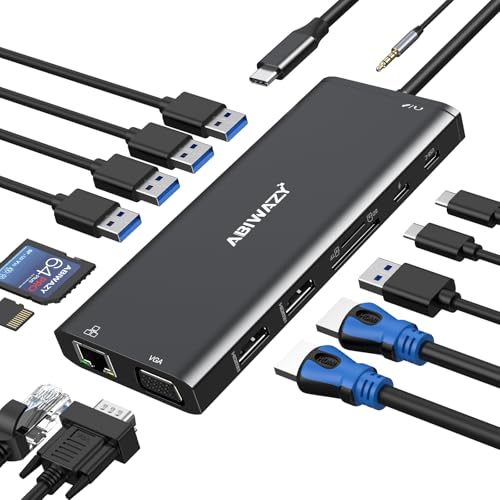
VVB 14-in-1 USB-C Triple Display Dock
Best for: Windows users needing dual 4K displays and Ethernet
- Host Interface
- USB-C, Thunderbolt 3
- Display Support
- Triple
- Max Resolution
- 4K@60Hz
- Power Delivery
- 87W
- Port Count
- 14
- Video Ports
- HDMI, VGA
View on Amazon: VVB 14-in-1 USB-C Triple Display Dock Affiliate link
The VVB 14-in-1 USB-C docking station expands a single port into 14 connections. It supports dual 4K HDMI and VGA outputs for triple display setups on Windows. The unit delivers up to 87W of power delivery to keep your laptop charged. It includes gigabit Ethernet, SD card readers, and multiple USB ports for peripherals. This hub suits users needing extensive connectivity and wired stability for their workspace.
Pros
- 14 ports including 2 HDMI and VGA
- Supports dual 4K displays at 60Hz
- 87W power delivery for laptop charging
- Gigabit Ethernet for stable wired internet
- SD and Micro SD card readers
Cons
- Mac OS only supports mirror mode
- Second HDMI port limited to 4K@30Hz
- VGA output drops to 1080p with multiple displays
Good fit if
- You need a wired gigabit Ethernet connection
- You want to use dual 4K monitors on Windows
- You require SD card access on your laptop
Skip if
- You use a Mac and need extended desktop mode
- You require 4K@60Hz on both HDMI ports simultaneously
- You need wireless audio via Bluetooth
Verdict: VVB 14-in-1 USB-C Docking Station fits Windows users who need dual 4K displays and wired networking. It offers a wide array of ports but lacks extended desktop support for Mac users.
Specifications side by side
| Spec | Hortore 12-in-1 Triple Display USB-C Dock | UGREEN Triple Display 4K USB-C Dock | UGREEN 8-in-1 Triple Display USB-C Dock | Anker 332 5-in-1 USB-C Hub | Selore 8-in-1 Dual HDMI USB-C Dock | HODO 8-in-2 MacBook USB-C Hub | VVB 14-in-1 USB-C Triple Display Dock |
|---|---|---|---|---|---|---|---|
| Host Interface | USB-C | USB-C | USB-C | USB-C | USB-C | USB-C | USB-C, Thunderbolt 3 |
| Display Support | Triple | Triple | Triple | 1 | Dual | not stated | Triple |
| Max Resolution | 4K@60Hz | 8K@30Hz | 4K | 4K@30Hz | 4K@60Hz | 5K | 4K@60Hz |
| Power Delivery | 92W | 85W | 85W | 85W | 85W | 100W | 87W |
| Port Count | 12 | 8 | 8 | 5 | 8 | 8 | 14 |
| Video Ports | HDMI, VGA | HDMI, DisplayPort | HDMI, VGA | HDMI | HDMI | HDMI, Thunderbolt 3 | HDMI, VGA |
| Max Data Speed | 5Gbps | 10Gbps | 10Gbps | 5Gbps | 5Gbps | 40Gbps | 5Gbps |
| Ethernet Speed | 1000Mbps | not stated | not stated | not stated | not stated | not stated | 1Gbps |
| Resolution | not stated | 4K UHD | 4K UHD | 4K UHD | 4K UHD | not stated | 4K UHD |
| Connectivity | USB-C, HDMI, Ethernet, USB-A, VGA | USB-C, DisplayPort, USB-A | USB-C, HDMI, USB-A, VGA | USB-C, HDMI, USB-A | USB-C, HDMI, USB-A | USB-C, HDMI, Thunderbolt 3 | USB-C, HDMI, Ethernet, VGA |
| Refresh Rate | not stated | 60Hz | not stated | not stated | 60Hz | not stated | not stated |
| Features | Card Reader | not stated | not stated | not stated | not stated | Card Reader | not stated |
| Slot Count | not stated | 1 Slot | not stated | not stated | not stated | not stated | not stated |
| Dimensions | 5 × 2.5 × 0.65 inches | 5.28 × 2.24 × 0.63 inches | 5.28 × 2.27 × 0.63 inches | 4.78 × 1.59 × 0.45 inches | 5 × 0.7 × 0.13 inches | not stated | 5 × 0.5 × 1 inches |
| Weight | not stated | 8.47 ounces | not stated | 1.44 ounces | 3.53 ounces | 3.63 ounces | 1 ounces |
| Size | 12 in 1 | not stated | not stated | not stated | 8-in-1 | 8-in-2 | not stated |
| Color | Silver | grey | grey | Black | Grey | Space Gray | Black |
| Model | not stated | 35625 | 35588 | A8355011 | SEUC0422 | HD2c03H | not stated |
Frequently asked questions
Can I use a UGREEN triple display dock with my Mac?
The UGREEN 8-in-1 dock with VGA support is not recommended for Mac users seeking triple display functionality. Its verdict notes that Mac users should look elsewhere for that specific setup. While it offers solid data speeds and charging for Windows, it does not provide the extended desktop support required for macOS triple monitors.
Which alternative is best for users who need wired Ethernet?
The Hortore 12-in-1 Triple Display USB-C Dock remains the top choice if you require a wired Ethernet connection. It includes a 1000Mbps port for stable networking alongside three monitor outputs. The VVB 14-in-1 dock also supports wired networking for Windows users needing dual 4K displays, though it lacks extended desktop support for Mac.
Does the Anker 332 support multiple monitors?
No, the Anker 332 5-in-1 USB-C Hub is designed for single-monitor setups. It supports a single 4K HDMI display and is ideal for users who value portability. It does not provide the port expansion or multi-screen capabilities needed for dual or triple monitor configurations, making it unsuitable for those specific requirements.
What is the difference between the UGREEN 8-in-1 and 12-in-1 docks?
The Hortore 12-in-1 dock supports three monitors and includes an Ethernet port, whereas the UGREEN 8-in-1 models focus on specific display outputs like DisplayPort or VGA. The UGREEN 8-in-1 with VGA includes legacy compatibility, while the other UGREEN model swaps VGA for DisplayPort. Both UGREEN options are 8-in-1, offering fewer total ports than the Hortore.
Is the HODO hub compatible with Thunderbolt 3 devices?
Yes, the HODO 8-in-2 MacBook USB-C Hub features Thunderbolt 3 connectivity. It is designed for MacBook users needing reliable data speeds and 4K HDMI output. The hub also includes a card reader, providing essential expansion without adding significant bulk. It is best suited for users who prioritize Thunderbolt performance and card reading capabilities.
Which dock is best for Windows users needing legacy VGA support?
The UGREEN 8-in-1 Triple Display USB-C Dock with VGA is the best option for Windows users needing legacy compatibility. It allows you to connect a VGA display alongside two HDMI monitors. This setup provides solid data speeds and charging, making it practical for professionals who must integrate older monitors into their modern dual or triple display workflows.
Does the Selore dock support three monitors simultaneously?
No, the Selore 8-in-1 Dual HDMI USB-C Dock supports only two monitors. It is designed for Windows users needing dual 4K displays and fast charging. If you require three screens, you should look at the Hortore or UGREEN triple display options instead. The Selore prioritizes screen real estate and port expansion over multi-monitor expansion.