Looking Beyond the LXU Laptop Screen Extender Monitor? 6 Alternatives Worth a Look
As an Amazon Associate we earn from qualifying purchases. Links on this page are affiliate links.
The LXU S7 14" Triple Portable Monitor offers a unique triple-screen experience for users who need maximum multitasking space. It features a 1200P WUXGA IPS panel and a sturdy aluminum kickstand. However, some buyers may find its three-panel design too bulky or its compatibility limited to specific chipsets. If you are looking for lxu laptop screen extender monitor alternatives, you might prefer a different form factor or resolution. Some users seek higher refresh rates for gaming, while others want a lighter single-screen option for travel.
This list includes 6 alternatives chosen because their specs overlap with the original product. We compared panel types, connectivity options, and physical dimensions to find suitable replacements. You will find options ranging from compact 14-inch extenders to larger 27-inch desktop displays. Each selection addresses specific needs that the LXU S7 may not fully satisfy. Whether you prioritize portability, image clarity, or legacy VGA ports, these picks cover the key areas where the original product varies. You can choose based on the exact specifications that matter most to your workflow.
How each alternative compares
MNN 17.3" 2.5K 165Hz Portable Monitor
The MNN 17.3" 2.5K 165Hz Portable Monitor swaps the LXU S7’s triple-screen layout for a single, larger display. You get a 2.5K resolution and 165Hz refresh rate, which significantly improves clarity and smoothness for gaming or detailed visual work. However, you give up the triple-monitor productivity and the compact aluminum kickstand design. This 17.3-inch unit is much heavier and bulkier, making it less ideal for tight travel spaces. It connects via USB-C and HDMI, similar to the LXU, but lacks the triple-screen versatility. Pick this if you prioritize high refresh rates and sharp visuals over multi-display multitasking.
Acer 27-Inch 100Hz IPS Monitor
The Acer 27-Inch 100Hz IPS Monitor is a desktop-focused option that differs sharply from the portable LXU S7. It offers a massive 27-inch screen with 1080p resolution and includes legacy VGA connectivity, which the LXU does not. You sacrifice portability entirely, as this monitor weighs nearly 12 pounds and requires a stable desk surface. It uses an IPS panel like the LXU but lacks the 1200P WUXGA sharpness and the 16:10 aspect ratio. This monitor is best for users who need a large, stationary display for office work or gaming and do not need to carry their setup on the go. It connects via HDMI and VGA, lacking USB-C video input.
KEFEYA 14-Inch Ultra-Thin Laptop Screen Extender
The KEFEYA 14-Inch Ultra-Thin Laptop Screen Extender offers a more compact alternative to the LXU S7’s triple-screen design. It features a single 14.2-inch 1080p FHD display, which is thinner and lighter than the LXU’s 3.5-pound build. You gain a simpler, more portable form factor that fits easily into a laptop bag, but you lose the triple-monitor productivity boost. The KEFEYA connects via USB-C and HDMI, similar to the LXU, but does not offer the same multi-screen workflow. It is a better choice for travelers who need a lightweight secondary screen rather than a full triple-monitor workstation. The trade-off is lower resolution compared to the LXU’s 1200P panel.
ARZOPA 16-Inch 2.5K IPS Portable Monitor
The ARZOPA 16-Inch 2.5K IPS Portable Monitor provides a high-resolution single-screen alternative to the LXU S7. It features a 2.5K resolution and IPS panel, delivering sharper images and better color accuracy than the LXU’s 1200P display. However, you give up the triple-screen setup and the aluminum kickstand design. This monitor is lighter at 1.72 pounds, making it highly portable, but it lacks the multi-tasking capability of the LXU. It connects via USB-C and HDMI, offering similar connectivity options. This option is ideal for professionals who travel frequently and prioritize screen sharpness and portability over having multiple displays for simultaneous tasks.
KYY 15.6" 1080p Portable Monitor (2-Pack)
The KYY 15.6" 1080p Portable Monitor (2-Pack) offers dual-screen portability, differing from the LXU S7’s triple-screen design. You get two 15.6-inch 1080p FHD screens, which provide more workspace than a single display but less than the LXU’s three panels. The pack weighs 8.28 pounds total, making it heavier to carry than the single LXU unit. It connects via USB-C and HDMI and includes a 1-slot design for compact storage. This option is best for users who need dual monitors for travel but do not require the triple-screen productivity of the LXU. The 60Hz refresh rate suits casual use rather than fast-paced gaming or high-motion tasks.
SANSUI 27-Inch 1440p Fast IPS Gaming Monitor
The SANSUI 27-Inch 1440p Fast IPS Gaming Monitor is a desktop-focused option that contrasts with the portable LXU S7. It features a 27-inch 1440p display with a 200Hz refresh rate, offering superior gaming performance and resolution compared to the LXU’s 1200P panel. However, it lacks portability and USB-C video connectivity, relying instead on standard desktop inputs. This monitor weighs 10.4 pounds and is designed for stationary use on a desk. It is ideal for gamers who prioritize high refresh rates and large screen real estate over the multi-display versatility and portability of the LXU S7. It does not support the plug-and-play mobile workflow of the LXU.
Quick picks
Our 7 picks

LXU S7 14" Triple Portable Monitor
Best for: stable triple-screen setups for coding
- Screen Size
- 14"
- Resolution
- 1200P
- Panel Type
- IPS
- Connectivity
- USB-C, HDMI
- Aspect Ratio
- 16:10
- Weight
- 3.5 lbs
View on Amazon: LXU S7 14" Triple Portable Monitor Affiliate link
The LXU S7 is a triple-screen extender featuring three 14-inch 1200P WUXGA IPS displays in a 16:10 aspect ratio. It weighs 3.5 lbs and connects via USB-C or HDMI. The aluminum kickstand allows stable placement without clipping to your laptop. This setup is ideal for professionals who need expanded vertical workspace for coding or design while traveling.
Pros
- Three 14-inch 1200P WUXGA IPS screens
- 16:10 aspect ratio for more vertical space
- Aluminum alloy kickstand for stable placement
- Connects via USB-C or HDMI
Cons
- Not compatible with M1, M2, or M3 chips
- Requires separate power when using HDMI input
- Heavier than single-screen portable monitors
Good fit if
- You work with code or design on multiple windows
- You travel and need a stable, non-clipping setup
- You use Intel or AMD laptops with M4/M5 chips
Skip if
- You use an Apple Silicon M1, M2, or M3 laptop
- You need a single lightweight screen under 3 lbs
- You want a plug-and-play HDMI connection without extra power
Verdict: The LXU S7 14" Triple Portable Monitor delivers three sharp 1200P screens for serious multitasking. It suits developers and designers who need stable, clip-free displays and use compatible Intel or AMD systems.

MNN 17.3" 2.5K 165Hz Portable Monitor
Best for: High-refresh gaming and detailed visual work
- Screen Size
- 17.3"
- Resolution
- 2560x1440
- Refresh Rate
- 165Hz
- Panel Type
- IPS
- Connectivity
- USB-C, HDMI
- Color Gamut
- 100% sRGB
View on Amazon: MNN 17.3" 2.5K 165Hz Portable Monitor Affiliate link
The MNN 17.3-inch portable monitor delivers a 2560x1440 QHD resolution on an IPS panel with 100% sRGB coverage. It features a 165Hz refresh rate for smooth motion and includes both USB-C and HDMI ports for versatile connectivity. The semi-metal build is lightweight and includes a built-in kickstand. This setup suits users who need a high-refresh secondary screen for gaming or detailed work on the go.
Pros
- 2560x1440 QHD resolution for sharp detail
- 165Hz refresh rate reduces screen tearing
- 100% sRGB color accuracy
- USB-C and HDMI connectivity
Cons
- Single built-in kickstand limits viewing angles
- 17.3-inch size is larger than standard 14-inch portables
- No mention of built-in speakers
Good fit if
- You need a high-refresh screen for gaming
- You want QHD resolution for detailed work
- You prefer a larger 17.3-inch display
Skip if
- You require a compact 14-inch form factor
- You need built-in audio without external speakers
- You prioritize a multi-angle adjustable stand
Verdict: MNN 17.3" 165Hz 2.5K Portable Monitor is a strong choice for gamers and creators who value high refresh rates and QHD clarity over compact portability.

Acer 27-Inch 100Hz IPS Monitor
Best for: Desktop setups requiring VGA connectivity
- Screen Size
- 27"
- Resolution
- 1920 x 1080
- Refresh Rate
- 100Hz
- Panel Type
- IPS
- Connectivity
- 1 x HDMI 1.4, 1 x VGA
- Weight
- 11.9 pounds
View on Amazon: Acer 27-Inch 100Hz IPS Monitor Affiliate link
This 27-inch IPS display offers Full HD resolution and a 100Hz refresh rate via HDMI. It includes a VGA port for legacy connections and AMD FreeSync support. The monitor features ergonomic tilt and VESA mounting compliance. It suits users needing a larger screen with traditional connectivity options for office or gaming tasks.
Pros
- 27-inch IPS panel with Full HD resolution
- 100Hz refresh rate and AMD FreeSync technology
- Includes VGA port for older devices
- VESA mount compatible (100 x 100mm)
Cons
- Only HDMI 1.4 connectivity, no USB-C
- Fixed tilt stand lacks height adjustment
- 11.9-pound weight limits portability
Good fit if
- You need a large 27-inch screen for desktop use
- You require VGA connectivity for older computers
- You want VESA mounting flexibility
Skip if
- You need USB-C connectivity
- You require a portable or lightweight display
- You want height-adjustable ergonomics
Verdict: Acer KB272 EBI 27" 100Hz VGA Monitor is a solid desktop option for users who prioritize screen size and legacy VGA ports over modern USB-C connectivity and portability.

KEFEYA 14-Inch Ultra-Thin Laptop Screen Extender
Best for: lightweight portable dual-screen setups
- Screen Size
- 14"
- Resolution
- 1920 x 1080P
- Connectivity
- USB-C, HDMI
- Color Gamut
- 72% NTSC
- Weight
- 1.3 lbs
- Dimensions
- 13.9 × 8.14 × 0.9 inches
View on Amazon: KEFEYA 14-Inch Ultra-Thin Laptop Screen Extender Affiliate link
The KEFEYA 14" portable monitor offers a 1080p FHD display with 300 nits brightness and 1000:1 contrast. It weighs just 1.3 lbs and measures 0.19 inches thick. You get 72% NTSC color coverage and support for extended, mirrored, and portrait modes. It connects via USB-C or HDMI. This lightweight extender suits travelers and remote workers needing a second screen without bulk.
Pros
- 14-inch 1920 x 1080p resolution
- Ultra-thin 0.19-inch profile
- Lightweight 1.3 lbs design
- 300 nits brightness
- USB-C and HDMI connectivity
Cons
- 72% NTSC color gamut is narrower than competitors
- 1000:1 contrast ratio is lower than typical IPS panels
- 14-inch size is smaller than standard 15.6-inch options
Good fit if
- You prioritize portability and thinness over screen size
- You need a lightweight secondary display for travel
- You work with basic text and web tasks
Skip if
- You require high-end color accuracy for creative work
- You want a larger 15.6-inch or 17-inch screen
- You need high contrast for dark room viewing
Verdict: KEFEYA 14" Portable Monitor is a compact, lightweight solution for users who need a simple second screen on the go. It fits travelers who value thinness and low weight over high-end display specs.

ARZOPA 16-Inch 2.5K IPS Portable Monitor
Best for: Productivity tasks needing high resolution and color accuracy
- Screen Size
- 16"
- Resolution
- 2560x1600
- Panel Type
- IPS
- Connectivity
- USB-C, HDMI
- Color Gamut
- 123% sRGB
- Aspect Ratio
- 16:10
View on Amazon: ARZOPA 16-Inch 2.5K IPS Portable Monitor Affiliate link
The ARZOPA 16-inch portable monitor offers a 2560x1600 QHD IPS display with 123% sRGB color coverage. Its 16:10 aspect ratio provides more vertical space for coding or spreadsheets. Weighing 1.46 lbs, it is lightweight for travel. You can connect via USB-C or HDMI to most devices. This screen suits users who need high resolution and color accuracy in a portable form.
Pros
- 2560x1600 QHD resolution for sharp text and images
- 123% sRGB color gamut for vibrant visuals
- 16:10 aspect ratio increases vertical workspace
- Lightweight 1.46 lbs design for portability
Cons
- 1.46 lbs is heavier than 14-inch models
- No mention of built-in speakers
- No mention of USB-C power delivery
Good fit if
- You need higher resolution than 1080p for detailed work
- You want a 16:10 screen for coding or spreadsheets
- You prioritize color accuracy over refresh rate
Skip if
- You require a 14-inch size for maximum compactness
- You need a high refresh rate for gaming
- You want built-in speakers for media
Verdict: ARZOPA 16" 2.5K Portable Monitor fits users who need sharp, colorful visuals and extra vertical space for productivity tasks. It is a solid choice for professionals who travel but refuse to compromise on screen quality.

KYY 15.6" 1080p Portable Monitor (2-Pack)
Best for: Dual-screen portability and travel productivity
- Screen Size
- 15.6"
- Resolution
- 1920 x 1080
- Refresh Rate
- 60Hz
- Panel Type
- IPS
- Connectivity
- 2 USB-C, Mini-HDMI
- Weight
- 1.7lb
View on Amazon: KYY 15.6" 1080p Portable Monitor (2-Pack) Affiliate link
You get two 15.6-inch IPS displays in this KYY pack. Each unit offers 1920 x 1080 resolution at 60Hz. The slim 0.35-inch design weighs 1.7 pounds per screen. It connects via USB-C and Mini-HDMI. This setup suits users who need dual screens for work or gaming on the go. The included smart cover acts as a stand.
Pros
- Includes two 15.6-inch 1080p IPS panels
- Lightweight 1.7lb build per monitor
- Smart cover doubles as a stable stand
- Connects via USB-C and Mini-HDMI
Cons
- 60Hz refresh rate limits high-end gaming
- Mini-HDMI requires an adapter for standard cables
- No built-in battery for standalone use
Good fit if
- You need a dual-screen portable setup
- You prioritize lightweight travel gear
- You want extra display space for productivity
Skip if
- You require high refresh rates for competitive gaming
- You prefer standard HDMI connections without adapters
- You need a single large display
Verdict: KYY 15.6" FHD Portable Monitor (Pack of 2) delivers two lightweight screens for users who value portability and extra workspace. It fits travelers needing dual displays, though the 60Hz panel suits casual use better than fast-paced gaming.
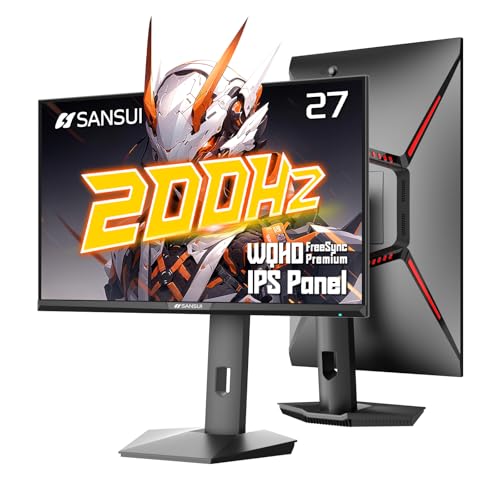
SANSUI 27-Inch 1440p Fast IPS Gaming Monitor
Best for: Desktop gaming and office setups
- Screen Size
- 27"
- Resolution
- 2560 x 1440
- Refresh Rate
- 200Hz
- Panel Type
- Fast IPS
- Connectivity
- DisplayPort 1.2, HDMI 2.0
- Color Gamut
- 95% DCI-P3, 130% sRGB
View on Amazon: SANSUI 27-Inch 1440p Fast IPS Gaming Monitor Affiliate link
This SANSUI display offers a 27-inch Fast IPS panel with 2560x1440 resolution and 200Hz refresh rates. It delivers 95% DCI-P3 and 130% sRGB color coverage. The stand supports pivot, swivel, and height adjustments. You get two DisplayPort 1.2 and two HDMI 2.0 inputs. It is a solid option for desktop gaming or office work where a large, high-refresh screen is needed.
Pros
- 27-inch 2560x1440 resolution
- 200Hz refresh rate on DisplayPort
- 95% DCI-P3 color gamut
- Ergonomic stand with pivot and height adjustment
- Two DisplayPort and two HDMI inputs
Cons
- No USB-C connectivity
- Heavier than portable monitors at 10.4 pounds
- HDMI ports limited to 144Hz
Good fit if
- You need a large 27-inch screen for gaming
- You want high refresh rates for smooth motion
- You prefer an ergonomic stand with pivot
Skip if
- You need a portable monitor for travel
- You require USB-C connectivity for power and video
- You want a lightweight display under 5 pounds
Verdict: SANSUI 27" 1440p 200Hz Monitor fits desktop gamers who want high refresh rates and a large screen. It is not suitable for users needing portability or USB-C connections.
Specifications side by side
| Spec | LXU S7 14" Triple Portable Monitor | MNN 17.3" 2.5K 165Hz Portable Monitor | Acer 27-Inch 100Hz IPS Monitor | KEFEYA 14-Inch Ultra-Thin Laptop Screen Extender | ARZOPA 16-Inch 2.5K IPS Portable Monitor | KYY 15.6" 1080p Portable Monitor (2-Pack) | SANSUI 27-Inch 1440p Fast IPS Gaming Monitor |
|---|---|---|---|---|---|---|---|
| Screen Size | 14" | 17.3" | 27" | 14" | 16" | 15.6" | 27" |
| Resolution | 1200P | 2560x1440 | 1920 x 1080 | 1920 x 1080P | 2560x1600 | 1920 x 1080 | 2560 x 1440 |
| Refresh Rate | not specified | 165Hz | 100Hz | not specified | not specified | 60Hz | 200Hz |
| Panel Type | IPS | IPS | IPS | not specified | IPS | IPS | Fast IPS |
| Connectivity | USB-C, HDMI | USB-C, HDMI | 1 x HDMI 1.4, 1 x VGA | USB-C, HDMI | USB-C, HDMI | 2 USB-C, Mini-HDMI | DisplayPort 1.2, HDMI 2.0 |
| Color Gamut | not specified | 100% sRGB | not specified | 72% NTSC | 123% sRGB | not specified | 95% DCI-P3, 130% sRGB |
| Aspect Ratio | 16:10 | not specified | not specified | not specified | 16:10 | not specified | not specified |
| Weight | 3.5 lbs | not specified | 11.9 pounds | 1.3 lbs | 1.46 lbs | 1.7lb | 10.4 lbs |
| Features | not specified | Kickstand | not specified | not specified | Kickstand | not specified | VESA Mountable, HDR |
| Use | not specified | Travel, Gaming | Gaming, Office | not specified | not specified | Gaming | Gaming |
| Size | 14 " Screen Extender | 17.3 Inch | 27-Inch | 14.2” Screen Extender | 16.0" | 15.6" Single (Pack of 2) | 27.00001 |
| Material | not specified | Metal | not specified | not specified | not specified | not specified | not specified |
| Slot Count | not specified | not specified | not specified | not specified | not specified | 1 Slot | not specified |
| Dimensions | 1.56 × 13.6 × 8.62 inches | 20 × 2 × 22 inches | 7.9 × 24.5 × 18 inches | 13.9 × 8.14 × 0.9 inches | 13.8 × 3.54 × 9.06 inches | 8.85 × 14.5 × 0.35 inches | 24.1 × 8.66 × 21 inches |
| Color | Silver | Dark Black | Black | Black | Black | Black | Black |
| Model | S7 | 15 | UM.HK2AA.E02 | S8 | Z1RC | K3 | ES-G27F6Q |
Frequently asked questions
Which portable monitor is best for coding and multitasking?
The LXU S7 14" Triple Portable Monitor is the top choice for stable triple-screen setups. It delivers three sharp 1200P screens, making it ideal for developers who need extensive workspace. The device measures 13.6 inches wide and weighs 3.5 pounds, offering a balance of screen real estate and portability for Intel or AMD systems.
What is the highest refresh rate available in these alternatives?
The MNN 17.3" 2.5K 165Hz Portable Monitor offers the highest refresh rate at 165Hz. This specification ensures smooth visuals for gaming and detailed work. It connects via USB-C and HDMI, providing a premium experience for users who prioritize performance over compact size. The 17.3-inch display is the largest single panel in this list.
Are there options with VGA connectivity for older computers?
Yes, the Acer 27-Inch 100Hz IPS Monitor includes VGA connectivity alongside HDMI. This makes it suitable for desktop setups requiring legacy port support. It features a 27-inch 1080p FHD IPS panel with a 100Hz refresh rate. The monitor weighs 11.9 pounds, so it is designed for stationary use rather than travel.
Which model is the thinnest and lightest for travel?
The ARZOPA 16-Inch 2.5K IPS Portable Monitor is the lightest option at 1.72 pounds. It measures 13.8 inches in length and 3.54 inches in width, fitting easily into a 1-slot bag. The 16-inch 2.5K IPS panel provides sharp, colorful visuals for professionals who need high resolution without adding significant weight to their travel gear.
Can I get two portable monitors for dual-screen productivity?
The KYY 15.6" 1080p Portable Monitor comes in a 2-Pack, providing two screens for dual-display setups. Each unit is lightweight and connects via USB-C or HDMI. The pack weighs 8.28 pounds total. While the 60Hz panel is better for casual use, this option offers excellent portability and extra workspace for travelers needing dual displays.
Is there a large monitor suitable for desktop gaming?
The SANSUI 27-Inch 1440p Fast IPS Gaming Monitor is designed for desktop gaming. It features a 200Hz refresh rate and 1440p resolution for fast-paced visuals. The 27-inch display measures 24.1 inches wide and weighs 10.4 pounds. It is not portable and lacks USB-C connectivity, making it best for stationary desk setups.
What is the best budget-friendly screen extender option?
The KEFEYA 14-Inch Ultra-Thin Laptop Screen Extender is the best budget choice. It offers a 1080p FHD resolution and connects via USB-C or HDMI. The monitor is only 0.9 inches thick and weighs 3.92 pounds. It is a compact solution for users who need a simple second screen without high-end display specs or extra bulk.