Looking Beyond the Lenovo ThinkPad Universal Thunderbolt 4? 6 Alternatives Worth a Look
As an Amazon Associate we earn from qualifying purchases. Links on this page are affiliate links.
The Lenovo ThinkPad Universal Thunderbolt 4 Dock connects up to four displays and delivers 100W of power through a single cable. If you are searching for lenovo thinkpad universal thunderbolt 4 alternatives, you might need different port counts or sizes. This dock supports 8K resolution and includes Gigabit Ethernet, but its specific dimensions or port layout may not fit every desk setup. Some users prefer smaller hubs or docks with more USB-A ports for legacy peripherals.
We selected these options because their specifications overlap with the original ThinkPad dock. All listed products use Thunderbolt 4 or USB-C connectivity and support high-resolution video output. The list includes docks that match the 100W charging capability while varying in physical size and port density. You can choose a compact hub for travel or a larger station for a fixed workstation. Each alternative offers distinct features like dual HDMI or additional USB ports to suit your specific workflow needs.
Comparing the Top Alternatives
Plugable Thunderbolt 4 Dual HDMI Dock
The Plugable Thunderbolt 4 Dual HDMI Dock offers a streamlined option for users who do not need four screens. It supports dual 4K displays and delivers 100W of power, matching the Lenovo dock’s charging capability. However, it lacks the extensive port variety of the ThinkPad, providing only dual HDMI outputs. This makes it ideal for Mac users or those with simpler setups who prioritize a driver-free connection. The space grey finish and compact design suit professionals who need reliable performance without the bulk of a full workstation dock.
Plugable 16-in-1 Thunderbolt 4 Dock
The Plugable 16-in-1 Thunderbolt 4 Dock significantly expands connectivity compared to the Lenovo ThinkPad Universal Dock. It provides 16 ports for heavy multitasking, catering to users who need more than the ThinkPad’s standard array. Like the original, it supports dual 4K displays and 100W power delivery. The silver model is larger, measuring 11.9 inches in length, which sacrifices portability for density. If you require extensive peripheral support and do not mind a heavier footprint, this dock is a robust choice for power users who prioritize connection variety over a compact form factor.
Plugable Thunderbolt 4 Quad Display Dock
The Plugable Thunderbolt 4 Quad Display Dock matches the Lenovo ThinkPad Universal Dock in supporting four simultaneous 4K monitors. It also delivers 100W of power through a single cable, ensuring your laptop stays charged. The main difference lies in the port configuration and brand ecosystem. This dock focuses on extensive connectivity for professionals who need multiple screens without sacrificing data transfer speeds. If you require four displays but prefer a different brand’s port layout or management features, this alternative provides similar multi-monitor performance with a distinct hardware approach.
UGREEN 5-in-1 USB-C Hub with 100W PD
The UGREEN 5-in-1 USB-C Hub is a compact alternative for users who only need a single 4K display. It delivers 100W of power, matching the Lenovo dock’s charging speed, but in a much smaller package. This hub lacks the multi-monitor support and extensive port count of the ThinkPad Universal Dock. It is best for travelers or those with limited desk space who need essential video and power features without the bulk. If you do not require multiple screens or a wide array of peripheral connections, this small grey hub offers a practical, portable solution.
HODO 5-in-1 Dual 4K 60Hz USB-C Hub
The HODO 5-in-1 Dual 4K 60Hz USB-C Hub supports two 4K displays at 60Hz, which is a step up from the Lenovo dock’s display configuration for dual setups. It offers 100W power delivery, though some sources note 87W, ensuring fast charging for compatible laptops. This hub is designed for Thunderbolt 4 or USB4 laptops with Alt Mode support. It is ideal for users who need two screens and charging from a single cable but want a more compact device. If you prioritize dual 4K performance in a small form factor, this hub is a strong contender.
Selore Dual 4K HDMI USB-C Dock
The Selore Dual 4K HDMI USB-C Dock provides a practical dual-monitor solution with a 9-in-1 port count. It supports 4K UHD resolution at 60Hz and delivers 100W of power. Unlike the Lenovo ThinkPad Universal Dock, which supports up to four displays, this dock is limited to dual screens. It is best for users who prioritize USB-A ports and card readers over high-speed data transfer or multi-monitor expansion. The grey model is lightweight and compact, making it suitable for USB-C laptops where dual displays are sufficient for your workflow.
Quick picks
Our 7 picks

Lenovo ThinkPad Universal Thunderbolt 4 Dock
Best for: multi-monitor Windows setups
- Host Interface
- Thunderbolt 4
- Display Support
- 4
- Max Resolution
- 8K@30Hz
- Power Delivery
- 100W
- Port Count
- 11
- Video Ports
- DisplayPort, HDMI, Thunderbolt 4
View on Amazon: Lenovo ThinkPad Universal Thunderbolt 4 Dock
The Lenovo ThinkPad Universal Thunderbolt 4 Dock connects up to four 4K displays or one 8K screen via a single cable. It delivers 100W of power delivery to your laptop and supports 40 Gbps data transfer. This dock works with Thunderbolt 3, Thunderbolt 4, USB 4, and USB-C systems. It suits users who need a single-cable solution for multiple monitors and high-speed peripherals.
Pros
- Supports up to four 4K displays at 60Hz
- Provides up to 100W power delivery to laptops
- Offers 40 Gbps data transfer speeds
- Compatible with Thunderbolt 3, 4, USB 4, and USB-C hosts
- Includes Gigabit Ethernet and HDMI 2.1 ports
Cons
- Max resolution limited to 8K only at 30Hz
- Requires a separate 135W power adapter for the dock
- Only includes one USB-C downstream port
Good fit if
- You need to drive four 4K monitors from one laptop
- You want to charge your laptop and connect peripherals with a single cable
- You use a Windows system with Thunderbolt or USB-C connectivity
Skip if
- You require 8K resolution at 60Hz
- You need more than four display outputs
- You are using a macOS system without Thunderbolt 4
Verdict: Lenovo ThinkPad Universal TB4 Dock is a robust hub for users who need to connect up to four 4K monitors and charge their laptop with a single cable. It is ideal for Windows-based setups requiring high bandwidth and multi-display support.

Plugable Thunderbolt 4 Dual HDMI Dock
Best for: Mac users needing dual 4K displays
- Host Interface
- Thunderbolt 4, USB4
- Display Support
- Dual
- Max Resolution
- 6K
- Power Delivery
- 100W
- Port Count
- 13
- Video Ports
- HDMI, Thunderbolt 4
This Plugable TBT-UDM dock connects two 4K monitors at 60Hz via dual HDMI ports. It uses a Thunderbolt 4 interface for 40Gbps data speeds and delivers 100W of power to your host device. The unit includes 13 total ports, such as USB-A and SD slots. It is designed for Mac systems and Windows devices with Thunderbolt 4 or USB4. This setup reduces cable clutter for multi-monitor workflows.
Pros
- Supports dual 4K displays at 60Hz over HDMI
- Provides 100W power delivery to host laptop
- Includes 13 ports with Thunderbolt 4 connectivity
- Requires no additional drivers for installation
- Aluminum chassis in Space Grey finish
Cons
- Base M1 and M2 MacBooks support only one external display
- Base M3 MacBooks require clamshell mode for dual monitors
- Ethernet port speed is not specified in the data
Good fit if
- You need dual 4K monitors for video or design work
- You use a Mac with Pro or Max M-series chips
- You want a single cable for data and charging
Skip if
- You use a base M1 or M2 MacBook Air or Pro
- You need more than two external displays
- Your laptop lacks Thunderbolt 4 or USB4 connectivity
Verdict: Plugable TBT-UDM Thunderbolt 4 Dock is ideal for Mac users needing dual 4K screens and fast data transfer. It suits professionals who require a reliable, driver-free connection for their workstation.

Plugable 16-in-1 Thunderbolt 4 Dock
Best for: Heavy multitasking and dual 4K setups
- Host Interface
- Thunderbolt 4
- Display Support
- Dual
- Max Resolution
- 4K@60Hz
- Power Delivery
- 100W
- Port Count
- 16
- Video Ports
- HDMI, DisplayPort
This Plugable dock offers a 16-port hub with dual 4K@60Hz display support via HDMI and DisplayPort. It features a 40Gbps Thunderbolt 4 host interface and 100W power delivery. The silver unit weighs 1.42 pounds. It suits users needing extensive connectivity for M4/M5 Macs or Windows laptops. The design includes USB-A ports, SD slots, and 2.5Gbps Ethernet for professional workflows.
Pros
- Dual 4K@60Hz monitor support
- 100W power delivery
- 16 total ports
- 2.5Gbps Ethernet
Cons
- Large physical footprint at 11.9 inches
- Heavy at 1.42 pounds
- Requires Thunderbolt 4 cable
Good fit if
- You need dual 4K displays
- You require 16 connection points
- You use Thunderbolt 4 laptops
Skip if
- You prefer compact docks
- You need single monitor setups
- You lack Thunderbolt 4 ports
Verdict: Plugable 16-in-1 Thunderbolt 4 Dock provides robust dual 4K support and 16 ports for heavy multitasking. It fits users prioritizing connectivity density over portability.
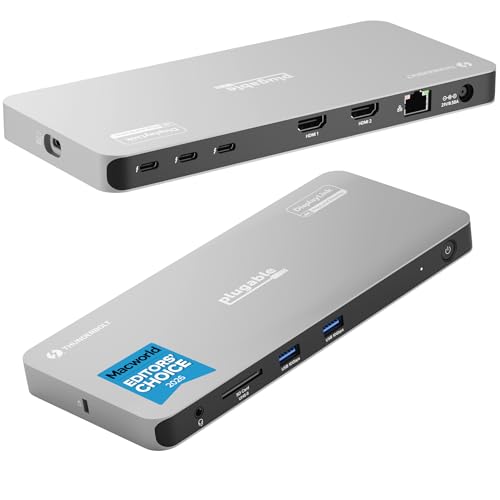
Plugable Thunderbolt 4 Quad Display Dock
Best for: Users requiring four simultaneous 4K displays
- Host Interface
- Thunderbolt 4
- Display Support
- Quad
- Max Resolution
- 8K
- Power Delivery
- 96W
- Video Ports
- HDMI, Thunderbolt
- Max Data Speed
- 40Gbps
This Thunderbolt 4 dock supports up to four 4K displays, combining native Thunderbolt outputs with two HDMI ports via DisplayLink. It delivers 96W of power delivery to your host device and includes three additional 40Gbps Thunderbolt ports for peripherals. The unit weighs 2.78 pounds and supports Windows, macOS, and ChromeOS. It suits users needing extensive multi-monitor setups with high-speed data transfer.
Pros
- Supports up to four 4K displays simultaneously
- Provides 96W power delivery for host laptops
- Includes three extra 40Gbps Thunderbolt ports
- Features Gigabit Ethernet and SD card slot
Cons
- Requires DisplayLink software for HDMI outputs
- Base M1 and M2 Macs limit to three displays
- Heavier at 2.78 pounds than simple hubs
Good fit if
- You need to connect four monitors to one computer
- You require 96W charging for your laptop
- You use Windows or newer Mac systems
Skip if
- You want a plug-and-play HDMI setup without drivers
- You use a base model M1 or M2 Mac
- You need a lightweight portable travel accessory
Verdict: Plugable Thunderbolt 4 Quad Dock delivers extensive connectivity for power users. It fits professionals who need four screens and fast data transfer without sacrificing laptop charging speed.

UGREEN 5-in-1 USB-C Hub with 100W PD
Best for: single monitor setups with charging needs
- Host Interface
- USB-C
- Max Resolution
- 4K
- Power Delivery
- 100W
- Port Count
- 5
- Video Ports
- HDMI
- Max Data Speed
- 5Gbps
This UGREEN adapter offers five connection points in a compact grey shell. It includes a 4K HDMI port for video output and a 100W USB-C PD port for charging. You get one 5 Gbps USB-A data port and two 480 Mbps ports for peripherals. The unit weighs just 3.21 ounces and measures 4.79 inches long. It suits users needing basic video and power expansion via USB-C.
Pros
- 4K UHD HDMI video output
- 100W USB-C Power Delivery
- Compact 3.21-ounce weight
- 5-in-1 connectivity layout
Cons
- Only one HDMI port
- Two USB-A ports limited to 480 Mbps
- No Thunderbolt support
Good fit if
- You need 4K video from a single HDMI port
- You require 100W charging through the same hub
- You want a lightweight USB-C expansion solution
Skip if
- You need to connect multiple monitors simultaneously
- You require high-speed 5Gbps data transfer on all ports
- You need Thunderbolt 4 connectivity
Verdict: UGREEN 5-in-1 USB-C Hub with 4K HDMI provides essential video and power features in a small form factor. It fits users who need a single 4K display and fast charging without the bulk of a full dock.

HODO 5-in-1 Dual 4K 60Hz USB-C Hub
Best for: Dual monitor setups with single cable
- Host Interface
- USB4, Thunderbolt 4
- Display Support
- Dual
- Max Resolution
- 8K@30Hz
- Power Delivery
- 87W
- Video Ports
- USB-C
- Max Data Speed
- 10Gbps
The HODO USB-C Hub connects two displays via a single USB-C or Thunderbolt 4 port. It supports 8K at 30Hz or 4K at 60Hz resolution. The hub delivers up to 87W of power delivery to your laptop. It offers 10Gbps data transfer speeds. This compact adapter suits users needing dual monitors and fast charging from a single cable connection.
Pros
- Supports dual monitor output via USB-C
- Delivers up to 87W power delivery
- Handles 8K@30Hz or 4K@60Hz video
- Provides 10Gbps data transfer speeds
Cons
- Video and data cannot use the main port simultaneously
- Requires a separate 65W+ power adapter
- Lacks HDMI or DisplayPort native outputs
Good fit if
- You need dual monitors from one cable
- Your laptop supports USB-C video output
- You want fast charging for your device
Skip if
- You require simultaneous video and data on one port
- Your laptop lacks USB-C Alt Mode
- You prefer HDMI or DisplayPort connections
Verdict: HODO USB-C Dual 4K Hub, 87W PD fits users who need two displays and charging from a single cable. It works well for Thunderbolt 4 or USB4 laptops with Alt Mode support.

Selore Dual 4K HDMI USB-C Dock
Best for: Dual monitor setups with USB-C laptops
- Host Interface
- USB-C
- Display Support
- Dual
- Max Resolution
- 4K@60Hz
- Power Delivery
- 100W
- Port Count
- 8
- Video Ports
- HDMI
The Selore 8-in-1 dock connects two displays via dual HDMI ports, supporting 4K resolution at 60Hz. It delivers 100W Power Delivery to charge your laptop while providing data transfer speeds of 5Gbps through its USB-A and USB-C ports. This compact grey unit includes SD and MicroSD slots for media access. It suits users needing a single-cable solution for dual monitors and fast charging on devices with full-featured USB-C ports.
Pros
- Supports dual 4K@60Hz displays via two HDMI ports
- Provides 100W Power Delivery for laptop charging
- Includes dedicated buttons for mirror/extend toggling and privacy mode
- Features SD and MicroSD card readers for quick file access
Cons
- Limited to USB 3.0 speeds of 5Gbps, lacking Thunderbolt bandwidth
- macOS users can only extend to one external monitor
- Requires manual system authorization on first use
Good fit if
- You need to drive two monitors from a single USB-C connection
- You want a compact dock with built-in card readers
- You require 100W charging for compatible laptops
Skip if
- You use macOS and need to extend beyond one screen
- You require Thunderbolt 4 speeds for high-bandwidth peripherals
- You want a plug-and-play setup without initial software configuration
Verdict: Selore 8-in-1 USB-C Dock Dual HDMI offers a practical dual-monitor solution for USB-C laptops, though macOS users are limited to single-screen extension. It fits users who prioritize dual displays and card readers over high-speed data transfer.
Specifications side by side
| Spec | Lenovo ThinkPad Universal Thunderbolt 4 Dock | Plugable Thunderbolt 4 Dual HDMI Dock | Plugable 16-in-1 Thunderbolt 4 Dock | Plugable Thunderbolt 4 Quad Display Dock | UGREEN 5-in-1 USB-C Hub with 100W PD | HODO 5-in-1 Dual 4K 60Hz USB-C Hub | Selore Dual 4K HDMI USB-C Dock |
|---|---|---|---|---|---|---|---|
| Host Interface | Thunderbolt 4 | Thunderbolt 4, USB4 | Thunderbolt 4 | Thunderbolt 4 | USB-C | USB4, Thunderbolt 4 | USB-C |
| Display Support | 4 | Dual | Dual | Quad | not specified | Dual | Dual |
| Max Resolution | 8K@30Hz | 6K | 4K@60Hz | 8K | 4K | 8K@30Hz | 4K@60Hz |
| Power Delivery | 100W | 100W | 100W | 96W | 100W | 87W | 100W |
| Port Count | 11 | 13 | 16 | not specified | 5 | not specified | 8 |
| Video Ports | DisplayPort, HDMI, Thunderbolt 4 | HDMI, Thunderbolt 4 | HDMI, DisplayPort | HDMI, Thunderbolt | HDMI | USB-C | HDMI |
| Max Data Speed | 40 Gbps | 40Gbps | 40Gbps | 40Gbps | 5Gbps | 10Gbps | 5Gbps |
| Ethernet Speed | Gigabit | not specified | 2.5Gbps | Gigabit | not specified | not specified | not specified |
| Resolution | 4K UHD | 4K UHD | 4K UHD | 4K UHD | 4K UHD | 4K UHD | 4K UHD |
| Connectivity | Thunderbolt 4 | HDMI, Ethernet, Thunderbolt 4 | HDMI, DisplayPort, Ethernet, Thunderbolt 4 | USB-C, HDMI, Thunderbolt 4 | USB-C, HDMI, USB-A | USB-C | USB-C, HDMI, USB-A |
| Refresh Rate | not specified | not specified | not specified | not specified | not specified | 60Hz | 60Hz |
| Features | not specified | not specified | Card Reader | not specified | not specified | not specified | not specified |
| Slot Count | not specified | 1 Slot | not specified | not specified | not specified | not specified | not specified |
| Dimensions | 6 × 3 × 1 inches | 3.35 × 8.86 × 0.91 inches | 11.9 × 6 × 4.3 inches | 8.42 × 3.74 × 0.72 inches | 4.79 × 1.09 × 0.47 inches | 5.7 × 2.32 × 0.47 inches | 4.5 × 2.1 × 0.7 inches |
| Weight | 1.16 pounds | 2.87 pounds | 1.42 pounds | 2.78 pounds | 3.21 ounces | 2.47 ounces | 3.39 ounces |
| Size | 1.18" x 3.15" | not specified | 11.6" × 5.8" × 4.1" | not specified | 0.65 feet | not specified | 9-in-1 |
| Color | Black | Space Grey | Silver | not specified | grey | not specified | Grey |
| Model | 40B00135US | TBT-UDM | TBT4-UDZ | TBT-6950PD | CM478 | not specified | SEUC0425 |
If you also track kitchen specifications, you can evaluate wusthof wusthof gourmet white 4 piece alternatives separately.
Frequently asked questions
Which alternative offers the most ports for heavy multitasking?
The Plugable 16-in-1 Thunderbolt 4 Dock is designed for users who prioritize connectivity density. It provides 16 ports to support heavy multitasking and dual 4K setups. This model fits professionals who need extensive connectivity options without sacrificing the high bandwidth of a Thunderbolt 4 connection.
Can I use a dock for dual 4K displays on a Mac?
Yes, the Plugable Thunderbolt 4 Dual HDMI Dock is ideal for Mac users needing dual 4K screens. It offers a reliable, driver-free connection suitable for workstation setups. This option allows you to extend your display across two monitors while maintaining fast data transfer speeds.
Is there a compact option for a single monitor and charging?
The UGREEN 5-in-1 USB-C Hub provides essential video and power features in a small form factor. It fits users who need a single 4K display and fast charging without the bulk of a full dock. This hub is lightweight and easy to carry.
Which dock supports four simultaneous 4K displays?
The Plugable Thunderbolt 4 Quad Display Dock delivers extensive connectivity for power users requiring four screens. It allows for four simultaneous 4K displays and fast data transfer. This dock ensures you do not sacrifice laptop charging speed while managing a multi-monitor workflow.
Do any alternatives include USB-A ports?
The Selore Dual 4K HDMI USB-C Dock is the best option if you need USB-A connectivity. It offers a practical dual-monitor solution for USB-C laptops with multiple USB-A ports. This model fits users who prioritize dual displays and card readers over high-speed data transfer.
What is the lightest portable hub available?
The UGREEN 5-in-1 USB-C Hub is the lightest option at 3.21 ounces. It measures 4.79 inches in length and 1.09 inches in width. This compact design makes it easy to transport while providing 4K HDMI output and 100W power delivery for your laptop.
Which hub supports dual 4K at 60Hz?
The HODO 5-in-1 Dual 4K 60Hz USB-C Hub supports two displays at 4K resolution and 60Hz refresh rates. It works well for Thunderbolt 4 or USB4 laptops with Alt Mode support. This hub allows you to connect two monitors and charge your device from a single cable.