Lenovo Docking Stations: 13 Picks Ranked by Specs
As an Amazon Associate we earn from qualifying purchases. Links on this page are affiliate links.
Finding the right lenovo docking station depends on your hardware connections and display needs. Lenovo offers desktop hubs, mechanical docks, and a slim travel dock, with black and black/red chassis designs weighing between 0.3 pounds and 2.52 pounds. Across the lineup, connections include USB-C, USB-A, Thunderbolt 3, and Thunderbolt 4. The Lenovo ThinkPad Hybrid USB-C and USB-A Dock takes the top spot because it provides reliable multi-monitor routing for mixed USB-C and USB-A laptop setups.
This guide compares 13 products ranked strictly by the specifications published on their listings.
Quick picks
Our 13 picks
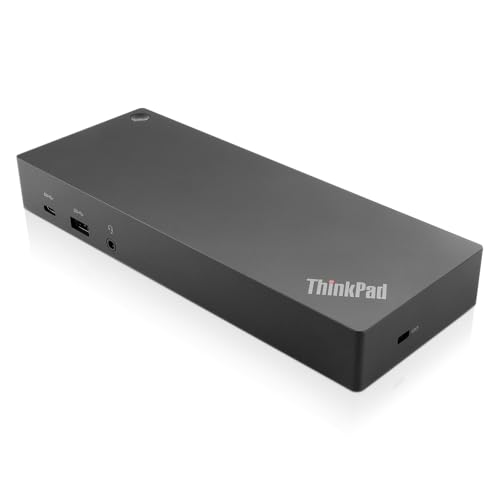
Lenovo ThinkPad Hybrid USB-C and USB-A Dock
Best for: mixed USB-C and USB-A laptop setups
- Host Interface
- USB-C, USB-A
- Video Ports
- DisplayPort, HDMI
- Max Data Speed
- 10Gbps
- Ethernet Speed
- Gigabit Ethernet
- Dimensions
- 8.3 × 3.1 × 1.2 inches
- Weight
- 1.05 pounds
This Lenovo docking station bridges older and newer setups using hybrid USB-C and USB-A connectivity. You get dual DisplayPort and dual HDMI video outputs alongside three 10Gbps USB 3.1 Gen 2 ports, two USB 2.0 ports, and Gigabit Ethernet. The front USB-C port provides data and 15W power delivery. It suits you if you need reliable desk connectivity across mixed fleets of USB-A laptops and modern USB-C ThinkPads.
Pros
- Dual DisplayPort and dual HDMI video connections
- Three 10Gbps USB 3.1 Gen 2 ports plus one USB-C data port
- Works across both USB-C and legacy USB-A host laptops
- Supports ThinkPad RapidCharge technology
Cons
- Two peripheral ports are limited to USB 2.0 speeds
- Front USB-C port power delivery maxes out at 15W
Good fit if
- You switch between USB-C and legacy USB-A laptops at your desk.
- You need multiple DisplayPort or HDMI connections for external displays.
- You want 10Gbps USB transfer speeds for fast external drives.
Skip if
- You require native Thunderbolt data transfer bandwidth.
- You need high-wattage power output directly from the accessory USB-C port.
Verdict: Lenovo ThinkPad Hybrid USB-C and USB-A Dock provides solid display versatility and reliable host compatibility for mixed setups. It handles everyday peripheral connectivity and multi-monitor routing across both older and modern systems.

Lenovo ThinkPad Universal Thunderbolt 4 Dock
Best for: quad-4K monitors and high-bandwidth Thunderbolt 4 workstations
- Host Interface
- Thunderbolt 4
- Display Support
- Up to 4
- Max Resolution
- 8K @ 30 Hz
- Power Delivery
- 100W
- Video Ports
- DisplayPort, HDMI, Thunderbolt 4
- Max Data Speed
- 40 Gbps
View on Amazon: Lenovo ThinkPad Universal Thunderbolt 4 Dock
This Lenovo ThinkPad Universal Thunderbolt 4 Dock expands your laptop setup through a single 40 Gbps connection. It delivers up to 100W of dynamic power charging with the included 135W power adapter. You get video support for a single 8K display at 30 Hz or up to four 4K displays at 60 Hz across two DisplayPort 1.4 ports, one HDMI 2.1 port, and a downstream Thunderbolt 4 port.
Pros
- Supports up to four 4K displays at 60 Hz or one 8K display at 30 Hz
- Supplies up to 100W dynamic charging via included 135W adapter
- Features 40 Gbps transfer speeds with a downstream Thunderbolt 4 port
- Provides four USB 3.1 Gen 2 ports, Gigabit Ethernet, and an audio jack
Cons
- Requires an external 135W power brick to operate
- Weighs 1.16 pounds, making it bulkier than compact travel docks
Good fit if
- You need to drive up to four 4K monitors or a single 8K screen from one dock.
- You require up to 100W power delivery for your USB-C or Thunderbolt notebook.
- You want 40 Gbps bandwidth with downstream Thunderbolt 4 device support.
Skip if
- You need a lightweight, bus-powered hub for travel that operates without an AC brick.
- You use a high-powered workstation laptop that requires more than 100W of charging.
Verdict: Lenovo ThinkPad Universal Thunderbolt 4 Dock provides high-speed 40 Gbps bandwidth and versatile multi-monitor output up to 8K resolution. It suits intensive desktop workstation setups needing up to 100W of power delivery.

Lenovo ThinkPad Universal USB-C Dock
Best for: workstations needing multi-display USB-C connectivity
- Host Interface
- USB-C
- Power Delivery
- 65W (Max 100W)
- Port Count
- 11+
- Video Ports
- 2 DisplayPort 1.4, 1 HDMI 2.0
- Max Data Speed
- 10 Gbps
- Ethernet Speed
- Gigabit
This Lenovo ThinkPad Universal USB-C Dock expands your laptop setup with 11 ports through a single cable connection. It provides two DisplayPort 1.4 outputs, one HDMI 2.0 port, Gigabit Ethernet, and six USB connections including three 10 Gbps USB-A ports. The unit delivers 65W of power delivery using the included 90W power adapter. It suits you if you need multi-monitor desk connectivity alongside network management tools like PXE boot and MAC pass-through.
Pros
- Offers three video outputs via two DisplayPort 1.4 and one HDMI 2.0
- Includes three 10 Gbps USB-A 3.1 Gen 2 ports and one 10 Gbps USB-C port
- Supports enterprise networking with PXE boot, WOL, and MAC Address Pass Through
- Features both Kensington and NanoSaver security lock slots
Cons
- Includes two legacy USB-A 2.0 ports
- Requires a separate 135W power adapter to reach 100W charging
Good fit if
- You need multiple display outputs using DisplayPort and HDMI connections.
- You require network management tools like PXE boot and MAC pass-through.
- You charge a laptop that operates within a standard 65W power limit.
Skip if
- You need 100W power delivery without buying an upgraded power brick.
- You require dedicated Thunderbolt bandwidth rather than USB-C data rates.
Verdict: Lenovo ThinkPad Universal USB-C Dock provides broad display output and clean peripheral management for standard desk environments. It delivers up to 65W charging out of the box, with higher 100W delivery requiring a separate power adapter.

Lenovo ThinkPad Thunderbolt 3 Dock Gen 2
Best for: dual 4K ThinkPad desktop setups
- Host Interface
- Thunderbolt 3
- Display Support
- Dual
- Max Resolution
- 4K
- Video Ports
- HDMI, DisplayPort
- Ethernet Speed
- 10Base-T/100Base-TX/1000Base-T
- Connectivity
- USB-C, HDMI, DisplayPort, Thunderbolt 3
This Lenovo ThinkPad Thunderbolt 3 docking station equips your desk setup with dual 4K display outputs using two HDMI and two DisplayPort connections. It includes five USB 3.1 Gen 2 ports, a dedicated Thunderbolt 3 port, and a bundled 135W power adapter. It suits you if you need high-bandwidth peripheral connections and wired Gigabit Ethernet for compatible ThinkPad laptops running Windows 10 or Windows 7.
Pros
- Dual 4K display output across two HDMI and two DisplayPort connections
- Five USB 3.1 Gen 2 ports including one always-on charging port
- Included 135W power adapter and Thunderbolt 3 cable
- Gigabit Ethernet RJ-45 port and 3.5mm audio jack
Cons
- Official OS support listed only for Windows 7 and Windows 10
- Weighs 2 pounds, requiring a dedicated desktop footprint
Good fit if
- You need dual 4K monitor support via HDMI or DisplayPort connections.
- You connect multiple accessories using five high-speed USB 3.1 ports.
- You use a compatible ThinkPad running Windows 10 or Windows 7.
Skip if
- You require native Thunderbolt 4 connectivity.
- You run an operating system other than Windows 7 or Windows 10.
Verdict: Lenovo ThinkPad Thunderbolt 3 Dual 4K Dock delivers robust multi-monitor output and extensive USB expansion paired with an included 135W power supply. It provides reliable desktop workstation connectivity for supported ThinkPad laptops.

Lenovo ThinkPad USB-C Dock Gen 2
Best for: triple-display productivity setups using USB-C
- Host Interface
- USB-C
- Display Support
- 3
- Max Resolution
- 4K at 60Hz
- Video Ports
- HDMI, DisplayPort
- Ethernet Speed
- Gigabit Ethernet
- Dimensions
- 2.95 × 6.22 × 8.3 inches
This Lenovo ThinkPad USB-C Dock Gen 2 connects via USB-C to expand your workspace with multiple accessories. It provides three video outputs including one HDMI and two DisplayPort connections capable of driving up to three external displays, with support for one 4K display at 60Hz. You also get five USB ports, Gigabit Ethernet, an audio combo jack, and an included 90W power adapter for a complete multi-monitor desk setup.
Pros
- Supports up to three external monitors via two DisplayPort and one HDMI port
- Includes a 90W AC power adapter, power cord, and USB-C cable
- Offers three USB 3.1 ports and two USB 2.0 ports for peripherals
- Equipped with Gigabit Ethernet and a 3.5mm combo audio jack
Cons
- Maximum 4K at 60Hz resolution limited to a single display
- Two of the five USB Type-A ports use slower USB 2.0 speeds
Good fit if
- You need to drive up to three external displays using DisplayPort and HDMI.
- You want a complete package that includes the 90W power adapter and USB-C cable.
- You require wired Gigabit Ethernet alongside standard USB peripheral connections.
Skip if
- You need dual or triple displays running at 4K resolution at 60Hz.
- You require all USB ports to operate at high-speed USB 3.1 specs.
Verdict: Lenovo ThinkPad USB-C Dock Gen 2 delivers reliable connectivity with three display ports, five USB ports, and an included 90W power adapter. It serves well as a dedicated desk hub for multi-monitor productivity without unnecessary complexity.

Lenovo ThinkPad Gen 2 USB-C Dock
Best for: single 4K monitor office setups
- Host Interface
- USB-C
- Max Resolution
- 4K@60Hz
- Video Ports
- DisplayPort, HDMI
- Max Data Speed
- 10Gbps
- Dimensions
- 6.73 × 3.15 × 1.18 inches
- Weight
- 11.5 ounces
The Lenovo ThinkPad USB-C Dock Gen 2 links your workstation through a single USB-C cable. It delivers up to 10Gbps data speeds across your connected accessories and supports single-screen output up to 4K at 60Hz through DisplayPort 1.4 or HDMI 2.0 ports. Weighing under 0.72 pounds with wired Ethernet management support, this compact black hub suits you if you need reliable desktop connectivity for office tasks and multiple monitor setups.
Pros
- Supports up to 4K at 60Hz video output via DisplayPort 1.4 or HDMI 2.0
- Fast USB peripheral transfer speeds up to 10Gbps
- Supports enterprise PXE Boot, Wake-on-LAN, and MAC address pass-through
- Backed by a 3-year worldwide warranty
Cons
- Maximum 4K at 60Hz output limited to a single screen
- Maximum video resolution depends directly on host system output support
Good fit if
- You need 10Gbps data transfer speeds for connected USB peripherals.
- You require network features like PXE Boot and MAC address pass-through.
- You want a single 4K display running at 60Hz via HDMI or DisplayPort.
Skip if
- You require dual 4K displays operating at 60Hz simultaneously.
- You connect a host computer lacking DisplayPort 1.4 or HDMI 2.0 output.
Verdict: Lenovo ThinkPad USB-C Dock Gen 2 provides essential 10Gbps peripheral connections and 4K display handling in a compact form factor. It gives you dependable multi-display support and network management for everyday work.

Lenovo ThinkPad Universal USB-C Dock
Best for: managed corporate desks and remote office setups
- Host Interface
- USB-C
- Dimensions
- 8.27 × 6.22 × 2.95 inches
- Weight
- 1.98 pounds
The Lenovo ThinkPad Universal USB-C Dock provides a single-cable connection for your laptop, displays, and desktop accessories. It supports rapid USB-C notebook charging and includes enterprise network management tools such as PXE boot, Wake-on-LAN, and MAC Address Pass Through. Measuring roughly 8.3 by 6.2 inches and weighing just under two pounds, this desktop dock suits you if you need reliable peripheral connections and remote manageability for office or home workstations.
Pros
- Supports PXE boot, Wake-on-LAN, and MAC Address Pass Through
- Installs critical firmware updates automatically
- Provides rapid USB-C notebook charging via a single cable
- Supports remote IT management and connected device data gathering
Cons
- Exact charging wattage is omitted from specifications
- Specific display output port types are not listed in specs
- Heavier desktop footprint at nearly two pounds
Good fit if
- You need network deployment tools like PXE boot and MAC Address Pass Through.
- You want single-cable USB-C connections with rapid laptop charging.
- You manage remote or hot-desking setups requiring automated firmware updates.
Skip if
- You require explicit display output specifications confirmed before purchase.
- You need a lightweight, compact dock for mobile travel use.
Verdict: Lenovo ThinkPad Universal USB-C Dock delivers single-cable docking and rapid USB-C charging alongside traditional enterprise network tools. It serves workstations that require remote IT visibility and simplified peripheral connectivity.

Lenovo USB-C Slim Travel Dock
Best for: mobile workers needing a lightweight travel dock
- Host Interface
- USB-C
- Max Resolution
- 4K @ 60 Hz
- Power Delivery
- Up to 65W
- Port Count
- 8
- Video Ports
- HDMI
- Max Data Speed
- 10 Gbps
The Lenovo USB-C Slim Travel Dock is an ultra-portable hub built for mobile setups. Weighing just 0.3 pounds, it slips easily into a laptop bag. You get an integrated USB-C cable, up to 65W Power Delivery pass-through, and a single HDMI 2.1 port driving 4K at 60 Hz. With five 10 Gbps USB ports, it suits anyone who needs multi-device connectivity and external video on the go without carrying a bulky desktop dock.
Pros
- Weighs 0.3 pounds with a compact 4.72-inch frame
- Supports 4K video at 60 Hz via HDMI 2.1
- Five 10 Gbps USB ports across USB-A and USB-C
- Integrated USB-C host connection cable
Cons
- Supports only one external display
- No Ethernet port or 3.5 mm audio jack listed
- Pass-through charging limited to 65W
Good fit if
- You need a lightweight 0.3-pound dock for travel.
- You use a single external 4K monitor at 60 Hz.
- You want fast 10 Gbps USB-C and USB-A data connections.
Skip if
- You need to drive two or more external monitors.
- You require more than 65W of charging power.
- You rely on a wired Ethernet network port.
Verdict: Lenovo USB-C Slim Travel Dock delivers fast 10 Gbps ports and 4K 60 Hz video output in a lightweight 0.3-pound form factor. It provides practical on-the-go connectivity if your setup requires only a single display and up to 65W charging pass-through.
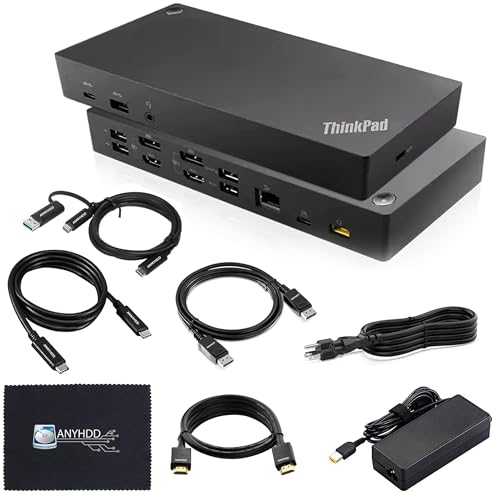
Lenovo ThinkPad Hybrid Dual Monitor Dock
Best for: dual-display setups needing flexible video port options
- Host Interface
- USB-C, USB-A
- Display Support
- Dual
- Video Ports
- 2 x DisplayPort 1.2, 2 x HDMI
- Ethernet Speed
- 10/100/1000 Mb/s
- Connectivity
- USB-C, HDMI, DisplayPort, USB-A
- Power Delivery
- 135W
The Lenovo ThinkPad Hybrid Dual Monitor Dock expands your laptop workspace with dual-display output. It features two HDMI ports, two DisplayPort 1.2 connections, gigabit Ethernet, and six total USB ports. Powered by an included 135W AC adapter, it connects via USB-C or USB-A. This setup suits you if you need a dedicated two-screen desk station with bundled video cables and legacy USB-A support.
Pros
- Supports dual monitor setups via two HDMI and two DisplayPort 1.2 outputs
- Includes a 135W AC power adapter
- Provides six USB data ports across USB-C and USB-A
- Ships with both HDMI and DisplayPort video cables
Cons
- DisplayPort connections use older 1.2 standard
- Two of the USB-A ports operate at USB 2.0 speeds
Good fit if
- You want to drive two external displays using either HDMI or DisplayPort.
- You need both USB-C and USB-A host compatibility.
- You want bundled HDMI and DisplayPort cables in the box.
Skip if
- You need DisplayPort standards newer than version 1.2.
- You require all USB ports to run at Gen 2 speeds.
Verdict: Lenovo ThinkPad Hybrid Dual Monitor Dock provides reliable two-screen connectivity and high-wattage power for your desktop workspace. It gives you flexible port selection with included video cables ready out of the box.

Lenovo ThinkPad Thunderbolt 4 Workstation Dock
Best for: Thunderbolt 4 workstation laptop setups
- Host Interface
- Thunderbolt 4
- Dimensions
- 10.7 × 7.7 × 3.5 inches
- Weight
- 15.9 ounces
View on Amazon: Lenovo ThinkPad Thunderbolt 4 Workstation Dock
The Lenovo ThinkPad Thunderbolt 4 Workstation Dock provides high-speed Thunderbolt 4 connectivity for your desk setup. Weighing under one pound at 0.99 pounds and measuring 10.7 by 7.7 by 3.5 inches, this black and red unit links your laptop to external displays. If you need Thunderbolt 4 data transmission to drive versatile displays from a lightweight hardware hub, this docking station suits your workspace.
Pros
- Thunderbolt 4 host connectivity
- Lightweight build at approximately 0.99 pounds
- Designed to expand displays with versatile monitor support
Cons
- Specific port types and counts not listed in product data
- Power delivery wattage not specified in provided details
Good fit if
- You need high-bandwidth Thunderbolt 4 connectivity for your system.
- You want a lightweight workstation dock weighing less than one pound.
- You plan to run versatile external monitor configurations.
Skip if
- You require explicit port counts and video output types before buying.
- You need verified charging wattage specifications for your laptop.
Verdict: Lenovo ThinkPad Thunderbolt 4 Workstation Dock delivers Thunderbolt 4 connectivity in a lightweight 0.99-pound chassis. It provides the high-bandwidth connection needed to support versatile display configurations for your workspace.

Lenovo ThinkPad Ultra Mechanical Dock
Best for: compatible ThinkPads needing triple display outputs
- Display Support
- 3 monitor
- Max Data Speed
- 10Gbps
- Ethernet Speed
- 10/1000 Gigabit Ethernet
- Dimensions
- 14.9 × 2.1 × 6.3 inches
- Weight
- 1.79 pounds
This mechanical dock connects directly to select ThinkPad laptops, providing desktop expansion without loose cables. You get video support for up to three external displays using two DisplayPort 1.4 ports, one HDMI 2.0 port, and an analog VGA port. It delivers four 10Gbps USB 3.1 Gen 2 ports, two USB-C ports, and Gigabit Ethernet. It suits you if you use supported ThinkPads like the T480 or X1 Carbon Gen 6.
Pros
- Supports up to three external displays via dual DisplayPort 1.4, HDMI 2.0, and VGA
- Four 10Gbps USB 3.1 Gen 2 ports and two 10Gbps USB-C ports
- Gigabit Ethernet with PXE Boot, Wake-On LAN, and MAC address pass-through
- Includes 135W AC adapter and two physical locking keys
Cons
- Mechanical dock connector restricts compatibility to specific older ThinkPad models
- Lacks universal single-cable USB-C or Thunderbolt compatibility
- Measures 14.9 inches long and weighs 1.79 pounds
Good fit if
- You own a supported ThinkPad such as the T480, T580, L480, P52s, or X280.
- You need to drive up to three monitors using DisplayPort, HDMI, or legacy VGA.
- You require network management tools like MAC address pass-through and PXE boot.
Skip if
- You own a newer laptop that relies on universal USB-C or Thunderbolt cables.
- You need a small, portable hub for travel rather than a desktop docking base.
Verdict: Lenovo ThinkPad Ultra Mechanical Dock provides dedicated multi-monitor connectivity and high-speed data ports for compatible business laptops. Its mechanical side connection and included 135W power adapter create a stable fixed workstation for supported systems.
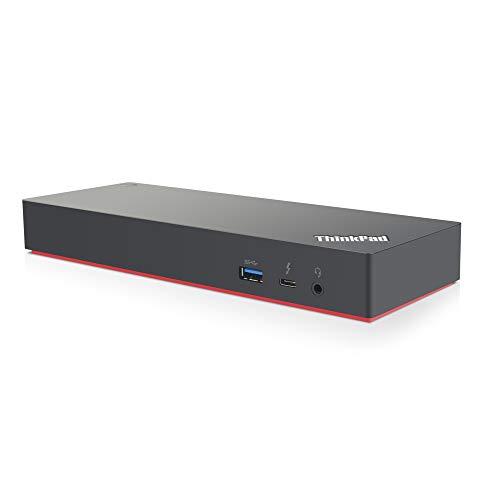
Lenovo ThinkPad Thunderbolt 3 Dock Gen 2
Best for: dual 4K displays and fast USB connectivity
- Host Interface
- Thunderbolt 3
- Display Support
- Dual
- Max Resolution
- 4K
- Video Ports
- HDMI, DisplayPort, USB-C
- Ethernet Speed
- 10Base-T/100Base-TX/1000Base-T
- Connectivity
- USB-C, HDMI, DisplayPort, Thunderbolt 3
This Lenovo ThinkPad Thunderbolt 3 Dock Gen 2 connects your laptop to dual 4K UHD displays and multiple desk peripherals. It includes a 135W power adapter, two HDMI ports, two DisplayPort outputs, and one downstream Thunderbolt 3 port. You also get Gigabit Ethernet and five USB 3.1 Gen 2 ports, with one offering always-on charging. It suits you if you run Windows and need high-bandwidth connectivity for multiple monitors and accessories.
Pros
- Dual 4K UHD display support via two HDMI and two DisplayPort outputs
- Includes a 135W power adapter and dedicated Thunderbolt 3 cable
- Five USB 3.1 Gen 2 ports with one always-on charging port
- Gigabit Ethernet and 3.5mm audio connectivity
Cons
- Operating system support in specs lists only Windows 7 and Windows 10
- No built-in SD or microSD card slot
- Heavier desktop footprint at 2.52 pounds
Good fit if
- You need to drive dual 4K displays using DisplayPort or HDMI.
- You want multiple 10Gbps USB 3.1 Gen 2 ports for high-speed accessories.
- You use a compatible Windows system with Thunderbolt 3 connectivity.
Skip if
- You require an integrated memory card reader for photo workflows.
- You need a lightweight, portable dock for travel.
Verdict: Lenovo ThinkPad Thunderbolt 3 Dock Gen 2 provides extensive video and data connectivity through dual 4K outputs and five high-speed USB ports. It delivers reliable power and bandwidth for a fixed Windows desktop arrangement.

Lenovo ThinkPad USB-C UltraDock 90W
Best for: dual FHD DisplayPort desk setups
- Host Interface
- USB-C
- Display Support
- Dual
- Max Resolution
- UHD @ 30Hz
- Power Delivery
- 60W
- Dimensions
- 6.73 × 3.15 × 1.28 inches
- Weight
- 10.2 ounces
This Lenovo USB-C dock powers your workstation using an included 90W AC adapter that supplies up to 60W of Power Delivery. It expands your setup through two DisplayPort connections, three USB 3.0 ports, two USB 2.0 ports, an RJ45 Ethernet jack, and a headset audio jack. You get support for dual FHD monitors or a single UHD display at 30Hz. It suits you if you run standard dual-screen desk setups.
Pros
- Includes 90W AC power adapter providing up to 60W Power Delivery
- Dual DisplayPort outputs supporting dual FHD displays
- Five USB Type-A ports alongside a dedicated USB Type-C port
- Built-in RJ45 Ethernet port and 3.5mm headset jack
Cons
- Single UHD output is limited to a 30Hz refresh rate
- Power Delivery caps at 60W rather than full 90W
- Lacks native HDMI video ports
Good fit if
- You run dual 1080p monitors using DisplayPort inputs.
- Your laptop requires 60W or less over USB-C power delivery.
- You need five standard USB ports for external peripherals.
Skip if
- You need a 4K UHD monitor running at 60Hz.
- You require direct HDMI connectivity without adapters.
- Your laptop requires more than 60W of charging power.
Verdict: Lenovo ThinkPad USB-C UltraDock 90W provides reliable dual FHD display connectivity and legacy USB expansion for office laptops requiring up to 60W charging. Its 30Hz refresh rate cap on UHD displays makes it better suited for standard resolution productivity.
Specifications side by side
| Spec | Lenovo ThinkPad Hybrid USB-C and USB-A Dock | Lenovo ThinkPad Universal Thunderbolt 4 Dock | Lenovo ThinkPad Universal USB-C Dock | Lenovo ThinkPad Thunderbolt 3 Dock Gen 2 | Lenovo ThinkPad USB-C Dock Gen 2 | Lenovo ThinkPad Gen 2 USB-C Dock | Lenovo ThinkPad Universal USB-C Dock | Lenovo USB-C Slim Travel Dock | Lenovo ThinkPad Hybrid Dual Monitor Dock | Lenovo ThinkPad Thunderbolt 4 Workstation Dock | Lenovo ThinkPad Ultra Mechanical Dock | Lenovo ThinkPad Thunderbolt 3 Dock Gen 2 | Lenovo ThinkPad USB-C UltraDock 90W |
|---|---|---|---|---|---|---|---|---|---|---|---|---|---|
| Host Interface | USB-C, USB-A | Thunderbolt 4 | USB-C | Thunderbolt 3 | USB-C | USB-C | USB-C | USB-C | USB-C, USB-A | Thunderbolt 4 | not specified | Thunderbolt 3 | USB-C |
| Display Support | not specified | Up to 4 | not specified | Dual | 3 | not specified | not specified | not specified | Dual | not specified | 3 monitor | Dual | Dual |
| Max Resolution | not specified | 8K @ 30 Hz | not specified | 4K | 4K at 60Hz | 4K@60Hz | not specified | 4K @ 60 Hz | not specified | not specified | not specified | 4K | UHD @ 30Hz |
| Power Delivery | not specified | 100W | 65W (Max 100W) | not specified | not specified | not specified | not specified | Up to 65W | not specified | not specified | not specified | not specified | 60W |
| Port Count | not specified | not specified | 11+ | not specified | not specified | not specified | not specified | 8 | not specified | not specified | not specified | not specified | not specified |
| Video Ports | DisplayPort, HDMI | DisplayPort, HDMI, Thunderbolt 4 | 2 DisplayPort 1.4, 1 HDMI 2.0 | HDMI, DisplayPort | HDMI, DisplayPort | DisplayPort, HDMI | not specified | HDMI | 2 x DisplayPort 1.2, 2 x HDMI | not specified | not specified | HDMI, DisplayPort, USB-C | not specified |
| Max Data Speed | 10Gbps | 40 Gbps | 10 Gbps | not specified | not specified | 10Gbps | not specified | 10 Gbps | not specified | not specified | 10Gbps | not specified | not specified |
| Ethernet Speed | Gigabit Ethernet | Gigabit Ethernet | Gigabit | 10Base-T/100Base-TX/1000Base-T | Gigabit Ethernet | not specified | not specified | not specified | 10/100/1000 Mb/s | not specified | 10/1000 Gigabit Ethernet | 10Base-T/100Base-TX/1000Base-T | not specified |
| Resolution | not specified | not specified | not specified | 4K UHD | not specified | not specified | not specified | 4K UHD | not specified | not specified | not specified | 4K UHD | not specified |
| Connectivity | USB-C, USB-A | Thunderbolt 4 | USB-C | USB-C, HDMI, DisplayPort, Thunderbolt 3 | USB-C | USB-C | USB-C | USB-C | USB-C, HDMI, DisplayPort, USB-A | Thunderbolt 4 | not specified | USB-C, HDMI, DisplayPort, Thunderbolt 3 | USB-C |
| Use | not specified | not specified | not specified | not specified | not specified | not specified | not specified | Travel | not specified | not specified | not specified | not specified | not specified |
| Dimensions | 8.3 × 3.1 × 1.2 inches | 6 × 3 × 1 inches | 3 × 6.2 × 8.2 inches | 8.66 × 3.15 × 1.18 inches | 2.95 × 6.22 × 8.3 inches | 6.73 × 3.15 × 1.18 inches | 8.27 × 6.22 × 2.95 inches | 4.72 × 2.17 × 0.79 inches | not specified | 10.7 × 7.7 × 3.5 inches | 14.9 × 2.1 × 6.3 inches | 9.45 × 27.2 × 0.98 inches | 6.73 × 3.15 × 1.28 inches |
| Weight | 1.05 pounds | 1.16 pounds | 11.5 ounces | 2 pounds | 1 pounds | 11.5 ounces | 1.98 pounds | 4.8 ounces | not specified | 15.9 ounces | 1.79 pounds | 2.52 pounds | 10.2 ounces |
| Color | Black | Black | Black | Black | Black | Black | Black | Black | Black | Black/Red | Black | Black | Black |
| Model | 40AF0135US | 40B00135US | 40AY0090US | 40AN0135US | 40AS0090US | 40AS0090JP | 40AY0090 | 4X11N40213 | 40AF0135US RENEWED | 40B00300US | 40AJ0135US | DK1841 | 40A90090US |
| Size | not specified | 1.18" x 3.15" | 1.21" x 3.15" | 1.2" x 8.7" x 3.1" | 1.2" x 6.7" x 3.1" | not specified | not specified | 0.43" x 2.17" | not specified | 1.18" x 3.15" | Mechanical Ultra Dock | not specified | not specified |
Lenovo Docking Station Lineup at a Glance
Lenovo groups its docks primarily by connection protocol and power delivery. Thunderbolt options like the Lenovo ThinkPad Universal Thunderbolt 4 Dock and Lenovo ThinkPad Thunderbolt 3 Dock Gen 2 target high-bandwidth setups. These supply 100W to 135W power delivery alongside multi-display support up to 4K or 8K resolution. If you manage legacy machines alongside modern laptops, the Lenovo ThinkPad Hybrid USB-C and USB-A Dock bridges both connection standards.
For travel, the 0.3-pound Lenovo USB-C Slim Travel Dock provides 4K 60 Hz video and 65W pass-through charging. Fixed desk setups benefit from full-size USB-C or mechanical docks with 90W to 135W power adapters that run dual or triple external displays. Choose based on your host port type, display needs, and required charging wattage.
Who Lenovo Docking Stations Fit Best
Lenovo suits you if you need utilitarian, horizontal desktop blocks or dedicated mechanical docking bases. The physical spread spans from the compact 0.3-pound Slim Travel Dock up to the 14.9-inch Ultra Mechanical Dock. Chassis shapes remain flat and rectangular, with exteriors limited to black or black/red. Noticeable gaps exist across the catalog. None of the models offer integrated lighting or RGB illumination. You also find no vertical upright form factors or built-in wireless phone charging pads. Lenovo focuses strictly on horizontal wired desk and travel setups.
For those needing storage solutions, see the best m 2 SSD docking stations for detailed spec comparisons.
How to Choose a Lenovo Docking Station
-
Match Host Port Standards
Check your laptop connection ports before choosing a dock. Standard docks rely purely on USB-C or Thunderbolt upstream connections. If your workspace includes older computers that lack USB-C, look for hybrid compatibility. The Lenovo ThinkPad Hybrid USB-C and USB-A Dock connects across both legacy USB-A ports and modern USB-C ports. Evaluating host connectivity ensures peripheral signals and video reach your screens regardless of laptop age. Choose dedicated USB-C or Thunderbolt docks only when your laptops have matching high-speed ports.
-
Verify Power Delivery Capacity
Check the power delivery rating against your laptop charging requirements. Docks provide varying power outputs, from 60W or 65W pass-through up to 135W dedicated supplies. If your machine demands higher wattage, underpowered hubs will charge slowly or drop battery levels under heavy processing loads. For instance, the Lenovo ThinkPad Universal USB-C Dock provides 65W charging out of the box and requires a separate adapter for 100W delivery. Match the rated wattage to your laptop specifications to maintain full operational power while running external displays and connected gear.
-
Check Video Resolution Limits
Examine the supported display resolution and refresh rate limits before buying. Docks handle video bandwidth differently depending on their internal display controllers. High-end models support 4K or 8K video output, while older revisions cap UHD monitors at 30Hz. For standard dual FHD office monitors, high bandwidth is not strictly necessary. The Lenovo ThinkPad USB-C UltraDock 90W handles dual FHD setups well, but limits UHD displays to a 30Hz refresh rate. Check your monitor native resolution and refresh requirements to prevent motion blur and display stutter.
-
Count Display Port Outputs
Determine how many external screens you intend to run simultaneously. Lenovo docks offer single-display, dual-monitor, triple-display, or quad-monitor configurations. Running multiple screens requires sufficient video outputs such as HDMI and DisplayPort, alongside enough protocol bandwidth. For desks requiring three simultaneous external panels, the Lenovo ThinkPad USB-C Dock Gen 2 provides three dedicated display ports along with five USB ports. Review your workstation display count to confirm the dock hardware provides enough physical video outputs without needing extra splitters.
-
Assess Data Transfer Speeds
Evaluate the data speed requirements of your attached storage drives and high-throughput peripherals. Standard USB-C docks operate with bandwidth ceilings up to 10 Gbps, which suffices for standard webcams, keyboards, and basic external storage. Workstations handling fast external SSDs or dense video streams require greater throughput. The Lenovo ThinkPad Universal Thunderbolt 4 Dock provides 40 Gbps bandwidth over its host link. If you move large media files or output high-resolution video streams simultaneously, prioritize 40 Gbps Thunderbolt interfaces to prevent data transfer bottlenecks across connected devices.
-
Consider Portability and Weight
Consider whether your docking station stays anchored to a desk or travels in a laptop bag. Desktop models weigh between one and two pounds, offering extensive port layouts designed for permanent setups. For hybrid workers who travel frequently, compact hubs minimize pack weight and footprint. The Lenovo USB-C Slim Travel Dock weighs 0.3 pounds and measures 4.72 inches long, offering 4K 60 Hz video output and 65W charging pass-through. Choosing a compact form factor saves space on mobile desks, while heavier fixed units suit dedicated multi-cable offices.
Frequently asked questions
Which Lenovo docking station supports an 8K monitor?
The Lenovo ThinkPad Universal Thunderbolt 4 Dock supports video output up to 8K resolution. It provides 40 Gbps of bandwidth across Thunderbolt 4 to drive single high-resolution displays or quad-4K monitor setups. The dock also delivers up to 100W of power delivery to your host laptop through a single cable connection.
Can you use a Lenovo dock with both USB-C and USB-A laptops?
Yes, the Lenovo ThinkPad Hybrid USB-C and USB-A Dock handles mixed hardware environments. It connects to both older USB-A computers and newer USB-C systems to route everyday peripherals and external displays. If you manage multiple machines with different port standards on a shared desk, this model provides flexible dual-port host connectivity.
How much power does the Lenovo ThinkPad Universal USB-C Dock deliver?
The Lenovo ThinkPad Universal USB-C Dock supplies up to 65W of charging to your laptop directly out of the box. If your workstation requires higher power, it can reach up to 100W delivery when paired with a separate power adapter. This configuration allows you to charge compatible productivity laptops while managing your desktop peripherals.
Which Lenovo dock is designed for portable use while traveling?
The Lenovo USB-C Slim Travel Dock is built specifically for mobile setups. Weighing just 4.8 ounces, it includes 10 Gbps data ports, single-display video output at 4K resolution at 60 Hz, and up to 65W charging pass-through. Its compact dimensions make it easy to pack into a laptop bag for remote work.
What video limits exist on the Lenovo ThinkPad USB-C UltraDock 90W?
The Lenovo ThinkPad USB-C UltraDock 90W is capped at a 30Hz refresh rate when connected to UHD displays. Because of this limitation, it is better suited for dual FHD setups using DisplayPort. The unit provides up to 60W of host charging and includes legacy USB ports for standard office productivity workstations.
How many external displays can the Lenovo ThinkPad USB-C Dock Gen 2 run?
The Lenovo ThinkPad USB-C Dock Gen 2 features three display ports to drive triple-monitor productivity configurations. Along with multi-screen video support, it features five USB ports and comes packaged with a 90W power adapter. It serves as a dedicated desktop hub for connecting routine peripherals and monitors over a single USB-C cable.
What connectivity does the Lenovo ThinkPad Thunderbolt 3 Dock Gen 2 offer?
The Lenovo ThinkPad Thunderbolt 3 Dock Gen 2 features USB-C, HDMI, DisplayPort, and Thunderbolt 3 connections. It supports dual 4K UHD displays, provides five high-speed USB ports, and includes a 135W power supply. This port layout gives you high bandwidth for demanding desktop setups using compatible ThinkPad laptops.