Lenovo ThinkPad Hybrid USB-C USB-A Alternatives: 6 Similar Picks Compared
As an Amazon Associate we earn from qualifying purchases. Links on this page are affiliate links.
The Lenovo ThinkPad Hybrid USB-C and USB-A Dock connects laptops via both connection types, offering essential video and network ports. If you are searching for lenovo thinkpad hybrid USB c USB a alternatives, you likely need different specs, size, or brand options. This dock supports dual displays and gigabit Ethernet while charging devices at 15W. Its hybrid interface ensures broad compatibility with older and newer ThinkPad models.
You might prefer a different dock for higher data speeds, more video outputs, or a lighter form factor. The alternatives listed here were chosen because their specs overlap with the original. Some offer dual 4K support, while others provide Thunderbolt 4 connectivity or triple display capabilities. Each option targets specific needs, from budget-conscious buyers to those requiring enterprise-grade networking. This comparison helps you find a docking station that matches your exact port requirements and performance expectations without unnecessary features.
How alternatives compare to Lenovo
Selore Dual 4K HDMI USB-C Dock
The Selore Dual 4K HDMI USB-C Dock offers dual 4K@60Hz outputs, whereas the Lenovo ThinkPad dock provides one DisplayPort and two HDMI ports with lower unspecified resolution support. Selore includes 100W power delivery compared to the Lenovo’s 15W USB-C and 10.5W USB-A charging. It weighs 3.39 ounces, significantly lighter than the Lenovo’s 1.05 pounds. You gain higher video resolution and faster charging but lose the Gigabit Ethernet port found on the Lenovo. This pick suits users who prioritize screen quality and charging speed over wired networking.
Plugable Dual 4K HDMI USB-C Dock with Ethernet
The Plugable Dual 4K HDMI USB-C Dock matches the Lenovo in offering Gigabit Ethernet, a feature the Selore lacks. It supports dual 4K@60Hz displays, exceeding the Lenovo’s video capabilities. The Plugable dock weighs 1.52 pounds, slightly heavier than the Lenovo’s 1.05 pounds. It lacks the Lenovo’s RapidCharge support and specific ThinkPad compatibility optimizations. You get reliable dual 4K output and wired networking without driver installation. This option is ideal for professionals who need stable Ethernet and high-resolution displays but do not require the specific enterprise features of the Lenovo dock.
CalDigit TS4 Thunderbolt 4 Dock
The CalDigit TS4 Thunderbolt 4 Dock uses a Thunderbolt 4 connection, offering much higher bandwidth than the Lenovo’s USB-C and USB-A hybrid interface. It supports dual 8K displays, far surpassing the Lenovo’s standard HD or 4K output. The CalDigit dock provides 2.5GbE networking, faster than the Lenovo’s Gigabit Ethernet. It weighs 1.41 pounds, similar to the Lenovo. You gain exceptional video performance and network speed but pay for premium connectivity. This dock fits users who need the highest possible resolution and fastest data transfer rates for professional workflows.
Anker 14-in-1 USB-C Triple Display Dock
The Anker 14-in-1 USB-C Triple Display Dock supports three monitors, including VGA, unlike the Lenovo’s two display outputs. It includes VGA ports, making it suitable for older equipment, which the Lenovo lacks. The Anker dock weighs 9.45 ounces, lighter than the Lenovo’s 1.05 pounds. It offers 1080p FHD resolution support across screens. You gain triple display capability and legacy VGA support but lose the dedicated Gigabit Ethernet port found on the Lenovo. This pick is best for users who need to drive multiple screens and connect to legacy VGA displays.
Lenovo USB-C Universal Business Dock
The Lenovo USB-C Universal Business Dock shares the brand but uses a USB-C interface instead of the hybrid USB-C/USB-A connection. It supports dual 4K output, improving on the original’s video specs. It provides 90W power delivery, significantly higher than the Lenovo ThinkPad’s 15W USB-C charging. It weighs 9.12 ounces, lighter than the 1.05-pound original. It lacks the Lenovo ThinkPad dock’s USB-A host port and RapidCharge features. You get universal compatibility and better charging but lose the hybrid connectivity. This option suits users who prefer a single USB-C connection with high power delivery.
Koncept 13-Port Thunderbolt 4 Dock
The Koncept 13-Port Thunderbolt 4 Dock uses Thunderbolt 4 connectivity, offering higher bandwidth than the Lenovo’s USB-C and USB-A setup. It supports multi-monitor setups with 4K resolution, exceeding the Lenovo’s display capabilities. The Koncept dock weighs 0.63 ounces, surprisingly light compared to the Lenovo’s 1.05 pounds. It provides extensive port options through a single connection. You gain Thunderbolt speed and multi-monitor support but lose the specific ThinkPad optimizations and hybrid USB-A host port. This dock is ideal for users who need maximum connectivity and speed via a single Thunderbolt connection.
Quick picks
Our 7 picks
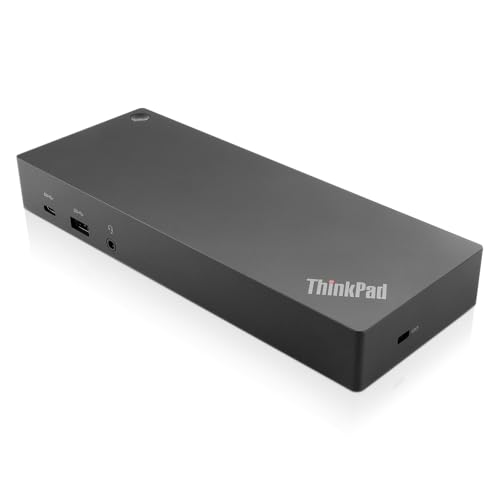
Lenovo ThinkPad Hybrid USB-C and USB-A Dock
Best for: Mixed laptop fleets needing hybrid connectivity
- Host Interface
- USB-C, USB-A
- Video Ports
- DisplayPort, HDMI
- Max Data Speed
- 10Gbps
- Ethernet Speed
- Gigabit Ethernet
- Dimensions
- 8.3 × 3.1 × 1.2 inches
- Weight
- 1.05 pounds
This docking station connects via both USB-C and USB-A, making it a practical bridge for older and newer laptops. It features a Gigabit Ethernet port and dual display outputs using HDMI and DisplayPort. The unit supports up to 10Gbps data speeds and includes always-on charging ports. It is designed for users who need reliable enterprise-class connectivity without requiring a specific proprietary connection.
Pros
- Hybrid USB-C and USB-A host interface for broad compatibility
- Dual video outputs with two HDMI and two DisplayPort connections
- Gigabit Ethernet port for stable wired network connectivity
- Always-on USB port for charging mobile devices
Cons
- Single Gigabit Ethernet speed, lacking 2.5G or higher options
- No Thunderbolt support for maximum data transfer speeds
- Limited to 10Gbps max data speed on USB ports
Good fit if
- You use a mix of older USB-A and newer USB-C laptops
- You need a wired Gigabit Ethernet connection for your workspace
- You want to connect two external displays via HDMI or DisplayPort
Skip if
- You require Thunderbolt 4 speeds for high-bandwidth peripherals
- You need more than two external monitors simultaneously
- You only have modern devices with exclusive USB-C ports
Verdict: Lenovo ThinkPad Hybrid USB-C Dock is a versatile bridge for mixed laptop fleets, offering essential video and network ports through both connection types. It suits users who prioritize broad compatibility and wired stability over high-speed data transfer standards.

Selore Dual 4K HDMI USB-C Dock
Best for: Windows users needing dual 4K displays
- Host Interface
- USB-C
- Display Support
- Dual
- Max Resolution
- 4K@60Hz
- Power Delivery
- 100W
- Port Count
- 8
- Video Ports
- HDMI
The Selore 8-in-1 dock connects two HDMI monitors at 4K resolution and 60Hz refresh rates. It includes a 100W Power Delivery port for charging your laptop and two USB-A ports for peripherals. A dedicated button lets you toggle between mirror and extend modes or black out the screen for privacy. This compact grey unit weighs 3.39 ounces and fits easily into your workspace setup.
Pros
- Supports dual 4K@60Hz displays via two HDMI ports
- Provides 100W Power Delivery for laptop charging
- Includes dedicated hardware button for display mode switching
- Compact dimensions of 4.5 by 2.1 by 0.7 inches
Cons
- macOS devices support only one external monitor
- Requires manual system authorization on first use
- USB data ports limited to 5Gbps speeds
Good fit if
- You need dual 4K displays at 60Hz on Windows
- You want a dedicated button to toggle screen modes
- You require 100W charging through a single cable
Skip if
- You use a Mac and need dual external monitors
- You need Thunderbolt 4 speeds for high bandwidth
- You prefer automatic plug-and-play without setup steps
Verdict: Selore 8-in-1 USB-C Dual HDMI Dock offers reliable dual 4K@60Hz output and 100W charging for Windows users who value hardware control. It is a practical pick for those who need a simple, button-driven setup without complex configuration.

Plugable Dual 4K HDMI USB-C Dock with Ethernet
Best for: Wired Ethernet and dual 4K displays on Windows
- Host Interface
- USB-C
- Display Support
- Dual
- Max Resolution
- 4K@60Hz
- Power Delivery
- 65W
- Port Count
- 10
- Video Ports
- HDMI
View on Amazon: Plugable Dual 4K HDMI USB-C Dock with Ethernet
This Plugable dock connects two HDMI monitors at 4K 60Hz through a single USB-C cable. It includes Gigabit Ethernet for wired internet and provides 65W power delivery to your laptop. The unit features three USB-A ports and one USB-C port for peripherals. It supports Windows and Chromebook systems with DP Alt Mode. This setup suits users who need stable wired connectivity and dual displays without complex driver installation.
Pros
- Dual HDMI ports support 4K resolution at 60Hz refresh rates
- Gigabit Ethernet port ensures stable wired network connections
- 65W Power Delivery charges your laptop through the dock
- Includes three USB-A ports and one USB-C port for accessories
- No drivers required for plug-and-play operation on supported systems
Cons
- Mac users are limited to a single external monitor
- Maximum data transfer speed is 5Gbps, not Thunderbolt
- Host laptop must support USB-C DisplayPort Alt Mode
Good fit if
- You need a reliable wired Ethernet connection for your desk
- You use Windows or Chromebook systems for dual monitor setups
- You want a simple plug-and-play dock without software installation
Skip if
- You use a Mac and require dual extended displays
- Your laptop lacks USB-C DisplayPort Alt Mode support
- You need Thunderbolt 4 speeds for high-bandwidth devices
Verdict: Plugable UD-MSTH2 Dual 4K 60Hz Dock fits professionals who prioritize stable wired networking and dual 4K displays on Windows or Chromebook systems. It delivers essential connectivity without requiring driver installation or complex configuration.

CalDigit TS4 Thunderbolt 4 Dock
Best for: Users needing dual 8K displays and 2.5GbE networking
- Host Interface
- Thunderbolt 4
- Display Support
- Dual
- Max Resolution
- 8K@30Hz
- Power Delivery
- 98W
- Port Count
- 18
- Video Ports
- DisplayPort
The CalDigit TS4 is an 18-port Thunderbolt 4 dock designed for high-bandwidth workflows. It delivers 98W of power delivery to charge your laptop while connecting peripherals. The dock supports dual displays, reaching up to 8K on Windows or 6K on macOS. It features a 2.5GbE port for faster network speeds. This setup suits users needing extensive connectivity and high-resolution video output from a single cable.
Pros
- 18 total ports including 3x Thunderbolt 4, 3x USB-C, and 5x USB-A
- 98W power delivery supports charging larger laptops
- 2.5GbE Ethernet port offers faster speeds than standard 1GbE
- Supports dual displays up to 8K on Windows or 6K on macOS
Cons
- Requires Thunderbolt 4 or fully optioned USB4 host for maximum performance
- M1 (Non-Pro) Mac users are limited to a single display
- Only includes one built-in DisplayPort 1.4 connector
Good fit if
- You need to connect multiple high-resolution monitors simultaneously
- You require fast 2.5GbE wired network connectivity
- You want to charge your laptop with up to 98W through the dock
Skip if
- You use a non-Pro M1 Mac and need dual external displays
- Your computer lacks Thunderbolt 4 or full-featured USB4 ports
- You prefer a simpler setup with fewer than 18 ports
Verdict: CalDigit TS4 Thunderbolt 4 Dock provides robust connectivity for users needing dual 8K or 6K displays and fast Ethernet. It fits professionals who demand high power delivery and extensive port options from a single host connection.

Anker 14-in-1 USB-C Triple Display Dock
Best for: Users needing VGA and triple displays
- Host Interface
- USB-C, USB4, Thunderbolt
- Display Support
- Triple
- Max Resolution
- 4K
- Power Delivery
- 80W
- Port Count
- 14
- Video Ports
- HDMI, VGA
This Anker hub offers 14 ports, including two 4K HDMI and one 1080p VGA output. It supports triple displays for multitasking. The 80W pass-through charging keeps your laptop powered. Data transfers run at 5 Gbps. It works with Windows, macOS, and ChromeOS. This dock suits users needing multiple screens and legacy VGA connectivity.
Pros
- Triple display support with two 4K HDMI ports
- Includes legacy 1080p VGA port
- 80W pass-through charging capability
- 14 total connectivity options
- 5 Gbps data transfer speeds
Cons
- Incompatible with Linux operating systems
- Max data speed is 5 Gbps, not 10 Gbps
- Wall charger not included
Good fit if
- You need a VGA port for older projectors
- You want to run three monitors simultaneously
- You use Windows or macOS laptops
Skip if
- You require Linux compatibility
- You need Thunderbolt 4 speeds
- You want a bundled power adapter
Verdict: Anker 14-in-1 USB-C Hub provides a versatile connection solution for users who need both modern 4K displays and older VGA equipment. It is ideal for Windows or macOS users who need to drive three screens at once.

Lenovo USB-C Universal Business Dock
Best for: Dual 4K display setups
- Host Interface
- USB-C
- Display Support
- Dual
- Max Resolution
- 4K
- Power Delivery
- 65W
- Port Count
- 9
- Video Ports
- DP 1.4, HDMI 2.0
The Lenovo USB-C Business Dock offers a universal connection for mixed PC environments. It supports dual 4K displays via DisplayPort 1.4 and HDMI 2.0. The dock provides up to 65W power delivery for notebooks. It features nine expansion ports for connectivity. This unit suits professionals needing a reliable, clutter-free setup with a single cable solution for data and video.
Pros
- Supports dual 4K monitors
- Includes DisplayPort 1.4 and HDMI 2.0
- Provides 65W power delivery
- Features nine expansion ports
- Universal USB-C connection
Cons
- Limited to 65W power delivery
- Only two video outputs available
- Does not support Thunderbolt protocols
Good fit if
- You need dual 4K displays
- You use mixed PC environments
- You want a single-cable solution
Skip if
- You require Thunderbolt 4 speeds
- You need triple display support
- You want more than 65W charging
Verdict: Lenovo USB-C Business Dock fits users who prioritize universal compatibility and dual 4K output over high-speed Thunderbolt connectivity. It is a solid choice for standard office setups.

Koncept 13-Port Thunderbolt 4 Dock
Best for: Windows users needing 4K multi-monitor setups
- Host Interface
- Thunderbolt 4
- Max Resolution
- 4K@60Hz
- Power Delivery
- 130W
- Port Count
- 13
- Video Ports
- Thunderbolt 4, DisplayPort, HDMI, USB-C
- Max Data Speed
- 40Gbps
This Koncept-branded docking station uses the Dell WD22TB4 design to offer 13 ports via a Thunderbolt 4 interface. It supports up to four 4K 60Hz displays on Windows and delivers 130W of power to your host device. You get Gigabit Ethernet and multiple USB options for a clutter-free setup. It works with Thunderbolt 4, USB4, and USB-C devices, making it a versatile hub for high-end laptops.
Pros
- 130W power delivery for host laptops
- Supports up to four 4K 60Hz displays
- Gigabit Ethernet port for stable networking
- 13 total ports including USB-A and USB-C
- 40Gbps data speed via Thunderbolt 4
Cons
- Mac users limited to one external display unless using DisplayLink
- No mention of built-in webcam or microphone
- Heavy 0.63 oz weight for a desktop dock
Good fit if
- You need to connect four monitors to a Windows PC
- You require 130W power delivery for a high-performance laptop
- You want a wired Gigabit Ethernet connection
Skip if
- You use an M1 or M2 Mac and need dual displays natively
- You need a portable dock for travel
- You require Thunderbolt 5 connectivity
Verdict: Koncept Dell WD22TB4 Thunderbolt 4 Dock provides robust multi-monitor support and high power delivery for Windows users. It is a solid choice for stationary setups requiring extensive connectivity and stable networking.
Specifications side by side
| Spec | Lenovo ThinkPad Hybrid USB-C and USB-A Dock | Selore Dual 4K HDMI USB-C Dock | Plugable Dual 4K HDMI USB-C Dock with Ethernet | CalDigit TS4 Thunderbolt 4 Dock | Anker 14-in-1 USB-C Triple Display Dock | Lenovo USB-C Universal Business Dock | Koncept 13-Port Thunderbolt 4 Dock |
|---|---|---|---|---|---|---|---|
| Host Interface | USB-C, USB-A | USB-C | USB-C | Thunderbolt 4 | USB-C, USB4, Thunderbolt | USB-C | Thunderbolt 4 |
| Display Support | not specified | Dual | Dual | Dual | Triple | Dual | not specified |
| Max Resolution | not specified | 4K@60Hz | 4K@60Hz | 8K@30Hz | 4K | 4K | 4K@60Hz |
| Power Delivery | not specified | 100W | 65W | 98W | 80W | 65W | 130W |
| Port Count | not specified | 8 | 10 | 18 | 14 | 9 | 13 |
| Video Ports | DisplayPort, HDMI | HDMI | HDMI | DisplayPort | HDMI, VGA | DP 1.4, HDMI 2.0 | Thunderbolt 4, DisplayPort, HDMI, USB-C |
| Max Data Speed | 10Gbps | 5Gbps | 5Gbps | 40Gb/s | 5 Gbps | not specified | 40Gbps |
| Ethernet Speed | Gigabit Ethernet | not specified | Gigabit | 2.5GbE | 1 Gbps | not specified | 1Gbps |
| Resolution | not specified | 4K UHD | 4K UHD | not specified | 1080p FHD | not specified | 4K UHD |
| Connectivity | USB-C, USB-A | USB-C, HDMI, USB-A | USB-C, HDMI, Ethernet, USB-A | USB-C, USB-A, Thunderbolt 4 | USB-C, HDMI, USB-A, VGA | USB-C, HDMI, DisplayPort, USB-A | USB-C, Ethernet, USB-A, Thunderbolt 4 |
| Refresh Rate | not specified | 60Hz | 60Hz | 60Hz | not specified | not specified | not specified |
| Dimensions | 8.3 × 3.1 × 1.2 inches | 4.5 × 2.1 × 0.7 inches | 9.25 × 5.71 × 3 inches | 4.46 × 1.65 × 5.55 inches | 5.91 × 2.13 × 0.67 inches | 6.06 × 3.15 × 0.94 inches | 10 × 6 × 4 inches |
| Weight | 1.05 pounds | 3.39 ounces | 1.52 pounds | 1.41 pounds | 9.45 ounces | 9.12 ounces | 0.63 ounces |
| Color | Black | Grey | Black | Space Gray | Grey | Multicolor | Black |
| Model | 40AF0135US | SEUC0425 | UD-MSTH2 | TS4-US 500971 | A8389 | 40B30090US | Docking-WD22TB4-Station New |
| Size | not specified | 9-in-1 | Dual Display (Pack of 3) | compact | 14 in 1 USB C Hub (Pack of 2) | not specified | not specified |
If you need independent power for your workspace, evaluate specs for best generators with USB-C to verify output ratings.
Frequently asked questions
Can I use a USB-C dock with a laptop that only has USB-A ports?
No. A standard USB-C dock requires a USB-C port on your laptop to function. The Lenovo ThinkPad Hybrid Dock is unique because it includes both USB-C and USB-A inputs. Most alternatives listed here, such as the Selore or Anker docks, only support USB-C connection. You must check your laptop's available ports before buying.
Which dock supports dual 4K displays at 60Hz?
The Selore Dual 4K HDMI USB-C Dock and the Plugable Dual 4K HDMI USB-C Dock both support dual 4K@60Hz output. The Plugable model adds built-in Ethernet for wired networking. The CalDigit TS4 supports dual 8K displays, which is higher than 4K. These options are ideal if you need high-resolution dual monitor setups.
Do I need to install drivers for these USB-C docks?
Most of these docks are plug-and-play and do not require driver installation. The Plugable UD-MSTH2 is specifically noted for fitting users who want to avoid complex configuration or driver issues. The Selore dock also offers a simple, button-driven setup. Always verify compatibility with your operating system, such as Windows or Chromebook, before connecting.
Which dock is best for users who need wired Ethernet?
The Plugable Dual 4K HDMI USB-C Dock is the best choice for wired networking. It includes a dedicated Ethernet port alongside dual HDMI outputs. Other docks like the CalDigit TS4 offer 2.5GbE networking. If you need stable internet without Wi-Fi, the Plugable model provides essential connectivity for professionals working in office environments.
Can I connect three monitors to a single USB-C dock?
Yes, the Anker 14-in-1 USB-C Triple Display Dock supports three screens simultaneously. It includes VGA, HDMI, and USB-C connectivity to drive multiple displays. The CalDigit TS4 supports dual 8K or 6K displays. Most other docks in this list support only dual monitors. Check the display support specifications to ensure the dock matches your multi-monitor needs.
What is the difference between USB-C and Thunderbolt 4 docks?
Thunderbolt 4 docks, like the CalDigit TS4 and Koncept 13-Port, offer higher bandwidth and faster data transfer speeds. They often support dual 8K displays and higher power delivery. USB-C docks, such as the Lenovo ThinkPad Hybrid, provide standard connectivity for video and data. Thunderbolt 4 is ideal for high-performance workstations, while USB-C suits general office tasks.
Which dock is the smallest and lightest?
The Selore Dual 4K HDMI USB-C Dock is the most compact option. It weighs only 3.39 ounces and measures 4.5 inches in length. The CalDigit TS4 is also small at 1.41 pounds, but the Selore is significantly lighter. If you need a portable solution that fits easily into a laptop bag, the Selore model offers the smallest footprint.
Does the Lenovo ThinkPad Hybrid Dock support power delivery?
The Lenovo ThinkPad Hybrid USB-C and USB-A Dock provides 15W of power delivery via its USB-C port. This is lower than alternatives like the Selore dock, which offers 100W charging. The Lenovo USB-C Business Dock provides 90W. If you need to charge your laptop through the dock, choose a model with higher wattage specifications.