Looking Beyond the FOPO 16" Laptop Screen Extender? 6 Alternatives Worth a Look
As an Amazon Associate we earn from qualifying purchases. Links on this page are affiliate links.
The fopo 16 laptop screen extender alternatives list helps you compare options if you need more than what the FOPO 16-Inch Triple Screen Laptop Extender offers. That device connects three screens with one cable and uses 16:10 IPS panels for wide viewing. It weighs 3.88 pounds and includes a carry bag. You might look elsewhere if you prefer a lighter single display or want features like touch control or a built-in battery. The FOPO unit requires driver installation and adds significant bulk to your setup.
We selected these alternatives because their core specifications overlap with the original. Each product listed here uses an IPS panel and delivers Full HD resolution, just like the FOPO. You will find options with USB-C connectivity, similar 16-inch sizes, and varying refresh rates. Some models include kickstands or touchscreen capabilities. Others focus on minimal weight for travel. This comparison allows you to weigh panel type, connectivity, and physical dimensions against your specific workflow needs.
How Each Alternative Compares
ASUS ZenScreen 16-Inch Portable Monitor
The ASUS ZenScreen MB16ACE gives you a standalone 16-inch Full HD IPS display with automated orientation switching and hybrid USB-C connectivity. At 0.31 inches thick and 3.2 pounds, it sits in a much slimmer profile than the 1.14-inch thick FOPO setup. You lose the FOPO model's dual-panel expansion and taller 1920x1200 16:10 aspect ratio, restricting you to a single secondary 1080p screen. However, you do not need to attach brackets to your laptop chassis or manage multi-screen driver configurations. You should pick the ZenScreen if you want a sleek, single-cable external monitor that slips easily into a slim bag and rotates automatically between portrait and landscape modes during mobile work sessions.
The ASUS VT169HE provides a 16-inch 1080p IPS touchscreen interface alongside both HDMI and legacy VGA video inputs. This connectivity allows direct integration with older desktop towers and specialized workstations that lack USB-C display output. By choosing this model, you give up the folding portability, bundled travel bag, and multi-display laptop mounting bracket that define the 3.88-pound FOPO extender. The VT169HE also relies on standard 1080p resolution rather than the 1920x1200 vertical space offered by FOPO. You should choose the ASUS VT169HE if you work at a stationary desk, need direct touch input for your applications, or rely on legacy VGA video connections rather than a mobile multi-screen clamp.
Amieipo 16-Inch 144Hz Portable Monitor
The Amieipo ZJ16 features a fast 144Hz refresh rate, built-in speakers, and dual USB-C and HDMI ports on a standalone 16-inch IPS panel. It weighs 1.76 pounds and measures 0.39 inches thick, making it less than half the weight and a fraction of the thickness of FOPO's 3.88-pound, 1.14-inch structure. In exchange for smoother motion, you trade away FOPO's triple-screen configuration and its 100% sRGB color gamut coverage. You also gain independent HDMI connectivity, avoiding mandatory driver installations. Choose the Amieipo display if your workflow benefits from fluid 144Hz rendering, gaming capability, or a lightweight standalone monitor rather than carrying a heavier laptop-mounted multi-panel bracket.
MNN 15.6-Inch 1080p Portable Monitor
The MNN 15.6-inch monitor emphasizes minimal carry weight, coming in at 1.53 pounds and 0.3 inches thick. It features Full HD resolution, HDR support, 60Hz refresh rate, and both USB-C and HDMI interfaces. Compared to the FOPO extender, it cuts your carry weight by more than half and takes up significantly less space inside your travel bag. However, you sacrifice FOPO's 1920x1200 16:10 workspace, 100% sRGB color coverage, and the ability to run three displays at once from a single cable. You should select the MNN display if you only require a basic, ultrathin secondary screen for everyday tasks and prefer carrying minimal weight over surrounding yourself with multiple mounted displays.
The Acer UM.QK2AA.003 shifts focus away from portable setups, delivering a stationary 23.8-inch IPS panel with a 120Hz refresh rate and a 1ms response time. Its larger surface area provides expansive viewing that dwarfs FOPO's compact 16-inch screen size. In return, you lose all mobile functionality: at 21.2 by 16.7 inches and 4.53 inches deep, it is built exclusively for a dedicated desktop workspace. You also forfeit FOPO's folding triple-screen layout, 16:10 vertical aspect ratio, and single-cable laptop power delivery. You should pick this Acer display if your work remains anchored to a permanent home or office desk and you prioritize a larger screen and 120Hz refresh rates over travel capability.
The InnoView US-001-05B integrates a built-in 90-degree kickstand directly into its 0.26-inch thick chassis, allowing immediate standalone positioning on any flat surface. It provides 1080p IPS visuals, HDR support, and USB-C connectivity without attaching hardware to your laptop bezel. Compared to the FOPO unit, it eliminates 3.88 pounds of clamp-on weight and avoids complex multi-monitor driver setups. What you forfeit is FOPO's simultaneous triple-display layout, 1920x1200 16:10 resolution, and 100% sRGB color gamut coverage. You should select the InnoView monitor if you prefer an ultra-slim, self-supporting display that deploys quickly beside your computer without adding physical strain or clamping brackets to your laptop display lid.
Quick picks
Our 7 picks
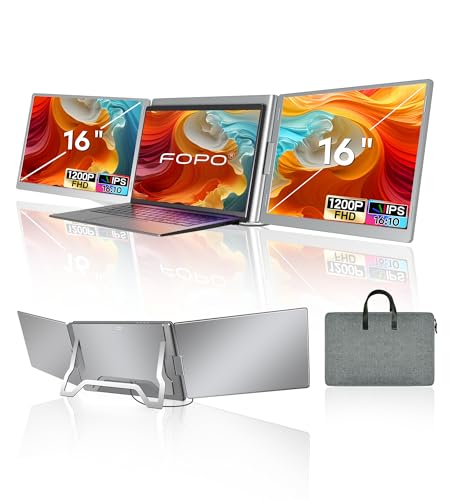
FOPO 16-Inch Triple Screen Laptop Extender
Best for: multi-screen setups needing single-cable connectivity
- Screen Size
- 16"
- Resolution
- 1920*1200P
- Panel Type
- IPS
- Connectivity
- USB-C, USB-A
- Color Gamut
- 100% sRGB
- Aspect Ratio
- 16:10
View on Amazon: FOPO 16-Inch Triple Screen Laptop Extender Affiliate link
The FOPO 16-Inch Triple Screen Extender attaches to your 13.3-inch to 18.5-inch laptop to add multi-display capability using a single USB-C cable or dual USB-A ports. It features 16:10 IPS panels running at 1920x1200 resolution with 100% sRGB color gamut coverage. Weighing 3.88 pounds, this foldable setup suits you if you need a comprehensive multi-screen mobile workstation for Windows or macOS without running separate video cables to each display.
Pros
- 1920x1200 resolution with 16:10 aspect ratio and 100% sRGB
- Single-cable USB-C video and power connection
- Works with Windows and macOS laptops from 13.3 to 18.5 inches
- Includes carry bag and dual USB-A to USB-C cable
Cons
- Requires driver installation from the included drive before use
- Weighs 3.88 pounds and measures over 1.1 inches thick when folded
- Requires two USB-A ports if your laptop lacks a compatible USB-C port
Good fit if
- You need a multi-screen setup powered through a single USB-C cable
- You use a Windows or macOS laptop between 13.3 and 18.5 inches
- You want 16:10 IPS panels with 100% sRGB color gamut coverage
Skip if
- You cannot install external drivers on your laptop
- You want a slim single-panel display weighing under two pounds
- Your laptop lacks USB-C and does not have two free USB-A ports
Verdict: FOPO 16-Inch Triple Screen Extender delivers a multi-display expansion using one USB-C connection and 16:10 IPS panels. It requires driver installation and adds 3.88 pounds to your bag, but provides complete multi-screen capability across macOS and Windows.

ASUS ZenScreen 16-Inch Portable Monitor
Best for: mobile workers needing an auto-rotating USB-C display
- Screen Size
- 15.6"
- Resolution
- 1920 x 1080
- Panel Type
- IPS
- Connectivity
- USB-C
- Weight
- 3.2 lbs
- Size
- 16 Inch
View on Amazon: ASUS ZenScreen 16-Inch Portable Monitor Affiliate link
The ASUS ZenScreen 15.6-Inch USB-C Portable Monitor provides a single 1080p Full HD IPS display in a 0.31-inch slim profile. It connects through a hybrid-signal USB Type-C port that carries power and video from Type-C or Type-A laptop connections. Integrated auto-rotation switches between landscape and portrait orientations using the included folding smart case stand. This display suits you if you need a slim second screen for travel.
Pros
- Hybrid-signal USB-C port supports video and power via USB Type-C or Type-A
- Auto-rotation automatically switches between portrait and landscape modes
- Slim 0.31-inch thickness with included foldable smart case stand
- Anti-glare 1080p IPS panel with TÜV Rheinland-certified flicker-free eye care
Cons
- Single USB-C connection without native HDMI or VGA ports
- Total weight is 3.2 pounds
- Provides one screen rather than a dual-panel extender setup
Good fit if
- You want an ultra-slim 0.31-inch display with auto-rotating orientation.
- You need compatibility across both USB Type-C and Type-A laptop ports.
- You prefer a folding case that doubles as a stand in portrait or landscape.
Skip if
- You need a dedicated HDMI port for legacy video connections.
- You want a multi-panel extender attached directly to your laptop lid.
Verdict: ASUS ZenScreen 15.6-Inch USB-C Portable Monitor delivers reliable Full HD IPS viewing with automated orientation switching and hybrid USB connectivity. It serves as a dependable, slim single-display expansion for work away from your desk.

ASUS ZenScreen 15.6-Inch USB-C Monitor
Best for: travelers needing a reliable, eye-friendly secondary display
- Screen Size
- 15.6"
- Resolution
- 1920x1080
- Panel Type
- IPS
- Connectivity
- USB-C, USB-A
- Weight
- 1.83 pounds
- Features
- Kickstand
View on Amazon: ASUS ZenScreen 15.6-Inch USB-C Monitor Affiliate link
The ASUS MB16ACV is a 15.6-inch Full HD portable monitor designed for travel and on-the-go meetings. It uses an IPS panel with anti-glare coating and connects via USB-C or USB-A ports. The unit weighs 1.83 pounds and includes a versatile kickstand for portrait or landscape use. It supports power delivery through a single cable and features eye care technology for comfortable viewing.
Pros
- 15.6-inch 1920x1080 IPS display with anti-glare finish
- Hybrid-signal connectivity supports USB-C and USB-A ports
- Built-in kickstand supports portrait and landscape orientations
- TÜV Rheinland-certified flicker-free and low blue light technology
- Weighs 1.83 pounds for easy portability
Cons
- 15.6-inch screen is smaller than the 16-inch options in this list
- 60Hz refresh rate is lower than the 144Hz gaming monitor on the list
- 1.83-pound weight is slightly heavier than some ultra-light competitors
Good fit if
- You need a reliable secondary screen for business trips
- You want a monitor with a sturdy built-in kickstand
- You prefer eye-care features like flicker-free technology
Skip if
- You require a 16-inch or larger display panel
- You need high refresh rates for competitive gaming
- You want a touchscreen interface for direct input
Verdict: The ASUS MB16ACV 15.6-inch Portable Monitor fits users who prioritize eye comfort and versatile mounting options over larger screens or high refresh rates.

ASUS ZenScreen 16-Inch Touchscreen Monitor
Best for: Touch-enabled portable setups
- Screen Size
- 15.6"
- Resolution
- 1920x1080
- Panel Type
- IPS
- Connectivity
- USB-C, Mini-HDMI
- Weight
- 2.5 pounds
- Features
- Kickstand, Touchscreen, Built-in Battery
View on Amazon: ASUS ZenScreen 16-Inch Touchscreen Monitor Affiliate link
This ASUS portable monitor adds touch input to a 15.6-inch 1080p IPS display. It includes a 7800 mAh built-in battery for up to four hours of wireless use. The hybrid USB-C and mini-HDMI connections support various devices. A built-in kickstand allows landscape or portrait viewing. It weighs 2.5 pounds and includes eye care technology for reduced strain.
Pros
- 10-point touch functionality for intuitive multitasking
- 7800 mAh built-in battery for wireless portability
- 15.6-inch 1080p IPS panel with wide viewing angles
- Integrated kickstand supports portrait and landscape modes
Cons
- Battery life is limited to four hours of continuous use
- Uses mini-HDMI instead of full-size HDMI for connectivity
- Weight is 2.5 pounds, slightly heavier than non-battery models
Good fit if
- You need touch input for drawing or navigation
- You want to run the monitor without a laptop cable
- You prefer portrait orientation for document viewing
Skip if
- You require a larger screen than 15.6 inches
- You need more than four hours of battery life
- You prefer full-size HDMI ports over mini-HDMI
Verdict: The ASUS MB16AMTR 15.6" Touch Portable Monitor suits travelers who need touch control and wireless independence. It fits users who value portrait mode flexibility over maximum battery endurance.

ASUS ZenScreen 15.6 1080p Portable
Best for: portable setups requiring portrait orientation
- Screen Size
- 15.6"
- Resolution
- 1080p
- Panel Type
- IPS
- Connectivity
- USB-C, Mini HDMI
- Weight
- 1.7 pounds
- Features
- Kickstand
View on Amazon: ASUS ZenScreen 15.6 1080p Portable Affiliate link
The ASUS ZenScreen MB169CK offers a 15.6-inch 1080p IPS display in a 1.7-pound package. It connects via USB-C and mini-HDMI for flexible setup. The 360-degree kickstand supports landscape and portrait orientations. Eye Care technology reduces flicker and blue light. This model suits users who need a lightweight, versatile screen for travel or desk extension.
Pros
- 15.6-inch 1080p IPS panel for clear visuals
- Lightweight 1.7-pound design for portability
- 360-degree kickstand enables portrait mode
- Dual USB-C and mini-HDMI connectivity
- TÜV Rheinland certified flicker-free and low blue light
Cons
- 1080p resolution is lower than the 1440p option on the list
- 15.6-inch screen is smaller than the 16-inch alternatives
- Uses mini-HDMI instead of full-size HDMI port
Good fit if
- You need a lightweight monitor under 2 pounds
- You want to rotate your screen to portrait mode
- You prefer eye-care features for long sessions
Skip if
- You require 1440p or 4K resolution
- You need a full-size HDMI port
- You want a larger 16-inch display
Verdict: ASUS ZenScreen MB169CK 15.6" IPS Portable Monitor provides a balanced mix of portability and versatility. It fits travelers who value a light build and adjustable viewing angles over maximum screen size.

Amieipo 16-Inch 144Hz Portable Monitor
Best for: budget-focused users needing high refresh rates
- Screen Size
- 16"
- Resolution
- 1920x1200
- Refresh Rate
- 144Hz
- Panel Type
- IPS
- Connectivity
- USB-C, Mini HDMI
- Aspect Ratio
- 16:10
View on Amazon: Amieipo 16-Inch 144Hz Portable Monitor Affiliate link
You get a standalone 16-inch IPS screen running at 1920x1200 with a 144Hz refresh rate. It uses a 16:10 aspect ratio for extra vertical working space, weighs 1.52 pounds, and includes an integrated kickstand. Connectivity includes two USB-C ports and a Mini HDMI input. If you need a fast-refresh secondary display for work or gaming without mounting extra hardware directly to your laptop, this panel fits your desk setup.
Pros
- High 144Hz refresh rate for fluid motion
- 1920x1200 resolution provides extra vertical 16:10 workspace
- Built-in kickstand provides adjustable tilt angles
- Dual full-function USB-C ports and Mini HDMI input
Cons
- Refresh rate caps at 120Hz when using HDMI
- Requires standalone desk space instead of clipping onto your laptop
Good fit if
- You want high refresh rates for gaming or smoother scrolling
- You prefer a taller 16:10 aspect ratio for productivity apps
- You need a display with an integrated kickstand
Skip if
- You want an extender that attaches directly to your laptop lid
- You need a full-size HDMI port without using mini cables
Verdict: Amieipo 16-Inch 144Hz Portable Monitor delivers high refresh rates and a taller 16:10 resolution in a lightweight, self-standing build. It works well if you want a fast standalone screen rather than a laptop-mounted multi-monitor bracket.

MNN 15.6-Inch 1080p Portable Monitor
Best for: Everyday mobile productivity and basic 60Hz viewing
- Screen Size
- 15.6"
- Resolution
- 1920*1080
- Refresh Rate
- 60Hz
- Panel Type
- IPS
- Connectivity
- USB-C, HDMI
- Weight
- 1.53 lbs
View on Amazon: MNN 15.6-Inch 1080p Portable Monitor Affiliate link
The MNN 15.6" FHD 60Hz Portable Monitor offers a lightweight second display for your mobile setup. It features a 1080p IPS panel with a 60Hz refresh rate and dual full-feature USB-C ports alongside an HDMI port. Weighing 1.53 pounds and measuring 0.3 inches thick, it packs easily into bags. This display suits you if you need a standard 60Hz travel screen that supports both landscape and portrait orientations.
Pros
- Weighs 1.53 pounds with a slim 0.3-inch profile
- Dual full-feature USB-C ports support single-cable video and power
- 1080p IPS panel with wide 178-degree viewing angles
- Includes a folding smart cover that doubles as a stand
Cons
- Refresh rate capped at standard 60Hz
- Glossy screen finish can cause reflections in bright light
- Single-cable operation requires host device support for DP Alt-Mode or Thunderbolt 3
Good fit if
- You want a lightweight 1.53-pound secondary display for travel.
- You need dual USB-C inputs plus HDMI for versatile connectivity.
- You prefer standard 60Hz operation for everyday office tasks and viewing.
Skip if
- You need a high-refresh display faster than 60Hz for gaming.
- You require a matte anti-glare screen surface.
Verdict: MNN 15.6" FHD 60Hz Portable Monitor delivers reliable dual-port USB-C connectivity and full HD resolution in an ultrathin 1.53-pound build. It serves as a dependable, no-fuss 60Hz travel companion for your laptop setup.
Specifications side by side
| Spec | FOPO 16-Inch Triple Screen Laptop Extender | ASUS ZenScreen 16-Inch Portable Monitor | ASUS ZenScreen 15.6-Inch USB-C Monitor | ASUS ZenScreen 16-Inch Touchscreen Monitor | ASUS ZenScreen 15.6 1080p Portable | Amieipo 16-Inch 144Hz Portable Monitor | MNN 15.6-Inch 1080p Portable Monitor |
|---|---|---|---|---|---|---|---|
| Screen Size | 16" | 15.6" | 15.6" | 15.6" | 15.6" | 16" | 15.6" |
| Resolution | 1920*1200P | 1920 x 1080 | 1920x1080 | 1920x1080 | 1080p | 1920x1200 | 1920*1080 |
| Refresh Rate | not stated | not stated | not stated | not stated | not stated | 144Hz | 60Hz |
| Panel Type | IPS | IPS | IPS | IPS | IPS | IPS | IPS |
| Connectivity | USB-C, USB-A | USB-C | USB-C, USB-A | USB-C, Mini-HDMI | USB-C, Mini HDMI | USB-C, Mini HDMI | USB-C, HDMI |
| Color Gamut | 100% sRGB | not stated | not stated | not stated | not stated | not stated | not stated |
| Aspect Ratio | 16:10 | not stated | not stated | not stated | not stated | 16:10 | not stated |
| Weight | 3.88 lb | 3.2 lbs | 1.83 pounds | 2.5 pounds | 1.7 pounds | 1.52 lbs | 1.53 lbs |
| Features | not stated | not stated | Kickstand | Kickstand, Touchscreen, Built-in Battery | Kickstand | Built-in Speakers | HDR |
| Use | not stated | not stated | Travel | Travel | not stated | Gaming | Gaming |
| Size | 16 Inch | 16 Inch | 16 Inch | 16 Inch | 16 Inch | 16 Inch | 15.6" 1080P |
| Dimensions | 1.5 × 13.3 × 7.8 inches | 14.2 × 8.91 × 0.31 inches | 8.85 × 14.1 × 0.41 inches | 0.5 × 14.2 × 8.9 inches | 0.5 × 14.2 × 8.9 inches | 0.39 × 9.29 × 13.9 inches | 14.5 × 8.85 × 0.3 inches |
| Color | Grey | Dark Gray | BLACK | BLACK | BLACK | black | Matte black |
| Model | S11 | MB16ACE | MB16ACV | MB16AMTR | MB169CK-P | ZJ16 | 15 |
If you need a matching host machine, published specs for the best 16 gaming laptops outline available video ports.
Frequently asked questions
Which alternative is best for a triple-screen laptop setup?
The FOPO 16-Inch Triple Screen Laptop Extender is the top choice for users needing three displays. It connects via a single USB-C cable and uses 16:10 IPS panels. This model supports both macOS and Windows. You should note it adds 3.88 pounds to your bag and requires driver installation for full functionality.
Is there a portable monitor with a built-in battery?
Yes, the ASUS ZenScreen MB16AMTR includes a built-in battery for wireless independence. It features a 15.6-inch touchscreen with 1080p FHD resolution. This model also supports portrait mode flexibility. It weighs 2.5 pounds and connects via USB-C, making it suitable for travelers who need touch control.
Which option offers the highest refresh rate for gaming?
The Amieipo 16-Inch Portable Monitor offers a 144Hz refresh rate. It features a 16:10 resolution and IPS panel for fast visuals. This device includes built-in speakers and connects via USB-C or HDMI. It weighs 1.76 pounds and stands on its own, ideal for budget-focused users wanting high speed.
What is the lightest portable monitor in this list?
The ASUS ZenScreen MB169CK-P is the lightest option at 1.7 pounds. It provides a 15.6-inch 1080p FHD IPS display. The monitor connects via USB-C and includes a kickstand for adjustable viewing angles. It is designed for travelers who prioritize a light build over maximum screen size.
Which monitor is best for eye comfort during travel?
The ASUS MB16ACV is designed for users prioritizing eye comfort. It features a 15.6-inch 1080p FHD IPS panel. This model offers versatile mounting options and connects via USB-C. It weighs 1.83 pounds and is ideal for travelers needing a reliable secondary display without large screen size or high refresh rates.
Does any alternative support automated orientation switching?
The ASUS ZenScreen MB16ACE supports automated orientation switching. It delivers a 16-inch Full HD IPS display with hybrid USB-C connectivity. This model is 0.31 inches thick and weighs 3.2 pounds. It serves as a slim, dependable single-display expansion for mobile workers who need flexible viewing angles.
Which monitor is suitable for everyday mobile productivity?
The MNN 15.6-Inch Portable Monitor is suitable for everyday productivity. It features a 1080p FHD IPS panel with 60Hz refresh rate. The device connects via dual USB-C ports and HDMI. It weighs 1.53 pounds and offers a matte black finish, providing a no-fuss travel companion for basic viewing tasks.