Looking Beyond the Anker 10-in-1 Triple Display USB-C? 6 Alternatives Worth a Look
As an Amazon Associate we earn from qualifying purchases. Links on this page are affiliate links.
The Anker 10-in-1 Triple Display USB-C Dock offers a solid foundation for expanding your laptop's connectivity. It provides ten ports, including Ethernet and DisplayLink support for three screens. However, you might seek anker docking station alternatives if you need different specifications. Perhaps you require higher refresh rates, a built-in stand, or a more compact footprint. The original model prioritizes port count and charging speed, but it may not fit every workflow.
We selected these alternatives because their core specs overlap with the Anker DL6350. Each option supports triple displays via DisplayLink technology. They also provide similar power delivery capabilities and video outputs. You can compare port layouts, resolution limits, and physical dimensions to find the right fit. This list includes options for budget-conscious buyers and those needing premium features. Review the data to see which dock matches your specific hardware requirements.
How alternatives compare to Anker
Belkin 16-in-1 Triple 4K DisplayLink Dock
The Belkin 16-in-1 dock expands your connectivity further than the Anker model. It offers six additional ports while maintaining triple display support. You get the same 100W power delivery for your laptop, ensuring consistent charging speeds. The key difference lies in the port count. Belkin provides more USB and video options for complex setups. It is ideal if you need more peripherals than the Anker’s ten ports allow. The DisplayLink technology remains the same, so you still need to install drivers. Choose this if maximum expansion is your priority over compact size.
Mukiya 10-in-1 Triple Display Laptop Stand Dock
The Mukiya dock combines a docking station with a laptop stand. It features a kickstand for adjustable viewing angles, which the Anker lacks. You get triple 4K display support, matching the Anker’s resolution capabilities. It also includes 100W power delivery. The design is foldable, making it more portable for travel. This is a better choice if you want a complete workspace solution. The Anker is just a hub. Mukiya provides physical support for your laptop. It is best for users who need stability and adjustability alongside their connectivity needs.
Plugable 13-in-1 Triple 4K USB-C Dock
The Plugable 13-in-1 dock offers three more ports than the Anker model. It supports triple 4K displays, matching the Anker’s resolution. You get 100W power delivery for fast charging. The main difference is the port layout. Plugable provides a different mix of USB and video outputs. It is slightly heavier and larger than the Anker. This option suits users who need more data ports without sacrificing screen real estate. The Anker includes Ethernet, which this model may not. Choose Plugable if you need more USB connectivity and do not require built-in wired internet.
Giq DisplayLink Triple 4K USB-C Dock
The Giq dock is a compact solution for triple 4K displays. It matches the Anker’s resolution support but in a smaller form factor. You get HDMI and USB-C connectivity. The Anker includes more ports, including Ethernet and DisplayPort. Giq focuses on essential video and data connections. It is lighter and easier to carry. This is ideal for mobile professionals who need three screens without bulk. The Anker is better for stationary desks. Choose Giq if you prioritize portability and do not need the extra peripheral expansion of the Anker.
WAVLINK Triple Display DisplayLink Dock
The WAVLINK dock emphasizes stable wired internet alongside triple displays. It includes an Ethernet port, similar to the Anker. You get 100W power delivery for your laptop. The key difference is the emphasis on network reliability. WAVLINK is designed for office use. It supports triple 4K displays via DisplayLink. The Anker also offers triple displays. Choose WAVLINK if you need a dedicated, stable connection for video calls and large data transfers. It is a robust option for home offices. The Anker is more versatile with its varied port selection.
Tobenone Quad 4K 20-in-1 DisplayLink Dock
The Tobenone dock supports four 4K displays at 60Hz, surpassing the Anker’s triple display limit. It offers 20 ports, far more than the Anker’s ten. You get Thunderbolt 4 connectivity for faster data speeds. The Anker is limited to USB-C. This dock is for power users who need maximum screen space and bandwidth. It is larger and heavier than the Anker. Choose Tobenone if you need quad monitors and high-speed transfers. The Anker is sufficient for most users. Tobenone is for those requiring extreme expansion and refresh rates.
Quick picks
Our 7 picks
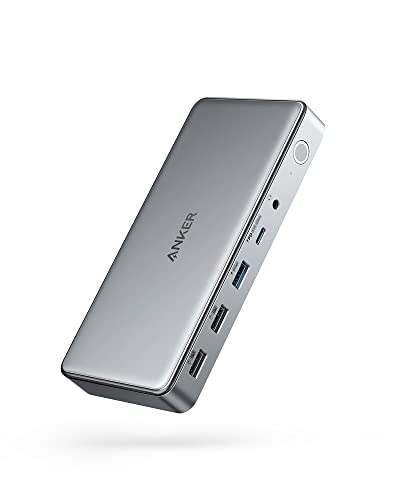
Anker 10-in-1 Triple Display USB-C Dock
Best for: Users needing triple displays and Ethernet connectivity
- Host Interface
- USB-C
- Display Support
- Triple
- Max Resolution
- 4K@30Hz
- Power Delivery
- 100W
- Port Count
- 10
- Video Ports
- HDMI, DisplayPort
View on Amazon: Anker 10-in-1 Triple Display USB-C Dock Affiliate link
The Anker DL6350 is a 10-in-1 USB-C docking station that supports triple displays via DisplayLink technology. It delivers 4K resolution at 30Hz on the primary screen, while secondary monitors reach 1080p at 60Hz. The dock includes a 100W Power Delivery port for your laptop and a separate 30W port for devices. It also offers Ethernet, audio, and high-speed data transfer up to 5 Gbps. This setup suits users needing extensive connectivity and multiple screens from a single USB-C port.
Pros
- Supports triple displays with DisplayLink technology
- 100W Power Delivery for laptop charging
- Includes Ethernet and AUX audio ports
- Data transfer speeds up to 5 Gbps
Cons
- Primary display is limited to 4K at 30Hz
- Requires screen recording permissions for Mac functionality
- Heavier build at 1.6 ounces with 180W adapter
Good fit if
- You need three monitors from one USB-C port
- You require Ethernet connectivity for stable internet
- You want to charge your laptop at 100W
Skip if
- You need 4K resolution at 60Hz on all screens
- You prefer a plug-and-play setup without drivers
- You need a compact travel dock under 1 ounce
Verdict: Anker DL6350 10-in-1 Triple Display Dock is ideal for professionals who need three screens and Ethernet access from a single laptop port. It fits users who prioritize port count and charging speed over high refresh rates on the main display.

Belkin 16-in-1 Triple 4K DisplayLink Dock
Best for: users needing triple 4K displays and high port counts
- Host Interface
- USB-C
- Display Support
- Triple
- Max Resolution
- 4K@60Hz
- Power Delivery
- 100W
- Port Count
- 16
- Video Ports
- HDMI, DisplayPort
View on Amazon: Belkin 16-in-1 Triple 4K DisplayLink Dock Affiliate link
The Belkin 16-in-1 dock supports three 4K@60Hz displays via DisplayLink technology. It offers 100W power delivery and 10Gbps data transfer speeds. You get 2.5Gb Ethernet and legacy USB-A compatibility. The unit includes VESA mounting and a Kensington lock slot. It suits users needing a high-port-count, secure, and fast workstation hub.
Pros
- Supports triple 4K@60Hz displays via DisplayLink
- 16 total ports for extensive connectivity
- 100W Power Delivery for laptop charging
- 10Gbps data transfer speeds
- 2.5Gb Ethernet and USB-A adapter included
Cons
- No mention of built-in Wi-Fi
- Requires DisplayLink driver installation
- Heavier build than single-monitor docks
Good fit if
- You need three external monitors for heavy multitasking
- You require 100W charging for your laptop
- You want VESA mounting and security lock support
Skip if
- You only need a single external display
- You prefer plug-and-play without driver software
- You need built-in wireless connectivity
Verdict: The Belkin 16-in-1 Triple Display Dock is a robust solution for users requiring maximum port expansion and triple-screen productivity. It fits professionals who prioritize wired speed and security features over wireless convenience.

Mukiya 10-in-1 Triple Display Laptop Stand Dock
Best for: Windows users needing adjustable triple 4K displays
- Host Interface
- USB-C, Thunderbolt 3/4
- Display Support
- Triple
- Max Resolution
- 4K@60Hz
- Power Delivery
- 100W
- Port Count
- 10
- Video Ports
- HDMI, DisplayPort
View on Amazon: Mukiya 10-in-1 Triple Display Laptop Stand Dock Affiliate link
The Mukiya HUB-M94 is a 10-in-1 USB-C dock that doubles as an adjustable laptop stand. It supports triple 4K@60Hz displays via two HDMI ports and one DisplayPort. A 100W Power Delivery port charges your laptop while you work. The aluminum build includes nine height adjustment levels for ergonomic viewing. It is a practical choice for users who want an all-in-one desk solution with strong video output capabilities.
Pros
- Supports triple 4K@60Hz displays for expanded multitasking
- 100W Power Delivery port charges laptops up to 85W
- Aluminum stand adjusts to nine height levels for better posture
- Includes SD and TF card slots for direct media access
- Folds flat to 10.5x2.2x0.9 inches for portable travel
Cons
- macOS systems are limited to mirror mode only due to system restrictions
- Requires Windows DP1.4 support for full triple display expansion
- Only includes one SD and one TF card slot
Good fit if
- You need a single device to charge, connect drives, and extend three screens
- You want an ergonomic stand with adjustable height to reduce neck strain
- You primarily use Windows for heavy multitasking with multiple monitors
Skip if
- You use a Mac and require independent extended displays across all three monitors
- You need Thunderbolt 4 speeds for maximum data transfer bandwidth
- You prefer a dock that does not double as a laptop stand
Verdict: Mukiya 10-in-1 Triple Display Dock Stand provides a sturdy, adjustable workspace with strong triple-monitor support for Windows users. It is ideal for professionals who need high-resolution displays and fast charging in a portable, foldable design.

Plugable 13-in-1 Triple 4K USB-C Dock
Best for: Triple monitor workstation setups
- Host Interface
- USB-C
- Display Support
- Triple
- Max Resolution
- 4K @ 60Hz
- Power Delivery
- 100W
- Port Count
- 13
- Video Ports
- HDMI, DisplayPort
View on Amazon: Plugable 13-in-1 Triple 4K USB-C Dock Affiliate link
The Plugable UD-ULTC4K is a 13-port docking station that supports triple 4K displays at 60Hz. It connects via a single USB-C cable and delivers 100W of power delivery to your laptop. The unit includes three HDMI and three DisplayPort outputs for flexible monitor setups. It also features a front USB-C port for accessories and a rear port for host charging. This dock suits professionals needing extensive screen real estate and wired connectivity.
Pros
- Supports triple 4K displays at 60Hz
- 100W power delivery for laptop charging
- 13 ports including Ethernet and SD card readers
- Mix and match HDMI and DisplayPort connections
Cons
- Requires DisplayLink drivers on macOS
- No HDCP support for protected streaming
- Heavier and bulkier than standard docks
Good fit if
- You need three high-resolution monitors
- You want a single cable for power and data
- You use Windows or ChromeOS primarily
Skip if
- You need to play DRM-protected content
- You prefer plug-and-play macOS setup
- You want a compact travel dock
Verdict: Plugable 13-in-1 Triple 4K Dock provides serious screen space for power users. It fits developers and analysts who need multiple windows and reliable wired connections.

Giq DisplayLink Triple 4K USB-C Dock
Best for: mobile professionals needing triple 4K displays
- Host Interface
- Thunderbolt 4/3, USB4, USB-C
- Display Support
- Triple
- Max Resolution
- 4K@60Hz
- Power Delivery
- 100W
- Video Ports
- HDMI, DisplayPort
- Max Data Speed
- 5Gbps
View on Amazon: Giq DisplayLink Triple 4K USB-C Dock Affiliate link
This Giq docking station supports three external 4K@60Hz monitors via DisplayLink, adding to your laptop screen for a four-display setup. It includes a 100W Power Delivery port for charging, gigabit Ethernet, and SD card slots. The compact design fits in a backpack, making it suitable for mobile professionals who need high resolution and portability.
Pros
- Supports up to 3x 4K@60Hz external displays
- 100W Power Delivery pass-through charging
- Compact dimensions for travel portability
- Gigabit Ethernet and SD card slots included
Cons
- Requires DisplayLink driver installation
- HDMI 2 port disabled with USB-A adapters
- Wall charger not included
Good fit if
- You need a compact dock for travel
- You require three external 4K monitors
- You use Mac M1-M5 or Windows laptops
Skip if
- You want a plug-and-play setup without drivers
- You need a wall charger included
- You only need dual monitor support
Verdict: Giq USB-C Triple Display Docking Station is a compact solution for users needing three external 4K displays on the go, provided they are willing to install drivers.

WAVLINK Triple Display DisplayLink Dock
Best for: stable wired internet and triple-screen setups
- Host Interface
- USB-C
- Display Support
- Triple
- Max Resolution
- 4K@60Hz
- Power Delivery
- 100W
- Video Ports
- HDMI, DisplayPort
- Max Data Speed
- 10Gbps
View on Amazon: WAVLINK Triple Display DisplayLink Dock Affiliate link
This WAVLINK docking station supports three external monitors via DisplayLink technology. It offers two 4K@60Hz HDMI outputs and one 2K output. You get 100W Power Delivery over a single USB-C cable. The dock includes a Gigabit Ethernet port and six USB ports with 10Gbps transfer speeds. It works with MacBook M1-M5 and most USB-C laptops.
Pros
- Supports triple displays with two 4K@60Hz HDMI ports
- Provides 100W Power Delivery for laptop charging
- Includes Gigabit Ethernet for stable wired internet
- Features six USB ports with 10Gbps data transfer
Cons
- MacBook M1-M5 users must install DisplayLink drivers
- Does not support USB-A laptops or gaming consoles
- Not recommended for gaming or HDCP-protected 4K streaming
Good fit if
- You need a stable Gigabit Ethernet connection for remote work
- You use a MacBook M1-M5 and can install drivers
- You want to connect three monitors with a single cable
Skip if
- You use a USB-A laptop without USB-C video output
- You want to play games or stream protected 4K content
- You prefer a plug-and-play setup without driver installation
Verdict: WAVLINK 100W PD Triple Display Dock suits users who need reliable wired internet and triple-screen productivity on compatible USB-C laptops.

Tobenone Quad 4K 20-in-1 DisplayLink Dock
Best for: Quad monitor setups with Thunderbolt 4
- Host Interface
- Thunderbolt 5/4/3, USB4, USB-C
- Display Support
- Quad
- Max Resolution
- 4K@60Hz
- Power Delivery
- 100W
- Port Count
- 20
- Video Ports
- HDMI, DisplayPort
View on Amazon: Tobenone Quad 4K 20-in-1 DisplayLink Dock Affiliate link
The TobenONE 20-in-1 dock expands your workspace to four external monitors. It supports 4K resolution at 60Hz across all displays. You get 100W power delivery for your laptop and 18W for a phone. The unit connects via Thunderbolt 4 and includes 20 total ports. It suits users who need maximum screen real estate and high-speed data transfer for professional multitasking.
Pros
- Supports quad 4K@60Hz displays via DisplayLink
- 20 total ports including 4 HDMI and 4 DP
- 100W USB-C PD charging for laptops
- Thunderbolt 4 host interface for high bandwidth
Cons
- Requires DisplayLink driver installation for setup
- M1 MacBooks limited to three monitors
- Does not support HDCP for video playback
Good fit if
- You need four external monitors for heavy multitasking
- You use a Windows PC or newer Mac
- You want a single dock for all peripherals
Skip if
- You use an M1 MacBook and need four screens
- You need HDCP support for protected content
- You prefer a plug-and-play setup without drivers
Verdict: TobenONE 20-in-1 Quad Display Dock fits users who need four 4K screens and a central hub for all their devices. It is ideal for Windows workstations and newer Macs that support Thunderbolt 4.
Specifications side by side
| Spec | Anker 10-in-1 Triple Display USB-C Dock | Belkin 16-in-1 Triple 4K DisplayLink Dock | Mukiya 10-in-1 Triple Display Laptop Stand Dock | Plugable 13-in-1 Triple 4K USB-C Dock | Giq DisplayLink Triple 4K USB-C Dock | WAVLINK Triple Display DisplayLink Dock | Tobenone Quad 4K 20-in-1 DisplayLink Dock |
|---|---|---|---|---|---|---|---|
| Host Interface | USB-C | USB-C | USB-C, Thunderbolt 3/4 | USB-C | Thunderbolt 4/3, USB4, USB-C | USB-C | Thunderbolt 5/4/3, USB4, USB-C |
| Display Support | Triple | Triple | Triple | Triple | Triple | Triple | Quad |
| Max Resolution | 4K@30Hz | 4K@60Hz | 4K@60Hz | 4K @ 60Hz | 4K@60Hz | 4K@60Hz | 4K@60Hz |
| Power Delivery | 100W | 100W | 100W | 100W | 100W | 100W | 100W |
| Port Count | 10 | 16 | 10 | 13 | not stated | not stated | 20 |
| Video Ports | HDMI, DisplayPort | HDMI, DisplayPort | HDMI, DisplayPort | HDMI, DisplayPort | HDMI, DisplayPort | HDMI, DisplayPort | HDMI, DisplayPort |
| Max Data Speed | 5Gbps | 10Gbps | 5Gbps | 10Gbps | 5Gbps | 10Gbps | not stated |
| Ethernet Speed | not stated | 2.5GbE | not stated | not stated | 1000 Mbps | Gigabit | not stated |
| Resolution | 4K UHD | 4K UHD | 4K UHD | 4K UHD | 4K UHD | not stated | 4K UHD |
| Connectivity | HDMI, DisplayPort | USB-C, HDMI, Ethernet | USB-C, HDMI, DisplayPort, USB-A | USB-C, HDMI, DisplayPort | USB-C, HDMI, DisplayPort, Ethernet | HDMI, DisplayPort, Ethernet | USB-C, Ethernet |
| Refresh Rate | not stated | 60Hz | 60Hz | not stated | not stated | not stated | 60Hz |
| Features | DisplayLink | DisplayLink | Kickstand | not stated | DisplayLink | DisplayLink | DisplayLink |
| Use | not stated | not stated | not stated | not stated | not stated | Office | not stated |
| Recommended Use | not stated | not stated | not stated | not stated | not stated | Home | not stated |
| Dimensions | 6.7 × 3.15 × 0.96 inches | not stated | not stated | 4.72 × 2.64 × 6.89 inches | 5.91 × 3.94 × 1.38 inches | 8.78 × 3.58 × 1.14 inches | 11.8 × 3.14 × 0.86 inches |
| Weight | 1.6 ounces | not stated | not stated | 1.07 pounds | not stated | 13.1 ounces | 2.27 pounds |
| Color | Gray | Black | Silver | not stated | Classic Gray | not stated | Grey |
| Model | A83951A1 | INC026ttBK | HUB-M94 | UD-ULTC4K | not stated | WL-UG63PD25(4K) | not stated |
| Size | not stated | not stated | not stated | not stated | not stated | not stated | small |
Looking beyond this list? See anker 521 portable power station alternatives.
Frequently asked questions
Which alternative offers the highest port count?
The Tobenone 20-in-1 Dock provides the most expansion options. It includes twenty ports to connect numerous peripherals simultaneously. This model also supports quad displays with 4K resolution at 60Hz. It is ideal for users who need a central hub for all devices without adding extra docks.
Can I use these docks for triple 4K monitors?
Yes, several models support triple 4K UHD displays. The Belkin, Mukiya, Plugable, and Giq docks all offer this capability. The Tobenone model extends this to four screens. Ensure your laptop supports the required bandwidth or uses DisplayLink drivers for these high-resolution outputs.
Do these alternatives include Ethernet ports?
Most options include wired networking for stable internet. The Anker, WAVLINK, and Belkin docks feature Ethernet connectivity. The Tobenone model also supports wired connections via Thunderbolt 4. If you need reliable internet without Wi-Fi interference, these docks provide the necessary ports for office or home use.
What is the maximum power delivery for laptop charging?
Many alternatives offer up to 100W of power delivery. The Belkin, Mukiya, Plugable, and WAVLINK docks support this charging speed. This allows you to power most laptops while using the dock. The Tobenone model also supports high-speed charging for compatible devices like newer Macs and Windows workstations.
Are there docks that also function as laptop stands?
The Mukiya 10-in-1 Dock includes a kickstand feature. It provides an adjustable workspace for your laptop while connecting to three external screens. This design helps improve ergonomics by elevating your display. It is a practical choice for users who want a portable and foldable setup.
Which dock is best for Thunderbolt 4 compatibility?
The Tobenone 20-in-1 Dock is designed for Thunderbolt 4 connections. It fits newer Macs and Windows systems that support this standard. This connection type ensures high bandwidth for quad 4K displays and fast data transfer. It is the top choice for users needing maximum performance and connectivity.