The Best Anker Docking Stations in 2026: 12 Picks
As an Amazon Associate we earn from qualifying purchases. Links on this page are affiliate links.
Finding the right anker docking station depends on your workspace footprint, display configuration, and power requirements. Anker offers hardware ranging from pocket-sized 5-in-1 hubs weighing under 0.1 pounds to vertical 14-in-1 desktop docks with up to 140W power delivery. The Anker 332 5-in-1 USB-C Hub leads because it provides 85W pass-through charging and 4K display output in a compact 0.09-pound footprint.
This guide compares 12 models strictly using the specifications published on their product listings to help you find the right setup.
Quick picks
Our 12 picks

Anker 332 5-in-1 USB-C Hub
Best for: portable single-display laptop setups on the go
- Host Interface
- USB-C
- Max Resolution
- 4K@30Hz
- Power Delivery
- 85W
- Port Count
- 5
- Video Ports
- HDMI
- Max Data Speed
- 5Gbps
This compact hub expands your laptop with five ports: one HDMI output, two 5 Gbps USB-A ports, one 5 Gbps USB-C data port, and a 100W Power Delivery input. It delivers up to 85W pass-through charging to keep your device powered while in use. The HDMI port supports 4K resolution at 30Hz. It suits you if you need a lightweight, pocket-sized dock for a basic single-monitor workstation.
Pros
- Supports up to 85W laptop pass-through charging via 100W PD-IN port
- Three 5 Gbps data transfer ports across USB-A and USB-C
- Lightweight 0.09-pound casing for travel
- HDMI output handles external displays up to 4K at 30Hz
Cons
- HDMI output is limited to 30Hz when running at 4K resolution
- USB-C ports do not support video output or display pass-through
- Incompatible with Linux systems
Good fit if
- You need a lightweight 0.09-pound hub with up to 85W pass-through charging.
- You want to connect a single external display at 4K 30Hz via HDMI.
- You use Windows, macOS, or ChromeOS and require 5 Gbps USB data connections.
Skip if
- You require 4K video output at 60Hz or higher refresh rates.
- You run a Linux operating system on your machine.
- You need video output directly through a USB-C port.
Verdict: Anker 5-in-1 USB-C Hub delivers dependable 85W pass-through power and essential 5 Gbps connectivity in a compact footprint. It provides an efficient single-display workspace setup without adding bulk to your bag.

Anker PowerExpand 8-in-1 Dual HDMI USB-C Hub
Best for: Dual-monitor Windows and ChromeOS mobile workstations
- Host Interface
- USB-C
- Display Support
- Dual
- Max Resolution
- 4K@60Hz
- Power Delivery
- 85W
- Port Count
- 8
- Video Ports
- HDMI
View on Amazon: Anker PowerExpand 8-in-1 Dual HDMI USB-C Hub
This compact 8-in-1 hub expands your laptop with two HDMI ports, two USB-A data ports, an Ethernet port, an SD/microSD card reader, and an 85W USB-C Power Delivery pass-through port. You can drive a single monitor at 4K@60Hz or dual displays at 4K@30Hz on compatible Windows and ChromeOS machines. At 0.2 pounds, it suits you if you need multi-screen connectivity without carrying a bulky dock.
Pros
- Supports up to 85W USB-C Power Delivery pass-through charging
- Dual HDMI ports supporting single 4K@60Hz or dual 4K@30Hz video
- Includes dedicated Ethernet and SD/microSD card reader slots
- Lightweight 0.2-pound form factor
Cons
- Dual 4K displays are capped at 30Hz refresh rates
- macOS mirrors identical content across both external monitors
- Incompatible with Linux operating systems
Good fit if
- You use Windows or ChromeOS and require two external HDMI monitors.
- You need 85W pass-through charging alongside card reader and Ethernet connectivity.
Skip if
- You use macOS and want two independent extended displays.
- You run Linux or require dual 4K displays running at 60Hz.
Verdict: Anker PowerExpand 8-in-1 Dual HDMI Hub provides dual-display output, memory card access, and 85W charging in a 0.2-pound footprint. It suits Windows and ChromeOS users seeking travel-friendly multi-screen support.

Anker 5-in-1 USB-C Hub with 4K HDMI
Best for: compact setups needing 90W laptop pass-through power
- Host Interface
- USB-C
- Max Resolution
- 4K at 30Hz
- Power Delivery
- 90W
- Port Count
- 5
- Video Ports
- HDMI
- Max Data Speed
- 5Gbps
This compact Anker 5-in-1 USB-C Hub expands your laptop with five core ports. You get an HDMI output supporting 4K resolution at 30Hz, one 5Gbps USB-A 3.0 port, and two 480Mbps USB-A 2.0 ports for accessories. It accepts up to 100W Power Delivery input to supply 90W pass-through charging to your computer. It suits you if you need a lightweight adapter for a single external display and basic desktop peripherals.
Pros
- Supports up to 90W pass-through charging with 100W input
- Provides 4K video output via HDMI at 30Hz
- Includes a 5Gbps USB-A 3.0 port for fast data transfer
- Lightweight design at 0.13 pounds
Cons
- HDMI output is limited to 30Hz at 4K resolution
- USB-C port only handles power input, not data or peripherals
- Not compatible with Linux operating systems
Good fit if
- You need 90W pass-through power delivery in a portable form factor.
- You connect to a single 4K monitor at 30Hz.
- You use legacy USB-A peripherals such as mice and thumb drives.
Skip if
- You require a 4K display output running at 60Hz.
- You use a Linux operating system.
- You need USB-C ports to connect external data devices.
Verdict: Anker 5-in-1 USB-C Hub delivers 90W pass-through power and 4K display output in a pocket-sized footprint. It is an effective solution if you want basic port expansion without extra bulk.

Anker Nano 13-in-1 Dock with Detachable Hub
Best for: hybrid workers needing desk and travel connectivity
- Host Interface
- USB-C
- Display Support
- Triple
- Max Resolution
- 4K@60Hz
- Power Delivery
- 100W
- Port Count
- 13
- Video Ports
- HDMI, DisplayPort
The Anker Nano is a 13-in-1 USB-C docking station built with a detachable 6-in-1 portable hub for travel. It supplies up to 100W of laptop charging via an included 140W power adapter and supports up to three external displays across two HDMI ports and one DisplayPort. This dock suits you if you split your time between a desk setup and mobile work and need multi-monitor output alongside high-speed data transfers.
Pros
- Detachable 6-in-1 hub snaps off for portable use
- 100W Power Delivery laptop charging with included 140W adapter
- Triple display support via two HDMI ports and one DisplayPort
- Fast 10Gbps USB-C data transfer port
Cons
- macOS supports only mirrored mode across multiple external displays
- Requires a connected host laptop for any ports to activate
- Triple display resolution drops to 1080p at 60Hz
Good fit if
- You switch frequently between a desktop workstation and mobile travel setups.
- You need to drive up to three external monitors from a Windows laptop.
- You want 100W laptop charging without supplying your own power brick.
Skip if
- You use macOS and require extended desktop across multiple external displays.
- You require 4K resolution across dual or triple monitor setups.
Verdict: Anker Nano 13-in-1 Dock with Detachable Hub combines desktop expansion and portable convenience into a single hardware solution. It gives Windows users versatile multi-monitor support and robust 100W power delivery.
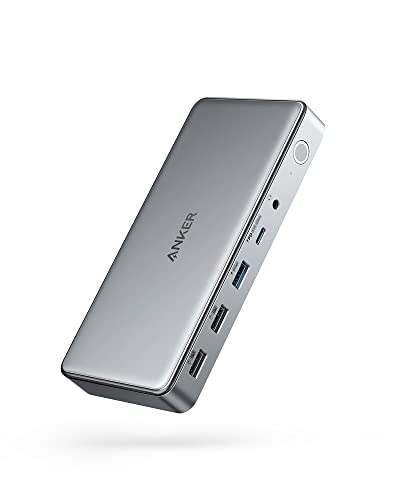
Anker 10-in-1 Triple Display USB-C Dock
Best for: MacBook triple-monitor setups requiring DisplayLink
- Host Interface
- USB-C
- Display Support
- Triple
- Max Resolution
- 4K@30Hz
- Power Delivery
- 100W
- Port Count
- 10
- Video Ports
- HDMI, DisplayPort
This 10-in-1 docking station uses DisplayLink technology to drive three external monitors from a single laptop USB-C port, including MacBooks. It delivers up to 100W Power Delivery to your machine and adds a dedicated 30W USB-C fast-charging port. Video output handles one 4K screen at 30Hz and two displays at 1080p 60Hz. It suits MacBook users needing multi-monitor setups alongside wired networking and multiple legacy USB accessories.
Pros
- Supports three external screens using DisplayLink
- Provides 100W host charging and 30W secondary USB-C Power Delivery
- Comes with an included 180W power adapter and USB-C cable
- Provides dual HDMI ports and one DisplayPort connection
Cons
- Maximum 4K resolution is restricted to 30Hz refresh rate
- Secondary and tertiary monitors are limited to 1080p at 60Hz
- Two USB-A data ports operate at USB 2.0 speeds
Good fit if
- You need triple external monitor support on a MacBook
- You want simultaneous 100W laptop charging and 30W phone charging
- You use both HDMI and DisplayPort monitors in your workspace
Skip if
- You need 4K resolution running at 60Hz or higher
- You require external displays with resolutions higher than 1080p on secondary screens
- You cannot install drivers requiring screen recording permissions
Verdict: Anker 10-in-1 Triple Display Docking Station delivers reliable triple-monitor expansion and 100W power delivery for laptops that require DisplayLink to overcome native display limits. Note that video outputs top out at 4K at 30Hz and 1080p at 60Hz across monitors.

Anker 565 11-in-1 Dual Display USB-C Hub
Best for: dual-display Windows laptop workstations
- Host Interface
- USB-C
- Display Support
- Dual
- Max Resolution
- 4K
- Power Delivery
- 85W
- Port Count
- 11
- Video Ports
- HDMI, DisplayPort
This Anker 11-in-1 USB-C hub expands your laptop with dual video outputs, 10 Gbps data ports, and up to 85W pass-through charging. You get dedicated HDMI and DisplayPort connections that support dual displays at up to 2K resolution at 60Hz on compatible Windows systems. Weighing 0.3 pounds, it suits mobile laptop setups requiring wired Ethernet, SD card access, and dual monitor productivity without carrying a heavy desktop dock.
Pros
- Dual video outputs via HDMI and DisplayPort up to 2K at 60Hz
- High-speed 10 Gbps USB-C and USB-A transfer ports
- Up to 85W laptop pass-through charging with 100W input
- Built-in SD/microSD slots, AUX audio, and Ethernet port
Cons
- macOS laptops can only mirror identical images to both external displays
- Wall charger is not included for pass-through power delivery
- Not compatible with Linux operating systems
Good fit if
- You need both HDMI and DisplayPort connections for a dual-monitor Windows workstation.
- You transfer media frequently via 10 Gbps USB ports and integrated SD card readers.
- You want up to 85W pass-through charging while keeping travel weight at 0.3 pounds.
Skip if
- You use macOS and require extended desktop across two external screens.
- You run a Linux operating system on your machine.
- You plan to output video using a native USB-C monitor connection.
Verdict: Anker 11-in-1 Dual Monitor USB-C Hub delivers comprehensive 10 Gbps connectivity and dual-display video in a lightweight 0.3-pound profile. It is a capable choice for Windows users who already own a high-wattage USB-C power supply.

Anker Prime 14-in-1 Thunderbolt 5 Dock
Best for: Thunderbolt 5 dual 8K multi-monitor laptop setups
- Host Interface
- Thunderbolt 5
- Display Support
- Dual
- Max Resolution
- 8K@60Hz
- Power Delivery
- 140W
- Port Count
- 14
- Video Ports
- HDMI, DisplayPort, Thunderbolt 5
This desktop docking station features next-generation Thunderbolt 5 connectivity with 14 ports. It delivers up to 140W host charging over Power Delivery 3.1 and supports dual 8K video output at 60Hz on compatible Windows systems. You also get a 2.5Gbps Ethernet jack, an integrated active cooling fan, and front memory card slots. It suits you if you need maximum data bandwidth and high-wattage charging for demanding multi-monitor laptop setups.
Pros
- Up to 140W Power Delivery 3.1 laptop charging
- Dual 8K@60Hz display support for Thunderbolt 5 Windows laptops
- Fast 2.5Gbps wired Ethernet port
- Dual Thunderbolt 5 downstream ports
Cons
- Dual 8K@60Hz display output requires a Thunderbolt 5 Windows laptop
- Front dual USB-C ports share 45W of total power
- Weighs 2.37 pounds, requiring dedicated desk space
Good fit if
- You use a Thunderbolt 5 laptop and want dual 8K display output.
- You need high-speed 140W power delivery over a single upstream cable.
- You require 2.5Gbps networking and downstream Thunderbolt 5 connections.
Skip if
- You need a lightweight, travel-friendly hub rather than a 2.37-pound desktop dock.
- You want independent high-wattage fast charging across all front USB-C ports.
Verdict: Anker Prime 14-in-1 Thunderbolt 5 Dock supplies top-tier 140W charging and high-bandwidth display support for modern workstations. It gives you 14 connections and active cooling to maintain heavy desktop workloads.

Anker 13-in-1 Triple Display USB-C Dock
Best for: Windows multi-monitor desktop setups
- Host Interface
- USB-C, USB4, Thunderbolt 3/4/5
- Display Support
- Triple
- Max Resolution
- 4K@60Hz
- Power Delivery
- 85W
- Port Count
- 13
- Video Ports
- HDMI, DisplayPort
This 13-in-1 desktop docking station connects via USB-C to power your workstation. It provides up to 85W laptop charging with the included 135W power supply and adds 18W phone charging. You can run three external displays at 1080p@60Hz on Windows or ChromeOS, or drive a single 4K@60Hz screen. It suits Windows laptop setups needing multi-monitor output, fast 10Gbps USB-C data transfers, and dedicated memory card slots.
Pros
- Includes 135W power adapter delivering 85W host and 18W secondary charging
- Supports triple external displays at 1080p@60Hz or single 4K@60Hz
- High-speed 10Gbps USB-C data port and integrated SD/microSD card slots
- Offers 13 ports including dual HDMI, DisplayPort, and Gigabit Ethernet
Cons
- macOS restricts external displays to mirrored mode only
- Triple display output maxes out at 1080p@60Hz resolution
Good fit if
- You use a Windows or ChromeOS laptop and need up to three extended external monitors.
- You want 85W laptop charging and 18W phone charging from an included power adapter.
Skip if
- You use macOS and require extended desktop across multiple external displays.
- You need triple monitors running at resolutions higher than 1080p.
Verdict: Anker 13-in-1 Triple Display USB-C Dock delivers comprehensive peripheral connectivity and multi-display utility for Windows laptops. It combines 85W host charging and 10Gbps data transfer into a space-saving vertical format.

Anker 8-in-1 USB-C Hub with Ethernet
Best for: connecting legacy VGA monitors and projectors
- Host Interface
- USB-C, USB4, Thunderbolt
- Display Support
- Triple
- Max Resolution
- 4K@60Hz
- Power Delivery
- 85W
- Port Count
- 8
- Video Ports
- HDMI, VGA
This compact Anker 8-in-1 hub gives your laptop legacy VGA and modern 4K HDMI video outputs. You get 85W USB-C Power Delivery pass-through, an Ethernet port, and 5Gbps USB data transfers. It supports multi-display setups on Windows machines while keeping desk footprint small. If you need to connect older VGA monitors or projectors alongside modern peripherals, this portable hub handles legacy hardware reliably.
Pros
- Includes a 1080p VGA port for legacy displays and projectors
- Supports up to 85W USB-C Power Delivery pass-through
- HDMI output supports resolutions up to 4K at 60Hz
- Features 5Gbps USB-C and USB-A data ports plus Ethernet
Cons
- Incompatible with Linux operating systems
- macOS supports only mirror mode across external monitors
- Requires separate 100W PD charger for maximum 85W pass-through
Good fit if
- You need a dedicated VGA port to connect legacy monitors or projectors.
- You want up to 85W pass-through charging with DP Alt Mode support.
- You run Windows and want multi-monitor video expansion.
Skip if
- You run Linux on your primary machine.
- You use macOS and require extended independent displays across multiple external screens.
Verdict: Anker 8-in-1 USB-C Hub with VGA pairs legacy 1080p VGA connectivity with modern 4K HDMI video and 85W charging. It gives Windows users a practical multi-display bridge for older monitors without sacrificing data speed.

Anker 14-in-1 Triple Display USB-C Hub
Best for: Windows users needing triple displays and legacy ports
- Host Interface
- USB-C, USB4, Thunderbolt
- Display Support
- Triple
- Max Resolution
- 4K
- Power Delivery
- 80W
- Port Count
- 14
- Video Ports
- HDMI, VGA
This 14-in-1 USB-C hub expands your laptop with dual 4K HDMI ports and a 1080p VGA port for triple-display setups. It provides five 5 Gbps USB-A ports, a 5 Gbps USB-C data port, Gigabit Ethernet, SD card slots, and 80W pass-through charging via a 100W PD-IN port. It fits your workspace if you use Windows and need multiple external screens alongside legacy VGA and standard USB peripherals.
Pros
- Supports triple displays via two 4K HDMI ports and one 1080p VGA port
- Up to 80W pass-through laptop charging with 100W PD-IN support
- Five 5 Gbps USB-A ports plus one 5 Gbps USB-C data port
- Includes Gigabit Ethernet, SD/microSD card slots, and AUX audio
Cons
- External displays mirror identically on macOS systems
- Wall power adapter not included
- Not compatible with Linux operating systems
Good fit if
- You run Windows and need three external displays using HDMI and VGA
- You need multiple USB-A ports for legacy desktop accessories
- You have an existing USB-C power adapter capable of up to 100W
Skip if
- You use macOS and want extended, independent desktop screens
- You run a Linux operating system
- You need a dock that includes a bundled power supply
Verdict: Anker 14-in-1 Triple Display USB-C Hub delivers comprehensive port expansion and multi-display outputs for Windows laptops. It requires an external power supply to deliver laptop charging and mirrors external displays on macOS.

Anker PowerExpand 9-in-1 USB-C Dock
Best for: workstations needing 60W laptop charging
- Host Interface
- USB-C
- Display Support
- Dual
- Max Resolution
- 4K@30Hz
- Power Delivery
- 60W
- Port Count
- 9
- Video Ports
- HDMI, DisplayPort
This Anker PowerExpand docking station gives you a 9-in-1 port layout for your desk setup. It provides 60W power delivery to charge your laptop alongside a dedicated 20W USB-C port for mobile devices. Video output supports 4K UHD display resolution through HDMI and DisplayPort connections, while built-in Ethernet provides stable wired networking. It suits you if you need reliable external display output and standard charging for modest laptops.
Pros
- Delivers 60W host charging plus 20W Power Delivery port
- Provides 9-in-1 connectivity including HDMI, DisplayPort, and Ethernet
- Supports 4K UHD video output
- Lightweight chassis weighing 0.41 pounds
Cons
- Host laptop power delivery capped at 60W
- Lacks Thunderbolt interface support
Good fit if
- You need 60W laptop charging alongside a dedicated 20W device charging port.
- You connect external displays using HDMI or DisplayPort at 4K UHD.
- You require wired Ethernet alongside basic USB-C connections.
Skip if
- You use a workstation laptop that requires more than 60W of power.
- You need Thunderbolt speeds for high-bandwidth storage drives.
Verdict: Anker PowerExpand 9-in-1 USB-C Dock delivers 60W laptop charging with essential 4K video and Ethernet connectivity. It provides a compact setup for laptops with standard power requirements.

Anker Prime 14-in-1 Dual Display Dock
Best for: Windows setups requiring high-wattage multi-device charging
- Host Interface
- USB-C
- Display Support
- Dual
- Max Resolution
- 4K
- Power Delivery
- 100W
- Port Count
- 14
- Video Ports
- HDMI
The Anker Prime 14-in-1 Dual Display Dock expands your laptop setup with 14 ports and 160W of total charging capability. You can charge up to four devices at once, with three USB-C ports delivering up to 100W each. It provides dual HDMI outputs supporting up to 2K resolution at 60Hz on DisplayPort 1.4 systems. This dock suits Windows and ChromeOS users who need fast 10Gbps data transfers and heavy charging capacity.
Pros
- 160W total power output supporting simultaneous four-device charging
- Three USB-C charging ports capable of up to 100W each
- Data transfer speeds up to 10Gbps across multiple ports
- Includes a 3.3-foot 100W 10Gbps USB-C upstream cable
Cons
- External displays mirror and cannot extend on macOS
- Incompatible with Linux operating systems
- Does not support 5120x1440 ultrawide monitors
Good fit if
- You use Windows or ChromeOS and need dual displays up to 2K at 60Hz.
- You need to charge multiple high-draw devices simultaneously from your desk.
Skip if
- You use macOS and require two distinct extended external displays.
- You run a Linux operating system or a 5120x1440 display.
Verdict: Anker Prime 14-in-1 Dual Display Dock delivers high-wattage charging and high-speed data for multi-device desktop workstations. It provides solid dual-screen connectivity for Windows laptops but cannot extend separate displays on macOS.
Specifications side by side
| Spec | Anker 332 5-in-1 USB-C Hub | Anker PowerExpand 8-in-1 Dual HDMI USB-C Hub | Anker 5-in-1 USB-C Hub with 4K HDMI | Anker Nano 13-in-1 Dock with Detachable Hub | Anker 10-in-1 Triple Display USB-C Dock | Anker 565 11-in-1 Dual Display USB-C Hub | Anker Prime 14-in-1 Thunderbolt 5 Dock | Anker 13-in-1 Triple Display USB-C Dock | Anker 8-in-1 USB-C Hub with Ethernet | Anker 14-in-1 Triple Display USB-C Hub | Anker PowerExpand 9-in-1 USB-C Dock | Anker Prime 14-in-1 Dual Display Dock |
|---|---|---|---|---|---|---|---|---|---|---|---|---|
| Host Interface | USB-C | USB-C | USB-C | USB-C | USB-C | USB-C | Thunderbolt 5 | USB-C, USB4, Thunderbolt 3/4/5 | USB-C, USB4, Thunderbolt | USB-C, USB4, Thunderbolt | USB-C | USB-C |
| Display Support | not specified | Dual | not specified | Triple | Triple | Dual | Dual | Triple | Triple | Triple | Dual | Dual |
| Max Resolution | 4K@30Hz | 4K@60Hz | 4K at 30Hz | 4K@60Hz | 4K@30Hz | 4K | 8K@60Hz | 4K@60Hz | 4K@60Hz | 4K | 4K@30Hz | 4K |
| Power Delivery | 85W | 85W | 90W | 100W | 100W | 85W | 140W | 85W | 85W | 80W | 60W | 100W |
| Port Count | 5 | 8 | 5 | 13 | 10 | 11 | 14 | 13 | 8 | 14 | 9 | 14 |
| Video Ports | HDMI | HDMI | HDMI | HDMI, DisplayPort | HDMI, DisplayPort | HDMI, DisplayPort | HDMI, DisplayPort, Thunderbolt 5 | HDMI, DisplayPort | HDMI, VGA | HDMI, VGA | HDMI, DisplayPort | HDMI |
| Max Data Speed | 5Gbps | not specified | 5Gbps | 10Gbps | 5 Gbps | 10 Gbps | not specified | 10Gbps | 5Gbps | 5Gbps | 5 Gbps | 10Gbps |
| Ethernet Speed | not specified | not specified | not specified | 1Gbps | not specified | not specified | 2.5Gbps | Gigabit | not specified | 1Gbps | not specified | not specified |
| Resolution | 4K UHD | 4K UHD | 4K UHD | not specified | not specified | 4K UHD | not specified | not specified | 4K UHD | not specified | not specified | not specified |
| Connectivity | USB-C, HDMI | USB-C, HDMI, Ethernet | USB-C, HDMI | USB-C | not specified | USB-C, HDMI, DisplayPort | not specified | USB-C | USB-C, HDMI, Ethernet, VGA | USB-C | USB-C | not specified |
| Refresh Rate | not specified | not specified | not specified | not specified | not specified | not specified | not specified | not specified | 60Hz | not specified | not specified | not specified |
| Features | not specified | not specified | not specified | not specified | DisplayLink | not specified | not specified | not specified | not specified | not specified | not specified | not specified |
| Dimensions | 4.78 × 1.59 × 0.45 inches | 4.65 × 2.01 × 0.69 inches | 4.8 × 1.2 × 0.46 inches | 3.74 × 1.57 × 5.51 inches | 6.7 × 3.15 × 0.96 inches | 5.39 × 2.24 × 0.55 inches | 3 × 4.6 × 4.6 inches | 4.95 × 3.49 × 1.64 inches | 4.5 × 2.1 × 0.7 inches | 5.91 × 2.13 × 0.67 inches | 5.71 × 2.56 × 0.94 inches | 5.51 × 3.82 × 1.85 inches |
| Weight | 1.44 ounces | 3.2 ounces | 2.03 ounces | not specified | 1.6 ounces | 4.8 ounces | 2.37 pounds | 13.1 ounces | 3.56 ounces | 4.73 ounces | 6.56 ounces | 2.82 pounds |
| Color | Black | Gray | Gray | Black | Gray | Gray | Gray | Gray | Gray | Grey | Gray | Grey |
| Model | A8355011 | A83800A1 | A8357 | A83C3 | A83951A1 | A8388 | A83B5 | A83921A1 | A8379 | A8389 | A8394 | A83B6 |
| Size | not specified | 8-in-1 USB C Hub | not specified | not specified | not specified | 11-in-1 | 4.60" x 4.60" x 3" | Small | 8-in-1 USB-C Hub | 14 in 1 USB C Hub | 19.7 x 8.1 x 19.7 inches | not specified |
Comparing the Anker Dock Lineup
Anker divides its lineup between lightweight travel hubs and permanent desktop docks. If you work on the go, compact units like the Anker 332 5-in-1 USB-C Hub and Anker PowerExpand 8-in-1 Dual HDMI USB-C Hub focus on portability and pass-through power. They weigh 0.2 pounds or less and deliver 85W charging alongside single or dual 4K video. This group suits mobile professionals.
For stationary workspaces, desktop docks provide higher wattage and expanded display support. High-capacity options like the Anker Prime 14-in-1 Thunderbolt 5 Dock supply 140W charging. If you face monitor limits, the Anker 10-in-1 Triple Display USB-C Dock uses DisplayLink to run three screens. These heavier models suit fixed multi-monitor setups.
Where the Anker Range Fits
Anker covers setups ranging from 0.09-pound travel hubs to 2.82-pound desktop stations. Hardware shapes include slim rectangular bars, upright vertical docks, detachable modules, and cubic desktop blocks. Visual designs remain utilitarian, offering only black or gray casings without decorative lighting.
This selection suits you if you need single, dual, or triple displays with power delivery between 60W and 140W. Clear gaps exist across the range. None of the 12 models provide quad-display support. Furthermore, standard multi-monitor hubs mirror rather than extend external screens on macOS, making the 10-in-1 DisplayLink dock your only option for expanded Mac workspaces.
If you need storage expansion, see our list of the best m 2 SSD docking stations for more options.
How to Choose an Anker Docking Station
-
Operating System Display Support
Check your laptop operating system before selecting a multi-monitor dock. Standard macOS builds do not support multi-stream transport over USB-C, meaning standard dual-display docks mirror external screens rather than extending them. If you run a MacBook and need independent desktop spaces across multiple screens, choose hardware with DisplayLink technology. The Anker 10-in-1 Triple Display USB-C Dock uses DisplayLink drivers to route separate video feeds over USB. For Windows laptops, native multi-stream transport works across standard dual or triple HDMI and DisplayPort connections without driver installations.
-
Host Charging Wattage
Match the dock power delivery specification to the energy requirements of your laptop. Compact ultraportables run comfortably on 60W or 85W pass-through charging. Workstations and gaming laptops with discrete graphics cards require higher continuous energy to prevent battery drain under heavy processor loads. The Anker Prime 14-in-1 Thunderbolt 5 Dock delivers up to 140W of upstream charging to meet demanding power thresholds. Check your laptop original power adapter rating before buying. Picking a dock with insufficient wattage causes slower battery replenishment or system throttling.
-
Display Refresh Rate Support
Verify the maximum refresh rate supported at your desired screen resolution. Some basic hubs limit 4K video to a 30Hz refresh rate, resulting in choppy cursor movement and sluggish window dragging during productivity tasks. For comfortable daily viewing, target hardware that specifies 4K at 60Hz. Check how the dock behaves when powering multiple screens at once. Certain hubs downgrade secondary outputs from 60Hz to 30Hz or drop display resolutions down to 1080p when bandwidth is divided among several connected monitors.
-
Legacy Video Port Compatibility
Evaluate whether your monitors rely on legacy connectors before choosing a dock with only digital outputs. Most modern docking units provide HDMI and DisplayPort sockets for high-resolution screens. If your office or conference room uses older projectors or analog displays, you need an integrated VGA interface. The Anker 8-in-1 USB-C Hub with Ethernet includes a dedicated VGA connection alongside HDMI. Selecting a dock with native analog support avoids the need to carry external display adapters, keeping your setup functional with older institutional presentation hardware.
-
Peripheral Data Transfer Speeds
Examine the rated transfer speeds of the USB data ports. Hubs equipped with 5 Gbps ports handle standard accessories such as mice, keyboards, and basic external hard drives without bottlenecking. If you routinely move large video files, edit from external solid-state drives, or back up local drives, look for 10 Gbps USB-C and USB-A connections. The Anker 565 11-in-1 Dual Display USB-C Hub offers 10 Gbps transfer capabilities for faster data handling. Choosing higher interface speeds prevents long transfer wait times when managing external media.
-
Integrated Wired Networking
Check for an integrated RJ45 Ethernet port if your work demands low-latency connectivity or reliable transfer stability. Wireless networks often experience signal dropouts, interference, and fluctuating bandwidth that disrupt video conferencing or large file downloads. An integrated Ethernet port guarantees a steady gigabit wired connection directly through the single host cable. The Anker PowerExpand 9-in-1 USB-C Dock includes dedicated Ethernet alongside its display outputs. If your desk setup already includes a wired local network drop, choosing a dock with built-in Ethernet eliminates the need for separate network dongles.
Frequently asked questions
Which Anker docking station supports triple monitors on a MacBook?
You should choose the Anker 10-in-1 Triple Display USB-C Dock. It uses DisplayLink technology to bypass native macOS display output limits, letting you drive up to three external screens. Note that its video output tops out at 4K at 30Hz and 1080p at 60Hz, while supplying 100W power delivery to your laptop.
Which Anker dock offers the highest charging wattage and display resolution?
The Anker Prime 14-in-1 Thunderbolt 5 Dock delivers the highest charging power at 140W. It supports dual 8K display setups for demanding workstations and includes active cooling across its 14 connection ports. This desktop unit weighs 2.37 pounds and measures 4.6 by 4.6 by 3 inches, making it built for permanent desk installations.
Does Anker make a hybrid docking station for desk and travel use?
Yes, the Anker Nano 13-in-1 Dock features a detachable hub built directly into its hardware. You can dock at your desk for full 13-in-1 connectivity and 100W power delivery, or detach the portable hub when traveling. It provides versatile multi-monitor support for Windows systems while maintaining a desktop footprint of 1.57 by 5.51 by 3.74 inches.
Can you connect an older VGA monitor with an Anker USB-C hub?
Yes, you can use the Anker 8-in-1 USB-C Hub with Ethernet. This model includes a legacy 1080p VGA port alongside a 4K 60Hz HDMI connection, allowing you to bridge older displays or projectors to modern laptops. It also provides 85W pass-through charging and Ethernet in a 3.56-ounce body measuring 4.5 inches long.
Which portable Anker hub includes a dedicated DisplayPort connection?
The Anker 565 11-in-1 Dual Display USB-C Hub includes both DisplayPort and HDMI video outputs with 4K UHD support. It provides dual-display output for Windows laptops and fast 10 Gbps data transfer speeds. Weighing 4.8 ounces, it requires an external high-wattage USB-C power supply to pass charging through to your connected laptop.
Which compact Anker hub allows dual HDMI displays for travel?
The Anker PowerExpand 8-in-1 Dual HDMI USB-C Hub provides two HDMI ports supporting 4K UHD video output. It supports dual-monitor setups on Windows and ChromeOS machines. The hub delivers 85W charging to your host machine, weighs only 3.2 ounces, and includes memory card access and Ethernet connectivity within a 4.65-inch frame.
What is the lightest Anker hub for basic single-monitor travel setups?
The Anker 332 5-in-1 USB-C Hub is the lightest option at just 1.44 ounces. It gives you 4K UHD HDMI video output, USB-C connectivity, and 5 Gbps data transfer speeds. It delivers dependable 85W pass-through charging to keep your laptop powered while fitting easily into any bag with its 4.78-inch length.