6 Best Alternatives to the ViewSonic 22-Inch 1080p Touchscreen Monitor (2026)
As an Amazon Associate we earn from qualifying purchases. Links on this page are affiliate links.
If you are researching viewsonic td2230 22 inch 1080p alternatives, you have several capable options for your desktop or workstation. The ViewSonic TD2230 delivers a 22-inch 1080p IPS display with 10-point multi-touch input, a 60Hz refresh rate, and a 7H scratch-resistant coating. It features flexible video connectivity through HDMI, DisplayPort, and legacy VGA ports, supported by a freestanding adjustable base. At 7.94 pounds, this setup works well for fixed kiosks and point-of-sale stations that stay in one location.
However, your setup might demand different specifications. You may need a lighter display under two pounds for travel, single-cable USB-C connectivity, or an integrated battery for cordless operation. Other workflows benefit from faster 120Hz or 144Hz refresh rates, or a larger 32-inch screen with 4K resolution. The 6 displays in this 2026 guide were selected because their core hardware specifications overlap with the original ViewSonic model while offering practical variations in size, mobility, and interface design.
Our top pick: ViewSonic 22-Inch 1080p Touchscreen Monitor.
Comparing ViewSonic TD2230 Alternatives by Spec
ZSCMALLS 23.8-Inch Battery Portable Monitor
ZSCMALLS offers a larger 23.8-inch 1080p IPS panel compared to the 22-inch ViewSonic TD2230. It features a built-in 10,000mAh battery and wireless streaming capability, allowing cable-free operation. However, you give up the 10-point multi-touch input and legacy VGA and USB connections found on the ViewSonic. It includes HDMI and DisplayPort inputs alongside VESA mounting support. You also lose the scratch-resistant 7H glass surface. Pick this display if you need a larger Full HD viewing area with internal battery power for remote presentations or cord-free setups, and your workflow does not require direct finger touch input.
Cocopar 15.6-Inch 1080p Touchscreen Portable Monitor
Cocopar cuts display size to 15.6 inches and weight to 2 pounds, making it far lighter than the 7.94-pound ViewSonic. It retains 1080p resolution and multi-touch capability while adding USB-C connectivity and built-in speakers. Unlike the ViewSonic, which offers VGA and DisplayPort alongside HDMI, the Cocopar relies on USB-C and HDMI ports. You give up the larger 22-inch screen, durable 7H glass coating, and freestanding desktop base. Select this model if you need a portable touchscreen with single-cable USB-C capability for travel dual-screen workstations rather than a fixed desktop installation.
Upperizon 21.5-Inch 120Hz Portable Monitor
Upperizon provides a 21.5-inch 1080p IPS screen with a 120Hz refresh rate, doubling the 60Hz rate of the ViewSonic for smoother motion. It weighs 3.79 pounds and measures 0.59 inches thick, making it significantly lighter and slimmer than the 7.94-pound TD2230. It includes USB-C, HDMI, HDR support, built-in speakers, and an integrated kickstand. However, you sacrifice touch functionality entirely, along with the ViewSonic's DisplayPort, VGA input, and 7H scratch protection. Choose this option if you want a 1080p desktop display with fluid 120Hz refresh rates and lighter construction, but do not need touchscreen interactions.
Prechen 32-Inch 4K 144Hz Touch Monitor
Prechen upgrades your workspace to a 32-inch 4K UHD panel with a 144Hz refresh rate, drastically exceeding the ViewSonic TD2230's 22-inch 1080p 60Hz specifications. It features touchscreen capability, HDR, an adjustable height stand, a kickstand, and VESA mounting. For connectivity, it provides HDMI and DisplayPort. You give up the compact desktop footprint and lower weight of the 22-inch ViewSonic, as well as its legacy VGA and USB hub inputs. Pick this monitor if you want an expansive, high-resolution 4K canvas with high-refresh responsiveness for desk-based touch multitasking and have sufficient space to accommodate a larger 32-inch monitor chassis.
UPERFECT 21.5-Inch 120Hz Touchscreen Monitor
UPERFECT maintains a similar screen size at 21.5 inches while upgrading refresh performance to 120Hz over the ViewSonic's 60Hz limit. It retains touchscreen support, VESA mounting, and includes an integrated kickstand. At 8.4 pounds, it is slightly heavier than the 7.94-pound ViewSonic, though its depth is a slim 0.5 inches. In exchange for the higher 120Hz refresh rate, you lose the ViewSonic's multi-port array that includes DisplayPort, VGA, and USB connections, relying instead on HDMI. Pick this monitor if you want desktop touchscreen utility paired with a faster 120Hz refresh rate for gaming or fluid interactions from an HDMI connection.
ASUS ProArt 14-Inch Touchscreen Monitor
ASUS ProArt delivers a highly compact 14-inch 1080p IPS touchscreen weighing only 1.63 pounds, compared to the 7.94-pound, 22-inch ViewSonic TD2230. It features 10-point touch input and modern USB-C and HDMI connectivity. At 0.47 inches thick, it packs easily into bags. You sacrifice substantial display real estate dropping from 22 inches to 14 inches, along with legacy VGA and DisplayPort inputs and VESA mounting capability. Choose this display if you prioritize extreme mobility and compact dimensions for creative touchscreen workflows on the go, rather than stationary desktop use with legacy hardware connectivity.
Quick picks
Our 7 picks

ViewSonic 22-Inch 1080p Touchscreen Monitor
Best for: desktop touch setups and retail kiosk stations
- Screen Size
- 22"
- Resolution
- 1920 x 1080
- Refresh Rate
- 60Hz
- Panel Type
- IPS
- Connectivity
- HDMI, DisplayPort, VGA, USB-B, USB-A
- Weight
- 7.94 lbs
The ViewSonic 22-Inch 1080p Touchscreen Monitor provides an IPS desktop display built with 10-point multi-touch functionality and a 7H scratch-resistant surface. It operates at a 60Hz refresh rate and includes HDMI, DisplayPort, VGA, and USB connections. A built-in adjustable stand allows angled tablet-style positioning on a desk, and VESA mount support offers mounting flexibility. This setup suits you if you need a durable, fixed-station touch screen for office or retail tasks.
Pros
- 10-point multi-touch IPS panel with 1920x1080 resolution
- Comprehensive connectivity with HDMI, DisplayPort, VGA, and USB
- Durable 7H scratch-resistant surface
- VESA mount compatible with an adjustable freestanding base
Cons
- Weighs 7.94 pounds
- Refresh rate maxes out at 60Hz
- Touch functionality does not support iPhone or iPad
Good fit if
- You need legacy VGA alongside DisplayPort and HDMI inputs.
- You want a durable 7H scratch-resistant surface for kiosk or POS use.
- You require an adjustable freestanding design that tilts like a tablet.
Skip if
- You require a refresh rate higher than 60Hz.
- You need a lightweight display for frequent mobile travel.
- You plan to use touch inputs with an iPhone or iPad.
Verdict: ViewSonic 22-Inch 1080p Touchscreen Monitor delivers a solid 1080p touch workspace with broad port support covering VGA, HDMI, and DisplayPort. Its 7.94-pound weight and freestanding base make it ideal for fixed desks rather than travel bags.
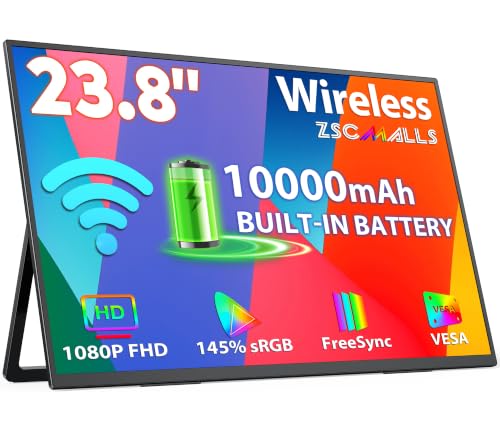
ZSCMALLS 23.8-Inch Battery Portable Monitor
Best for: cordless multi-device setups and remote presentations
- Screen Size
- 23.8 inch
- Refresh Rate
- 100Hz
- Panel Type
- IPS
- Connectivity
- USB-C, HDMI
- Color Gamut
- 145% sRGB
- Resolution
- 1080p FHD
The ZSCMALLS 23.8-inch display provides a large Full HD IPS screen powered by a built-in 10,000mAh battery for cord-free setups. You can mirror content wirelessly using AirPlay or Miracast, or connect directly through USB-C or HDMI ports. It achieves up to a 100Hz refresh rate when plugged into power. This monitor suits you if you need portable desktop-sized screen real estate without hunting for an electrical outlet.
Pros
- Built-in 10,000mAh battery for cord-free operation
- AirPlay and Miracast support for driver-free wireless casting
- 100Hz refresh rate when connected to power
- 145% sRGB color gamut coverage
Cons
- No touchscreen capability listed in specifications
- Reaching 100Hz refresh rate requires an external power connection
- HDMI connection requires external USB power
Good fit if
- You need a portable 23.8-inch display that runs on internal battery power.
- You want cable-free screen mirroring via AirPlay or Miracast.
- You require VESA mounting or an integrated adjustable kickstand.
Skip if
- You require touchscreen capability for direct interaction.
- You need maximum refresh rates while operating solely on battery power.
Verdict: ZSCMALLS 23.8-Inch Battery Portable Monitor delivers expansive Full HD workspace with wire-free convenience via its 10,000mAh battery and wireless streaming. It trades touch input for battery independence and a larger 23.8-inch panel.

Cocopar 15.6-Inch 1080p Touchscreen Portable Monitor
Best for: portable dual-screen setups needing full touch support
- Screen Size
- 15.6 Inch
- Resolution
- 1920x1080
- Panel Type
- IPS
- Connectivity
- dual USB-C, standard HDMI
- Color Gamut
- 90% sRGB
- Weight
- 2 pounds
View on Amazon: Cocopar 15.6-Inch 1080p Touchscreen Portable Monitor
The Cocopar 15.6-Inch 1080p Touchscreen Monitor provides an ultra-portable alternative to full-sized 22-inch desktop touch displays. Weighing 2 pounds and measuring 0.23 inches thick, it features a 1920x1080 IPS panel with 90% sRGB coverage and 270 nits brightness. It supports native touch gestures on both Windows and macOS through a single USB-C cable. An integrated kickstand, metal frame, and built-in speakers suit users needing compact mobile touch control.
Pros
- Supports native multi-touch gestures on Windows and macOS
- Single-cable USB-C handles video, power, and touch signals
- Weighs 2 pounds with a 0.23-inch slim profile
- Integrated adjustable kickstand with a sturdy metal frame
- Tempered glass surface with a 178-degree viewing angle IPS panel
Cons
- Peak brightness reaches only 270 nits
- Smaller 15.6-inch viewing area compared to 22-inch desktop monitors
- Touch functionality does not work via standard HDMI with game consoles
Good fit if
- You need macOS or Windows touch gestures over a single USB-C connection.
- You want a lightweight 2-pound secondary screen with an integrated kickstand.
- You prefer a scratch-resistant tempered glass display over plastic-film screens.
Skip if
- You need a stationary 22-inch or larger display for your primary desk setup.
- You work in direct sunlight and require more than 270 nits of brightness.
- You plan to use touch inputs on gaming consoles connected via HDMI.
Verdict: Cocopar 15.6-Inch 1080p Touchscreen Monitor delivers versatile macOS and Windows touch support in a slim 2-pound package. It replaces bulkier 22-inch touch monitors whenever travel portability and single-cable connectivity take priority.

Upperizon 21.5-Inch 120Hz Portable Monitor
Best for: high-refresh desktop multitasking without touch controls
- Screen Size
- 21.5 inch
- Resolution
- 1920x1080
- Refresh Rate
- 120Hz
- Panel Type
- IPS
- Connectivity
- USB-C, HDMI
- Color Gamut
- 110% sRGB
The Upperizon 21.5-Inch 120Hz Portable Monitor gives you a 1080p IPS display with a fast 120Hz refresh rate and 110% sRGB coverage. At 3.79 pounds, it includes an integrated 90-degree kickstand, 75x75mm VESA mount support, and built-in speakers. Connectivity relies on USB-C and HDMI ports. It suits you if you need a large secondary display with fluid motion and accurate colors, provided you do not require touchscreen input.
Pros
- Smooth 120Hz refresh rate via USB-C and HDMI
- Wide color space with 110% sRGB coverage
- Integrated 90-degree kickstand and 75x75mm VESA mounting
- Anti-glare IPS screen with 300 nits brightness and 1300:1 contrast
Cons
- No touchscreen capability listed in specifications
- Requires high-power source to prevent screen flickering
- Heavier than compact portable displays at 3.79 pounds
Good fit if
- You want a fast 120Hz refresh rate on a large 21.5-inch panel.
- You need flexible mounting options with a built-in kickstand or VESA arm.
- You prioritize wide color reproduction with 110% sRGB.
Skip if
- You require touchscreen capability for direct interaction.
- You need an ultra-light screen under three pounds for mobile travel.
- Your host device lacks high-bandwidth video output over USB-C or HDMI.
Verdict: Upperizon 21.5-Inch 120Hz Portable Monitor delivers fluid high-refresh viewing and flexible mounting, though it lacks touch functionality. It serves as an expansive desktop companion for general work and media.

Prechen 32-Inch 4K 144Hz Touch Monitor
Best for: high-resolution desktop touch workflows and multitasking
- Screen Size
- 32 Inch
- Resolution
- 3840x2160
- Refresh Rate
- 144Hz
- Connectivity
- HDMI 2.1, DP 1.4, Type-C
- Features
- VESA Mountable, HDR, Kickstand, Touchscreen, Adjustable Height
- Recommended Use
- Desk
The Prechen 32-inch monitor upgrades your workspace from standard 1080p setups with a 3840x2160 4K UHD panel and a fast 144Hz refresh rate. It features a 10-point capacitive touchscreen, full-featured USB-C, HDMI 2.1, and DisplayPort 1.4 inputs. Its fully ergonomic stand tilts, swivels, adjusts in height, and pivots 90 degrees. This monitor suits you if you need expansive desktop screen space, ultra-sharp resolution, and smooth touch navigation for creative work or multitasking.
Pros
- 3840x2160 4K UHD resolution with a 144Hz refresh rate
- 10-point capacitive touchscreen input
- Ergonomic stand with height, tilt, swivel, and 90-degree pivot adjustments
- Versatile ports including HDMI 2.1, DisplayPort 1.4, and full-featured USB-C
Cons
- Touch is limited to 2 points on macOS and unsupported on iOS or gaming consoles
- Requires a separate USB-A to USB-B connection for touch when using HDMI or DisplayPort
- Requires power from the included power adapter before connecting video cables
Good fit if
- You want a large 32-inch 4K touchscreen running at a 144Hz refresh rate.
- You need an ergonomic desktop stand that pivots 90 degrees into portrait mode.
- You connect modern laptops via a full-featured USB-C cable for display and touch.
Skip if
- You primarily use macOS and require full 10-point multi-touch functionality.
- You plan to use touch controls on iOS mobile devices or gaming consoles.
- You need a compact, battery-powered portable display for travel.
Verdict: Prechen 32-Inch 4K 144Hz Touchscreen Monitor delivers a large 4K canvas with high-refresh responsiveness and flexible ergonomics. It is a capable, high-resolution desktop upgrade over traditional 1080p touch panels.

UPERFECT 21.5-Inch 120Hz Touchscreen Monitor
Best for: high-refresh gaming and desktop touchscreen setups
- Screen Size
- 21.5"
- Refresh Rate
- 120Hz
- Connectivity
- HDMI, Type C
- Weight
- 2.9 lbs
- Features
- VESA Mountable, Kickstand, Touchscreen
- Use
- Gaming
View on Amazon: UPERFECT 21.5-Inch 120Hz Touchscreen Monitor
This 21.5-inch portable touchscreen display gives you a desktop-sized workspace with an elevated 120Hz refresh rate for smoother motion. It connects via standard HDMI and Type-C ports, allowing simple plug-and-play operation across your systems. With an integrated adjustable stand, VESA mounting holes, and a 2.9-pound build, it suits you if you need a responsive, high-refresh touch monitor for gaming setups or travel workstations.
Pros
- 120Hz refresh rate for smooth gaming visual performance
- Large 21.5-inch touchscreen interface
- Standard HDMI and Type-C plug-and-play connections
- Integrated adjustable kickstand plus VESA mount support
Cons
- No built-in battery listed in technical specifications
- Large 19.5-inch width takes up substantial desk space
Good fit if
- You want a 120Hz refresh rate for smoother gaming and interactions.
- You need a large 21.5-inch touchscreen display with VESA mounting capabilities.
- You prefer standard HDMI and Type-C plug-and-play inputs.
Skip if
- You need an internal battery for cord-free operation.
- You require a smaller, compact screen for minimal travel weight.
Verdict: UPERFECT 21.5-Inch 120Hz Touchscreen Monitor pairs a responsive 21.5-inch touch panel with a 120Hz refresh rate and versatile mounting options. It is an ideal high-speed alternative for users who want desktop screen space with portable flexibility.

ASUS ProArt 14-Inch Touchscreen Monitor
Best for: mobile creative work needing accurate color
- Screen Size
- 14"
- Resolution
- 1080p FHD
- Panel Type
- IPS
- Connectivity
- Two USB-C, Micro HDMI
- Color Gamut
- 100% sRGB, 100% Rec. 709
- Weight
- 1.63 pounds
This portable 14-inch IPS monitor provides a compact alternative to 22-inch desktop touchscreens. You get a 1080p resolution display with 10-point multitouch, 100% sRGB, and 100% Rec. 709 color coverage. At 1.63 pounds, it includes an integrated metal kickstand, an ASUS Dial controller, and two USB-C ports alongside a Micro HDMI port. It suits you if you need color-accurate touch controls in a compact mobile form factor.
Pros
- 100% sRGB and 100% Rec. 709 factory-calibrated color coverage
- 10-point capacitive multitouch on an anti-glare IPS panel
- Lightweight 1.63-pound build with built-in metal kickstand and tripod socket
- Dual USB-C ports with DP Alt Mode plus Micro HDMI input
Cons
- 14-inch screen offers significantly less viewing area than 22-inch displays
- Uses Micro HDMI rather than a standard full-size HDMI port
- No built-in battery included
Good fit if
- You need factory-calibrated 100% sRGB and Rec. 709 color accuracy.
- You want a lightweight 1.63-pound touchscreen monitor for travel.
- You want built-in physical controls including the ASUS Dial and kickstand.
Skip if
- You need a larger 22-inch screen for a stationary desktop setup.
- You prefer full-size HDMI cables without using adapters.
- You require an integrated battery for cord-free operation.
Verdict: ASUS ProArt 14-Inch Touchscreen Monitor delivers verified color accuracy and responsive 10-point touch in a highly portable 1.63-pound chassis. It serves as a compact alternative when desk-bound 22-inch touch monitors are too large for your mobile setup.
Specifications side by side
| Spec | ViewSonic 22-Inch 1080p Touchscreen Monitor | ZSCMALLS 23.8-Inch Battery Portable Monitor | Cocopar 15.6-Inch 1080p Touchscreen Portable Monitor | Upperizon 21.5-Inch 120Hz Portable Monitor | Prechen 32-Inch 4K 144Hz Touch Monitor | UPERFECT 21.5-Inch 120Hz Touchscreen Monitor | ASUS ProArt 14-Inch Touchscreen Monitor |
|---|---|---|---|---|---|---|---|
| Screen Size | 22" | 23.8 inch | 15.6 Inch | 21.5 inch | 32 Inch | 21.5" | 14" |
| Resolution | 1920 x 1080 | not specified | 1920x1080 | 1920x1080 | 3840x2160 | not specified | 1080p FHD |
| Refresh Rate | 60Hz | 100Hz | not specified | 120Hz | 144Hz | 120Hz | not specified |
| Panel Type | IPS | IPS | IPS | IPS | not specified | not specified | IPS |
| Connectivity | HDMI, DisplayPort, VGA, USB-B, USB-A | USB-C, HDMI | dual USB-C, standard HDMI | USB-C, HDMI | HDMI 2.1, DP 1.4, Type-C | HDMI, Type C | Two USB-C, Micro HDMI |
| Color Gamut | not specified | 145% sRGB | 90% sRGB | 110% sRGB | not specified | not specified | 100% sRGB, 100% Rec. 709 |
| Weight | 7.94 lbs | not specified | 2 pounds | 3.79 lbs | not specified | 2.9 lbs | 1.63 pounds |
| Features | VESA Mountable, Touchscreen | VESA Mountable, Built-in Battery | Built-in Speakers, VESA Mountable, Touchscreen | Built-in Speakers, VESA Mountable, HDR, Kickstand | VESA Mountable, HDR, Kickstand, Touchscreen, Adjustable Height | VESA Mountable, Kickstand, Touchscreen | Touchscreen |
| Use | not specified | not specified | Travel | Travel | not specified | Gaming | not specified |
| Size | 22-Inch | 23.8" | 15.6 Inches | 21.5 inch | not specified | 21.5" | 14 Inch |
| Recommended Use | not specified | not specified | not specified | not specified | Desk | not specified | not specified |
| Dimensions | 19.3 × 5.1 × 11.8 inches | 23 × 14 × 23 inches | 0.23 × 14 × 8.8 inches | 0.59 × 19.4 × 11.3 inches | 1.37 × 28.1 × 16.4 inches | 0.5 × 19.5 × 11.4 inches | 8.05 × 12.8 × 0.47 inches |
| Color | BLACK,BLUE | A3-WX238-Black | Black | Black | Black | Black | BLACK |
| Model | TD2230 | W238 | Y156FH7LHT | M215FH | HD-315 | 215E02 | PA148CTV |
If you also buy outdoor equipment, you can compare weber weber 22 inch charcoal kettle alternatives by size.
Frequently asked questions
Which ViewSonic TD2230 alternative offers a higher refresh rate with touch support?
The UPERFECT 21.5-Inch Touchscreen Monitor is your best option for high refresh rates. It delivers a 120Hz refresh rate alongside responsive touchscreen functionality. The monitor features HDMI connectivity, an integrated kickstand, and VESA mounting support. At 8.4 pounds, it gives you a responsive desktop touch display with much smoother motion than standard 60Hz screens.
Is there a lighter portable touch monitor than the ViewSonic TD2230?
Yes, both the Cocopar 15.6-Inch and ASUS ProArt 14-Inch monitors are significantly lighter alternatives. The Cocopar weighs 2 pounds and the ASUS ProArt weighs only 1.63 pounds, compared to the 7.94-pound ViewSonic display. Both feature 1080p touchscreens with USB-C and HDMI connectivity, making them easy to pack into a laptop bag for travel.
Can you find a 4K touchscreen alternative to the ViewSonic TD2230?
The Prechen 32-Inch Monitor provides a 4K UHD touchscreen upgrade over the 1080p ViewSonic panel. It features a 3840-pixel canvas with a 144Hz refresh rate, HDR support, and DisplayPort and HDMI inputs. It also includes an integrated kickstand and adjustable height functionality, making it well suited for stationary desktop touch workspaces.
Which 21.5-inch alternative works best if you do not need touch controls?
The Upperizon 21.5-Inch Portable Monitor is an ideal non-touch alternative. It matches the Full HD resolution on an IPS panel while boosting your refresh rate to 120Hz. Weighing 3.79 pounds, it is less than half the weight of the ViewSonic model and includes USB-C, HDMI, HDR support, built-in speakers, and an integrated kickstand.
Are there large alternatives that run on battery power?
The ZSCMALLS 23.8-Inch Monitor features a built-in 10,000mAh battery for cordless operation. While it lacks the touchscreen functionality found on the ViewSonic display, it provides an expansive 23.8-inch 1080p IPS screen. You can connect devices through HDMI or DisplayPort, and the chassis supports VESA mounting for flexible placement without relying on immediate wall power.
Can you mount these ViewSonic TD2230 alternatives to a monitor arm?
Yes, several alternatives on this list support standard VESA mounting. The ZSCMALLS 23.8-Inch, Upperizon 21.5-Inch, UPERFECT 21.5-Inch, Prechen 32-Inch, and Cocopar 15.6-Inch all feature VESA mounting capability. This allows you to attach them directly to desk arms, wall brackets, or workstation stands to clear desk space just like the ViewSonic TD2230.
Which alternative is best suited for mobile color-accurate work?
The ASUS ProArt 14-Inch Touchscreen Monitor is designed specifically for creative color accuracy. It features a compact 1080p FHD IPS panel with 10-point touch input. At just 1.63 pounds and under half an inch thick, it connects via USB-C or HDMI, offering a lightweight mobile solution when larger 22-inch desk monitors are impractical.