Looking Beyond the UGREEN 8-in-1 USB-C Hub 2-Pack? 6 Alternatives Worth a Look
As an Amazon Associate we earn from qualifying purchases. Links on this page are affiliate links.
The UGREEN Revodok Pro 8-in-1 USB-C Hub 2-Pack delivers reliable 4K@60Hz video and 85W pass-through charging. It is a solid choice for users needing dual hubs with consistent performance. If you are searching for ugreen revodok pro USB c alternatives, you might want a different spec or feature set. Some buyers prefer Ethernet ports for wired internet. Others need triple monitor support or a smaller footprint for travel. The original product lacks VGA inputs and does not include an Ethernet jack in this specific model. These missing features drive the need for other options.
We selected these 6 alternatives because their published specifications overlap with the UGREEN hub. Each listed device supports 4K UHD resolution and connects via USB-C. The selection includes hubs with VGA, Ethernet, and dual HDMI outputs. You can compare port counts, data speeds, and power delivery ratings. This list helps you find a device that matches your exact hardware requirements. Whether you need a budget option or a premium dock, the data shows clear differences in connectivity and size. Review the specs to see which hub fits your laptop setup.
Our top pick: UGREEN 8-in-1 USB-C Hub 2-Pack.
How each alternative compares
Anker 8-in-1 USB-C Hub with Ethernet
The Anker 8-in-1 USB-C Hub with Ethernet adds an RJ-45 port and a VGA output, which the UGREEN model lacks. This makes it suitable for Windows users who need three monitors and wired internet. You gain connectivity options but lose the second hub included in the UGREEN pack. The Anker unit is slightly lighter at 3.56 ounces. It supports 4K@60Hz video on its HDMI ports. Choose this if you require Ethernet or legacy VGA support on a single device rather than two separate hubs.
Selore 8-in-1 USB-C Hub
The Selore 8-in-1 USB-C Hub focuses on single-display setups with 4K@60Hz output. It does not include a second unit like the UGREEN pack. This model is lighter and more compact, ideal for users who only need one high-resolution monitor. You sacrifice the dual-hub convenience and potentially lower power delivery. It is a budget-friendly option for basic data transfer and video extension. Pick this if you do not need two hubs or Ethernet connectivity and prefer a smaller footprint for travel or desk use.
Anker PowerExpand 8-in-1 Dual HDMI USB-C Hub
The Anker PowerExpand 8-in-1 Dual HDMI USB-C Hub supports two HDMI outputs for dual 4K monitors. The UGREEN hub provides only one HDMI port per unit. This Anker model includes Ethernet for stable wired connections. It is heavier at 3.2 ounces and designed for desktop replacements. It lacks independent display support on macOS. Choose this if you need dual monitors and Ethernet on a single dock. It is less portable than the UGREEN pack but offers more video outputs for Windows and ChromeOS environments.
Acer 5-in-1 4K 60Hz USB-C Hub
The Acer 5-in-1 4K 60Hz USB-C Hub is a compact aluminum option with fewer ports. It lacks the SD card reader and extra USB ports found on the UGREEN hub. It supports 4K@60Hz video and fast charging. This model is for users who prioritize portability and a sleek design over extensive connectivity. You give up the second hub and some data ports. It is a solid choice for minimalists who need basic video extension and charging without the bulk of a multi-port dock.
Selore Dual 4K HDMI USB-C Dock
The Selore Dual 4K HDMI USB-C Dock offers dual 4K display support and 100W power delivery. It provides more charging power than the UGREEN hub. This dock is for users needing two high-resolution monitors and fast charging on a single device. It lacks the second hub included in the UGREEN pack. It is best for Windows users or those accepting single-monitor limits on Mac. Choose this if you require dual 4K screens and high-speed charging without managing two separate hubs.
HODO 8-in-1 Triple Display USB-C Dock
The HODO 8-in-1 Triple Display USB-C Dock supports three 4K displays, exceeding the UGREEN hub's single HDMI output. It is designed for Windows users needing extensive monitor setups. This dock offers fast charging and stable wired connections. It is lighter at 2.82 ounces. You lose the second hub and the simplicity of the UGREEN pack. Pick this if you require triple displays and high-speed data transfer on a Windows laptop. It is a robust solution for power users who need more video outputs than a standard hub provides.
Quick picks
Our 7 picks
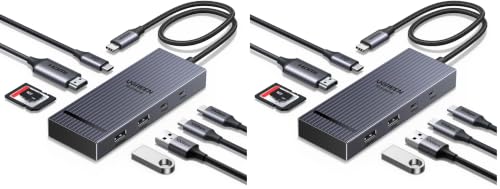
UGREEN 8-in-1 USB-C Hub 2-Pack
Best for: Users needing dual hubs with 4K@60Hz HDMI
- Host Interface
- USB-C
- Max Resolution
- 4K@60Hz
- Power Delivery
- 85W
- Port Count
- 8
- Video Ports
- HDMI
- Max Data Speed
- 10Gbps
View on Amazon: UGREEN 8-in-1 USB-C Hub 2-Pack Affiliate link
This pack of two UGREEN hubs expands a single USB-C port into eight connections. It includes a 4K@60Hz HDMI output for clear video, 10Gbps data transfer, and 85W pass-through charging. The compact design fits easily into a laptop bag. It suits users who need reliable dual monitors or extra ports for MacBooks and Windows laptops without cluttering their workspace.
Pros
- Includes two hubs for value
- 4K@60Hz HDMI output
- 85W pass-through charging
- 10Gbps data transfer speed
Cons
- Only one HDMI port per hub
- 30cm cable may be short for some desks
- No Ethernet port included
Good fit if
- You need two identical hubs for different locations
- You require 4K@60Hz video output
- You want 85W charging for your laptop
Skip if
- You need built-in Ethernet connectivity
- You require dual HDMI outputs on one device
- You need a longer cable than 30cm
Verdict: UGREEN Revodok Pro 8-in-1 USB-C Hub is a solid choice for users who need reliable 4K@60Hz video and 85W charging across two devices. It fits those who value port expansion and consistent performance for creative or office work.

Anker 8-in-1 USB-C Hub with Ethernet
Best for: Windows users needing three monitors and Ethernet
- Host Interface
- USB-C, USB4, Thunderbolt
- Display Support
- Triple Display
- Max Resolution
- 4K@60Hz
- Power Delivery
- 85W
- Port Count
- 8
- Video Ports
- HDMI, VGA
View on Amazon: Anker 8-in-1 USB-C Hub with Ethernet Affiliate link
This Anker hub offers eight ports, including HDMI, VGA, and Ethernet, for broad connectivity. It supports triple displays with one HDMI port delivering 4K@60Hz resolution. The device handles 5Gbps data transfers and provides 85W power delivery pass-through charging. It connects via USB-C, USB4, or Thunderbolt. This setup suits users who need multiple monitor outputs and reliable wired connections for their laptops.
Pros
- Supports triple display output for increased productivity
- HDMI port delivers 4K@60Hz video clarity
- Includes Ethernet and VGA ports for legacy devices
- Provides 85W power delivery pass-through charging
- Compatible with USB-C, USB4, and Thunderbolt hosts
Cons
- Not compatible with Linux operating systems
- macOS only supports mirror mode for external displays
- Maximum charging requires a 100W wall charger
Good fit if
- You need to connect three monitors simultaneously
- You require a built-in Ethernet port for stable internet
- You use a Windows laptop with USB-C or Thunderbolt
Skip if
- You use a Linux-based computer
- You need independent extended desktop mode on macOS
- You require 4K@60Hz output on all connected monitors
Verdict: Anker 8-in-1 USB-C Hub with Triple Display fits professionals who need three screens and wired internet on Windows machines. It avoids macOS extended desktop users and Linux users due to software limitations.

Selore 8-in-1 USB-C Hub
Best for: Single 4K@60Hz display and basic data transfer
- Host Interface
- USB-C
- Max Resolution
- 4K@60Hz
- Power Delivery
- 87W
- Port Count
- 8
- Video Ports
- HDMI, USB-C
- Max Data Speed
- 5Gbps
View on Amazon: Selore 8-in-1 USB-C Hub Affiliate link
This 8-in-1 USB-C hub offers a single HDMI port capable of 4K resolution at 60Hz. It includes two USB 3.0 ports for peripherals and one USB-C data port. The device supports 100W power delivery input, delivering up to 87W to your laptop. It also features microSD and TF card readers. This compact adapter suits users needing basic video extension and data transfer without dual monitor support.
Pros
- HDMI port supports 4K@60Hz output for clear video
- 100W PD input provides up to 87W power to host
- Includes two USB 3.0 ports for 5Gbps data transfer
- Built-in microSD and TF card reader slots
Cons
- Only one video output port limits multi-monitor setups
- Power delivery output is capped at 87W, not 100W
- Does not support Apple USB SuperDrive
Good fit if
- You need a single external display at 4K@60Hz
- You require fast data transfer for USB 3.0 devices
- You want to charge your laptop while using the hub
Skip if
- You need to connect two external monitors simultaneously
- You require Gigabit Ethernet connectivity
- You need to use an Apple USB SuperDrive
Verdict: Selore 8-in-1 USB-C Hub 4K@60Hz works well for users who need one high-resolution display and basic peripheral connectivity. It does not fit those requiring dual monitor setups or Ethernet ports.

Anker PowerExpand 8-in-1 Dual HDMI USB-C Hub
Best for: Dual 4K monitor setups with Ethernet
- Host Interface
- USB-C
- Display Support
- Dual
- Max Resolution
- 4K @ 60Hz
- Power Delivery
- 85W
- Port Count
- 8
- Video Ports
- HDMI
View on Amazon: Anker PowerExpand 8-in-1 Dual HDMI USB-C Hub Affiliate link
The Anker 8-in-1 USB-C Hub supports dual 4K displays via two HDMI ports. It delivers 4K@60Hz on a single monitor or 4K@30Hz on two screens. The hub includes an Ethernet port, SD card reader, and two USB-A ports. It supports up to 85W pass-through charging. This setup suits users needing a stable dual-monitor workspace from one USB-C connection.
Pros
- Dual HDMI ports for two displays
- 4K@60Hz support on single monitor
- Built-in Gigabit Ethernet port
- 85W Power Delivery pass-through
- SD and microSD card readers
Cons
- Dual displays limited to 4K@30Hz
- Not compatible with Linux systems
- macOS mirrors both external screens
Good fit if
- You need two external monitors
- You require wired Ethernet connectivity
- You use Windows or ChromeOS
Skip if
- You use a Linux-based laptop
- You need independent displays on macOS
- You require 4K@60Hz on two screens
Verdict: Anker 8-in-1 Dual HDMI USB-C Hub offers reliable dual-monitor support with Ethernet for Windows and ChromeOS users. It is ideal for desktop replacements but lacks independent display support on macOS.

Acer 5-in-1 4K 60Hz USB-C Hub
Best for: Compact 4K@60Hz video and fast charging
- Host Interface
- USB-C
- Max Resolution
- 4K@60Hz
- Power Delivery
- 90W
- Port Count
- 5
- Video Ports
- HDMI 2.0
- Max Data Speed
- 5Gbps
View on Amazon: Acer 5-in-1 4K 60Hz USB-C Hub Affiliate link
The Acer 5-in-1 USB-C Hub expands a single port into a compact workstation. It delivers 4K@60Hz video output and supports 100W pass-through charging, providing up to 90W to your laptop. Data transfer speeds reach 5Gbps via USB-C 3.0 and USB-A 3.0 ports. This aluminum-built adapter suits users who need reliable connectivity without the bulk of larger docking stations.
Pros
- Supports 4K resolution at 60Hz for smooth visuals
- 100W PD pass-through charging with 90W output
- 5Gbps data transfer speeds on USB-C 3.0 port
- Aluminum shell for improved heat dissipation
Cons
- Only five ports compared to eight-port competitors
- No Ethernet or SD card slots included
- Does not support ultrawide monitors
Good fit if
- You need 4K@60Hz video output from a single cable
- You want a lightweight aluminum hub for travel
- You require 100W pass-through charging capability
Skip if
- You need to connect more than three devices simultaneously
- You require an Ethernet port for wired internet
- You plan to use an ultrawide monitor
Verdict: The Acer 5-in-1 USB-C Hub fits users who prioritize 4K@60Hz video and fast charging in a compact aluminum design. It is a solid choice for those who do not need extra ports like Ethernet or SD card readers.

Selore Dual 4K HDMI USB-C Dock
Best for: Dual 4K display setups with charging
- Host Interface
- USB-C
- Display Support
- Dual
- Max Resolution
- 4K@60Hz
- Power Delivery
- 100W
- Port Count
- 8
- Video Ports
- HDMI
View on Amazon: Selore Dual 4K HDMI USB-C Dock Affiliate link
This Selore docking station connects two external displays via dual HDMI ports, supporting 4K resolution at 60Hz. It includes a 100W Power Delivery port for charging your laptop while in use. The hub also provides two USB-A ports, one USB-C data port, and SD/TF card readers. You get a dedicated button to toggle between mirror and extend modes or activate privacy blackouts. It requires a full-featured USB-C port on your host device.
Pros
- Dual HDMI outputs support 4K@60Hz resolution
- 100W Power Delivery charging pass-through
- Dedicated hardware button for display mode toggling
- Includes SD and MicroSD card slots
Cons
- macOS supports only one external monitor in extend mode
- Requires one-time system authorization on first use
- Lacks an integrated Ethernet port
Good fit if
- You need dual 4K displays for productivity
- You want a single cable for charging and video
- You frequently transfer files from SD cards
Skip if
- You rely on macOS for dual monitor setups
- You need built-in Ethernet connectivity
- Your laptop lacks a full-featured USB-C port
Verdict: Selore 9-in-1 USB-C Docking Station fits users who need dual 4K displays and fast charging through one cable, provided you use Windows or accept single-monitor limits on Mac.

HODO 8-in-1 Triple Display USB-C Dock
Best for: Windows users needing triple 4K displays
- Host Interface
- USB-C
- Display Support
- Triple
- Max Resolution
- 8K@30Hz
- Power Delivery
- 87W
- Port Count
- 8
- Video Ports
- HDMI, USB-C
View on Amazon: HODO 8-in-1 Triple Display USB-C Dock Affiliate link
This HODO docking station supports three independent 4K displays. It features two HDMI ports and one USB-C port for video output. The USB-C host port delivers up to 87W of power delivery to your laptop. Data transfer speeds reach 10Gbps across the USB-A ports. A gigabit Ethernet port provides stable wired networking. macOS users should note that this device only mirrors displays on Apple systems rather than extending them.
Pros
- Supports triple 4K display expansion
- 87W USB-C power delivery output
- 10Gbps data transfer on USB ports
- Gigabit Ethernet for stable internet
- Single port handles video and data
Cons
- macOS only supports mirrored displays
- Power cord not included
- Requires 65W+ laptop charger for PD
Good fit if
- You need three external monitors
- You require 87W laptop charging
- You want wired gigabit networking
Skip if
- You use a macOS laptop
- You need included power cables
- You prefer wireless connectivity only
Verdict: HODO 8-in-1 Triple 4K USB-C Dock fits users who need three screens and fast charging. It is a solid choice for Windows laptops requiring a stable wired connection and high-speed data transfer.
Specifications side by side
| Spec | UGREEN 8-in-1 USB-C Hub 2-Pack | Anker 8-in-1 USB-C Hub with Ethernet | Selore 8-in-1 USB-C Hub | Anker PowerExpand 8-in-1 Dual HDMI USB-C Hub | Acer 5-in-1 4K 60Hz USB-C Hub | Selore Dual 4K HDMI USB-C Dock | HODO 8-in-1 Triple Display USB-C Dock |
|---|---|---|---|---|---|---|---|
| Host Interface | USB-C | USB-C, USB4, Thunderbolt | USB-C | USB-C | USB-C | USB-C | USB-C |
| Display Support | not stated | Triple Display | not stated | Dual | not stated | Dual | Triple |
| Max Resolution | 4K@60Hz | 4K@60Hz | 4K@60Hz | 4K @ 60Hz | 4K@60Hz | 4K@60Hz | 8K@30Hz |
| Power Delivery | 85W | 85W | 87W | 85W | 90W | 100W | 87W |
| Port Count | 8 | 8 | 8 | 8 | 5 | 8 | 8 |
| Video Ports | HDMI | HDMI, VGA | HDMI, USB-C | HDMI | HDMI 2.0 | HDMI | HDMI, USB-C |
| Max Data Speed | 10Gbps | 10Gbps | 5Gbps | not stated | 5Gbps | 5Gbps | 10Gbps |
| Ethernet Speed | not stated | not stated | not stated | 1Gbps | not stated | not stated | 1Gbps |
| Resolution | 4K UHD | 4K UHD | 4K UHD | 4K UHD | 4K UHD | 4K UHD | 4K UHD |
| Connectivity | USB-C, HDMI | USB-C, HDMI, Ethernet, USB-A, VGA | USB-C, HDMI | USB-C, HDMI, Ethernet | USB-C, HDMI, USB-A | USB-C, HDMI, USB-A | USB-C, HDMI, Ethernet |
| Refresh Rate | 60Hz | 60Hz | 60Hz | not stated | 60Hz | 60Hz | not stated |
| Features | not stated | Card Reader | not stated | Card Reader | not stated | not stated | not stated |
| Dimensions | 4.69 × 1.77 × 0.63 inches | 4.5 × 2.1 × 0.7 inches | not stated | 4.65 × 2.01 × 0.69 inches | not stated | 4.5 × 2.1 × 0.7 inches | 4.5 × 2.5 × 0.6 inches |
| Weight | 5.64 ounces | 3.56 ounces | not stated | 3.2 ounces | not stated | 3.39 ounces | 2.82 ounces |
| Size | USB C (Pack of 2) | 8-in-1 USB-C Hub | Portable | 8-in-1 USB C Hub | not stated | 9-in-1 | 8-in-1 |
| Color | black | Gray | Dark Grey | Gray | Grey | Grey | Space Gray |
| Model | 75027 | A8379 | USB C Hub HDMI Adapter | A83800A1 | ODK5U0 | SEUC0425 | not stated |
If you need external storage, compare ugreen USB c m 2 nvme SSD alternatives for your desk setup.
Frequently asked questions
Which USB-C hub is best for Windows triple monitors?
The Anker 8-in-1 USB-C Hub with Ethernet supports three displays and includes an RJ-45 port for wired internet. It is designed for Windows machines and avoids macOS extended desktop limitations. The HODO 8-in-1 Triple Display Dock is another option that provides three 4K screens and fast charging for stable workflows.
Does the UGREEN 2-Pack work with dual monitors?
The UGREEN 8-in-1 USB-C Hub 2-Pack provides two separate hubs, each with a single HDMI output. It is best for users needing two devices to display 4K@60Hz video independently. It does not support a single dual-monitor setup from one hub. You get two complete ports instead of one multi-display solution.
What is the best budget USB-C hub for 4K video?
The Selore 8-in-1 USB-C Hub is a solid budget choice for single 4K@60Hz displays. It handles basic data transfer and peripheral connectivity well. It does not support dual monitors or Ethernet. You get essential ports in a portable, dark grey design without the cost of premium features like wired networking.
Is there a USB-C hub with VGA output?
Yes, the Anker 8-in-1 USB-C Hub with Ethernet includes a VGA port alongside HDMI. This allows connection to older displays or projectors. It also offers an RJ-45 Ethernet jack. This combination is useful for Windows users who need legacy video support and reliable wired internet in one compact gray device.
Which hub supports dual 4K monitors with Ethernet?
The Anker PowerExpand 8-in-1 Dual HDMI USB-C Hub supports two 4K monitors and includes an Ethernet port. It is ideal for desktop replacements on Windows and ChromeOS. It lacks independent display support on macOS. You get reliable dual-monitor performance and wired connectivity in a compact gray aluminum design.
Can I use a USB-C hub for dual 4K displays on Mac?
Most hubs in this list, like the UGREEN 2-Pack and Anker Dual HDMI, do not support independent dual monitors on macOS. The Selore 9-in-1 Dock supports dual 4K displays but requires Windows for full functionality or accepts single-monitor limits on Mac. You must check your operating system compatibility before buying.
What is the smallest USB-C hub for 4K video?
The Acer 5-in-1 4K 60Hz USB-C Hub is a compact option in an aluminum design. It provides 4K@60Hz video and fast charging without extra ports like Ethernet or SD readers. It is ideal for users who prioritize portability and essential connectivity. You get a sleek, small form factor for basic needs.
Which hub offers 100W charging for laptops?
The Selore 9-in-1 USB-C Docking Station supports 100W power delivery for fast laptop charging. It also provides dual 4K HDMI outputs and USB-A ports. This is suitable for users who need high-power charging and multiple displays through one cable. You get comprehensive connectivity and strong power support in a grey dock.