MAGICRAVEN One Cable Plug & Alternatives: 6 Similar Picks Compared
As an Amazon Associate we earn from qualifying purchases. Links on this page are affiliate links.
The MAGICRAVEN 14-Inch Dual Laptop Screen Extender offers a compact dual-display solution for mobile professionals. You might explore magicraven one cable plug alternatives if you need a larger single screen or a different panel technology. This guide compares 6 similar picks to help you find the right setup.
We selected these alternatives because their specifications overlap with the original product. The MAGICRAVEN features a 14-inch 1080p IPS panel with 100% sRGB color gamut and weighs 3.2 pounds. It connects via USB-C and includes a protective carrying case. Buyers may prefer other options for higher resolution, faster refresh rates, or OLED contrast. The list includes 4K, 2K, and OLED displays from brands like KYY, Corsair, and AOC. Each option addresses specific needs such as gaming speed or color accuracy. Review the specs to see which monitor fits your workflow.
How these alternatives compare
KYY 15.6-Inch 4K UHD Portable Monitor
The KYY 15.6-inch model swaps the dual-screen layout for a single, larger canvas. You gain 4K UHD resolution and a 1000:1 contrast ratio on an aluminum chassis that weighs only 1.7 pounds. This is 1.5 pounds lighter than the MAGICRAVEN. You lose the ability to run two extended displays simultaneously. The KYY is VESA mountable, offering flexibility the MAGICRAVEN does not list. Choose this if you prioritize sharp text and color accuracy over multi-monitor productivity. It fits professionals who need a high-resolution single screen for travel without the bulk of a dual setup.
Corsair XENEON Edge 14.5" Touchscreen Monitor
The Corsair XENEON Edge targets PC builders rather than general mobile workers. It features a 2K resolution and a touchscreen interface, which the MAGICRAVEN lacks. The translucent smoke design and internal mounting options make it niche. It weighs 1.57 pounds, significantly lighter than the MAGICRAVEN’s 3.2 pounds. You connect via USB-C and HDMI. This display is not for standard laptop setups. Pick this if you want widget visibility inside a PC case. It gives up portability and standard laptop compatibility for specialized integration. The MAGICRAVEN remains the better choice for traditional mobile office environments.
SANSUI 27-Inch 1440p 260Hz Fast IPS Monitor
The SANSUI 27-inch monitor is a stationary display, not a portable one. It offers 1440p resolution and a 260Hz refresh rate on a Fast IPS panel. It weighs 11.2 pounds, making it unsuitable for travel. You connect via DisplayPort. This monitor sacrifices portability for high-speed gaming performance and large screen real estate. It is ideal for desk-bound users who need color fidelity and speed. The MAGICRAVEN is designed for commutes and mobile workstations. Choose the SANSUI only if you never plan to move the screen. It provides superior motion handling for gaming but lacks the lightweight, plug-and-play nature of portable options.
AOC 16-Inch OLED Portable Monitor
The AOC 16-inch OLED monitor delivers exceptional contrast and color accuracy. It uses an OLED panel, which differs from the MAGICRAVEN’s IPS technology. The 16-inch size offers more vertical space than the 14-inch MAGICRAVEN. It weighs less than the dual setup but is a single screen. You gain deep blacks and vibrant colors for professional visual work. You lose the dual-display productivity boost. This model suits users who need a slim, high-quality secondary display for travel or compact desks. It is a premium choice for color-critical tasks. The MAGICRAVEN is better for multitasking. Pick the AOC if image quality matters more than screen count.
Lenovo L16 16-Inch WUXGA Portable Monitor
The Lenovo L16 is a lightweight 16-inch WUXGA portable monitor. It uses an IPS panel with a 60Hz refresh rate. It weighs 2.1 pounds, which is 1.1 pounds lighter than the MAGICRAVEN. You get a larger single screen with higher resolution than the MAGICRAVEN’s 1080p. It focuses on power delivery and portability. You lose the dual-screen capability and the included carrying case. This model fits professionals who prioritize a reliable, lightweight screen for work or study. It is a solid choice for single-screen mobile productivity. The MAGICRAVEN is better for users who need to run multiple applications side-by-side. Choose the Lenovo for simplicity and weight savings.
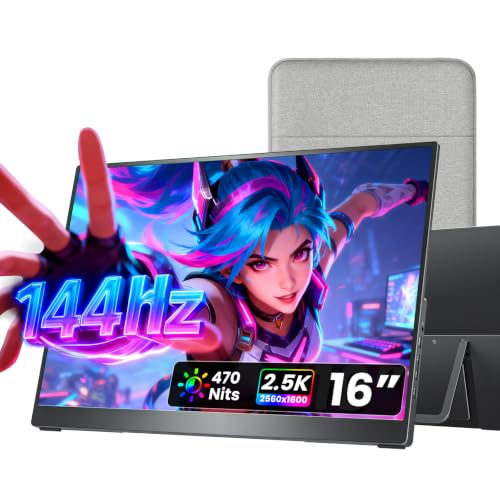
Cocopar 16-Inch 2.5K 144Hz Portable Monitor
The Cocopar 16-inch monitor offers a 2.5K resolution and a 144Hz refresh rate. It uses a metal chassis and weighs only 1.5 pounds. It includes built-in speakers, a kickstand, and VESA mountability. You connect via USB-C and HDMI. This model provides smooth motion and sharp visuals, surpassing the MAGICRAVEN’s 1080p and 60Hz specs. You lose the dual-screen layout. It is ideal for gaming and travel with a single cable. Choose this if you prioritize smooth motion and a compact footprint over multi-monitor setups. The MAGICRAVEN is better for productivity. The Cocopar is the superior choice for users who want a high-performance single screen for gaming or media.
Quick picks
Our 7 picks

MAGICRAVEN 14-Inch Dual Laptop Screen Extender
Best for: Windows multi-screen mobile work
- Screen Size
- 14"
- Resolution
- 1080P FHD
- Panel Type
- IPS
- Connectivity
- USB-C
- Color Gamut
- 100% sRGB
- Weight
- 3.2 lbs
View on Amazon: MAGICRAVEN 14-Inch Dual Laptop Screen Extender
The MAGICRAVEN 14-Inch Dual Screen Extender adds two displays to your notebook using a folding frame. It features 1080p IPS panels with 300 nits of brightness and 100% sRGB coverage. You connect Windows machines with a single USB-C cable for quick setup. It suits mobile professionals and programmers who need multi-screen workspaces on laptops up to 16.1 inches.
Pros
- Single USB-C cable connection for Windows laptops
- 1080p IPS panels with 100% sRGB color gamut and 300 nits brightness
- Screens fold with a 250-degree rotation angle
- Includes a padded carrying case fitting laptops up to 16.1 inches
Cons
- Base Apple M1, M2, M3, and M4 chips support only one extended display
- Requires two cables for macOS connections
Good fit if
- You use a 13.3-inch to 16.1-inch Windows laptop and want a single-cable dual-display setup.
- You travel often and need an included carrying case for your screens and laptop.
Skip if
- You use a MacBook with a base M1, M2, M3, or M4 chip and need two extended screens.
- You have a laptop with a screen larger than 16.1 inches.
Verdict: MAGICRAVEN 14-Inch Dual Screen Extender delivers a portable multi-monitor layout for Windows users working on 13.3-inch to 16.1-inch laptops. It gives traveling coders and analysts dual 1080p IPS displays in a single 3.2-pound package.

KYY 15.6-Inch 4K UHD Portable Monitor
Best for: Sharp 4K visuals in a lightweight aluminum chassis
- Screen Size
- 15.6"
- Resolution
- 3840 x 2160
- Refresh Rate
- 60Hz
- Panel Type
- IPS
- Color Gamut
- 100% sRGB
- Aspect Ratio
- 16:9
The KYY 15.6-inch portable monitor delivers true 4K UHD resolution (3840 x 2160) on an S-grade IPS panel. It covers 100% sRGB color gamut with 400 nits brightness for vivid visuals. Weighing just 1.5 pounds, it fits easily in your bag. The aluminum alloy back aids heat dissipation and includes VESA mount holes. This screen suits users needing high pixel density for detailed work or media consumption on the go.
Pros
- True 4K UHD resolution (3840 x 2160)
- 100% sRGB color gamut coverage
- Lightweight 1.5 lb aluminum alloy body
- VESA mountable with 75x75 mm holes
Cons
- 60Hz refresh rate limits motion smoothness
- No touch screen capability
- Single USB-C connection required for power and video
Good fit if
- You need high pixel density for text or photo editing
- You want a lightweight screen for travel
- You plan to mount it on a VESA arm
Skip if
- You require a high refresh rate for fast gaming
- You need touch input for navigation
- You want a larger than 15.6-inch display
Verdict: KYY 15.6" 4K Portable Monitor offers sharp 4K visuals in a light aluminum chassis. It fits professionals who prioritize color accuracy and resolution over motion speed.

Corsair XENEON Edge 14.5" Touchscreen Monitor
Best for: PC case internal mounting and widgets
- Screen Size
- 14.5"
- Resolution
- 2560x720
- Refresh Rate
- 60Hz
- Panel Type
- LCD
- Connectivity
- HDMI, USB-C
- Weight
- 1.57 pounds
View on Amazon: Corsair XENEON Edge 14.5" Touchscreen Monitor
This is a 14.5-inch LCD portable monitor with a 2560x720 resolution and 60Hz refresh rate. It features a five-point multi-touch capacitive screen and connects via HDMI or USB-C. The unit weighs 1.57 pounds and includes magnets for case mounting. It suits users who want a secondary display for system metrics or widgets inside a PC case or as a standalone screen.
Pros
- Five-point multi-touch capacitive touchscreen
- Native 2560x720 resolution
- Connects via HDMI and USB-C
- Includes magnets for internal case mounting
Cons
- Narrow 2560x720 resolution limits vertical content
- 14.5-inch size is smaller than 16-inch competitors
- 60Hz refresh rate is standard, not high-speed
Good fit if
- You want to mount a screen inside your PC case
- You need a touchscreen for quick widget interaction
- You prefer a compact 14.5-inch display size
Skip if
- You require a standard widescreen aspect ratio
- You need a 16-inch or larger screen
- You want a high refresh rate for gaming
Verdict: Corsair XENEON Edge 14.5" Touchscreen is a niche display for PC builders who want to integrate a touchscreen into their case. It fits users who prioritize internal mounting and widget visibility over standard screen proportions.

SANSUI 27-Inch 1440p 260Hz Fast IPS Monitor
Best for: stationary gaming and color work
- Screen Size
- 27"
- Resolution
- 2560 x 1440P
- Refresh Rate
- 260Hz
- Panel Type
- Fast IPS
- Connectivity
- 2 x Display Port 1.4, 2 x HDMI 2.0
- Color Gamut
- DCI-P3 98%, sRGB 130%
This SANSUI monitor offers a 27-inch Fast IPS panel with 2560 x 1440 resolution and a 260Hz refresh rate. It covers 98% of the DCI-P3 color gamut and 130% of sRGB. The display includes FreeSync Premium and 1ms MPRT response time. It connects via two DisplayPort 1.4 and two HDMI 2.0 ports. This setup suits gamers needing high refresh rates and color accuracy.
Pros
- 260Hz refresh rate for smooth motion
- 2560 x 1440 WQHD resolution
- 98% DCI-P3 color coverage
- Fast IPS panel with 1ms MPRT response
Cons
- 11.2 pounds weight reduces portability
- Requires external power adapter
- No built-in speakers listed
Good fit if
- You need high refresh rates for gaming
- You want accurate color reproduction
- You prefer a larger 27-inch screen
Skip if
- You need a portable travel monitor
- You require built-in speakers
- You want a 4K resolution display
Verdict: SANSUI 27-inch 1440p 260Hz Monitor delivers high performance for stationary gaming setups. It fits users prioritizing speed and color fidelity over portability.

AOC 16-Inch OLED Portable Monitor
Best for: Color-accurate portable displays
- Screen Size
- 16"
- Resolution
- 1920x1200
- Refresh Rate
- 60Hz
- Panel Type
- OLED
- Connectivity
- USB-C, Mini HDMI
- Color Gamut
- 95% DCI-P3
The AOC 16T40D is a 16-inch portable monitor featuring an OLED panel with WUXGA 1920x1200 resolution. It offers a 16:10 aspect ratio and 95% DCI-P3 color gamut for vivid visuals. The ultra-slim design weighs 1.12 lb and includes dual USB-C ports and Mini HDMI connectivity. A built-in kickstand and VESA mount support flexible setups for travel or desk use.
Pros
- OLED panel with 95% DCI-P3 color gamut
- WUXGA 1920x1200 resolution with 16:10 aspect ratio
- Ultra-slim 1.12 lb design with built-in kickstand
- Dual USB-C and Mini HDMI connectivity
Cons
- Mini HDMI port instead of standard HDMI
- 1080p-class resolution on a 16-inch screen
- No mention of USB-C power delivery pass-through
Good fit if
- You prioritize color accuracy and contrast for creative work
- You need a lightweight screen for frequent travel
- You want a 16:10 aspect ratio for productivity
Skip if
- You require a standard HDMI port
- You need 4K resolution for detailed text
- You want a larger 27-inch or ultrawide display
Verdict: AOC 16-Inch OLED Portable Monitor delivers exceptional contrast and color for professionals who value portability. It suits users who need a slim, high-quality secondary display for travel or compact desk setups.

Lenovo L16 16-Inch WUXGA Portable Monitor
Best for: Lightweight mobile productivity and power delivery
- Screen Size
- 16"
- Resolution
- WUXGA
- Refresh Rate
- 60Hz
- Panel Type
- IPS
- Connectivity
- Dual USB-C
- Aspect Ratio
- 16:10
The Lenovo L16 is a 16-inch portable monitor featuring a WUXGA IPS display and a 60Hz refresh rate. It weighs 2.1 lbs and includes dual USB-C ports with 65W power pass-through. The stand offers 90-degree tilt and portrait mode rotation. It targets users needing a lightweight, clear screen for multitasking on the go.
Pros
- 16-inch WUXGA IPS display with 300 nits brightness
- Dual USB-C ports support 65W power pass-through
- Lightweight 2.1 lbs build with 90-degree tilt stand
- Supports portrait and landscape orientation switching
Cons
- 60Hz refresh rate limits smoothness for fast gaming
- No built-in speakers or HDMI port listed
- 16:10 aspect ratio may not fill 16:9 video content
Good fit if
- You need a lightweight secondary screen for travel
- You want to charge your laptop while using the monitor
- You prefer vertical layouts for coding or documents
Skip if
- You require a high refresh rate for gaming
- You need built-in speakers for audio
- You want a 16:9 widescreen format
Verdict: Lenovo L16 16-inch Portable Monitor is a solid choice for professionals who prioritize portability and power delivery over high refresh rates. It fits users who need a reliable, lightweight screen for work or study.
Cocopar 16-Inch 2.5K 144Hz Portable Monitor
Best for: Gaming and travel with a single USB-C cable
- Screen Size
- 16"
- Resolution
- 2560x1600
- Refresh Rate
- 144Hz
- Connectivity
- USB-C, HDMI
- Color Gamut
- 110% sRGB
- Aspect Ratio
- 16:10
This Cocopar portable monitor features a 16-inch 2.5K display with a 144Hz refresh rate. It uses a single USB-C cable for plug-and-play connectivity. The unit weighs 1.5 pounds and includes a metal adjustable stand. You get 110% sRGB color coverage and built-in speakers. It suits travelers and gamers needing a high-refresh secondary screen.
Pros
- 144Hz refresh rate for smooth motion
- 2560x1600 2.5K resolution
- 1.5 lb lightweight design
- Single USB-C plug-and-play connection
- Metal adjustable kickstand included
Cons
- 16-inch size is larger than 14-inch competitors
- 1.5W built-in speakers are low power
- Requires DP Alt Mode or Thunderbolt support
Good fit if
- You need a high refresh rate for gaming
- You travel frequently and want a light screen
- You want a single cable setup for your laptop
Skip if
- You prefer a smaller 14-inch form factor
- You need 4K resolution for detailed work
- Your device lacks USB-C DisplayPort support
Verdict: Cocopar 16" 2.5K 144Hz Portable Monitor offers a sharp 2.5K panel with a 144Hz refresh rate in a lightweight metal chassis. It fits users who prioritize smooth motion and portability over a compact 14-inch footprint.
Specifications side by side
| Spec | MAGICRAVEN 14-Inch Dual Laptop Screen Extender | KYY 15.6-Inch 4K UHD Portable Monitor | Corsair XENEON Edge 14.5" Touchscreen Monitor | SANSUI 27-Inch 1440p 260Hz Fast IPS Monitor | AOC 16-Inch OLED Portable Monitor | Lenovo L16 16-Inch WUXGA Portable Monitor | Cocopar 16-Inch 2.5K 144Hz Portable Monitor |
|---|---|---|---|---|---|---|---|
| Screen Size | 14" | 15.6" | 14.5" | 27" | 16" | 16" | 16" |
| Resolution | 1080P FHD | 3840 x 2160 | 2560x720 | 2560 x 1440P | 1920x1200 | WUXGA | 2560x1600 |
| Refresh Rate | not specified | 60Hz | 60Hz | 260Hz | 60Hz | 60Hz | 144Hz |
| Panel Type | IPS | IPS | LCD | Fast IPS | OLED | IPS | not specified |
| Connectivity | USB-C | not specified | HDMI, USB-C | 2 x Display Port 1.4, 2 x HDMI 2.0 | USB-C, Mini HDMI | Dual USB-C | USB-C, HDMI |
| Color Gamut | 100% sRGB | 100% sRGB | not specified | DCI-P3 98%, sRGB 130% | 95% DCI-P3 | not specified | 110% sRGB |
| Aspect Ratio | not specified | 16:9 | not specified | not specified | 16:10 | 16:10 | 16:10 |
| Weight | 3.2 lbs | 1.5 lb | 1.57 pounds | 11.2 pounds | 1.12 lb | 2.1 lbs | 1.5 lbs |
| Features | Built-in Speakers | VESA Mountable, HDR | Touchscreen | not specified | Built-in Speakers, VESA Mountable, Kickstand | not specified | Built-in Speakers, VESA Mountable, Kickstand |
| Use | Travel, Office | Gaming | not specified | Gaming | not specified | not specified | Travel |
| Size | 14" Dual with Bag | 15.6 Inches | not specified | 27.01 | 16 inch OLED | L16 | 16 |
| Recommended Use | Home | not specified | not specified | not specified | not specified | not specified | not specified |
| Dimensions | 10.8 × 7.6 × 0.4 inches | 8.85 × 14.5 × 0.35 inches | 14.6 × 4.72 × 0.87 inches | 5.63 × 27 × 19.3 inches | 0.51 × 9.27 × 13.9 inches | 4.59 × 14.2 × 10.3 inches | 0.3 × 14.4 × 8.8 inches |
| Color | Black | Black | Translucent Smoke | Black | Black | Luna Grey | black |
| Model | not specified | K5 | CC-9011357-WW | ESA-G27F6Q PRO | 16T40D | 68F4UAC1US | Y16QLH |
For workstation break areas, you can review shardor one touch coffee grinder alternatives using their listed specifications.
Frequently asked questions
Does the KYY 15.6-inch monitor support VESA mounting?
Yes, the KYY 15.6-inch 4K UHD Portable Monitor features VESA mountable design. This allows you to attach it to compatible arms or stands. The aluminum chassis weighs 1.7 pounds, making it a lightweight option for professionals who prioritize resolution and portability.
Is the Corsair XENEON Edge suitable for standard laptop setups?
The Corsair XENEON Edge 14.5-inch Touchscreen Monitor is designed for PC case internal mounting rather than standard laptop use. It features a translucent smoke color and weighs 1.57 pounds. You should consider this niche display if you prioritize internal mounting and widget visibility over standard screen proportions.
Can the SANSUI 27-inch monitor be used for portable work?
No, the SANSUI 27-inch 1440p 260Hz Fast IPS Monitor is built for stationary gaming setups. It weighs 11.2 pounds and measures 27 inches wide. You should choose this model only if you prioritize speed and color fidelity over portability for a fixed desk environment.
Does the AOC 16-inch OLED monitor have a high refresh rate?
The provided specifications for the AOC 16-inch OLED Portable Monitor do not list a refresh rate. It focuses on delivering exceptional contrast and color for professionals. The slim design weighs 0.51 inches thick, making it suitable for travel or compact desk setups where color accuracy is key.
Is the Lenovo L16 portable monitor good for gaming?
The Lenovo L16 16-inch WUXGA Portable Monitor has a 60Hz refresh rate, which is standard for productivity rather than gaming. It weighs 2.1 pounds and features an IPS panel. You should select this model if you prioritize portability and power delivery over high refresh rates for work or study.
What connectivity options does the Cocopar 16-inch monitor offer?
The Cocopar 16-inch 2.5K 144Hz Portable Monitor offers USB-C and HDMI connectivity. It also includes built-in speakers, VESA mountable design, and a kickstand. The lightweight metal chassis weighs 1.5 pounds, fitting users who prioritize smooth motion and portability for travel or gaming.
How does the MAGICRAVEN dual screen compare in weight to single screens?
The MAGICRAVEN 14-Inch Dual Laptop Screen Extender weighs 3.2 pounds. This is heavier than single-screen alternatives like the KYY 15.6-inch model, which weighs 1.7 pounds. The dual layout provides two 1080p IPS displays in one package for mobile professionals needing multi-screen workflows on Windows laptops.