Magedok 13.3-Inch 2K OLED Touch Alternatives: 6 Similar Picks Compared
As an Amazon Associate we earn from qualifying purchases. Links on this page are affiliate links.
If you are looking for magedok OLED portable touch monitor alternatives, this guide compares 6 similar picks based on published specifications. The original Magedok model offers a 13.3-inch 2K OLED panel with 100% DCI-P3 color accuracy and 10-point capacitive touch. Its slim 0.26-inch metal frame and 1.76-pound weight make it highly portable for travelers. The device includes both USB-C and Mini HDMI ports for versatile connectivity.
You might want a different option if you need a larger screen, higher refresh rate, or a built-in battery. Some competitors offer 120Hz or 240Hz panels for smoother motion in gaming. Others provide 4K resolution for color-critical editing tasks. These alternatives were chosen because their specs overlap with the original, ensuring they serve similar use cases. Each pick addresses specific needs, such as faster touch interaction or desktop gaming immersion. This list helps you find the right portable display by comparing key attributes like panel type, resolution, and weight.
Our top pick: Magedok 13.3-Inch 2K OLED Touch Monitor.
Comparing similar OLED monitors
JUNEBOX 16" 2K 120Hz OLED Touchscreen Monitor
The JUNEBOX 16-inch model steps up to a larger display with a 120Hz refresh rate, offering smoother motion than the Magedok. It retains the OLED panel type and touch functionality, making it suitable for fast-paced interaction. However, the larger 16-inch screen means it is less compact for tight backpacks. You gain a higher refresh rate for gaming or scrolling but lose the extreme portability of the smaller 13.3-inch form factor. This pick suits users who prioritize screen real estate and speed over minimal weight.
Prystivue 16-Inch 120Hz OLED Monitor
The Prystivue 16-inch monitor also features a 120Hz OLED panel, delivering smooth motion for gaming and media. Like the Magedok, it uses an OLED panel for deep contrast. The key difference is the lack of touch capability and the larger 16-inch size. It includes built-in speakers and a kickstand, adding convenience for desktop or lap use. You trade touch input and compactness for a bigger viewing area and audio output. This option fits users who want high refresh rates and multimedia features without needing touch control.
Upperizon 16-Inch 240Hz 2.5K Portable Monitor
The Upperizon 16-inch model offers a significantly higher 240Hz refresh rate, ideal for competitive gaming. It features a 2K resolution and a 16-inch size, which is larger than the Magedok. Unlike the Magedok, this model does not list touch functionality or an OLED panel in its attributes, suggesting a different display technology. It includes HDMI connectivity and VESA mount compatibility. You gain extreme speed and versatile mounting options but lose the OLED contrast and touch interface. This pick is best for gamers prioritizing frame rate over color accuracy and touch interaction.
KTC 32-Inch 240Hz Curved Gaming Monitor
The KTC 32-inch curved monitor is a desktop-focused device, not a portable touch alternative. It features a 240Hz refresh rate and a 32-inch curved screen for immersion. It lacks the portability, touch capability, and compact size of the Magedok. The weight and dimensions make it unsuitable for travel or laptop pairing. You gain a large, immersive gaming display but lose all mobility and touch functionality. This model fits users who want a high-speed desktop monitor and do not need a secondary portable screen for mobile setups.
Wixzet 14-Inch OLED Monitor with Battery
The Wixzet 14-inch OLED monitor includes a built-in battery, offering power independence that the Magedok lacks. It features an OLED panel for vivid contrast but does not list touch functionality. The 14-inch size is slightly larger than the Magedok but still portable. You gain freedom from external power sources and the convenience of clipping to a laptop, but you lose touch input. This pick suits users who prioritize OLED contrast and battery life over touch interaction and the smallest possible footprint.
UPERFECT 13.3-Inch 4K OLED Monitor
The UPERFECT 13.3-inch model offers a 4K UHD resolution, providing significantly higher pixel density than the Magedok's 2K panel. It retains the OLED panel type for excellent color accuracy and contrast. However, it does not include touch functionality. The weight is lighter at 1 pound, making it highly portable. You gain sharper visuals for color-critical editing and a lighter package, but you lose touch control. This option fits users who prioritize maximum resolution and color precision for professional work over interactive touch features.
Quick picks
Our 7 picks
Magedok 13.3-Inch 2K OLED Touch Monitor
Best for: travelers needing a lightweight OLED touch screen
- Screen Size
- 13.3"
- Resolution
- 2K QHD
- Panel Type
- OLED
- Connectivity
- USB-C, Mini-HDMI
- Color Gamut
- 100% DCI-P3
- Weight
- 1.76 lbs
View on Amazon: Magedok 13.3-Inch 2K OLED Touch Monitor Affiliate link
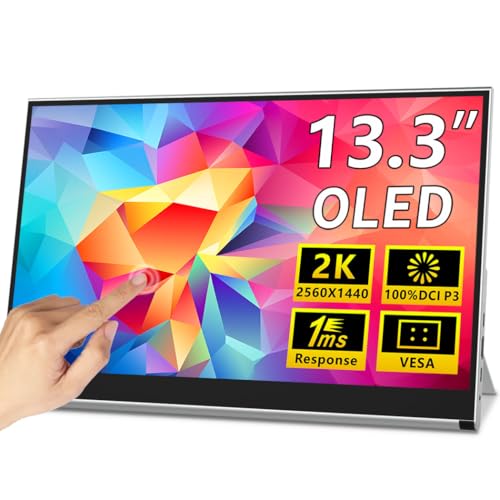
The Magedok X12 is a 13.3-inch portable monitor with a 2K OLED display and 10-point capacitive touch. It covers 100% DCI-P3 color and weighs 1.76 lbs. You get two USB-C ports and one Mini-HDMI for connectivity. The slim metal frame fits in backpacks. It suits travelers needing a sharp, responsive second screen for laptops or consoles.
Pros
- 13.3-inch 2K QHD OLED panel with 100% DCI-P3 color
- 10-point capacitive touch support for Windows and Android
- Lightweight 1.76 lbs build with slim 0.26-inch metal frame
- VESA mount compatible with integrated adjustable kickstand
Cons
- Uses Mini-HDMI instead of standard HDMI
- Requires Thunderbolt 3/4 or DisplayPort Alt Mode for single-cable video and power
- 13.3-inch screen is smaller than the 16-inch OLED alternatives on this list
Good fit if
- You need touch input for navigation or drawing
- You prioritize high contrast and color accuracy for creative work
- You want a lightweight screen under 2 lbs for travel
Skip if
- You require a standard HDMI port for easy plug-and-play
- You want a larger display for immersive gaming
- You need a monitor with built-in speakers
Verdict: Magedok 13.3" 2K OLED Touch Portable Monitor delivers sharp OLED visuals and touch control in a lightweight package. It fits users who need a compact, high-color-accuracy secondary display for creative tasks or travel.

JUNEBOX 16" 2K 120Hz OLED Touchscreen Monitor
Best for: fast touch interaction and vivid OLED color
- Screen Size
- 16"
- Resolution
- 2048×1280
- Refresh Rate
- 120Hz
- Panel Type
- OLED
- Connectivity
- USB-C, Mini HDMI
- Color Gamut
- 100% DCI-P3
View on Amazon: JUNEBOX 16" 2K 120Hz OLED Touchscreen Monitor Affiliate link
The JUNEBOX 16-inch OLED monitor offers 2048×1280 resolution with 120Hz refresh rate. It includes a touchscreen for direct interaction and built-in stereo speakers. Weighing 1.5 lb, it is slim and portable. The display features true blacks and 100% DCI-P3 color. It suits users needing a fast, vivid secondary screen for gaming or creative work on the go.
Pros
- 120Hz refresh rate for smooth motion
- 10-point touchscreen with 0.1ms response
- Built-in dual stereo speakers
- 100% DCI-P3 color gamut
- Lightweight 1.5 lb design
Cons
- Mini HDMI port lacks touch support
- macOS does not support external touch
- Requires external power via USB-C
Good fit if
- You want fast touch response for gaming
- You need vivid OLED colors for editing
- You prefer built-in speakers for calls
Skip if
- You use a Mac and need touch
- You want HDMI touch connectivity
- You need a larger 4K display
Verdict: JUNEBOX 16" 2K OLED Touch Monitor delivers a fast, colorful, and lightweight portable display. It fits users who prioritize speed and touch interaction over broad operating system compatibility.

Prystivue 16-Inch 120Hz OLED Monitor
Best for: OLED contrast and smooth motion gaming
- Screen Size
- 16"
- Resolution
- 2048x1280
- Refresh Rate
- 120Hz
- Panel Type
- OLED
- Connectivity
- USB-C, Mini HDMI
- Color Gamut
- 100% DCI-P3
View on Amazon: Prystivue 16-Inch 120Hz OLED Monitor Affiliate link
The Prystivue 16-inch portable monitor features a 2K OLED panel with 120Hz refresh rate and 500 nits brightness. It offers 100% DCI-P3 color coverage and 100000:1 contrast for vivid visuals. The 8:5 aspect ratio provides extra vertical space for multitasking. It includes built-in speakers and a kickstand. This display suits users seeking high contrast and smooth motion for media or gaming on the go.
Pros
- 16-inch OLED panel with 100000:1 contrast ratio
- 120Hz refresh rate with 0.1ms response time
- 500 nits peak brightness for bright environments
- Built-in stereo speakers and foldable kickstand
Cons
- 2048x1280 resolution is lower than 2K QHD
- Mini HDMI port requires adapter for standard HDMI
- 1.76 pounds weight is heavier than smaller models
Good fit if
- You want OLED contrast and deep blacks
- You need 120Hz smooth motion for gaming
- You use the monitor in bright indoor spaces
Skip if
- You require standard HDMI connectivity without adapters
- You prefer a lighter monitor under 1.5 pounds
- You need 4K resolution for detailed work
Verdict: Prystivue 16" OLED Portable Monitor delivers vivid OLED contrast and smooth 120Hz performance for gamers and media users who prioritize color depth over maximum pixel density.

Upperizon 16-Inch 240Hz 2.5K Portable Monitor
Best for: High-refresh-rate portable gaming and travel
- Screen Size
- 16"
- Resolution
- 2560x1600
- Refresh Rate
- 240Hz
- Connectivity
- USB-C, HDMI
- Color Gamut
- 145% sRGB
- Aspect Ratio
- 16:10
View on Amazon: Upperizon 16-Inch 240Hz 2.5K Portable Monitor Affiliate link
The Upperizon 16-inch portable monitor delivers 2K QHD resolution with a 240Hz refresh rate. It features a 145% sRGB color gamut and 400 nits brightness. The aluminum chassis includes a built-in kickstand and VESA mount points. Weighing 1.6 lbs, it connects via USB-C or HDMI. This setup suits travelers and gamers needing high-speed visuals on the go.
Pros
- 240Hz refresh rate for smooth motion
- 145% sRGB color gamut for accurate visuals
- Aluminum chassis with adjustable kickstand
- Lightweight 1.6 lb design for travel
Cons
- Requires HDMI 2.1 or USB-C DP 1.4 for 240Hz
- No OLED panel compared to OLED alternatives
- Standard contrast ratio, not infinite like OLED
Good fit if
- You need high refresh rates for gaming
- You want a lightweight aluminum build
- You require 2K resolution on a 16-inch screen
Skip if
- You prioritize OLED contrast and black levels
- You need a 13.3-inch compact size
- Your device lacks USB-C DisplayPort Alt mode
Verdict: Upperizon 16" 2K 240Hz Portable Monitor offers high-speed performance and a premium build for mobile gamers and professionals who value color accuracy and portability.

KTC 32-Inch 240Hz Curved Gaming Monitor
Best for: desktop gaming setups
- Screen Size
- 32"
- Resolution
- 2560×1440
- Refresh Rate
- 240Hz
- Connectivity
- 2 HDMI, 2 DP
- Color Gamut
- 122% sRGB
- Use
- Gaming
View on Amazon: KTC 32-Inch 240Hz Curved Gaming Monitor Affiliate link
This is a large 32-inch curved gaming monitor with a 240Hz refresh rate. It features a 1000R curvature and 2560x1440 resolution. It includes two HDMI and two DP ports for connectivity. This display suits gamers who want high speed and immersion. It is not a portable touch monitor. It requires a desk setup.
Pros
- 240Hz refresh rate for smooth motion
- 1000R curved screen for immersion
- 2560x1440 QHD resolution
- Multiple ports including 2x HDMI and 2x DP
Cons
- Not portable or touch-enabled
- Large 32-inch size requires desk space
- Curved design limits side viewing angles
Good fit if
- You want high refresh rate gaming
- You have a dedicated desk setup
- You prefer curved displays for immersion
Skip if
- You need a portable monitor
- You require touch screen functionality
- You have limited desk space
Verdict: KTC 32-Inch 2K Curved Gaming Monitor fits desktop gamers who prioritize speed and immersion. It does not replace portable touch monitors for mobile use.

Wixzet 14-Inch OLED Monitor with Battery
Best for: Laptop users needing OLED contrast and battery power
- Screen Size
- 14"
- Resolution
- 1200P
- Panel Type
- OLED
- Connectivity
- Type-C, Mini-HDMI
- Aspect Ratio
- 16:10
- Weight
- 1.85 lbs
View on Amazon: Wixzet 14-Inch OLED Monitor with Battery Affiliate link
This Wixzet 14-inch monitor uses an OLED panel for true black contrast and sharp visuals. It includes a built-in 5600mAh battery for up to five hours of cord-free use. The 1200P resolution and 16:10 aspect ratio suit productivity tasks. Its clip-on design attaches to laptops from 13 to 17.3 inches. You get a lightweight, thin display that reduces cable clutter during mobile work.
Pros
- Built-in 5600mAh battery provides 4-5 hours of untethered use
- OLED panel delivers infinite contrast ratio and true black
- Clip-on design attaches securely to 13-17.3 inch laptops
- Supports 180-degree rotation for versatile viewing angles
Cons
- 1200P resolution is lower than the 2K displays in this guide
- No touch screen capability listed in specifications
- Requires external power for non-Type-C devices
Good fit if
- You need a battery to avoid draining your laptop
- You prefer OLED contrast over standard IPS panels
- You want a clip-on mount for your laptop
Skip if
- You require a 2K or higher resolution display
- You need touch screen functionality
- You prefer a larger 16-inch screen size
Verdict: Wixzet 14" OLED Portable Monitor with Battery is ideal for users who prioritize OLED contrast and battery freedom over high resolution. It fits those who clip monitors to laptops for mobile setups.

UPERFECT 13.3-Inch 4K OLED Monitor
Best for: Color-accurate mobile editing
- Screen Size
- 13.3"
- Resolution
- 3840x2160
- Refresh Rate
- 60Hz
- Panel Type
- OLED
- Connectivity
- USB-C, HDMI
- Color Gamut
- 109% DCI-P3
View on Amazon: UPERFECT 13.3-Inch 4K OLED Monitor Affiliate link
This UPERFECT portable display offers 4K UHD resolution on a 13.3-inch OLED panel. It covers 109% DCI-P3 and reaches 500 nits brightness. The aluminum build keeps weight to 1 pound. You get 60Hz refresh and 1ms response. It connects via USB-C or HDMI. This setup suits travelers needing sharp color for editing or media.
Pros
- 3840x2160 4K UHD resolution
- 109% DCI-P3 color gamut
- 500 nits peak brightness
- 1 pound lightweight aluminum body
- USB-C and HDMI connectivity
Cons
- 60Hz refresh rate limits high-speed gaming
- 13.3-inch size is smaller than 16-inch competitors
- No touch screen support
Good fit if
- You need 4K color accuracy for creative work
- You prioritize portability and low weight
- You want OLED contrast and deep blacks
Skip if
- You require a touchscreen interface
- You need high refresh rates for fast gaming
- You want a larger 16-inch display
Verdict: UPERFECT 13.3" 4K OLED Portable Monitor delivers sharp visuals for color-critical tasks. It fits users who value compact weight and high resolution over touch or speed.
Specifications side by side
| Spec | Magedok 13.3-Inch 2K OLED Touch Monitor | JUNEBOX 16" 2K 120Hz OLED Touchscreen Monitor | Prystivue 16-Inch 120Hz OLED Monitor | Upperizon 16-Inch 240Hz 2.5K Portable Monitor | KTC 32-Inch 240Hz Curved Gaming Monitor | Wixzet 14-Inch OLED Monitor with Battery | UPERFECT 13.3-Inch 4K OLED Monitor |
|---|---|---|---|---|---|---|---|
| Screen Size | 13.3" | 16" | 16" | 16" | 32" | 14" | 13.3" |
| Resolution | 2K QHD | 2048×1280 | 2048x1280 | 2560x1600 | 2560×1440 | 1200P | 3840x2160 |
| Refresh Rate | not specified | 120Hz | 120Hz | 240Hz | 240Hz | not specified | 60Hz |
| Panel Type | OLED | OLED | OLED | not specified | not specified | OLED | OLED |
| Connectivity | USB-C, Mini-HDMI | USB-C, Mini HDMI | USB-C, Mini HDMI | USB-C, HDMI | 2 HDMI, 2 DP | Type-C, Mini-HDMI | USB-C, HDMI |
| Color Gamut | 100% DCI-P3 | 100% DCI-P3 | 100% DCI-P3 | 145% sRGB | 122% sRGB | not specified | 109% DCI-P3 |
| Aspect Ratio | not specified | not specified | 8:5 | 16:10 | not specified | 16:10 | not specified |
| Weight | 1.76 lbs | 1.5 lb | 1.76 pounds | 1.6 lbs | not specified | 1.85 lbs | 1 pounds |
| Features | Kickstand | Built-in Speakers, Kickstand, Touchscreen | Built-in Speakers, Kickstand | Built-in Speakers, VESA Mountable, HDR, Kickstand | not specified | Built-in Battery | not specified |
| Use | not specified | not specified | not specified | Travel | Gaming | not specified | Travel, Gaming |
| Size | 13.3" | not specified | 16 Inch | 16 Inch | 32" 2K Curved 240Hz | 14'' | 13.3" |
| Material | not specified | not specified | not specified | not specified | not specified | Aluminum | Aluminum |
| Dimensions | 0.39 × 12.6 × 7.87 inches | 0.4 × 13.8 × 8.8 inches | 0.38 × 13.8 × 8.86 inches | 0.39 × 7.87 × 15.7 inches | 7.28 × 32.1 × 21.1 inches | 8.15 × 14.2 × 1.4 inches | 0.39 × 13.8 × 9.84 inches |
| Color | black | dark | dark black | Black | Black | Mirror Silver | Black |
| Model | PI-X12 | Mon-215-fhd | Pm-156fhd | UJ160QHLS-240 | H32S25E | S14 | M133J03 |
Frequently asked questions
Does the Magedok 13.3-inch OLED touch monitor have a built-in battery?
The Magedok 13.3-inch 2K OLED Touch Monitor does not list a built-in battery in its specifications. It relies on external power via its connection cables. If you need wireless operation, the Wixzet 14-inch OLED Monitor is a better alternative, as it includes a built-in battery for power freedom.
Which alternative offers a higher refresh rate than the Magedok?
Several alternatives offer higher refresh rates than the standard Magedok display. The JUNEBOX 16-inch and Prystivue 16-inch models both feature 120Hz OLED panels. For even faster performance, the Upperizon 16-inch portable monitor provides a 240Hz refresh rate, making it suitable for high-speed gaming or smooth motion tasks.
Is there a portable OLED monitor with a larger screen size?
Yes, several options exceed the Magedok’s 13.3-inch size. The JUNEBOX, Prystivue, and Upperizon models all feature 16-inch displays. The Wixzet offers a 14-inch OLED screen. These larger panels provide more viewing area while maintaining portability, though they are physically wider than the compact 13.3-inch Magedok unit.
Can I use these monitors for gaming?
Yes, several picks are optimized for gaming. The Upperizon 16-inch model offers 240Hz refresh rates for high-speed mobile gaming. The JUNEBOX and Prystivue 16-inch OLED monitors provide 120Hz performance for smooth motion. The KTC 32-inch curved monitor is designed for desktop gaming setups, offering immersion but not portability.
Which model has the highest resolution available?
The UPERFECT 13.3-inch OLED Monitor offers the highest resolution at 4K UHD. This provides sharper visuals for color-critical mobile editing tasks. The Magedok and other listed models, such as the JUNEBOX and Prystivue, use 2K resolution. The UPERFECT model prioritizes pixel density over touch functionality or high refresh rates.
Do these monitors include built-in speakers?
Many alternatives include built-in speakers for audio output. The JUNEBOX 16-inch, Prystivue 16-inch, and Upperizon 16-inch models all feature integrated speakers. The Magedok 13.3-inch specifications do not list built-in speakers, so you may need external audio devices. The Wixzet model specifications also do not explicitly confirm speaker inclusion.
Which portable monitor is the lightest?
The UPERFECT 13.3-inch OLED Monitor is the lightest option at 1 pound. It offers high resolution in a very compact package. The Upperizon 16-inch model weighs 1.6 pounds, while the Magedok weighs 1.76 pounds. The JUNEBOX 16-inch is slightly lighter at 1.54 pounds, making it easy to carry.
Are there models with a kickstand included?
Yes, some alternatives include a kickstand for standalone use. The Prystivue 16-inch OLED Monitor and the Upperizon 16-inch portable monitor both list a kickstand in their features. This allows you to prop the monitor up without an external stand. The Magedok specifications do not mention an integrated kickstand mechanism.