Looking Beyond the Acer Laptop Docking Station 3? 6 Alternatives Worth a Look
As an Amazon Associate we earn from qualifying purchases. Links on this page are affiliate links.
The Acer 11-in-1 Triple Display Dock delivers high-resolution triple display support and stable networking for users with compatible Thunderbolt or USB-C laptops. It is ideal for professionals needing multiple 4K screens and wired internet access. If you are looking for acer laptop docking station 3 alternatives, you might want a different spec, size, feature or brand. The alternatives were chosen because their specs overlap with the original.
Some users prefer higher port density or compact designs. Others need specific resolutions or better compatibility with their operating system. This list covers 6 options that match the core requirements of triple monitor support. Each choice focuses on practical specifications like display output, data transfer speeds, and power delivery. You can compare these docks to find the one that fits your workspace. We review the technical details to help you make an informed decision based on your specific needs.
How these alternatives compare
VVB 14-in-1 USB-C Triple Display Dock
The VVB 14-in-1 dock offers one more port than the Acer unit, adding flexibility for peripherals. It supports triple displays and includes SD card slots, which the Acer also provides. However, VVB lists no specific data transfer speeds for its USB ports, whereas the Acer guarantees 10Gbps on its USB-C ports and 5Gbps on USB-A. The VVB is lighter and smaller, making it easier to carry. If you prioritize raw port count and a compact footprint over verified high-speed data transfers, this is a practical budget choice for Windows users needing SD access.
Plugable USB-C Triple HDMI Docking Station
The Plugable UD-3900PDZ matches the Acer in display support but delivers 100W Power Delivery compared to the Acer’s 85W. This extra power headroom is useful for high-performance laptops. Both docks offer triple HDMI outputs and Ethernet connectivity. The Plugable is significantly larger and heavier, weighing 11.7 ounces versus the Acer’s unlisted weight but smaller form factor. It supports Windows and Apple Silicon. If you need maximum charging power for your laptop while driving three monitors, the Plugable’s higher wattage makes it a stronger option despite its bulkier design.
Anker 13-in-1 Triple Display USB-C Dock
The Anker 13-in-1 dock provides triple display support similar to the Acer but focuses on a compact, all-in-one desk setup. It lacks the specific 10Gbps data speed rating found in the Acer’s USB-C ports. Anker emphasizes a smaller footprint, which suits users with limited desk space. Both units support triple monitors and target Windows users. The Anker model is slightly heavier at 13.1 ounces. If you value a streamlined, compact design for a clean workspace over explicitly rated high-speed data transfers, the Anker offers a solid alternative for triple display needs.
Selore 8-in-1 Triple Display USB-C Dock
The Selore 8-in-1 dock distinguishes itself with a dedicated DisplayPort output supporting 4K@60Hz, whereas the Acer relies on HDMI for 4K@60Hz and DP for 8K@30Hz. Selore also includes a VGA port, adding legacy monitor support that the Acer lacks. It delivers 100W charging, beating the Acer’s 85W. However, it is not suitable for Mac extended displays. If you need a specific 4K@60Hz DisplayPort connection or VGA compatibility for older screens, and you use Windows, the Selore offers more versatile video outputs and higher charging power.
TobenONE 18-in-1 Triple Display Dock
The TobenONE 18-in-1 dock offers the highest port count on this list, providing extensive connectivity for complex setups. It supports triple 4K displays, matching the Acer’s multi-monitor capabilities. Unlike the Acer, which specifies Thunderbolt 3/4/5 compatibility, TobenONE’s host interface details are less specific in the provided data. It is designed for Windows users seeking to reduce cable clutter. The TobenONE is comparable in size to the Acer. If you require maximum port density alongside triple 4K support, this dock provides more connection options, though it lacks the Acer’s explicit high-speed data transfer ratings.
Plugable 13-in-1 Triple HDMI Dock
The Plugable UD-ULTCDL is a 13-in-1 dock offering triple HDMI outputs and 100W Power Delivery, exceeding the Acer’s 85W charging. It is explicitly noted as suitable for Mac users, whereas the Acer has macOS limitations for extended displays. The Plugable requires driver setup for macOS, which adds a configuration step. It is larger and heavier than the Acer. If you use a Mac and need three extended displays with higher charging power, this dock is a better fit. For Windows users, the Acer’s simpler compatibility and lower weight may be preferable.
Quick picks
Our 7 picks

Acer 11-in-1 Triple Display Dock
Best for: users needing triple 4K displays and wired Ethernet
- Host Interface
- USB-C
- Display Support
- Triple
- Max Resolution
- 8K@30Hz
- Power Delivery
- 85W
- Port Count
- 11
- Video Ports
- HDMI, DisplayPort
This Acer docking station connects up to three displays via dual HDMI and one DisplayPort. It supports 8K@30Hz on a single screen or 4K@60Hz across three monitors. The hub includes 10Gbps USB-C ports, 1Gbps Ethernet, and delivers 85W of power to your laptop. You need a Thunderbolt 3/4/5 or full-featured USB-C port to use it. It suits users who need high-resolution triple displays and stable wired networking.
Pros
- Supports triple monitor setups with 4K@60Hz resolution
- Single display output reaches 8K@30Hz via DisplayPort
- Includes 1Gbps Ethernet for stable wired connections
- Delivers 85W power delivery to compatible laptops
- Features 10Gbps data transfer speeds on USB-C ports
Cons
- Requires Thunderbolt 3/4/5 or full-featured USB-C host port
- macOS users can only mirror displays, not extend them
- Power adapter and cable are not included
Good fit if
- You need three high-resolution screens for productivity
- You require a stable 1Gbps wired internet connection
- Your laptop has Thunderbolt 3/4/5 or full-featured USB-C
Skip if
- You use a Mac and want extended desktop mode
- Your laptop lacks Thunderbolt or full-featured USB-C ports
- You want a plug-and-play solution without extra cables
Verdict: Acer 11-in-1 USB-C Triple Monitor Dock delivers high-resolution triple display support and stable networking for users with compatible Thunderbolt or USB-C laptops. It is ideal for professionals needing multiple 4K screens and wired internet access.
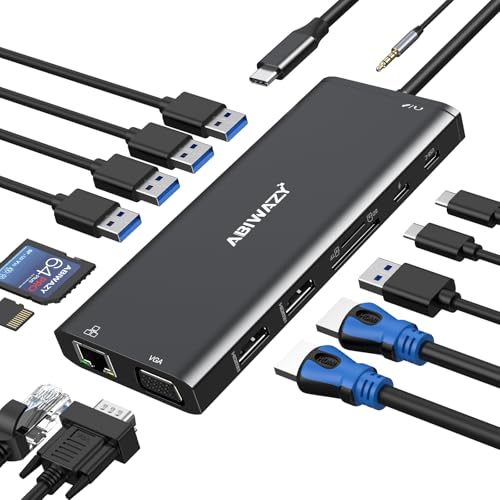
VVB 14-in-1 USB-C Triple Display Dock
Best for: Windows users needing triple displays and SD access
- Host Interface
- USB-C, Thunderbolt 3
- Display Support
- Dual, Triple
- Max Resolution
- 4K@60Hz
- Power Delivery
- 87W
- Port Count
- 14
- Video Ports
- HDMI, VGA
The VVB 14-in-1 USB-C docking station expands a single port into 14 connections. It supports dual 4K HDMI and VGA outputs for triple displays on Windows. The dock delivers up to 87W of power delivery to your laptop. It includes gigabit Ethernet, SD card readers, and multiple USB ports for peripherals. This setup suits users needing extensive connectivity and multi-monitor support.
Pros
- 14-in-1 port count including HDMI, VGA, and USB
- Supports dual 4K@60Hz and triple displays on Windows
- Up to 87W power delivery for laptop charging
- Gigabit Ethernet port for stable wired internet
- Built-in SD and Micro SD card readers
Cons
- Mac OS only supports mirror mode, not extended displays
- HDMI 2 is limited to 4K@30Hz resolution
- VGA output drops resolution to 1080P in multi-display setups
Good fit if
- You need to connect two external monitors and a laptop screen simultaneously
- You require a wired gigabit Ethernet connection for stable networking
- You frequently transfer large files via SD cards to your laptop
Skip if
- You use a Mac and need extended desktop functionality across multiple screens
- You require HDMI 2 to output 4K@60Hz resolution
- You need a single port to drive three 4K displays natively
Verdict: VVB 14-in-1 USB-C Docking Station provides high port density and triple display support for Windows users. It is ideal for professionals who need wired networking and SD card access alongside multiple monitors.

Plugable USB-C Triple HDMI Docking Station
Best for: users needing three monitors and wired networking
- Host Interface
- USB-C
- Display Support
- Triple
- Max Resolution
- 4K@30Hz
- Power Delivery
- 100W
- Port Count
- 12
- Video Ports
- HDMI
This is a 12-port docking station supporting three HDMI displays. It uses DisplayLink technology to enable triple extended monitors on Windows, macOS, and ChromeOS. The dock includes Gigabit Ethernet, six USB 3.0 ports, and 100W power delivery. It measures 7.9 by 3.3 by 1.2 inches and weighs 11.7 ounces. It suits users needing reliable multi-monitor setups for hybrid workspaces.
Pros
- Supports up to three extended HDMI displays
- Includes 100W USB-C power delivery
- Features Gigabit Ethernet and six USB 3.0 ports
- Compatible with USB-C, USB4, and Thunderbolt hosts
Cons
- One 4K display is limited to 30Hz
- Requires DisplayLink driver installation on macOS
- Not compatible with Linux operating systems
Good fit if
- You need three monitors on a single laptop
- You use Windows, macOS, or ChromeOS laptops
- You require wired Gigabit Ethernet connectivity
Skip if
- You use a Linux-based operating system
- You need 4K resolution at 60Hz on all screens
- You prefer a setup without driver installation
Verdict: Plugable UD-3900PDZ Triple Display Dock provides a robust 12-port solution for users who need three monitors and wired networking. It is ideal for hybrid teams using Windows or Apple Silicon laptops who need reliable, enterprise-grade connectivity.

Anker 13-in-1 Triple Display USB-C Dock
Best for: Windows users needing triple displays
- Host Interface
- USB-C
- Display Support
- Triple
- Max Resolution
- 4K @ 60Hz
- Power Delivery
- 85W
- Port Count
- 13
- Video Ports
- HDMI, DisplayPort
This Anker dock gives you 13 ports through one USB-C connection. It supports three monitors at 1080p or one at 4K. You get 85W charging for your laptop and 18W for a phone. The vertical design saves desk space. It works with Windows and ChromeOS for extended displays. Mac users get charging and data, but screen mirroring only.
Pros
- 13 ports including 2 HDMI and 1 DisplayPort
- Supports triple 1080p displays on Windows
- 85W laptop and 18W device charging
- 10Gbps data transfer speeds
Cons
- macOS limits output to mirror mode only
- Max single display resolution is 4K@60Hz
- Gigabit Ethernet, not 2.5G
Good fit if
- You need three screens for Windows multitasking
- You want built-in 85W laptop charging
- You prefer a compact vertical footprint
Skip if
- You use a Mac and need extended desktop mode
- You require 2.5G Ethernet speeds
- You need more than 13 ports
Verdict: Anker 13-in-1 Triple Display Dock is a solid choice for Windows users who need three monitors and fast charging. It fits those who value a compact, all-in-one desk setup.

Selore 8-in-1 Triple Display USB-C Dock
Best for: Windows users needing 4K@60Hz DisplayPort output
- Host Interface
- USB-C
- Display Support
- Quad
- Max Resolution
- 4K@60Hz
- Power Delivery
- 100W
- Video Ports
- HDMI, DisplayPort, VGA
- Connectivity
- USB-C, HDMI, DisplayPort, VGA
This Selore docking station connects up to three displays via dual HDMI, DisplayPort, and VGA. It supports 4K resolution at 60Hz on the DisplayPort output. The unit includes a 100W USB-C Power Delivery port for laptop charging. It is designed for Windows laptops with full-featured USB-C or Thunderbolt ports. MacBooks are limited to mirroring mode only. The compact design weighs just over 3 ounces.
Pros
- DisplayPort output supports 4K@60Hz resolution
- 100W USB-C Power Delivery charging
- Supports triple monitor setups
- Includes VGA port for legacy displays
Cons
- One HDMI port is limited to 30Hz
- MacBooks cannot use extended desktop mode
- Data transfer speed capped at 480Mbps
Good fit if
- You need a 4K@60Hz display via DisplayPort
- You use a Windows laptop with USB-C video support
- You want to charge your laptop while docked
Skip if
- You use a MacBook for extended desktops
- You require high-speed data transfer over 480Mbps
- You need a second HDMI port at 60Hz
Verdict: Selore 8-in-1 USB-C Triple Monitor Dock fits Windows users who need a dedicated 4K@60Hz DisplayPort output and 100W charging. It is not suitable for Mac users requiring extended displays.

TobenONE 18-in-1 Triple Display Dock
Best for: Windows users needing triple 4K displays
- Host Interface
- USB-C
- Display Support
- Triple
- Max Resolution
- 4K@60Hz
- Power Delivery
- 100W
- Port Count
- 18
- Video Ports
- HDMI
This TobenONE hub expands your laptop into a triple-monitor workstation. It supports three 4K displays at 60Hz and offers 18 ports, including nine USB connections. The 100W Power Delivery keeps your device charged. It is designed for Windows and Chrome OS laptops with full-featured USB-C ports. This setup helps you manage spreadsheets and video calls without lag.
Pros
- Supports triple 4K@60Hz displays for high-resolution multitasking
- Includes 18 total ports with nine USB connections
- Provides 100W Power Delivery for continuous laptop charging
- Compact dimensions of 3.5 by 1.6 by 4.9 inches
Cons
- Not recommended for Mac users
- Power adapter is not included in the box
- Requires a power supply over 65W for stable usage
Good fit if
- You need three external monitors for your Windows laptop
- You want a single cable to connect nine USB peripherals
- You require 100W charging while running multiple displays
Skip if
- You use a Mac laptop with USB-C
- You prefer a plug-and-play setup without a separate power brick
- You only need one or two external monitors
Verdict: TobenONE 18-in-1 Triple 4K Dock is a solid choice for Windows users who need to drive three 4K screens simultaneously. It fits professionals who want to reduce desk cable clutter while maintaining high display performance.

Plugable 13-in-1 Triple HDMI Dock
Best for: Mac users needing triple displays
- Host Interface
- USB-C
- Display Support
- Triple
- Max Resolution
- 4K @ 30Hz
- Power Delivery
- 100W
- Port Count
- 13
- Video Ports
- HDMI
This Plugable docking station supports three HDMI displays, making it a strong alternative to the Acer Laptop Docking Station 3. It delivers 100W power delivery for your laptop and includes 13 total ports. The unit supports 4K resolution on one port and 1080p on the others. It is designed for Windows, Mac, and ChromeOS systems. You get a compact black device that simplifies desk connectivity.
Pros
- Supports three external monitors via HDMI
- Provides 100W power delivery to laptops
- Includes 13 ports for peripherals
- Compatible with macOS and Windows
Cons
- HDMI 1 is limited to 4K at 30Hz
- HDMI 2 and 3 max at 1920x1200
- Requires DisplayLink driver for Mac multi-monitor use
Good fit if
- You need three screens on a Mac
- You want a single cable for power and data
- You use Windows or ChromeOS laptops
Skip if
- You require 60Hz refresh rates on all three displays
- You want to watch protected content like Netflix
- You prefer plug-and-play without driver installation
Verdict: Plugable 13-in-1 USB-C Triple Dock fits users who need three monitors on Mac or Windows without buying separate adapters. It offers solid port variety but requires driver setup for macOS.
Specifications side by side
| Spec | Acer 11-in-1 Triple Display Dock | VVB 14-in-1 USB-C Triple Display Dock | Plugable USB-C Triple HDMI Docking Station | Anker 13-in-1 Triple Display USB-C Dock | Selore 8-in-1 Triple Display USB-C Dock | TobenONE 18-in-1 Triple Display Dock | Plugable 13-in-1 Triple HDMI Dock |
|---|---|---|---|---|---|---|---|
| Host Interface | USB-C | USB-C, Thunderbolt 3 | USB-C | USB-C | USB-C | USB-C | USB-C |
| Display Support | Triple | Dual, Triple | Triple | Triple | Quad | Triple | Triple |
| Max Resolution | 8K@30Hz | 4K@60Hz | 4K@30Hz | 4K @ 60Hz | 4K@60Hz | 4K@60Hz | 4K @ 30Hz |
| Power Delivery | 85W | 87W | 100W | 85W | 100W | 100W | 100W |
| Port Count | 11 | 14 | 12 | 13 | not specified | 18 | 13 |
| Video Ports | HDMI, DisplayPort | HDMI, VGA | HDMI | HDMI, DisplayPort | HDMI, DisplayPort, VGA | HDMI | HDMI |
| Max Data Speed | 10Gbps | 5Gbps | 5Gbps | 10Gbps | not specified | not specified | 5Gbps |
| Ethernet Speed | 1Gbps | 1Gbps | Gigabit Ethernet | Gigabit Ethernet | not specified | not specified | Gigabit Ethernet |
| Resolution | 4K UHD | not specified | 1080p FHD | not specified | 4K UHD | 4K UHD | not specified |
| Connectivity | USB-C, HDMI, DisplayPort, Ethernet | USB-C | USB-C, HDMI | USB-C, HDMI, DisplayPort, Ethernet, USB-A | USB-C, HDMI, DisplayPort, VGA | USB-C, HDMI, Ethernet | USB-C, HDMI, Ethernet |
| Refresh Rate | 60Hz | not specified | 60Hz | not specified | not specified | not specified | not specified |
| Features | not specified | not specified | not specified | not specified | not specified | not specified | DisplayLink |
| Use | not specified | not specified | not specified | not specified | not specified | Office | not specified |
| Dimensions | not specified | 5 × 0.5 × 1 inches | 7.87 × 3.54 × 1.18 inches | 4.95 × 3.49 × 1.64 inches | 4.5 × 2 × 0.62 inches | 4.9 × 3.5 × 1.6 inches | 4.7 × 2.6 × 6.9 inches |
| Weight | not specified | 1 ounces | 11.7 ounces | 13.1 ounces | 3.17 ounces | 10.9 ounces | 14.1 ounces |
| Size | 11-in-1 | not specified | 7.9 x 3.3 x 1.2 inches | Small | not specified | Without power supply | 6.9" |
| Color | Grey | Black | Black | Gray | Gray | Grey-docking station for Windows | Black |
| Model | ODK5A0 | not specified | UD-3900PDZ | A83921A1 | Docking Station Dual HDMI Monitor | not specified | UD-ULTCDL |
If you require higher graphics output for your setup, specs for the best acer gaming laptops detail available display interfaces.
Frequently asked questions
Can I use these docks with MacBooks?
Most options in this list work with MacBooks, but compatibility varies. The Plugable 13-in-1 model is explicitly noted as suitable for Mac users without separate adapters. However, you must set up drivers for macOS on that specific unit. The Selore dock is not suitable for Mac extended displays. Always check the manufacturer's notes for your specific laptop model before purchasing.
Do these docking stations support triple 4K monitors?
Yes, several models support three 4K displays simultaneously. The Acer 11-in-1 and TobenONE 18-in-1 docks are designed for high-resolution triple setups. The Selore dock specifically offers a 4K@60Hz DisplayPort output. Other units like the VVB and Plugable models provide triple display support, but you should verify resolution limits in the full specifications to ensure they meet your screen requirements.
Which dock offers the most ports?
The TobenONE 18-in-1 dock provides the highest port count at eighteen connections. The VVB 14-in-1 dock is a close second with fourteen ports. The Acer and Plugable 13-in-1 models follow with thirteen ports each. More ports allow you to connect more peripherals, such as keyboards, mice, and storage drives, directly to the dock without using laptop USB slots.
Do these docks provide Ethernet connectivity?
Yes, wired networking is a key feature for most units listed. The Acer dock is highlighted for stable networking and wired Ethernet access. The VVB dock also includes wired networking alongside its SD card slots. The Plugable models offer robust networking solutions for hybrid teams. This feature ensures a stable internet connection for video calls and large file transfers.
Can these docks charge my laptop?
Many models include Power Delivery charging capabilities. The Plugable UD-3900PDZ and the Plugable 13-in-1 dock both support 100W power delivery. The Selore dock also offers 100W charging for compatible devices. This feature allows you to power your laptop through the dock, reducing the number of cables on your desk. Ensure your laptop supports USB-C charging for this to work.
Are these docks compatible with Windows laptops?
Yes, all listed docks are compatible with Windows laptops. The VVB, Anker, Selore, and TobenONE docks are specifically noted as ideal for Windows users. The Plugable models also work with Windows systems. The Acer dock supports compatible Thunderbolt or USB-C laptops, which includes most modern Windows machines. You may need to install specific drivers for optimal performance on some models.
Which dock is best for SD card access?
The VVB 14-in-1 dock is ideal if you need frequent SD card access. It includes SD card slots alongside its triple display support and wired networking. This makes it convenient for photographers or videographers who transfer large media files directly from their cameras. Other docks may offer USB ports for card readers, but the VVB integrates the slot directly into the unit.