14 Best Docking Stations Under $30, Compared
As an Amazon Associate we earn from qualifying purchases. Links on this page are affiliate links.
You need a reliable hub to expand your laptop’s connectivity without breaking the bank. This list of the best docking stations under $30 compares 14 options based strictly on their published specifications. The HODO 8-in-2 MacBook USB-C Hub leads because it offers Thunderbolt 3 speeds and a dedicated SD card reader, which is rare in this price range. We evaluated each model’s port count, video output limits, and physical dimensions to ensure you get the right specs for your workflow. Use this guide to decide which dock fits your monitor setup and device compatibility.
Quick picks
The best fit for you
- You need Thunderbolt speeds and SD access on a Mac HODO 8-in-2 MacBook USB-C Hub It offers Thunderbolt 3 connectivity and a built-in card reader for MacBook users.
- You want the most compact model on the list Dell 4-in-1 USB-C Travel Hub Weighing 1.6 ounces, it is the lightest option for single-monitor travel setups.
- You need triple 4K displays at 60Hz refresh rate NOVOO 11-in-1 4K 60Hz USB-C Dock It supports triple 4K@60Hz output in a compact 11-in-1 form factor.
- You require wired Ethernet and 100W charging for work Vicfluxion 9-in-1 USB-C Hub with DisplayPort It provides Gigabit Ethernet and 90W charging alongside dual display outputs.
Our 14 picks

HODO 8-in-2 MacBook USB-C Hub
Best for: MacBook users needing Thunderbolt and SD access
- Host Interface
- USB-C
- Max Resolution
- 5K
- Power Delivery
- 100W
- Port Count
- 8
- Video Ports
- HDMI, Thunderbolt 3
- Max Data Speed
- 40Gbps
This HODO adapter expands two USB-C ports on select MacBook models into eight connections. It includes a Thunderbolt 3 port supporting 40Gbps data and 5K video, plus a standard HDMI port for 4K displays. You get four USB-A ports, SD card readers, and 100W power delivery. The compact design fits easily into your workflow without adding bulk.
Pros
- Thunderbolt 3 port supports 40Gbps data transfer
- HDMI port outputs 4K UHD resolution
- 100W Power Delivery passthrough
- Built-in SD and Micro SD card readers
- Includes two USB 3.1 and one USB 2.0 port
Cons
- Only compatible with specific 13, 14, and 16-inch MacBooks
- Second USB-C port lacks HDMI and charging support
- Incompatible with Logitech mice and keyboards
Good fit if
- You own a compatible MacBook Pro or Air
- You need high-speed data transfer via Thunderbolt 3
- You require SD card access for photo workflows
Skip if
- You use a Windows laptop or PC
- You need to connect multiple external monitors simultaneously
- You use Logitech peripherals for input devices
Verdict: HODO 8-in-2 USB-C Hub for MacBook is a specialized solution for Apple users needing Thunderbolt speeds and card readers. It fits perfectly if you stick to compatible Mac models and single-monitor setups.

Selore 8-in-1 Dual HDMI USB-C Hub
Best for: Windows users needing dual 4K displays
- Host Interface
- USB-C
- Display Support
- Dual
- Max Resolution
- 4K@60Hz
- Power Delivery
- 85W
- Port Count
- 8
- Video Ports
- HDMI
This Selore hub expands your laptop with two HDMI ports for dual 4K@60Hz displays. It includes a 100W PD input for charging, USB 3.0 data ports, and SD/TF card slots. The device weighs 3.21 ounces and connects via a single USB-C host interface. It suits Windows users needing extended desktop space, though Mac users are limited to mirrored screens only.
Pros
- Dual HDMI ports support 4K@60Hz resolution
- 100W PD charging input with 85W output
- Includes SD and TF card readers
- Two USB 3.0 ports for peripherals
Cons
- MacOS supports mirroring only, not extended displays
- Power charger and cable not included
- Requires Thunderbolt or full-featured USB-C port
Good fit if
- You use a Windows laptop for work
- You need dual 4K monitors at 60Hz
- You frequently transfer photos from SD cards
Skip if
- You own a MacBook needing extended displays
- Your USB-C port lacks video output support
- You need a included power supply unit
Verdict: Selore 8-in-1 Dual HDMI USB-C Hub delivers reliable dual 4K@60Hz support for Windows laptops, making it a solid pick for office setups requiring multiple screens.

UGREEN 7-in-1 Dual 4K HDMI USB-C Dock
Best for: dual 4K displays on Windows laptops
- Host Interface
- USB-C
- Display Support
- Dual
- Max Resolution
- 4K@60Hz
- Power Delivery
- 100W
- Port Count
- 7
- Video Ports
- HDMI
This compact aluminum 7-in-1 hub pairs your laptop with dual 4K displays at 60Hz using two HDMI outputs. You get four USB 3.2 data ports running at 10Gbps across two USB-A and two USB-C connections, alongside a 100W Power Delivery pass-through port. It suits Windows laptop users who need dual external monitors and fast peripheral transfers without carrying a bulky desktop dock.
Pros
- Dual HDMI ports support dual 4K displays at 60Hz
- Four 10Gbps USB 3.2 data ports across two USB-A and two USB-C
- Supports up to 100W Power Delivery pass-through charging
- Lightweight aluminum shell weighing 3.21 ounces
Cons
- macOS devices only support mirror display mode across external monitors
- USB data ports do not support peripheral charging, video, or audio
- Does not include an Ethernet port or memory card reader
Good fit if
- You run a Windows laptop with DP 1.4 support and need dual 4K 60Hz outputs.
- You transfer data using high-speed 10Gbps USB-A or USB-C storage drives.
- You want 100W power pass-through to maintain single-cable laptop charging.
Skip if
- You use macOS and require two distinct extended desktop screens.
- You require a hardwired Ethernet connection for network access.
- You need USB ports that provide power to charge phones or accessories.
Verdict: UGREEN 7-in-1 Dual HDMI USB-C Dock delivers dual 4K 60Hz video and fast 10Gbps data ports in a lightweight aluminum enclosure. It provides Windows laptop users with high display bandwidth and rapid transfers in a compact footprint.

Selore&S-Global 8-in-1 Quad Video Dock
Best for: multi-monitor setups with older VGA displays
- Host Interface
- USB-C
- Max Resolution
- 4K@60Hz
- Power Delivery
- 100W
- Port Count
- 8
- Video Ports
- HDMI, DisplayPort, VGA
- Connectivity
- USB-C, HDMI, DisplayPort, VGA
This Selore docking station supports up to four displays via dual HDMI, DisplayPort, and VGA outputs. It delivers 4K resolution at 60Hz on compatible ports and includes a 100W Power Delivery port for fast laptop charging. The unit offers eight total ports, including USB 2.0 and USB-C data connections. It requires a full-featured USB-C or Thunderbolt 3/4 host port to function correctly.
Pros
- Supports up to 4 monitors simultaneously
- 100W Power Delivery charging capability
- Includes VGA, HDMI, and DisplayPort outputs
- 4K@60Hz resolution support on select ports
Cons
- One HDMI port is limited to 30Hz
- MacBooks only support screen mirroring, not extended desktop
- Data transfer speeds capped at 480Mbps
Good fit if
- You need to drive multiple displays from a single laptop
- Your laptop has a full-featured USB-C or Thunderbolt port
- You require VGA connectivity for older projectors or monitors
Skip if
- You use a MacBook and need extended desktop mode
- Your laptop USB-C port lacks video output support
- You require high-speed data transfer above 480Mbps
Verdict: Selore 8-in-1 USB-C Docking Station is a practical solution for users needing four screens, provided their host port supports video output and they can accept the 30Hz limitation on one display.
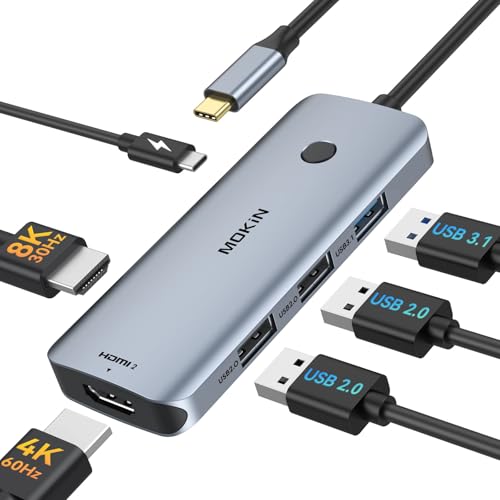
MOKiN 6-in-1 Dual HDMI USB-C Hub
Best for: Windows dual 4K 60Hz monitor setups
- Host Interface
- USB-C
- Display Support
- Triple
- Max Resolution
- 4K@60Hz
- Power Delivery
- 100W
- Port Count
- 6
- Video Ports
- HDMI
The MOKiN 6-in-1 Dual HDMI USB-C Dock expands a single USB-C port into six connections. You get dual HDMI ports supporting up to 4K resolution at 60Hz, a 10Gbps USB 3.1 port, two USB 2.0 ports, and 100W Power Delivery pass-through. It supports MST multi-stream transport for triple display setups on Windows. This hub suits Windows laptop users who want dual 4K external monitors and high-speed data in a compact 2.72-ounce unit.
Pros
- Dual HDMI ports supporting up to 4K at 60Hz simultaneously
- 10Gbps USB 3.1 port for high-speed file transfer
- 100W USB-C Power Delivery pass-through charging
- Supports MST triple display mode on Windows laptops
Cons
- No MST support for macOS, limiting Mac users to mirror mode
- Two USB ports operate at slower USB 2.0 speeds
- No Ethernet port or memory card reader included
Good fit if
- You use a Windows laptop and need dual external 4K monitors running at 60Hz.
- You want 100W Power Delivery charging alongside a fast 10Gbps USB port.
Skip if
- You use macOS and require extended independent displays across multiple external screens.
- You require a wired Gigabit Ethernet network connection.
Verdict: MOKiN 6-in-1 Dual HDMI USB-C Dock delivers dual 4K at 60Hz and 100W charging for Windows multi-display setups. Its lack of macOS MST support and legacy USB 2.0 ports keep it focused strictly on basic desktop expansion.

Vicfluxion 9-in-1 USB-C Hub with DisplayPort
Best for: dual-display setups using HDMI and DisplayPort
- Host Interface
- USB-C
- Display Support
- Dual
- Max Resolution
- 4K@60Hz
- Power Delivery
- 90W
- Port Count
- 9
- Video Ports
- HDMI, DisplayPort
View on Amazon: Vicfluxion 9-in-1 USB-C Hub with DisplayPort
The Vicfluxion 9-in-1 USB-C Dock expands your laptop with DisplayPort, HDMI, Gigabit Ethernet, SD and TF readers, and USB-A 3.0 ports. It outputs up to dual 4K at 60Hz across two displays if your host device supports DP 1.4 Alt Mode. It routes up to 90W passthrough power to your computer from a 100W supply. This fits mixed-cable multi-monitor setups needing wired networking.
Pros
- Dual 4K at 60Hz output via HDMI and DisplayPort
- 90W Power Delivery passthrough charging
- Integrated 1000Mbps Gigabit Ethernet port
- Dedicated SD and TF card slots
Cons
- No charger or power cable included
- Reserves 10W internally, which can trigger slow-charger warnings on 65W laptops
- USB data ports do not support video output
Good fit if
- You need both DisplayPort and HDMI ports for dual monitors.
- You require wired Gigabit Ethernet alongside memory card readers.
- You want up to 90W power passthrough for your host laptop.
Skip if
- You need video output directly over USB ports.
- You lack DP 1.4 Alt Mode on your host USB-C port for 4K at 60Hz.
- You require a dock that includes its own AC power adapter.
Verdict: Vicfluxion 9-in-1 USB-C Dock with HDMI & DP combines mixed monitor outputs with 90W charging and Gigabit Ethernet. It provides complete desktop connectivity through a single USB-C connection.

WAVLINK 12-in-1 Triple Monitor USB-C Dock
Best for: Windows users needing triple 1080p screens and card slots
- Host Interface
- USB-C, Thunderbolt 3/4
- Display Support
- Triple
- Max Resolution
- 4K@60Hz
- Power Delivery
- 85W
- Port Count
- 12
- Video Ports
- HDMI, DisplayPort
The WAVLINK KR-RZUS-UMD303 is a 12-port docking station supporting triple displays. It offers one HDMI and two DisplayPort outputs, allowing for single 4K@60Hz or triple 1080p@60Hz setups. The unit delivers 85W of power delivery to your laptop. It includes gigabit Ethernet, SD/TF slots, and multiple USB ports. This silver dock connects via USB-C or Thunderbolt 3/4. It suits users needing extensive connectivity and multiple screens for productivity.
Pros
- Supports triple monitor displays for expanded workspace
- Provides 85W power delivery to charge laptops
- Includes gigabit Ethernet and SD/TF card slots
- Offers 12 total ports for various peripherals
- Compatible with Windows, Mac OS, and Chrome OS
Cons
- Only supports triple 1080p displays on Mac OS
- Charger and cable are not included
- Max resolution is limited to 4K@60Hz on one screen
Good fit if
- You need three screens for coding or data analysis
- You require SD and TF card access on your dock
- You use a Windows or Linux laptop with USB-C video
Skip if
- You want to run three 4K displays simultaneously
- You need the power adapter included in the box
- You use Mac OS and need independent triple displays
Verdict: The WAVLINK 12-in-1 Triple Display Dock fits professionals who need three screens and built-in card readers. It delivers solid connectivity for Windows and Linux users, though Mac users should note the display limitations.

Hortore 12-in-1 Triple Display USB-C Dock
Best for: multi-monitor remote workstations
- Host Interface
- USB-C
- Display Support
- Triple
- Max Resolution
- 4K@60Hz
- Power Delivery
- 92W
- Port Count
- 12
- Video Ports
- HDMI, VGA
This Hortore docking station supports three external monitors via dual HDMI and VGA ports. It uses a DisplayLink chip to maintain stable visuals for extended desktop work. The unit includes a 100W PD input that delivers up to 92W to your laptop. You also get a 1000Mbps Ethernet port and USB 3.0 data transfer at 5Gbps. This setup suits users needing a comprehensive multi-screen workspace.
Pros
- Supports triple display output with 4K@60Hz on one HDMI port
- Provides up to 92W power delivery to connected laptops
- Includes 1000Mbps Ethernet port for wired internet connectivity
- Features USB 3.0 port with 5Gbps data transfer speed
Cons
- Requires a laptop with video-enabled USB-C ports
- Includes only one VGA port alongside dual HDMI outputs
- Uses DisplayLink technology which may add slight input delay
Good fit if
- You need to connect three monitors to a single laptop
- You require a wired 1000Mbps Ethernet connection for stability
- You want a single dock to handle charging and data
Skip if
- You only need to drive one or two monitors
- Your laptop lacks video-enabled USB-C ports
- You prefer plug-and-play without additional driver installation
Verdict: Hortore 12-in-1 USB-C Triple Display Dock is ideal for professionals who need a robust, multi-monitor setup with reliable wired networking and fast charging capabilities.

Giq 10-in-1 USB-C Dual HDMI Dock
Best for: Dual 4K monitor setups with wired internet
- Host Interface
- USB-C
- Display Support
- Dual
- Max Resolution
- 4K@60Hz
- Power Delivery
- 100W
- Port Count
- 10
- Video Ports
- 2x HDMI
The Giq 10-in-1 dock offers dual 4K@60Hz HDMI outputs for extended display setups. It includes 100W PD pass-through charging and a 1000Mbps Ethernet port. You get two USB-A 3.0 and two USB-C 3.0 ports for 5Gbps data transfer, plus an SD/TF card reader. It works with Windows, macOS, and ChromeOS devices that support DisplayPort Alternate Mode. This grey hub is a practical choice for users needing multiple video outputs and stable wired networking.
Pros
- Dual 4K@60Hz HDMI video outputs
- 100W PD pass-through charging
- 1000Mbps Ethernet port
- SD and TF card reader
Cons
- SD and TF cards cannot be read simultaneously
- macOS limits extended displays to mirrored mode
- Requires laptop support for DisplayPort Alternate Mode
Good fit if
- You need two external monitors at 4K resolution
- You require stable wired internet via Ethernet
- You frequently transfer photos using SD or TF cards
Skip if
- You use a Mac and need true extended desktop mode
- Your laptop USB-C port lacks video output support
- You need to read both SD and TF cards at the same time
Verdict: Giq 10-in-1 USB-C Dual HDMI Dock provides dual 4K video and wired networking for users who need expanded screens and stable internet connectivity on compatible laptops.
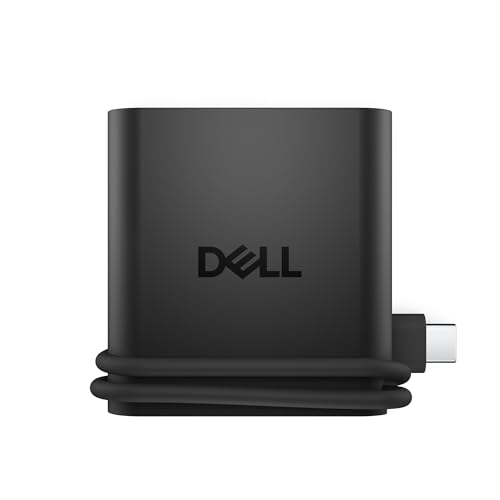
Dell 4-in-1 USB-C Travel Hub
Best for: lightweight single-monitor travel setups
- Host Interface
- USB-C
- Max Resolution
- 4K
- Port Count
- 4
- Video Ports
- HDMI
- Connectivity
- USB-C, HDMI, USB-A
- Use
- Travel
The Dell DA225 is a compact 4-port USB-C hub designed for travelers. It supports 4K HDMI video output and includes two USB-C ports plus one USB-A port. Its slim profile measures 2.24 by 2.36 inches and weighs just 1.6 ounces. The device features Smart Power Management to rebalance power in real time. It is ideal for users who need a lightweight, plug-and-play solution for connecting a monitor and peripherals on the go.
Pros
- Supports 4K UHD resolution via HDMI
- Extremely lightweight at 1.6 ounces
- Includes Smart Power Management technology
- Compact dimensions of 2.24 x 2.36 inches
Cons
- Only provides one video output port
- Lacks Ethernet connectivity for wired internet
- Limited to four total ports
Good fit if
- You need a lightweight hub for travel
- You primarily use a single external monitor
- You want a plug-and-play device without drivers
Skip if
- You require dual or triple monitor support
- You need Ethernet for stable internet connections
- You require multiple USB-A ports
Verdict: Dell DA225 Slim Travel Hub is a highly portable option for users who prioritize weight savings and single-monitor setups. It fits perfectly in laptop sleeves for travelers who do not need extensive connectivity.

UANTIN 8-in-1 Triple Display USB-C Dock
Best for: Windows users needing triple 4K screens
- Host Interface
- USB-C, Thunderbolt
- Display Support
- Triple
- Max Resolution
- 4K@60Hz
- Power Delivery
- 100W
- Port Count
- 8
- Video Ports
- HDMI, DisplayPort
The UANTIN 8-in-1 USB-C dock expands a single port into three 4K@60Hz displays via dual HDMI and one DisplayPort. It includes three USB-A 3.0 ports, one USB-C data port, and 100W power delivery. The aluminum housing aids heat dissipation. This setup suits users needing triple-screen productivity on Windows. Note that macOS limits output to mirrored mode only.
Pros
- Supports triple 4K@60Hz displays on Windows
- 100W USB-C power delivery for fast charging
- Aluminum alloy housing for better heat dissipation
- Five high-speed USB ports for peripherals
Cons
- macOS only supports mirrored display mode
- Requires laptop with DP 1.4 signal output
- No Ethernet or SD card slots included
Good fit if
- You need three screens for multitasking
- You use a Windows laptop with USB-C
- You want to charge your laptop through the dock
Skip if
- You use a Mac and need extended desktop mode
- Your laptop lacks DisplayPort 1.4 support
- You require Ethernet or SD card connectivity
Verdict: UANTIN 8-in-1 Triple Monitor Dock delivers essential triple-screen expansion for Windows users who need high-resolution multitasking and fast charging in one compact unit.

NOVOO 11-in-1 4K 60Hz USB-C Dock
Best for: users needing triple 4K displays
- Host Interface
- USB-C
- Display Support
- Triple
- Max Resolution
- 4K@60Hz
- Power Delivery
- 100W
- Port Count
- 11
- Video Ports
- HDMI, DP
This NOVOO docking station supports triple displays with 4K resolution at 60Hz. It connects via a single USB-C host interface and includes HDMI and DisplayPort outputs. The unit provides 100W power delivery and an Ethernet port. It measures 11 by 1.57 by 0.39 inches and weighs 0.7 ounces. This setup suits users who need multiple screens for productivity without complex wiring.
Pros
- Supports triple monitor displays
- 4K resolution at 60Hz refresh rate
- 100W power delivery support
- Includes Gigabit Ethernet port
Cons
- Only 0.7 ounces weight may feel less substantial
- Requires specific driver installation for triple display functionality
- Limited to USB-C host connection only
Good fit if
- You need three screens for extended workspace
- You require 4K@60Hz video output
- You want a compact 11-in-1 hub design
Skip if
- You only need a single external monitor
- You require Thunderbolt 4 speed
- You prefer a wireless connection solution
Verdict: NOVOO 11-in-1 USB-C Triple Display Dock delivers triple 4K@60Hz support in a compact form. It fits users who need maximum screen real estate from a single USB-C port.

HyperDrive 6-in-2 USB-C Hub
Best for: MacBook users needing wired Ethernet
- Host Interface
- Thunderbolt 3.0 USB-C
- Display Support
- Dual
- Max Resolution
- 5K or 2x4K@60Hz
- Power Delivery
- 100W
- Port Count
- 6
- Video Ports
- HDMI
This HyperDrive hub adds a gigabit Ethernet port and HDMI output to your laptop. It supports 40Gbps data transfer and 100W power delivery. The aluminum build keeps it compact at 1.8 ounces. You get a direct HDMI connection for 4K video. It also includes two USB-A ports for peripherals. This setup works well for MacBook users needing stable wired internet.
Pros
- 100W power delivery for charging
- Gigabit Ethernet port for wired internet
- 40Gbps data transfer speed
- Compact 1.8-ounce aluminum design
- Two USB 3.1 ports included
Cons
- Only one HDMI port for video
- No Thunderbolt 3 passthrough for daisy-chaining
- Limited to 4K at 30Hz on HDMI
Good fit if
- You need a wired Ethernet connection on the go
- You use a MacBook Pro or Air with limited ports
- You want a lightweight silver hub for travel
Skip if
- You require dual monitor support from a single hub
- You need more than one HDMI video output
- You prefer a USB-C only connection without USB-A
Verdict: HyperDrive 6-in-2 USB-C Hub is a compact solution for users who prioritize wired internet and fast data transfer over multiple video outputs. It fits MacBook owners who need to add an Ethernet port without adding bulk to their setup.

UGREEN Triple Display 4K USB-C Dock
Best for: Windows laptops needing triple 4K external displays
- Host Interface
- USB-C
- Display Support
- Triple
- Max Resolution
- 4K
- Power Delivery
- 85W
- Port Count
- 8
- Video Ports
- HDMI, DisplayPort
This 8-in-1 USB-C hub expands your laptop with two 4K HDMI ports and one 4K DisplayPort for dual or triple monitor setups. You get four 10Gbps USB 3.2 Gen 2 data ports alongside 85W pass-through charging from a 100W input. It suits Windows laptop users who need multiple external 4K displays and high-speed peripheral connections on a single desktop workstation.
Pros
- Supports triple 4K monitor output via dual HDMI and DisplayPort on Windows
- Four 10Gbps USB 3.2 Gen 2 ports across USB-A and USB-C
- 85W USB-C pass-through charging with 100W Power Delivery input
- Dedicated DisplayPort connection alongside two HDMI options
Cons
- macOS systems are limited to SST mode without extended triple displays
- USB-C data ports do not support video output or host charging
- No built-in Ethernet port or memory card readers
Good fit if
- You use a Windows laptop and want to run up to three external 4K screens.
- You need 10Gbps transfer speeds for external drives across both USB-A and USB-C.
- You want up to 85W pass-through power delivery to charge your notebook.
Skip if
- You use macOS and require extended desktop mode across multiple external monitors.
- You need a wired Ethernet connection or SD card slots on your dock.
Verdict: UGREEN 8-in-1 Triple Display USB-C Dock delivers dual HDMI and DisplayPort video with fast 10Gbps data ports. It is a capable choice for Windows users seeking a multi-monitor productivity setup.
Specifications side by side
| Spec | HODO 8-in-2 MacBook USB-C Hub | Selore 8-in-1 Dual HDMI USB-C Hub | UGREEN 7-in-1 Dual 4K HDMI USB-C Dock | Selore&S-Global 8-in-1 Quad Video Dock | MOKiN 6-in-1 Dual HDMI USB-C Hub | Vicfluxion 9-in-1 USB-C Hub with DisplayPort | WAVLINK 12-in-1 Triple Monitor USB-C Dock | Hortore 12-in-1 Triple Display USB-C Dock | Giq 10-in-1 USB-C Dual HDMI Dock | Dell 4-in-1 USB-C Travel Hub | UANTIN 8-in-1 Triple Display USB-C Dock | NOVOO 11-in-1 4K 60Hz USB-C Dock | HyperDrive 6-in-2 USB-C Hub | UGREEN Triple Display 4K USB-C Dock |
|---|---|---|---|---|---|---|---|---|---|---|---|---|---|---|
| Host Interface | USB-C | USB-C | USB-C | USB-C | USB-C | USB-C | USB-C, Thunderbolt 3/4 | USB-C | USB-C | USB-C | USB-C, Thunderbolt | USB-C | Thunderbolt 3.0 USB-C | USB-C |
| Display Support | not specified | Dual | Dual | not specified | Triple | Dual | Triple | Triple | Dual | not specified | Triple | Triple | Dual | Triple |
| Max Resolution | 5K | 4K@60Hz | 4K@60Hz | 4K@60Hz | 4K@60Hz | 4K@60Hz | 4K@60Hz | 4K@60Hz | 4K@60Hz | 4K | 4K@60Hz | 4K@60Hz | 5K or 2x4K@60Hz | 4K |
| Power Delivery | 100W | 85W | 100W | 100W | 100W | 90W | 85W | 92W | 100W | not specified | 100W | 100W | 100W | 85W |
| Port Count | 8 | 8 | 7 | 8 | 6 | 9 | 12 | 12 | 10 | 4 | 8 | 11 | 6 | 8 |
| Video Ports | HDMI, Thunderbolt 3 | HDMI | HDMI | HDMI, DisplayPort, VGA | HDMI | HDMI, DisplayPort | HDMI, DisplayPort | HDMI, VGA | 2x HDMI | HDMI | HDMI, DisplayPort | HDMI, DP | HDMI | HDMI, DisplayPort |
| Max Data Speed | 40Gbps | 5Gbps | 10Gbps | not specified | 10Gbps | not specified | not specified | 5Gbps | 5Gbps | not specified | 5Gbps | not specified | 40Gbps | 10Gbps |
| Ethernet Speed | not specified | not specified | not specified | not specified | not specified | 1000Mbps | Gigabit | 1000Mbps | 1000Mbps | not specified | not specified | not specified | 1Gbps | not specified |
| Resolution | not specified | not specified | not specified | 4K UHD | not specified | 4K UHD | not specified | not specified | not specified | 4K UHD | not specified | 4K UHD | not specified | 4K UHD |
| Connectivity | USB-C, HDMI, Thunderbolt 3 | USB-C, HDMI, USB-A | USB-C | USB-C, HDMI, DisplayPort, VGA | USB-C, HDMI | USB-C, HDMI, DisplayPort, Ethernet | HDMI, DisplayPort | USB-C | USB-C, HDMI | USB-C, HDMI, USB-A | USB-C, HDMI, DisplayPort | USB-C, HDMI, DisplayPort, Ethernet | USB-C, HDMI, Ethernet | USB-C, DisplayPort |
| Refresh Rate | not specified | not specified | not specified | not specified | not specified | not specified | not specified | not specified | not specified | not specified | not specified | 60Hz | not specified | not specified |
| Features | Card Reader | not specified | not specified | not specified | not specified | not specified | not specified | not specified | not specified | not specified | not specified | not specified | not specified | not specified |
| Use | not specified | not specified | not specified | not specified | not specified | not specified | not specified | not specified | not specified | Travel | not specified | not specified | not specified | not specified |
| Material | not specified | not specified | Aluminum | not specified | not specified | not specified | not specified | not specified | not specified | not specified | not specified | not specified | not specified | not specified |
| Weight | 3.63 ounces | 3.21 ounces | 3.21 ounces | not specified | 2.72 ounces | 2.56 ounces | 5.82 ounces | not specified | not specified | 1.6 ounces | not specified | 0.7 ounces | 1.8 ounces | 8.47 ounces |
| Dimensions | not specified | not specified | 3.1 × 0.8 × 0.49 inches | not specified | 2 × 1 × 2 inches | 5.53 × 1.65 × 0.59 inches | 6.22 × 1.61 × 0.63 inches | 5 × 2.5 × 0.65 inches | not specified | 2.36 × 2.24 × 0.6 inches | not specified | 3.94 × 1.57 × 0.39 inches | 0.21 × 1.1 × 0.4 inches | 5.28 × 2.24 × 0.63 inches |
| Size | 8-in-2 | 8-in-1 | 7 in 1 | 8-IN-1 | 6-in-1 | not specified | 100W | 12 in 1 | 10 in 1 | DA225 | 11INCH | 11 in 1 DP | not specified | not specified |
| Color | Space Gray | Black | Black or grey | White | Grey | Grey- HDMI&DP | Silver | Silver | Grey | Black | Grey | Gray | Silver | grey |
| Model | HD2c03H | SEUC0422 | 45365 | Dual HDMI Docking Station | not specified | not specified | KR-RZUS-UMD303 | not specified | not specified | DA225 | Docking Station 3 Monitors | not specified | GN28N-SILVER | 35625 |
If you also need kitchen gear, see our list of best juicers under 30 for more comparison data.
How to Choose the Right Docking Station
-
Target 60Hz Video Output
When connecting an external 4K monitor, check the supported refresh rate on the video output port. Basic hubs often cap 4K resolution at 30Hz, which produces noticeable cursor lag and choppy window movements during routine desk work. If you plan to connect a high-resolution screen, look for models specified for 4K at 60Hz, such as the Selore 8-in-1 USB-C Hub. Verifying that the dock outputs 60Hz at your display's native resolution ensures fluid desktop scrolling, smooth video playback, and reduced visual fatigue.
-
Calculate Power Delivery Overhead
Examine the power delivery wattage rating to ensure your laptop charges properly under heavy workloads. USB-C hubs consume a portion of incoming power to run internal chipsets and connected accessories, passing the remainder to your machine. For instance, the MOKiN 6-in-1 Dual HDMI USB-C Hub supports 100W power delivery, which provides ample energy for standard and power-hungry laptops alike. Compare your computer manufacturer's original charger wattage against the hub's pass-through output to confirm the dock delivers enough wattage without draining your battery while plugged in.
-
Check USB Data Speeds
Review the generation and bandwidth rating of each USB data port on the hub. Standard peripherals like keyboards, mice, and basic flash drives function well on 5 Gbps connections. If you regularly move large files using external solid-state drives, choose a dock with 10 Gbps ports, such as the UGREEN 7-in-1 Dual 4K HDMI USB-C Dock. Matching port speeds to your actual accessories avoids file-transfer bottlenecks and guarantees that fast storage drives operate at their maximum read and write performance.
-
Match Video Port Types
Inspect the physical display connectors on your monitors before selecting a dock. While HDMI is common, many desktop screens and portable monitors rely on DisplayPort or legacy VGA ports. Selecting a model with matching connections, such as the Vicfluxion 9-in-1 USB-C Hub with DisplayPort, eliminates the need for extra signal adapters or specialized conversion cables. Check whether your monitor setup requires HDMI, DisplayPort, or VGA outputs, and choose a hub that provides direct, native connections for every display you plan to use.
-
Verify Wired Ethernet Needs
Determine whether your workspace requires a hardwired network connection for stable, low-latency data transfers. Many compact hubs omit RJ45 network jacks to save space, leaving you dependent on wireless signals. If you participate in frequent video calls, transfer massive files across local networks, or work in environments with congested Wi-Fi, select a dock with an integrated Gigabit Ethernet port. A dedicated Ethernet port ensures consistent connection speeds and prevents latency spikes during data-intensive office tasks and real-time communications.
-
Assess Host Connector Design
Pay close attention to how the dock connects to your laptop chassis. Most models use a flexible, tethered USB-C cable that accommodates various laptop brands and stands. In contrast, dual-prong direct-attach docks, like the Hyper HyperDrive 6-in-2 Dual USB-C Hub, plug directly into two adjacent Thunderbolt ports on specific MacBook designs. Direct-attach models eliminate dangling cords but will not seat properly if you use a protective laptop case, whereas flexible cable hubs offer universal compatibility across different laptop form factors.
Frequently asked questions
Can I use these hubs with MacBooks?
Yes, but compatibility varies. The HODO 8-in-2 MacBook USB-C Hub supports Thunderbolt 3 and includes a card reader, making it ideal for Apple users. Other models like the MOKiN 6-in-1 Dual HDMI USB-C Hub lack macOS MST support. You should verify your Mac model matches the dock’s requirements before purchasing.
Which docking station is best for dual monitors?
The Selore 8-in-1 Dual HDMI USB-C Hub and UGREEN 7-in-1 Dual 4K HDMI USB-C Dock are top choices. Both support dual 4K@60Hz video output for Windows laptops. The UGREEN model features an aluminum enclosure and fast 10Gbps data ports. These options provide reliable multi-display expansion for office setups.
Do any docks support triple displays under $30?
Yes, several options support triple monitors. The WAVLINK 12-in-1 Triple Monitor USB-C Dock and Hortore 12-in-1 Triple Display USB-C Dock offer three screen outputs. The NOVOO 11-in-1 4K 60Hz USB-C Dock also delivers triple 4K@60Hz support. These docks are suitable for Windows users needing extensive multitasking capabilities.
Is there a lightweight option for travel?
The Dell 4-in-1 USB-C Travel Hub is the lightest option at 1.6 ounces. It supports 4K UHD resolution and includes HDMI, USB-C, and USB-A ports. Its compact size fits easily into laptop sleeves. This model is ideal for users who prioritize portability and single-monitor setups while on the go.
Which hub includes an Ethernet port?
The Vicfluxion 9-in-1 USB-C Hub with DisplayPort includes Gigabit Ethernet. It also offers HDMI and DisplayPort outputs with 90W charging. The NOVOO 11-in-1 4K 60Hz USB-C Dock also features Ethernet connectivity. These models provide stable wired internet connections for desktop expansion through a single USB-C link.
Can I connect older VGA monitors with these docks?
The Selore&S-Global 8-in-1 Quad Video Dock includes a VGA port. It supports four screens, though one display may be limited to 30Hz. This makes it suitable for multi-monitor setups that include older VGA displays. Ensure your host port supports video output to utilize all connected screens effectively.
Which dock offers the fastest data transfer speeds?
The HODO 8-in-2 MacBook USB-C Hub uses Thunderbolt 3 for high-speed data. The UGREEN 7-in-1 Dual 4K HDMI USB-C Dock provides 10Gbps data ports. The UGREEN Triple Display 4K USB-C Dock also features fast 10Gbps transfers. These models are best for users needing rapid file movement alongside video output.