Best Docking Stations Under $300: 12 Spec-Based Picks
As an Amazon Associate we earn from qualifying purchases. Links on this page are affiliate links.
Finding the best docking stations under $300 requires looking at published specifications rather than marketing claims. We compared 12 options to help you match hardware to your desk. The Lenovo ThinkPad Thunderbolt 4 Smart Dock leads because it supports 100W power delivery and 40 Gbps transfer speeds for high-refresh dual 4K setups. These picks rely strictly on the specs listed on each product page. This guide helps you decide which connection speeds, power output, and port counts fit your specific laptop and monitor requirements.
Quick picks
The best fit for you
- You need high-refresh dual 4K laptop setups Lenovo ThinkPad Thunderbolt 4 Smart Dock It delivers 40 Gbps speeds and 100W power for dual high-refresh displays.
- You require 130W power delivery for your laptop Koncept Thunderbolt 4 Modular Dock 130W It provides 130W charging alongside dual 4K support and 40 GB/s bandwidth.
- You want high-refresh dual HDMI workstation setups Plugable Thunderbolt 5 Dual HDMI Dock It offers 140W charging and native dual HDMI 2.1 output up to 8K.
- You need 180W charging for high-power workstations Dell Pro Thunderbolt 4 Modular Dock It provides 40 Gb/s data transfer and 180W power for demanding setups.
- You want cutting-edge Thunderbolt 5 bandwidth and power Plugable Thunderbolt 5 11-in-1 Dock It provides 120Gbps throughput and 140W charging for high-end multi-display setups.
Our 12 picks

Lenovo ThinkPad Thunderbolt 4 Smart Dock
Best for: high-refresh dual 4K laptop setups
- Host Interface
- Thunderbolt 4
- Max Resolution
- 8K@60Hz, 4K@144Hz
- Power Delivery
- 100W
- Video Ports
- HDMI, DisplayPort
- Max Data Speed
- 40Gbps
- Dimensions
- 8.66 × 3.15 × 1.18 inches
This Lenovo docking station gives you Thunderbolt 4 connectivity with 40 Gbps data bandwidth and up to 100W power delivery. It supports a single 8K monitor at 60Hz or dual 4K monitors at 144Hz through HDMI 2.1 and DisplayPort 1.4 outputs. The unit also includes USB-A, USB-C, and an RJ45 Ethernet port. It suits your workspace if you require high-resolution external displays and fast wired network speeds.
Pros
- Thunderbolt 4 interface with 40 Gbps bandwidth
- Up to 100W power delivery charging via PD 3.1
- Supports one 8K display at 60Hz or two 4K displays at 144Hz
- Includes HDMI 2.1, DisplayPort 1.4, USB-A, USB-C, and RJ45 ports
Cons
- No SD or microSD card slot listed in specifications
- Data limits native multi-display setups to two 4K monitors
Good fit if
- You need up to 100W power delivery to charge your laptop over Thunderbolt 4.
- You run dual 4K monitors at up to 144Hz or a single 8K display at 60Hz.
- You need cloud-based remote management features through Lenovo Accessories Fleet Manager.
Skip if
- You need a built-in SD card reader for external media.
- You plan to run three or four monitors simultaneously from this dock.
Verdict: Lenovo ThinkPad Thunderbolt 4 Smart Dock delivers 40 Gbps transfer speeds and 100W power delivery for dual high-refresh display setups. It offers a solid wired hub with HDMI 2.1, DisplayPort 1.4, and integrated network connectivity.
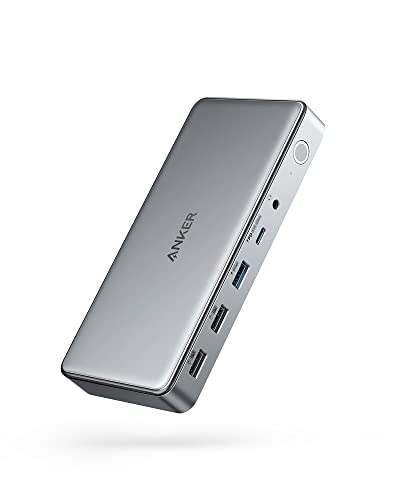
Anker 10-in-1 Triple Display USB-C Dock
Best for: triple-monitor MacBook and Windows office setups
- Host Interface
- USB-C
- Display Support
- Triple
- Max Resolution
- 4K@30Hz
- Power Delivery
- 100W
- Port Count
- 10
- Video Ports
- HDMI, DisplayPort
This USB-C docking station uses DisplayLink technology to add up to three external displays to your laptop. It routes connections through two HDMI ports and one DisplayPort, delivering up to 4K at 30Hz on one screen and 1080p at 60Hz on two screens. It supplies up to 100W Power Delivery to your host machine while offering 5 Gbps data ports. It suits you if you need multi-monitor support across macOS or Windows setups.
Pros
- Supports triple external displays via two HDMI ports and one DisplayPort
- Provides up to 100W host charging plus a separate 30W USB-C Power Delivery port
- Includes a 180W power adapter and USB-C 3.2 Gen 2 host cable
Cons
- Display output caps at 4K at 30Hz on the primary monitor and 1080p at 60Hz on secondary monitors
- Data transfer speeds peak at 5 Gbps and includes two USB 2.0 ports
- Requires DisplayLink software installation and screen recording permissions on macOS
Good fit if
- You need three external monitors connected to a single USB-C laptop port.
- You want up to 100W power delivery without providing your own laptop charger.
- You run standard 1080p monitors or a 4K display capped at 30Hz.
Skip if
- You require 4K resolution running at 60Hz or higher.
- You need high-speed 10 Gbps or 40 Gbps data transfer ports.
- You cannot install third-party drivers or enable screen recording permissions on your machine.
Verdict: Anker 10-in-1 Triple Display Dock provides multi-screen connectivity and 100W power pass-through using DisplayLink over a single host cable. It trades high refresh rates and ultra-fast data speeds for multi-monitor display options.

Koncept Thunderbolt 4 Modular Dock 130W
Best for: laptops requiring 130W power delivery
- Host Interface
- Thunderbolt 4, USB-C
- Display Support
- Dual
- Max Resolution
- 4K
- Power Delivery
- 130W
- Video Ports
- DisplayPort, HDMI, USB-C, Thunderbolt
- Max Data Speed
- 40 GB/s
This Thunderbolt 4 docking station supplies up to 130W of power delivery to your connected laptop using an included 180W power adapter. It supports dual 4K displays and provides transfer rates up to 40 GB/s across multiple USB and video ports. With its modular swappable design, Gigabit Ethernet, and included video cables, it suits your multi-monitor workstation if you need high-wattage charging and broad operating system support across Windows, macOS, or Ubuntu.
Pros
- Delivers up to 130W power delivery via an included 180W adapter
- Thunderbolt 4 host connection offering speeds up to 40 GB/s
- Supports dual 4K displays across HDMI, DisplayPort, and USB-C
- Comes packaged with Thunderbolt, HDMI, and DisplayPort cables
Cons
- Maximum display output is limited to dual monitors
- Display output is capped at 4K resolution
- Wired networking tops out at Gigabit Ethernet speeds
Good fit if
- You need up to 130W power delivery to charge your laptop.
- You want to connect dual 4K monitors through DisplayPort, HDMI, or USB-C.
- You prefer an out-of-the-box setup that includes video and Thunderbolt cables.
Skip if
- You require support for triple or quad external displays.
- You plan to run displays at resolutions above 4K.
- You need wired network speeds faster than 1 Gbps.
Verdict: Koncept Thunderbolt 4 Dock with 130W Charging delivers high-power host charging alongside dual 4K monitor support and 40 GB/s bandwidth. It is a solid pick if you need modular connectivity with essential video cables included in the box.

Plugable 16-in-1 Thunderbolt 4 Dock
Best for: dual 4K workstations needing 100W charging
- Host Interface
- Thunderbolt 4
- Display Support
- Dual
- Max Resolution
- 4K@60Hz
- Power Delivery
- 100W
- Port Count
- 16
- Video Ports
- HDMI, DisplayPort
This 16-in-1 Thunderbolt 4 docking station expands your laptop through a single 40Gbps cable. It supplies up to 100W of Power Delivery to charge your system while driving dual 4K monitors at 60Hz across HDMI or DisplayPort connections. With 2.5Gbps Ethernet, seven USB ports, and SD slots, it suits you if you need high-bandwidth peripheral connectivity and dual-screen productivity on macOS 11 or Windows 10 and newer.
Pros
- Delivers up to 100W Power Delivery to host laptops
- Supports dual 4K displays at 60Hz via HDMI or DisplayPort
- Includes a high-speed 2.5Gbps Ethernet port
- Offers 16 ports including SD and microSD card slots
- Comes with a 3.3-foot 40Gbps Thunderbolt 4 cable
Cons
- Limits external display output to two monitors
- Caps maximum video resolution at 4K 60Hz without 8K support
Good fit if
- You need dual 4K 60Hz external displays over HDMI or DisplayPort without extra display drivers.
- You require 2.5Gbps wired networking alongside 100W laptop charging.
- You connect using a Thunderbolt 4, Thunderbolt 5, or USB4 host system.
Skip if
- You need to connect three or four external monitors to one dock.
- You require 8K resolution support for your display setup.
Verdict: Plugable 16-in-1 Thunderbolt 4 Dock pairs 100W charging and 2.5Gbps Ethernet with dual 4K 60Hz display outputs. It serves as a dependable desktop hub for dual-monitor macOS and Windows laptops.

Plugable Thunderbolt 5 Dual HDMI Dock
Best for: high-refresh dual HDMI workstation setups
- Host Interface
- Thunderbolt 5, Thunderbolt 4, USB4
- Display Support
- Dual
- Max Resolution
- 8K@60Hz, 4K@144Hz
- Power Delivery
- 140W
- Port Count
- 16
- Video Ports
- HDMI
This 16-in-1 desktop docking station pairs Thunderbolt 5 connectivity with dual native HDMI 2.1 outputs, delivering up to dual 8K at 60Hz or 4K at 144Hz. You get 140W power delivery to charge demanding laptops alongside 2.5Gbps Ethernet and six USB-C ports. It suits power users who run high-refresh-rate dual HDMI displays on modern Thunderbolt 4, Thunderbolt 5, or USB4 systems without needing extra video adapters.
Pros
- Dual HDMI 2.1 ports support up to dual 8K at 60Hz or 4K at 144Hz
- Delivers up to 140W host charging and two front 30W charging ports
- Features six USB-C ports, 2.5Gbps Ethernet, and UHS-II card readers
- Driverless setup compatible with Thunderbolt 5, Thunderbolt 4, and USB4
Cons
- No DisplayPort outputs provided
- Incompatible with Thunderbolt 3, legacy USB-C, and Windows ARM hosts
- Base Apple M1, M2, and M3 chips support only one external display
Good fit if
- You need native dual HDMI 2.1 monitor connections without using display adapters.
- You require high 140W power delivery to charge your laptop.
- You use a compatible Thunderbolt 5, Thunderbolt 4, or USB4 host system.
Skip if
- You rely on DisplayPort cables to connect your external monitors.
- You use a laptop running Thunderbolt 3, plain USB-C, or Windows ARM.
- You have a base M1, M2, or M3 Mac and need dual external screens.
Verdict: Plugable Thunderbolt 5 Dual HDMI Dock provides cutting-edge 140W charging and native dual HDMI 2.1 video output up to 8K at 60Hz. It is an ideal pick for modern Thunderbolt systems needing high bandwidth and fast multi-port connectivity without video adapters.
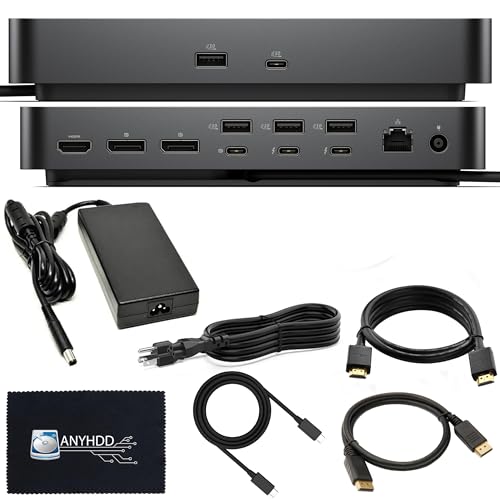
Dell Pro Thunderbolt 4 Modular Dock
Best for: high-bandwidth multi-monitor Thunderbolt 4 workstations
- Host Interface
- Thunderbolt 4
- Max Resolution
- 8K
- Video Ports
- DisplayPort 1.4, HDMI 2.0, USB-C, TB4
- Max Data Speed
- 40 GB/s
- Ethernet Speed
- Gigabit Ethernet
- Power Delivery
- 180W
This modular Thunderbolt 4 docking station pairs with your laptop over a 40 Gbps connection to run displays up to 8K. It includes a 180W power adapter, two downstream Thunderbolt 4 ports, two DisplayPort 1.4 connections, and HDMI 2.0. If you manage multiple peripherals and need flexible video outputs across Windows, macOS, or Ubuntu systems, this heavy-duty desktop hub gives you dedicated display paths without tying up your machine's ports.
Pros
- Supports up to 8K resolution video output
- Two downstream Thunderbolt 4 ports with 40 Gb/s transfer speeds
- Includes dedicated 180W power supply adapter
- Modular chassis with swappable upgrade capability
Cons
- Heavy physical footprint at 4.06 pounds
- HDMI output is limited to standard 2.0 bandwidth
- No integrated audio jack or SD card slot in port list
Good fit if
- You need downstream Thunderbolt 4 connectivity alongside DisplayPort and HDMI.
- You run high-resolution single-screen setups up to 8K on Windows, macOS, or Ubuntu.
- You want a stationary desk hub powered by an included 180W adapter.
Skip if
- You need a lightweight, portable hub to carry in a travel bag.
- You require an integrated 3.5mm audio port or SD card reader.
- You want HDMI 2.1 bandwidth for modern high-refresh displays.
Verdict: ANYHDD Thunderbolt 4 Modular Dock provides 40 Gb/s data transfer, high-wattage power, and dual Thunderbolt 4 connections for demanding workstation setups. Its swappable design and 8K video support suit multi-monitor desks requiring broad OS compatibility.

Tobenone Quad 4K 20-in-1 DisplayLink Dock
Best for: quad 4K monitor workstation setups
- Host Interface
- Thunderbolt 4
- Display Support
- Quad
- Max Resolution
- 4K@60Hz
- Power Delivery
- 100W
- Port Count
- 20
- Video Ports
- HDMI, DP
This Tobenone unit is a 20-port docking station built for multi-screen setups. It drives up to four 4K displays at 60Hz through four HDMI and four DisplayPort options using DisplayLink technology. You get 100W power delivery for your laptop alongside an 18W USB-C charging port for mobile devices. It suits you if you need extensive peripheral connections and quad-monitor output across Windows or macOS systems.
Pros
- Supports up to four 4K displays at 60Hz
- 20 total ports including SD and microSD card slots
- Supplies 100W laptop charging plus 18W USB-C device charging
- Offers four HDMI and four DisplayPort video outputs
Cons
- Requires DisplayLink driver installation before use
- Does not support HDCP
- Restricts M1 chip MacBooks to three external displays
Good fit if
- You need to run four 4K monitors at 60Hz simultaneously.
- You need 20 ports including card readers, Ethernet, and audio.
- You require up to 100W of power delivery for your laptop.
Skip if
- You require HDCP support for protected streaming content.
- You cannot install external DisplayLink drivers on your system.
- You use a base M1 MacBook and demand four external displays.
Verdict: Tobenone 20-in-1 Quad 4K DisplayLink Dock delivers comprehensive 20-port connectivity with quad 4K display capability and 100W host power delivery. It works well for multi-display workflows if you do not need HDCP compliance.

Lenovo ThinkPad Thunderbolt 4 Workstation Dock
Best for: Thunderbolt 4 ThinkPad desk setups
- Host Interface
- Thunderbolt 4
- Dimensions
- 10.7 × 7.7 × 3.5 inches
- Weight
- 15.9 ounces
View on Amazon: Lenovo ThinkPad Thunderbolt 4 Workstation Dock
The Lenovo ThinkPad Thunderbolt 4 Workstation Dock links to your setup through a high-bandwidth Thunderbolt 4 host interface. It measures 10.7 inches long by 7.7 inches wide and weighs 15.9 ounces, finished in a signature black and red exterior. You get high-speed connectivity designed to support versatile display expansion. This dock suits you if you need a dedicated Thunderbolt 4 workstation connection for your daily laptop desk setup.
Pros
- Thunderbolt 4 host interface connectivity
- Weighs 15.9 ounces for stable desk placement
- Supports versatile display expansion
Cons
- Specific port types and counts are omitted from the specifications
- Power delivery wattage rating is not listed
Good fit if
- You need a workstation dock with a Thunderbolt 4 host interface.
- You want a dedicated black and red ThinkPad desk accessory.
Skip if
- You require explicit port breakdown details before purchasing.
- You need verified power delivery wattage specifications for your laptop.
Verdict: Lenovo ThinkPad Thunderbolt 4 Workstation Dock provides a dedicated Thunderbolt 4 interface in a classic black and red design. It delivers workstation-level connectivity for compatible desk configurations.

Dell Thunderbolt 4 Dock
Best for: Dell laptop users needing 130W charging
- Host Interface
- Thunderbolt 4, Thunderbolt 3, USB-C
- Display Support
- Dual, Triple
- Max Resolution
- 4K@60Hz
- Power Delivery
- 130W (Dell), 90W (non-Dell)
- Port Count
- 13
- Video Ports
- DisplayPort, HDMI, USB-C, Thunderbolt
This 13-port Thunderbolt 4 docking station connects to your laptop via a 40Gbps link. It delivers 130W of power to Dell systems and 90W to other laptops using its included 180W power adapter. You get Gigabit Ethernet, dual DisplayPort 1.4 outputs, and two Thunderbolt 4 ports supporting up to 4K resolution at 60Hz. It suits you if you need multi-monitor expansion and high wattage for a compatible workstation.
Pros
- Up to 130W power delivery for Dell laptops and 90W for non-Dell laptops
- 40Gbps data bandwidth across two Thunderbolt 4 ports
- Multiple video outputs including dual DisplayPort 1.4 and HDMI 2.0
- Includes 180W power adapter, HDMI cable, and DisplayPort cable
Cons
- HDMI and USB-C DisplayPort Alt Mode ports are shared and cannot run simultaneously
- Non-Dell laptops receive a reduced power delivery limit of 90W
- Base M1, M2, and M3 MacBooks only support a single external monitor
Good fit if
- You use a Dell laptop that supports 130W USB-C charging.
- You need a 40Gbps Thunderbolt 4 connection with dual DisplayPort outputs.
- You want included video cables and a 180W power adapter in the box.
Skip if
- You need to use the HDMI port and the rear USB-C video port at the same time.
- You have a base M1, M2, or M3 MacBook and need multiple external screens.
- You use a gaming laptop that requires 180W or more over USB-C under heavy load.
Verdict: Dell Thunderbolt 4 Dock with 180W Adapter provides 40Gbps speeds and high-wattage charging across 13 ports for compatible workstations. Its display flexibility makes it a reliable desktop hub if your setup accommodates its shared port layout.
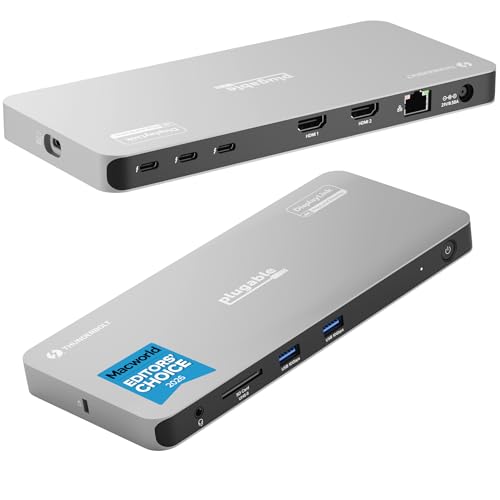
Plugable Thunderbolt 4 Quad Display Dock
Best for: quad 4K monitor workstations
- Host Interface
- Thunderbolt 4
- Display Support
- Quad
- Max Resolution
- 8K
- Power Delivery
- 96W
- Video Ports
- HDMI, Thunderbolt
- Max Data Speed
- 40Gbps
This Thunderbolt 4 docking station pairs native Thunderbolt video with DisplayLink to run up to four 4K displays or a single 8K screen. You get 96W certified laptop charging, three downstream 40Gbps Thunderbolt ports, Gigabit Ethernet, and an SD card slot. It suits you if you need a high-bandwidth desktop hub capable of driving multi-monitor setups on compatible Windows, macOS, or ChromeOS laptops.
Pros
- Supports up to four 4K displays or one 8K display
- Three downstream 40Gbps Thunderbolt ports with 15W charging
- Delivers up to 96W certified host power delivery
- Includes Gigabit Ethernet, HDMI ports, and an SD card slot
Cons
- Requires DisplayLink software drivers for the HDMI outputs
- Limits base model M1 and M2 Macs and ChromeOS to three extended displays
- Requires clamshell mode on base model M3 Macs to run four displays
Good fit if
- You need to connect up to four 4K monitors to one dock.
- You want three downstream 40Gbps Thunderbolt ports for peripherals.
- You require up to 96W power delivery for your host laptop.
Skip if
- You cannot install DisplayLink software on your machine.
- You use a base M1 or M2 Mac and require four extended monitors.
- You need Ethernet speeds faster than Gigabit.
Verdict: Plugable Thunderbolt 4 Quad Display Dock combines 96W host charging and 40Gbps ports with DisplayLink to support four 4K monitors. It offers a capable multi-display solution for compatible Windows, Mac, and ChromeOS workstations.

UGREEN Maxidok Thunderbolt 5 Docking Station
Best for: Thunderbolt 5 laptops needing high power delivery
- Host Interface
- Thunderbolt 5
- Display Support
- Triple
- Max Resolution
- 8K, 4K@144Hz
- Power Delivery
- 140W
- Video Ports
- Thunderbolt
- Max Data Speed
- 120Gbps
View on Amazon: UGREEN Maxidok Thunderbolt 5 Docking Station
This docking station connects via Thunderbolt 5 to deliver transfer speeds up to 120Gbps across four Thunderbolt ports. You get up to 140W of dynamic power delivery to charge your laptop, alongside a 2.5Gbps Ethernet port and UHS-II card slots. Video output runs entirely over Thunderbolt, supporting up to three 4K displays or a single 8K screen. It suits setups needing high data bandwidth and heavy laptop power.
Pros
- Up to 120Gbps data transfer speeds via Thunderbolt 5
- Supplies up to 140W dynamic host laptop charging
- 2500Mbps high-speed wired Ethernet connection
- Supports triple 4K or single 8K display output
Cons
- Lacks dedicated HDMI or DisplayPort connections
- Incompatible with Thunderbolt 3 hosts and devices
Good fit if
- You need up to 140W of dynamic power delivery for your laptop.
- You connect displays or high-speed storage primarily through Thunderbolt.
- You require 2.5Gbps wired Ethernet and UHS-II card readers.
Skip if
- You need direct HDMI or DisplayPort sockets for your monitors.
- You use a computer or peripheral limited to Thunderbolt 3.
Verdict: UGREEN Thunderbolt 5 Docking Station delivers extreme 120Gbps throughput and 140W charging for demanding modern workflows. Its pure Thunderbolt display routing requires USB-C monitor connections rather than traditional video cables.

Plugable Thunderbolt 5 11-in-1 Dock
Best for: High-wattage laptops needing cutting-edge Thunderbolt 5 bandwidth
- Host Interface
- Thunderbolt 5
- Display Support
- Up to 3
- Max Resolution
- 8K 120Hz
- Power Delivery
- Up to 140W
- Port Count
- 11
- Video Ports
- Thunderbolt 5
The Plugable Thunderbolt 5 11-in-1 Dock expands your workstation with up to 120Gbps bandwidth across three downstream Thunderbolt 5 ports. It delivers up to 140W Power Delivery to your host laptop and drives up to three external displays, reaching 8K at 120Hz on Windows or triple 6K at 60Hz on Mac. This dock suits power users who need high-bandwidth connectivity, 2.5Gbps wired Ethernet, and fast memory card readers.
Pros
- Supports up to 140W host charging via USB PD 3.1
- Three downstream Thunderbolt 5 ports with up to 120Gbps bandwidth
- Supports displays up to 8K at 120Hz or 4K at 144Hz
- Includes 2.5Gbps Ethernet alongside SD and microSD slots
Cons
- Lacks dedicated HDMI or DisplayPort video outputs
- Heavier desktop footprint at 3.6 pounds
Good fit if
- You need high-wattage charging up to 140W for a power-hungry laptop.
- You run high-refresh monitors up to 144Hz or high-resolution displays up to 8K.
- You connect modern Thunderbolt or USB-C native monitors.
Skip if
- You need direct HDMI or DisplayPort connections without USB-C adapters.
- You want a lightweight, travel-friendly hub rather than a 3.6-pound desktop unit.
Verdict: Plugable Thunderbolt 5 11-in-1 Dock provides next-generation 120Gbps throughput and strong 140W charging for high-end multi-display setups. It is ideal if your monitors connect directly through Thunderbolt or USB-C.
Specifications side by side
| Spec | Lenovo ThinkPad Thunderbolt 4 Smart Dock | Anker 10-in-1 Triple Display USB-C Dock | Koncept Thunderbolt 4 Modular Dock 130W | Plugable 16-in-1 Thunderbolt 4 Dock | Plugable Thunderbolt 5 Dual HDMI Dock | Dell Pro Thunderbolt 4 Modular Dock | Tobenone Quad 4K 20-in-1 DisplayLink Dock | Lenovo ThinkPad Thunderbolt 4 Workstation Dock | Dell Thunderbolt 4 Dock | Plugable Thunderbolt 4 Quad Display Dock | UGREEN Maxidok Thunderbolt 5 Docking Station | Plugable Thunderbolt 5 11-in-1 Dock |
|---|---|---|---|---|---|---|---|---|---|---|---|---|
| Host Interface | Thunderbolt 4 | USB-C | Thunderbolt 4, USB-C | Thunderbolt 4 | Thunderbolt 5, Thunderbolt 4, USB4 | Thunderbolt 4 | Thunderbolt 4 | Thunderbolt 4 | Thunderbolt 4, Thunderbolt 3, USB-C | Thunderbolt 4 | Thunderbolt 5 | Thunderbolt 5 |
| Display Support | not specified | Triple | Dual | Dual | Dual | not specified | Quad | not specified | Dual, Triple | Quad | Triple | Up to 3 |
| Max Resolution | 8K@60Hz, 4K@144Hz | 4K@30Hz | 4K | 4K@60Hz | 8K@60Hz, 4K@144Hz | 8K | 4K@60Hz | not specified | 4K@60Hz | 8K | 8K, 4K@144Hz | 8K 120Hz |
| Power Delivery | 100W | 100W | 130W | 100W | 140W | not specified | 100W | not specified | 130W (Dell), 90W (non-Dell) | 96W | 140W | Up to 140W |
| Port Count | not specified | 10 | not specified | 16 | 16 | not specified | 20 | not specified | 13 | not specified | not specified | 11 |
| Video Ports | HDMI, DisplayPort | HDMI, DisplayPort | DisplayPort, HDMI, USB-C, Thunderbolt | HDMI, DisplayPort | HDMI | DisplayPort 1.4, HDMI 2.0, USB-C, TB4 | HDMI, DP | not specified | DisplayPort, HDMI, USB-C, Thunderbolt | HDMI, Thunderbolt | Thunderbolt | Thunderbolt 5 |
| Max Data Speed | 40Gbps | 5 Gbps | 40 GB/s | 40Gbps | not specified | 40 GB/s | not specified | not specified | 40Gbps | 40Gbps | 120Gbps | 120Gbps |
| Ethernet Speed | not specified | not specified | Gigabit Ethernet | 2.5Gbps | 2.5Gbps | Gigabit Ethernet | not specified | not specified | Gigabit Ethernet | Gigabit | 2500Mbps | not specified |
| Resolution | not specified | not specified | 4K UHD | 4K UHD | 4K UHD | not specified | 4K UHD | not specified | 4K UHD | 4K UHD | 4K UHD | not specified |
| Connectivity | Thunderbolt 4 | not specified | USB-C, Thunderbolt 4 | Thunderbolt 4 | HDMI | Thunderbolt 4 | not specified | Thunderbolt 4 | USB-C, Thunderbolt 4 | Thunderbolt 4 | not specified | not specified |
| Refresh Rate | not specified | not specified | not specified | not specified | 144Hz | not specified | 60Hz | not specified | not specified | not specified | 60Hz | not specified |
| Features | not specified | DisplayLink | not specified | not specified | not specified | not specified | DisplayLink | not specified | not specified | not specified | not specified | not specified |
| Dimensions | 8.66 × 3.15 × 1.18 inches | 6.7 × 3.15 × 0.96 inches | 8.07 × 3.54 × 1.39 inches | 11.9 × 6 × 4.3 inches | 1.97 × 2.95 × 5.91 inches | not specified | 11.8 × 3.14 × 0.86 inches | 10.7 × 7.7 × 3.5 inches | not specified | 8.42 × 3.74 × 0.72 inches | 7.6 × 4.06 × 0.94 inches | 3.1 × 1.6 × 6.9 inches |
| Weight | 1.21 pounds | 1.6 ounces | 1.28 pounds | 1.42 pounds | 8.92 ounces | 4.06 pounds | 2.27 pounds | 15.9 ounces | not specified | 2.78 pounds | not specified | 3.6 pounds |
| Color | Eclipse Black | Gray | Black | Silver | Space Gray | Black | Grey | Black/Red | Black | not specified | not specified | Space Grey |
| Model | 40BE0135US | A83951A1 | SD25TB4 | TBT4-UDZ | TBT-UDH2 | DOCK-SD25TB4 | not specified | 40B00300US | WD22TB4-DOCK NEW | TBT-6950PD | U715 | TBT-UDT3 |
| Size | not specified | not specified | not specified | 11.6" × 5.8" × 4.1" | not specified | not specified | small | 1.18" x 3.15" | not specified | not specified | not specified | not specified |
If you prefer fresh juice, see our list of best juicers under 300 for more spec-based picks.
Choosing the Right Laptop Docking Station
-
Host Connection Bandwidth
Check your laptop port generation. Thunderbolt 5 delivers up to 120Gbps throughput, whereas Thunderbolt 4 offers 40Gbps, and standard USB-C tops out lower at 10Gbps. High bandwidth lets you drive multiple displays and external devices without connection bottlenecks. If your laptop features Thunderbolt 5, a dock like the UGREEN Maxidok Thunderbolt 5 Docking Station utilizes that full 120Gbps capacity. Matching your laptop port generation prevents underutilizing the dock or saturating available data channels.
-
Video Driver Requirements
Determine if you want driver-free video or driver-based multi-display routing. Docks using DisplayLink technology compress video over standard USB connections to drive three or four monitors, including on systems that normally limit external displays. However, DisplayLink setups require installed background drivers and frequently lack HDCP compliance for copy-protected media streaming. The Anker 10-in-1 Triple Display USB-C Dock relies on DisplayLink to deliver triple-display support across platforms. If you cannot install third-party drivers on a locked work laptop, avoid DisplayLink hardware.
-
Host Charging Capacity
Verify the power wattage your specific laptop model requires to charge under full workload. While many docks provide baseline 100W power delivery, demanding workstations consume more power and may drain battery if underpowered. High-output options supply up to 140W or 180W pass-through charging directly over the host connection. The Dell Thunderbolt 4 Dock provides 180W power delivery to keep high-draw laptops running at full performance. Check your factory charger rating to ensure the dock matches or exceeds that wattage output specification.
-
Monitor Connection Types
Inspect the video input cables your monitors use before choosing an output configuration. Some modern docking stations route video entirely through Thunderbolt or USB-C downstream ports instead of traditional HDMI or DisplayPort sockets. For instance, the Plugable Thunderbolt 5 11-in-1 Dock routes video over downstream USB-C and Thunderbolt channels, requiring USB-C monitor connections or dedicated conversion adapters. If your displays only accept HDMI or DisplayPort, choosing a dock with dedicated legacy video outputs saves you from purchasing additional adapters or cable upgrades.
-
Ethernet Port Speed
Check the Ethernet port specifications if you rely on wired network connectivity for daily operations. Standard docks provide 1Gbps Ethernet, but high-bandwidth docks integrate 2.5Gbps Ethernet controllers for faster local network transfers, NAS connections, and high-speed office backbones. The UGREEN Quad Display DisplayLink Dock includes a 2.5GbE network jack alongside its multi-port connectivity. If your office infrastructure or home router supports multi-gigabit speeds, selecting a dock with a 2.5Gbps port eliminates the network throughput bottleneck on large file transfers.
-
Physical Size and Placement
Measure your desk area and evaluate whether the dock stays fixed or travels. Dock weights on this list range from 1.6 ounces for lightweight portable units up to 4.06 pounds for heavy workstation hubs. The Dell Pro Thunderbolt 4 Modular Dock weighs 4.06 pounds, anchoring thick workstation cables without sliding across your desk surface. If you operate in a compact workspace, check published dimensions such as length and width to ensure the dock chassis fits cleanly beneath your monitor setup.
Frequently asked questions
Which dock supports the highest power delivery for laptops?
The ANYHDD Thunderbolt 4 Modular Dock provides 180W of power delivery. This high wattage suits demanding workstation setups that need substantial charging. The Dell Thunderbolt 4 Dock also offers 180W charging across its ports. These options ensure your laptop stays powered while connected to multiple displays and peripherals.
Can I use a docking station for four monitors?
Yes, several docks support quad 4K display setups. The Tobenone 20-in-1 DisplayLink Dock delivers quad 4K capability with 100W host power delivery. The Plugable Thunderbolt 4 Quad Display Dock also supports four 4K monitors using DisplayLink technology. These models are ideal for complex multi-screen workflows.
What is the difference between Thunderbolt 4 and Thunderbolt 5 docks?
Thunderbolt 5 offers higher bandwidth than Thunderbolt 4. Thunderbolt 4 provides 40 Gbps transfer speeds, while Thunderbolt 5 delivers up to 120 Gbps throughput. The UGREEN Maxidok and Plugable Thunderbolt 5 docks use this higher bandwidth. This allows for faster data transfer and support for newer display standards.
Do I need DisplayLink for triple monitor setups?
DisplayLink is useful for driving multiple displays beyond your laptop's native outputs. The Anker 10-in-1 Triple Display Dock uses DisplayLink to provide triple-monitor connectivity. The Tobenone Quad Dock also relies on DisplayLink for its four-screen capability. This technology allows you to extend your workspace across several monitors via a single cable.
Which dock is best for high-refresh rate gaming or editing?
The Plugable Thunderbolt 5 Dual HDMI Dock supports 144Hz refresh rates. It provides native dual HDMI 2.1 video output up to 8K at 60Hz. The Lenovo ThinkPad Thunderbolt 4 Smart Dock is also noted for high-refresh dual 4K laptop setups. These options deliver the bandwidth needed for smooth, high-resolution visuals.
Are modular docks better than fixed designs?
Modular docks allow you to swap components like power adapters or network cards. The ANYHDD Thunderbolt 4 Modular Dock features a swappable design for broad OS compatibility. The Dell Thunderbolt 4 Dock also uses a modular approach with a shared port layout. This flexibility helps you customize the dock to your specific desk requirements.