Best Docking Stations with Thunderbolt 3: 13 Spec-Based Picks
As an Amazon Associate we earn from qualifying purchases. Links on this page are affiliate links.
Choosing the right docking station with Thunderbolt 3 depends on your monitor setup, peripheral count, and power delivery requirements. To help you choose, 13 products are compared strictly by the specifications published on their product listings.
The HODO 8-in-2 MacBook USB-C Hub leads the list because its direct dual-port design provides 100W charging and 5K video support. This guide helps you decide which hub or dock matches your workstation display resolution, port layout, and charging capacity.
Quick picks
The best fit for you
- You need dual-port MacBook expansion with high-resolution video HODO 8-in-2 MacBook USB-C Hub Its 8-in-2 design supports 5K video, 100W charging, and card reader expansion through direct dual-port connections.
- You want the highest power delivery for your workstation Dell WD19 180W Docking Station Bundle It provides 180W power delivery alongside dual monitor support and dedicated Ethernet connectivity.
- You need memory card access and DisplayPort video output CalDigit TS3 Plus Thunderbolt 3 Dock It features an integrated card reader, DisplayPort connectivity, and 87W power delivery for desktop setups.
- You want a lightweight hub with maximum port options NOVOO 14-in-1 Thunderbolt 3 Dock This 1.76-ounce hub provides a 14-in-1 port layout with dual monitor 4K UHD video output.
Our 13 picks

HODO 8-in-2 MacBook USB-C Hub
Best for: dual-port MacBook setups needing Thunderbolt pass-through
- Connectivity
- USB-C, HDMI, Thunderbolt 3 (what this guide is about)
- Host Interface
- USB-C
- Max Resolution
- 5K
- Power Delivery
- 100W
- Port Count
- 8
- Video Ports
- HDMI, Thunderbolt 3
The HODO 8-in-2 MacBook Thunderbolt 3 Hub plugs directly into dual USB-C ports on compatible MacBook Pro and MacBook Air models. It features a full-speed 40Gbps Thunderbolt 3 pass-through port delivering up to 100W power and 5K video, alongside a 4K HDMI port. You also get two 10Gbps USB 3.1 ports, USB 2.0, SD and microSD readers, and audio support for your everyday desk peripherals.
Pros
- Thunderbolt 3 port supports 40Gbps data, 5K display, and 100W power delivery
- Dual 10Gbps USB 3.1 Type-A ports for high-speed file transfers
- Includes 4K HDMI output plus SD and microSD card slots
Cons
- Does not fit MacBooks with protective cases installed
- Incompatible with Logitech mice and keyboards
- Supports only one external hard drive or SSD at a time
Good fit if
- You use a dual USB-C MacBook Pro or MacBook Air without a protective case.
- You need a pass-through Thunderbolt 3 port supporting 100W charging and 5K video.
- You want built-in SD card slots alongside 10Gbps USB-A ports.
Skip if
- You use Logitech wireless keyboards or mice.
- You need to run multiple external SSDs or hard drives simultaneously.
- You keep a snap-on protective case on your MacBook.
Verdict: HODO 8-in-2 MacBook Thunderbolt 3 Hub delivers direct dual-port expansion with 100W charging and 5K video support for compatible MacBooks. It provides broad connectivity, though case clearance and specific peripheral restrictions apply.

Lenovo ThinkPad Thunderbolt 3 Dock Gen 2
Best for: compatible ThinkPad dual-display desk setups
- Connectivity
- USB-C, HDMI, DisplayPort, Thunderbolt 3 (what this guide is about)
- Host Interface
- Thunderbolt 3
- Display Support
- Dual
- Max Resolution
- 4K
- Video Ports
- HDMI, DisplayPort
- Ethernet Speed
- 10Base-T/100Base-TX/1000Base-T
This docking station connects via Thunderbolt 3 to power your workspace with support for dual 4K UHD displays. You get two HDMI ports, two DisplayPort outputs, five USB 3.1 Gen 2 ports, and Gigabit Ethernet. Powered by an included 135W power adapter, it delivers reliable laptop charging while expanding connectivity. It suits you if you run a compatible ThinkPad on Windows.
Pros
- Dual 4K UHD display support via two HDMI and two DisplayPort connections
- Includes 135W power adapter and Thunderbolt 3 cable
- Five USB 3.1 Gen 2 ports, including one always-on charging port
- Gigabit Ethernet and 3.5mm audio jack built in
Cons
- Official OS support listed only for Windows 7 and Windows 10
- No integrated SD or microSD card slot listed
- Security lock is sold separately
Good fit if
- You use a compatible Lenovo ThinkPad laptop running Windows 7 or 10.
- You need dual 4K monitor support through HDMI or DisplayPort connections.
- You want multiple high-speed USB 3.1 Gen 2 accessory ports at your desk.
Skip if
- You need macOS or Linux operating system support.
- You require built-in memory card slots for photo workflows.
Verdict: Lenovo ThinkPad Thunderbolt 3 Dual 4K Dock delivers robust port expansion and dual-display capabilities for compatible Windows workstations. It gives you comprehensive connectivity with high-speed video and USB outputs.

Belkin Thunderbolt 3 12-Port Dock
Best for: dual 4K setups needing SD card access
- Connectivity
- Thunderbolt 3 (what this guide is about)
- Host Interface
- Thunderbolt 3, USB-C
- Display Support
- Dual
- Max Resolution
- 4K
- Power Delivery
- 85W
- Port Count
- 12
This Belkin Thunderbolt 3 docking station expands your laptop setup through a single connection with twelve built-in ports. It delivers up to 85W of upstream charging from an included 170W power supply and supports dual 4K external displays. You get dedicated SD card, Ethernet, audio, USB-A, and USB-C connections. It fits your desk if you need full peripheral connectivity and multi-monitor output on Windows or Mac.
Pros
- Up to 85W upstream charging with included 170W power adapter
- Dual 4K external monitor support
- 12-port array includes SD card reader, Ethernet, and audio
- Includes 2.6-foot (0.8m) Thunderbolt 3 cable
Cons
- Charging capped at 85W for connected laptops
- Included connection cable measures 2.6 feet
Good fit if
- You run two 4K external monitors from a Windows or Mac laptop
- You need an SD card slot, Ethernet, and USB ports in one dock
- You want a dock that includes both a power supply and host cable
Skip if
- You need more than 85W of power delivery for high-draw laptops
- You require host cable runs longer than 2.6 feet (0.8 meters)
Verdict: Belkin Thunderbolt 3 12-Port Dock pairs dual 4K display output with 85W laptop power delivery and twelve peripheral ports. It provides complete desktop expansion for Thunderbolt 3 laptops using its included 170W supply.
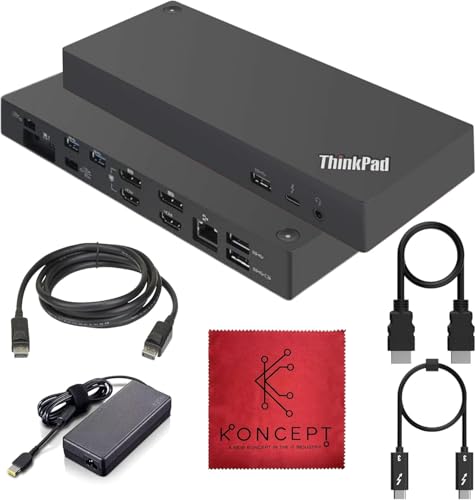
Koncept ThinkPad Thunderbolt 3 Dock
Best for: dual-4K Windows desktop workstation setups
- Connectivity
- Thunderbolt 3 (what this guide is about)
- Host Interface
- Thunderbolt 3
- Display Support
- Dual
- Max Resolution
- 4K
- Video Ports
- HDMI, DisplayPort, Thunderbolt 3
- Max Data Speed
- 10Gbps
This Koncept docking station connects to your laptop via Thunderbolt 3 to expand your workstation across multiple displays and peripherals. It features dual 4K display output through two HDMI and two DisplayPort connections, along with five USB 3.1 Gen 2 ports delivering up to 10Gbps transfer speeds. If you need dedicated Gigabit Ethernet, integrated audio, and extensive desktop display configurations for Windows systems, this unit provides the essential wired ports for your setup.
Pros
- Dual 4K video output across two HDMI and two DisplayPort connections
- High-speed 10Gbps USB 3.1 Gen 2 data ports
- Dedicated RJ-45 Gigabit Ethernet port and 3.5mm audio jack
- Integrated security lock slot for physical protection
Cons
- Supported operating systems listed only include Windows 7 and Windows 10
- Host laptop charging wattage is not specified in the product data
- No integrated SD or microSD memory card slots
Good fit if
- You run dual 4K external monitors using DisplayPort or HDMI connections.
- You require multiple 10Gbps USB 3.1 Gen 2 peripheral ports.
- You use a Windows 10 or Windows 7 laptop with Thunderbolt 3.
Skip if
- You need verified compatibility for macOS or Linux environments.
- You require built-in SD or microSD card readers for media transfers.
Verdict: Koncept ThinkPad Thunderbolt 3 Dock delivers versatile multi-display connectivity and 10Gbps USB data transfer for Windows workstations. It provides an expansive array of display and peripheral ports for fixed desktop setups.
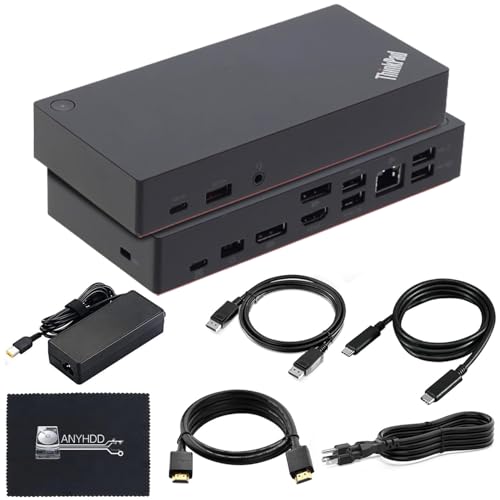
ANYHDD ThinkPad Docking Station Gen 2
Best for: desktop setups needing 90W charging and DisplayPort
- Connectivity
- USB-C, HDMI, DisplayPort, Thunderbolt 3 (what this guide is about)
- Host Interface
- Thunderbolt 3, USB-C
- Max Resolution
- 4K at 60Hz
- Video Ports
- 1x HDMI, 2x DisplayPort
- Ethernet Speed
- Gigabit Ethernet
- Power Delivery
- 90W
This docking station connects via USB-C or Thunderbolt 3 to expand your laptop ports through a single link. It includes a 90W AC adapter for power delivery, three USB 3.1 ports, two USB 2.0 ports, Gigabit Ethernet, and an audio combo jack. For displays, you get two DisplayPort connections and one HDMI output supporting up to 4K resolution at 60Hz. It suits users who need multi-monitor desk setups and dedicated peripheral expansion.
Pros
- Includes 90W AC adapter for host power delivery
- Dual DisplayPort and single HDMI video outputs
- Supports up to 4K resolution at 60Hz
- Five total USB ports alongside Gigabit Ethernet
- Bundled with HDMI, DisplayPort, and USB-C cables
Cons
- Maximum video output caps at a single 4K display at 60Hz
- Two of the USB data ports run at USB 2.0 speeds
Good fit if
- You need 90W power delivery to charge your laptop through the dock.
- You connect external monitors using DisplayPort or HDMI connections.
- You want included display and USB-C cables in the box.
Skip if
- You require multiple external monitors to run simultaneously at 4K 60Hz.
- You need all USB ports to support USB 3.1 transfer speeds.
Verdict: ANYHDD ThinkPad Docking Station Gen 2 provides essential desktop expansion with 90W power delivery, Gigabit Ethernet, and multiple video outputs. It offers practical connectivity for single 4K 60Hz setups and everyday office peripherals.

NOVOO 14-in-1 Thunderbolt 3 Dock
Best for: compact triple-display Windows laptop workstations
- Connectivity
- HDMI, Thunderbolt 3 (what this guide is about)
- Host Interface
- Thunderbolt 3, USB-C
- Display Support
- Triple
- Max Resolution
- 8K@30Hz
- Power Delivery
- 100W
- Port Count
- 14
This 14-in-1 docking station connects to your Thunderbolt 3 laptop to expand your workspace with multiple video and data ports. It features two HDMI ports, one DisplayPort supporting single outputs up to 8K at 30Hz, and 100W USB-C Power Delivery pass-through. You also get Gigabit Ethernet, SD card slots, and six USB ports. It suits you if you need a compact hub for multi-monitor Windows setups without buying a bulky desktop unit.
Pros
- Supports up to triple external displays on Windows via dual HDMI and DisplayPort
- Single DisplayPort output handles up to 8K at 30Hz or 4K at 120Hz
- Pass-through charging supports up to 100W USB-C Power Delivery
- Includes Gigabit Ethernet, 3.5mm audio, and SD/TF card readers
Cons
- Does not include a power supply or charging cable
- macOS does not support MST for multiple extended displays
- USB data ports top out at 5Gbps with three ports limited to USB 2.0
Good fit if
- You use Windows and want to connect up to three external screens.
- You already own a 65W or higher USB-C power adapter for pass-through charging.
- You need legacy USB 2.0, SD card, and Gigabit Ethernet ports in one compact adapter.
Skip if
- You use macOS and require multiple independent extended displays.
- You want an included standalone AC power supply out of the box.
Verdict: NOVOO 14-in-1 Thunderbolt 3 Dock delivers broad 14-port connectivity and triple display support for Windows setups in a pocketable footprint. It requires your own 65W or higher charger for power delivery and limits macOS to mirrored external screens.
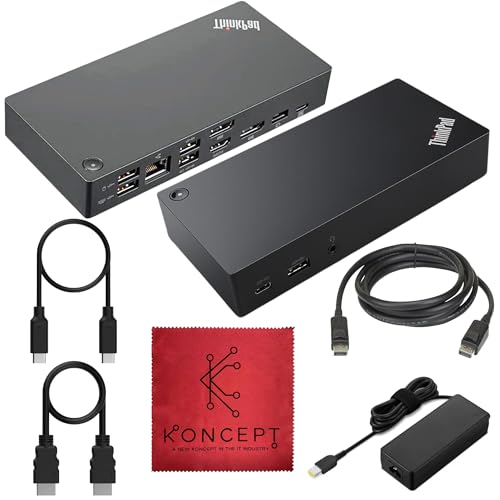
Koncept ThinkPad USB-C and Thunderbolt Dock
Best for: multi-display setups requiring DisplayPort and HDMI ports
- Connectivity
- USB-C, HDMI, DisplayPort, Thunderbolt 3 (what this guide is about)
- Host Interface
- USB-C
- Video Ports
- DisplayPort 1.2, HDMI
- Max Data Speed
- 10Gbps
- Ethernet Speed
- Gigabit
- Dimensions
- 6.73 × 3.15 × 1.28 inches
This desktop dock expands your workspace through Thunderbolt 3 and USB-C host connections. You get video output flexibility with two DisplayPort 1.2 ports and two HDMI ports for multi-monitor setups. Data connectivity includes three 10Gbps USB 3.1 Gen 2 Type-A ports, two USB 2.0 ports, a USB-C data port, and Gigabit Ethernet. It suits you if you need extensive peripheral hookups alongside dual digital display routing from a single laptop connection.
Pros
- Four video outputs featuring two DisplayPort 1.2 and two HDMI ports
- Three 10Gbps USB 3.1 Gen 2 Type-A ports with one always-on port
- Gigabit Ethernet port and 3.5mm stereo/mic combo audio jack
- Includes 90W power adapter, HDMI cable, DisplayPort cable, and USB-C cable
Cons
- DisplayPort connections use older 1.2 specification
- Two USB Type-A ports are limited to USB 2.0 speeds
- Peripheral USB-C port power output is capped at 5V 3A
Good fit if
- You need multiple display output options using DisplayPort or HDMI cables.
- You want high-speed 10Gbps USB-A ports for fast external storage.
- You require wired Gigabit Ethernet and integrated 3.5mm audio connectivity.
Skip if
- You require newer DisplayPort 1.4 or DisplayPort 2.1 video bandwidth.
- You need high-wattage charging from the accessory USB-C port beyond 5V 3A.
Verdict: Koncept ThinkPad USB-C and Thunderbolt Dock provides versatile multi-display connectivity and 10Gbps USB transfer speeds in a compact footprint. It gives you comprehensive peripheral routing without requiring extra display adapters.

Dell Thunderbolt 3 Dock 130W
Best for: high-wattage laptop charging and dual 4K setups
- Connectivity
- USB-C, HDMI, DisplayPort, Thunderbolt 3 (what this guide is about)
- Host Interface
- Thunderbolt 3, USB-C
- Display Support
- Up to 3
- Max Resolution
- 5K
- Power Delivery
- 130W
- Video Ports
- Dual DisplayPort, HDMI
This black Dell docking station connects to your laptop via Thunderbolt 3 and provides up to 130W of Power Delivery. It features HDMI, DisplayPort, and USB-C connectivity, allowing you to run up to three external displays, including dual 4K monitors or a single 5K display. Built-in enterprise tools like MAC Address pass-thru make it a practical fit if you need high power delivery and multi-monitor support for compatible Dell, HP, or Lenovo laptops.
Pros
- Supplies up to 130W Power Delivery
- Supports dual 4K monitors or a single 5K display
- Offers HDMI, DisplayPort, USB-C, and Thunderbolt 3 connectivity
- Includes enterprise features like PXE Boot and MAC Address pass-thru
Cons
- Lacks integrated 3.5mm audio jacks
- Built-in host cable is fixed at 0.8 meters
- VESA mounting bracket is an optional accessory
Good fit if
- You need 130W Power Delivery for a compatible high-draw laptop.
- You want to connect dual 4K monitors or a single 5K display.
- You require network management tools like Wake-on-LAN and PXE Boot.
Skip if
- You need built-in 3.5mm headphone or microphone ports.
- You need a host connection cable longer than 0.8 meters.
Verdict: Dell Thunderbolt 3 Dock with 130W Power Delivery provides robust multi-display output and high charging wattage through a single connection. It is an effective desktop hub if you do not require analog 3.5mm audio jacks.
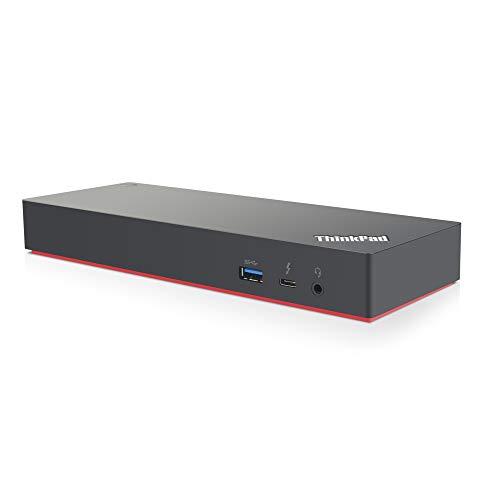
Lenovo ThinkPad Thunderbolt 3 Dock Gen 2
Best for: dual 4K Windows workstation setups
- Connectivity
- USB-C, HDMI, DisplayPort, Thunderbolt 3 (what this guide is about)
- Host Interface
- Thunderbolt 3
- Display Support
- Dual
- Max Resolution
- 4K
- Video Ports
- HDMI, DisplayPort, USB-C
- Ethernet Speed
- 10Base-T/100Base-TX/1000Base-T
This Lenovo docking station uses Thunderbolt 3 connectivity to drive up to dual 4K UHD displays. You get two HDMI ports, two DisplayPort outputs, five USB 3.1 Gen 2 ports, and a Gigabit Ethernet jack. It comes bundled with a 135W power adapter and a dedicated Thunderbolt 3 cable. It suits your workspace if you run a Windows laptop and need high-speed data transfer alongside multi-monitor video outputs.
Pros
- Dual 4K UHD display support via two HDMI and two DisplayPort outputs
- Five USB 3.1 Gen 2 ports, including one always-on charging port
- Includes 135W power adapter and Thunderbolt 3 cable in the box
- Gigabit RJ-45 Ethernet port and 3.5mm audio jack
Cons
- No built-in SD or microSD card reader listed
- Designed specifically for Windows 7 and Windows 10 systems
- Weighs 2.52 pounds, making it heavy for portable setups
Good fit if
- You need dual 4K monitor support via HDMI or DisplayPort connections.
- You want five USB 3.1 Gen 2 ports for high-speed desktop peripherals.
- You use a Windows 10 or Windows 7 laptop with Thunderbolt 3.
Skip if
- You need an integrated SD or TF card slot for flash media.
- You require an ultra-lightweight travel dock instead of a 2.52-pound desktop unit.
Verdict: Lenovo ThinkPad Thunderbolt 3 Dual 4K Dock delivers extensive display connectivity with dual 4K capability and five high-speed USB ports for Windows desktop setups. Its included 135W power adapter provides robust power to keep your workstation running.
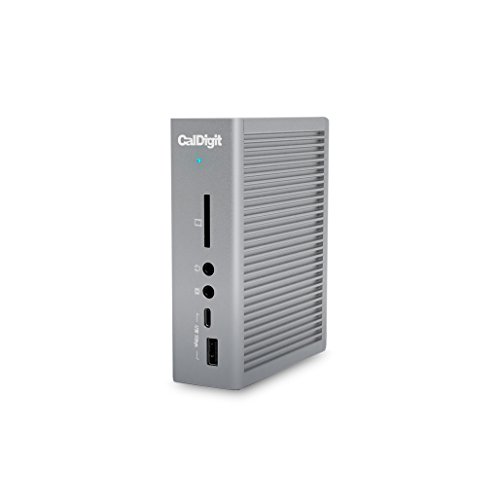
CalDigit TS3 Plus Thunderbolt 3 Dock
Best for: creative workflows needing extensive peripheral connectivity
- Connectivity
- USB-C, DisplayPort, Ethernet, Thunderbolt 4, Thunderbolt 3 (what this guide is about)
- Host Interface
- Thunderbolt 3
- Display Support
- Dual
- Max Resolution
- 5K@60Hz
- Power Delivery
- 87W
- Port Count
- 15
The CalDigit TS3 Plus Thunderbolt 3 Dock adds 15 ports to your workstation over a 40Gb/s connection. It delivers up to 87W of charging power to your laptop, drives dual 4K displays at 60Hz or a single 5K screen, and includes seven USB ports alongside a UHS-II SD card slot. It suits creators and professionals who need high peripheral density and fast media offloading without extra adapters.
Pros
- Up to 87W host charging with an extra 15W downstream Thunderbolt 3 port
- 15 total ports including optical audio (S/PDIF) and 7 USB ports
- UHS-II SD card reader with bus speeds up to 312 MB/s
- Supports dual 4K displays at 60Hz or a single 5K screen at 60Hz
Cons
- Requires active adapters for DisplayPort conversion to HDMI, DVI, or VGA
- Does not support dual displays on base M1 Macs over Thunderbolt
Good fit if
- You need high-speed SD card transfers and dedicated optical audio output.
- You want to connect up to seven USB accessories and dual 4K monitors.
Skip if
- You use a base M1 Mac and require dual external displays.
- You need native HDMI ports without buying separate active adapters.
Verdict: CalDigit TS3 Plus Thunderbolt 3 Dock provides massive peripheral expansion and reliable 87W power delivery for demanding desktop setups. It is a capable choice if your workflow relies on fast SD cards, optical audio, and multiple USB accessories.

DUDUXI Under Desk Dock Mount for TS3 Plus and TS4
Best for: mounting CalDigit docks under desks
- Connectivity
- Thunderbolt 4, Thunderbolt 3 (what this guide is about)
- Recommended Use
- Desk
- Weight
- 1.15 pounds
View on Amazon: DUDUXI Under Desk Dock Mount for TS3 Plus and TS4
The DUDUXI Under Desk Dock Mount is a thickened iron storage bracket engineered to hold a CalDigit TS3 Plus or TS4 dock beneath your desktop. Built from powder-coated iron weighing 1.15 pounds, it includes four silicone blocks to prevent chassis scratches. The open frame ensures unrestricted airflow around your hardware and leaves all ports accessible. It suits you if you want to mount your dock horizontally using the included screws or adhesive tape.
Pros
- Thickened iron construction with powder-coat finish
- Four silicone blocks protect dock casing from scratches
- Open frame layout maintains airflow and port access
- Includes 12 installation screws and supports tape mounting
Cons
- Mounting accessory only; does not include a docking station
- Designed specifically for CalDigit TS4 and TS3 Plus form factors
Good fit if
- You own a CalDigit TS3 Plus or TS4 dock and need under-desk mounting.
- You want an open-frame metal holder that preserves airflow.
- You prefer mounting with either screws or adhesive tape.
Skip if
- You need an active Thunderbolt 3 docking station rather than a bracket.
- You use a dock from another brand with different chassis dimensions.
Verdict: DUDUXI Under Desk Dock Mount for TS3 Plus and TS4 provides dedicated iron under-desk storage to free up workspace while preserving cooling and port access. It secures your CalDigit dock firmly without risking surface scratches.
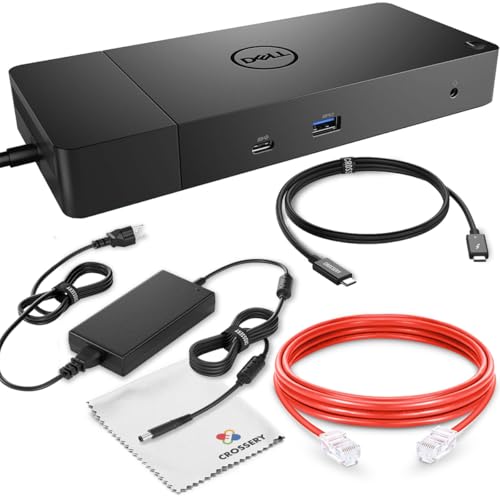
Dell WD19 180W Docking Station Bundle
Best for: high-wattage Dell laptop dual-display setups
- Connectivity
- USB-C, Ethernet, Thunderbolt 3 (what this guide is about)
- Host Interface
- USB-C
- Display Support
- Dual
- Max Resolution
- 3840 x 2160 - 60 Hz
- Power Delivery
- 130W
- Video Ports
- DisplayPort, HDMI, USB-C
This bundle centers on a refurbished Dell WD19 modular dock paired with a 180W power adapter and a Thunderbolt 3 cable. It powers Dell laptops at up to 130W and non-Dell systems at 90W while connecting your workspace through one connection. You get dual monitor output at up to 4K resolution, three USB-A ports, two DisplayPort 1.4 outputs, and Gigabit Ethernet, making it suitable if you run a demanding desk workstation.
Pros
- 180W power adapter supplies 130W Power Delivery to Dell laptops and 90W to non-Dell systems
- Dual 4K display support up to 60 Hz over DisplayPort 1.4
- Comes bundled with a Thunderbolt 3 cable, Ethernet cable, and power adapter
- Offers two DisplayPort 1.4 ports, one HDMI port, and one multifunction USB-C port
Cons
- Dock unit is renewed rather than brand new
- Non-Dell laptops are limited to 90W Power Delivery
- DisplayPort 1.2 host connections cap 4K resolution at 30 Hz
Good fit if
- You use a Dell laptop that requires up to 130W of charging power.
- You want an all-in-one bundle that includes the necessary Thunderbolt 3 and Ethernet cables.
- You run a dual-monitor setup using DisplayPort or HDMI connections.
Skip if
- You require a factory-new dock unit instead of a renewed model.
- You use a non-Dell laptop that demands more than 90W of power delivery.
- You need 60 Hz 4K output from a host device limited to DisplayPort 1.2.
Verdict: Dell WD19 180W Docking Station Bundle pairs high-wattage charging with diverse video outputs for multi-display laptop desks. It delivers strong power delivery for Dell laptops alongside essential connection cables right in the box.

Motiexic Under Desk Mount for CalDigit Docks
Best for: under-desk mounting of CalDigit docks
- Connectivity
- Thunderbolt 4, Thunderbolt 3 (what this guide is about)
- Recommended Use
- Desk
- Weight
- 15.5 ounces
View on Amazon: Motiexic Under Desk Mount for CalDigit Docks
This mounting bracket is an under-desk holder built specifically for CalDigit TS3 Plus, TS4, and TS5 docks. Weighing 0.97 pounds, it features a metal frame with four open sides to maintain airflow and ensure full port access. You can mount the separate power brick bracket together with or apart from the main dock holder. It suits you if you already own a compatible dock and want clear desk space.
Pros
- Adjustable width supports CalDigit TS3 Plus, TS4, and TS5 docks
- Metal construction with four open sides for dock airflow
- Separate brackets allow combined or independent dock and power brick mounting
- Maintains open access to all ports and includes cable straps
Cons
- Mounting accessory only; does not include a docking station
- Designed exclusively for CalDigit dock dimensions
Good fit if
- You own a CalDigit TS3 Plus, TS4, or TS5 dock.
- You need to mount your dock and power brick under your desk.
Skip if
- You need an actual docking station with electronic ports.
- You use a dock model from a brand other than CalDigit.
Verdict: Motiexic Under Desk Mount for CalDigit Docks secures compatible hardware beneath your work surface using a ventilated metal frame. It provides dedicated placement for both the dock and power supply while preserving port access.
Specifications side by side
| Spec | HODO 8-in-2 MacBook USB-C Hub | Lenovo ThinkPad Thunderbolt 3 Dock Gen 2 | Belkin Thunderbolt 3 12-Port Dock | Koncept ThinkPad Thunderbolt 3 Dock | ANYHDD ThinkPad Docking Station Gen 2 | NOVOO 14-in-1 Thunderbolt 3 Dock | Koncept ThinkPad USB-C and Thunderbolt Dock | Dell Thunderbolt 3 Dock 130W | Lenovo ThinkPad Thunderbolt 3 Dock Gen 2 | CalDigit TS3 Plus Thunderbolt 3 Dock | DUDUXI Under Desk Dock Mount for TS3 Plus and TS4 | Dell WD19 180W Docking Station Bundle | Motiexic Under Desk Mount for CalDigit Docks |
|---|---|---|---|---|---|---|---|---|---|---|---|---|---|
| Host Interface | USB-C | Thunderbolt 3 | Thunderbolt 3, USB-C | Thunderbolt 3 | Thunderbolt 3, USB-C | Thunderbolt 3, USB-C | USB-C | Thunderbolt 3, USB-C | Thunderbolt 3 | Thunderbolt 3 | not specified | USB-C | not specified |
| Display Support | not specified | Dual | Dual | Dual | not specified | Triple | not specified | Up to 3 | Dual | Dual | not specified | Dual | not specified |
| Max Resolution | 5K | 4K | 4K | 4K | 4K at 60Hz | 8K@30Hz | not specified | 5K | 4K | 5K@60Hz | not specified | 3840 x 2160 - 60 Hz | not specified |
| Power Delivery | 100W | not specified | 85W | not specified | not specified | 100W | not specified | 130W | not specified | 87W | not specified | 130W | not specified |
| Port Count | 8 | not specified | 12 | not specified | not specified | 14 | not specified | not specified | not specified | 15 | not specified | not specified | not specified |
| Video Ports | HDMI, Thunderbolt 3 | HDMI, DisplayPort | not specified | HDMI, DisplayPort, Thunderbolt 3 | 1x HDMI, 2x DisplayPort | DisplayPort, HDMI | DisplayPort 1.2, HDMI | Dual DisplayPort, HDMI | HDMI, DisplayPort, USB-C | DisplayPort, Thunderbolt 3 | not specified | DisplayPort, HDMI, USB-C | not specified |
| Max Data Speed | 40Gbps | not specified | not specified | 10Gbps | not specified | 5Gbps | 10Gbps | not specified | not specified | 40Gb/s | not specified | not specified | not specified |
| Ethernet Speed | not specified | 10Base-T/100Base-TX/1000Base-T | not specified | 1000Base-T | Gigabit Ethernet | 1000Mbps | Gigabit | not specified | 10Base-T/100Base-TX/1000Base-T | Gigabit Ethernet | not specified | Gigabit | not specified |
| Resolution | not specified | 4K UHD | not specified | not specified | not specified | 4K UHD | not specified | not specified | 4K UHD | not specified | not specified | not specified | not specified |
| Connectivity | USB-C, HDMI, Thunderbolt 3 | USB-C, HDMI, DisplayPort, Thunderbolt 3 | Thunderbolt 3 | Thunderbolt 3 | USB-C, HDMI, DisplayPort, Thunderbolt 3 | HDMI, Thunderbolt 3 | USB-C, HDMI, DisplayPort, Thunderbolt 3 | USB-C, HDMI, DisplayPort, Thunderbolt 3 | USB-C, HDMI, DisplayPort, Thunderbolt 3 | USB-C, DisplayPort, Ethernet, Thunderbolt 4, Thunderbolt 3 | Thunderbolt 4, Thunderbolt 3 | USB-C, Ethernet, Thunderbolt 3 | Thunderbolt 4, Thunderbolt 3 |
| Features | Card Reader | not specified | not specified | not specified | not specified | not specified | not specified | not specified | not specified | Card Reader | not specified | not specified | not specified |
| Recommended Use | not specified | not specified | not specified | not specified | not specified | not specified | not specified | not specified | not specified | not specified | Desk | not specified | Desk |
| Weight | 3.63 ounces | 2 pounds | 14.9 ounces | not specified | not specified | 1.76 ounces | not specified | 3 pounds | 2.52 pounds | 1.32 pounds | 1.15 pounds | not specified | 15.5 ounces |
| Dimensions | not specified | 8.66 × 3.15 × 1.18 inches | 9.75 × 5.12 × 0.79 inches | 8.6 × 3.5 × 1.2 inches | not specified | 4.12 × 1.83 × 0.54 inches | 6.73 × 3.15 × 1.28 inches | 3.5 × 11.2 × 1.1 inches | 9.45 × 27.2 × 0.98 inches | 6.8 × 5.4 × 4.8 inches | not specified | not specified | not specified |
| Size | 8-in-2 | 1.2" x 8.7" x 3.1" | 1" x 7.9" x 3.2" | not specified | not specified | 14 in 1 | Lenovo 40as0090us Renewed | not specified | not specified | 0.8 Meter Cable | not specified | not specified | not specified |
| Color | Space Gray | Black | Space Gray | Black | Black | Silver Gray HUB | Black | Black | Black | TS3 Plus - Space Gray | Black | Black | Black bracket fit for TS3Plus TS4 TS5 Dock |
| Model | HD2c03H | 40AN0135US | F4U097tt | 40AN0135US | DOCK-40AS0090US-NEW | NHM14S-632C2 | Docking-40AS0090US | WD19TBS-cr | DK1841 | TS3PLUS-US07-SG | not specified | not specified | not specified |
If you require data migration, explore the best SSD docking stations with offline clone for your workflow.
How to Choose a Thunderbolt 3 Dock
-
Match Video Output Port Types
Check available display connection types on the dock against your monitors. Many docks provide both DisplayPort and HDMI ports. The Lenovo ThinkPad Thunderbolt 3 Dock Gen 2 includes both DisplayPort and HDMI connections to drive 4K UHD external displays directly. If your monitors only accept DisplayPort inputs, choose docks with dedicated native DisplayPort jacks to eliminate extra adapter cables. If you run legacy HDMI monitors, ensure the dock supplies native HDMI outputs without requiring converters.
-
Verify Multi Monitor OS Compatibility
Examine multi-display specifications across your primary operating system. Windows workstations support extended independent desktops across multiple external screens over a single connection. Certain hubs handle external displays differently depending on the host platform. The NOVOO 14-in-1 Thunderbolt 3 Dock supports multi-display setups on Windows, but limits macOS systems to mirrored external screens. Check whether your setup requires extended multi-monitor operation or simple mirroring. Always confirm multi-stream transport compatibility for your specific operating system before choosing a dock.
-
Check Integrated Card Reader Needs
Look at integrated media card reader slots if your daily workflow involves offloading photo or video footage. Standard docking stations often omit flash memory card slots, which forces you to use external USB dongles. Docks like the CalDigit TS3 Plus integrate a dedicated card reader directly on the chassis alongside high-speed peripheral ports. Selecting a model with built-in card access keeps USB ports open for external storage drives and wired accessories while reducing desk wire clutter.
-
Consider Mounting and Desk Placement
Determine whether your workstation requires desktop placement or under-desk installation. Large multi-port docking stations occupy desk surface area and route multiple cables across the desktop. Dedicated hardware like the DUDUXI Under Desk Dock Mount secures compatible docks beneath your work surface using an iron bracket. This setup clears your desk while preserving cooling ventilation and port access. If desk space is minimal, compare dock dimensions and confirm whether under-desk mounting brackets match your specific dock model.
-
Count Required Peripheral Connections
Audit your peripheral devices before choosing a dock model. Basic hubs offer fewer expansion points, while full-sized desktop docks provide extensive connection options. The Belkin Thunderbolt 3 12-Port Dock supplies twelve distinct peripheral ports to manage external drives, wired networking, and accessories simultaneously. If you connect only basic input devices, lower port counts suffice. If you operate multiple external drives, wired audio, and network drops, select docks that provide high port counts to avoid daisy-chaining separate hubs.
Frequently asked questions
Can a Thunderbolt 3 dock support 4K or 5K display outputs?
Yes, Thunderbolt 3 docks provide high-resolution display outputs for compatible setups. The HODO 8-in-2 MacBook USB-C Hub supports up to 5K video output. Meanwhile, desktop models like the Lenovo ThinkPad Thunderbolt 3 Dock Gen 2 and NOVOO 14-in-1 deliver 4K UHD resolutions across external monitors. Make sure your host computer supports these resolutions before connecting.
Do Thunderbolt 3 docking stations work with standard USB-C laptops?
Yes, many docking stations support both USB-C and Thunderbolt 3 host connections. Models such as the Koncept ThinkPad Dock and ANYHDD ThinkPad Docking Station Gen 2 list compatibility with both standards. However, using a standard USB-C host port instead of native Thunderbolt 3 may limit video bandwidth, supported display counts, and peripheral transfer speeds.
What display limitations should you expect on macOS with multi-monitor docks?
Certain multi-display docks limit external monitor configurations when connected to Apple computers. For example, the NOVOO 14-in-1 Thunderbolt 3 Dock provides triple display output on Windows workstations, but its product listing notes that macOS is limited to mirrored external screens. Check your operating system requirements to confirm whether independent extended displays are supported.
Do all Thunderbolt 3 docking stations include a power adapter?
No, power supply configurations vary depending on dock design and form factor. Desktop models like the Belkin Thunderbolt 3 12-Port Dock use an included 170W power brick, while Lenovo includes a 135W adapter. In contrast, compact travel docks like the NOVOO 14-in-1 dock require you to supply your own 65W or higher charger for power delivery.
Can you mount a Thunderbolt 3 dock under your desk?
Yes, you can secure select desktop docks under your workstation using dedicated mounting hardware. Brackets like the DUDUXI Under Desk Dock Mount and Motiexic Under Desk Mount are designed specifically for CalDigit TS3 Plus and TS4 docks. These iron brackets keep ports accessible while clearing desk space and maintaining proper device airflow.
Which Thunderbolt 3 docking stations include built-in card readers?
Several models feature integrated memory card slots directly on the hub chassis. The HODO 8-in-2 MacBook USB-C Hub and CalDigit TS3 Plus Thunderbolt 3 Dock both list card reader functionality among their core hardware specifications. These integrated readers let you import photos and media files directly without plugging in standalone USB card adapters.
What USB data transfer speeds do Thunderbolt 3 docks provide?
Thunderbolt 3 docks supply fast peripheral ports to connect external storage and accessories. The Koncept ThinkPad Thunderbolt 3 Dock and Koncept ThinkPad USB-C and Thunderbolt Dock both specify 10Gbps USB transfer speeds. These high-speed ports let you move large files quickly to external drives while maintaining connections to monitors and network cables.