12 Best Docking Stations with VGA, Compared
As an Amazon Associate we earn from qualifying purchases. Links on this page are affiliate links.
A reliable docking station with VGA lets you connect legacy analog monitors and conference room projectors to modern USB-C laptops. To help you balance older displays with current video standards, we evaluated 12 models using only the specifications published on their listings.
The MOKiN 8-in-1 Dual DisplayPort USB-C Dock takes the top spot because it pairs legacy 1080p VGA video with modern 4K outputs and 100W power delivery. This guide helps you choose the ideal model for your workstation based on physical port selections, video output capabilities, and laptop charging power.
Quick picks
The best fit for you
- You need the best overall VGA and 4K setup MOKiN 8-in-1 Dual DisplayPort USB-C Dock It pairs legacy 1080p VGA video with modern 4K outputs and 100W power delivery.
- You want the most compact model on the list Baseus 7-in-1 USB-C Dock with VGA & Dual HDMI Its aluminum casing weighs only 2.26 ounces while providing VGA and dual HDMI outputs.
- You need the highest port density with VGA Anker 14-in-1 USB-C Triple Display Dock This 14-in-1 dock offers comprehensive peripheral expansion alongside simultaneous VGA and dual 4K HDMI video.
- You need VGA support on Apple Silicon laptops HYRTA 12-in-1 DisplayLink Dock with VGA It uses DisplayLink technology to enable multi-monitor setups with VGA on systems that lack native support.
Our 12 picks

MOKiN 8-in-1 Dual DisplayPort USB-C Dock
Best for: mixed VGA and 4K multi-display setups
- Connectivity
- USB-C, HDMI, DisplayPort, VGA (what this guide is about)
- Host Interface
- USB-C
- Max Resolution
- 4K@60Hz
- Power Delivery
- 100W
- Port Count
- 8
- Video Ports
- 2 DP, HDMI, VGA
This 8-in-1 MOKiN USB-C docking station provides a dedicated legacy VGA port running up to 1080p at 60Hz alongside two DisplayPort outputs and one HDMI port capable of 4K at 60Hz. You also get 100W Power Delivery pass-through charging and three USB 2.0 ports. It suits you if you need to run an older VGA monitor or projector alongside modern displays from a compatible Windows USB-C laptop setup.
Pros
- VGA port supports video output up to 1080p at 60Hz
- Dual DisplayPort and single HDMI ports support up to 4K at 60Hz
- Supports up to 100W USB-C Power Delivery pass-through
- Lightweight build weighing approximately 0.22 pounds
Cons
- macOS systems support mirror mode only without extended displays
- USB data ports operate at USB 2.0 speeds up to 480Mbps
Good fit if
- You need to output to a 1080p VGA monitor alongside 4K displays.
- You want up to 100W Power Delivery charging through a single hub.
- You use a Windows laptop equipped with a full-featured USB-C port.
Skip if
- You use a Mac and require extended desktop across external screens.
- You need USB 3.0 transfer speeds for high-bandwidth external drives.
Verdict: MOKiN 8-in-1 USB-C Dock with VGA & Dual DP pairs legacy 1080p VGA video with modern 4K outputs and 100W power delivery. It serves Windows users who need mixed legacy and high-resolution display connectivity.

Selore&S-Global 8-in-1 Quad Video Dock
Best for: Windows users needing VGA and 4K displays
- Connectivity
- USB-C, HDMI, DisplayPort, VGA (what this guide is about)
- Host Interface
- USB-C
- Max Resolution
- 4K@60Hz
- Power Delivery
- 100W
- Port Count
- 8
- Video Ports
- HDMI, DisplayPort, VGA
This Selore docking station supports up to four displays via dual HDMI, one DisplayPort, and one VGA port. It delivers 4K resolution at 60Hz on compatible outputs and includes a 100W Power Delivery port for fast laptop charging. The unit connects through a single USB-C host interface. It is designed for users who need legacy VGA connectivity alongside modern digital displays on Windows systems.
Pros
- Supports up to four simultaneous monitors
- Includes legacy VGA output port
- Provides 100W Power Delivery charging
- Delivers 4K@60Hz on HDMI and DP outputs
Cons
- MacBooks are limited to mirroring or SST mode
- VGA connection limits all screens to 1080p on Mac
- Requires full-featured USB-C or Thunderbolt 3/4 port
Good fit if
- You need a VGA port for older projectors
- You want to connect up to four screens
- You use a Windows laptop with USB-C video support
Skip if
- You rely on macOS extended desktop features
- Your laptop lacks a full-featured USB-C port
- You need 8K resolution support
Verdict: Selore 8-in-1 USB-C VGA Dock is a practical solution for Windows users who must connect legacy VGA displays while maintaining high-resolution digital outputs. It fits professionals needing multi-monitor setups with older peripherals.

MOKiN 8-in-1 Triple Display Docking Station
Best for: mixed VGA and digital multi-monitor setups
- Connectivity
- USB-C, HDMI, DisplayPort, VGA (what this guide is about)
- Host Interface
- USB-C
- Display Support
- Triple
- Power Delivery
- 100W
- Port Count
- 8
- Video Ports
- HDMI, DisplayPort, VGA
This MOKiN 8-in-1 hub provides four video ports: one VGA, two HDMI, and one DisplayPort. You can drive up to three external displays from a full-function USB-C or Thunderbolt port, though macOS mirrors external screens. It includes a 100W USB-C power delivery pass-through port alongside two USB-A 2.0 ports and one USB-C 2.0 port. It suits you if you need legacy VGA monitor support alongside modern digital video outputs.
Pros
- Includes VGA, two HDMI, and one DisplayPort video connections
- Supports 100W USB-C Power Delivery pass-through charging
- Enables triple-display output on supported systems
- Includes an 18-month warranty
Cons
- USB data ports are limited to USB 2.0 speeds of 480Mbps
- External displays mirror each other when connected to macOS systems
Good fit if
- You need to connect an older VGA monitor alongside HDMI or DisplayPort screens.
- You want 100W USB-C Power Delivery pass-through for charging your laptop.
- You use a Windows laptop with a Thunderbolt or full-function USB-C port.
Skip if
- You need high-speed USB data transfer rates beyond 480Mbps for external drives.
- You use macOS and need independent extended desktops across multiple external displays.
Verdict: MOKiN 8-in-1 Triple Display Dock with VGA pairs legacy VGA connectivity with three digital video outputs and 100W power delivery. It provides flexible multi-monitor expansion, though peripheral data transfers remain capped at USB 2.0 speeds.

Anker 8-in-1 USB-C Hub with Ethernet
Best for: portable setups needing legacy VGA and HDMI
- Connectivity
- USB-C, HDMI, Ethernet, VGA (what this guide is about)
- Host Interface
- USB-C, USB4, Thunderbolt
- Display Support
- Triple
- Max Resolution
- 4K@60Hz
- Power Delivery
- 85W
- Port Count
- 8
This compact hub expands your laptop with eight ports, including a legacy 1080p VGA connection and a 4K at 60Hz HDMI port. It supports up to 85W pass-through Power Delivery and data transfers up to 5Gbps across USB-A and USB-C ports. Built-in Ethernet keeps your network wired. It suits you if you need multi-display flexibility with older analog monitors and modern displays in a portable footprint.
Pros
- 1080p VGA port alongside 4K at 60Hz HDMI video output
- Supports up to 85W USB-C pass-through Power Delivery
- Compact 4.5-inch enclosure weighing 0.22 pounds
- Integrated Ethernet port and 5Gbps USB data ports
Cons
- Not compatible with Linux operating systems
- macOS supports only Mirror mode across external screens
- Requires a separate 100W wall charger for 85W pass-through
Good fit if
- You need to connect an external 1080p VGA monitor and a 4K HDMI screen.
- You want up to 85W pass-through charging via USB-C Power Delivery.
- You work on Windows, macOS 12 or newer, or ChromeOS with DP Alt Mode.
Skip if
- You use a laptop running Linux.
- You require extended multi-monitor desktop support on a Mac.
- You need USB transfer speeds faster than 5Gbps.
Verdict: Anker 8-in-1 USB-C Hub with VGA delivers 1080p analog and 4K digital video outputs in a lightweight travel-friendly body. It is an effective docking option for connecting legacy projectors or monitors alongside modern peripherals.

Anker 14-in-1 USB-C Triple Display Dock
Best for: Windows setups needing high port density and VGA
- Connectivity
- USB-C, HDMI, USB-A, VGA (what this guide is about)
- Host Interface
- USB-C, USB4, Thunderbolt
- Display Support
- Triple
- Max Resolution
- 4K
- Power Delivery
- 80W
- Port Count
- 14
This 14-in-1 hub pairs legacy 1080p VGA with dual 4K HDMI outputs, allowing you to connect three external monitors at once on compatible Windows systems. It supplies up to 80W of pass-through power delivery and adds five 5 Gbps USB-A ports, Gigabit Ethernet, and SD card readers. It suits your workspace if you need extensive peripheral connections alongside legacy analog and modern digital displays.
Pros
- Triple display support via two 4K HDMI ports and one 1080p VGA port
- 80W pass-through laptop charging via 100W USB-C PD input
- Broad connectivity with five 5 Gbps USB-A ports and Gigabit Ethernet
- Integrated SD and microSD card slots plus an AUX audio port
Cons
- macOS mirrors external displays rather than extending independent desktops
- Does not include a power supply or wall charger
- Incompatible with Linux operating systems
Good fit if
- You run Windows 10, Windows 11, or ChromeOS with DP Alt Mode support.
- You need to drive two HDMI screens and one VGA screen at the same time.
- You use numerous USB-A accessories, memory cards, and wired Ethernet.
Skip if
- You use a Linux operating system.
- You want extended dual or triple screens on macOS.
- You need an included wall charger ready out of the box.
Verdict: Anker 14-in-1 USB-C Triple Display Dock gives Windows users comprehensive peripheral expansion and simultaneous VGA and dual 4K HDMI video output. Its 80W pass-through charging and 14-port layout handle demanding desktop arrangements cleanly.

Baseus Quadruple Display 8-in-1 USB-C Dock
Best for: multi-monitor setups needing legacy VGA connectivity
- Connectivity
- USB-C, HDMI, DisplayPort, USB-A, VGA (what this guide is about)
- Host Interface
- USB-C
- Display Support
- Quadruple
- Max Resolution
- 8K@30Hz
- Power Delivery
- 92W
- Video Ports
- DisplayPort, HDMI, VGA
This Baseus 8-in-1 docking station connects to your laptop via USB-C to provide legacy VGA output alongside HDMI and DisplayPort connections. It supports up to four displays with DisplayPort video output up to 8K at 30Hz. A 100W Power Delivery input routes up to 92W to your laptop while providing an extra 20W USB-C output. It suits setups that require legacy VGA monitors alongside modern high-resolution displays.
Pros
- Dedicated VGA port alongside HDMI and 8K DisplayPort video outputs
- Up to 92W laptop charging from a 100W Power Delivery input
- Secondary 20W USB-C fast charging port for mobile devices
- Individual hardware buttons to power down connected displays
Cons
- USB-A data ports cap at 5Gbps transfer speeds
- No integrated wired Ethernet port listed
- DisplayPort 8K video output caps at a 30Hz refresh rate
Good fit if
- You need to run a legacy VGA monitor alongside 4K HDMI or 8K DisplayPort screens.
- You want physical buttons to quickly disconnect individual displays for privacy.
- You need dedicated 20W USB-C fast charging alongside laptop power pass-through.
Skip if
- You require an integrated RJ45 wired Ethernet connection.
- You need USB peripheral transfer speeds higher than 5Gbps.
Verdict: Baseus 8-in-1 Docking Station with VGA pairs legacy analog video with modern DisplayPort and HDMI outputs for multi-display workstations. Dedicated screen-off buttons and 92W laptop charging provide strong utility for multi-monitor desks.

NOVOO 14-in-1 USB-C Dock with VGA
Best for: Windows multi-monitor setups needing legacy VGA connectivity
- Connectivity
- USB-C, HDMI, DisplayPort, Ethernet, VGA (what this guide is about)
- Host Interface
- USB-C
- Display Support
- Quad
- Max Resolution
- 8K@30Hz
- Power Delivery
- 100W
- Port Count
- 14
This NOVOO hub expands a single USB-C port into 14 outputs, including one VGA port, two HDMI ports, and an 8K DisplayPort. It provides wired Gigabit Ethernet, five 5Gbps USB data ports, and up to 100W Power Delivery passthrough. If you need to drive legacy analog displays alongside modern high-resolution screens from one workstation, this dock gives you broad display connectivity.
Pros
- Includes VGA, dual HDMI, and DisplayPort video connections
- Supports up to 100W Power Delivery charging input
- Features Gigabit Ethernet and five 5Gbps USB data ports
- Integrated SD and TF card readers up to 104MB/s
Cons
- External power cord is not included
- Supports only one connected external hard drive or SSD at a time
- macOS laptops only support SST mirror mode across external screens
Good fit if
- You need VGA connectivity alongside dual HDMI and DisplayPort outputs.
- You use a Windows laptop that supports MST multi-monitor desktop extension.
- You want 100W Power Delivery passthrough and Gigabit Ethernet in one hub.
Skip if
- You use macOS and require multiple independent extended displays.
- You need to connect multiple external hard drives or SSDs simultaneously.
- You require an included power supply brick and cable in the box.
Verdict: NOVOO 14-in-1 USB-C Dock with VGA delivers versatile video routing by pairing legacy VGA with DisplayPort and HDMI ports. It handles multi-display output and peripheral connectivity reliably on compatible Windows systems.

MOKiN 13-in-1 USB-C Dock with VGA
Best for: Windows multi-display setups needing legacy VGA output
- Connectivity
- USB-C, HDMI, DisplayPort, Ethernet, VGA (what this guide is about)
- Host Interface
- USB-C
- Max Resolution
- 8K, 4K@60Hz
- Power Delivery
- 85W
- Port Count
- 13
- Video Ports
- HDMI, DisplayPort, VGA
This MOKiN 13-in-1 USB-C hub expands your setup with legacy VGA alongside two HDMI ports and a DisplayPort. It delivers up to 85W of pass-through power delivery to your laptop from a 100W input. You also get three 10Gbps USB ports, Gigabit Ethernet, and an SD card reader. It suits you if you need legacy VGA alongside high-speed data transfer and multiple digital monitor connections on a Windows machine.
Pros
- Includes VGA, two HDMI ports, and a DisplayPort
- Supports up to 85W laptop pass-through charging
- Three 10Gbps USB 3.1 ports across USB-C and USB-A
- Built-in Gigabit Ethernet and SD/TF card reader
Cons
- macOS can only extend to one external display
- Two USB-A ports use slower USB 2.0 speeds
Good fit if
- You use a Windows laptop and want multi-monitor output including VGA.
- You require fast 10Gbps USB-C and USB-A peripheral connections.
- You need wired Gigabit Ethernet and integrated memory card readers.
Skip if
- You use macOS and need multiple extended external screens.
- You require more than 85W pass-through charging power.
Verdict: MOKiN 13-in-1 USB-C Dock with VGA combines legacy video output with modern 10Gbps ports and broad multi-display connectivity for Windows systems. It provides extensive port expansion without requiring driver installation.

NOVOO 12-in-1 Dual Monitor Dock with VGA
Best for: mixed VGA and dual HDMI multi-monitor setups
- Connectivity
- USB-C, HDMI, VGA (what this guide is about)
- Host Interface
- USB-C
- Display Support
- Triple
- Max Resolution
- 4K@60Hz
- Power Delivery
- 87W
- Port Count
- 12
The NOVOO 12-in-1 Dual Monitor Dock with VGA connects legacy displays alongside modern screens. You get a dedicated 1080p VGA port, two HDMI ports reaching up to 4K, and 10Gbps USB data transfers. It passes through up to 87W of charging power to your laptop from a 100W source. This hub suits you if you need multiple display options, legacy monitor support, and high-speed peripheral connections on a single USB-C port.
Pros
- Dedicated VGA port supporting 1080p at 60Hz
- Three 10Gbps USB 3.2 data ports across Type-C and Type-A
- Supports 100W Power Delivery input with 87W laptop charging
- Integrated SD and TF 3.0 card reader slots at 170MB/s
Cons
- No RJ45 Ethernet port included
- Second HDMI port is limited to 4K at 30Hz
- macOS is limited to mirrored display plus one extended screen
Good fit if
- You need to run a 1080p VGA monitor alongside HDMI displays.
- You use fast 10Gbps USB-C or USB-A storage drives.
- You want an integrated SD and TF card reader on your desk.
Skip if
- You require a built-in wired Ethernet connection.
- You need multiple extended desktop displays on macOS.
Verdict: NOVOO 12-in-1 Dual Monitor Dock with VGA pairs legacy analog video with modern 10Gbps USB connectivity. It provides flexible multi-display outputs for Windows laptops that require both VGA and dual HDMI.
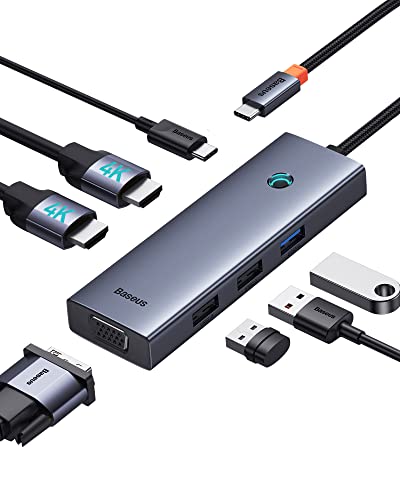
Baseus 7-in-1 USB-C Dock with VGA & Dual HDMI
Best for: portable multi-monitor setups needing VGA connectivity
- Connectivity
- USB-C, HDMI, VGA (what this guide is about)
- Host Interface
- USB-C
- Display Support
- Triple
- Max Resolution
- 4K@60Hz
- Power Delivery
- 100W
- Port Count
- 7
View on Amazon: Baseus 7-in-1 USB-C Dock with VGA & Dual HDMI
This Baseus 7-in-1 USB-C hub expands your laptop with a legacy VGA port and two HDMI outputs, supporting up to three external displays. It delivers up to 100W Power Delivery to keep your machine charged while offering one USB 3.0 port and two USB 2.0 ports for accessories. It suits you if you need a compact, pocketable adapter to run older VGA projectors alongside modern 4K HDMI monitors on the go.
Pros
- Features two HDMI ports and one VGA port for up to three external displays
- Supports single-display resolution up to 4K at 60Hz over HDMI 1
- Provides up to 100W USB-C Power Delivery pass-through charging
- Weighs approximately 0.14 pounds in a compact aluminum alloy shell
Cons
- macOS mirrors display content across external screens rather than extending independently
- Two of the three USB-A ports operate at USB 2.0 transfer speeds
- Does not include an Ethernet port or memory card reader
Good fit if
- You need a compact travel hub featuring both VGA and dual HDMI video outputs.
- You want 100W Power Delivery pass-through to charge your laptop through a single hub.
- You carry your setup often and need an adapter that weighs under 0.15 pounds.
Skip if
- You use macOS and require multiple independent extended monitor desktops.
- You transfer files frequently and need more than one high-speed USB 3.0 port.
- You require a wired RJ45 Ethernet connection for local networking.
Verdict: Baseus 7-in-1 USB-C Dock with VGA & Dual HDMI provides multi-display video output and 100W Power Delivery in a lightweight aluminum casing. It serves as a practical choice for pairing older VGA hardware with modern screens without carrying a bulky docking station.

UGREEN 8-in-1 Triple Display USB-C Dock
Best for: triple displays with VGA and fast data
- Connectivity
- USB-C, HDMI, USB-A, VGA (what this guide is about)
- Host Interface
- USB-C
- Display Support
- Triple
- Max Resolution
- 4K
- Power Delivery
- 85W
- Port Count
- 8
The UGREEN 8-in-1 USB-C Dock provides legacy VGA output alongside dual 4K HDMI ports, letting you drive up to three external displays at 1080p resolution. It features four 10Gbps USB 3.2 Gen 2 ports split evenly across USB-A and USB-C formats, plus 85W pass-through charging from a 100W Power Delivery input. This setup suits you if you need fast data speeds and older display connectivity in a compact footprint.
Pros
- Supports triple display output with one 1080p VGA and two 4K HDMI ports
- Four 10Gbps USB 3.2 Gen 2 ports across USB-A and USB-C
- 100W Power Delivery port provides up to 85W laptop pass-through charging
Cons
- macOS does not support multi-stream transport (MST) for triple displays
- USB-C 3.2 data ports do not support video output or charging
- No Ethernet port or 3.5mm audio jack included
Good fit if
- You need a dedicated VGA port alongside dual HDMI outputs for multi-monitor setups.
- You transfer files frequently using 10Gbps USB-A or USB-C peripherals.
- You need up to 85W pass-through power delivered to your laptop.
Skip if
- You use a Mac and require independent extended screens across three displays.
- You require a wired Ethernet connection or a built-in headphone jack.
Verdict: UGREEN 8-in-1 USB-C Dock with VGA combines legacy video output with 10Gbps data ports and 85W pass-through charging for multi-screen workstations. It serves Windows laptop users who balance older analog monitors with modern high-speed peripherals.

HYRTA 12-in-1 DisplayLink Dock with VGA
Best for: DisplayLink multi-monitor setups needing VGA
- Connectivity
- USB-C, HDMI, USB-A, VGA (what this guide is about)
- Host Interface
- USB-C, USB-A
- Display Support
- Triple
- Max Resolution
- 2048×1152@60Hz
- Power Delivery
- 100W
- Port Count
- 12
The HYRTA 12-in-1 DisplayLink Dock connects via USB-C or USB-A to provide one VGA port at 1080p alongside dual HDMI outputs up to 2048x1152 at 60Hz. It includes 100W Power Delivery passthrough, Gigabit Ethernet, card readers, and four USB ports. Driven by a DisplayLink chip, it lets you add external displays across platforms, making it ideal if you need legacy VGA monitor integration alongside modern digital screens.
Pros
- DisplayLink chip enables multi-display output on M1, M2, and M3 MacBooks
- Dedicated VGA output supports resolutions up to 1920x1080 at 60Hz
- Supports up to 100W Power Delivery input for laptop charging
- Includes a USB-C to USB-A adapter for broad host compatibility
Cons
- HDMI outputs are capped at 2048x1152 at 60Hz instead of 4K
- Requires DisplayLink driver installation prior to use
- Extended mode on macOS yields two identical display images
Good fit if
- You need to connect a 1080p VGA screen alongside HDMI monitors to an Apple Silicon Mac.
- You use a laptop with standard USB-A or USB-C ports and need 100W Power Delivery.
- You require Gigabit Ethernet and multiple USB ports on a single hub.
Skip if
- You need native 4K display output on your external screens.
- You cannot install external DisplayLink drivers on your managed machine.
- You require three completely independent extended displays on macOS.
Verdict: HYRTA 12-in-1 DisplayLink Dock with VGA solves multi-monitor constraints on Apple Silicon and older laptops using DisplayLink technology alongside a legacy VGA port. It delivers broad port utility for mixed-display setups, though maximum HDMI resolution is limited to 2048x1152.
Specifications side by side
| Spec | MOKiN 8-in-1 Dual DisplayPort USB-C Dock | Selore&S-Global 8-in-1 Quad Video Dock | MOKiN 8-in-1 Triple Display Docking Station | Anker 8-in-1 USB-C Hub with Ethernet | Anker 14-in-1 USB-C Triple Display Dock | Baseus Quadruple Display 8-in-1 USB-C Dock | NOVOO 14-in-1 USB-C Dock with VGA | MOKiN 13-in-1 USB-C Dock with VGA | NOVOO 12-in-1 Dual Monitor Dock with VGA | Baseus 7-in-1 USB-C Dock with VGA & Dual HDMI | UGREEN 8-in-1 Triple Display USB-C Dock | HYRTA 12-in-1 DisplayLink Dock with VGA |
|---|---|---|---|---|---|---|---|---|---|---|---|---|
| Host Interface | USB-C | USB-C | USB-C | USB-C, USB4, Thunderbolt | USB-C, USB4, Thunderbolt | USB-C | USB-C | USB-C | USB-C | USB-C | USB-C | USB-C, USB-A |
| Display Support | not specified | not specified | Triple | Triple | Triple | Quadruple | Quad | not specified | Triple | Triple | Triple | Triple |
| Max Resolution | 4K@60Hz | 4K@60Hz | not specified | 4K@60Hz | 4K | 8K@30Hz | 8K@30Hz | 8K, 4K@60Hz | 4K@60Hz | 4K@60Hz | 4K | 2048×1152@60Hz |
| Power Delivery | 100W | 100W | 100W | 85W | 80W | 92W | 100W | 85W | 87W | 100W | 85W | 100W |
| Port Count | 8 | 8 | 8 | 8 | 14 | not specified | 14 | 13 | 12 | 7 | 8 | 12 |
| Video Ports | 2 DP, HDMI, VGA | HDMI, DisplayPort, VGA | HDMI, DisplayPort, VGA | HDMI, VGA | HDMI, VGA | DisplayPort, HDMI, VGA | DisplayPort, HDMI, VGA | HDMI, DisplayPort, VGA | HDMI, VGA | HDMI, VGA | HDMI, VGA | 2 HDMI, 1 VGA |
| Max Data Speed | 480Mbps | not specified | 480Mbps | 5Gbps | 5 Gbps | 5Gbps | 5Gbps | 10Gbps | 10Gbps | not specified | 10Gbps | 5Gbps |
| Ethernet Speed | not specified | not specified | not specified | not specified | 1 Gbps | not specified | Gigabit | 1000Mbps | not specified | not specified | not specified | 10/100/1000Mbps |
| Resolution | not specified | 4K UHD | not specified | 4K UHD | 1080p FHD | 4K UHD | 4K UHD | not specified | 4K UHD | 4K UHD | 4K UHD | not specified |
| Connectivity | USB-C, HDMI, DisplayPort, VGA | USB-C, HDMI, DisplayPort, VGA | USB-C, HDMI, DisplayPort, VGA | USB-C, HDMI, Ethernet, VGA | USB-C, HDMI, USB-A, VGA | USB-C, HDMI, DisplayPort, USB-A, VGA | USB-C, HDMI, DisplayPort, Ethernet, VGA | USB-C, HDMI, DisplayPort, Ethernet, VGA | USB-C, HDMI, VGA | USB-C, HDMI, VGA | USB-C, HDMI, USB-A, VGA | USB-C, HDMI, USB-A, VGA |
| Refresh Rate | not specified | not specified | not specified | 60Hz | not specified | not specified | 60Hz | not specified | not specified | not specified | not specified | not specified |
| Features | not specified | not specified | not specified | not specified | not specified | not specified | not specified | not specified | not specified | not specified | not specified | DisplayLink |
| Weight | 3.53 ounces | not specified | not specified | 3.56 ounces | 9.45 ounces | not specified | 4.8 ounces | not specified | not specified | 2.26 ounces | not specified | not specified |
| Dimensions | not specified | not specified | 5.47 × 3.19 × 0.75 inches | 4.5 × 2.1 × 0.7 inches | 5.91 × 2.13 × 0.67 inches | not specified | 2.36 × 0.65 × 5.7 inches | not specified | not specified | 4.33 × 1.46 × 0.55 inches | 5.28 × 2.27 × 0.63 inches | 4.7 × 2.2 × 0.59 inches |
| Color | Grey | White | 8 in 1 | Gray | Grey | black | Grey | 13 in 1(2 HDMI+DP+VGA) | Grey | not specified | grey | Grey |
| Size | not specified | 8-IN-1 | 2 HDMI+DP+VGA | 8-in-1 USB-C Hub | 14 in 1 USB C Hub (Pack of 2) | small | 14 in 1 Dock | 13 in 1(2 HDMI+DP+VGA) | 12-in-1 | 6 in 1 | not specified | not specified |
| Model | not specified | Dual HDMI Docking Station | not specified | A8379 | A8389 | not specified | NHM14S-632B2 | not specified | NHM12S-MS12 | not specified | 35588 | not specified |
You may also want to review the best SSD docking stations with offline clone for your specific storage needs.
Choosing the Right USB-C Dock with VGA
-
Verify Pass-Through Power Delivery
Check the power delivery wattage rating before matching a dock to your laptop charger. Docking stations consume internal power to run video controllers and connected ports. A hub rated for 100W input typically reserves between 8W and 20W for onboard operations. For example, the Baseus Quadruple Display 8-in-1 USB-C Dock routes 92W directly to the host laptop from a 100W power source. If your laptop requires high wattage under heavy processing workloads, verify the actual pass-through delivery spec rather than relying strictly on the total input number.
-
Check Peripheral Transfer Speeds
Examine the USB port versions if you transfer large files to external solid-state drives. Docking stations with legacy VGA ports often manage internal bandwidth by dropping USB-A and USB-C ports to basic USB 2.0 speeds. However, models like the UGREEN 8-in-1 USB-C Dock incorporate fast 10Gbps data ports alongside analog video outputs. If you only connect simple peripherals like keyboards and mice, USB 2.0 ports suffice. If you frequently move video files or data backups across external drives, look specifically for 10Gbps USB specs on the listing.
-
Assess Wired Ethernet Requirements
Determine whether your daily workstation setup requires an integrated RJ45 Ethernet port. Many compact VGA docking stations omit network jacks to reduce physical enclosure volume and keep component layouts simple. If you work in environments with unreliable wireless signals or corporate networks requiring hardwired connections, select a dock with dedicated Ethernet. The Anker 8-in-1 USB-C Hub with Ethernet integrates a network jack alongside its VGA and HDMI outputs. Selecting a hub without Ethernet forces you to use a separate network adapter or depend entirely on wireless connections.
-
Select Digital Video Connector Types
Identify the exact digital video ports on your external screens before buying. Docks that support VGA combine the analog port with different digital standards, typically HDMI, DisplayPort, or both. If your modern monitor only has DisplayPort inputs free, choose a dock that supplies native DisplayPort output instead of buying extra adapters. The MOKiN 8-in-1 Dual DisplayPort USB-C Dock provides dual DisplayPort connectors alongside VGA. Matching the physical video sockets on the dock to your existing cables prevents signal handshake issues and keeps your desktop wiring organized.
-
Evaluate Dimensions and Carrying Weight
Compare physical dimensions and overall weight if you travel between offices or present in different conference rooms. Docks range from lightweight mobile dongles to dense multi-port desktop hubs. For frequent mobile travel, look for enclosures weighing under a quarter pound with short dimensions. For instance, the Baseus 7-in-1 USB-C Dock with VGA weighs just 0.141 pounds and measures 4.33 inches long. Larger docks with high port counts offer broad stationary connectivity, but their heavier aluminum bodies and longer profiles take up significantly more space inside laptop bags.
-
Confirm Digital Port Refresh Rates
Inspect the maximum refresh rate listed for the digital outputs alongside the VGA connection. Analog VGA ports operate at standard 1080p frequencies, but modern digital screens benefit from higher frame delivery. When running 4K monitors through a multi-display dock, some units cap refresh rates at 30Hz, causing mouse stutter and sluggish window movements. Models such as the NOVOO 14-in-1 USB-C Dock with VGA specify 4K output at 60Hz. Confirming 60Hz capability ensures smooth desktop cursor tracking and responsive video playback across your primary digital displays during daily multitasking.
Frequently asked questions
Can I connect three monitors to a laptop using a VGA dock?
Yes, several models support triple display setups. The MOKiN 8-in-1 Triple Display Dock and the UGREEN 8-in-1 USB-C Dock both allow you to use VGA alongside two digital outputs. These docks provide flexible multi-monitor expansion for Windows laptops that need legacy analog connectivity combined with modern high-resolution screens.
Which docking station is best for connecting old projectors and modern 4K screens?
The MOKiN 8-in-1 Dual DisplayPort USB-C Dock is a strong choice for mixed setups. It pairs legacy 1080p VGA video with modern 4K outputs. This configuration serves users who need to connect older conference room projectors while maintaining high-resolution digital displays for their primary work tasks.
Do these docks support pass-through charging for my laptop?
Most models include power delivery features to charge your device. The MOKiN 8-in-1 and Baseus 7-in-1 docks offer 100W power delivery. The Anker 14-in-1 dock provides 80W pass-through charging. This allows you to power your laptop through the dock while connecting multiple peripherals and displays.
Are these docks compatible with Mac computers?
Compatibility depends on the specific technology used. The HYRTA 12-in-1 DisplayLink Dock is designed to solve multi-monitor constraints on Apple Silicon laptops. Most other listed docks are described as suitable for Windows systems. You should verify your Mac model supports the specific video output method of the dock you choose.
What is the maximum resolution for the VGA output?
VGA is an analog standard that typically supports up to 1080p resolution. The data confirms that docks like the MOKiN 8-in-1 and Anker 8-in-1 deliver 1080p analog video. While the digital HDMI or DisplayPort outputs may reach 4K UHD, the VGA port itself remains limited to standard high-definition clarity.
Which dock offers the most ports for peripherals?
The Anker 14-in-1 USB-C Triple Display Dock and the NOVOO 14-in-1 USB-C Dock provide the highest port density. They feature 14 ports each, handling demanding desktop arrangements. These models include VGA, HDMI, USB-A, and Ethernet options, offering comprehensive peripheral expansion for users with many connected devices.
How heavy are the portable VGA docking stations?
Portability varies by model size and materials. The Baseus 7-in-1 USB-C Dock is one of the lightest options at 2.26 ounces. The MOKiN 8-in-1 Dual DisplayPort dock weighs 3.53 ounces. Heavier models like the Anker 14-in-1 weigh 9.45 ounces. Lighter docks are better for travel.
Do I need to install drivers for these docks?
Most standard USB-C docks are plug-and-play. The MOKiN 13-in-1 USB-C Dock explicitly states it provides extensive port expansion without requiring driver installation. However, specialized docks like the HYRTA 12-in-1 DisplayLink Dock rely on DisplayLink technology. You may need to install specific software for DisplayLink models to function correctly.