Best 9-in-1 Docking Stations: 12 Spec-Based Picks
As an Amazon Associate we earn from qualifying purchases. Links on this page are affiliate links.
Choosing the best 9-in-1 docking stations requires comparing nine ports and video outputs across many models. We evaluated 12 options based strictly on published specifications. The HODO 9-in-1 USB-C Dock with Dual HDMI and DP leads this list because it supports dual monitor setups with versatile connectivity for Windows workstations. Each pick focuses on port count, refresh rates, and power delivery specs. This guide helps you decide which hub matches your display and charging needs.
Quick picks
The best fit for you
- You need dual monitor outputs with HDMI and DisplayPort HODO 9-in-1 USB-C Dock with Dual HDMI and DP This dock provides dual HDMI and DisplayPort connections for flexible multi-monitor setups.
- You want high refresh rate 4K video output Baseus 9-in-1 USB-C Dock with 4K 120Hz HDMI It supports 4K resolution at a 120Hz refresh rate for fluid visual output.
- You need dual extended 4K displays on macOS UGREEN DisplayLink Dual 4K Docking Station Its DisplayLink hardware enables dual 4K 60Hz extended monitor support on macOS laptops.
- You want an integrated ergonomic stand for your laptop Mukiya 9-in-1 Laptop Stand Docking Station An integrated kickstand elevates your laptop while supplying nine expansion ports including dual HDMI.
Our 12 picks

HODO 9-in-1 USB-C Dock with Dual HDMI and DP
Best for: Windows multi-monitor setups needing versatile video options
- Port Count
- 9-in-1 (what this guide is about)
- Host Interface
- USB-C
- Display Support
- Quadruple
- Max Resolution
- 8K@30Hz
- Power Delivery
- 87W
- Video Ports
- HDMI, DisplayPort, VGA
View on Amazon: HODO 9-in-1 USB-C Dock with Dual HDMI and DP
This 9-in-1 USB-C docking station expands your laptop with four video outputs, including two HDMI ports, one DisplayPort, and one VGA port. It delivers up to 87W pass-through charging from a 100W Power Delivery input, alongside one 5Gbps USB 3.0 port and two USB 2.0 ports. It suits you if you need multi-monitor productivity on a Windows laptop with support for up to quad external displays at 1080p.
Pros
- Supports up to four external displays across dual HDMI, DisplayPort, and VGA
- Provides up to 87W pass-through charging from a 100W Power Delivery input
- Single display video output supports up to 8K at 30Hz or 4K at 144Hz
- Includes dedicated USB 3.0, USB 2.0, and USB-C data ports
Cons
- macOS mirrors external screens rather than extending across separate displays
- Connecting the VGA port drops all connected screens to 1080p resolution
- Power adapter and charging cable are not included
Good fit if
- You use a Windows laptop supporting DisplayPort 1.4 video output.
- You require varied video connections including HDMI, DisplayPort, and legacy VGA.
- You want up to 87W pass-through charging via an existing 65W or higher USB-C charger.
Skip if
- You use macOS and require multiple independent extended external displays.
- You need 5Gbps transfer speeds across more than one USB port.
Verdict: HODO 9-in-1 USB-C Dock with Dual HDMI and DP delivers flexible multi-monitor connectivity and high-wattage charging pass-through for Windows workstations. It serves as a practical hub if you do not require macOS multi-display extending.

Selore Dual 4K HDMI USB-C Dock
Best for: dual 4K monitor setups needing privacy control
- Port Count
- 9-in-1 (what this guide is about)
- Host Interface
- USB-C
- Display Support
- Dual
- Max Resolution
- 4K@60Hz
- Power Delivery
- 100W
- Video Ports
- HDMI
The Selore 9-in-1 Dual 4K HDMI USB-C Dock is a compact multiport adapter designed for multi-display desktop setups. It delivers dual HDMI outputs running at up to 4K at 60Hz, alongside 100W Power Delivery passthrough and three 5Gbps USB data ports. A built-in physical privacy button lets you instantly blank screens or toggle display modes. It fits you well if you need dual high-resolution monitors and card transfers without bulky hardware.
Pros
- Dual HDMI ports support up to 4K resolution at 60Hz
- Dedicated physical button for instant privacy screen blackout and mode toggling
- Supports up to 100W USB-C Power Delivery passthrough
- Three 5Gbps USB data ports across one USB-C and two USB-A connections
- Integrated SD and TF card slots with read speeds up to 104Mbps
Cons
- No Ethernet port for wired local network connections
- macOS limits external displays to mirror mode or a single extended screen
- No 3.5mm audio jack included
Good fit if
- You run two external 4K displays at 60Hz from a Windows laptop.
- You want a dedicated hardware button to quickly blank screens or switch display modes.
- You frequently offload photos or video via SD and microSD card slots.
Skip if
- You require a wired Gigabit Ethernet internet connection.
- You use macOS and need two independent extended external monitors.
- You need a built-in 3.5mm audio port for wired headphones or speakers.
Verdict: Selore 9-in-1 Dual 4K HDMI USB-C Dock provides dual 4K 60Hz video and rapid card offloading in an ultra-portable design. Its hardware privacy switch and 100W power delivery make it a capable dual-screen hub for compatible laptops.

Acer 9-in-1 Dual HDMI USB-C Dock
Best for: Windows setups needing dual 4K 60Hz displays
- Port Count
- 9-in-1 (what this guide is about)
- Host Interface
- USB-C
- Display Support
- Dual
- Max Resolution
- 4K@60Hz
- Power Delivery
- 90W
- Video Ports
- HDMI
This Acer 9-in-1 USB-C dock gives you dual 4K display output at 60Hz across two HDMI ports. It delivers up to 90W of Power Delivery pass-through charging from a 100W input. For peripherals, you get three 5Gbps USB-A ports, one 5Gbps USB-C port, and SD/microSD card readers. It suits Windows laptop setups that require dual 4K monitors and fast peripheral access through an integrated cable.
Pros
- Dual HDMI ports support up to 4K at 60Hz
- Delivers up to 90W laptop charging from 100W PD input
- Four 5Gbps data ports (three USB-A and one USB-C)
- Hardware lock button secures screen output instantly
Cons
- macOS does not support extended dual displays (A-BC mode)
- No Ethernet port included
- Built-in host cable is fixed at 0.65 feet
Good fit if
- You use a Windows laptop and require dual 4K monitors at 60Hz.
- You need 90W pass-through power alongside SD card access and 5Gbps ports.
- You want a physical one-click screen lock feature on your desk.
Skip if
- You use macOS and want two independent extended external screens.
- You require a hardwired Ethernet connection on your dock.
- Your laptop USB-C port lacks DisplayPort Alt Mode video output.
Verdict: Acer Dual HDMI 9-in-1 USB-C Dock provides dual 4K 60Hz video and 90W Power Delivery in an aluminum enclosure. It gives Windows users high-resolution multi-monitor output and ample USB connectivity.

Vicfluxion 9-in-1 USB-C Hub with DisplayPort
Best for: mixed HDMI and DisplayPort dual-monitor setups
- Port Count
- 9-in-1 (what this guide is about)
- Host Interface
- USB-C
- Display Support
- Dual
- Max Resolution
- 4K@60Hz
- Power Delivery
- 90W
- Video Ports
- HDMI, DisplayPort
View on Amazon: Vicfluxion 9-in-1 USB-C Hub with DisplayPort
This Vicfluxion 9-in-1 hub expands your laptop with HDMI and DisplayPort video outputs, Gigabit Ethernet, SD and TF card readers, and USB-A 3.0 ports. Both display connections support up to 4K resolution at 60Hz when paired with DP 1.4 Alt Mode. It accepts up to 100W Power Delivery input, reserving 10W for internal operation while passing up to 90W to your system. It suits you if you need mixed display outputs.
Pros
- Dual display outputs supporting up to 4K resolution at 60Hz over HDMI and DisplayPort
- Supports up to 90W Power Delivery passthrough charging from a 100W source
- Integrated Gigabit Ethernet port supporting wired speeds up to 1000Mbps
- Built-in SD and TF 3.0 card readers for photo and file offloading
Cons
- External power supply and USB-C charging cable are not included
- USB data ports do not support display or video output
- Requires host laptop DP 1.4 Alt Mode support to achieve 4K at 60Hz
Good fit if
- You need both HDMI and DisplayPort outputs for a dual-monitor setup.
- You want up to 90W passthrough charging in a lightweight 0.16-pound travel hub.
- You require wired Gigabit Ethernet alongside integrated SD and TF card slots.
Skip if
- You require dual HDMI connections rather than a mixed HDMI and DisplayPort layout.
- You want an all-in-one dock that includes its own dedicated power adapter.
- You plan to output video through USB-A or standard USB data ports.
Verdict: Vicfluxion 9-in-1 Dual 4K HDMI and DP Dock delivers mixed DisplayPort and HDMI 4K video alongside 90W passthrough charging in a 0.16-pound format. It provides solid core connectivity for dual-display setups that do not require bundled power accessories.
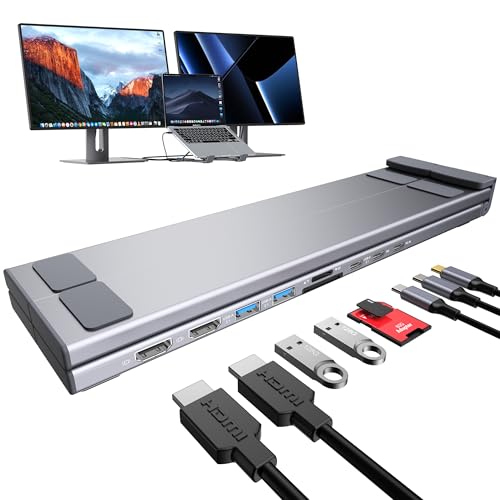
Mukiya 9-in-1 Laptop Stand Docking Station
Best for: Windows users wanting an ergonomic dual-display stand
- Port Count
- 9-in-1 (what this guide is about)
- Host Interface
- USB-C
- Display Support
- Dual
- Max Resolution
- 4K@60Hz
- Video Ports
- HDMI
- Max Data Speed
- 5Gbps
This 9-in-1 device combines an adjustable aluminum laptop stand with a USB-C docking station. You get two 4K at 60Hz HDMI ports, three 5Gbps USB ports, SD and TF card slots, and USB-C Power Delivery 3.0 pass-through. It supports laptops from 10 to 17 inches across nine angle adjustments and folds down for travel. It suits Windows users needing dual external displays and an ergonomic riser in one compact unit.
Pros
- Integrated 9-level adjustable aluminum stand supports laptops up to 17 inches and 40 pounds
- Dual 4K at 60Hz HDMI video outputs with Windows MST support
- Folds to 10.5 by 2.2 by 0.9 inches and weighs 0.7 pounds
- Includes SD and TF card readers alongside three 5Gbps USB data ports
Cons
- macOS supports mirror mode (SST) only, not extended desktop displays
- No Ethernet port for wired network connectivity
- No 3.5mm audio jack included
Good fit if
- You use a Windows laptop with DP 1.4 and want dual extended 4K displays.
- You want an ergonomic 9-level riser and docking hub combined in one foldable unit.
- You need integrated SD and TF card readers alongside standard USB ports.
Skip if
- You use macOS and require extended dual monitors rather than mirrored displays.
- You require a built-in Gigabit Ethernet port for wired internet.
Verdict: Mukiya Foldable Laptop Stand 9-in-1 Dock pairs physical ergonomic elevation with dual 4K HDMI outputs and card readers for mobile Windows workstations. It eliminates desk clutter by integrating nine ports directly into an adjustable aluminum frame.

LIONWEI 9-in-1 Quad Display Dock
Best for: Windows users needing four screens
- Port Count
- 9-in-1 (what this guide is about)
- Host Interface
- USB-C
- Display Support
- 4
- Max Resolution
- 4K@60Hz
- Power Delivery
- 100W
- Video Ports
- HDMI, DisplayPort, VGA
This LIONWEI docking station supports up to four displays via two HDMI ports, one DisplayPort, and one VGA port. It delivers 4K resolution at 60Hz on Windows systems using MST technology. The hub includes a 100W Power Delivery port for charging, gigabit Ethernet, and USB 3.0 data ports. It requires no drivers for Windows. macOS users can only extend one monitor in this configuration.
Pros
- Supports up to 4 simultaneous displays
- 100W Power Delivery pass-through charging
- Gigabit Ethernet port for stable connectivity
- Plug-and-play operation without drivers on Windows
- Includes legacy VGA port for older monitors
Cons
- macOS supports only one extended display
- Requires Windows OS for multi-monitor MST
- No DisplayLink support for driver-based expansion
Good fit if
- You use Windows and need four screens
- You require a legacy VGA connection
- You want a driver-free setup
Skip if
- You use a Mac and need dual monitors
- You need USB-C to DisplayPort expansion
- You require driver-based multi-monitor support
Verdict: LIONWEI 9-in-1 4-Monitor USB-C Hub is a practical solution for Windows users who need to drive four displays simultaneously. It fits professionals who prioritize screen real estate and legacy connectivity over macOS compatibility.

Baseus 9-in-1 USB-C Dock with 4K 120Hz HDMI
Best for: Windows setups needing 4K 120Hz video
- Port Count
- 9-in-1 (what this guide is about)
- Host Interface
- USB-C
- Display Support
- Dual
- Max Resolution
- 4K@120Hz
- Power Delivery
- 85W
- Video Ports
- HDMI
This Baseus 9-in-1 USB-C hub expands your laptop connections using a single cable. It features two HDMI ports capable of up to 4K resolution at 120Hz on a single display, alongside dual-monitor support. You also get gigabit Ethernet, SD and TF card slots, three USB-A ports, and 100W Power Delivery input delivering up to 85W to your computer. It suits users who need high refresh rate video and wired networking.
Pros
- Supports up to 4K at 120Hz output on a single display
- Provides up to 85W laptop charging pass-through from 100W input
- Includes gigabit Ethernet port for 1000Mbps wired networks
- Integrated SD and TF card reader slots up to 104MB/s
Cons
- macOS does not support dual extended displays
- Internal hub operation consumes 15W of power
- One of three USB-A ports runs at USB 2.0 speed
Good fit if
- You want up to 4K at 120Hz video output on a single monitor.
- You use a Windows laptop and require dual extended displays.
- You need integrated SD and TF card readers alongside gigabit Ethernet.
Skip if
- You use macOS and require two independent extended external screens.
- You need full 100W pass-through charging without the 15W hub deduction.
Verdict: Baseus 9-in-1 4K 120Hz USB-C Dock delivers high refresh rate 4K video, reliable 1000Mbps wired Ethernet, and essential memory card readers. It serves as an effective desktop expansion tool for Windows dual-monitor setups.

UGREEN 9-in-1 Foldable Kickstand Dock
Best for: handheld gaming consoles and portable tablet setups
- Port Count
- 9-in-1 (what this guide is about)
- Host Interface
- USB-C
- Max Resolution
- 4K@60Hz
- Power Delivery
- 100W
- Max Data Speed
- 10Gbps
- Features
- Kickstand, Foldable
UGREEN Foldable USB-C Gaming Dock combines a 9-in-1 hub with an integrated two-panel kickstand. It routes video up to 4K at 60Hz or 1080p at 240Hz to an external screen while supplying up to 100W USB Power Delivery. For peripherals, you get two 10Gbps USB 3.2 Gen 2 ports alongside two USB-A 2.0 connectors. It suits you if you dock a handheld console or compatible tablet.
Pros
- Foldable dual-panel kickstand keeps console vents unobstructed
- Supports up to 100W USB Power Delivery pass-through
- Two 10Gbps USB 3.2 Gen 2 ports with both Type-A and Type-C
- Display output reaches 4K at 60Hz and 1080p at 240Hz
Cons
- Two of the USB-A ports run at USB 2.0 transfer speeds
- Not compatible with Switch 2
Good fit if
- You need an adjustable stand dock for a Steam Deck, ROG Ally, or USB-C tablet.
- You want high refresh rates up to 240Hz on a 1080p monitor.
- You transfer files using 10Gbps external drives.
Skip if
- You need dual display outputs from your docking station.
- You need a dock for a Switch 2.
Verdict: UGREEN Foldable USB-C Gaming Dock provides 100W power delivery, 10Gbps data, and high-refresh video via a folding dual-panel stand. It gives handheld console and tablet users an adjustable, ventilated workstation setup.
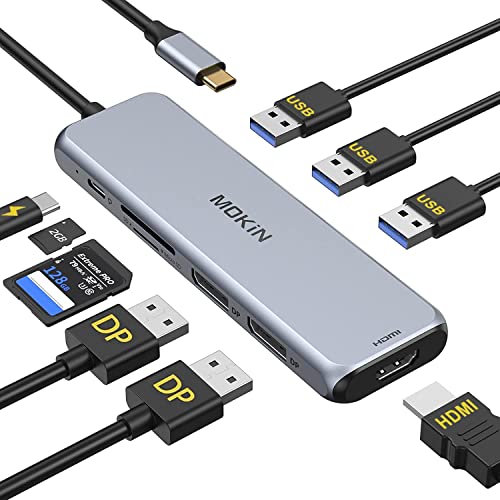
MOKiN Dual DisplayPort 9-in-1 USB-C Hub
Best for: triple-display setups with dual DisplayPort screens
- Port Count
- 9-in-1 (what this guide is about)
- Host Interface
- USB-C
- Display Support
- Triple
- Power Delivery
- 87W
- Video Ports
- DisplayPort, HDMI
- Max Data Speed
- 5GB/s
The MOKiN Dual DisplayPort 9-in-1 USB-C Hub gives you three video outputs featuring two DisplayPort connections and one HDMI port. It includes three USB-A 3.0 ports running at 5 Gbps, dedicated SD and microSD slots operating at 104 MB/s, and 100W Power Delivery pass-through delivering 87W to your laptop. This hub suits you if you run multiple DisplayPort monitors alongside standard USB accessories from a single USB-C port.
Pros
- Dual DisplayPort outputs alongside one HDMI port
- Supports up to 87W laptop charging from 100W PD input
- Three USB-A 3.0 ports with transfer rates up to 5 Gbps
- Integrated SD and microSD card slots supporting 104 MB/s
Cons
- No Ethernet port included
- macOS does not support multi-display MST expansion
- Lacks downstream USB-C data ports
Good fit if
- You need dual DisplayPort outputs along with an HDMI connection.
- You want up to 87W USB-C pass-through power delivery.
- You frequently transfer data using SD and microSD cards.
Skip if
- You need a wired Ethernet connection for network access.
- You use a Mac laptop and require extended multi-monitor desktop support.
- You require downstream USB-C data ports for newer peripherals.
Verdict: MOKiN Dual DisplayPort 9-in-1 USB-C Hub provides dedicated dual DisplayPort and HDMI video outputs for multi-monitor setups, though it omits wired Ethernet and USB-C data connectivity.

UGREEN DisplayLink Dual 4K Docking Station
Best for: macOS dual extended 4K monitor setups
- Port Count
- 9-in-1 (what this guide is about)
- Host Interface
- USB-C
- Display Support
- Dual
- Max Resolution
- 4K@60Hz
- Power Delivery
- 100W
- Video Ports
- HDMI, DP
This 9-in-1 hub utilizes DisplayLink technology to drive dual extended 4K displays at 60Hz across both macOS and Windows. It provides connectivity through two HDMI ports, two DisplayPort outputs, three 10Gbps USB 3.2 Gen 2 ports, and Gigabit Ethernet. You also get 100W Power Delivery pass-through support. It suits you if you need multi-monitor setups on laptops that restrict native dual display outputs.
Pros
- Dual 4K at 60Hz extended displays on macOS and Windows
- Three 10Gbps USB 3.2 Gen 2 ports for fast data transfers
- 100W Power Delivery pass-through charging support
- Choice of two HDMI and two DisplayPort video outputs
Cons
- Requires driver installation for display and network functionality
- External power adapter is not included
- Does not include HDMI or DisplayPort cables
Good fit if
- You need dual extended 4K displays on a Mac laptop.
- You transfer data using 10Gbps USB-A or USB-C devices.
- You already have a 100W USB-C power adapter.
Skip if
- You cannot install third-party DisplayLink drivers on your system.
- You want a docking station with an included power supply.
Verdict: UGREEN DisplayLink 9-in-1 Dual 4K Dock delivers dual 4K 60Hz display support for macOS and Windows systems via DisplayLink. It provides high-speed 10Gbps peripheral ports and 100W pass-through charging if you supply your own power brick.

NOVOO 9-in-1 USB-C Hub with 4K 60Hz HDMI
Best for: single 4K 60Hz display setups
- Port Count
- 9-in-1 (what this guide is about)
- Host Interface
- USB-C
- Max Resolution
- 4K@60Hz
- Power Delivery
- 100W
- Video Ports
- HDMI
- Max Data Speed
- 5Gbps
The NOVOO 9-in-1 USB-C Hub expands your laptop port selection with a 4K 60Hz HDMI video output, 100W Power Delivery pass-through, and five USB ports. It also includes dedicated SD and TF card readers alongside three 5Gbps USB 3.0 connections. Weighing 0.11 pounds, this portable adapter suits you if you need smooth single-screen 4K video, fast memory card transfers, and multiple ports for desktop accessories.
Pros
- HDMI output supports 4K resolution at 60Hz
- 100W USB-C Power Delivery pass-through
- Five USB ports including one USB-C and two USB-A at 5Gbps
- Dedicated SD and TF card slots
Cons
- Single display output with no second HDMI or DisplayPort
- No Ethernet port for wired network access
- Two of the USB-A ports operate at USB 2.0 speeds
Good fit if
- You need 4K resolution at a 60Hz refresh rate on a single external screen.
- You regularly transfer media from SD or TF memory cards.
- You want 100W Power Delivery pass-through with five USB connections.
Skip if
- You require dual monitor connectivity from a single dock.
- You need a wired Ethernet connection for your network.
Verdict: NOVOO 9-in-1 USB-C Hub with 4K 60Hz HDMI delivers fluid single-display output, dedicated card readers, and 100W power passthrough in a compact 0.11-pound shell. It provides a balanced set of daily peripheral connections for single-monitor desks.

Anker PowerExpand 9-in-1 USB-C Dock
Best for: Laptops needing 60W charging and 4K output
- Port Count
- 9-in-1 (what this guide is about)
- Host Interface
- USB-C
- Display Support
- Dual
- Max Resolution
- 4K@30Hz
- Power Delivery
- 60W
- Video Ports
- HDMI, DisplayPort
The Anker PowerExpand 9-in-1 USB-C Dock gives you desktop expansion in a compact 0.41-pound gray chassis. It supplies 60W power delivery to charge your laptop, alongside a dedicated 20W power delivery port for auxiliary gear. For display output, you get 4K UHD support through HDMI and DisplayPort connections. Built-in Ethernet handles wired networking alongside standard USB-C connectivity. It suits you if you need reliable charging and multi-display video.
Pros
- Provides 60W host charging and a secondary 20W Power Delivery port
- Outputs 4K UHD video through HDMI and DisplayPort
- Includes wired Ethernet and USB-C connectivity
- Weighs 0.41 pounds for easy desk placement
Cons
- Host laptop charging capped at 60W
- Available only in a gray color finish
Good fit if
- You need 60W laptop charging paired with an extra 20W Power Delivery port.
- You want 4K UHD video output through HDMI or DisplayPort.
- You require a wired Ethernet connection at your desk.
Skip if
- You require more than 60W of power delivery to run your laptop.
- You prefer a docking station color other than gray.
Verdict: Anker PowerExpand 9-in-1 USB-C Dock delivers 4K UHD video and wired Ethernet while supplying up to 60W of power to your laptop. It offers a balanced port selection for workstations that operate within a 60W charging profile.
Specifications side by side
| Spec | HODO 9-in-1 USB-C Dock with Dual HDMI and DP | Selore Dual 4K HDMI USB-C Dock | Acer 9-in-1 Dual HDMI USB-C Dock | Vicfluxion 9-in-1 USB-C Hub with DisplayPort | Mukiya 9-in-1 Laptop Stand Docking Station | LIONWEI 9-in-1 Quad Display Dock | Baseus 9-in-1 USB-C Dock with 4K 120Hz HDMI | UGREEN 9-in-1 Foldable Kickstand Dock | MOKiN Dual DisplayPort 9-in-1 USB-C Hub | UGREEN DisplayLink Dual 4K Docking Station | NOVOO 9-in-1 USB-C Hub with 4K 60Hz HDMI | Anker PowerExpand 9-in-1 USB-C Dock |
|---|---|---|---|---|---|---|---|---|---|---|---|---|
| Host Interface | USB-C | USB-C | USB-C | USB-C | USB-C | USB-C | USB-C | USB-C | USB-C | USB-C | USB-C | USB-C |
| Display Support | Quadruple | Dual | Dual | Dual | Dual | 4 | Dual | not specified | Triple | Dual | not specified | Dual |
| Max Resolution | 8K@30Hz | 4K@60Hz | 4K@60Hz | 4K@60Hz | 4K@60Hz | 4K@60Hz | 4K@120Hz | 4K@60Hz | not specified | 4K@60Hz | 4K@60Hz | 4K@30Hz |
| Power Delivery | 87W | 100W | 90W | 90W | not specified | 100W | 85W | 100W | 87W | 100W | 100W | 60W |
| Port Count | 9 | 8 | 9 | 9 | 9 | 9 | 9 | 9 | 9 | 9 | 9 | 9 |
| Video Ports | HDMI, DisplayPort, VGA | HDMI | HDMI | HDMI, DisplayPort | HDMI | HDMI, DisplayPort, VGA | HDMI | not specified | DisplayPort, HDMI | HDMI, DP | HDMI | HDMI, DisplayPort |
| Max Data Speed | 5Gbps | 5Gbps | 5Gbps | not specified | 5Gbps | 5Gbps | 5Gbps | 10Gbps | 5GB/s | 10Gbps | 5Gbps | 5 Gbps |
| Ethernet Speed | not specified | not specified | not specified | 1000Mbps | not specified | 1000Mbps | 1000Mbps | not specified | not specified | Gigabit Ethernet | not specified | not specified |
| Resolution | not specified | 4K UHD | not specified | 4K UHD | not specified | 4K UHD | 4K UHD | not specified | not specified | 4K UHD | 4K UHD | not specified |
| Connectivity | USB-C | USB-C, HDMI, USB-A | USB-C, HDMI | USB-C, HDMI, DisplayPort, Ethernet | USB-C, HDMI | USB-C, HDMI | USB-C | USB-C | USB-C, HDMI, DisplayPort, USB-A | USB-C | USB-C, HDMI | USB-C |
| Refresh Rate | not specified | 60Hz | not specified | not specified | not specified | not specified | 120Hz | not specified | not specified | 60Hz | 60Hz | not specified |
| Features | not specified | not specified | not specified | not specified | Kickstand | not specified | not specified | Kickstand, Foldable | not specified | DisplayLink | not specified | not specified |
| Dimensions | not specified | 4.5 × 2.1 × 0.7 inches | not specified | 5.53 × 1.65 × 0.59 inches | not specified | not specified | 5.31 × 1.93 × 0.63 inches | 6.3 × 4.53 × 1.65 inches | 60 × 2 × 0.25 inches | 6 × 3 × 0.9 inches | 4.12 × 1.83 × 0.54 inches | 5.71 × 2.56 × 0.94 inches |
| Weight | not specified | 3.39 ounces | not specified | 2.56 ounces | not specified | not specified | 5.3 ounces | not specified | 3.84 ounces | 1.12 pounds | 1.76 ounces | 6.56 ounces |
| Size | 9-in-1 | 9-in-1 | 0.65FT | not specified | not specified | 9-in-1 (4 Monitor) | 9 in 1 | not specified | (19.10)/Gm.2768 | not specified | 9in1 | 19.7 x 8.1 x 19.7 inches |
| Color | Gray | Grey | Grey | Grey- HDMI&DP | Silver | 9-in-1 (4 Monitor) | Grey | grey | white | Black | HDMI 4K | Gray |
| Model | not specified | SEUC0425 | ODK4K0 | not specified | HUB-M91 | not specified | not specified | 25869 | 2903 | 90912 | not specified | A8394 |
For offline cloning needs, see our guide to the best SSD docking stations with offline clone.
Choosing the Best 9-in-1 Docking Station
-
Verify Pass-Through Power Delivery
Docking stations route power from an external charger to your computer through pass-through charging. You must check the maximum wattage rating to ensure your laptop charges at full speed. Compact setups using low-power laptops can run effectively on 60W models, such as the Anker PowerExpand 9-in-1 USB-C Dock. Laptops requiring higher power draw operate better with docks rated for 90W or 100W pass-through. Choosing a wattage rating below your laptop charger specification results in slower battery charging or battery drain during heavy tasks. Always verify your laptop power requirements first.
-
Check Video Port Types
Examine the video ports on your monitors before you buy a dock. Most portable hubs provide HDMI ports, but setups using desktop computer monitors often rely on DisplayPort connections. If your workstation uses screens requiring DisplayPort inputs, select a hub with matching native ports, such as the MOKiN Dual DisplayPort 9-in-1 USB-C Hub. Using the correct built-in ports removes the need for passive or active video adapters, which simplifies cable routing on your desk. Match the hub output selection directly to the physical video inputs available on your display panels.
-
Confirm Wired Ethernet Support
Not every 9-in-1 docking station carries an RJ45 Ethernet port. If you work in environments with congested Wi-Fi or require stable, low-latency network performance, verify that an Ethernet jack is listed in the specifications. Models like the Vicfluxion 9-in-1 USB-C Hub with DisplayPort integrate wired networking alongside standard USB and video channels. Choosing a dock without an Ethernet port frees up space for extra display outputs or USB sockets, but requires relying entirely on wireless networks. Check your office connectivity requirements before deciding whether an integrated network port is essential.
-
Consider Stand and Enclosure Form
Docking stations come in several physical form factors, from pocket-sized dongles on short tethered cables to larger desktop designs. Some options integrate ports directly into an elevated stand, such as the Mukiya 9-in-1 Laptop Stand Docking Station. Stand-based hubs combine screen elevation and port expansion in one unit, which helps reduce desk clutter and improves ergonomics. In contrast, compact flat hubs slide into laptop sleeves for easy travel. Decide whether your priority is portable mobile use across locations or a permanent desk setup with built-in device elevation.
-
Match Total Display Outputs
Review how many independent external screens you plan to connect simultaneously. A 9-in-1 hub can focus its available bandwidth and port allocation on a single screen, dual monitors, or even more. If you run a Windows workstation that demands an extensive multi-screen array, consider a hub engineered for maximum video connections like the LIONWEI 9-in-1 Quad Display Dock. Choosing a model with four display outputs gives you room to expand your visual workspace. Make sure your graphics hardware supports the exact quantity of displays you intend to drive at once.
-
Check Hardware Privacy Controls
Some docking stations incorporate dedicated physical switches to manage display output or device privacy without unplugging cables. The Selore Dual 4K HDMI USB-C Dock includes a hardware privacy switch alongside its dual 4K video connections. This feature allows you to immediately disconnect or blank connected external monitors during presentations, meetings, or sensitive work tasks. If you share screens frequently or work in open office spaces, physical hardware toggles give you direct, instant control over your visual outputs. Compare control features if operational security and fast screen management matter for your workflow.
Frequently asked questions
Can a 9-in-1 USB-C docking station run dual monitors with DisplayPort and HDMI together?
Yes, several 9-in-1 docking stations provide mixed video outputs to match different monitors. Models like the Vicfluxion 9-in-1 hub and the MOKiN hub include both HDMI and DisplayPort connections. This configuration lets you link DisplayPort panels alongside standard HDMI monitors without needing external display adapters or dedicated converter cables on your desk.
What refresh rate can you expect from a 9-in-1 4K USB-C dock?
Most 9-in-1 docking stations output 4K resolution at 60Hz, but select performance models support higher refresh rates. For instance, the Baseus 9-in-1 dock delivers 4K at 120Hz for smoother motion on compatible screens. Standard options like the Selore SEUC0425 or NOVOO hub operate at 4K 60Hz, which satisfies typical office tasks and everyday media playback.
Do all 9-in-1 docking stations include an integrated Ethernet port?
No, port configurations vary across different 9-in-1 designs. Units like the Baseus 9-in-1, Vicfluxion hub, and Anker PowerExpand A8394 feature dedicated wired Ethernet ports for stable network speeds up to 1000Mbps. In contrast, docks such as the MOKiN 9-in-1 hub prioritize extra display outputs like dual DisplayPort connectors and omit the wired Ethernet jack completely.
Can a 9-in-1 docking station function as an ergonomic laptop stand?
Yes, certain 9-in-1 hubs combine desktop connectivity with physical elevation hardware. The Mukiya HUB-M91 integrates dual 4K HDMI outputs and card readers into an adjustable aluminum stand frame. Similarly, the UGREEN model 25869 features a foldable kickstand design tailored for handheld consoles and tablets, delivering 100W power delivery and 10Gbps data ports while keeping your hardware propped up.
How much power delivery pass-through do 9-in-1 docks typically support?
Power pass-through ratings on 9-in-1 docking stations generally range between 60W and 100W depending on the model. The Anker PowerExpand A8394 provides 60W charging designed for smaller notebooks. If your workstation requires higher power input, options like the Selore SEUC0425, NOVOO hub, and UGREEN 90912 support up to 100W power delivery from an external power supply.
Is a 9-in-1 docking station lightweight enough for daily travel?
Yes, many 9-in-1 hubs use compact enclosures specifically tailored for travel bags. For example, the NOVOO 9-in-1 hub weighs only 0.11 pounds, while the Vicfluxion hub weighs 0.16 pounds. Even dual-monitor options like the Selore SEUC0425 remain portable at roughly 0.21 pounds, whereas larger desktop-focused models such as the UGREEN 90912 reach over 1.12 pounds.
How many external monitors can a 9-in-1 dock support simultaneously?
Most 9-in-1 docking stations support one or two external displays, but specific models can support more on compatible systems. For example, the LIONWEI 9-in-1 Quad Display Dock provides four video outputs for Windows workstations. Dual-display models such as the Acer ODK4K0 and Selore dock handle two screens, while simple hubs like the NOVOO focus on a single 4K display.