Plugable vs Tobenone: Docking Stations Compared by Specs
As an Amazon Associate we earn from qualifying purchases. Links on this page are affiliate links.
When comparing the plugable vs tobenone docking station, you face two distinct approaches to laptop expansion. Both units provide multiple display outputs and USB connectivity to extend your workspace. The main difference lies in their capabilities and target systems. Plugable offers a universal, driver-based solution with dual monitors, while Tobenone delivers a high-performance, plug-and-play triple display setup. Your choice depends on whether you prioritize broad compatibility or raw screen real estate.
Key differences
| Aspect | Plugable Dual HDMI Universal Docking Station | TobenONE 18-in-1 Triple Display Dock |
|---|---|---|
| Display Support | Dual HDMI | Triple HDMI |
| Max Resolution | 2560x1440 @ 50Hz | 4K @ 60Hz |
| Host Interface | USB 3.0 and USB-C | USB-C |
| Power Delivery | Does not charge laptop | 100W PD |
| OS Compatibility | Windows, macOS, ChromeOS | Windows, ChromeOS |
Which one should you choose?
Choose Plugable Dual HDMI Universal Docking Station if
- You use a macOS laptop and need reliable driver support.
- You require a universal dock that works with older USB 3.0 ports.
- You only need two monitors for productivity tasks.
Choose TobenONE 18-in-1 Triple Display Dock if
- You want three 4K displays for intensive multitasking.
- You need your laptop to charge through the dock.
- You use a Windows or ChromeOS laptop with a full-featured USB-C port.
Verdict: Choose the Plugable model if you need broad operating system support, especially for macOS, or if you have older hardware. Pick the Tobenone dock if you require triple 4K displays and fast charging for a modern Windows or ChromeOS laptop. Each serves a different niche based on your display and connectivity needs.
Plugable vs Tobenone Spec Comparison
Display Support
TobenONE supports triple displays with three HDMI ports, allowing you to connect three monitors simultaneously for maximum multitasking. Plugable offers dual HDMI outputs, limiting you to two screens. TobenONE’s triple display setup is better for video editing or heavy spreadsheet work. Plugable’s dual setup is sufficient for standard productivity tasks. If you need three screens, TobenONE is the clear choice. Plugable is better if you only need two monitors. This is a significant difference in workspace flexibility.
Resolution
TobenONE supports 4K resolution at 60Hz on its displays, providing sharp images for detailed design work. Plugable maxes out at 2560x1440 at 50Hz on a single screen, or 1920x1200 at 60Hz for dual screens. Plugable does not support 4K. TobenONE offers higher clarity and smoother refresh rates for compatible displays. Plugable is limited to lower resolutions. If you have high-resolution monitors, TobenONE utilizes them fully. Plugable will downscale or limit those displays.
Power Delivery
TobenONE includes 100W Power Delivery to charge your laptop while connected. Plugable does not charge the host laptop at all. You must use a separate charger for your computer with Plugable. TobenONE simplifies your desk by powering your device through the dock. This is a major convenience factor for mobile users. Plugable requires an extra cable for power. TobenONE’s charging capability is a significant advantage for keeping your workspace clean and efficient.
Compatibility
Plugable supports Windows, macOS, and ChromeOS, making it a universal option for various systems. TobenONE is explicitly designed for Windows and ChromeOS laptops and is not recommended for Mac users. Plugable requires a manual DisplayLink driver for macOS. TobenONE works natively with Windows and ChromeOS. If you use a Mac, Plugable is your only option. For Windows users, both work, but Plugable offers broader system support across different operating systems.
Connectivity
TobenONE provides 18 ports, including 9 USB ports, SD/microSD card readers, and audio jacks. Plugable offers fewer ports, with 2x USB 3.0 and 4x USB 2.0 ports, plus Ethernet and audio. TobenONE has more expansion options for peripherals like drives and cards. Plugable has a Gigabit Ethernet port, which TobenONE also includes. TobenONE’s higher port count reduces cable clutter. Plugable is simpler but less versatile for connecting many devices simultaneously.
Which docking station fits your setup
Users needing three monitors
The TobenONE supports triple 4K displays at 60Hz. You can connect three screens simultaneously for extensive multitasking. This setup handles video editing and spreadsheets without lag. If your workflow requires three distinct visual areas, this dock provides the necessary port count and resolution to keep your desk organized and efficient.
ChromeOS and Windows users
TobenONE is designed specifically for Windows and ChromeOS laptops with full-featured USB-C ports. It eliminates cable clutter with 18 ports. You get 100W power delivery to keep your laptop charged. This dock is ideal for remote workers or students who want a clean, efficient workspace without managing multiple cables.
Mac users needing dual screens
Plugable supports macOS 14 or later with a manual DisplayLink driver. You get dual HDMI outputs up to 2560x1440. The dock includes wired Gigabit Ethernet and audio jacks. This universal solution works with Windows 11 and ChromeOS too. It is a practical choice for Mac users who need reliable dual monitor expansion.
The products compared

Plugable Dual HDMI Universal Docking Station
Best for: Dual monitor Windows and ChromeOS setups
- Host Interface
- USB 3.0, USB-C
- Display Support
- Dual
- Max Resolution
- 2560x1440 @ 50Hz
- Video Ports
- HDMI
- Ethernet Speed
- Gigabit Ethernet
- Connectivity
- USB-C, HDMI, Ethernet
View on Amazon: Plugable Dual HDMI Universal Docking Station Affiliate link
The Plugable UD-3900 connects two monitors via HDMI using a hybrid USB 3.0 or USB-C cable. It supports dual displays up to 1920x1200 or one at 2560x1440. You get Gigabit Ethernet, audio jacks, and five USB ports. It works with Windows and ChromeOS, but requires a manual driver for macOS. It does not charge your laptop.
Pros
- Hybrid USB 3.0 and USB-C host cable
- Dual HDMI outputs for two monitors
- Gigabit Ethernet and audio jacks included
- Five USB ports (3x 3.0, 4x 2.0)
Cons
- No 4K display support
- Does not charge the host laptop
- Manual driver needed for macOS 14+
Good fit if
- You need two screens for productivity
- You use Windows or ChromeOS
- You require wired Ethernet connectivity
Skip if
- You need 4K resolution
- You want to charge your laptop
- You use Linux or Unix systems
Verdict: Plugable Dual HDMI USB Dock fits users who need two screens and wired networking without charging their laptop. It is a solid choice for Windows and ChromeOS setups.
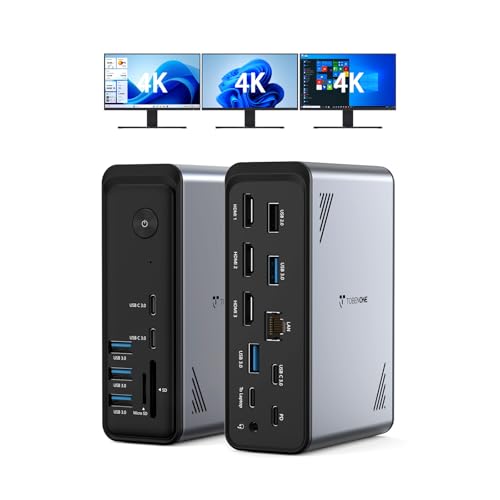
TobenONE 18-in-1 Triple Display Dock
Best for: Windows users needing triple 4K displays
- Host Interface
- USB-C
- Display Support
- Triple
- Max Resolution
- 4K@60Hz
- Power Delivery
- 100W
- Port Count
- 18
- Video Ports
- HDMI
View on Amazon: TobenONE 18-in-1 Triple Display Dock Affiliate link
The TobenONE 18-in-1 docking station expands your laptop via a single USB-C host connection. It supports triple 4K@60Hz displays through three HDMI ports, ideal for complex spreadsheets or video editing. The unit provides 100W Power Delivery to keep your machine charged. It includes nine USB ports and card readers. This setup suits Windows and Chrome OS laptops with full-featured USB-C ports, offering a clean, multi-monitor workspace.
Pros
- Supports triple 4K@60Hz displays via three HDMI ports
- 18 total ports including nine USB connections
- 100W Power Delivery for laptop charging
- Includes SD and microSD card slots
Cons
- Not compatible with Mac users
- Power adapter is not included in the box
- Requires a power supply over 65W for stable usage
Good fit if
- You need three external monitors for your workflow
- You use a Windows or Chrome OS laptop
- You want to reduce cable clutter with one connection
Skip if
- You own a Mac laptop
- You need a complete kit without buying a separate power adapter
- You only need a single monitor setup
Verdict: TobenONE 18-in-1 Triple 4K Dock fits Windows and Chrome OS users who require a triple-monitor setup and extensive port expansion. It delivers high-resolution video and fast charging, provided you supply your own power adapter.
Specifications side by side
| Spec | Plugable Dual HDMI Universal Docking Station | TobenONE 18-in-1 Triple Display Dock |
|---|---|---|
| Host Interface | USB 3.0, USB-C | USB-C |
| Display Support | Dual | Triple |
| Max Resolution | 2560x1440 @ 50Hz | 4K@60Hz |
| Power Delivery | not stated | 100W |
| Port Count | not stated | 18 |
| Video Ports | HDMI | HDMI |
| Ethernet Speed | Gigabit Ethernet | not stated |
| Resolution | not stated | 4K UHD |
| Connectivity | USB-C, HDMI, Ethernet | USB-C, HDMI, Ethernet |
| Use | not stated | Office |
| Dimensions | 6.45 × 3.22 × 4.02 inches | 4.9 × 3.5 × 1.6 inches |
| Weight | 13 ounces | 10.9 ounces |
| Size | Dual Display | Without power supply |
| Color | Black | Grey-docking station for Windows |
| Model | UD-3900 | not stated |
Frequently asked questions
Does the Plugable dock support Apple Mac computers?
The Plugable Dual HDMI Universal Docking Station is designed for Windows and ChromeOS setups. The product data does not list macOS compatibility. You should verify your Mac’s specific requirements before purchasing this universal USB dock for extended displays.
What is the weight difference between the two docks?
The Plugable UD-3900 weighs 13 ounces. The TobenONE 18-in-1 Triple Display Dock weighs 10.9 ounces. You get a slightly lighter unit with the TobenONE option, which may matter for portable setups. The difference is just under three ounces.
Can I use the TobenONE dock without a power adapter?
No, you must supply your own power adapter for the TobenONE dock. The product verdict explicitly states this requirement. Without it, the docking station will not function. Ensure you have a compatible power source before connecting it to your laptop.
Which dock is smaller in physical dimensions?
The TobenONE dock is more compact. It measures 3.5 inches wide, 1.6 inches high, and 4.9 inches long. The Plugable UD-3900 is larger at 3.22 inches wide, 4.02 inches high, and 6.45 inches long. You save desk space with the TobenONE model.
Does the Plugable dock charge my laptop?
The Plugable dock does not charge your laptop. The verdict notes it fits users who do not need charging. It focuses on dual screen expansion and wired networking. You will need a separate charger for your computer while using this dock.
What resolution does the TobenONE dock support?
The TobenONE dock supports 4K UHD resolution. It is designed for Windows users needing triple 4K displays. This allows you to connect three monitors simultaneously at high clarity. It is suitable for workflows requiring extensive visual real estate.