6 Best Laptop Cooling Pads with Adjustable Height, Compared
As an Amazon Associate we earn from qualifying purchases. Links on this page are affiliate links.
Finding the best laptop cooling pads with adjustable height requires looking at the physical specs that matter most. We compared 6 models based strictly on the specifications published on the listings. The ICE Coorel 6-Fan Laptop Cooling Pad leads because it offers five height levels and two extra USB ports. These features provide ergonomic flexibility and connectivity for your setup. This guide helps you decide which cooling pad fits your laptop size and desk needs.
Quick picks
The best fit for you
- You need height adjustment and extra USB ports ICE Coorel 6-Fan Laptop Cooling Pad It features five height levels and two USB ports for connectivity.
- You are a gamer needing LCD feedback and RGB ICE Coorel 17.3-Inch 6-Fan Laptop Cooling Pad It offers six height levels and RGB lighting for gaming setups.
- You want the lightest portable laptop cooling pad LIENS Dual-Fan 15.6-Inch Laptop Cooling Pad Weighing 1.59 pounds, it prioritizes portability and adjustability over raw airflow.
Our 6 picks

ICE Coorel 6-Fan Laptop Cooling Pad
Best for: users needing height adjustment and extra USB ports
- Features
- Kickstand, Adjustable Height, 2 USB Ports (what this guide is about)
- Compatible Laptop Size
- Up to 17 in
- Fan Count
- 6
- Maximum Fan Speed
- 2600 RPM
- USB Port Count
- 2 ports
- Fan Diameter
- 70 mm
View on Amazon: ICE Coorel 6-Fan Laptop Cooling Pad Affiliate link
This cooling pad uses six 70 mm fans spinning up to 2600 RPM to dissipate heat from laptops up to 17 inches. The metal mesh surface improves airflow and durability. Five adjustable height settings let you position the stand for better ergonomics. Two extra USB 2.0 ports allow you to connect peripherals. It is a practical option for users who need strong airflow and height adjustment in a single device.
Pros
- Six 70 mm fans with speeds up to 2600 RPM
- Five adjustable height settings for ergonomic positioning
- Metal mesh surface for firm support and heat dissipation
- Two USB 2.0 ports for connecting other devices
Cons
- Heavier at 2.27 pounds, reducing portability
- Uses USB 2.0 ports instead of USB 3.0
- No mention of a carrying case or handle
Good fit if
- You need five height levels for optimal viewing angles
- You want two extra USB ports for peripherals
- You use laptops up to 17 inches
Skip if
- You require USB 3.0 connectivity for faster data transfer
- You prioritize ultra-lightweight portability under 2 pounds
- You need a carrying case included for travel
Verdict: ICE COOREL 6 Fan Cooling Pad offers robust cooling and five height levels for users needing ergonomic flexibility. It suits those who value airflow and extra USB ports over lightweight design.
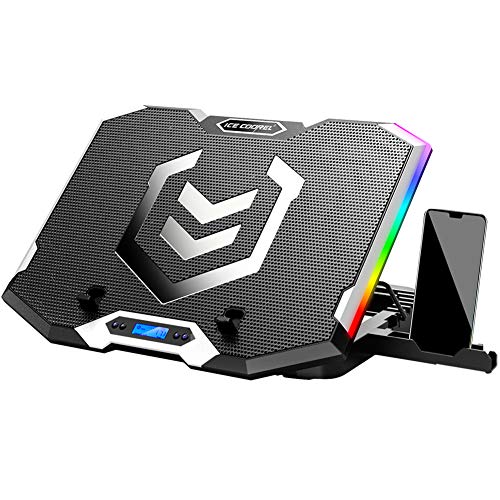
ICE Coorel 17.3-Inch 6-Fan Laptop Cooling Pad
Best for: Gamers needing six height levels and LCD feedback
- Features
- Kickstand, Adjustable Height, RGB Lighting, 2 USB Ports (what this guide is about)
- Compatible Laptop Size
- 15–17.3 in
- Fan Count
- 6
- Height Adjustment Levels
- 6
- USB Port Count
- 2
- Lighting
- RGB
View on Amazon: ICE Coorel 17.3-Inch 6-Fan Laptop Cooling Pad Affiliate link
This is a laptop cooling pad for 15–17.3 inch machines. It uses six transparent fans to provide all-round dynamic cooling. You get six height adjustment levels to set the ergonomic angle. An LCD display shows fan speed. It includes two USB ports and seven RGB light modes. The fans run quietly even at maximum speed. It suits gamers who want adjustable height and visual feedback.
Pros
- Six transparent cooling fans for efficient heat dissipation
- Six height adjustment levels for ergonomic comfort
- LCD display shows current fan speed
- Two USB ports for connectivity
- Seven RGB light modes for atmosphere
Cons
- RGB lighting may not suit minimal setups
- LCD display adds complexity for basic users
- Heavier build at 3 pounds
Good fit if
- You need six height levels for neck relief
- You want to see fan speed on an LCD
- You prefer RGB lighting for gaming setups
Skip if
- You want a silent fan with no lights
- You need more than six height levels
- You prefer a lighter pad under 3 pounds
Verdict: ICE Coorel K9 17.3 Inch 6 Fan Cooling Pad fits users who value visible fan speed and six height levels. It is a solid choice for gamers who want RGB lighting and quiet operation.

Trullypine 17.3-Inch 12-Fan Cooling Pad
Best for: Large laptops needing strong airflow and height adjustability
- Features
- Kickstand, Adjustable Height, 2 USB Ports, Phone Holder (what this guide is about)
- Compatible Laptop Size
- 12-17.3 in
- Fan Count
- 12
- Height Adjustment Levels
- 5 levels
- USB Port Count
- 2 ports
- Lighting
- LED
View on Amazon: Trullypine 17.3-Inch 12-Fan Cooling Pad Affiliate link
This cooling pad features 12 quiet fans and a metal mesh surface for broad heat dissipation. It offers five height adjustment levels and includes two USB ports for extra connectivity. The design fits laptops from 12 to 17.3 inches and adds a side phone holder. It suits users who need strong airflow and adjustable ergonomics for larger devices.
Pros
- 12 high-speed fans for deep cooling
- Five-level height adjustment for ergonomics
- Dual USB 2.0 ports for connectivity
- Metal mesh surface for heat dissipation
Cons
- Heavier at 2.4 pounds for portability
- LED lights cannot be fully disabled without holding button
- No Bluetooth or wireless connectivity
Good fit if
- You use a 17.3-inch laptop and need strong airflow
- You want multiple USB ports without using laptop ports
- You prefer adjustable height settings for comfort
Skip if
- You need a lightweight pad for frequent travel
- You want a completely silent experience without any lighting options
- You only use a small 12-inch laptop and need minimal bulk
Verdict: Trullypine 17.3-Inch 12-Fan Cooling Pad delivers robust cooling with 12 fans and five height settings. It fits users who prioritize airflow and ergonomics for large laptops over ultra-portability.
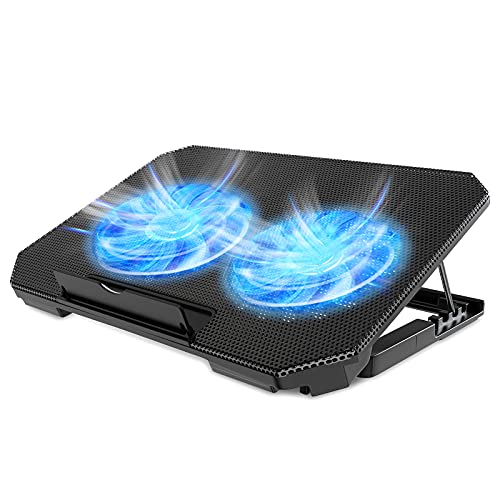
LIENS Dual-Fan 15.6-Inch Laptop Cooling Pad
Best for: lightweight portable laptop setups
- Features
- Adjustable Height, 2 USB Ports (what this guide is about)
- Compatible Laptop Size
- 12–15.6 in
- Fan Count
- 2
- Maximum Fan Speed
- 2000 RPM
- Height Adjustment Levels
- 4 levels
- USB Port Count
- 2 ports
View on Amazon: LIENS Dual-Fan 15.6-Inch Laptop Cooling Pad Affiliate link
The LIENS cooling pad offers four height levels, adjusting from 2.3 to 5.1 inches. It uses two 5.1-inch fans running up to 2000 RPM. The unit includes two USB ports for connectivity. It weighs 1.59 pounds and fits laptops from 12 to 15.6 inches. This setup suits users who need a lightweight, adjustable stand for basic cooling.
Pros
- Four height adjustment levels from 2.3 to 5.1 inches
- Two 5.1-inch fans with speeds up to 2000 RPM
- Built-in dual USB ports for device connectivity
- Lightweight design at 1.59 pounds for easy transport
Cons
- Only two fans compared to six or twelve in other options
- Fan noise can reach 15 dB at maximum speed
- Blue LED lights may be distracting in dark environments
Good fit if
- You need a lightweight cooling pad for travel
- You prefer adjustable height for ergonomic typing
- You want extra USB ports for peripherals
Skip if
- You require maximum cooling power for heavy gaming
- You need silent operation below 10 dB
- You use a laptop larger than 15.6 inches
Verdict: LIENS Laptop Cooling Pad with 2 Fans provides essential cooling and adjustability for casual users. It fits those prioritizing portability and ergonomics over raw airflow capacity.

AIMIUZI 6-Fan 7-Height Laptop Cooling Pad
Best for: Ergonomic desk setups with large laptops
- Features
- Adjustable Height (what this guide is about)
- Compatible Laptop Size
- 12–17 in
- Fan Count
- 6
- Height Adjustment Levels
- 7
- Surface Material
- Metal mesh
- Use
- Gaming
View on Amazon: AIMIUZI 6-Fan 7-Height Laptop Cooling Pad Affiliate link
This AIMIUZI cooling pad supports laptops from 12 to 17 inches. It uses six fans to draw air from the bottom. You can adjust the fan speed with two gear switches. The metal mesh base offers seven height levels. This setup helps lower temperatures and improves ergonomics. It includes dual USB ports and a built-in phone holder for added convenience.
Pros
- Seven adjustable height levels for better ergonomics
- Six quiet fans with independent or grouped control
- Dual USB ports for connecting additional devices
- Built-in phone holder and anti-slip baffle
Cons
- Heavier build at 1.85 pounds
- No mention of battery or wireless operation
- Only two fan speed settings available
Good fit if
- You need precise height adjustment for your desk
- You use a laptop up to 17 inches
- You want extra USB ports on your pad
Skip if
- You prefer a lightweight and portable design
- You need more than two fan speed options
- You require wireless or battery-powered operation
Verdict: AIMIUZI 17-Inch 7-Height Cooling Pad suits users who prioritize adjustable ergonomics and robust cooling for larger laptops. It is ideal for desk setups where stability and multiple USB connections matter more than portability.

AISUNKUTECH 17-Inch Laptop Cooling Pad with Kickstand
Best for: Users needing height adjustment and USB ports
- Features
- Kickstand, Adjustable Height, 2 USB Ports, Phone Holder (what this guide is about)
- Compatible Laptop Size
- 12-17 Inch
- Fan Count
- 3
- Height Adjustment Levels
- 5
- USB Port Count
- 2
- Surface Material
- stainless steel mesh
View on Amazon: AISUNKUTECH 17-Inch Laptop Cooling Pad with Kickstand Affiliate link
This AISUNKUTECH cooling pad features three fans and five height adjustment levels. It includes two USB ports and a built-in phone holder. The stainless steel mesh surface supports laptops from 12 to 17 inches. The unit measures 13.4 by 10.1 inches. It suits users needing ergonomic angle changes and extra connectivity for their devices.
Pros
- Five-level height adjustment for ergonomic positioning
- Three cooling fans for heat dissipation
- Two extra USB ports for connectivity
- Built-in phone holder for multitasking
- Stainless steel mesh surface for durability
Cons
- Only three fans compared to six or twelve on other models
- Requires Type-C adapter for modern devices
- No mention of remote control or app support
Good fit if
- You need multiple height settings for comfort
- You want to charge or connect USB devices
- You use a phone alongside your laptop
Skip if
- You require maximum airflow with six or more fans
- You prefer a larger 17.3-inch specific fit
- You need wireless control or app integration
Verdict: AISUNKUTECH F3 Ultra 17-inch Cooling Pad offers practical ergonomics with five height levels and extra USB ports. It fits users who value adjustable angles and connectivity over raw fan count.
Specifications side by side
| Spec | ICE Coorel 6-Fan Laptop Cooling Pad | ICE Coorel 17.3-Inch 6-Fan Laptop Cooling Pad | Trullypine 17.3-Inch 12-Fan Cooling Pad | LIENS Dual-Fan 15.6-Inch Laptop Cooling Pad | AIMIUZI 6-Fan 7-Height Laptop Cooling Pad | AISUNKUTECH 17-Inch Laptop Cooling Pad with Kickstand |
|---|---|---|---|---|---|---|
| Compatible Laptop Size | Up to 17 in | 15–17.3 in | 12-17.3 in | 12–15.6 in | 12–17 in | 12-17 Inch |
| Fan Count | 6 | 6 | 12 | 2 | 6 | 3 |
| Maximum Fan Speed | 2600 RPM | not stated | not stated | 2000 RPM | not stated | not stated |
| Height Adjustment Levels | not stated | 6 | 5 levels | 4 levels | 7 | 5 |
| USB Port Count | 2 ports | 2 | 2 ports | 2 ports | not stated | 2 |
| Fan Diameter | 70 mm | not stated | not stated | 5.1 in | not stated | not stated |
| Lighting | not stated | RGB | LED | Blue LED | not stated | not stated |
| Surface Material | Metal mesh | not stated | Metal mesh | not stated | Metal mesh | stainless steel mesh |
| Features | Kickstand, Adjustable Height, 2 USB Ports | Kickstand, Adjustable Height, RGB Lighting, 2 USB Ports | Kickstand, Adjustable Height, 2 USB Ports, Phone Holder | Adjustable Height, 2 USB Ports | Adjustable Height | Kickstand, Adjustable Height, 2 USB Ports, Phone Holder |
| Use | not stated | Gaming | Gaming | not stated | Gaming | Gaming |
| Size | 6 Fans | 17.3 Inch | 17.3 Inch | not stated | Black | for 12"-17" Laptops |
| Dimensions | 16.5 × 11 × 1.1 inches | 16 × 12 × 1.4 inches | 14.3 × 10.2 × 1.3 inches | 13.8 × 9.8 × 1.1 inches | 14.2 × 10 × 1.18 inches | 13.4 × 10.1 × 1.4 inches |
| Weight | 2.27 pounds | 3 pounds | 2.4 pounds | 1.59 pounds | 1.85 pounds | not stated |
| Color | Blue | Black | F12Fan-Gear | black | Black | black |
| Model | CO-K21-FBA | ICE K9 | Gear | not stated | F5 | F3 Ultra |
How to choose the right one
-
Check height levels available
Look at the number of adjustable positions. More levels offer finer ergonomic control. The ICE Coorel K9 provides six height settings for precise angle selection. The AIMIUZI model goes further with seven levels. Fewer options, like the five found on the Trullypine pad, are still sufficient for most users. Choose more levels if you need specific neck alignment. Fewer levels keep the mechanism simpler and potentially more durable over time.
-
Verify fan count and size
Match the fan quantity to your laptop screen size. A 15.6-inch laptop works well with two fans, as seen on the LIENS pad. Larger 17.3-inch machines benefit from six fans, like the ICE Coorel K9 or the AIMIUZI. High-end options like the Trullypine pad use twelve fans for maximum airflow. Ensure the fan count covers your entire keyboard area. More fans generally mean better heat dissipation for heavy workloads.
-
Review physical dimensions
Measure your laptop to ensure it fits the cooling pad. The LIENS pad measures 13.8 by 9.8 inches, suitable for smaller devices. The ICE Coorel K9 is 16 by 12 inches, designed for larger screens. The Trullypine pad is 14.3 by 10.2 inches. Check the width and length specifications carefully. A pad that is too small will leave parts of your laptop uncovered. A pad that is too large may overhang your desk.
-
Assess weight for portability
Consider how much you will carry the pad. The LIENS model weighs 1.59 pounds, making it the lightest option here. The AIMIUZI pad is slightly heavier at 1.85 pounds. The ICE Coorel K9 weighs 3 pounds, which is substantial for travel. Heavier pads often feel more stable on a desk. Lighter models are better for coffee shop or library use. Decide if stability or easy transport matters more for your daily routine.
-
Identify extra features needed
Look for additional utilities beyond cooling and height adjustment. Some models include RGB lighting, like the ICE Coorel K9, for gaming aesthetics. Others offer phone holders, such as the Trullypine and AISUNKUTECH pads. Extra USB ports are common, with most models providing two. Determine if you need connectivity expansion or device storage. These features add convenience but may increase the overall weight and price of the unit.
Frequently asked questions
Which laptop cooling pad offers the most height adjustment levels?
The AIMIUZI 6-Fan model provides the highest number of settings with seven distinct height levels. This allows for precise ergonomic control to find your ideal viewing angle. Other options like the ICE Coorel K9 offer six levels, while most others provide five. More levels mean finer adjustments for your desk setup.
Do these cooling pads include extra USB ports for connectivity?
Most models on this list include two USB ports to help you save laptop connections. The ICE Coorel, LIENS, Trullypine, and AISUNKUTECH pads all feature two ports. This allows you to plug in peripherals directly to the cooling pad rather than using your laptop’s limited ports.
Which cooling pad is the lightest for portable use?
The LIENS Dual-Fan cooling pad is the lightest option at 1.59 pounds. Its compact design makes it easier to carry in a bag compared to heavier models. Heavier options like the ICE Coorel K9 weigh 3 pounds due to additional features like RGB lighting and more robust construction.
Are there models with phone holders included?
Yes, the Trullypine 12-Fan and AISUNKUTECH F3 Ultra pads both include a dedicated phone holder. This feature allows you to place your smartphone securely on the pad while you work or game. It adds convenience for users who want to keep their mobile device within easy reach.
Which cooling pad is best for large 17.3-inch laptops?
The Trullypine 12-Fan and ICE Coorel K9 are designed specifically for 17.3-inch laptops. They offer sufficient surface area and airflow for larger machines. The Trullypine provides twelve fans for robust cooling, while the ICE Coorel K9 offers six fans with RGB lighting and LCD feedback for gamers.
Does the AIMIUZI cooling pad support RGB lighting?
No, the AIMIUZI model does not list RGB lighting in its specifications. It focuses on seven height levels and six fans for cooling performance. If you want RGB lighting, the ICE Coorel K9 is the better choice as it explicitly includes this feature along with six height settings.