Best Plugable Docking Stations Under $150: 6 Spec-Based Picks
As an Amazon Associate we earn from qualifying purchases. Links on this page are affiliate links.
You need reliable hardware to expand your workspace. This list covers the best plugable docking stations under $150, ranked by their published specifications. We compared 6 models to find the most capable options for your setup.
The Plugable USB-C Triple HDMI Docking Station leads because it supports triple monitors with 100W power delivery. This guide helps you decide which dock fits your port and display needs.
Quick picks
| # | Product | Best for | Price |
|---|---|---|---|
| 1 | Plugable USB-C Triple HDMI Docking Station Best overall | Triple-monitor setups with 100W charging | Check price of Plugable USB-C Triple HDMI Docking Station on Amazon |
| 2 | Plugable Dual 4K DisplayPort and HDMI Dock Also great | Office workers needing dual 4K screens | Check price of Plugable Dual 4K DisplayPort and HDMI Dock on Amazon |
| 3 | Plugable 15-in-1 Triple HDMI USB-C Dock Also great | Windows users needing triple 4K displays and 15 ports | Check price of Plugable 15-in-1 Triple HDMI USB-C Dock on Amazon |
| 4 | Plugable 7-in-1 Dual 4K HDMI USB-C Dock Best budget | Dual 4K 60Hz HDMI setups on macOS | Check price of Plugable 7-in-1 Dual 4K HDMI USB-C Dock on Amazon |
| 5 | Plugable 5-in-1 Thunderbolt 4 Hub Best 5-in-1 | Thunderbolt 4 expansion and dual 4K displays | Check price of Plugable 5-in-1 Thunderbolt 4 Hub on Amazon |
| 6 | Plugable TBT4-HUB3C Thunderbolt 4 Hub Best premium | Thunderbolt 4 expansion with dual 4K | Check price of Plugable TBT4-HUB3C Thunderbolt 4 Hub on Amazon |
The best fit for you
- You need triple monitors and 100W charging Plugable USB-C Triple HDMI Docking Station It supports three HDMI displays and delivers 100W power delivery.
- You want dual 4K 60Hz on macOS Plugable 7-in-1 Dual 4K HDMI USB-C Dock It provides dual 4K HDMI outputs with 60Hz refresh rates.
- You require maximum port expansion for Windows Plugable 15-in-1 Triple HDMI USB-C Dock It offers 15 ports and supports triple 4K displays.
- You need to daisy-chain Thunderbolt devices Plugable 5-in-1 Thunderbolt 4 Hub It uses Thunderbolt 4 to support daisy-chaining multiple devices.
Our 6 picks

Plugable USB-C Triple HDMI Docking Station
Best for: Triple-monitor setups with 100W charging
- Host Interface
- USB-C
- Display Support
- Triple
- Max Resolution
- 4K @ 30Hz
- Power Delivery
- 100W
- Port Count
- 12
- Video Ports
- HDMI
View on Amazon: Plugable USB-C Triple HDMI Docking Station Affiliate link
This Plugable dock expands your laptop into a triple-monitor workstation. It supports three HDMI displays, combining one 4K @ 30Hz output with two 1080p @ 60Hz screens. The 100W Power Delivery port charges your host device while you work. It connects via USB-C, USB4, or Thunderbolt and includes Gigabit Ethernet and six USB 3.0 ports. This setup suits users needing extensive connectivity and multi-screen productivity across Windows, macOS, and ChromeOS.
Pros
- Supports up to three extended HDMI displays
- 100W USB-C Power Delivery for host charging
- Includes Gigabit Ethernet and six USB 3.0 ports
- Compatible with USB-C, USB4, and Thunderbolt hosts
- Works with Apple Silicon M1 through M5 MacBooks
Cons
- Maximum resolution limited to 4K @ 30Hz
- No support for Linux operating systems
- Does not support HDCP content protection
Good fit if
- You need to run three monitors from a single laptop
- You require a wired Gigabit Ethernet connection for stable networking
- You use a Windows, macOS, or ChromeOS laptop with USB-C
Skip if
- You need a Linux-compatible docking solution
- You require 4K resolution at 60Hz refresh rates
- You need HDCP support for protected media playback
Verdict: Plugable UD-3900PDZ 12-Port Triple HDMI Dock provides a robust triple-display setup with 100W charging and extensive I/O for hybrid workspaces. It is ideal for professionals who prioritize multi-monitor productivity and wired connectivity over high-refresh-rate gaming or Linux compatibility.

Plugable Dual 4K DisplayPort and HDMI Dock
Best for: Office workers needing dual 4K screens
- Host Interface
- USB-C, USB 3.0
- Display Support
- Dual
- Max Resolution
- 3840x2160 @ 60Hz
- Video Ports
- HDMI, DisplayPort
- Ethernet Speed
- Gigabit Ethernet
- Connectivity
- USB-C, HDMI, DisplayPort, Ethernet
View on Amazon: Plugable Dual 4K DisplayPort and HDMI Dock Affiliate link
The Plugable UD-6950Z supports dual 4K monitors at 60Hz via HDMI and DisplayPort. It connects through USB-C or USB 3.0 and includes Gigabit Ethernet and six USB 3.0 ports. This dock is designed for productivity tasks like web browsing and office work. It does not charge your laptop or support gaming. It fits Windows, macOS, and ChromeOS users needing expanded connectivity.
Pros
- Supports dual 4K displays at 60Hz
- Includes Gigabit Ethernet port
- Offers six USB 3.0 ports
- Connects via USB-C or USB 3.0
Cons
- Does not charge the host laptop
- No support for gaming or HDCP content
- Requires manual driver installation on macOS
Good fit if
- You need dual 4K monitors for office work
- You require built-in Gigabit Ethernet
- You use Windows or ChromeOS
Skip if
- You need to charge your laptop through the dock
- You want to play games or watch protected streaming content
- You use Linux without manual driver setup
Verdict: The Plugable UD-6950Z Dual 4K Dock delivers reliable dual 4K output and extensive ports for productivity-focused Windows and ChromeOS users who do not need laptop charging.

Plugable 15-in-1 Triple HDMI USB-C Dock
Best for: Windows users needing triple 4K displays and 15 ports
- Host Interface
- USB-C
- Display Support
- Triple
- Max Resolution
- 4K@60Hz
- Power Delivery
- 100W
- Port Count
- 15
- Video Ports
- HDMI
View on Amazon: Plugable 15-in-1 Triple HDMI USB-C Dock Affiliate link
This Plugable docking station offers 15 ports via a single USB-C connection. It supports triple displays, including dual 4K at 60Hz or one 4K and two 1080p screens. You get 100W power delivery for your laptop, plus a separate 30W port for devices. The unit includes 2.5Gbps Ethernet and six USB ports. It is designed for Windows and ChromeOS laptops, providing a complete workstation setup.
Pros
- Supports triple HDMI displays with dual 4K 60Hz capability
- 100W host charging plus 30W dedicated charge port
- 15 total ports including 2.5Gbps Ethernet and SD readers
- Driverless plug-and-play for Windows 11 and ChromeOS
Cons
- Not compatible with Mac or ARM-based systems
- Heavier build at 1.02 pounds compared to simpler hubs
- Limited to HDMI video output without DisplayPort native support
Good fit if
- You need three monitors for data analysis or trading
- You use a Windows or ChromeOS laptop
- You want 100W power delivery for your host device
Skip if
- You use a macOS laptop
- You require Thunderbolt 4 connectivity
- You need a lightweight travel hub under 1 pound
Verdict: Plugable 15-Port Triple Display Dock fits users who need maximum screen real estate and port expansion on compatible Windows or ChromeOS machines.
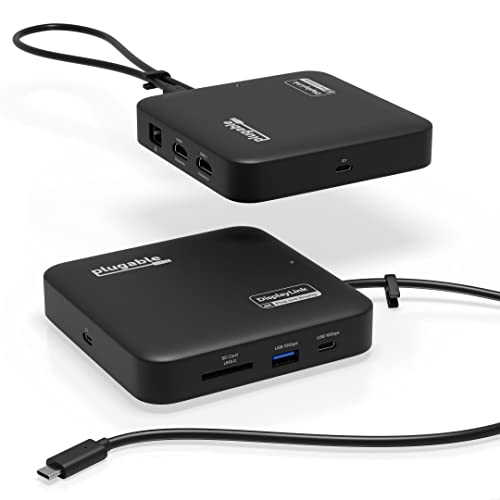
Plugable 7-in-1 Dual 4K HDMI USB-C Dock
Best for: Dual 4K 60Hz HDMI setups on macOS
- Host Interface
- USB-C
- Display Support
- Dual
- Max Resolution
- 4K@60Hz
- Power Delivery
- 82W
- Port Count
- 7
- Video Ports
- HDMI
View on Amazon: Plugable 7-in-1 Dual 4K HDMI USB-C Dock Affiliate link
This Plugable docking station expands your laptop with two HDMI ports for dual 4K 60Hz displays. It uses DisplayLink technology to support extended screens on systems without native dual video output. The dock includes a Gigabit Ethernet port, USB-A and USB-C data ports, and an SD card slot. It accepts up to 100W input for pass-through charging, delivering up to 82W to your host device. The compact unit weighs 8.82 ounces.
Pros
- Outputs two extended 4K 60Hz HDMI displays via DisplayLink
- Provides up to 82W pass-through charging from a 100W adapter
- Includes Gigabit Ethernet, USB-A, USB-C, and SD card slot
- Compact design measures 4.72 inches square and weighs 8.82 ounces
Cons
- Requires DisplayLink driver installation on macOS
- Supports only dual monitors, not triple displays
- Charging cable is sold separately
Good fit if
- You need dual 4K 60Hz HDMI displays on a macOS laptop
- You want a compact dock with Gigabit Ethernet and SD support
- You require pass-through charging for USB-C laptops
Skip if
- You need triple monitor support without DisplayLink drivers
- You want a Thunderbolt 4 connection for higher bandwidth
- You prefer a dock with included charging cables
Verdict: Plugable 7-in-1 USB-C Dual 4K Dock fits users who need reliable dual 4K 60Hz HDMI output on macOS or Windows laptops. It suits those who value compact size and integrated Ethernet and SD slots over native high-bandwidth connections.

Plugable 5-in-1 Thunderbolt 4 Hub
Best for: Thunderbolt 4 expansion and dual 4K displays
- Host Interface
- Thunderbolt 4, USB4
- Display Support
- Dual
- Max Resolution
- 8K
- Power Delivery
- 15W
- Port Count
- 5
- Video Ports
- Thunderbolt 4, HDMI
View on Amazon: Plugable 5-in-1 Thunderbolt 4 Hub Affiliate link
This Thunderbolt 4 hub offers 40Gbps data bandwidth and supports up to two 4K displays at 60Hz. It includes one HDMI adapter and three downstream Thunderbolt 4 ports for expansion. The Intel Goshen Ridge chipset ensures compatibility with Apple silicon and Windows PCs. You get a 10Gbps USB-A port for legacy devices. It weighs 1.92 pounds and measures 8.35 inches long.
Pros
- Intel Engineered for EVO certified chipset
- Supports dual 4K 60Hz displays
- Three downstream Thunderbolt 4 ports
- Includes HDMI video adapter
Cons
- Heavier than most USB-C hubs at 1.92 pounds
- Only provides 15W power delivery per port
- Requires separate HDMI adapter for video output
Good fit if
- You need multiple high-speed Thunderbolt 4 connections
- You use Apple silicon Macs or Windows 10+ PCs
- You want Intel certified compatibility
Skip if
- You require built-in HDMI ports without adapters
- You need more than 15W power delivery
- You use Thunderbolt 3 Windows systems
Verdict: Plugable 5-in-1 Thunderbolt 4 Hub suits users who need to daisy-chain multiple Thunderbolt 4 devices and screens. It is ideal for those prioritizing Intel certification and high bandwidth over compact size.

Plugable TBT4-HUB3C Thunderbolt 4 Hub
Best for: Thunderbolt 4 expansion with dual 4K
- Host Interface
- Thunderbolt 4, USB4
- Display Support
- Dual
- Max Resolution
- 8K@30Hz
- Power Delivery
- 60W
- Max Data Speed
- 40Gbps
- Slot Count
- 1 Slot
View on Amazon: Plugable TBT4-HUB3C Thunderbolt 4 Hub Affiliate link
This hub expands a Thunderbolt 4 or USB4 host with three downstream ports. Each port supports 40Gbps data and 15W charging. It drives up to two 4K displays at 60Hz or one 8K screen at 30Hz. It includes 60W power delivery and an HDMI adapter. You need a compatible host system for full function. It suits users needing multiple high-speed connections.
Pros
- Three Thunderbolt 4 downstream ports
- 40Gbps data transfer speed
- Supports dual 4K@60Hz displays
- 60W power delivery
Cons
- Requires Thunderbolt 4 or USB4 host
- Limited to 60W power delivery
- Heavier at 2.2 pounds
Good fit if
- You need three Thunderbolt connections
- You drive dual 4K monitors
- You use Thunderbolt 4 systems
Skip if
- You have USB-C only hosts
- You need 100W charging
- You want a lightweight design
Verdict: Plugable Thunderbolt 4 Hub 3 Ports fits users who require multiple high-speed Thunderbolt connections and dual 4K display support on compatible systems.
Specifications side by side
| Spec | Plugable USB-C Triple HDMI Docking Station | Plugable Dual 4K DisplayPort and HDMI Dock | Plugable 15-in-1 Triple HDMI USB-C Dock | Plugable 7-in-1 Dual 4K HDMI USB-C Dock | Plugable 5-in-1 Thunderbolt 4 Hub | Plugable TBT4-HUB3C Thunderbolt 4 Hub |
|---|---|---|---|---|---|---|
| Host Interface | USB-C | USB-C, USB 3.0 | USB-C | USB-C | Thunderbolt 4, USB4 | Thunderbolt 4, USB4 |
| Display Support | Triple | Dual | Triple | Dual | Dual | Dual |
| Max Resolution | 4K @ 30Hz | 3840x2160 @ 60Hz | 4K@60Hz | 4K@60Hz | 8K | 8K@30Hz |
| Power Delivery | 100W | not stated | 100W | 82W | 15W | 60W |
| Port Count | 12 | not stated | 15 | 7 | 5 | not stated |
| Video Ports | HDMI | HDMI, DisplayPort | HDMI | HDMI | Thunderbolt 4, HDMI | not stated |
| Max Data Speed | 5Gbps | not stated | 10Gbps | 10Gbps | 40Gbps | 40Gbps |
| Ethernet Speed | Gigabit Ethernet | Gigabit Ethernet | 2.5Gbps | 1Gbps | not stated | not stated |
| Resolution | 1080p FHD | not stated | 1080p FHD | 4K UHD | 4K UHD | 4K UHD |
| Connectivity | USB-C, HDMI | USB-C, HDMI, DisplayPort, Ethernet | USB-C, HDMI | USB-C, HDMI, Ethernet, USB-A | USB-C, HDMI, Thunderbolt 4 | Thunderbolt 4 |
| Refresh Rate | 60Hz | not stated | not stated | 60Hz | not stated | not stated |
| Features | not stated | DisplayLink | not stated | DisplayLink | not stated | not stated |
| Slot Count | not stated | not stated | not stated | not stated | 1 Slot | 1 Slot |
| Dimensions | 7.87 × 3.54 × 1.18 inches | 1.97 × 2.76 × 1.97 inches | 3.39 × 1.65 × 4.8 inches | 4.72 × 4.72 × 1.02 inches | 8.35 × 5.59 × 2.17 inches | 4.7 × 2.9 × 0.7 inches |
| Weight | 11.7 ounces | 12.3 ounces | 1.02 pounds | 8.82 ounces | 1.92 pounds | 2.2 pounds |
| Size | 7.9 x 3.3 x 1.2 inches | 7.5" × 2.8" × 5.3" | not stated | not stated | not stated | not stated |
| Color | Black | Black | Space Gray | Black | Grey | Black |
| Model | UD-3900PDZ | UD-6950Z | UD-MSTH3 | USBC-6950PDZ | USB4-HUB3A | TBT4-HUB3C |
How to choose the right docking station
-
Check your port count
Count the peripherals you use daily. If you need many connections, look for models with higher port counts. The Plugable 15-in-1 Triple HDMI USB-C Dock offers fifteen ports, ideal for heavy users. Smaller docks like the 7-in-1 Dual 4K HDMI model provide fewer options but save space. Match the number of available USB and video ports to your current gear. This ensures you do not need additional adapters later.
-
Verify display support
Decide how many screens you need. Some docks support triple monitors, while others are limited to dual displays. The Plugable USB-C Triple HDMI Docking Station supports three HDMI outputs. If you only need two screens, a dual-monitor dock like the Dual 4K DisplayPort and HDMI model may suffice. More screens require more bandwidth. Ensure your laptop can handle the extra load. Choose the count that fits your workflow.
-
Match resolution needs
Check the maximum resolution each dock supports. Most models here handle 4K UHD. The Plugable 7-in-1 Dual 4K HDMI USB-C Dock delivers 4K resolution at 60Hz. This is suitable for sharp text and detailed images. Some triple-monitor setups may cap at 1080p per screen. The Plugable 15-in-1 Triple HDMI USB-C Dock supports 1080p FHD for all three displays. Pick the resolution that matches your monitor capabilities.
-
Confirm power delivery
Determine if the dock charges your laptop. High-wattage power delivery can replace your laptop charger. The Plugable USB-C Triple HDMI Docking Station provides 100W charging. The Plugable 7-in-1 Dual 4K HDMI USB-C Dock also offers 100W. However, the Dual 4K DisplayPort and HDMI Dock does not charge your computer. If you rely on one cable for both data and power, select a model with sufficient wattage output.
-
Identify connectivity type
Your laptop must support the dock’s connection interface. Thunderbolt 4 hubs require specific ports. The Plugable 5-in-1 Thunderbolt 4 Hub and the TBT4-HUB3C model use this interface. They offer high bandwidth and daisy-chaining capabilities. Standard USB-C docks work with most modern laptops. The Plugable USB-C Triple HDMI Docking Station uses USB-C. Verify your laptop’s port type before buying. Mismatched interfaces will not work.
-
Consider refresh rates
Look at the refresh rate if you watch video or game. The Plugable 7-in-1 Dual 4K HDMI USB-C Dock supports 60Hz on both screens. This provides smooth motion. Other models may not specify high refresh rates for multiple displays. If you need fluid visuals, check the specs for 60Hz support. Standard office work often runs at 30Hz or 60Hz. Ensure the dock meets your visual comfort needs.
Frequently asked questions
Can I use these docks with MacBooks?
Yes, several models support macOS. The Plugable 7-in-1 Dual 4K HDMI USB-C Dock is explicitly suited for macOS laptops. It provides dual 4K 60Hz HDMI output. Other USB-C and Thunderbolt models also work with Macs, provided your system supports the connection type and display standards.
Do these docking stations charge my laptop?
Most models include power delivery, but not all. The Plugable USB-C Triple HDMI Dock and the 15-in-1 Triple HDMI Dock both offer 100W charging. The Plugable Dual 4K DisplayPort and HDMI Dock does not provide laptop charging. Check the attributes to confirm power delivery capabilities before purchasing.
Which dock is best for three monitors?
The Plugable USB-C Triple HDMI Docking Station is ideal for triple-monitor setups. It supports three HDMI displays simultaneously. The Plugable 15-in-1 Triple HDMI USB-C Dock also handles three screens. Both models are designed for users who need maximum screen real estate for productivity workflows.
Do I need Thunderbolt for these docks?
Not always. Standard USB-C docks work with most modern laptops. However, the Plugable 5-in-1 Thunderbolt 4 Hub and the TBT4-HUB3C require Thunderbolt 4 ports. These models offer higher bandwidth and daisy-chaining capabilities. Verify your laptop has the correct port type to ensure compatibility.
What is the maximum resolution supported?
Most docks support 4K UHD resolution. The Plugable 7-in-1 Dual 4K HDMI USB-C Dock delivers dual 4K 60Hz outputs. The Plugable Dual 4K DisplayPort and HDMI Dock also provides dual 4K support. Some models may support 1080p FHD depending on the specific configuration and connection used.
Are these docks compatible with Windows?
Yes, all listed models support Windows operating systems. The Plugable 15-in-1 Triple HDMI USB-C Dock is specifically noted for Windows users needing extensive port expansion. DisplayLink technology in some models ensures broad compatibility with Windows drivers for multi-display setups.