The Best IVANKY Docking Stations in 2026: 2 Picks
As an Amazon Associate we earn from qualifying purchases. Links on this page are affiliate links.
You can find the best IVANKY docking stations in this guide. We compared 2 models to help you choose. IVANKY offers compact, fanless docks in sizes ranging from 0.89 to standard heights. The iVANKY FusionDock Max 2 Thunderbolt 5 Dock leads because it supports triple displays and silent operation for Mac Pro or Max users. Our picks are based strictly on the specifications published on the listings. We focus on connectivity, dimensions, and performance data. This approach ensures you get clear, factual information for your setup.
Quick picks
| # | Product | Best for | Price |
|---|---|---|---|
| 1 | iVANKY FusionDock Max 2 Thunderbolt 5 Dock Best overall | Mac Pro/Max users needing triple displays and silent operation | Check price of iVANKY FusionDock Max 2 Thunderbolt 5 Dock on Amazon |
| 2 | iVANKY 12-in-2 FusionDock 1 M5 Best budget | M4/M5 and Pro/Max MacBooks needing dual 4K displays | Check price of iVANKY 12-in-2 FusionDock 1 M5 on Amazon |
Our 2 picks
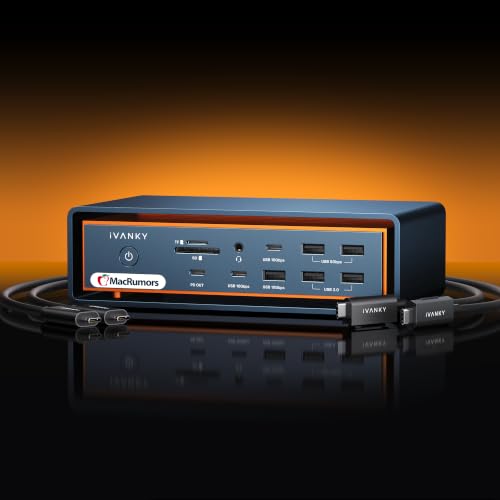
iVANKY FusionDock Max 2 Thunderbolt 5 Dock
Best for: Mac Pro/Max users needing triple displays and silent operation
- Host Interface
- Thunderbolt 5
- Display Support
- Up to 4
- Max Resolution
- 6K@60Hz
- Power Delivery
- 140W
- Port Count
- 23
- Video Ports
- Thunderbolt, HDMI
View on Amazon: iVANKY FusionDock Max 2 Thunderbolt 5 Dock Affiliate link
The iVANKY FusionDock Max 2 is a 23-in-1 Thunderbolt 5 docking station designed exclusively for Mac laptops. It supports triple displays up to 6K@60Hz on high-end M-series chips. The dock features 120Gbps data transfer speeds and 2.5Gbps Ethernet. Its all-aluminum chassis uses passive cooling with no internal fan. This unit suits Mac Pro or Max users needing extensive connectivity and silent operation.
Pros
- Thunderbolt 5 host interface with 120Gbps data transfer
- Supports triple displays up to 6K@60Hz on compatible Macs
- 2.5Gbps Ethernet port for stable network connections
- Passive cooling design eliminates fan noise
- 23 total ports including 10 USB connections
Cons
- Incompatible with Windows and Chrome laptops
- Restricted to a single Mac connection without switching
- Triple display support limited to M-series Max and select Pro chips
Good fit if
- You own a Mac with M1/M2/M3/M4/M5 Max chips
- You need triple external displays for your workflow
- You prefer silent operation without internal fans
Skip if
- You use a Windows or Chrome laptop
- You need to switch between multiple Macs
- You require a laptop with M-series base chips for triple displays
Verdict: The iVANKY FusionDock Max 2 Thunderbolt 5 Dock delivers high-speed connectivity and triple display support for Mac Pro or Max users. It offers a silent, fanless design ideal for professionals who need extensive ports without noise.

iVANKY 12-in-2 FusionDock 1 M5
Best for: M4/M5 and Pro/Max MacBooks needing dual 4K displays
- Display Support
- Dual
- Max Resolution
- 4K@120Hz
- Power Delivery
- 96W
- Port Count
- 12
- Max Data Speed
- 5Gbps
- Ethernet Speed
- 1000Mb/s
View on Amazon: iVANKY 12-in-2 FusionDock 1 M5 Affiliate link
The iVANKY FusionDock 1 is a 12-port docking station designed primarily for Apple Silicon and Intel MacBooks. It supports dual 4K@120Hz displays on compatible M4/M5 and Pro/Max chips, or dual 4K@60Hz on Intel models. The dock includes a 150W power adapter that delivers up to 96W of power delivery to your laptop. It features four USB 3.0 ports for 5Gbps data transfer, an SD/TF card reader, and a Gigabit Ethernet port for stable networking.
Pros
- Supports dual 4K@120Hz displays on M4/M5 and Pro/Max MacBooks
- Includes 150W power adapter for up to 96W laptop charging
- Four USB 3.0 ports with 5Gbps data transfer speed
- Gigabit Ethernet port for stable 1000Mb/s connectivity
- Compact dimensions of 5.6 x 3 x 0.89 inches
Cons
- Base M1/M2/M3 MacBooks are limited to a single 4K@120Hz display
- USB data transfer speed is 5Gbps, not Thunderbolt speeds
- Does not support dual displays on base chip MacBook models
Good fit if
- You use an M4/M5, Pro, or Max MacBook and need dual 4K@120Hz displays
- You need a reliable Gigabit Ethernet connection for your Mac
- You want a dock that charges your laptop up to 96W
Skip if
- You use a base M1/M2/M3 MacBook and require dual external monitors
- You need Thunderbolt 5 speeds for maximum data transfer
- You require more than four USB 3.0 ports
Verdict: The iVANKY FusionDock 1 12-in-2 Dock is a solid choice for M4/M5 and Pro/Max MacBook users who need dual high-resolution displays and stable Ethernet. It is less suitable for base chip models that cannot drive two screens simultaneously.
Specifications side by side
| Spec | iVANKY FusionDock Max 2 Thunderbolt 5 Dock | iVANKY 12-in-2 FusionDock 1 M5 |
|---|---|---|
| Host Interface | Thunderbolt 5 | not stated |
| Display Support | Up to 4 | Dual |
| Max Resolution | 6K@60Hz | 4K@120Hz |
| Power Delivery | 140W | 96W |
| Port Count | 23 | 12 |
| Video Ports | Thunderbolt, HDMI | not stated |
| Max Data Speed | 120Gbps | 5Gbps |
| Ethernet Speed | 2.5Gbps | 1000Mb/s |
| Resolution | not stated | 4K UHD |
| Connectivity | not stated | Ethernet |
| Refresh Rate | 60Hz | 120Hz |
| Weight | 6.08 pounds | 1.13 pounds |
| Dimensions | not stated | 5.6 × 3 × 0.89 inches |
| Color | Midnight Blue | Black |
| Size | not stated | Standard Speed |
| Model | not stated | Lite |
IVANKY Docking Station Picks
The top-ranked iVANKY FusionDock Max 2 Thunderbolt 5 Dock targets Mac Pro or Max users who require triple display support. Its fanless, silent design suits professionals needing extensive connectivity without noise. This model prioritizes high-speed data transfer and robust multi-screen output for demanding workflows.
The second option, the iVANKY FusionDock 1 M5, serves M4 or M5 MacBook users needing dual 4K displays. It offers stable Ethernet and a compact build. This model is less suitable for base chip models that cannot drive two screens simultaneously. Both docks provide reliable port expansion for specific Mac configurations.
Who Should Choose IVANKY
IVANKY suits Mac users seeking compact, silent docks. The range spans from the slim, 0.89-inch FusionDock 1 Lite to the larger FusionDock Max 2. You get choices in black or midnight blue finishes. These fanless designs prioritize quiet operation for professionals. However, the lineup focuses heavily on Apple Silicon. Base chip MacBooks may not support dual 4K displays on the smaller dock. There are no options for Windows-only setups or USB-C hubs without docking features in this specific selection. You should verify your Mac model compatibility before buying.
How to Choose the Right IVANKY Dock
-
Check Display Output Limits
You must verify how many screens the dock can drive. The iVANKY FusionDock Max 2 Thunderbolt 5 Dock supports triple displays. This makes it suitable for Mac Pro or Max users who need extensive visual workspace. Other models may only support dual screens. You should check the specific display support for your setup. If you need three monitors, ensure the dock explicitly lists triple display capability. This spec is critical for productivity workflows that require multiple windows open simultaneously.
-
Verify Chip Compatibility
Not all docks work with every MacBook chip. The iVANKY FusionDock 1 12-in-2 Dock is designed for M4, M5, and Pro or Max models. It may not function correctly with base chip models. You need to confirm your processor type before purchasing. Base chip MacBooks often cannot drive two screens simultaneously through a dock. Always match the dock’s compatibility list with your specific laptop model to avoid connectivity issues or limited performance.
-
Assess Physical Dimensions
Consider the size of the dock for your desk space. The iVANKY FusionDock 1 Lite measures 3 inches wide and 0.89 inches high. This slim profile fits easily into compact setups. The larger FusionDock Max 2 likely requires more surface area. You should measure your available desk space before deciding. A smaller dock offers flexibility but may have fewer ports. A larger dock provides more connectivity but takes up more room. Choose the size that fits your physical environment.
-
Look for Silent Operation
Noise levels matter for professional environments. Both IVANKY docks feature fanless designs. This ensures silent operation during use. You will not hear any cooling fans running. This is ideal for video calls or quiet offices. If you work in a noisy environment, this might be less critical. However, for studios or home offices, silent operation is a key benefit. Check the product description for fanless claims to ensure quiet performance.
-
Consider Color Options
The finish of the dock may matter for aesthetics. IVANKY offers options in black and midnight blue. The FusionDock 1 Lite comes in black. The FusionDock Max 2 is available in midnight blue. You might prefer a color that matches your laptop or desk. While this does not affect performance, it can influence your choice. Consider the visual integration of the dock with your existing gear. A matching color can create a more cohesive workspace appearance.
Frequently asked questions
Which iVANKY dock is best for Mac Pro users needing three screens?
The iVANKY FusionDock Max 2 Thunderbolt 5 Dock is the top choice. It supports triple displays, making it ideal for Mac Pro or Max users. The device features a silent, fanless design in Midnight Blue. This setup provides high-speed connectivity without operational noise, which is essential for professional workflows requiring multiple monitors.
Does the iVANKY FusionDock 1 support dual 4K displays on all MacBooks?
It supports dual high-resolution displays for M4, M5, and Pro/Max MacBook models. However, it is less suitable for base chip models that cannot drive two screens simultaneously. The dock comes in Black and offers stable Ethernet connectivity. Its compact dimensions are 5.6 inches by 3 inches by 0.89 inches.
What are the physical dimensions of the iVANKY FusionDock 1 Lite?
The iVANKY FusionDock 1 Lite measures 5.6 inches in length, 3 inches in width, and 0.89 inches in height. It weighs 1.13 pounds. The device is available in Black. These compact dimensions make it easy to place on a desk without taking up excessive space while providing necessary ports for your laptop.
Is the iVANKY FusionDock Max 2 fanless?
Yes, the iVANKY FusionDock Max 2 Thunderbolt 5 Dock features a fanless design. This ensures silent operation, which is beneficial for professionals who need quiet environments. The dock is available in Midnight Blue. It prioritizes high-speed data transfer and robust multi-screen output without generating noise during use.
What color options are available for iVANKY docking stations?
iVANKY offers docking stations in Black and Midnight Blue finishes. The FusionDock 1 Lite is available in Black. The FusionDock Max 2 Thunderbolt 5 Dock comes in Midnight Blue. These color choices allow you to match your desk setup while maintaining the brand's compact and fanless design philosophy for quiet operation.
Does the iVANKY FusionDock 1 include Ethernet connectivity?
Yes, the iVANKY FusionDock 1 provides stable Ethernet connectivity. This feature is particularly useful for M4, M5, and Pro/Max MacBook users who require reliable wired network connections. The dock supports dual high-resolution displays and is designed for stability. Its compact size fits well alongside laptops that need robust peripheral support.