Plugable vs Lenovo: Docking Stations Compared by Specs
As an Amazon Associate we earn from qualifying purchases. Links on this page are affiliate links.
This plugable vs lenovo docking station comparison focuses on the Plugable UD-3900 and the Lenovo ThinkPad Hybrid Dock. Both units offer dual display support and gigabit Ethernet for expanded connectivity. The main difference lies in their video output standards and charging capabilities. The Plugable model uses HDMI for broad compatibility, while the Lenovo dock combines DisplayPort and HDMI ports. We compare these specs to help you decide which setup fits your workflow.
Key differences
| Aspect | Plugable Dual HDMI Universal Docking Station | Lenovo ThinkPad Hybrid USB-C and USB-A Dock |
|---|---|---|
| Video Ports | 2x HDMI | 2x DisplayPort, 2x HDMI |
| Max Resolution | 2560x1440 @ 50Hz | not listed |
| Host Interface | USB 3.0, USB-C | USB-C, USB-A |
| Laptop Charging | Does not charge host | Supports ThinkPad RapidCharge |
| Weight | 13 ounces | 1.05 pounds |
Which one should you choose?
Choose Plugable Dual HDMI Universal Docking Station if
- You need a dock that works with both Windows and macOS without complex setup
- You prefer a lighter unit that fits easily in a laptop bag
- You want a lower weight profile for travel
Choose Lenovo ThinkPad Hybrid USB-C and USB-A Dock if
- You use a Lenovo ThinkPad and need RapidCharge support
- You require DisplayPort outputs for specific monitors
- You need a dock that charges your laptop while in use
Verdict: Choose the Plugable dock if you value cross-platform compatibility and a lighter form factor. Select the Lenovo dock if you own a compatible ThinkPad and need laptop charging capabilities. Both units provide reliable dual display expansion for productivity tasks.
Docking Station Specs Compared
Video resolution
The Plugable UD-3900 supports dual HDMI displays up to 1920x1200 at 60Hz. It can also drive a single HDMI display at 2560x1440 at 50Hz. This option does not support 4K resolution. The Lenovo ThinkPad Hybrid Dock uses two DisplayPort and two HDMI ports. The data does not list specific maximum resolution limits for the Lenovo unit. If you need high resolution on a single screen, the Plugable spec is clear. You must check the Lenovo manual for its exact limits. The Plugable has a defined advantage for single high-res setups.
Connectivity ports
The Plugable offers two HDMI outputs, a Gigabit Ethernet port, audio jacks, two USB 3.0 ports, and four USB 2.0 ports. It connects via a hybrid USB 3.0 and USB-C cable. The Lenovo ThinkPad Hybrid Dock provides two DisplayPort and two HDMI outputs. It also includes a Gigabit Ethernet port and a stereo/mic combo audio port. For USB, it has three USB 3.1 Gen2 ports and two USB 2.0 ports. The Lenovo has more high-speed USB 3.1 Gen2 ports. The Plugable has more total USB 2.0 ports. The Lenovo offers a wider variety of video connector types.
Power delivery
The Plugable UD-3900 does not charge the host laptop. It is designed for web and productivity software usage only. The Lenovo ThinkPad Hybrid Dock supports ThinkPad RapidCharge and can charge mobile devices. It provides 5V 3A power from the USB-C port and 10.5W from an always-on USB 3.0 port. If you need to charge your laptop or other devices through the dock, the Lenovo is the better choice. The Plugable lacks any power delivery capability for the host. This is a clear advantage for the Lenovo unit.
Compatibility
The Plugable works with Windows 11, 10, ChromeOS 100+, and macOS 14+ with manual driver installation. It is not compatible with Linux or Unix systems. The Lenovo ThinkPad Hybrid Dock lists compatibility with many specific ThinkPad models, including T, X, L, and E series. It also works with older Lenovo and non-Lenovo laptops. The Plugable has broader operating system support across different platforms. The Lenovo is optimized for specific ThinkPad hardware. You should choose the Plugable for general use across different OS environments.
Physical size
The Plugable UD-3900 measures 6.45 inches in length, 3.22 inches in width, and 4.02 inches in height. It weighs 13 ounces. The Lenovo ThinkPad Hybrid Dock measures 8.3 inches in length, 3.1 inches in width, and 1.2 inches in height. It weighs 1.05 pounds. The Lenovo is taller but thinner and longer than the Plugable. The Plugable is more compact in overall volume. The Lenovo is heavier due to its internal components. The Plugable is easier to move around on a desk. The Plugable has a slight advantage in portability.
Choose your docking station
Users needing high-res single displays
The Plugable UD-3900 supports a single HDMI display at 2560x1440 resolution. This is ideal if you want higher clarity on one screen rather than two lower-resolution monitors. It also includes a 3.5 mm headphone jack and microphone input for audio needs without extra adapters.
Users preferring DisplayPort connections
The Lenovo ThinkPad Hybrid Dock features two DisplayPort outputs alongside its HDMI ports. This gives you flexibility if your monitors use DisplayPort inputs. It also offers faster USB data speeds up to 10Gbps via USB 3.1 Gen 2 ports for quicker file transfers.
Users needing laptop charging
The Lenovo dock supports ThinkPad RapidCharge and provides 5V 3A power through its USB-C port. It also charges mobile devices with 15W and 10.5W from other ports. The Plugable model does not charge the host laptop, making the Lenovo option better for power management.
Users wanting universal compatibility
The Plugable UD-3900 works with Windows 11, 10, ChromeOS 100+, and macOS 14+ with a manual driver. It is not limited to specific laptop brands. The Lenovo dock lists specific ThinkPad models, which may restrict compatibility if you use a different brand of laptop.
The products compared

Plugable Dual HDMI Universal Docking Station
Best for: Windows users needing dual HDMI and Ethernet
- Host Interface
- USB 3.0, USB-C
- Display Support
- Dual
- Max Resolution
- 2560x1440 @ 50Hz
- Video Ports
- HDMI
- Ethernet Speed
- Gigabit Ethernet
- Connectivity
- USB-C, HDMI, Ethernet
View on Amazon: Plugable Dual HDMI Universal Docking Station Affiliate link
The Plugable UD-3900 connects a laptop to two external monitors via HDMI. It supports dual displays up to 1920x1200 and a single display up to 2560x1440. You get Gigabit Ethernet and multiple USB ports for peripherals. It works with Windows and ChromeOS out of the box, but requires a manual driver install for macOS. This dock does not charge your host laptop.
Pros
- Dual HDMI outputs for two monitors
- Gigabit Ethernet port included
- Works with Windows and ChromeOS without extra setup
- Hybrid USB 3.0 and USB-C cable
Cons
- No power delivery for host laptop
- macOS requires manual DisplayLink driver installation
- Does not support 4K resolution
Good fit if
- You need a wired Ethernet connection on the go
- You use Windows or ChromeOS primarily
- You want dual monitors without complex setup
Skip if
- You need to charge your laptop through the dock
- You want plug-and-play support on macOS
- You require 4K display support
Verdict: The Plugable UD-3900 Dual HDMI Dock is a solid choice for Windows and ChromeOS users who need dual displays and Ethernet connectivity without the hassle of manual driver installation.
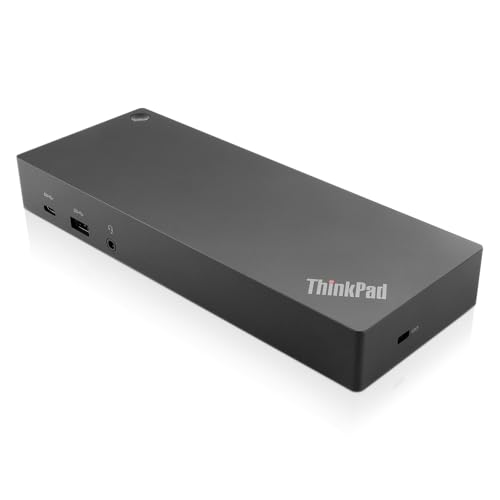
Lenovo ThinkPad Hybrid USB-C and USB-A Dock
Best for: Dual monitor and Ethernet needs
- Host Interface
- USB-C, USB-A
- Video Ports
- DisplayPort, HDMI
- Max Data Speed
- 10Gbps
- Ethernet Speed
- Gigabit Ethernet
- Dimensions
- 8.3 × 3.1 × 1.2 inches
- Weight
- 1.05 pounds
View on Amazon: Lenovo ThinkPad Hybrid USB-C and USB-A Dock Affiliate link
This docking station expands your laptop’s connectivity through a single USB-C or USB-A host port. It provides dual video output via two DisplayPorts and two HDMI ports, supporting external monitors. The unit includes a Gigabit Ethernet port for wired networking and three USB 3.1 Gen 2 ports for high-speed data transfer. It is designed to work with various Lenovo ThinkPad models and other laptops.
Pros
- Dual HDMI and DisplayPort video outputs
- Gigabit Ethernet for stable wired connection
- Three USB 3.1 Gen 2 ports for fast data
- Supports 10Gbps data transfer speeds
Cons
- Heavier and bulkier than the Plugable alternative
- Requires specific power adapter (not included in port list)
- Limited to one USB-C data port
Good fit if
- You need dual monitor support via HDMI
- You require a Gigabit Ethernet connection
- You use a Lenovo ThinkPad laptop
Skip if
- You prefer a lighter, more portable dock
- You need more than two video outputs
- You only have USB-A ports on your laptop
Verdict: Lenovo ThinkPad Hybrid USB-C Dock offers robust connectivity with dual video and Gigabit Ethernet. It fits users who prioritize wired networking and multi-monitor setups over compact size.
Specifications side by side
| Spec | Plugable Dual HDMI Universal Docking Station | Lenovo ThinkPad Hybrid USB-C and USB-A Dock |
|---|---|---|
| Host Interface | USB 3.0, USB-C | USB-C, USB-A |
| Display Support | Dual | not stated |
| Max Resolution | 2560x1440 @ 50Hz | not stated |
| Video Ports | HDMI | DisplayPort, HDMI |
| Max Data Speed | not stated | 10Gbps |
| Ethernet Speed | Gigabit Ethernet | Gigabit Ethernet |
| Connectivity | USB-C, HDMI, Ethernet | USB-C, USB-A |
| Dimensions | 6.45 × 3.22 × 4.02 inches | 8.3 × 3.1 × 1.2 inches |
| Weight | 13 ounces | 1.05 pounds |
| Size | Dual Display | not stated |
| Color | Black | Black |
| Model | UD-3900 | 40AF0135US |
Frequently asked questions
Does the Plugable UD-3900 support dual monitors?
Yes, the Plugable UD-3900 supports dual displays. It can drive two HDMI monitors at 1920x1200 resolution at 60Hz. This setup works well for Windows and ChromeOS users who need multiple screens for productivity tasks without complex driver installations.
What is the maximum resolution for a single display on the Plugable dock?
The Plugable UD-3900 supports a single HDMI display at 2560x1440 resolution at 50Hz. This higher clarity option is ideal if you prefer one large screen over two lower-resolution monitors. Note that this model does not support 4K resolution for either single or dual setups.
Does the Lenovo ThinkPad Hybrid Dock have Ethernet?
Yes, the Lenovo ThinkPad Hybrid Dock includes Gigabit Ethernet connectivity. This feature ensures stable wired networking for users who prioritize reliable internet connections. It is a solid choice for those who need robust connectivity alongside dual video outputs in a single docking station solution.
How big is the Plugable UD-3900 docking station?
The Plugable UD-3900 measures 6.45 inches in length, 3.22 inches in width, and 4.02 inches in height. It weighs 13 ounces and features a black color finish. These dimensions make it a compact unit that fits easily on most desks while providing essential dual display ports.
What connectors does the Lenovo ThinkPad Hybrid Dock use?
The Lenovo ThinkPad Hybrid Dock uses both USB-C and USB-A connections. This hybrid approach allows compatibility with various laptop types. It provides dual video outputs and Gigabit Ethernet, making it suitable for users who need versatile connectivity options without relying solely on USB-C ports.
Is the Lenovo ThinkPad Hybrid Dock heavy?
The Lenovo ThinkPad Hybrid Dock weighs 1.05 pounds. It measures 8.3 inches in length, 3.1 inches in width, and 1.2 inches in height. The black finish matches typical office equipment. Its weight suggests a sturdy build designed for stable desk placement and reliable daily use.
Can I use the Plugable dock with ChromeOS?
Yes, the Plugable UD-3900 is compatible with ChromeOS. It is designed as a universal docking station for Windows and ChromeOS users. This compatibility allows you to expand your screen real estate and connect peripherals easily without the hassle of manual driver installation on supported ChromeOS devices.