Plugable vs Acer: Docking Stations Compared by Specs
As an Amazon Associate we earn from qualifying purchases. Links on this page are affiliate links.
This plugable vs acer docking station guide compares two distinct connectivity solutions. Both devices expand laptop ports and support external displays. The Plugable UD-3900 offers dual monitor output and Gigabit Ethernet for a fixed desk setup. The Acer ODK5U0 provides a single 4K@60Hz display connection with 100W power delivery. You must choose between multi-monitor productivity or high-resolution portability.
Key differences
| Aspect | Plugable Dual HDMI Universal Docking Station | Acer 5-in-1 4K 60Hz USB-C Hub |
|---|---|---|
| Max Resolution | 2560x1440 @ 50Hz | 4K@60Hz |
| Display Support | Dual HDMI | Single HDMI |
| Power Delivery | Not listed | 90W output |
| Ethernet | Gigabit Ethernet | Not listed |
| Host Interface | USB 3.0, USB-C | USB-C |
Which one should you choose?
Choose Plugable Dual HDMI Universal Docking Station if
- You need to run two monitors simultaneously for productivity tasks.
- You require a wired Gigabit Ethernet connection for stable internet.
- You use Windows 11 or ChromeOS and want plug-and-play setup without manual driver installation.
Choose Acer 5-in-1 4K 60Hz USB-C Hub if
- You need a single display with 4K resolution at 60Hz for sharp visuals.
- You want to charge your laptop with up to 90W while connected.
- You prioritize a compact, aluminum design for travel and remote work.
Verdict: Choose the Plugable UD-3900 if your workflow relies on dual monitors and wired networking. Select the Acer ODK5U0 if you need high-resolution 4K video and pass-through charging for a portable setup.
Plugable vs Acer Docking Station Specs
Display Resolution
The Acer ODK5U0 supports 4K resolution at 60Hz. This provides sharper images and smoother motion for video editing or streaming. The Plugable UD-3900 tops out at 2560x1440 at 50Hz on a single display. Dual monitors on the Plugable are limited to 1920x1200 at 60Hz. The Acer delivers higher pixel density and refresh rates for a single screen. The Plugable offers lower resolution but supports two screens simultaneously. You get clarity with the Acer and quantity with the Plugable.
Display Support
The Plugable UD-3900 connects two HDMI monitors at once. This is useful for spreadsheets or coding across two views. The Acer ODK5U0 supports only one HDMI display. It cannot drive a second screen through its single port. If you need a dual-monitor workspace without a laptop, the Plugable is the better choice. The Acer is designed for a single external display alongside the laptop screen. You must choose between dual screens or higher resolution on one screen.
Power Delivery
The Acer ODK5U0 includes 100W Power Delivery pass-through. It can output up to 90W to charge your laptop while in use. The Plugable UD-3900 does not charge the host laptop. You must keep your original charger plugged in for power. The Acer simplifies desk setups by reducing cable clutter. The Plugable requires a separate power source for the computer. Power delivery is a significant advantage for mobile professionals using the Acer.
Connectivity Options
The Plugable UD-3900 offers a wider range of ports. It includes Gigabit Ethernet, headphone and microphone jacks, and five USB ports. The Acer ODK5U0 has five ports total, focusing on data and video. It lacks Ethernet and audio jacks. The Plugable is better for office environments needing wired internet and audio. The Acer is simpler, targeting users who primarily need video and data transfer. You get more versatility with the Plugable and less with the Acer.
Host Interface
The Plugable UD-3900 works with both USB 3.0 and USB-C connections. This allows use with older laptops that only have USB-A ports. The Acer ODK5U0 requires a full-featured USB-C port. It must support DisplayPort Alt Mode and Power Delivery. Older laptops without USB-C cannot use the Acer device. The Plugable is more flexible for diverse hardware. The Acer is limited to modern USB-C systems. You need a compatible port for the Acer but have more options with the Plugable.
Which Docking Station Fits Your Needs
Users needing dual monitors and ethernet
The Plugable UD-3900 supports two HDMI displays at 1920x1200. It includes Gigabit Ethernet for wired internet. This setup works well for fixed desks. You get multiple USB ports for peripherals. The hybrid cable connects via USB 3.0 or USB-C. It is ideal for productivity tasks on a stationary workstation.
Professionals requiring high resolution and charging
The Acer ODK5U0 delivers 4K resolution at 60Hz. This ensures sharp images and smooth motion for video work. It also provides 90W pass-through charging. This keeps your laptop powered during long sessions. The aluminum shell helps with heat dissipation. It is a compact solution for single-monitor setups.
Travelers wanting a portable single display
The Acer hub is designed for portability. Its slim profile fits easily into a bag. It connects via a single USB-C cable. This simplifies travel by reducing cable clutter. You get fast data transfer speeds up to 5Gbps. The device supports Windows, macOS, and ChromeOS for broad compatibility on the go.
The products compared

Plugable Dual HDMI Universal Docking Station
Best for: Windows users needing dual 1080p monitors
- Host Interface
- USB 3.0, USB-C
- Display Support
- Dual
- Max Resolution
- 2560x1440 @ 50Hz
- Video Ports
- HDMI
- Ethernet Speed
- Gigabit Ethernet
- Connectivity
- USB-C, HDMI, Ethernet
View on Amazon: Plugable Dual HDMI Universal Docking Station Affiliate link
The Plugable UD-3900 expands your laptop with dual HDMI outputs and a hybrid USB 3.0 or USB-C connection. It supports two monitors at 1920x1200 or a single display at 2560x1440. You get wired Gigabit Ethernet and multiple USB ports. It works with Windows and ChromeOS out of the box. You need a driver for macOS. It does not charge your laptop.
Pros
- Hybrid USB 3.0 and USB-C host cable
- Dual HDMI video outputs for two monitors
- Wired Gigabit Ethernet port included
- Plug-and-play on Windows 11 and 10
Cons
- No 4K display support
- Does not charge the host laptop
- Manual driver install required for macOS
Good fit if
- You need dual monitors for productivity
- You use Windows or ChromeOS
- You want a wired Ethernet connection
Skip if
- You require 4K resolution
- You need laptop charging
- You use Linux systems
Verdict: Plugable UD-3900 Dual HDMI Dock suits office workers who need two screens and stable wired internet on Windows or ChromeOS. It is not for gamers or Mac users who want plug-and-play simplicity.
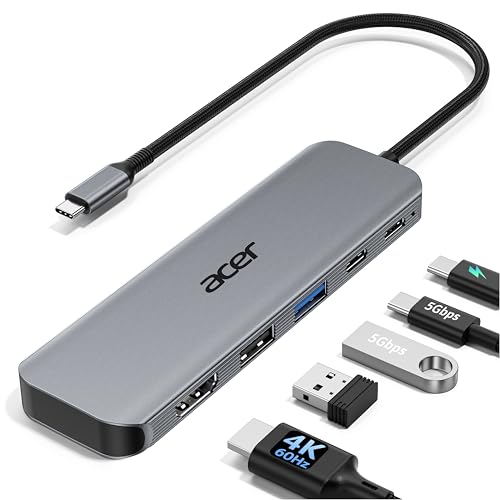
Acer 5-in-1 4K 60Hz USB-C Hub
Best for: Single 4K@60Hz display and laptop charging
- Host Interface
- USB-C
- Max Resolution
- 4K@60Hz
- Power Delivery
- 90W
- Port Count
- 5
- Video Ports
- HDMI 2.0
- Max Data Speed
- 5Gbps
View on Amazon: Acer 5-in-1 4K 60Hz USB-C Hub Affiliate link
This Acer adapter expands a single USB-C port into five connections. It supports 4K@60Hz video output, which offers smoother motion than standard 30Hz displays. The hub delivers up to 90W of power delivery to your laptop. It includes USB-C and USB-A 3.0 ports for 5Gbps data transfer. This compact aluminum device suits users needing a reliable, single-cable docking solution for travel or office work.
Pros
- Supports 4K@60Hz HDMI output for smooth visuals
- Provides up to 90W power delivery to laptops
- Includes USB-C and USB-A 3.0 ports for 5Gbps data transfer
- Built with an aluminum shell for heat dissipation
Cons
- Only one video port, limiting multi-monitor setups
- Requires a separate 100W power adapter for optimal charging
- Does not support ultrawide monitors
Good fit if
- You need 4K@60Hz video output for smooth presentations
- You want to charge your laptop while connected
- You prefer a compact, single-cable docking solution
Skip if
- You require multiple monitor connections
- You plan to use an ultrawide monitor
- You need a hub with built-in power supply
Verdict: Acer 5-in-1 USB-C Hub delivers smooth 4K@60Hz video and reliable 90W charging in a compact aluminum body. It fits professionals who need a single-cable solution for presentations and travel.
Specifications side by side
| Spec | Plugable Dual HDMI Universal Docking Station | Acer 5-in-1 4K 60Hz USB-C Hub |
|---|---|---|
| Host Interface | USB 3.0, USB-C | USB-C |
| Display Support | Dual | not stated |
| Max Resolution | 2560x1440 @ 50Hz | 4K@60Hz |
| Power Delivery | not stated | 90W |
| Port Count | not stated | 5 |
| Video Ports | HDMI | HDMI 2.0 |
| Max Data Speed | not stated | 5Gbps |
| Ethernet Speed | Gigabit Ethernet | not stated |
| Resolution | not stated | 4K UHD |
| Connectivity | USB-C, HDMI, Ethernet | USB-C, HDMI, USB-A |
| Refresh Rate | not stated | 60Hz |
| Dimensions | 6.45 × 3.22 × 4.02 inches | not stated |
| Weight | 13 ounces | not stated |
| Size | Dual Display | not stated |
| Color | Black | Grey |
| Model | UD-3900 | ODK5U0 |
Frequently asked questions
Can the Plugable UD-3900 drive two monitors at once?
Yes, this docking station supports dual display output. It connects to two external screens via HDMI ports. This setup allows you to extend your workspace significantly. It is ideal for users who need multiple windows open simultaneously for productivity tasks.
What is the maximum resolution for the Acer ODK5U0?
The Acer hub supports 4K UHD resolution at 60Hz. This provides sharp images and smooth motion for a single external display. It is suitable for professionals who need high clarity for video editing or detailed design work on one screen.
Which dock is better for a single 4K display?
The Acer ODK5U0 is the better choice for a single 4K screen. It delivers 4K at 60Hz, ensuring crisp visuals. The Plugable UD-3900 focuses on dual lower-resolution outputs. If you prioritize high resolution over multiple screens, the Acer model fits your needs.
Does the Plugable UD-3900 include Ethernet connectivity?
Yes, the Plugable UD-3900 includes Gigabit Ethernet. This allows for a stable wired internet connection. It is useful for office workers who need reliable network speeds. This feature is not listed for the Acer ODK5U0, which focuses on video and charging.
How heavy is the Plugable UD-3900 docking station?
The Plugable UD-3900 weighs 13 ounces. Its dimensions are 6.45 inches in length, 4.02 inches in height, and 3.22 inches in width. The compact size makes it easy to place on a desk without taking up excessive space.
Can the Acer ODK5U0 charge a laptop?
Yes, the Acer ODK5U0 supports laptop charging. It delivers up to 90W of power through its USB-C connection. This single-cable solution simplifies your desk setup by combining video output and power delivery into one port for compatible devices.
Is the Plugable UD-3900 compatible with Mac?
The Plugable UD-3900 is designed primarily for Windows and ChromeOS. It may not offer plug-and-play simplicity for Mac users. If you use a Mac, check compatibility requirements carefully. The Acer ODK5U0 also focuses on specific USB-C implementations for various laptops.
What is the refresh rate of the Acer 4K hub?
The Acer ODK5U0 supports a 60Hz refresh rate at 4K resolution. This ensures smoother motion for video playback and general desktop use. It provides a fluid visual experience compared to lower refresh rates, making it suitable for media consumption and professional tasks.