Plugable USB-C Triple HDMI Docking or Plugable 13-in-1 Triple HDMI Dock? Which Plugable Model to Buy
As an Amazon Associate we earn from qualifying purchases. Links on this page are affiliate links.
When comparing the plugable USB c triple display vs USB c triple monitor docking options, you face two robust enterprise-grade docks. Both support three HDMI monitors and deliver 100W power delivery to your laptop. They share Gigabit Ethernet and compatibility with Windows, macOS, and ChromeOS. The main difference lies in their physical design and port configuration. One model offers a more compact footprint with front-facing charging, while the other provides a larger chassis with a different port layout. You need to decide which physical form and connectivity mix fits your desk setup best.
Key differences
| Aspect | Plugable USB-C Triple HDMI Docking Station | Plugable 13-in-1 Triple HDMI Dock |
|---|---|---|
| Port Count | 12 ports | 13 ports |
| Host Interface | USB-C, USB4, Thunderbolt | USB-C |
| Front USB-C Charging | Not listed | 20W device charging |
| Dimensions | 7.9 x 3.3 x 1.2 inches | 4.7 x 2.6 x 6.9 inches |
| Weight | 11.7 ounces | 14.1 ounces |
Which one should you choose?
Choose Plugable USB-C Triple HDMI Docking Station if
- You use a Thunderbolt or USB4 laptop and want broad host interface compatibility.
- You prefer a lower profile dock that sits flatter on your desk.
- You prioritize a lighter dock for easier transport between workspaces.
Choose Plugable 13-in-1 Triple HDMI Dock if
- You need an extra port for peripherals like SD cards or additional USB-A devices.
- You want to charge a phone or accessory directly from the front of the dock.
- You require TAA, NDAA, and Section 889 compliance for government or enterprise procurement.
Verdict: The Plugable UD-3900PDZ suits users who need Thunderbolt support and a compact, lightweight design. The Plugable UD-ULTCDL is better for those who need more ports, front-facing device charging, and specific regulatory compliance for enterprise deployments. Both docks deliver identical triple-monitor performance and 100W laptop charging.
Port Count and Connectivity Differences
Port Count
The Plugable 13-in-1 Triple HDMI Dock offers thirteen total ports, including four USB-A 5Gbps ports, an SD card reader, and two USB-C ports. One rear USB-C port handles 100W laptop charging, while the front USB-C port provides 20W charging for accessories. The Plugable USB-C Triple HDMI Docking Station lists twelve ports. It includes six USB 3.0 ports and a single USB-C host interface. You get more peripheral options with the 13-in-1 model, particularly for connecting multiple USB-A devices or using the SD card reader. The other dock provides more USB-A ports but lacks the dedicated accessory charging port and card slot.
Host Interface Support
The Plugable USB-C Triple HDMI Docking Station supports USB-C, USB4, and Thunderbolt host interfaces. This allows you to connect it to a wider range of modern laptops that feature Thunderbolt or USB4 connectivity. The Plugable 13-in-1 Triple HDMI Dock specifies only USB-C as its host interface. While both docks work with USB-C laptops, the first model gives you more flexibility if your computer uses Thunderbolt or USB4 standards. You can use the Thunderbolt-compatible dock with older USB-C devices, but the 13-in-1 dock is limited to standard USB-C connections. If your laptop has Thunderbolt, the first option is more versatile.
Display Resolution Setup
Both docks support up to 4K resolution at 30Hz on one HDMI port. The Plugable 13-in-1 Triple HDMI Dock delivers 1920x1200 at 60Hz on its second and third HDMI ports. The Plugable USB-C Triple HDMI Docking Station supports 1080p at 60Hz on two ports via DisplayLink and 4K at 30Hz on the third via Alt Mode. The 13-in-1 model provides a higher resolution and refresh rate on two screens simultaneously. The other dock offers one high-resolution screen and two standard 1080p screens. If you need higher clarity on multiple monitors, the 13-in-1 dock is better.
Physical Dimensions
The Plugable USB-C Triple HDMI Docking Station measures 7.9 inches in length, 3.3 inches in width, and 1.2 inches in height. It weighs 11.7 ounces. The Plugable 13-in-1 Triple HDMI Dock measures 4.7 inches in length, 2.6 inches in width, and 6.9 inches in height. It weighs 14.1 ounces. The first dock is longer and flatter, which may fit better in some desk setups. The second dock is taller and more compact in footprint but heavier. You should check your desk space to see which form factor works best for your specific workspace arrangement.
Compliance Standards
The Plugable 13-in-1 Triple HDMI Dock is TAA, NDAA, and Section 889 compliant. These standards are important for government, education, and certain enterprise deployments. The Plugable USB-C Triple HDMI Docking Station does not list these specific compliance certifications in its data. If you work for a government agency or a company with strict procurement rules, the 13-in-1 dock is the safer choice. For general home or private office use, this distinction may not matter. You should verify your organization's requirements before deciding.
Choose your ideal Plugable triple display dock
Users needing SD card and front charging ports
You should choose the 13-in-1 model if you need an SD card reader for quick photo transfers. It also features a front USB-C port that delivers 20W charging for your phone or tablet. This setup keeps your desk organized by allowing easy access to media and device power without reaching behind the dock.
Mac users wanting native Alt Mode support
Select the USB-C Triple HDMI Docking Station if you prefer native video output. It uses USB-C Alt Mode for one 4K display, which can simplify setup on newer Apple Silicon systems. This model also supports USB4 and Thunderbolt hosts, offering broader interface compatibility for high-speed data and display connections compared to standard USB-C.
IT managers deploying standardized enterprise workstations
The 13-in-1 dock is TAA, NDAA, and Section 889 compliant, making it suitable for government and regulated office environments. It includes a power adapter and AC cord in the box, ensuring you have everything needed for immediate deployment. This compliance and included power hardware streamline large-scale IT rollouts across your organization.
Users prioritizing compact dock dimensions
If desk space is limited, the 12-in-1 model is physically smaller. It measures 7.9 by 3.3 by 1.2 inches and weighs 11.7 ounces. This compact form factor allows for a tighter footprint on your workspace compared to the larger 13-in-1 unit, which is taller and heavier, making it better for spacious desks.
The products compared

Plugable USB-C Triple HDMI Docking Station
Best for: Users needing three monitors on Apple Silicon Macs
- Host Interface
- USB-C
- Display Support
- Triple
- Max Resolution
- 4K @ 30Hz
- Power Delivery
- 100W
- Port Count
- 12
- Video Ports
- HDMI
View on Amazon: Plugable USB-C Triple HDMI Docking Station Affiliate link
This Plugable dock supports three HDMI displays for Windows, macOS, and ChromeOS laptops. It uses native USB-C Alt Mode for one 4K @ 30Hz screen and DisplayLink technology for two 1080p @ 60Hz monitors. The unit includes 100W Power Delivery to charge your host device. It also provides Gigabit Ethernet and six USB 3.0 ports. This setup bypasses native display limits on Apple Silicon MacBooks.
Pros
- Supports up to three extended HDMI displays
- 100W USB-C Power Delivery for host charging
- Native 4K @ 30Hz via Alt Mode
- Two additional 1080p @ 60Hz monitors via DisplayLink
- Includes Gigabit Ethernet and six USB 3.0 ports
Cons
- Only one display supports 4K resolution
- Not compatible with Linux operating systems
- Does not support HDCP content protection
Good fit if
- You need three monitors on a single laptop
- You use Apple Silicon MacBooks with display limits
- You require Gigabit Ethernet connectivity
Skip if
- You use a Linux-based operating system
- You need 4K resolution on all three screens
- You require HDCP support for protected content
Verdict: Plugable 13-in-1 Triple HDMI Dock delivers a reliable three-monitor setup for Windows and macOS users. It is the right choice if you need to bypass Apple Silicon display limits or require dedicated Ethernet ports.
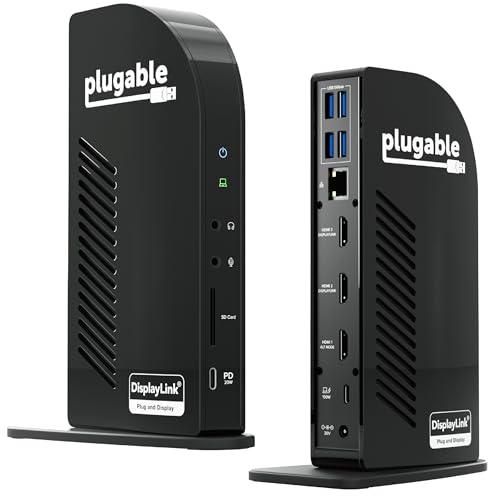
Plugable 13-in-1 Triple HDMI Dock
Best for: Office setups requiring three external monitors
- Host Interface
- USB-C
- Display Support
- Triple
- Max Resolution
- 4K @ 30Hz
- Power Delivery
- 100W
- Port Count
- 13
- Video Ports
- HDMI
View on Amazon: Plugable 13-in-1 Triple HDMI Dock Affiliate link
This 13-in-1 dock connects three HDMI displays for expanded workspace. It supports 4K at 30Hz on one port and 1080p at 60Hz on the other two. You get 100W laptop charging and 20W device charging. It works with Windows, macOS, and ChromeOS. Mac users need a driver for the extra screens. It includes Gigabit Ethernet and an SD reader. This model is ideal for office setups requiring multiple monitors.
Pros
- Connects up to three HDMI displays
- 100W USB-C charging for laptops
- Includes Gigabit Ethernet and SD card reader
- Compatible with Windows, macOS, and ChromeOS
Cons
- HDMI 1 maxes out at 4K 30Hz
- Requires DisplayLink driver on macOS for triple screens
- Does not support HDCP protected content playback
Good fit if
- You need three external monitors
- You use a Mac with M-series chips
- You want a single cable for power and data
Skip if
- You need 4K 60Hz on all three screens
- You want to watch protected streaming content on the docked displays
- You prefer a plug-and-play Mac experience without drivers
Verdict: Plugable 13-in-1 USB-C Triple HDMI Dock provides reliable triple-monitor expansion for Mac and Windows users. It fits professionals who need more screen real estate and do not require high-refresh-rate gaming or protected video playback on the docked displays.
Specifications side by side
| Spec | Plugable USB-C Triple HDMI Docking Station | Plugable 13-in-1 Triple HDMI Dock |
|---|---|---|
| Host Interface | USB-C | USB-C |
| Display Support | Triple | Triple |
| Max Resolution | 4K @ 30Hz | 4K @ 30Hz |
| Power Delivery | 100W | 100W |
| Port Count | 12 | 13 |
| Video Ports | HDMI | HDMI |
| Max Data Speed | 5Gbps | 5Gbps |
| Ethernet Speed | Gigabit Ethernet | Gigabit Ethernet |
| Resolution | 1080p FHD | not stated |
| Connectivity | USB-C, HDMI | USB-C, HDMI, Ethernet |
| Refresh Rate | 60Hz | not stated |
| Features | not stated | DisplayLink |
| Dimensions | 7.87 × 3.54 × 1.18 inches | 4.7 × 2.6 × 6.9 inches |
| Weight | 11.7 ounces | 14.1 ounces |
| Size | 7.9 x 3.3 x 1.2 inches | 6.9" |
| Color | Black | Black |
| Model | UD-3900PDZ | UD-ULTCDL |
Frequently asked questions
Does the Plugable 13-in-1 dock support three monitors on Apple Silicon Macs?
No. The 13-in-1 model is designed for Windows and ChromeOS environments. It does not bypass the native display limitations found in newer Apple Silicon chips. If you require three active displays on an M1 or M2 Mac, you must select the USB-C Triple HDMI Docking Station instead. That specific model includes the necessary driver support to enable triple-screen output on these machines.
Which dock is better for users who need dedicated Ethernet ports?
Both models include Gigabit Ethernet ports. However, the Plugable 13-in-1 Triple HDMI Dock offers a more comprehensive connectivity suite for office setups. It provides thirteen total ports, including four USB-A ports and an SD card reader. This makes it ideal for professionals who need to connect multiple peripherals alongside their network connection without using additional hubs.
Can I charge my laptop with 100W power delivery on both docks?
Yes. Both the Plugable USB-C Triple HDMI Docking Station and the 13-in-1 model support 100W Power Delivery. You can connect your laptop via the rear USB-C port on either device. This allows you to charge your computer while simultaneously driving three external monitors. The power delivery ensures your laptop stays powered during heavy multi-monitor workloads.
What is the difference in physical size between the two Plugable docks?
The USB-C Triple HDMI Docking Station is larger, measuring 7.87 inches in length and 3.54 inches in width. It weighs 11.7 ounces. In contrast, the 13-in-1 model is taller but narrower, standing 6.9 inches high with a width of 2.6 inches. It weighs slightly more at 14.1 ounces. You should choose based on your desk space and portability needs.
Does the 13-in-1 dock have front-facing charging capabilities?
Yes. The Plugable 13-in-1 Triple HDMI Dock features a front USB-C port that delivers 20W of charging power. This allows you to quickly charge a smartphone or tablet without reaching behind the device. The rear USB-C port handles the primary 100W charging for your laptop. This front port adds convenience for devices you frequently connect and disconnect.
Which model should I buy for Windows office work?
The Plugable 13-in-1 Triple HDMI Dock is the recommended choice for Windows office setups. It provides reliable triple-monitor expansion for Mac and Windows users. It fits professionals who need more screen real estate and do not require high-refresh-rate gaming. It also includes an SD card reader and multiple USB-A ports for standard office peripherals.
Are both docks compatible with ChromeOS devices?
Yes. Both the Plugable USB-C Triple HDMI Docking Station and the 13-in-1 model are compatible with ChromeOS. You can use either dock to extend your display to three external monitors. They also provide Gigabit Ethernet connectivity for stable internet access. This makes them suitable for Chromebook users who need a robust docking solution for their workflow.