Acer vs Selore&S-Global Docking Stations: Which Brand Fits You?
As an Amazon Associate we earn from qualifying purchases. Links on this page are affiliate links.
Choosing between the acer vs selore s global docking station options depends on your port needs. Both brands offer aluminum USB-C hubs with power delivery. The Acer model includes an HDMI port for 4K video. The Selore hub replaces HDMI with Thunderbolt 3 and SD card slots. You must select based on whether you need direct video output or faster data speeds and media access.
Key differences
| Aspect | Acer 5-in-1 4K 60Hz USB-C Hub | Selore 6-in-2 MacBook USB-C Hub |
|---|---|---|
| Video Output | HDMI | Thunderbolt 3 |
| Max Resolution | 4K@60Hz | 5K |
| Data Speed | 5Gbps | 40Gbps |
| Additional Ports | USB-A 3.0/2.0 | SD/Micro SD |
| Power Delivery | 90W output | 100W output |
Which one should you choose?
Choose Acer 5-in-1 4K 60Hz USB-C Hub if
- You need a dedicated HDMI port for standard monitors.
- You want to connect USB-A devices like mice or keyboards directly.
- You prefer a simpler 5-port layout for basic desk setups.
Choose Selore 6-in-2 MacBook USB-C Hub if
- You require high-speed data transfer for large files.
- You need to read SD cards without a separate reader.
- You want maximum power delivery for your laptop.
Verdict: The Acer hub is better for users who need straightforward HDMI video and USB-A connectivity. The Selore hub suits professionals who need Thunderbolt 3 speeds and SD card access. Your choice depends on whether video ports or data speed matters more.
Acer vs Selore Hub Specs
Video Output
The Acer 5-in-1 hub features a dedicated HDMI port that supports 4K resolution at 60Hz. This provides a smooth, high-bandwidth connection for external displays, making it suitable for video editing or presentations where motion clarity matters. In contrast, the Selore 6-in-2 hub lacks an HDMI port entirely. Instead, it relies on its Thunderbolt 3 host interface to output video. It supports up to 5K resolution or dual 4K@60Hz displays. If you need a simple plug-and-play HDMI connection, the Acer design is more straightforward. The Selore option requires a compatible Thunderbolt 3 display or adapter.
Data Transfer Speed
Connectivity speed is a major differentiator between these two hubs. The Acer model utilizes USB 3.0 ports that offer a maximum data transfer speed of 5Gbps. This is sufficient for standard peripherals like mice, keyboards, and external hard drives. The Selore hub, however, leverages its Thunderbolt 3 interface to achieve a maximum data speed of 40Gbps. This is significantly faster, allowing for rapid file transfers with high-speed storage devices. If you frequently move large media files or use fast NVMe enclosures, the Selore architecture provides much higher bandwidth. For basic office tasks, both speeds are adequate.
Power Delivery
Both hubs support power delivery for charging your laptop while connected to peripherals. The Acer hub includes a PD 3.0 port that supports up to 100W input and provides a stable 90W output to your device. This ensures your laptop stays powered during intensive tasks. The Selore hub also supports up to 100W power delivery through its Thunderbolt 3 port. Both products offer similar charging capabilities, ensuring you can keep your machine running. The Acer specifies a 90W output, while the Selore lists 100W support. For most users, either hub will provide enough power to maintain battery life during work.
Port Configuration
The port layouts differ significantly based on intended use. The Acer hub offers a 5-in-1 configuration, including one HDMI port, one USB-C 3.0 port, one USB-A 3.0 port, one USB-A 2.0 port, and a power input. This setup is versatile for general connectivity. The Selore hub provides a 6-in-2 layout, featuring three USB 3.0 ports, an SD card reader, a microSD card reader, and a Thunderbolt 3 port. It notably lacks HDMI. If you are a photographer or designer, the Selore SD readers are valuable. If you need standard USB-A connections and video output, the Acer layout is more practical.
Compatibility
Device compatibility varies due to the underlying technology. The Acer hub requires a full-featured USB-C port supporting DisplayPort Alt Mode, Power Delivery, and data transfer. It is compatible with Windows, macOS, and ChromeOS systems. The Selore hub is specifically designed for Thunderbolt 3 devices, such as MacBook Pro and Air models. It supports data transfer speeds up to 40Gbps, which requires a Thunderbolt 3 capable port. The Selore documentation notes it does not work with protective cases. If you use a non-Apple laptop without Thunderbolt 3, the Acer hub is the only viable option for both video and data.
Choose your Acer or Selore hub
Users needing HDMI and 4K@60Hz
The Acer hub includes a dedicated HDMI port supporting 4K resolution at 60Hz. This ensures smooth video for presentations and editing without motion blur. If you require a standard HDMI connection for your display, this model provides the necessary bandwidth and compatibility for high-quality visual output.
MacBook users needing SD cards
The Selore hub features built-in SD and microSD card readers, ideal for transferring photos and videos quickly. It is designed specifically for MacBook models and supports Thunderbolt 3 speeds up to 40Gbps. If you frequently use memory cards for creative work, this hub streamlines your workflow.
Users prioritizing data transfer speed
With a Thunderbolt 3 interface, the Selore hub offers data transfer speeds up to 40Gbps. This is significantly faster than the Acer hub’s 5Gbps USB-C 3.0 ports. If you move large files often, this higher bandwidth ensures quicker transfers for external drives and other high-speed peripherals.
Users wanting versatile port selection
The Acer 5-in-1 hub offers a balanced mix of ports including HDMI, USB-C, and USB-A. It supports 100W pass-through charging and 4K video. If you prefer a straightforward setup with a dedicated video port and standard USB connections, this compact aluminum hub fits your desk needs.
The products compared
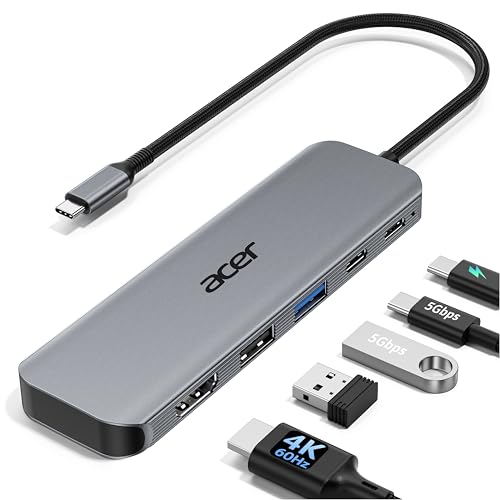
Acer 5-in-1 4K 60Hz USB-C Hub
Best for: single 4K display setups with charging needs
- Host Interface
- USB-C
- Max Resolution
- 4K@60Hz
- Power Delivery
- 90W
- Port Count
- 5
- Video Ports
- HDMI 2.0
- Max Data Speed
- 5Gbps
View on Amazon: Acer 5-in-1 4K 60Hz USB-C Hub Affiliate link
This Acer adapter expands a single USB-C port into five connections. It outputs 4K video at 60Hz through HDMI, which reduces motion blur for smooth video and presentations. The 100W PD input delivers up to 90W to your laptop, keeping it charged during heavy work. Data moves at 5Gbps via the USB-C 3.0 port. The aluminum shell helps dissipate heat while you work.
Pros
- HDMI port supports 4K resolution at 60Hz
- Pass-through charging delivers up to 90W to laptops
- USB-C 3.0 port transfers data at 5Gbps
- Aluminum shell improves heat dissipation
Cons
- Does not support ultra-wide monitors
- Includes only one HDMI video output
- 100W power adapter and cable are not included
Good fit if
- You need smooth 4K@60Hz video for editing or streaming
- You want to charge your laptop while using external displays
- You prefer a compact aluminum design for travel
Skip if
- You use ultra-wide monitors that require higher bandwidth
- You need multiple HDMI ports for dual-screen setups
- You want a complete kit with all necessary cables included
Verdict: Acer 5-in-1 USB-C Hub is a solid choice for professionals who need reliable 4K@60Hz output and strong pass-through charging. It fits users who value smooth visuals and organized desks over multi-monitor expansion.

Selore 6-in-2 MacBook USB-C Hub
Best for: MacBook users needing SD access and 100W charging
- Host Interface
- USB-C
- Display Support
- Dual
- Max Resolution
- 5K
- Power Delivery
- 100W
- Port Count
- 6
- Video Ports
- Thunderbolt 3
View on Amazon: Selore 6-in-2 MacBook USB-C Hub Affiliate link
This Selore hub expands your MacBook’s connectivity via a single Thunderbolt 3 port. It delivers 100W power delivery and supports video output up to 5K or dual 4K@60Hz. You get three USB 3.0 ports for peripherals and an SD card reader for media. The aluminum body aids heat dissipation. It is designed specifically for MacBook Air and Pro models without protective cases.
Pros
- Thunderbolt 3 host interface with 40Gbps data speed
- 100W power delivery pass-through
- Video output up to 5K resolution
- SD and microSD card readers
- Aluminum anodized body for heat dissipation
Cons
- Does not work with protective cases
- Supports only one hard drive
- Does not support Apple SuperDrive
Good fit if
- You use a MacBook Air or Pro without a case
- You need high-speed data transfer for external drives
- You require SD card access for photography
Skip if
- You use a protective case on your laptop
- You need to connect an Apple SuperDrive
- You require multiple hard drives simultaneously
Verdict: Selore 6-in-1 Thunderbolt 3 Hub suits MacBook users who need fast data transfer and SD card access without a protective case. It provides reliable 100W charging and high-resolution video output for your specific laptop model.
Specifications side by side
| Spec | Acer 5-in-1 4K 60Hz USB-C Hub | Selore 6-in-2 MacBook USB-C Hub |
|---|---|---|
| Host Interface | USB-C | USB-C |
| Display Support | not stated | Dual |
| Max Resolution | 4K@60Hz | 5K |
| Power Delivery | 90W | 100W |
| Port Count | 5 | 6 |
| Video Ports | HDMI 2.0 | Thunderbolt 3 |
| Max Data Speed | 5Gbps | 40Gbps |
| Resolution | 4K UHD | not stated |
| Connectivity | USB-C, HDMI, USB-A | USB-C, Thunderbolt 3 |
| Refresh Rate | 60Hz | not stated |
| Features | not stated | Card Reader |
| Dimensions | not stated | 4.72 × 1.37 × 0.48 inches |
| Weight | not stated | 2.47 ounces |
| Color | Grey | Grey |
| Model | ODK5U0 | UC2205 |
| Size | not stated | 6-in-2 |
Frequently asked questions
Does the Acer hub support 4K video at 60Hz?
Yes, the Acer 5-in-1 hub supports 4K UHD resolution at a 60Hz refresh rate. This specification ensures smooth visuals for video editing and presentations. It uses an HDMI port to deliver this high-bandwidth connection to your external display.
What is the model number for the Acer USB-C hub?
The model number for the Acer 5-in-1 4K USB-C Hub is ODK5U0. You can use this identifier to verify compatibility with your specific laptop or to find official documentation from the manufacturer regarding its features.
How much power does the Selore hub provide for charging?
The Selore 6-in-2 hub provides 100W of pass-through charging power. This allows you to charge your laptop while using the hub. It is particularly suitable for MacBook users who need fast power delivery without removing their protective cases.
Does the Selore hub include an SD card slot?
Yes, the Selore 6-in-2 MacBook USB-C Hub includes an SD card slot. This feature allows you to transfer photos and data directly from cameras. It is useful for users who need quick access to media files without additional adapters.
What are the physical dimensions of the Selore hub?
The Selore hub measures 4.72 inches in length, 1.37 inches in width, and 0.48 inches in height. It weighs 2.47 ounces. These compact dimensions make it easy to carry in a laptop bag or keep on a desk without taking up much space.
Which hub is better for single monitor setups?
The Acer 5-in-1 hub is better for single monitor setups requiring 4K@60Hz output. It focuses on reliable video performance and strong charging capabilities. This makes it ideal for professionals who value smooth visuals and an organized desk over multi-monitor expansion.
What connectivity options does the Acer hub offer?
The Acer hub offers USB-C and HDMI connectivity options. It is a 5-in-1 device designed to expand your laptop's ports. The inclusion of HDMI allows for direct connection to displays supporting 4K resolution at 60Hz.
Is the Selore hub compatible with Thunderbolt 3?
Yes, the Selore hub is described as a Thunderbolt 3 hub. This connectivity standard supports fast data transfer rates and high-resolution video output. It is designed to work seamlessly with MacBook models that utilize Thunderbolt 3 ports.