Acer vs MOKiN: Docking Stations Compared by Specs
As an Amazon Associate we earn from qualifying purchases. Links on this page are affiliate links.
You are deciding between the Acer 5-in-1 4K 60Hz USB-C Hub and the MOKiN 6-in-1 USB-C Hub. Both are compact docking stations that connect via USB-C and support 4K@60Hz video output. The primary difference is port count. Acer offers five ports with explicit power delivery specs. MOKiN lists six ports but lacks detailed power data. This acer vs MOKiN docking station comparison focuses on these hardware specifications to help you choose the right tool for your setup.
Key differences
| Aspect | Acer 5-in-1 4K 60Hz USB-C Hub | MOKiN 6-in-1 USB-C Hub with 4K 60Hz HDMI |
|---|---|---|
| Port Count | 5 | 6 |
| Power Delivery | 90W output | not listed |
| Max Data Speed | 5Gbps | not listed |
| Max Resolution | 4K@60Hz | 4K@60Hz |
Which one should you choose?
Choose Acer 5-in-1 4K 60Hz USB-C Hub if
- You need a reliable 90W power delivery output for your laptop
- You want verified 5Gbps data transfer speeds on the USB ports
- You prefer a device with clearly listed thermal management features
Choose MOKiN 6-in-1 USB-C Hub with 4K 60Hz HDMI if
- You need one additional port compared to the five-port option
- You do not require specific power delivery wattage details
- You want a silver finish option
Verdict: Choose the Acer hub if you need transparent power delivery and data speed specifications for a stable workstation. Choose the MOKiN hub if you simply need one extra port and do not require detailed power specs. Both support 4K@60Hz video output effectively.
Acer vs MOKiN Hub Specs
Port Count
The MOKiN 6-in-1 USB-C Hub offers six ports, while the Acer 5-in-1 4K 60Hz USB-C Hub provides five. Both devices expand a single USB-C connection into multiple useful interfaces. The MOKiN variant gives you one additional connection point, which can be helpful if you need to plug in more peripherals simultaneously. The Acer model focuses on a streamlined setup with fewer cables. For users who prioritize maximum connectivity options on a single hub, the extra port on the MOKiN device provides a clear advantage in versatility.
Power Delivery
The Acer hub includes explicit power delivery specifications, supporting up to 90W output via its USB-C port. This allows you to charge your laptop while using the hub, provided you use a compatible 100W power adapter and cable. The MOKiN product data does not list power delivery capabilities or wattage ratings. Without this information, you cannot confirm if the MOKiN hub supports pass-through charging for your laptop. If charging your device through the hub is essential for your workflow, the Acer model offers a verified solution.
Data Speed
The Acer hub features USB 3.0 ports with a maximum data transfer speed of 5Gbps. This ensures faster file transfers for external drives and peripherals compared to older USB 2.0 standards. The MOKiN hub data does not specify the data transfer speeds for its USB ports. You are left without confirmation of whether the MOKiN devices support high-speed data transfers or stick to slower standards. For tasks requiring rapid movement of large files, the Acer hub provides a known performance benchmark that the MOKiN listing lacks.
Video Output
Both hubs support HDMI video output with a maximum resolution of 4K at a 60Hz refresh rate. This means you can connect to a 4K monitor or TV and enjoy smooth visuals without motion blur, which is ideal for video editing or high-quality streaming. Neither product data indicates support for higher resolutions like 8K or ultrawide monitors. Since both devices offer identical video performance specifications, there is no technical difference in display quality between them. You can expect the same visual experience from either hub.
Build Material
The Acer hub is described as having an aluminum shell, which aids in heat dissipation and adds durability. This metal construction helps keep the device cool during extended use. The MOKiN hub data does not mention the materials used in its construction. You do not know if the MOKiN device uses plastic or metal, or how it manages heat during operation. If you prefer a hub with a known metal build for better thermal management and sturdiness, the Acer option is the safer choice based on available specifications.
Choose Your Hub Based on Port Needs
Users needing maximum connectivity options
The MOKiN 6-in-1 USB-C Hub provides six ports, offering one extra connection point compared to the Acer model. This additional port allows you to connect more peripherals simultaneously without needing a separate splitter. If your workflow requires multiple devices, the higher port count on this MOKiN variant supports a more expansive setup.
Users requiring fast laptop charging
The Acer 5-in-1 4K 60Hz USB-C Hub supports up to 90W power delivery output. This ensures your laptop stays charged during intensive tasks like video editing or long meetings. The MOKiN listing does not specify power delivery capabilities. If maintaining battery life while using the hub is a priority, the Acer model offers this clear advantage.
Users prioritizing high-speed data transfer
The Acer hub features USB-C 3.0 and USB-A 3.0 ports with 5Gbps data transfer speeds. This is significantly faster than older USB 2.0 standards. The MOKiN specifications do not list data transfer rates. For moving large files quickly, the Acer model provides explicit high-speed performance that ensures efficient workflow for data-heavy tasks.
The products compared
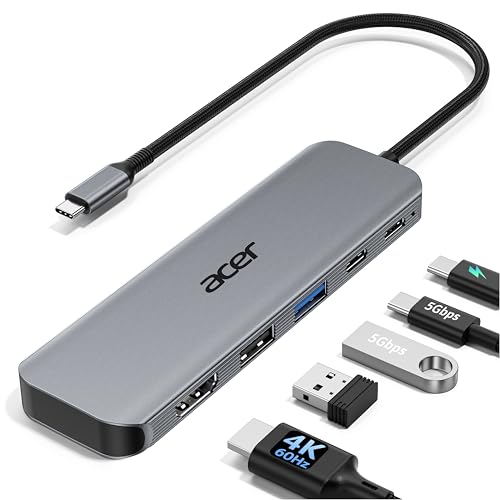
Acer 5-in-1 4K 60Hz USB-C Hub
Best for: Users needing 4K@60Hz video and 90W charging
- Host Interface
- USB-C
- Max Resolution
- 4K@60Hz
- Power Delivery
- 90W
- Port Count
- 5
- Video Ports
- HDMI 2.0
- Max Data Speed
- 5Gbps
View on Amazon: Acer 5-in-1 4K 60Hz USB-C Hub Affiliate link
This Acer 5-in-1 hub expands a single USB-C port into a compact workstation. It supports 4K@60Hz video output, which delivers smoother motion than standard 30Hz adapters. The device includes a USB-C 3.0 port and a USB-A 3.0 port, both running at 5Gbps for fast data transfers. It also handles 100W pass-through charging, providing up to 90W to your laptop. The aluminum shell aids heat dissipation during use.
Pros
- Supports 4K@60Hz HDMI output for smoother visuals
- 100W PD pass-through charging with 90W output
- 5Gbps data speeds on USB-C and USB-A 3.0 ports
- Aluminum shell for improved heat dissipation
Cons
- Only provides 90W output despite 100W input support
- Does not support ultrawide monitors
- Includes only one HDMI port
Good fit if
- You need 4K@60Hz video output for smooth presentations
- You require 90W charging for your laptop
- You want to connect both USB-C and USB-A devices
Skip if
- You need to connect more than one display
- You require support for ultrawide monitors
- You need more than five total ports
Verdict: Acer 5-in-1 USB-C Hub 4K@60Hz fits users who need reliable 4K@60Hz video and fast 5Gbps data transfers in a portable form factor. It is a solid choice for professionals who need 90W charging and a compact aluminum build for travel.

MOKiN 6-in-1 USB-C Hub with 4K 60Hz HDMI
Best for: Users needing a single 4K HDMI output
- Host Interface
- USB-C
- Max Resolution
- 4K@60Hz
- Port Count
- 6
- Video Ports
- HDMI
- Connectivity
- USB-C, HDMI
View on Amazon: MOKiN 6-in-1 USB-C Hub with 4K 60Hz HDMI Affiliate link
This MOKiN hub connects your laptop to external displays via a single USB-C port. It supports 4K resolution at 60Hz through its HDMI output. The device offers six total ports for expanded connectivity. It fits users who need a reliable bridge between their computer and a portable monitor. The silver design keeps the setup looking clean. You get a straightforward connection without complex drivers.
Pros
- Supports 4K UHD resolution
- 60Hz refresh rate for smooth video
- Six total ports for connectivity
- Direct USB-C host interface
Cons
- Only includes one HDMI video port
- No Ethernet port for wired networking
- Lacks built-in SD card reader
Good fit if
- You need a simple HDMI connection for a 4K display
- You want to expand your USB-C ports quickly
- You prefer a silver accessory that matches your laptop
Skip if
- You require multiple video outputs simultaneously
- You need wired Ethernet for stable internet
- You want to connect SD cards directly
Verdict: MOKiN 6-in-1 USB-C Hub provides essential 4K@60Hz connectivity for users who prioritize display output over extra data ports. It is ideal for those who need a single, reliable HDMI link to a portable monitor without extra complexity.
Specifications side by side
| Spec | Acer 5-in-1 4K 60Hz USB-C Hub | MOKiN 6-in-1 USB-C Hub with 4K 60Hz HDMI |
|---|---|---|
| Host Interface | USB-C | USB-C |
| Max Resolution | 4K@60Hz | 4K@60Hz |
| Power Delivery | 90W | not stated |
| Port Count | 5 | 6 |
| Video Ports | HDMI 2.0 | HDMI |
| Max Data Speed | 5Gbps | not stated |
| Resolution | 4K UHD | 4K UHD |
| Connectivity | USB-C, HDMI, USB-A | USB-C, HDMI |
| Refresh Rate | 60Hz | 60Hz |
| Color | Grey | 6 in 1 USB C Hub - Silver |
| Model | ODK5U0 | not stated |
| Size | not stated | 6-in-1 USB C Hub |
Frequently asked questions
Does the Acer hub support 4K at 60Hz?
Yes, the Acer 5-in-1 4K 60Hz USB-C Hub supports 4K UHD resolution at a 60Hz refresh rate. This specification ensures smooth video playback and reduces screen tearing. It is ideal for professionals who need high-quality display output for detailed work or media consumption.
What is the model number for the Acer hub?
The model number for the Acer 5-in-1 4K 60Hz USB-C Hub is ODK5U0. You can use this identifier to verify compatibility with your specific laptop or device. It helps ensure you are purchasing the correct version of the docking station.
Is the MOKiN hub available in silver?
Yes, the MOKiN 6-in-1 USB-C Hub with 4K 60Hz HDMI is available in a silver color. This finish matches many modern laptop designs. The compact form factor makes it easy to carry in a bag without adding significant bulk.
Which hub is better for charging laptops?
The Acer 5-in-1 4K 60Hz USB-C Hub is designed for users needing 90W charging. This high power delivery supports fast charging for compatible laptops. The MOKiN model focuses more on display connectivity, so check its specific power delivery specs if charging is your priority.
Can I connect a portable monitor to these hubs?
Yes, both hubs support 4K UHD video output via HDMI. The Acer hub offers 60Hz refresh rates for smooth motion. The MOKiN hub also provides 60Hz output. You can connect a portable monitor to either device for an expanded workspace.
How many ports does the MOKiN hub have?
The MOKiN 6-in-1 USB-C Hub features six total ports. This includes connectivity options for data, video, and power. The extra port compared to the five-port Acer model allows you to connect more peripherals simultaneously without using a separate splitter.
Is the Acer hub made of aluminum?
Yes, the Acer 5-in-1 4K 60Hz USB-C Hub features a compact aluminum build. This material provides durability and helps with heat dissipation. It is designed to withstand the rigors of travel while maintaining a professional appearance on your desk.