Best Acer Docking Stations: 5 Models Compared
As an Amazon Associate we earn from qualifying purchases. Links on this page are affiliate links.
This guide covers the best Acer docking stations to help you choose the right hardware. We compared 5 models based strictly on published specifications. Acer offers compact hubs and larger docks in grey and space gray finishes, with port counts ranging from 5-in-1 to 13-in-1. The Acer 5-in-1 4K 60Hz USB-C Hub leads as the top pick for single 4K display setups with charging. These devices support various display configurations, from single to triple monitors, and provide power delivery for laptops. You can select a model that matches your specific connectivity and screen needs.
Quick picks
| # | Product | Best for | Price |
|---|---|---|---|
| 1 | Acer 5-in-1 4K 60Hz USB-C Hub Best overall | single 4K display setups with charging | Check price of Acer 5-in-1 4K 60Hz USB-C Hub on Amazon |
| 2 | Acer 9-in-1 Dual HDMI USB-C Dock Best budget | Dual 4K display setups with fast charging | Check price of Acer 9-in-1 Dual HDMI USB-C Dock on Amazon |
| 3 | Acer 11-in-1 Triple Display Dock Also great | users needing triple display expansion and 85W charging | Check price of Acer 11-in-1 Triple Display Dock on Amazon |
| 4 | Acer 13-in-1 Triple Display USB-C Dock Best premium | Windows laptops needing triple 4K displays | Check price of Acer 13-in-1 Triple Display USB-C Dock on Amazon |
| 5 | Acer 13-in-1 Triple HDMI USB-C Dock Also great | triple monitor setups and high bandwidth needs | Check price of Acer 13-in-1 Triple HDMI USB-C Dock on Amazon |
Our 5 picks
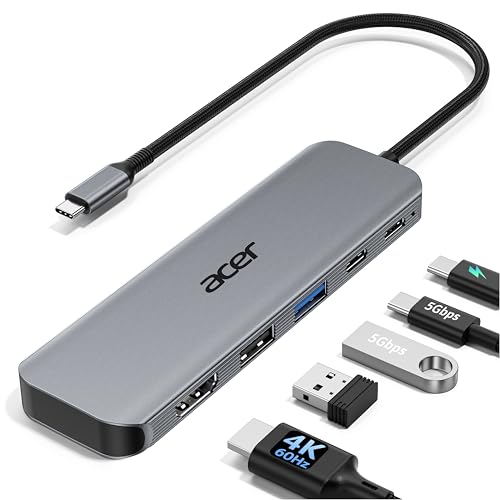
Acer 5-in-1 4K 60Hz USB-C Hub
Best for: single 4K display setups with charging
- Host Interface
- USB-C
- Max Resolution
- 4K@60Hz
- Power Delivery
- 90W
- Port Count
- 5
- Video Ports
- HDMI 2.0
- Max Data Speed
- 5Gbps
View on Amazon: Acer 5-in-1 4K 60Hz USB-C Hub Affiliate link
This Acer hub expands a single USB-C port into a compact workstation. It supports 4K@60Hz video output, ensuring smooth visuals for editing or presentations. The 90W power delivery keeps your laptop charged during heavy use. You get fast 5Gbps data transfers alongside a standard USB-A port. It fits well if you need a simple, reliable connection for one external display without clutter.
Pros
- Supports 4K@60Hz HDMI output for smooth video
- Provides up to 90W power delivery to laptops
- Includes USB-C 3.0 and USB-A 3.0 ports for data
- Aluminum shell aids heat dissipation during use
Cons
- Supports only one external monitor, unlike multi-monitor docks
- USB-C data speed is 5Gbps, not 10Gbps or higher
- Does not support ultrawide monitors
Good fit if
- You need a single 4K@60Hz display connection
- You want to charge your laptop while using the hub
- You prefer a compact adapter over a large docking station
Skip if
- You require dual or triple monitor support
- You need Thunderbolt 4 speeds for large files
- You plan to use an ultrawide monitor
Verdict: Acer 5-in-1 USB-C Hub 4K@60Hz is a focused tool for users who need one high-refresh-rate screen and charging in a small package. It suits professionals who travel light and do not need complex multi-display setups.

Acer 9-in-1 Dual HDMI USB-C Dock
Best for: Dual 4K display setups with fast charging
- Host Interface
- USB-C
- Display Support
- Dual
- Max Resolution
- 4K@60Hz
- Power Delivery
- 90W
- Port Count
- 9
- Video Ports
- HDMI
View on Amazon: Acer 9-in-1 Dual HDMI USB-C Dock Affiliate link
This Acer docking station offers dual 4K@60Hz HDMI outputs for extended displays. It includes nine ports, featuring three USB-A and one USB-C data slots at 5Gbps. The unit delivers up to 90W of power delivery to your laptop. It features a built-in 0.65FT cable and an aluminum alloy body. This setup suits users needing reliable dual-monitor support with fast charging and secure connectivity for compatible Windows or Mac devices.
Pros
- Dual HDMI ports support 4K@60Hz resolution
- Delivers up to 90W power delivery
- Includes SD and MicroSD card slots
- Built-in 0.65FT cable for easy setup
- Aluminum alloy body with security lock
Cons
- Only supports dual monitor configurations
- Mac users limited to mirroring modes
- Built-in cable length is fixed at 0.65FT
Good fit if
- You need two external displays at 4K@60Hz
- You require 90W fast charging for your laptop
- You want a compact dock with built-in cable
Skip if
- You need to connect three monitors simultaneously
- You require Thunderbolt 4 speeds exceeding 5Gbps
- You need a longer built-in cable than 0.65FT
Verdict: Acer 9-in-1 Dual 4K USB-C Dock provides a stable dual-monitor setup with 90W charging for laptops needing straightforward connectivity. It fits professionals who prioritize video output and power delivery over multi-monitor expansion or high-speed data transfer.
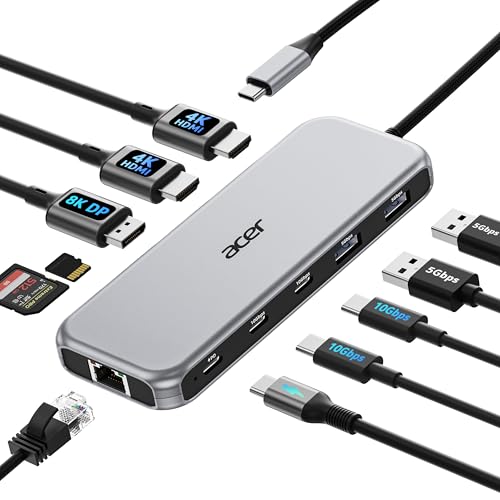
Acer 11-in-1 Triple Display Dock
Best for: users needing triple display expansion and 85W charging
- Host Interface
- USB-C
- Display Support
- Triple
- Max Resolution
- 8K@30Hz
- Power Delivery
- 85W
- Port Count
- 11
- Video Ports
- HDMI, DisplayPort
View on Amazon: Acer 11-in-1 Triple Display Dock Affiliate link
This Acer 11-in-1 docking station supports triple displays, featuring two HDMI ports for 4K@60Hz and one DisplayPort for 8K@30Hz. It delivers 85W of power delivery to keep your laptop charged while working. The unit includes 10Gbps USB-C ports for fast data transfer and a 1Gbps Ethernet port for stable networking. You need a laptop with a full-featured USB-C or Thunderbolt port to use these video outputs effectively.
Pros
- Supports triple monitor setups with up to 4K@60Hz on HDMI
- Delivers 85W power delivery for connected laptops
- Includes 10Gbps USB-C ports for high-speed data
- Features a 1Gbps Ethernet port for stable internet
Cons
- Requires a laptop with Thunderbolt or full-featured USB-C
- Power adapter and cable are not included
- macOS users can only mirror displays across all monitors
Good fit if
- You need to connect three external monitors to your laptop
- You require 10Gbps data transfer speeds for large files
- You want a single cable solution for power and video
Skip if
- Your laptop lacks a Thunderbolt 3/4/5 or full-featured USB-C port
- You use a Mac and need independent extended displays
- You prefer a plug-and-play setup without buying a separate power adapter
Verdict: Acer 11-in-1 Triple Monitor Dock is a solid choice for users who need to drive three screens and charge their laptop from one hub. It fits professionals who need high-speed data and stable ethernet connectivity.

Acer 13-in-1 Triple Display USB-C Dock
Best for: Windows laptops needing triple 4K displays
- Host Interface
- USB-C
- Display Support
- Triple
- Max Resolution
- 4K@30Hz
- Power Delivery
- 100W
- Port Count
- 13
- Video Ports
- HDMI, DisplayPort
View on Amazon: Acer 13-in-1 Triple Display USB-C Dock Affiliate link
This Acer docking station supports three independent screens via two HDMI ports and one DisplayPort. It includes a 110W power adapter delivering 100W of power to your host laptop. The aluminum body houses Gigabit Ethernet, audio jacks, and card readers. It suits Windows users needing a clutter-free workspace with stable performance for extended use.
Pros
- Supports triple displays with 2 HDMI and 1 DisplayPort
- Includes 110W adapter for 100W laptop charging
- Aluminum body for efficient heat dissipation
- Integrated Kensington security slot
Cons
- Rear USB-C port supports data only, no video
- Does not support Thunderbolt devices
- Mac users limited to mirrored displays only
Good fit if
- You need three monitors for Windows laptops
- You want a single cable for power and data
- You need Gigabit Ethernet and SD card access
Skip if
- You use a Mac and need extended desktop mode
- You require Thunderbolt 4 or 5 connectivity
- You need the extra USB-C port for video output
Verdict: Acer 13-in-1 Triple Display Dock is a solid choice for Windows users who need three screens and reliable 100W charging in a compact aluminum unit.

Acer 13-in-1 Triple HDMI USB-C Dock
Best for: triple monitor setups and high bandwidth needs
- Host Interface
- USB-C
- Display Support
- Triple
- Max Resolution
- 4K@60Hz
- Power Delivery
- 85W
- Port Count
- 13
- Video Ports
- HDMI
View on Amazon: Acer 13-in-1 Triple HDMI USB-C Dock Affiliate link
This Acer dock supports three external displays via three HDMI ports, handling up to 4K@60Hz on two screens. It offers 13 connection points, including 10Gbps USB-C data ports and 100W Power Delivery input. You get a gigabit Ethernet port and SD card slots. It suits users needing high bandwidth and multi-monitor setups for heavy multitasking.
Pros
- Three HDMI ports support triple monitor configurations
- 100W Power Delivery input keeps laptops charged
- 10Gbps data transfer speeds on USB-C ports
- Gigabit Ethernet provides stable wired connectivity
Cons
- USB ports are data-only and lack charging output
- Mac users can only mirror displays across all monitors
- Requires a separate 100W+ USB-C charger and cable
Good fit if
- You need three external displays for productivity
- You require 10Gbps data transfer for large files
- You want a single dock for video and data
Skip if
- You need to charge peripherals through the USB ports
- You use a Mac and want extended desktop mode
- You want a portable setup without a dedicated charger
Verdict: Acer 13-in-1 Triple Monitor USB-C Dock delivers robust multi-display support and fast data speeds for desktop replacements. It is ideal for users who prioritize screen real estate and wired stability over peripheral charging convenience.
Specifications side by side
| Spec | Acer 5-in-1 4K 60Hz USB-C Hub | Acer 9-in-1 Dual HDMI USB-C Dock | Acer 11-in-1 Triple Display Dock | Acer 13-in-1 Triple Display USB-C Dock | Acer 13-in-1 Triple HDMI USB-C Dock |
|---|---|---|---|---|---|
| Host Interface | USB-C | USB-C | USB-C | USB-C | USB-C |
| Display Support | not stated | Dual | Triple | Triple | Triple |
| Max Resolution | 4K@60Hz | 4K@60Hz | 8K@30Hz | 4K@30Hz | 4K@60Hz |
| Power Delivery | 90W | 90W | 85W | 100W | 85W |
| Port Count | 5 | 9 | 11 | 13 | 13 |
| Video Ports | HDMI 2.0 | HDMI | HDMI, DisplayPort | HDMI, DisplayPort | HDMI |
| Max Data Speed | 5Gbps | 5Gbps | 10Gbps | 5Gbps | 10Gbps |
| Ethernet Speed | not stated | not stated | 1Gbps | 1Gbps | 1Gbps |
| Resolution | 4K UHD | 4K UHD | 4K UHD | not stated | 4K UHD |
| Connectivity | USB-C, HDMI, USB-A | USB-C, HDMI, USB-A | USB-C, HDMI, DisplayPort, Ethernet | USB-C, HDMI, DisplayPort, USB-A | USB-C, HDMI, Ethernet |
| Refresh Rate | 60Hz | 60Hz | 60Hz | not stated | 60Hz |
| Dimensions | not stated | not stated | not stated | 7.89 × 3.25 × 0.94 inches | not stated |
| Color | Grey | Grey | Grey | Space Gray | Grey |
| Model | ODK5U0 | ODK4K0 | ODK5A0 | not stated | ODK5B0 |
| Size | not stated | 0.65FT | 11-in-1 | not stated | 13-in-1 |
Acer Docking Station Options
The lineup ranges from compact hubs to expansive docks. The Acer 5-in-1 4K 60Hz USB-C Hub suits travelers needing one high-refresh screen and charging. The Acer 9-in-1 Dual HDMI USB-C Dock offers dual 4K support with 90W power for budget-conscious users. These models prioritize straightforward connectivity and portable form factors for single or dual display setups.
For complex workstations, the Acer 11-in-1 Triple Display Dock and Acer 13-in-1 Triple Display USB-C Dock drive three screens with stable ethernet and high-speed data. The latter includes DisplayPort and 100W charging for Windows laptops. These larger units fit professionals who need maximum screen real estate and wired stability over peripheral convenience. Choose based on your display count and power needs.
Where Acer fits your setup
Acer’s range covers single to triple display needs. You can choose between compact hubs and larger aluminum docks. The smallest option is the 5-in-1 hub. The largest is the 13-in-1 dock. Most units are grey or space gray. You get USB-C, HDMI, and DisplayPort connectivity. Power delivery ranges from 85W to 100W. None of these models offer wireless charging pads. They also lack built-in speakers. If you need those features, you must look elsewhere. This brand focuses on wired stability and screen expansion. It suits users who prioritize port count and video output over extra peripherals. The spread handles most desktop replacement scenarios.
How to choose the right Acer dock
-
Check display support needs
Determine how many screens you need to drive simultaneously. The Acer 9-in-1 Dual HDMI USB-C Dock supports dual monitors, making it suitable for users who want two distinct workspaces. If you require three screens, look at the Acer 13-in-1 Triple Display USB-C Dock. These docks handle triple monitor setups for expanded desktop real estate. Single-screen users may find the 5-in-1 hub sufficient. Always verify your laptop supports the desired number of external displays before purchasing.
-
Verify resolution and refresh rate
Ensure the dock outputs the resolution you require. The Acer 5-in-1 4K 60Hz USB-C Hub delivers 4K UHD video at a smooth 60Hz refresh rate. This is ideal for professionals who need sharp text and fluid motion on a single high-quality display. Other models support dual or triple 4K outputs. Check the specifications to confirm the maximum resolution per port. Higher refresh rates provide better responsiveness for video editing or general desktop use.
-
Assess power delivery requirements
Check the wattage the dock provides to your laptop. The Acer 9-in-1 Dual HDMI USB-C Dock offers 90W charging, which suits most business laptops. The Acer 13-in-1 Triple Display USB-C Dock provides 100W charging, suitable for higher-power devices. The Acer 11-in-1 Triple Display Dock offers 85W charging. Ensure the wattage meets your laptop’s minimum requirements. Insufficient power may cause the laptop to drain its battery while connected to the dock during heavy use.
-
Review connectivity options
Match the port types to your peripherals. The Acer 13-in-1 Triple Display USB-C Dock includes DisplayPort connectivity, which is essential for certain professional monitors. Most models use HDMI and USB-C for primary connections. The Acer 5-in-1 hub combines USB-C and HDMI in a compact form. Consider whether you need specific ports for Ethernet, USB-A devices, or card readers. Ensure the dock has enough physical ports for your current and future peripherals.
-
Consider physical dimensions
Evaluate the size of the dock for your workspace. The Acer 13-in-1 Triple Display USB-C Dock measures 7.89 inches in length and 0.94 inches in height. This compact aluminum unit fits well on a desk. The Acer 9-in-1 dock is described as compact as well. Larger port counts often correlate with larger footprints. Measure your available space to ensure the dock fits comfortably next to your laptop and keyboard without obstructing airflow.
Frequently asked questions
Which Acer docking station is best for a single 4K display?
The Acer 5-in-1 4K 60Hz USB-C Hub is the top choice for single-screen setups. It supports 4K UHD resolution at a 60Hz refresh rate. This model connects via USB-C and HDMI. It is ideal for professionals who travel light and need charging alongside one high-quality screen.
Can I connect two monitors to an Acer dock?
Yes, the Acer 9-in-1 Dual HDMI USB-C Dock supports dual monitor setups. It provides stable video output for two displays simultaneously. This dock also includes 90W charging for your laptop. It is designed for users who prioritize video output and power delivery over complex multi-monitor expansion.
What is the maximum number of displays an Acer dock supports?
Several models in this lineup support triple displays. The Acer 11-in-1, 13-in-1 Triple Display USB-C Dock, and 13-in-1 Triple HDMI USB-C Dock all drive three screens. These docks are suitable for desktop replacements where maximum screen real estate and wired stability are required for your workflow.
Does the Acer 13-in-1 Triple Display Dock use DisplayPort?
Yes, the Acer 13-in-1 Triple Display USB-C Dock includes a DisplayPort. It also features USB-C and HDMI connectivity. This configuration is a solid choice for Windows users needing three screens. The unit is compact, measuring 3.25 inches in width and 7.89 inches in length.
How much power do these Acer docks provide for laptops?
Power delivery varies by model. The Acer 9-in-1 Dual HDMI USB-C Dock offers 90W charging. The Acer 13-in-1 Triple Display USB-C Dock provides 100W charging. Other models, like the 5-in-1 hub, focus on connectivity and basic charging without specifying high-wattage power delivery in the published specs.
What colors are available for Acer docking stations?
Most units in this range come in grey or space gray finishes. The Acer 9-in-1 Dual HDMI USB-C Dock is available in grey. The Acer 13-in-1 Triple Display USB-C Dock is offered in space gray. These neutral colors fit standard professional office environments and desk setups.
Which dock is best for users needing high-speed data transfer?
The Acer 11-in-1 Triple Display Dock is designed for users needing high-speed data and stable ethernet connectivity. It supports triple monitors and 85W charging. This model fits professionals who require robust data transfer capabilities alongside multi-display expansion from a single hub connected via USB-C.