Acer 11-in-1 Triple Display Dock Review (2026): A Spec-Based Look
As an Amazon Associate we earn from qualifying purchases. Links on this page are affiliate links.
This acer laptop docking station 3 review covers the Acer 11-in-1 Triple Display Dock. It connects to laptops via USB-C or Thunderbolt 3/4/5. The dock supports up to three external monitors. It delivers high resolution output, including 8K at 30Hz on DisplayPort. You also get fast data transfer speeds through its USB-C ports. This setup is designed for users who need multiple screens and reliable connectivity in a single compact unit.
What stands out
- Supports triple displays with resolutions up to 4K@60Hz on HDMI
- Features a DisplayPort capable of 8K@30Hz output
- Includes 100W input power delivery delivering 85W to your laptop
- Provides 10Gbps data transfer speeds on two USB-C ports
- Offers 1Gbps Ethernet for stable wired network connections
Who it fits
Good fit for
This dock suits professionals who need a stable, high-bandwidth connection for multiple monitors. It is ideal for users with laptops that have Thunderbolt 3/4/5 or full-featured USB-C ports. Photographers and designers will appreciate the fast 10Gbps USB-C and SD card slots. Users requiring a wired Ethernet connection for low-latency work will also find this model useful. It works well for those who want to power their laptop while connecting several peripherals.
Who should skip it
You should look elsewhere if your laptop lacks a Thunderbolt 3/4/5 or full-featured USB-C port. The dock requires these specific host interfaces to function. Mac users should note that macOS only mirrors content across external monitors; it does not support extended desktops on this device. Additionally, the power adapter and cable are not included, so you must supply your own 100W charger. If you need native HDMI expansion without these host requirements, this is not the right choice.
Verdict: The Acer 11-in-1 Triple Display Dock is a spec-heavy hub for users with compatible laptops who need triple screen support and fast data transfer. It delivers on its core promises of connectivity and power delivery, provided you have the right host ports.
Key specs explained
Max Resolution: 8K@30Hz
This dock outputs up to 8K resolution at 30Hz via its DisplayPort. This high pixel count offers extreme detail for static tasks like photo editing or coding. You will notice sharp text and fine lines. However, 30Hz may feel less smooth for fast-moving video or gaming compared to 60Hz options. If you prioritize clarity over fluid motion, this spec suits your needs. Compare this against standard 4K@60Hz docks for a balance of resolution and refresh rate.
Display Support: Triple
The device supports three external monitors simultaneously. This creates a wide workspace for multitasking, allowing you to spread spreadsheets, emails, and reference materials across screens. You can combine different resolutions, such as two 4K displays and one 1080p screen. This setup is ideal for productivity-focused users who need more real estate than a single laptop offers. It replaces the need for multiple separate hubs, keeping your desk organized and your workflow continuous.
Power Delivery: 85W
The dock delivers up to 85W of power to your laptop while connected. This allows you to charge your device and use peripherals through a single cable. Most modern laptops require between 45W and 100W, so 85W covers many ultrabooks and mid-range machines. Ensure your laptop supports charging via USB-C. This reduces cable clutter on your desk. When shopping, check your laptop’s power requirements to confirm this output is sufficient for stable operation during heavy use.
Max Data Speed: 10Gbps
Two USB-C ports on this dock support data transfer speeds up to 10Gbps. This is twice as fast as standard 5Gbps USB-A ports. You will benefit when moving large files, such as 4K video footage or high-resolution images, between your computer and external drives. Faster transfers save time and reduce wait periods. This speed is suitable for professionals handling data-intensive workflows. Compare this with slower hubs to ensure you are not bottlenecked when connecting high-speed storage devices.
Design and Build Details
The Acer 11-in-1 Triple Display Dock arrives in a grey finish. The listing identifies the model as ODK5A0. It features an 11-in-1 size configuration. This compact form factor helps save desk space. You place it near your laptop for easy access. The layout groups ports for logical workflow. Video outputs sit alongside data and power connections. This arrangement reduces cable clutter on your work surface.
According to the listing, the dock uses a robust build suitable for daily office or home use. The grey color matches most modern laptop chassis. You connect via a single USB-C or Thunderbolt port. This single-cable setup keeps your desk tidy. The Ethernet port sits within reach for stable wired connections. You do not need to hunt for network cables.
The design prioritizes function over flair. There are no flashy lights or unique shapes. This plain aesthetic fits professional environments. You can slide it under your monitor stand when not in use. The port density allows you to keep peripherals plugged in. You simply connect your laptop and work. The build supports triple displays without bulk. This makes it a practical choice for fixed workstations.
Setup and Daily Use Guide
Setting up this dock requires a laptop with a Thunderbolt 3, 4, or 5 port, or a full-featured USB-C port. You must connect the included power adapter to ensure stable operation, as the unit does not include the adapter or cable. The dock supports up to 100W input, delivering 85W to your laptop for charging while you work. This keeps your device powered during heavy use. For video, you can connect up to three monitors. The DisplayPort supports single displays up to 8K at 30Hz. HDMI ports handle 4K at 60Hz. Triple-display setups support 4K at 60Hz on two screens and 1080p at 60Hz on the third. Mac users should note that macOS mirrors content across all external monitors rather than extending the desktop. Data transfer is fast, with two USB-C ports offering 10Gbps speeds and two USB-A ports at 5Gbps. SD and MicroSD slots provide 104Mbps transfer rates. The Ethernet port delivers 1000Mbps connectivity for low-latency networking. Ensure your laptop’s HDMI version is 2.0 or higher for optimal performance. This configuration suits professionals who need multiple screens and fast data access. The grey finish and compact size help it fit neatly on your desk. You simply plug in your peripherals and connect the host cable to your laptop. The dock handles power, video, and data simultaneously. This reduces cable clutter and simplifies your daily workflow. You get a stable connection for work and entertainment tasks.
Compatibility And Setup Checks
Before you buy this Acer 11-in-1 Triple Display Dock, you must verify your laptop compatibility. The listing requires a Thunderbolt 3, 4, or 5 port, or a full-featured USB-C port. You need to confirm your device supports DisplayPort Alt Mode for video output. Also, check that your HDMI version is 2.0 or higher for optimal performance. You will need to purchase a 100W power adapter separately, as it is not included. Ensure your laptop’s USB-C port supports charging to utilize the 85W power delivery feature. This dock fits well into setups requiring multiple screens, but it is not a portable monitor. It is a stationary hub. You should place it near your laptop for easy access to its eleven ports. Keep the area clean to maintain stable connections. This solution suits users who need a fixed, high-bandwidth workspace rather than mobile display flexibility.
Check before you buy
- Confirm your laptop has Thunderbolt 3/4/5 or full-featured USB-C.
- Verify your HDMI version is 2.0 or higher.
- Purchase a 100W power adapter, as it is not included.
- Ensure your device supports DisplayPort Alt Mode for video.
The product at a glance
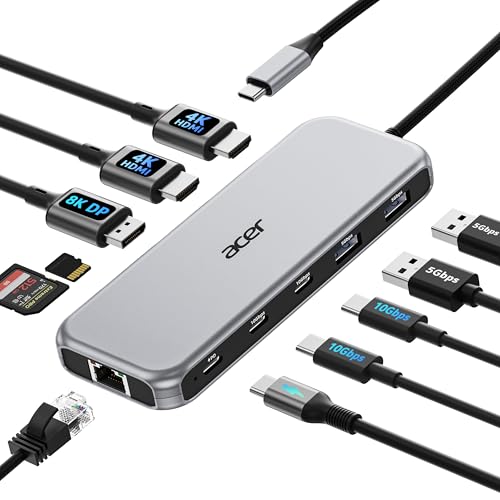
Acer 11-in-1 Triple Display Dock
Best for: Users needing triple displays and high-speed data
- Host Interface
- USB-C
- Display Support
- Triple
- Max Resolution
- 8K@30Hz
- Power Delivery
- 85W
- Port Count
- 11
- Video Ports
- HDMI, DisplayPort
View on Amazon: Acer 11-in-1 Triple Display Dock Affiliate link
This Acer 11-in-1 docking station supports triple monitors with resolutions up to 8K@30Hz on DisplayPort or 4K@60Hz on HDMI. It offers 100W input power delivery and 10Gbps data transfer speeds via USB-C ports. You get stable 1Gbps Ethernet and SD card slots for media. This hub suits users needing extensive connectivity and high-resolution displays for professional workflows.
Pros
- Supports triple monitor setups with 4K@60Hz + 4K@60Hz + 1080P@60Hz
- Delivers up to 85W power to your laptop
- Features 10Gbps USB-C and 5Gbps USB-A ports
- Includes 1Gbps Ethernet for stable wired connections
Cons
- macOS users can only mirror content across external monitors
- Power adapter and cable are not included
- Requires Thunderbolt 3/4/5 or full-featured USB-C host port
Good fit if
- You need to drive three external displays simultaneously
- You require high-speed data transfer for large files
- You want a single hub for networking and storage
Skip if
- You use a Mac and need independent extended displays
- Your laptop lacks Thunderbolt or full-featured USB-C
- You need the power adapter included in the box
Verdict: Acer 11-in-1 Triple Display Dock provides robust multi-monitor support and fast data speeds for users with compatible Thunderbolt or USB-C laptops. It is a solid solution for professionals needing extensive connectivity and high-resolution output.
Specifications side by side
| Spec | Acer 11-in-1 Triple Display Dock |
|---|---|
| Host Interface | USB-C |
| Display Support | Triple |
| Max Resolution | 8K@30Hz |
| Power Delivery | 85W |
| Port Count | 11 |
| Video Ports | HDMI, DisplayPort |
| Max Data Speed | 10Gbps |
| Ethernet Speed | 1Gbps |
| Resolution | 4K UHD |
| Connectivity | USB-C, HDMI, DisplayPort, Ethernet |
| Refresh Rate | 60Hz |
| Size | 11-in-1 |
| Color | Grey |
| Model | ODK5A0 |
Frequently asked questions
Does the Acer 11-in-1 Triple Display Dock support three monitors simultaneously?
Yes, this dock is designed to support triple monitor setups. The product data explicitly lists triple monitor display support as a key feature. This allows you to expand your workspace significantly. You can connect three external screens to your laptop. This configuration is ideal for multitasking and productivity workflows.
What connection type does this dock use to link to laptops?
The dock uses a USB-C connection to link to your computer. The specifications confirm USB-C as the primary connectivity method. You need a laptop with a compatible USB-C or Thunderbolt port. This single cable handles both data transfer and video output. Ensure your laptop port supports the necessary display protocols.
Is the Acer ODK5A0 dock suitable for high-resolution video output?
Yes, it is built for high-resolution output. The dock supports up to 8K resolution at 30Hz via DisplayPort. This high pixel count provides extreme detail for static tasks. You will see sharp text and fine lines. It is a solid solution for professionals needing extensive connectivity and high-resolution output on their screens.
What is the model number for this Acer docking station?
The model number for this unit is ODK5A0. You can find this identifier in the product specifications. It is part of the 11-in-1 size configuration. The dock arrives in a grey finish. Knowing the model helps you verify compatibility with your specific laptop setup and drivers.
Who is the best user for this triple display dock?
This dock is best for users needing triple displays and high-speed data. It is a solid solution for professionals who require extensive connectivity. You will benefit from the robust multi-monitor support if you work with multiple applications. The fast data speeds complement the video output for efficient workflows.
Does this dock come in different color options?
The available color option for this model is grey. The specifications list the color as grey. It features an 11-in-1 size configuration. This compact form factor helps save desk space. You place it near your laptop for easy access to the various ports.