PULWTOP Dual 4K MacBook Dock or PULWTOP Dual 4K Vertical Docking? Which PULWTOP Model to Buy
As an Amazon Associate we earn from qualifying purchases. Links on this page are affiliate links.
You are deciding between the pulwtop macbook docking station dual vs USB c docking station. Both docks support dual 4K@60Hz displays and include vertical laptop stands. They share USB-C connectivity and gigabit Ethernet. The main difference is compatibility. One model is built specifically for MacBook Pro and Air chips. The other is designed for Windows laptops. Choose the correct dock for your computer type to ensure full functionality.
Key differences
| Aspect | PULWTOP Dual 4K MacBook Dock Stand | PULWTOP Dual 4K Vertical Docking Station Stand |
|---|---|---|
| Compatibility | MacBook Pro/Air 2016–2026 (Pro/Max chips only) | Windows laptops (Dell, Lenovo, HP, ThinkPad) |
| Power Delivery Output | 95W | 85W |
| USB-A Ports | 1x 10Gbps, 1x 2.0 | 1x 10Gbps, 2x 5Gbps, 1x 2.0 |
| Dimensions | 5.4 x 4.21 x 3.37 inches | 5.91 x 4.53 x 4.13 inches |
| Weight | 14.1 ounces | not listed |
Which one should you choose?
Choose PULWTOP Dual 4K MacBook Dock Stand if
- You own a MacBook Pro or Air with Pro or Max chips
- You need higher charging speed up to 95W
- You prefer a lighter and more compact dock
Choose PULWTOP Dual 4K Vertical Docking Station Stand if
- You use a Windows laptop
- You need more USB-A ports for peripherals
- You require a dock with 11 total ports
Verdict: Select the MacBook dock if you have an Intel or M-series Pro/Max chip MacBook. Choose the USB-C dock if you use a Windows laptop. Both provide dual 4K@60Hz video output and vertical stand support.
MacBook vs Windows Dock Specs
Compatibility
Product A, the PULWTOP Dual 4K MacBook Dock Stand, is engineered specifically for MacBook Pro and Air models from 2016 through 2026. It supports Intel chips and Apple Silicon including M1 Pro/Max, M2 Pro/Max, M3 Pro/Max, M4 Base/Pro/Max, and M5 Base/Pro/Max. It explicitly excludes M1, M2, or M3 Base chips, Windows laptops, and MacBook Neo. Product B, the PULWTOP Dual 4K Vertical Docking Station Stand, is designed for Windows laptops such as Dell, Lenovo, HP, and ThinkPad. It supports Thunderbolt 3/4/5, USB4, and full-featured USB-C Windows devices. It explicitly states it does not support Mac users. This is a clear split based on your operating system.
Power Delivery
Product A supports a maximum 100W PD input and delivers 95W output to charge your MacBook Pro or Air. This allows for full-speed charging even under heavy loads like Final Cut Pro with dual monitors connected. Product B supports up to 100W input but delivers 85W safe charging to your laptop. The manufacturer recommends a 65W or higher PD adapter for stable charging on Product B. While both docks handle significant power, Product A offers a higher output wattage for connected devices, which may benefit high-performance MacBooks more effectively than Product B's 85W limit.
Connectivity Ports
Product A provides 2x HDMI, 2x USB-C 10Gbps, 1x USB-A 10Gbps, 1x USB-A 2.0, SD/TF card slots, 3.5mm Audio, and Gigabit Ethernet. Product B offers 11 ports total, including 2x HDMI, 2x USB-C Gen2 10Gbps, 1x USB-A Gen2 10Gbps, 2x USB 3.0 5Gbps, 1x USB 2.0, Gigabit Ethernet, and a USB-C host port. Product B includes additional USB-A ports and a dedicated host port, offering more peripheral connections. Product A includes SD/TF and audio ports, which Product B lacks. Product B has more total ports, while Product A has specialized media inputs.
Physical Dimensions
Product A measures 5.4 inches in length, 4.21 inches in width, and 3.37 inches in height. It weighs 14.1 ounces. Product B measures 5.91 inches in length, 4.53 inches in width, and 4.13 inches in height. Product B is larger in all three dimensions and does not list a weight. Product A is more compact and lighter, which may suit smaller desks or portable setups better. Product B’s larger footprint provides a more substantial base, potentially offering greater stability for heavier laptops. Choose Product A for space efficiency, or Product B if you prefer a larger, sturdier form factor.
Clamshell Mode
Product A requires a specific Terminal command, sudo pmset -a disablesleep 1, to enable clamshell mode with dual displays on macOS. You must enter your administrator password and may need to restart your MacBook. To revert, you run sudo pmset -a disablesleep 0. Product B supports clamshell mode by connecting a PD adapter to the PD port and a mouse to a USB 2.0 port to wake the screen. Product A offers a software-based solution for macOS users, while Product B uses a hardware trigger method. Product A’s method is native to macOS, whereas Product B’s method is generic.
Choose the right PULWTOP dock
MacBook Pro or Air M1 Pro/Max users
This dock is precision-engineered for MacBook Pro and Air models with Pro or Max chips. It supports dual 4K@60Hz HDMI outputs and delivers 95W PD charging. You get 10Gbps data transfer and gigabit Ethernet. It also functions as a vertical stand. This model is not compatible with base chip MacBooks or Windows laptops.
Windows laptop owners needing dual displays
This dock supports Windows laptops with Thunderbolt 3/4/5 or USB4. It drives two independent 4K@60Hz monitors via HDMI. You receive 85W PD charging and gigabit Ethernet. The 11-in-1 connectivity includes multiple USB ports for peripherals. It is explicitly not supported for Mac users. The vertical stand design saves desk space while providing cooling.
MacBook users with base M1, M2, or M3 chips
The MacBook-specific dock does not support base chip MacBooks. This Windows-compatible dock is a viable alternative for users who need dual 4K@60Hz displays. It offers 85W PD charging and gigabit Ethernet. You get 10Gbps data transfer speeds. The vertical stand design helps with workspace organization. Note that this dock is not optimized for Mac-specific features.
The products compared

PULWTOP Dual 4K MacBook Dock Stand
Best for: MacBook Pro/Max users needing dual 4K displays
- Host Interface
- USB-C
- Display Support
- Dual
- Max Resolution
- 4K@60Hz
- Power Delivery
- 95W
- Video Ports
- HDMI
- Max Data Speed
- 10Gbps
View on Amazon: PULWTOP Dual 4K MacBook Dock Stand Affiliate link
This PULWTOP dock combines a vertical stand with dual 4K@60Hz HDMI output. It supports 95W PD charging and 10Gbps data transfer. The device is engineered exclusively for MacBook Pro and Air models with Pro or Max chips. It includes gigabit Ethernet and audio ports. You get a stable workspace for video editing or multitasking. Verify your chip type before buying, as base M1, M2, or M3 chips are not supported.
Pros
- Dual HDMI ports deliver 4K@60Hz video output
- 95W Power Delivery charges MacBook under load
- Vertical stand holds MacBook, tablet, or phone
- 2x 10Gbps USB-C and 1x 10Gbps USB-A ports
Cons
- Incompatible with base M1, M2, and M3 chips
- Requires Terminal command for clamshell mode
- PD adapter not included
Good fit if
- You own a MacBook with Pro or Max chips
- You need dual 4K@60Hz displays for creative work
- You want a vertical stand to save desk space
Skip if
- You use a Windows laptop
- You have a base M1, M2, or M3 MacBook
- You need plug-and-play clamshell mode without commands
Verdict: PULWTop Dual 4K MacBook Dock fits users with Pro or Max chips who need dual 4K displays and a vertical stand. It requires Terminal setup for lid-closed use and excludes base chip models.
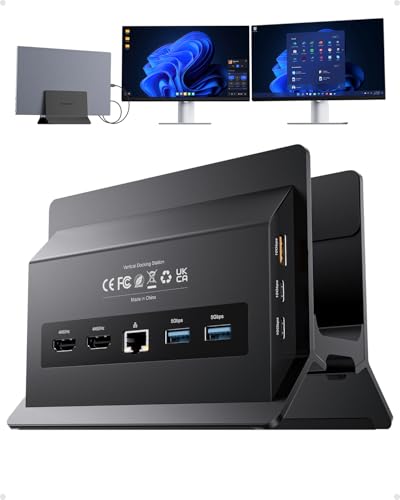
PULWTOP Dual 4K Vertical Docking Station Stand
Best for: Windows laptops needing dual 4K displays
- Host Interface
- USB-C
- Display Support
- Dual
- Max Resolution
- 4K@60Hz
- Power Delivery
- 85W
- Port Count
- 11
- Video Ports
- HDMI
View on Amazon: PULWTOP Dual 4K Vertical Docking Station Stand Affiliate link
The PULWTOP BD216C is a vertical USB-C docking station designed for Windows laptops. It supports dual 4K@60Hz displays via HDMI and offers 11 ports, including 10Gbps data transfer. It delivers 85W Power Delivery charging and includes Gigabit Ethernet. The vertical stand saves desk space. It is not compatible with Mac computers. This dock suits users needing high-speed peripherals and dual screens for productivity or gaming.
Pros
- Supports dual 4K@60Hz displays via HDMI
- 10Gbps USB-C and USB-A data ports
- 85W Power Delivery charging for laptops
- Vertical stand design saves desk space
- Gigabit Ethernet port for stable internet
Cons
- Not compatible with Mac computers
- USB-C ports are data-only without video output
- Power adapter is not included
Good fit if
- You use a Windows laptop with a full-featured USB-C port
- You need two external monitors at 4K@60Hz
- You want to save desk space with a vertical stand
Skip if
- You use a MacBook or Mac computer
- You need video output from the USB-C ports
- You do not have a separate PD power adapter
Verdict: The PULWTOP BD216C Dual 4K Vertical Dock fits Windows users who need dual 4K displays and high-speed data transfer in a compact vertical form factor.
Specifications side by side
| Spec | PULWTOP Dual 4K MacBook Dock Stand | PULWTOP Dual 4K Vertical Docking Station Stand |
|---|---|---|
| Host Interface | USB-C | USB-C |
| Display Support | Dual | Dual |
| Max Resolution | 4K@60Hz | 4K@60Hz |
| Power Delivery | 95W | 85W |
| Port Count | not stated | 11 |
| Video Ports | HDMI | HDMI |
| Max Data Speed | 10Gbps | 10Gbps |
| Ethernet Speed | Gigabit | Gigabit |
| Resolution | 4K UHD | 4K UHD |
| Connectivity | not stated | USB-C, Ethernet |
| Refresh Rate | 60Hz | 60Hz |
| Features | not stated | Kickstand |
| Use | Office | Office |
| Recommended Use | Home | Home |
| Dimensions | 5.4 × 4.21 × 3.37 inches | 5.91 × 4.53 × 4.13 inches |
| Weight | 14.1 ounces | not stated |
| Color | Midnight | Black |
| Model | BD239B-Midnight | BD216C |
Frequently asked questions
Does the PULWTOP Dual 4K MacBook Dock work with base chip MacBooks?
No, it does not. This dock is designed specifically for MacBook Pro and Air models equipped with Pro or Max chips. It excludes base chip models from compatibility. You must verify your processor type before purchasing to ensure the hardware supports the required display and data throughput specifications.
Can I use the PULWTOP Dual 4K Vertical Dock for Windows laptops?
Yes, this model fits Windows users who need dual 4K displays. It offers a compact vertical form factor and supports high-speed data transfer. The dock provides USB-C connectivity and dual HDMI outputs for 4K@60Hz resolution, making it a suitable choice for non-Apple systems requiring expanded screen real estate.
What is the refresh rate for dual 4K displays on these docks?
Both models support a 60Hz refresh rate for dual 4K UHD displays. This ensures smooth motion for office work and general computing tasks. The consistent 60Hz output applies to both the MacBook-specific dock and the Windows-compatible vertical dock, maintaining visual clarity across connected monitors.
How heavy is the PULWTOP Dual 4K MacBook Dock Stand?
The stand weighs 14.1 ounces. Its dimensions are 5.4 inches in length, 4.21 inches in width, and 3.37 inches in height. This compact size allows it to fit neatly on a desk while supporting the vertical laptop position and dual monitor connections without taking up excessive space.
Does the PULWTOP Dual 4K Vertical Dock include a kickstand?
Yes, the vertical dock features a built-in kickstand. This design element supports the laptop in an upright position, saving desk space. The stand helps stabilize the device while providing access to ports, ensuring a secure setup for Windows laptops needing dual 4K displays and efficient workspace organization.
What color options are available for the PULWTOP Dual 4K MacBook Dock?
The MacBook-specific dock is available in Midnight. This color matches the aesthetic of newer MacBook Pro and Air models. The vertical dock for Windows systems comes in Black. These color choices allow users to select a dock that complements their existing hardware appearance and desk setup.