The Best PULWTOP Docking Stations in 2026: 6 Picks
As an Amazon Associate we earn from qualifying purchases. Links on this page are affiliate links.
You are looking at the best PULWTOP docking stations for your setup. We compared 6 models based strictly on published specifications. PULWTOP offers compact vertical and horizontal docks with 4K@60Hz display support. The PULWTOP Dual 4K MacBook Dock Stand leads the list. It supports dual 4K monitors and fits MacBook Pro or Air models with Pro or Max chips. These hubs provide wired connectivity and vertical stands for organized workspaces. You will find options for both Windows and Mac users.
Quick picks
| # | Product | Best for | Price |
|---|---|---|---|
| 1 | PULWTOP Dual 4K MacBook Dock Stand Best overall | MacBook Pro/Air with Pro or Max chips | Check price of PULWTOP Dual 4K MacBook Dock Stand on Amazon |
| 2 | PULWTOP Dual 4K Vertical Docking Station Stand Also great | Windows dual-monitor setups with vertical stand | Check price of PULWTOP Dual 4K Vertical Docking Station Stand on Amazon |
| 3 | PULWTOP 11-in-2 MacBook Dock with SSD Best premium | MacBook Pro users needing dual 4K monitors | Check price of PULWTOP 11-in-2 MacBook Dock with SSD on Amazon |
| 4 | PULWTOP Dual Monitor Vertical Stand Dock Also great | Windows laptops needing dual 4K monitors | Check price of PULWTOP Dual Monitor Vertical Stand Dock on Amazon |
| 5 | PULWTOP Vertical USB-C Dock with M.2 Slot Also great | Users needing wired internet and SSD expansion | Check price of PULWTOP Vertical USB-C Dock with M.2 Slot on Amazon |
| 6 | PULWTOP 11-in-1 Dual 4K Dock Best budget | Windows users needing dual 4K displays | Check price of PULWTOP 11-in-1 Dual 4K Dock on Amazon |
Our 6 picks

PULWTOP Dual 4K MacBook Dock Stand
Best for: MacBook Pro/Air with Pro or Max chips
- Host Interface
- USB-C
- Display Support
- Dual
- Max Resolution
- 4K@60Hz
- Power Delivery
- 95W
- Video Ports
- HDMI
- Max Data Speed
- 10Gbps
View on Amazon: PULWTOP Dual 4K MacBook Dock Stand Affiliate link
This PULWTOP docking station serves as both a vertical stand and hub for select MacBook models. It supports dual 4K@60Hz displays via HDMI and offers 100W PD input with 95W output for power. The device includes Gigabit Ethernet and fast 10Gbps data ports. It is designed specifically for newer Apple Silicon MacBooks, excluding base M1, M2, and M3 chips.
Pros
- Dual HDMI ports support 4K@60Hz video output
- 100W PD input delivers up to 95W to the laptop
- 2x USB-C and 1x USB-A ports run at 10Gbps
- Built-in Gigabit Ethernet port for wired internet
- Vertical stand design holds MacBook, tablet, or phone
Cons
- Incompatible with Windows laptops and base M1/M2/M3 chips
- Requires Terminal command to enable clamshell mode
- PD adapter is not included in the box
Good fit if
- You own a MacBook Pro or Air with Pro or Max chips
- You need a vertical stand that integrates with your dock
- You require stable wired internet via Gigabit Ethernet
Skip if
- You use a Windows laptop or base chip MacBook
- You want a plug-and-play clamshell mode without commands
- You need a dock that includes the power adapter
Verdict: PULWTop MacBook Dock Dual 4K@60Hz is a specialized hub for users with Pro or Max chips who need dual 4K displays and a vertical stand. It fits those who value wired connectivity and do not mind configuring Terminal settings.
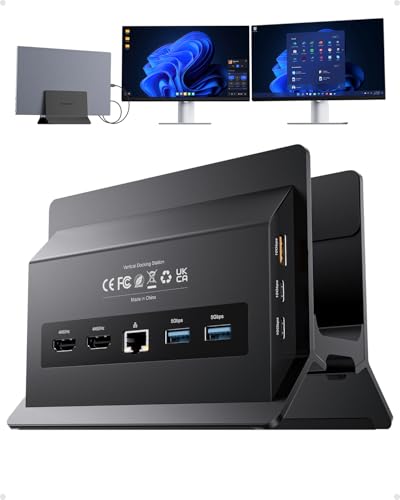
PULWTOP Dual 4K Vertical Docking Station Stand
Best for: Windows dual-monitor setups with vertical stand
- Host Interface
- USB-C
- Display Support
- Dual
- Max Resolution
- 4K@60Hz
- Power Delivery
- 85W
- Port Count
- 11
- Video Ports
- HDMI
View on Amazon: PULWTOP Dual 4K Vertical Docking Station Stand Affiliate link
This PULWTOP docking station expands a Windows laptop into a dual-monitor workstation. It supports two 4K@60Hz displays via HDMI ports and delivers up to 85W of Power Delivery charging. The unit includes 11 ports, featuring 10Gbps data transfer speeds and Gigabit Ethernet. It combines a vertical stand with connectivity, saving desk space. It is designed for users needing high-speed peripherals and stable wired internet for work or gaming.
Pros
- Supports dual 4K@60Hz monitors via HDMI
- 100W PD input with 85W output
- 10Gbps USB-C and USB-A data ports
- Integrated vertical laptop stand
- Gigabit Ethernet for stable connectivity
Cons
- Not compatible with Mac users
- Power adapter not included
- USB-C ports are data-only
Good fit if
- You need a dual 4K@60Hz setup for Windows
- You want a vertical stand to save desk space
- You require fast 10Gbps data transfers
Skip if
- You use a Mac or Apple Silicon laptop
- You prefer wireless connectivity over Gigabit Ethernet
- You want a charging adapter included
Verdict: PULWTOP USB-C Docking Station fits Windows users who need dual 4K displays and a vertical stand. It delivers fast data and stable wired internet for productivity.

PULWTOP 11-in-2 MacBook Dock with SSD
Best for: MacBook Pro users needing dual 4K monitors
- Display Support
- Dual
- Max Resolution
- 4K@60Hz
- Port Count
- 11
- Video Ports
- HDMI
- Max Data Speed
- 10Gbps
- Ethernet Speed
- Gigabit Ethernet
View on Amazon: PULWTOP 11-in-2 MacBook Dock with SSD Affiliate link
This PULWTOP dock supports dual 4K@60Hz displays via HDMI and includes a vertical stand to save desk space. It offers 100W Power Delivery and an M.2 NVMe enclosure for up to 4TB of storage. The unit weighs 1.26 pounds and features Gigabit Ethernet. It is designed for MacBook Pro and Air users who need expanded connectivity and fast data transfer speeds.
Pros
- Supports dual 4K@60Hz monitors via HDMI
- Includes M.2 NVMe enclosure for 4TB storage
- Vertical stand design saves desk space
- 100W Power Delivery capability
- Gigabit Ethernet port for stable internet
Cons
- Incompatible with Windows laptops and iPads
- M1/M2/M3 base chips only support single monitor
- Requires Terminal command for clamshell mode
Good fit if
- You use a MacBook Pro M4 or M5
- You need dual 4K displays for work
- You want built-in SSD storage expansion
Skip if
- You use a Windows laptop
- You have a base M1/M2/M3 MacBook
- You need plug-and-play clamshell mode
Verdict: PULWTOP BD216D MacBook Docking Station fits MacBook Pro users who need dual 4K monitors and internal storage expansion. It is not suitable for Windows users or those with base M-series chips who require dual display support.

PULWTOP Dual Monitor Vertical Stand Dock
Best for: Windows laptops needing dual 4K monitors
- Host Interface
- USB-C
- Display Support
- Dual
- Max Resolution
- 4K@60Hz
- Power Delivery
- 85W
- Port Count
- 11
- Video Ports
- HDMI
View on Amazon: PULWTOP Dual Monitor Vertical Stand Dock Affiliate link
This PULWTOP USB-C docking station expands your Windows laptop into a dual-monitor workstation. It supports two 4K@60Hz displays via HDMI and includes 11 ports for peripherals. The unit features a vertical stand for space saving and delivers up to 85W of Power Delivery charging. It is designed for users needing high-speed data transfer and stable wired internet through its Gigabit Ethernet port.
Pros
- Supports dual 4K@60Hz monitors via HDMI
- 11-in-1 connectivity including USB-C and USB-A ports
- Vertical stand design saves desk space
- Up to 85W Power Delivery charging
- Gigabit Ethernet for stable internet
Cons
- Not compatible with Mac users
- Power adapter is not included
- USB-C ports are data-only without video output
Good fit if
- You use a Windows laptop and need two external monitors
- You want a vertical stand to save desk space
- You require fast 10Gbps data transfer speeds
Skip if
- You use a MacBook or Apple Silicon device
- You need a power adapter included in the box
- You want to use USB-C ports for video output
Verdict: PULWTOP USB-C Docking Station with Vertical Stand is a solid choice for Windows users who need dual 4K displays and a compact vertical footprint. It fits those who prioritize port expansion and stable wired connectivity over Mac compatibility.

PULWTOP Vertical USB-C Dock with M.2 Slot
Best for: Users needing wired internet and SSD expansion
- Host Interface
- USB-C
- Max Resolution
- 4K@60Hz
- Power Delivery
- 100W
- Port Count
- 11
- Video Ports
- HDMI
- Max Data Speed
- 10Gbps
View on Amazon: PULWTOP Vertical USB-C Dock with M.2 Slot Affiliate link
This vertical docking station adds an HDMI 4K@60Hz port and a Gigabit Ethernet jack to your laptop. It includes an M.2 NVMe SSD slot for storage expansion up to 2TB. The dock supports 100W power delivery and offers four USB ports for data transfer. It functions as a stand for your device. This setup suits users who need wired internet and extra storage in a compact vertical form factor.
Pros
- HDMI port supports 4K@60Hz video output
- Includes M.2 NVMe SSD expansion slot for up to 2TB storage
- RJ45 port provides Gigabit wired Ethernet connectivity
- Supports 100W Power Delivery for laptop charging
- Vertical design acts as a laptop stand
Cons
- Does not support dual monitor setups
- USB-C data ports do not support video or charging output
- Power adapter and cable are not included
Good fit if
- You need a wired Gigabit Ethernet connection for stable internet
- You want to expand your laptop storage with an NVMe SSD
- You prefer a vertical dock that doubles as a laptop stand
Skip if
- You require dual monitor support for extended desktop space
- You need USB-C ports to output video to displays
- You do not have a separate power adapter for the dock
Verdict: PULWTop Vertical Dock with SSD Slot is a practical choice for users who prioritize wired networking and local storage expansion over multi-monitor setups. It fits those who value a tidy vertical desk layout and have their own power supply ready.

PULWTOP 11-in-1 Dual 4K Dock
Best for: Windows users needing dual 4K displays
- Host Interface
- USB-C, Thunderbolt
- Display Support
- Dual
- Max Resolution
- 4K@60Hz
- Power Delivery
- 85W
- Port Count
- 11
- Video Ports
- HDMI
View on Amazon: PULWTOP 11-in-1 Dual 4K Dock Affiliate link
This PULWTOP docking station expands your laptop into a dual 4K@60Hz workstation. It features 11 ports, including two HDMI outputs and 10Gbps data transfer speeds. The built-in stand holds your device upright to save space. It supports PD 85W charging and Gigabit Ethernet. This dock is designed for Windows and ChromeOS users who need reliable multi-monitor setups and fast connectivity.
Pros
- Dual HDMI outputs support 4K@60Hz resolution
- 11-in-1 port expansion with USB-C and USB-A
- 10Gbps data transfer speeds for large files
- Built-in vertical stand saves desk space
- Gigabit Ethernet for stable wired internet
Cons
- Power delivery caps at 85W, not 100W
- Windows and ChromeOS only, no macOS support
- Surface Pro dual monitor limited to 30Hz
Good fit if
- You use a Windows laptop and need two external displays
- You want a vertical stand to save desk space
- You require Gigabit Ethernet for stable internet
Skip if
- You use a MacBook or iPad and need full feature support
- You need 100W power delivery for high-power laptops
- You require Thunderbolt 4 speeds for maximum bandwidth
Verdict: PULWTOP BD239A 11-in-1 Dock fits Windows users who need a compact dual-monitor setup with a built-in stand. It offers solid 4K@60Hz performance and ample ports for most office tasks.
Specifications side by side
| Spec | PULWTOP Dual 4K MacBook Dock Stand | PULWTOP Dual 4K Vertical Docking Station Stand | PULWTOP 11-in-2 MacBook Dock with SSD | PULWTOP Dual Monitor Vertical Stand Dock | PULWTOP Vertical USB-C Dock with M.2 Slot | PULWTOP 11-in-1 Dual 4K Dock |
|---|---|---|---|---|---|---|
| Host Interface | USB-C | USB-C | not stated | USB-C | USB-C | USB-C, Thunderbolt |
| Display Support | Dual | Dual | Dual | Dual | not stated | Dual |
| Max Resolution | 4K@60Hz | 4K@60Hz | 4K@60Hz | 4K@60Hz | 4K@60Hz | 4K@60Hz |
| Power Delivery | 95W | 85W | not stated | 85W | 100W | 85W |
| Port Count | not stated | 11 | 11 | 11 | 11 | 11 |
| Video Ports | HDMI | HDMI | HDMI | HDMI | HDMI | HDMI |
| Max Data Speed | 10Gbps | 10Gbps | 10Gbps | 10Gbps | 10Gbps | 10Gbps |
| Ethernet Speed | Gigabit | Gigabit | Gigabit Ethernet | Gigabit | Gigabit | Gigabit Ethernet |
| Resolution | 4K UHD | 4K UHD | 4K UHD | 4K UHD | 4K UHD | 4K UHD |
| Connectivity | not stated | USB-C, Ethernet | HDMI, Ethernet, USB-A | USB-C, Ethernet | USB-C, HDMI, Ethernet, USB-A | USB-C, Ethernet |
| Refresh Rate | 60Hz | 60Hz | 60Hz | 60Hz | 60Hz | 60Hz |
| Features | not stated | Kickstand | Kickstand | Kickstand | not stated | Kickstand |
| Use | Office | Office | Office | Office | not stated | not stated |
| Recommended Use | Home | Home | Home | Home | not stated | not stated |
| Dimensions | 5.4 × 4.21 × 3.37 inches | 5.91 × 4.53 × 4.13 inches | 5.91 × 4.57 × 2.56 inches | 5.91 × 4.53 × 4.13 inches | 5.91 × 4.57 × 2.56 inches | 4.9 × 0.6 × 4.9 inches |
| Weight | 14.1 ounces | not stated | 1.26 pounds | not stated | 1.63 pounds | 1.04 pounds |
| Color | Midnight | Black | Black | Gray | Black-Vertical Docking Station | Black |
| Model | BD239B-Midnight | BD216C | BD216D | BD216C | BD216A-Black | BD239A-Black |
PULWTOP Docking Stations at a Glance
PULWTOP offers distinct vertical docks for different needs. The Dual 4K MacBook Dock Stand suits Mac users with Pro or Max chips who need dual 4K displays and a vertical stand. It requires specific Terminal configuration for optimal performance. The Dual 4K Vertical Docking Station Stand is a budget-friendly option for Windows users. It provides dual 4K output with a kickstand for stability.
For those needing storage expansion, the 11-in-2 MacBook Dock with SSD adds internal drive support for MacBook Pro users. The Vertical USB-C Dock with M.2 Slot prioritizes wired internet and SSD slots over multi-monitor setups. The 11-in-1 Dual 4K Dock fits Windows users needing a compact dual-monitor setup. Each model targets specific connectivity and display requirements.
Who PULWTOP Fits Best
PULWTOP targets users needing dual 4K displays with vertical stands. The range spans from lightweight 14-ounce models to heavier 1.6-pound docks. All units support 4K@60Hz refresh rates. You will find options for both macOS and Windows systems, though some require specific chip configurations or Terminal settings. The lineup includes models with internal SSD slots and Ethernet ports. However, none of the listed products offer wireless connectivity or single-monitor configurations. If you require Bluetooth or HDMI-only setups without vertical stands, this brand does not currently fit your needs.
How to Choose the Right PULWTOP Dock
-
Check Chip Compatibility
Verify your processor matches the dock’s intended system. The PULWTOP Dual 4K MacBook Dock Stand works best with Pro or Max chips. It may require Terminal configuration for optimal performance. If you use a base M-series chip, this model might not support dual displays. Always confirm your specific chip version before buying to avoid connectivity issues or limited functionality on your secondary screens.
-
Match Operating System
Ensure the dock supports your operating system. The PULWTOP 11-in-2 MacBook Dock with SSD is designed for macOS and is not suitable for Windows users. Conversely, models like the Dual 4K Vertical Docking Station Stand target Windows users needing dual 4K displays. Selecting a dock incompatible with your OS will result in a non-functional setup. Check the product specifications to confirm Windows or macOS support before purchasing.
-
Evaluate Port Needs
Consider the types of connections you require. The PULWTOP Vertical USB-C Dock with M.2 Slot includes Ethernet and USB-A ports alongside HDMI. This setup suits users who prioritize wired networking and local storage expansion over multi-monitor setups. If you need fast data transfer or stable internet, look for docks with dedicated Ethernet ports. Avoid models that only offer USB-C if you rely on traditional USB-A peripherals.
-
Assess Display Support
Determine if you need one or two external monitors. Most PULWTOP docks listed here support dual 4K displays at 60Hz. However, some models like the Vertical USB-C Dock with M.2 Slot focus on single-display or expansion needs rather than dual-monitor setups. If your workflow requires two high-resolution screens, choose a dock explicitly labeled for dual monitor support. Single-display docks save space but limit your productivity layout.
-
Review Physical Footprint
Check the dimensions to ensure it fits your desk. The PULWTOP Dual 4K MacBook Dock Stand measures 4.21 inches wide and weighs 14.1 ounces. Heavier models like the 11-in-2 MacBook Dock with SSD weigh 1.26 pounds. Vertical docks save desk space by stacking components. Measure your available surface area before buying. A compact footprint keeps your workspace tidy, while a larger base might offer more stability for heavier laptops or additional peripherals.
Frequently asked questions
Do all PULWTOP docks support dual 4K monitors?
Most models in this lineup support dual 4K displays at 60Hz. The PULWTOP Dual 4K MacBook Dock Stand and the Vertical USB-C Dock with M.2 Slot are exceptions. These specific units focus on single high-resolution output or specialized connectivity. Always check the Display Support attribute in the specifications to confirm dual monitor capability for your setup.
Which PULWTOP dock is best for Windows laptops?
The PULWTOP Dual 4K Vertical Docking Station Stand is ideal for Windows users. It delivers stable wired internet and fast data transfer alongside dual 4K support. The PULWTOP Dual Monitor Vertical Stand Dock is another solid choice for Windows systems. It prioritizes port expansion and compact vertical design over macOS compatibility features.
Can I use a PULWTOP dock with a base M-series MacBook?
No, the PULWTOP 11-in-2 MacBook Dock with SSD is not suitable for base M-series chips. It is designed specifically for MacBook Pro users with Pro or Max chips who need dual 4K monitors. Using it with base models may result in limited display support. Check your chip type before selecting a dock for optimal performance.
Do these docks include a built-in stand?
Several models feature integrated stands for vertical or angled positioning. The PULWTOP Dual 4K MacBook Dock Stand and the PULWTOP 11-in-1 Dual 4K Dock include built-in support structures. Other units, like the Vertical USB-C Dock with M.2 Slot, rely on their vertical form factor or external stands. Verify the physical dimensions and features list to confirm stand inclusion.
Do PULWTOP docks support Ethernet connectivity?
Not all models include Ethernet ports. The PULWTOP Dual 4K Vertical Docking Station Stand and the Vertical USB-C Dock with M.2 Slot offer wired internet connections. Other docks in the list focus primarily on USB-C and display outputs. If you need stable wired networking, select a model that explicitly lists Ethernet in its connectivity attributes.
What is the weight difference between the lightest and heaviest dock?
The lightest option is the PULWTOP Dual 4K MacBook Dock Stand at 14.1 ounces. The heaviest is the Vertical USB-C Dock with M.2 Slot at 1.63 pounds. This difference reflects the inclusion of internal components like SSD slots in heavier models. Choose a lighter unit for portability or a heavier one for added stability and storage expansion.