PULWTOP Dual 4K Vertical Docking vs PULWTOP 11-in-2 MacBook Dock SSD (2026): Key Differences
As an Amazon Associate we earn from qualifying purchases. Links on this page are affiliate links.
You are comparing the PULWTOP Dual 4K Vertical Docking Station (BD216C) and the PULWTOP 11-in-2 MacBook Dock (BD216D). Both docks offer dual 4K@60Hz video output and 11 ports. The primary difference is OS compatibility and storage. The first is for Windows laptops. The second supports Macs and includes an M.2 SSD enclosure. This pulwtop dual 4k vertical docking vs macbook docking station dual comparison highlights these distinct use cases.
Key differences
| Aspect | PULWTOP Dual 4K Vertical Docking Station Stand | PULWTOP 11-in-2 MacBook Dock with SSD |
|---|---|---|
| Compatible Operating Systems | Windows laptops only (not for Mac) | MacBook Pro/Air (M1–M5); not for Windows |
| Storage Expansion | No built-in storage enclosure | Built-in M.2 NVMe SSD enclosure (up to 4TB) |
| Power Delivery Output | 85W charging to laptop | 100W charging to laptop |
| Physical Dimensions | 4.53 x 4.13 x 5.91 inches | 4.57 x 2.56 x 5.91 inches |
| Additional Ports | USB-C host port, USB 2.0 port | SD card slot, TF card slot |
Which one should you choose?
Choose PULWTOP Dual 4K Vertical Docking Station Stand if
- You use a Windows laptop and need a USB-C host port for peripherals.
- You prefer a taller stand design with a USB 2.0 port for low-latency mice.
Choose PULWTOP 11-in-2 MacBook Dock with SSD if
- You use a MacBook and need native dual 4K@60Hz support.
- You want built-in NVMe SSD storage expansion up to 4TB.
Verdict: Choose the BD216C for Windows laptops requiring a host port and standard peripheral connectivity. Choose the BD216D for Mac users who need native dual display support and internal SSD expansion. The choice depends entirely on your operating system and storage needs.
Docking Station Specs Compared
OS Compatibility
The PULWTOP Dual 4K Vertical Docking Station (BD216C) is built specifically for Windows laptops. It supports Dell, Lenovo, HP, and ThinkPad models with Thunderbolt 3/4/5 or USB4. It explicitly does not support Mac users. In contrast, the PULWTOP 11-in-2 MacBook Dock (BD216D) is designed for macOS. It works with MacBook Pro and Air models using M1 through M5 chips, including Pro and Max variants, as well as Intel Macs from 2016 to 2020. It is incompatible with Windows laptops, MacBook Neo, and iPads. You must choose the dock that matches your operating system to ensure basic functionality.
Storage Expansion
The PULWTOP 11-in-2 MacBook Dock (BD216D) includes a built-in M.2 NVMe SSD enclosure. This feature allows you to add up to 4TB of high-speed internal storage directly to the docking station. This is useful for editors and photographers who need fast access to large video files or photo libraries without cluttering the desk with external drives. Note that the SSD itself is not included, and only NVMe drives are supported, not SATA. The PULWTOP Dual 4K Vertical Docking Station (BD216C) does not have any internal storage expansion capabilities listed in its specifications. It relies entirely on external drives connected via its USB ports.
Power Delivery
The PULWTOP Dual 4K Vertical Docking Station (BD216C) features a USB-C PD port that supports up to 100W input. However, it delivers a maximum of 85W of charging power to your connected laptop. The documentation recommends using a 65W or higher PD adapter for stable operation. The PULWTOP 11-in-2 MacBook Dock (BD216D) also lists a 100W PD port. Its feature description notes that a 65W or higher power supply is required for proper function, though it does not specify the exact output wattage delivered to the host device in the same way the Windows dock does. Both docks require you to provide your own power adapter.
Port Configuration
Both docks offer 11 ports, but the specific layout differs. The PULWTOP Dual 4K Vertical Docking Station (BD216C) provides two HDMI ports, two USB-C Gen2 ports, one USB-A Gen2 port, two USB 3.0 ports, one USB 2.0 port, Gigabit Ethernet, and a USB-C host port. The USB-C ports on this model are data-only. The PULWTOP 11-in-2 MacBook Dock (BD216D) offers two HDMI ports, one 10Gbps USB-C port, one 10Gbps USB-A port, Gigabit Ethernet, USB 2.0, and an SD/TF card slot. The inclusion of SD and TF card slots on the MacBook dock is a distinct advantage for photographers and users who frequently transfer media from cameras. The Windows dock lacks these direct card reading capabilities.
Physical Dimensions
The two docks have different form factors. The PULWTOP Dual 4K Vertical Docking Station (BD216C) measures 4.53 inches in width, 5.91 inches in length, and 4.13 inches in height. It is designed as a vertical stand to save desk space. The PULWTOP 11-in-2 MacBook Dock (BD216D) measures 4.57 inches in width, 5.91 inches in length, and 2.56 inches in height. It weighs 1.26 pounds. The MacBook dock is significantly shorter in height, making it a lower profile device. This difference in vertical space might affect how much clearance you have above the dock or how it fits under certain laptop stands. Both are black and share the same length.
Which PULWTOP Dock Fits Your Setup
Windows users needing dual 4K displays
This dock supports dual 4K@60Hz monitors on Windows laptops via MST. It includes two HDMI ports and 10Gbps USB-C data transfer. The vertical stand improves airflow. Note that it does not support Mac users. You get Gigabit Ethernet and 85W PD charging for your Windows device.
MacBook users wanting built-in SSD storage
This dock is designed for MacBook Pro and Air with M1–M5 chips. It features a built-in M.2 NVMe enclosure for up to 4TB of storage. It supports dual 4K@60Hz displays on Pro/Max models. It includes Gigabit Ethernet and 100W PD input. It is incompatible with Windows laptops.
Windows users prioritizing high-speed data ports
You get two USB-C Gen2 ports and one USB-A Gen2 port, all running at 10Gbps. This allows fast transfers of large files. The dock also includes two USB 3.0 ports at 5Gbps. It supports dual 4K@60Hz output. The vertical design saves desk space while providing stable connectivity for peripherals.
Mac users needing SD card and TF slots
This dock includes SD and TF card slots for direct media access. It supports dual 4K@60Hz HDMI output for compatible Mac models. The vertical stand saves space. It offers 100W PD input and Gigabit Ethernet. You can expand storage with an M.2 NVMe SSD up to 4TB for your workflow.
The products compared
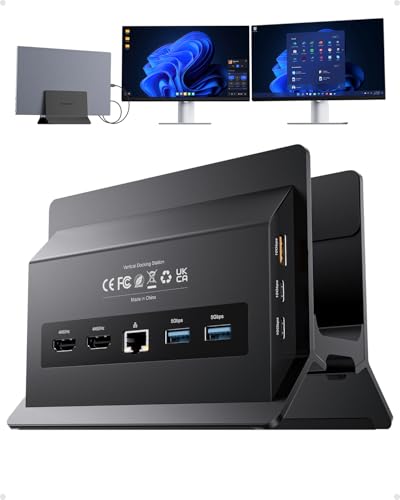
PULWTOP Dual 4K Vertical Docking Station Stand
Best for: Windows laptops needing dual 4K monitors
- Host Interface
- USB-C
- Display Support
- Dual
- Max Resolution
- 4K@60Hz
- Power Delivery
- 85W
- Port Count
- 11
- Video Ports
- HDMI
View on Amazon: PULWTOP Dual 4K Vertical Docking Station Stand Affiliate link
This is a vertical USB-C docking station with 11 ports. It supports dual 4K@60Hz monitors via HDMI for Windows laptops. You get 10Gbps data speeds and 85W power delivery. The design includes a built-in stand for space saving. It is ideal for Windows users needing expanded connectivity and dual displays. It does not support Mac.
Pros
- Supports dual 4K@60Hz displays via HDMI
- 11-in-1 port expansion including Gigabit Ethernet
- Vertical stand saves desk space
- 10Gbps USB-C data transfer speeds
- 85W PD charging for laptops
Cons
- Not compatible with Mac devices
- Power adapter is not included
- USB-C ports are data-only without video output
Good fit if
- You use a Windows laptop and need dual monitors
- You want a compact vertical design to save desk space
- You require high-speed 10Gbps data transfer for large files
Skip if
- You use a MacBook or Mac device
- You need a power adapter included in the box
- You require USB-C ports to output video signals
Verdict: PULWTOP BD216C 11-in-1 Vertical Dock is a practical solution for Windows users who need dual 4K displays and a space-saving vertical design. It fits those prioritizing port expansion and data speed over Mac compatibility.

PULWTOP 11-in-2 MacBook Dock with SSD
Best for: MacBook Pro users needing dual 4K displays and SSD storage
- Display Support
- Dual
- Max Resolution
- 4K@60Hz
- Port Count
- 11
- Video Ports
- HDMI
- Max Data Speed
- 10Gbps
- Ethernet Speed
- Gigabit Ethernet
View on Amazon: PULWTOP 11-in-2 MacBook Dock with SSD Affiliate link
This PULWTOP dock adds dual 4K@60Hz HDMI outputs and an M.2 NVMe SSD slot to your MacBook. It supports up to 4TB of high-speed storage and includes a vertical stand to save desk space. The unit features Gigabit Ethernet and 10Gbps USB ports for stable connectivity. It is designed for MacBook Pro and Air models, though base M1–M3 chips only support single monitors.
Pros
- Dual HDMI ports for 4K@60Hz displays
- Built-in M.2 NVMe SSD enclosure up to 4TB
- Vertical stand saves desk space
- Gigabit Ethernet and 10Gbps USB ports
Cons
- Base M1–M3 chips support single monitor only
- Clamshell mode requires Terminal commands
- Power supply for 100W PD not included
Good fit if
- You need extra storage for large video files
- You want a vertical setup to save space
- You use a MacBook Pro with Pro or Max chips
Skip if
- You use a base M1, M2, or M3 chip
- You need plug-and-play clamshell mode
- You use Windows or iPad devices
Verdict: PULWTOP 11-in-2 MacBook Dock SSD offers robust dual 4K support and built-in storage for MacBook Pro users who need a clean, vertical workspace. It is a practical solution for editors and analysts who require fast data transfer and stable internet connections.
Specifications side by side
| Spec | PULWTOP Dual 4K Vertical Docking Station Stand | PULWTOP 11-in-2 MacBook Dock with SSD |
|---|---|---|
| Host Interface | USB-C | not stated |
| Display Support | Dual | Dual |
| Max Resolution | 4K@60Hz | 4K@60Hz |
| Power Delivery | 85W | not stated |
| Port Count | 11 | 11 |
| Video Ports | HDMI | HDMI |
| Max Data Speed | 10Gbps | 10Gbps |
| Ethernet Speed | Gigabit | Gigabit Ethernet |
| Resolution | 4K UHD | 4K UHD |
| Connectivity | USB-C, Ethernet | HDMI, Ethernet, USB-A |
| Refresh Rate | 60Hz | 60Hz |
| Features | Kickstand | Kickstand |
| Use | Office | Office |
| Recommended Use | Home | Home |
| Dimensions | 5.91 × 4.53 × 4.13 inches | 5.91 × 4.57 × 2.56 inches |
| Weight | not stated | 1.26 pounds |
| Color | Black | Black |
| Model | BD216C | BD216D |
Frequently asked questions
Can I use the PULWTOP Dual 4K Vertical Docking Station with a MacBook?
No, this dock is not compatible with Macs. It is designed specifically for Windows laptops, including Dell, Lenovo, HP, and ThinkPad models. If you use a MacBook, you should choose the 11-in-2 MacBook Dock SSD instead. That model supports macOS and includes built-in SSD storage for your files.
Does the PULWTOP 11-in-2 MacBook Dock SSD include internal storage?
Yes, this dock features built-in SSD storage. It helps MacBook Pro users keep their workspace clean by integrating drive space directly into the docking station. This setup is practical for editors and analysts who need fast data transfer speeds and stable internet connections without cluttering their desk with external drives.
What is the difference in size between the two PULWTOP docks?
The PULWTOP Dual 4K Vertical Docking Station measures 5.91 x 4.53 x 4.13 inches. The 11-in-2 MacBook Dock SSD is slightly wider but thinner, measuring 5.91 x 4.57 x 2.56 inches. The MacBook dock also weighs 1.26 pounds. Both maintain a vertical form factor to save desk space.
Do both docks support dual 4K monitors at 60Hz?
Yes, both models support dual 4K UHD displays at a 60Hz refresh rate. The Windows dock uses MST technology to drive two monitors via HDMI. The MacBook dock also provides dual 4K@60Hz output. You get identical video performance for your external displays on either device.
Which PULWTOP dock is better for Windows users?
The PULWTOP Dual 4K Vertical Docking Station is the better choice for Windows users. It explicitly supports Windows laptops with Thunderbolt 3/4/5 or USB4 connections. It offers 10Gbps USB-C data transfer and a kickstand for stability. The MacBook dock does not support Windows or Mac systems.
Is the PULWTOP Dual 4K Vertical Docking Station compatible with Thunderbolt 5?
Yes, the PULWTOP Dual 4K Vertical Docking Station supports Thunderbolt 5. It also works with Thunderbolt 3, Thunderbolt 4, and USB4 connections on Windows laptops. This ensures broad compatibility with modern Windows devices from brands like Dell, Lenovo, HP, and ThinkPad for reliable dual monitor setups.
Does the PULWTOP 11-in-2 MacBook Dock SSD have a kickstand?
The provided data does not list a kickstand for the PULWTOP 11-in-2 MacBook Dock SSD. The Windows dock (BD216C) explicitly includes a kickstand feature. The MacBook dock focuses on SSD integration and port expansion. You should check the physical design if a kickstand is essential for your desk setup.