Plugable 13-in-1 Triple HDMI Dock Review: Specs, Pros and Cons
As an Amazon Associate we earn from qualifying purchases. Links on this page are affiliate links.
This plugable USB c triple monitor docking review focuses on the Plugable 13-in-1 model. It is a USB-C docking station designed to expand your workspace significantly. The two defining specs are its ability to drive three separate displays and its 100W power delivery. You get a unified setup that replaces multiple adapters. The device includes an SD card reader, Gigabit Ethernet, and four USB-A ports. It supports Windows, macOS, and ChromeOS, though Mac users must install a driver. This dock aims to simplify desk clutter while boosting productivity through extended screen real estate.
What stands out
- Supports three HDMI displays for extended workspace
- 100W Power Delivery for laptop charging via rear port
- 13 total ports including SD reader and Gigabit Ethernet
- Compatible with M-series Macs for multi-monitor use
- TAA and NDAA compliant for government and enterprise use
Who it fits
Good fit for
This dock suits professionals who need three screens for multitasking, such as traders or data analysts. It is ideal for IT departments standardizing hardware, thanks to its fleet deployment features. Users with USB-C laptops needing 100W charging will appreciate the rear port. Mac users who want more than one external display will find this solution necessary. It also fits setups requiring wired Ethernet and SD card access without adding extra hubs to the desk.
Who should skip it
You should look elsewhere if you need to watch protected content like Netflix or Hulu on the external monitors, as the dock does not support HDCP. If your laptop only has USB-A ports, this USB-C dock will not work for you. Users who want plug-and-play simplicity on macOS without installing DisplayLink drivers may find the setup process inconvenient. Those needing higher refresh rates on all three screens will be limited to 30Hz on the primary HDMI port.
Verdict: The Plugable 13-in-1 dock is a practical choice for users needing three displays and high-power charging. It delivers on its promise of expanded productivity for compatible systems.
Key specs explained for this dock
Display Support: Triple
This dock connects three separate monitors simultaneously. You gain a large, expanded desktop area without needing multiple adapters. This setup is ideal for workflows that require many windows open at once, such as coding, trading, or data analysis. It replaces single-monitor setups, giving you more screen real estate for multitasking.
Max Resolution: 4K @ 30Hz
One HDMI port supports 4K resolution at 30Hz. This provides sharp text and images for detailed work. However, 30Hz may feel less smooth than 60Hz for cursor movement. If you need higher refresh rates, check if your other ports support 60Hz at lower resolutions. This spec defines the visual clarity of your primary display.
Power Delivery: 100W
The dock delivers up to 100W of power to your laptop through the USB-C host port. This eliminates the need for a separate laptop charger on your desk. It supports most ultrabooks and larger laptops. You simply plug the power adapter into the dock, and it charges your computer while connecting other devices.
Ethernet Speed: Gigabit Ethernet
The built-in Gigabit Ethernet port provides a wired network connection. Wired connections offer more stable speeds and lower latency than Wi-Fi. This is crucial for video calls, large file transfers, or online gaming. It ensures your internet connection does not drop when you close your laptop lid or move around.
Port Count: 13
This unit offers thirteen total ports, including HDMI, USB-A, SD card, and audio jacks. It consolidates many connections into one hub. You can connect peripherals like mice, keyboards, and drives without using laptop ports. This reduces cable clutter and keeps your laptop free for other uses, streamlining your workspace significantly.
Design and build details
The listing describes the Plugable 13-in-1 dock as a solid, black unit. It measures 6.9 inches in length, 4.7 inches in width, and 2.6 inches in height. According to the listing, the device weighs 14.1 ounces. This compact footprint allows it to sit comfortably on most desks without taking up excessive space. The matte black finish helps it blend into standard office environments.
The layout prioritizes accessibility. You get three HDMI ports on the rear for your displays. The front panel includes a USB-C port for 20W device charging and several USB-A ports for peripherals. This arrangement lets you reach your phone charger or mouse without bending down. The rear also houses the Gigabit Ethernet jack, SD card reader, and audio jacks. These are less frequently used, so placing them at the back keeps the front clear.
The unit connects to your computer via a included 1-meter USB-C host cable. This length provides some flexibility for cable management. The power adapter connects separately to the back. This design means you need an available wall outlet near your desk. The build focuses on utility rather than aesthetics. It is built to handle daily use in busy office settings. You get a straightforward, functional tool that expands your workspace without adding visual clutter to your setup.
Setup and daily workflow
Setting up this dock requires a computer with a USB-C, USB4, or Thunderbolt port. You connect the included one-meter host cable from the dock to your laptop. The rear USB-C port delivers up to 100W of power to charge your laptop, while the front USB-C port provides 20W for phones or accessories. You must also connect the provided power adapter to the dock and plug it into a wall outlet. This power setup eliminates the need for separate laptop chargers on your desk.
For display configuration, you can connect up to three HDMI monitors. The first HDMI port supports resolutions up to 4K at 30Hz. The second and third HDMI ports support resolutions up to 1920x1200 at 60Hz. If you use a Mac running macOS 11 or later, you must install the DisplayLink Manager driver to enable the second and third displays. Windows 10 and ChromeOS systems also require compatible drivers for full functionality. Note that this dock does not support protected content playback like Netflix or Hulu.
Daily use involves plugging in peripherals via the four USB-A ports, SD card reader, and Gigabit Ethernet. The compact design, measuring 6.9 inches by 4.7 inches by 2.6 inches, keeps your workspace organized. You gain a unified desktop environment without managing multiple power bricks. The device includes lifetime support from a North American team, which adds reliability for business deployments.
Check Compatibility And Setup Needs
Before you buy, verify your computer has a USB-C, USB4, or Thunderbolt port. This dock requires this specific host interface to function. You must also check your operating system. Windows 10+, macOS 11+, and ChromeOS are supported. Mac users need to install DisplayLink Manager software. This driver is mandatory for HDMI 2 and 3 to work. Note that this device does not support protected content like Netflix. If you watch streaming video, this limitation matters. You will need to connect your own power adapter for the dock. The listing includes a power cord, but ensure your outlet is nearby. This dock fits well in a multi-monitor laptop setup. It complements portable monitors by adding a fixed, high-bandwidth hub. You gain three stable displays alongside your laptop screen. Check your laptop’s USB-C port capabilities first. Not all ports support video output or high power delivery. Confirm your specific model supports these features. This ensures the dock works as advertised.
Check before you buy
- Verify your laptop has a USB-C, USB4, or Thunderbolt port.
- Confirm your OS is Windows 10+, macOS 11+, or ChromeOS.
- Install DisplayLink Manager software if you use a Mac.
- Ensure your laptop USB-C port supports video output.
- Accept that protected content streaming is not supported.
The product at a glance
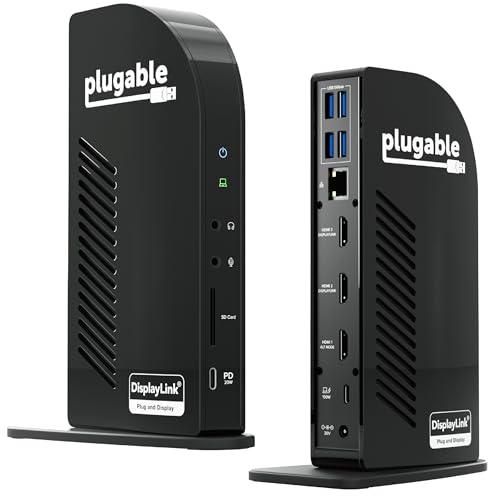
Plugable 13-in-1 Triple HDMI Dock
Best for: macOS users needing triple monitor expansion
- Host Interface
- USB-C
- Display Support
- Triple
- Max Resolution
- 4K @ 30Hz
- Power Delivery
- 100W
- Port Count
- 13
- Video Ports
- HDMI
View on Amazon: Plugable 13-in-1 Triple HDMI Dock Affiliate link
This is a 13-in-1 USB-C docking station designed for triple monitor setups. It supports up to three extended HDMI displays, delivering 4K at 30Hz on one port and 1920x1200 at 60Hz on the other two. The dock provides 100W of power delivery for your laptop and includes 20W charging for accessories. It works with Windows, macOS, and ChromeOS, though Mac users must install DisplayLink drivers. It also features Gigabit Ethernet and an SD card reader.
Pros
- Supports three extended HDMI displays for expanded workspace
- 100W USB-C power delivery for compatible laptops
- Includes Gigabit Ethernet and SD card reader
- Compatible with Windows, macOS, and ChromeOS systems
- TAA and NDAA compliant for enterprise use
Cons
- HDMI 1 is limited to 4K at 30Hz
- Requires DisplayLink driver installation on macOS
- Does not support protected content playback like Netflix
Good fit if
- You need to connect three external monitors to a single laptop
- You use a Mac and want to enable multi-monitor support
- You require a dock with Gigabit Ethernet and SD card access
Skip if
- You want to watch protected streaming content on external displays
- You prefer a setup that requires no driver installation on Mac
- You need 4K resolution at 60Hz on all three displays
Verdict: Plugable 13-in-1 USB-C Triple HDMI Dock is a practical solution for users who need to drive three screens from one port, especially on Mac systems. It fits office environments where standardized deployments and compliance are priorities.
Specifications side by side
| Spec | Plugable 13-in-1 Triple HDMI Dock |
|---|---|
| Host Interface | USB-C |
| Display Support | Triple |
| Max Resolution | 4K @ 30Hz |
| Power Delivery | 100W |
| Port Count | 13 |
| Video Ports | HDMI |
| Max Data Speed | 5Gbps |
| Ethernet Speed | Gigabit Ethernet |
| Connectivity | USB-C, HDMI, Ethernet |
| Features | DisplayLink |
| Dimensions | 4.7 × 2.6 × 6.9 inches |
| Weight | 14.1 ounces |
| Size | 6.9" |
| Color | Black |
| Model | UD-ULTCDL |
Frequently asked questions
Does the Plugable 13-in-1 dock support macOS for triple monitors?
Yes, this dock is a practical solution for macOS users needing triple monitor expansion. It supports macOS 11 and newer. Mac users must install the DisplayLink Manager software to enable the three-screen setup. This ensures compatibility with Apple systems for office deployments.
What is the maximum power delivery for laptops on this dock?
The dock provides up to 100W of power delivery. This allows you to charge your laptop while connected to the dock. You connect the power adapter to the rear USB-C port. This high wattage supports most modern laptops without needing a separate charger.
How big is the Plugable triple HDMI dock?
The unit measures 6.9 inches in length, 4.7 inches in width, and 2.6 inches in height. It weighs 14.1 ounces. This compact footprint allows it to fit easily on a desk. The black design helps it blend into standard office environments.
Which operating systems are compatible with this USB-C dock?
This dock supports Windows 10 and newer, macOS 11 and newer, and ChromeOS. You must ensure your computer has a USB-C, USB4, or Thunderbolt port. Windows users typically do not need extra software, while Mac users require the DisplayLink Manager app.
Can this dock drive three monitors simultaneously?
Yes, the Plugable 13-in-1 dock is designed to drive three separate displays. You gain a large, expanded desktop area without needing multiple adapters. This setup is ideal for workflows that require many windows open at once, such as coding or trading.
What is the model number for this Plugable dock?
The model number for this device is UD-ULTCDL. It is part of the Plugable 13-in-1 series. You can use this model number to verify compatibility with your specific laptop or to find the correct drivers and support documentation online.